
Quick verdict
- What it is
- Store information collected; independent summary not yet available.
- At a glance
-
- Free to download
- In-app purchases
Categories and search queries
Official categories
- Lifestyle
- Utilities
AppCorpus categories
Key functions
| Function | Availability | Access | Scope | Evidence |
|---|---|---|---|---|
| Free app | Yes | Free | — | Store published |
| In-app purchases | Yes | Limited free | — | Store published |
Screens
16 store screenshots

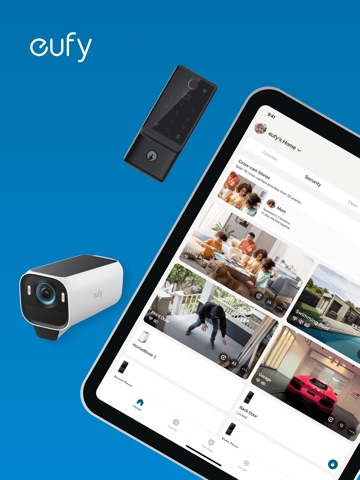


12 store screenshots


Pricing & paywalls
Shown for US
- Cloud Backup Basic (1 device) — $3.99
- Cloud Backup Basic (1 device) — $39.99
- Cloud Backup Basic(2 devices) — $7.99
- Cloud Backup Plus(10 devices) — $13.99
- Cloud Storage Basic(1 device) — $3.99
- Cloud Storage Basic(1 device) — $39.99
- Cloud Storage Basic(2 devices) — $7.99
- Cloud Storage Plus(10 devices) — $13.99
- Protection Plan Plus(1 home) — $9.99
Shown for US
- Free to download
- In-app purchases: $0.99 - $399.99 per item
Ratings & reviews
Shown for US
-
5/5Unwavering top notch customer service
The news about doorbell thumbnail images being uploaded to eufy cloud was alarming… however people need to know that Eufy is on top of this and making sure customers are aware that 1. They have a choice about selecting thumbnails or not, and 2. Eufy is not trying to steal personal information . The thumbnails go to their cloud storage just long enough to send them to phone apps and then they are deleted. I researched all the major security cameras before I bought a eufy system 2 years ago. I chose eufy because I could store all the data locally. Cloud storage is optional. I even drowned my indoor blink camera in a bowl of water before discarding it (I hate that technology winds up in landfills but there you have it). I had trouble with one of my first cameras and eufy replaced it immediately. They even replaced the mounting hardware at no charge even though the issue was mine rather than theirs. Today I talked to customer service rep David R. And my total confidence in Eufy is restored. No hardware is ever going to be perfect in the age of cyber theft but I’m confident that Eufy will be a leader. By the way, their batteries are Anker products and I have confidence in Anker as well. Power surge protectors, portable battery chargers for cellphones and tablets, and long lasting security camera batteries. Well done.
1Houdini · 30 Aug 2026
-
4/5Works well but have some suggestion
I love all my Eufy security cams, I currently have 4 on my house that I am able to monitor most all areas except for private rooms inside and out of my home and it’s great to be able to check into my dog at home and the backyard or front yard for packages or just to feel more secure knowing my home is safe. Having said that the only issue that I would love to see an option for is a very simple user interface correction or bare minimum toggle option to go in and select ALL recordings to delete them or do whatever other tasks one might do. It is a tedious and annoying task to go through each day individually, hit select all, hit delete then have to wait two seconds for the pop up at the top screen to clear so I can click back another day to eventually clear all data when I want to. I understand videos after so many months gets deleted but also having 99+ on all of my cameras is a bit of a pet peeve of mine and it feels nice to occasionally go into the app and just delete everything saved on the drives. Please Eufy talk to your app devs and see if this small update can be done because it’s the easiest functionality to add for them and would make tons of peoples small amount of OCD love Eufy that much more. You can have the best hardware in the world but if your user interface to work it has annoyances left and right then the overall product looses users. Overall Eufy gets 8/10 so far though and I’d recommend it to anyone!
Cjwelcome · 30 Aug 2026
-
3/5Lock is awesome; app needs work
The door lock itself is wonderful. Love the bright, illuminated keypad when you press any key. LOVE the fingerprint lock/unlock (works flawlessly for me). Very easy to use. The app is another story. It is very slow to respond when I arrive home. When I first open it up, it shows the door lock as being unlocked (it isn’t) and it takes several seconds for it to update itself and show the locked status. Several times, it’s hung on me in that “in-between” time and I’ve had to force close the app before it finds its brain again and shows the correct status. Tonight, two force closes did not solve the issue and I had to unlock the door using my fingerprint or keypad. I find the “slide down” to lock/unlock inconvenient. Why can’t it be a button I simply tap - red for locked/green for unlocked? I’d also like to see an Auto unlock feature based on proximity. In other words, give me an option so when I arrive home, the lock auto-unlocks the door without me having to use the app or keypad. I would also like to hear a different tone for locking and unlocking. Having that audible difference would be a better confirmation, in my opinion. Also - minor thing here, but quite annoying - the notification messages always use the full email address to identify who unlocked the door. You already have my name in the app account settings. Why not use it for the notification messages instead of my full email address? Thanks for listening. I hope some of these changes will make their way into future app updates.
Vixyswillie · 30 Aug 2026
-
4/5Options
This is all New to me unfortunately I’ve had to get security cameras on my home after 33 years. I had some misfortune and now neighbors are just being plain ugly leaving all kinds of insulting things at my house around my front door main thing sad for no reason. hence I have to have proof for the police that have come here each night for the past five nights in time after time have to have proof. what’s so funny is nothing has been stolen it’s just for instance a huge shopping cart of trash left in my front door outside my screen porch front I’ve had a stolen bicycle put on my property so the thief that took it come back and get it later I’ve had can Tainer‘s of gasoline put in the back of the pick up truck so the thief could come back and use it for a moped of his now this thief is a squatter. i’ve never been the kind of person that has to show out but I am very good at doing it because of the upbringing I had in the schools I went to junior high school especially. The one thing I do wish is it would move with like a car I wish it would move with the motion of the car. I haven’t even had them for one week yet but so far so good because a month ago I was actually using my phone to follow cars that I thought might look suspicious and I did very good at that. also I was I had already gotten into almost a contract with ADT my daughter is the one that said hey want to try this thank God I did thank you again.
no regrets Judy · 30 Aug 2026
-
4/5Good but some things are annoying!
I love having the wired doorbell and as a single mother I was able to install myself, it has great instructions. However, it takes some time to adjust your settings to how you like. I would receive too many notifications w motion detected when the wind blows so i set it to human onmy moderate sensitivity, but it only starts recording the event once they’re basically at the door. I’d rather it be from when they’re at least on the porch. I lowered the sensitivity so perhaps that will help. But my main issues would be there seems to be a lag at times when you get the notification there is a human or the doorbell was rung from when the app will open and load the camera… I have a good wifi connection too. It also seems to lag a lot or may not even work when using the quick response. I just had someone at my house late at night ringing the doorbell and it seemed like the quick responses weren’t working. I opened the two way communication and that works well, the lag doesn’t seem to be bad. But then Later I noticed the recording stops once you start the conversation! Why?! That’s a main part to have the recording in case something weird is done or said that needed to be reported! I’m not sure why it stops, less than the 60 second clip I had it set up for. After Google search it seems it happens to others too when the conversation starts. At least the video is clear enough at night that you can still get a good picture of the person. But those two things can hopefully be fixed with an update. Otherwise it works well, especially for the one time price! And the app is fairly simple to use or figure out.
because222 · 30 Aug 2026
Shown for US
-
3/5
haven't been able to play a replay of a video in weeks. video always stuck at "decrypting video" but it rarely plays. wifi signal is good. I changed the video quality and changed to single mode, but didn't help
Ivan Broski · 1 Aug 2026
-
1/5
AI detection is a joke. Shadows, clouds and a hibiscus plant are humans. Cameras are great, detection needs work
Shane ????????????? · 1 Aug 2026
-
5/5
i love it
Russell Landry · 1 Aug 2026
-
1/5
horrible service and horrible cameras, they brick them after a while so you buy more, not worth it, they are expensive and have horrible detection, not reliable
La Reyna Mari · 1 Aug 2026
-
1/5
Issue: Severe lag and loading timeouts after 5 months. My Doorbell C31 has become progressively slower to respond and view stored video. The app frequently hangs on a loading screen for over 5 minutes without displaying anything. I have already attempted standard troubleshooting—restarting the hardware, reinstalling the app, and changing the Wi-Fi network—with no success. It seems to be a device or firmware issue.
Lily Tan · 1 Aug 2026
Privacy & accessibility
Privacy
- Data Linked to You — Analytics — Identifiers — User ID Developer declared
- Data Linked to You — App Functionality — Contact Info — Email Address Developer declared
- Data Linked to You — App Functionality — Identifiers — User ID Developer declared
- Data Linked to You — Contact Info Developer declared
- Data Linked to You — Identifiers Developer declared
- Data Not Linked to You — Analytics — Usage Data — Product Interaction Developer declared
- Data Not Linked to You — App Functionality — Diagnostics — Crash Data Developer declared
- Data Not Linked to You — App Functionality — Diagnostics — Other Diagnostic Data Developer declared
- Data Not Linked to You — App Functionality — Diagnostics — Performance Data Developer declared
- Data Not Linked to You — App Functionality — Location — Coarse Location Developer declared
- Data Not Linked to You — App Functionality — Location — Precise Location Developer declared
- Data Not Linked to You — App Functionality — User Content — Customer Support Developer declared
- Data Not Linked to You — Diagnostics Developer declared
- Data Not Linked to You — Location Developer declared
- Data Not Linked to You — Usage Data Developer declared
- Data Not Linked to You — User Content Developer declared
Accessibility
No accessibility labels collected yet.
Privacy
- Data collected — App functionality, Fraud prevention, security, and compliance, Account management — Personal info — Email address Developer declared
- Security practices — Your data is transferred over a secure connection — Data is encrypted in transit Developer declared
- Security practices — The developer provides a way for you to request that your data be deleted — You can request that data be deleted Developer declared
Accessibility
No accessibility labels collected yet.
Versions
-
5.0.71
• Optimized Favorites tab functionality • Security Series Updates: —New Homebase 2 compatible devices —Multi-Bridge platform support for T8223/T8224 • Clean Series Enhancements: —New supported models: L35 Hybrid+, LR30 Hybrid+, G20 Hybrid/G20 —Service: Added access point for accessories —3D Map support for E28 & E25 models —Improved error notification handling • Other user experience improvements
-
5.0.72
-Improved the video download experience for NVR cameras and enhanced download speed -Enhanced the timeline interaction experience during NVR camera playback
-
5.0.73
-Improved the video download experience for NVR cameras and enhanced download speed -Enhanced the timeline interaction experience during NVR camera playback
-
5.0.80
1. Optimized Favorites tab experience 2. Added support to hide currently unsupported Clean devices 3. Enhanced language translations across the app 4. Improved general app interaction design 5. Strengthened security verification and app stability
-
5.0.90
1.Clean Device X10 now supports the 3D Map feature. 2.Clean Devices support Matter functionality and access points. 3.Clean Devices support iOS Siri Shortcuts. 4.QR code login is now supported for the Smart Screen. 5.Optimized the layout of the Home screen and Sidebar. 6.Optimized page interactions and UI. 7.Enhanced the app's fundamental performance and stability. 8.Improved the app's security and privacy capabilities. 9.Fixed several issues.
-
5.1.00
1. Supports one-tap login to eufy App via eufy Clean App. 2. Clean devices now support home screen widgets. 3. Improved user experience for Automation features. 4. Optimized the home selection process during network setup. 5. Enhanced login and registration workflows. 6. Redesigned device card styles in the Clean device list. 7. Other interactive experience optimizations. 8. Bug fixes and App stability improvements.
-
5.1.10
1. Supports one-tap login to eufy App via eufy Clean App. 2. Clean devices now support home screen widgets. 3. Improved user experience for Automation features. 4. Optimized the home selection process during network setup. 5. Enhanced login and registration workflows. 6. Redesigned device card styles in the Clean device list. 7. Other interactive experience optimizations. 8. Bug fixes and App stability improvements.
-
5.2.00
Basic Experience Optimization
-
5.2.10
Basic Experience Optimization
-
5.3.00
1. New Doorbell Automation: Added one-touch door lock control directly from the live view page. 2. Smart Screen: Now supports QR code login for compatible smart displays. 3. Custom Clean Notifications: Added independent controls for enabling/disabling Clean series notification alerts. 4. Clean Task Card Sorting: Introduced manual sorting for frequently used task cards. 5. Privacy Agreement Reminder: Added checkbox prompt for privacy policy acknowledgment on login screen. 6. T9000 Base Station Relocation: Optimized the moving and setup experience. 7. Performance Enhancements: Improved app launch speed and reduced installation package size. 8. Additional Improvements: Includes various user experience optimizations and bug fixes.
-
5.4.00
1.The Favorites cards have received a complete visual style upgrade. 2.The access points for third-party voice assistants have been consolidated and moved to "Sidebar > Third-Party Services". 3.Optimized the Do Not Disturb mode for robot vacuums. 4.Improved the cleaning parameter settings for robot vacuums. 5.Some robot vacuums now support control via Apple Watch. 6.Other user experience optimizations and bug fixes.
-
5.4.10
Stability and performance improvements.
-
5.6.00
1. Visual Upgrade: Optimized the layout and style of device cards for a unified experience. 2. Service Tab: Refreshed the visual interface and improved usability. 3. Settings: Optimized the App Settings experience. 4. Robot Vacuum: Improved cleaning task and multi-zone settings. Added a "Support" entry to the device settings page. 5. General: Other bug fixes and performance improvements.
-
5.7.00
1. Device Updates: Added 3D Map support for eufy Robot Vacuum C28 and optimized map editing for Robot Vacuum C28/E28/E25. Enhanced experience for select eufy Security Cameras, Smart Locks, Smart Lights, and Robot Lawn Mowers. 2. User Interface: Optimized App interface and interactions. 3. General: Bug fixes and performance improvements.
-
5.8.00
1. Unified Message Center: Experience a seamless, consolidated Message Center across all your eufy devices. 2. eufyCam Enhancements: Supported Multi-Bridge control on eufyCam S4 to enhance connectivity. 3. NVR Enhancements: Introduced "One-Tap Migration" for effortless data transfer from HomeBase to NVR. Also optimized live streaming for faster loading and smoother playback. 4. Baby Monitor Upgrades: Added a 180° video rotation feature for Baby Monitors, and added NAS continuous recording support for the C10 model. 5. Expanded Device Support: Added compatibility for new Smart Locks and Baby Bottle Washers. 6. General: Includes bug fixes and UI improvements for better system stability.
-
6.0.00
Includes device optimization and interface refinements for a smoother experience.
-
6.0.03
Includes device optimization and interface refinements for a smoother experience.
-
6.0.10
Includes device optimization and interface refinements for a smoother experience.
-
6.0.11
General device and app optimization, including interface refinements.
-
6.0.20
General device and app optimization, including interface refinements.
-
6.0.30
General device and app optimization, including interface refinements.
-
6.0.31
General device and app optimization, including interface refinements.
-
6.0.40
General device and app optimization, including interface refinements.
-
6.0.50
General device and app optimization, including interface refinements.
-
6.0.60
· 9 Jul 2026
Video Playback: Faster first-frame loading, lower latency during smooth streaming, and better audio-video synchronization. Network Setup Upgrade: Optimized device auto-discovery and web-based network setup, with new PoE connection guidance added. Monitoring & Baby Care: Baby monitors now support video sharing between devices and two-way notifications; some models also support dual power modes, including battery power. Security & Stability: Two-step facial verification is enabled, multiple crashes have been fixed, and overall operation is now safer and more stable.
-
6.0.70
· 30 Jul 2026
- Added Traditional Chinese language support — App follows your system language automatically - SOS Emergency Alert: When the Panic button is pressed on your device, your phone triggers a full-screen alert with sound and vibration, even in silent mode - Breast Pump Dashboard overhaul: records sync in real time, manual entry and editing supported, precision to 1ml, plus notes and capacity reminders - Added a Service tab on the device details page - Live video now shows current video quality at a glance - Device Settings page UI refreshed for a cleaner, more consistent look - Robot vacuum firmware update progress bar no longer gets stuck — clearly shows when the device is restarting - One-tap access to customer support when pairing fails, with automatic log upload - You can now delete unfamiliar face records to better protect your privacy - SD card quality check before formatting to prevent issues caused by low-quality cards - Expanded device support; added Spot Mowing guidance for robot lawn mower - Various bug fixes and stability improvements
-
6.0.80
Added AI Assistant for conversational Clean device control and support HomeBase Pro now supports Wi-Fi Direct Extend (Repeater mode) for stronger, wider camera connections New Smart Scene shortcut cards on the home page with local automation support Improved anti-theft experience for robot lawn mowers with clearer status notifications Added hard drive protection guide during HomeBase device migration to prevent data loss Enhanced security system delay settings with flexible per-device configuration Updated HomeBase Pro product images for the new Pewter color edition Cameras now support automatic recording resolution that adapts to the scene Added WiFi self-diagnosis when pairing fails, helping identify connection issues faster Various bug fixes and stability improvements
-
6.0.90
· 27 Aug 2026
· Robot vacuum map edits apply instantly · Added Swedish, Danish, Norwegian and Finnish · Customizable video timestamp format · Adjustable alarm duration (30 sec - 10 min) · Sensor alarms can trigger other devices · Privacy Mode shortcut on the home page · Glass break sensitivity setup and false alarm reporting · Share pumping records and earn milestone badges · Doorbell card taps open a filtered event list · Improved setup guides and playback · Fixed 188 known issues
- 6.0.62_27648 · 13 Jul 2026
- 6.0.80_28612 · 22 Aug 2026
Alternatives
- Meross — Same category + similar ratings
- Aqara Home — Same category + similar ratings
- Cove Connect — Same category + similar ratings
- Home Assistant — Same category + similar ratings
- SkyportHome — Same category + similar ratings
- Schlage Home — Same category + similar ratings
Availability by market
- US
Data quality & evidence
- Page completeness
- Live store listing
- Last verified
- 31 Aug 2026
- Sources
- App Store, Google Play
- Independent summary has not been published yet.