
Quick verdict
- What it is
- Store information collected; an Apoku editorial summary is not yet published.
- At a glance
-
- Free to download
Categories and search queries
Official categories
- Lifestyle
- Utilities
Apoku categories
Key functions
| Function | Availability | Access | Scope | Evidence |
|---|---|---|---|---|
| Free app | Yes | Free | Context-specific | Store published |
| Apple Wallet | Unknown | Unknown | Scope unknown | Store published |
Screens
App Store
7 store screenshots

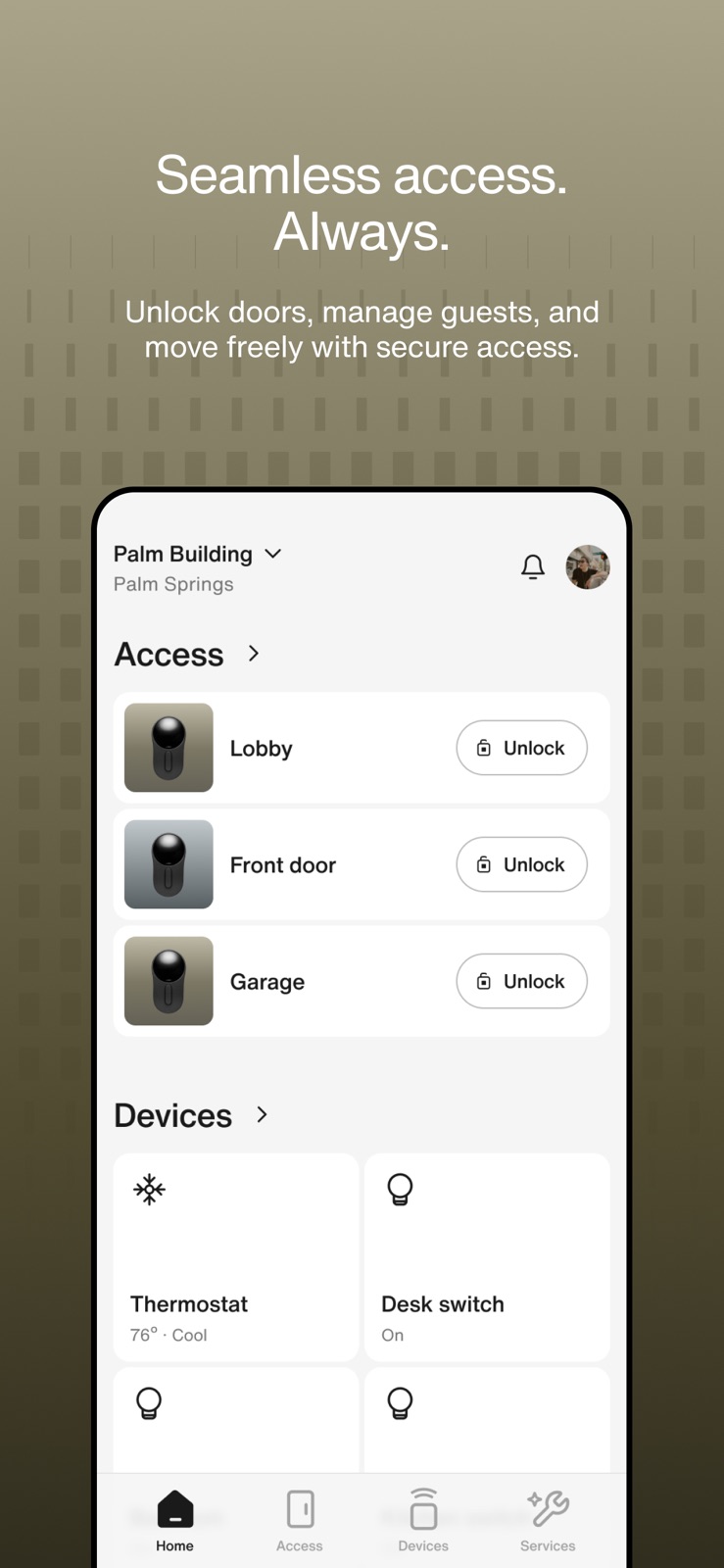
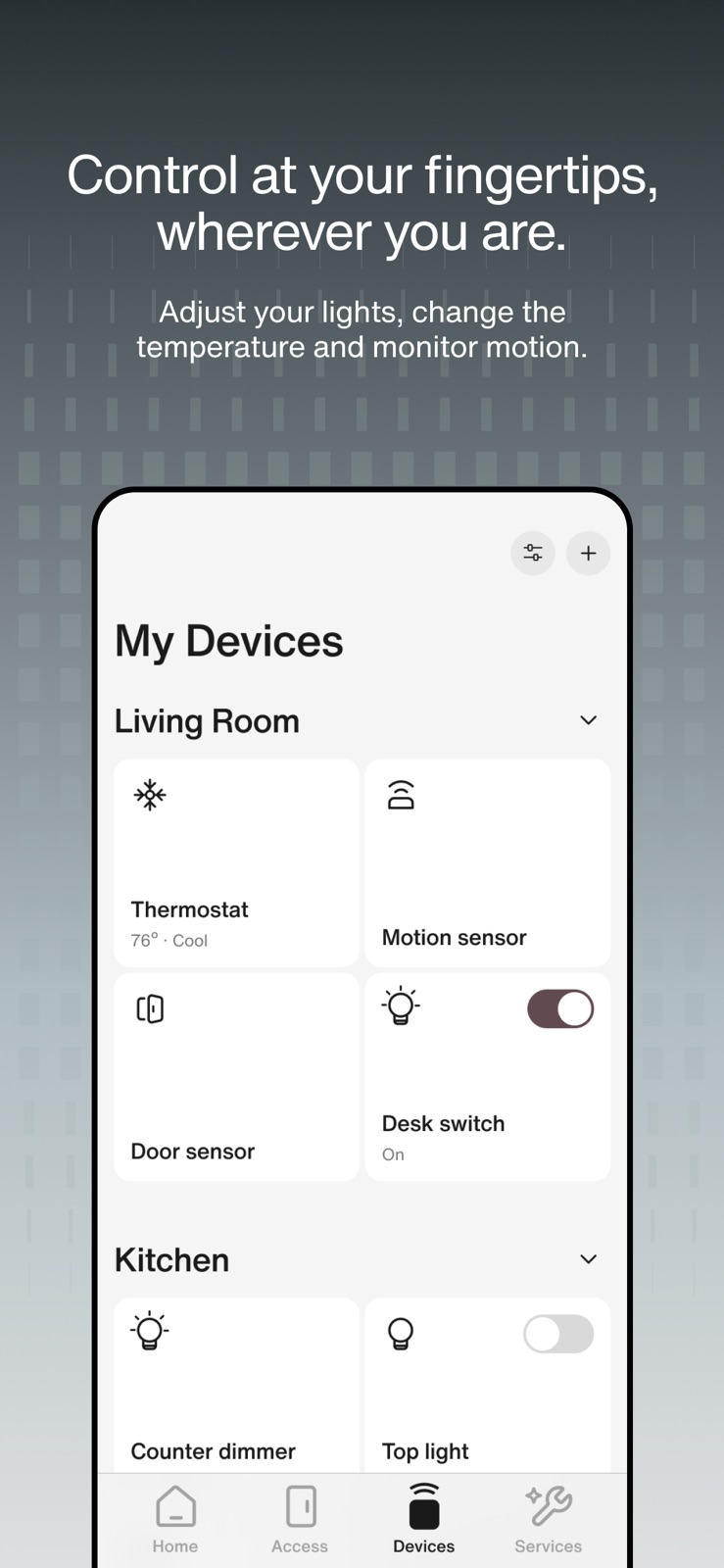
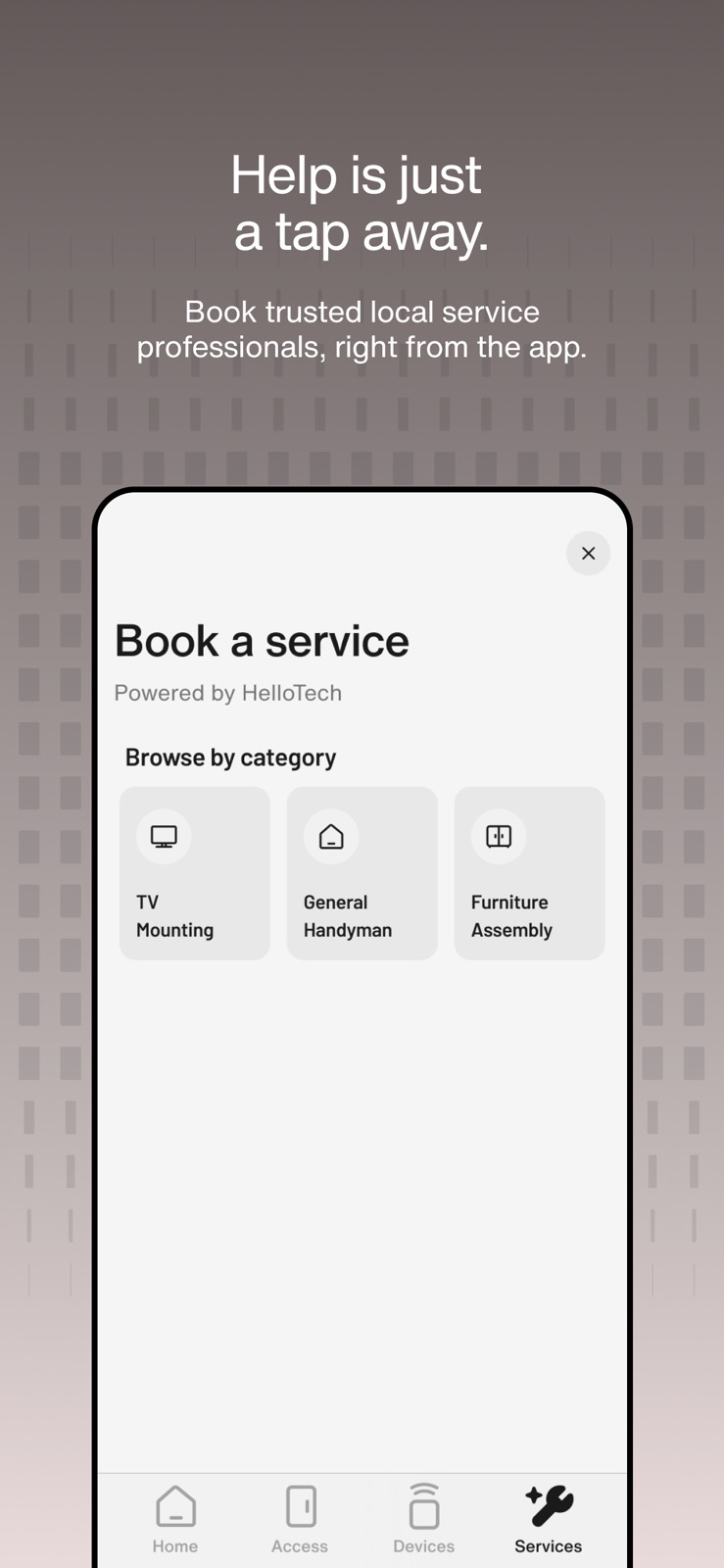
Pricing & paywalls
App Store
- Free to download
Ratings & reviews
App Store
-
5/5UI often doesn't reflect application's state, app freezes, functionality doesn't.
My title describes it well enough. Overall good app, kinda slower than latch, most likely due to quantity of people in my apt, but functionally works. Oftentimes, the UI will not reflect the application's state properly. An example is when you go to click unlock on the door after previously unlocking another door. The button won't have an active status, there will be no loading indicator, the UI will look frozen, but it still technically works. The fix I've found: restarting the app. This is fine, but it occurs almost every time. This all happened after one of the recent updates, specifically when ya'll updated the "unlock" door buttons to have a black background color instead of white.
rjdbcb_# · 30 Sep 2026
-
2/5Functionality
My apartments originally had the latch app as our main usage for locking and unlocking all doors and gate systems. I had no issues whatsoever. Ever since we transitioned over to the DOOR app it is about a 50-50 as to whether or not you will be able to unlock doors and gates via cell phone or having to manually type in the codes. The DOOR app always tells me that my phone is not connected to Bluetooth even when I can confirm that it is. The DOOR app also is unable to connect to your Siri for verbal cues in the event that you were unable to reach your phone. One of my biggest complaints with both apps is that there is no feature to unlock gates at a distance, you have to be within at least 2 feet which makes it incredibly difficult if you have guests coming over that you are not able to remotely open the gate for them. You either have to drive to the gate or have them download the app entirely and give them special permissions….. which I have come to experience that it is sometimes very difficult and they don’t always receive the email in order to download it as an extension of your app. All in all…. this app can be very frustrating.
Functionality  · 30 Sep 2026
-
2/5Slow app that degrades experience
This App has several issues that introduce a lot of friction in entire system. 1) App is super slow. I believe it tries to authenticate user’s account with the server each time you open the app making it very very slow. I have to wait for 15 secs before it’s ready to unlock the doors this is after I have already signed in before. Apple Watch is no different. It’s faster to unlock the door with a physical key. Product team: make it faster to unlock. Atleast match the speed of using a physical key. Right now I’m yelling curses every single time I have to unlock. 2) I have enabled notifications assuming I get notified anytime the door is opened by authorized user. I do not get any notification. Product team: please send me a notification “[user name] has unlocked the door at [date/time]” immediately (and not 2 mins later) 3) app asked me to reset the password like 4 days after setting up the account. Product team: Add support for 1Password authentication and passkeys. 4) we have been surprised by door being unlocked by kids. Product team: allow option to play a tiny chime after unlocking 5) add support for Apple Key allowing me to unlock similar to the experience of unlocking my Tesla. 6) improve the user experience design currently it looks very unappealing. 7) App logs out repeatedly for no reason. I hope product team will respond to this.
BlueDurian72628 · 30 Sep 2026
-
4/5Minor update to usabikity
Pretty reliable app. I like the fact that I can add the doors in a widget and also have my favorite doors in the beginning of the list. Many times bringing phone next to the reader takes a long time to detect and you might even need to restart the app. What really bothers me in the main view is that the most used function, Ulock the door, is behind this really small button on the right side. You will most likely miss is almost every time when carry groceries in the house etc. The function should be reversed. The small button should go to the options screen that you barely ever use and clicking the actual row should open the door. Don't understand why the UI designers got this so wrong.
Jee-jee77 · 30 Sep 2026
-
2/5Better than Latch but not better than a key or fob
This app solves plenty of problems for landlords by piling them onto tenants. Landlords no longer need to keep track of fobs or keys; no more leaving your keys with a concierge for your dog-walker to pick up; immediate solution when you’ve locked yourself out; maintenance can easily access any unit. The downside is that the tenant is at the mercy of an app that’s slow, takes longer to connect than a fob or keycard, and if the app goes down, then you can’t enter your apartment (or get into the building from the parking garage, front door, etc). Yes, there are numeric codes for the locks, but you can’t see those either if the app is down. It’s a great idea in theory, but be wary if the landlord presents this as the ONLY way to access your home. Ask for a key or a fob in addition to the app.
Luckyfalcor · 30 Sep 2026
Privacy & accessibility
App Store
Privacy
- Data Linked to You — Analytics — Contact Info — Email Address Developer declared
- Data Linked to You — Analytics — Diagnostics — Crash Data Developer declared
- Data Linked to You — Analytics — Diagnostics — Other Diagnostic Data Developer declared
- Data Linked to You — Analytics — Diagnostics — Performance Data Developer declared
- Data Linked to You — Analytics — Identifiers — Device ID Developer declared
- Data Linked to You — Analytics — Identifiers — User ID Developer declared
- Data Linked to You — Analytics — Usage Data — Product Interaction Developer declared
- Data Linked to You — App Functionality — Contact Info — Email Address Developer declared
- Data Linked to You — App Functionality — Contact Info — Name Developer declared
- Data Linked to You — App Functionality — Contact Info — Phone Number Developer declared
- Data Linked to You — App Functionality — Contact Info — Physical Address Developer declared
- Data Linked to You — App Functionality — Diagnostics — Crash Data Developer declared
- Data Linked to You — App Functionality — Diagnostics — Other Diagnostic Data Developer declared
- Data Linked to You — App Functionality — Diagnostics — Performance Data Developer declared
- Data Linked to You — App Functionality — Identifiers — Device ID Developer declared
- Data Linked to You — App Functionality — Identifiers — User ID Developer declared
- Data Linked to You — App Functionality — Usage Data — Product Interaction Developer declared
- Data Linked to You — App Functionality — User Content — Customer Support Developer declared
- Data Linked to You — App Functionality — User Content — Photos or Videos Developer declared
- Data Linked to You — Contact Info Developer declared
- Data Linked to You — Diagnostics Developer declared
- Data Linked to You — Identifiers Developer declared
- Data Linked to You — Usage Data Developer declared
- Data Linked to You — User Content Developer declared
- Data Not Linked to You — App Functionality — Location — Precise Location Developer declared
- Data Not Linked to You — Location Developer declared
Accessibility
No accessibility labels collected yet.
Versions
App Store
-
3.0.0
This update brings a smarter, more seamless experience to your fingertips. Enjoy enhancements to access sharing, a new suite of smart home controls, and service booking. The DOOR App is designed to feel intuitive and effortless. It’s how modern buildings stay connected—and how residents stay in control.
-
3.0.1
Bug fixes and improvements.
-
3.0.2
Bug fixes and improvements
-
3.1.0
Bug fixes and improvements
-
3.2.0
Apple Watch application
-
3.3.0
Bug fixes and improvements
-
3.4.0
Bug fixes and improvements
-
3.4.1
We’ve fixed several bugs and resolved an issue that caused Apple Watch users to be logged out unexpectedly.
-
3.5.0
Bug fixes and improvements
-
3.5.1
Bug fixes and improvements
-
3.6.0
Bug fixes and improvements
-
3.6.1
Bug fixes and improvements
-
3.6.2
Bug fixes and improvements
-
3.6.3
Bug fixes and improvements
-
3.7.0
Bug fixes and improvements
-
3.7.2
Bug fixes and improvements
-
3.7.3
Bug fixes and improvements
-
3.7.4
Bug fixes and improvements
-
3.7.5
bug fixes and improvements
-
3.7.6
Bug fixes and improvements
-
3.7.7
Bug fixes and improvements
-
3.8.1
bug fixes and improvements
-
3.8.2
bug fixes and improvements
-
3.8.3
- Use Siri Shortcuts to enable and unlock your residential doors. - Added a Save button when editing device settings. - Door Sync now reflects real completion status. - Fixed a crash on the unlock screen. - Plus bug fixes and stability improvements.
-
3.8.4
· 30 Jul 2026
Tap a door on your Home tab to jump straight into its settings. More reliable Apple Watch sign-in. Bug fixes and stability improvements.
-
3.8.6
• Temperature and humidity sensors now show their alert settings, so you can choose the ranges you want to be warned about. • Tap any alert in a sensor's history to see full details, including where it happened. • Doors that need a firmware update or have pending changes are now flagged with a badge in settings. • Clearer wording for air quality alerts and for the device pairing steps. • Updated customer support hours. • Plus bug fixes and stability improvements.
-
3.8.7
Fixed intercom calls hanging up right after you answered them — you can now answer in listen-only mode even if microphone access isn't granted. Your Work Orders on the Home screen now update instantly when you create, edit, or cancel one. Fixed a Settings screen navigation issue on iOS 16. Plus bug fixes and stability improvements.
-
3.8.8
· 25 Aug 2026
Refreshed the work order activity feed with cleaner spacing and layout. Plus bug fixes and stability improvements.
-
3.8.9
Refreshed app menu with a cleaner, easier-to-scan layout. Tapping a remote unlock notification now takes you straight to the right door. Faster, clearer errors when assigning a lock during installation. Plus bug fixes and stability improvements.
-
3.9.0
Your custom door order on the Access screen now sticks — it no longer resets while the list refreshes. The last door in your list is no longer cut off behind the tab bar. Changing a door code now takes effect right away. Temperature and humidity alerts now use the exact thresholds you set, and match your sensor's own defaults. Firmware upgrade works offline (when possible) Plus bug fixes and stability improvements.
-
3.9.1
Property managers can open History for devices in occupied units, with residents' private events filtered out. Find your intercom's serial number in Intercom Status & Settings. The app now keeps device updates ready offline using less storage on your phone. Intercom call improvements Plus bug fixes and stability improvements.
-
3.9.2
· 23 Sep 2026
Improvements for offline firmware upgrade Your lock no longer unlocks unexpectedly while the app is syncing or updating its firmware. Thermostat temperatures now display and round accurately, including the top and bottom of the range. Fixed a visual glitch on the back button in some screens. Plus bug fixes and stability improvements.
Alternatives
- Luxer One — Same category + similar ratings
- Resident Experience — Same category + similar ratings
- Tour24 self-guided apt tour — Same category + similar ratings
- BuildingLink Resident App — Same category + similar ratings
- Updater: Essential Moving App — Same category + similar ratings
- Cobu - Power Genuine Community — Same category + similar ratings
Availability by market
- US
Data quality & evidence
- Page completeness
- Live store listing
- Last verified
- 30 Sep 2026
- Sources
- App Store
- Apoku editorial summary has not been published yet.