
Quick verdict
- What it is
- Store information collected; independent summary not yet available.
- At a glance
-
- Free to download
Categories and search queries
Official categories
- Business
- Productivity
AppCorpus categories
Key functions
| Function | Availability | Access | Scope | Evidence |
|---|---|---|---|---|
| Free app | Yes | Free | — | Store published |
Screens
5 store screenshots

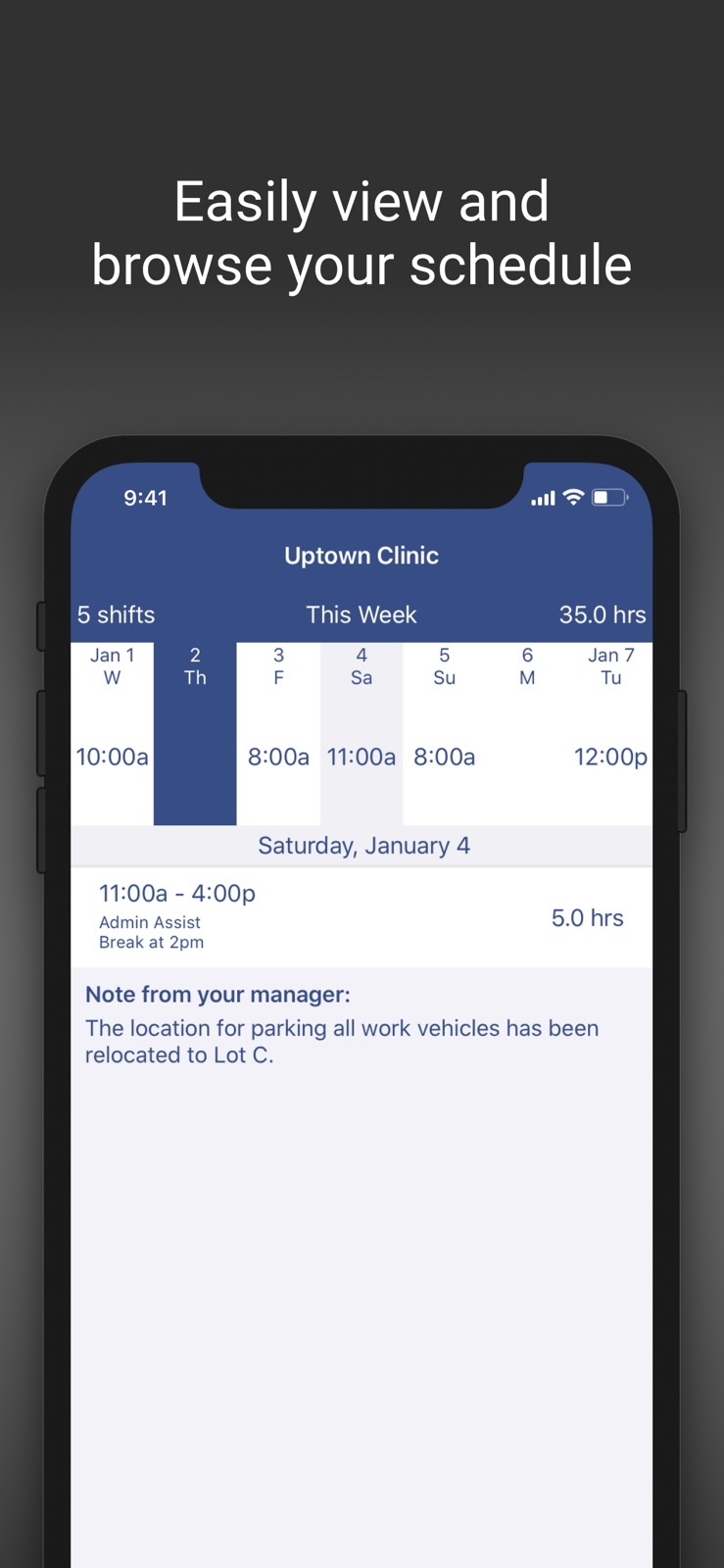


5 store screenshots


Pricing & paywalls
- Free
- Free to download
Ratings & reviews
-
3/5App is confusing, use website instead
Website is easy to use but the app is confusing and unclear. I accepted a shift trade offer from someone and it disappeared, not changing our schedules or showing up anywhere else. On the support website I read that it would not change the schedule if the manager had selected an option to approve all trades, however it also said in this case it should appear as pending approval (which it did not). I went on the website eventually and realized that there was a clear easy way to view trades pending approval online and this cleared up confusing. I like the website but the app is to confusing and does not show nearly as much information as the website. Also another note: notifications default to being off so make sure to turn them on if so you are aware when a shift trade offer has been made to you. So overall: website is clear and easy to use, app is stressful and confusing.
4f5f6s · 7 Aug 2026
-
4/5Suggestion
If I could make a suggestion to the W2W app, I would suggest to make a small change in the area of available shifts. I make my own schedule, so it would be very helpful if I was able to block out days that I know I am not able to work. Would it be within your power to give me the option to black out the days that I cannot pick up? For example, if I make a appointment for my kid a month and a half in advance and I know I won’t be able to work at that time it would be helpful for me to go to W2W app, to the day of the appointment and block out that time block in the available shifts section ahead of time so I know I have something important on that day. When my employer posts the new schedule I can pick up the Monday, Tuesday Wednesday and Thursday I can work. But when I come to the available shifts on that Friday I will see that it is black or gray or purple and I will remember that I cannot pick up shifts on that day because I blacked out that day when I made the appointment. this saves me from having to find someone to work for me because I accidentally picked up on the day that I knew I couldn’t work.
Brookie5292 · 7 Aug 2026
-
3/5Push notifications stopped coming through
Overall, a pretty straightforward and easy to navigate app. The only issue I have with it is that I have push notifications turned on through the app AND notifications for this app turned on through my settings, and I still don’t receive any notifications for this app. And I know it’s an issue with the app and not me because this happened with my last phone, and now I have the iPhone 17 pro max all updated and everything and it’s still an issue. I’ve also tried uninstalling and reinstalling it and still nothing. I’m missing out on some important work things! I would also love a pink option for one of the color settings. Thank you!
Neesha ^_^ · 7 Aug 2026
-
3/5Notifications don’t work anymore
When the push notifications actually came through, the app was great. Within the last month it seems like no matter what settings I change, whether in my phone’s system settings or the app’s settings, push notifications won’t work anymore. It’s a really unfortunate thing because I no longer get some pretty important updates regarding scheduling for work. Hope they fix it soon.
Chyfon · 7 Aug 2026
-
5/5Honest Review
I work per diem. Before downloading this app I would have to call twice into work to have my supervisor sign my name on a OT sheet for hours. I would call when they put up the sheet, then call when I got approved for some shifts. Not anymore. This app is so good. Very easy to use. Might take a little while getting used to. I love the fact everything is organized. And I'm able to get push notifications. Plus there's a full site. I feel like every company should use this!
Mass boy · 7 Aug 2026
No store reviews collected for Google Play · US
Privacy & accessibility
App Store
Privacy
- Data Not Collected Developer declared
Accessibility
No accessibility labels collected yet.
Versions
App Store
-
1.31.1
Major improvements coming soon. Stay tuned - Fixed potential crash on launch after updating - Updated for iOS10 - Minor bug fixes and stability improvements
-
1.32.1
- Added a weekly view header for employees - Send us feedback/questions found in user settings - Fixed crashing issue for users with extremely long usernames or passwords - Minor bug fixes
-
1.33.1
- Added push notifications - Optimized network use - Added Video Demo and Trouble Signing In links to sign in page
-
1.33.2
- General UI and bug fixes - Minor network optimization
-
1.33.3
- Fixed “Down For Maintenance” error occurring for some users - Updated for iPhone X
-
1.33.4
- Minor network optimization
-
2.0.0
A new, fully redesigned app! Many new features, fixes, and more. Check it out and let us know what you think at [email protected]
-
2.0.2
A new, fully redesigned app! Many new features, fixes, and more. Check it out and let us know what you think at [email protected]
-
2.1.1
- Quality of life additions - Bug fixes and stability improvements
-
2.2.4
- General bug fixes - Small UI improvements - Added some quality of life features
-
2.3
Bug fixes and minor additions
-
2.4
- Added many, many more viewable weeks to the Upcoming tab section - UI tweaks and updates - Bug fixes More updates coming very soon
-
2.5
Added features and numerous big fixes
-
2.6
Fixed bug affecting some user's schedule note not displaying correctly.
-
2.7
Minor bug fixes and UI improvements.
-
2.8
- Added shift reminders for Pro Plan users - Bug fixes
-
2.9
Increased the maximum number of accounts that can be logged in.
-
3.0.0
- iOS 26 compatibility - Support for SSO sign in
-
3.01
- Bug fixes
-
3.02
- Minor bug fixes
-
3.04
Support for SSO user self provisioning
-
3.05
Minor bug and performance fixes
-
3.06
General bug fixes and improvements
-
3.07
Fixed some issues regarding web cookies.
-
3.08
· 28 Jul 2026
- Cleaned up some UI bugs - Corrected shift colors showing inconsistently for employees
Alternatives
- Wepa Print — Same category + similar ratings
- When I Work Staff Scheduling — Same category + similar ratings
- TimeClock Plus Clock — Same category + similar ratings
- Humanity Schedule by TCP — Same category + similar ratings
- OnShift Mobile — Same category + similar ratings
- UKG Ready — Same category + similar ratings
Availability by market
- US
Data quality & evidence
- Page completeness
- Live store listing
- Last verified
- 7 Aug 2026
- Sources
- App Store, Google Play
- Independent summary has not been published yet.