
Quick verdict
- What it is
- Store information collected; independent summary not yet available.
- At a glance
-
- Free to download
Categories and search queries
Official categories
- Business
- Productivity
AppCorpus categories
Key functions
| Function | Availability | Access | Scope | Evidence |
|---|---|---|---|---|
| Free app | Yes | Free | — | Store published |
Screens
19 store screenshots
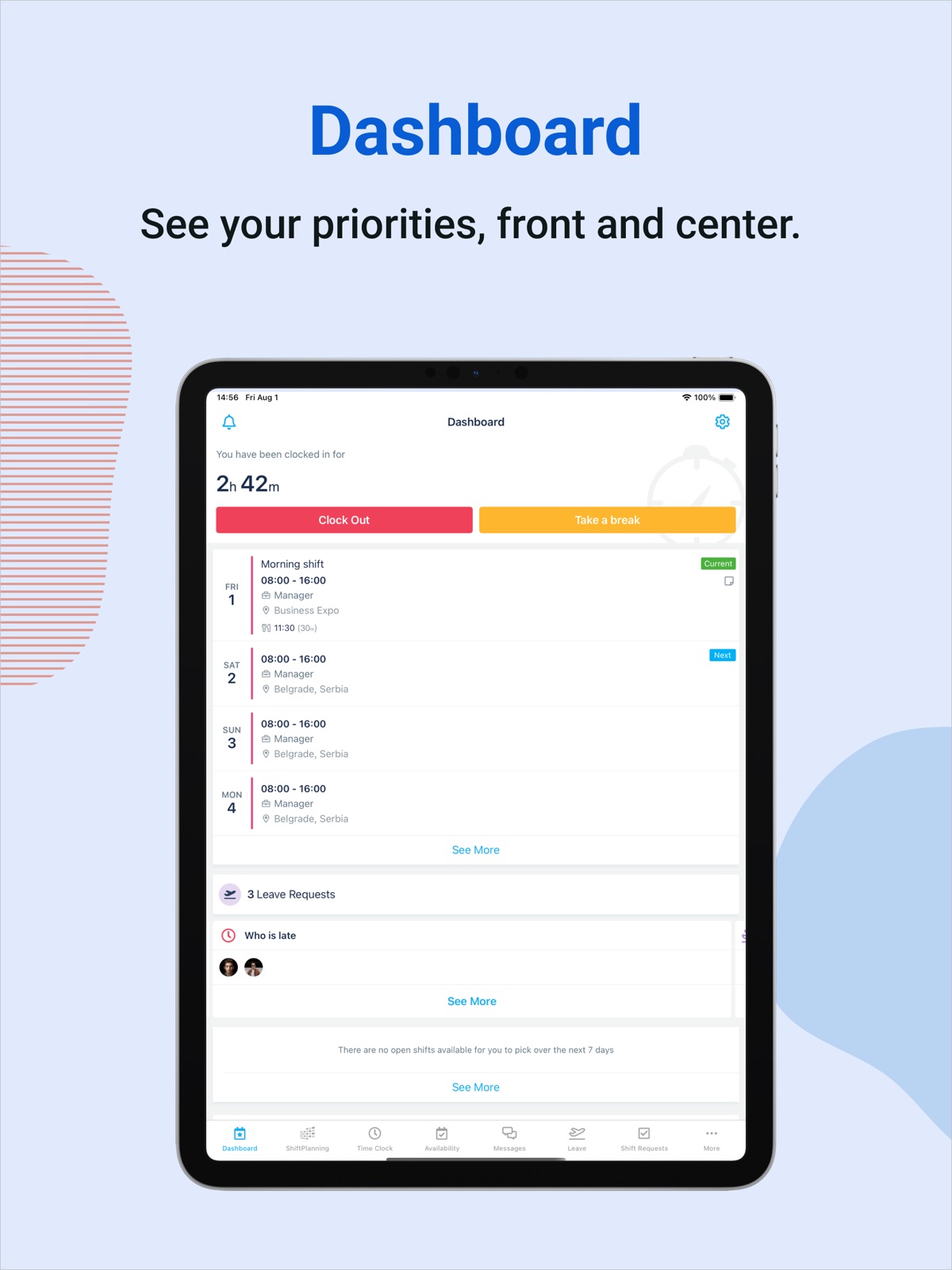


12 store screenshots


Pricing & paywalls
- Free
- Free to download
Ratings & reviews
-
5/5Excellent app for work scheduling
I really enjoy this app because it has a setting to where it alerts you 24 hours before your next shift, 12 hours before the next shift, and continues on up to an hour before you’ll need to be at work. My job is very physically demanding and this app eliminates any need to load my alarm clock with alerts which means more time to sleep/ rest in between shifts. I recommend this app to any employer / employee as it eliminates any excessive stress due to scheduling changes and eases the entire work scheduling process. Also the ability to sacrifice or pick up a shift is very helpful, you can send a message to any coworkers via the app if you might need to swap shifts due to personal reasons/ unforeseen circumstances.
666dvl666 · 5 Sep 2026
-
5/5I miss Humanity
My company’s management recently switched over to paychex flex... worst decision they’ve made since I’ve been with the company. Humanity is a very straightforward and easy to use app that makes scheduling and switching shifts a breeze. It was so easy to switch shifts with Humanity, and I love how all your upcoming shifts were displayed on the home page... that would just make sense to do right? Also, there’s a feature where you can look at all the other employees contact info. which is super convenient when you’re on the job and don’t have any other way to contact fellow employees. I miss Humanity so much, 100 times better than Paychex Flex.
Lil_baller5 · 5 Sep 2026
-
1/5Used to be great, now basically worthless.
Humanity used to be so awesome for me navigating around my new job, schedule, and coworkers. Recently, I’m no longer able to search MOST people in our network, where I had no issues with before. (I can sign on a PC and have no issues finding anyone I’m trying to search for) Another feature I’ve noticed has been tampered with recently is shiftplanning. It used to be relatively painless to look at the schedule. Before, I was able to find out who was working in what department on what day with a few clicks and scrolls. Sometimes it could be a little more difficult to navigate, but at least I had access to the information I needed. Now, I can only search for assigned shifts by the “shifts on my position” or “shifts by my location” filter feature. The location option flat out juSt doesn’t give me any options. It just says something along the lines of “there are no shifts available at your location.” There is a “custom filter” option which allows you to search departments in your network... except there are no departments. It literally says so before I even try to search. “If I try to search anything, it immediately changes to say “the position you’re searching for doesn’t exist.” As you can imagine, this makes it extremely hard, if not impossible, for me to see who else is working (managers, other departments we communicate with heavily, etc.) with the app. (Again, I have none of these issues with a PC) TL;DR The app was fantastic until recently. Now it seems like they’re taking away features instead of adding or changing/fixing! (I still love the Humanity website, but the app has really been let go.)
Earthly rose · 5 Sep 2026
-
4/5Easy to use and glad to have
I use this app to manage a small company of about 10 employees. They have done a lot in their recent updates to manipulate the scheduling system for the better and I’m all for it. Being that I make all the schedules for the company that I manage having something as paramount as this app and site is crucial to be able to let my people know when they are working. I do have to say that for whatever reason none of my workers get notified when the schedule gets posted or changed and that’s something that needs to get fixed. When that gets fixed I’ll update to five stars I have no other complaints.
Bourneplayer69 (Xbox Gamertag) · 5 Sep 2026
-
5/5Wendy’s Review
I haven’t had much opportunity to use this system but it seems to be working quite well for me I still find I stumble in a few areas but then I just either look it up or ask her help person to see what I need to do and it works out thank you for placing everything online to help make it easier for everyone to see who is going to be wearing what you were going to be doing I really think once I get more used to the system it will be even more beneficial to me thank you everyone for your patience and I hope you’re having a great memorial day weekend!
xpossible1 · 5 Sep 2026
No store reviews collected for Google Play · US
Privacy & accessibility
Privacy
- Data Linked to You — Analytics — Diagnostics — Crash Data Developer declared
- Data Linked to You — Analytics — Diagnostics — Performance Data Developer declared
- Data Linked to You — Analytics — Identifiers — Device ID Developer declared
- Data Linked to You — Analytics — Identifiers — User ID Developer declared
- Data Linked to You — Analytics — Usage Data — Product Interaction Developer declared
- Data Linked to You — App Functionality — Contact Info — Email Address Developer declared
- Data Linked to You — App Functionality — Contact Info — Name Developer declared
- Data Linked to You — App Functionality — Contact Info — Phone Number Developer declared
- Data Linked to You — App Functionality — Contact Info — Physical Address Developer declared
- Data Linked to You — App Functionality — Contacts Developer declared
- Data Linked to You — App Functionality — Identifiers — Device ID Developer declared
- Data Linked to You — App Functionality — Identifiers — User ID Developer declared
- Data Linked to You — App Functionality — Location — Coarse Location Developer declared
- Data Linked to You — App Functionality — Location — Precise Location Developer declared
- Data Linked to You — App Functionality — Other Data — Other Data Types Developer declared
- Data Linked to You — App Functionality — Sensitive Info Developer declared
- Data Linked to You — App Functionality — User Content — Customer Support Developer declared
- Data Linked to You — App Functionality — User Content — Photos or Videos Developer declared
- Data Linked to You — Product Personalization — Identifiers — Device ID Developer declared
- Data Linked to You — Product Personalization — Identifiers — User ID Developer declared
- Data Linked to You — Contact Info Developer declared
- Data Linked to You — Contacts Developer declared
- Data Linked to You — Diagnostics Developer declared
- Data Linked to You — Identifiers Developer declared
- Data Linked to You — Location Developer declared
- Data Linked to You — Other Data Developer declared
- Data Linked to You — Sensitive Info Developer declared
- Data Linked to You — Usage Data Developer declared
- Data Linked to You — User Content Developer declared
- Data Not Linked to You — Analytics — Usage Data — Advertising Data Developer declared
- Data Not Linked to You — App Functionality — Usage Data — Advertising Data Developer declared
- Data Not Linked to You — Product Personalization — Usage Data — Advertising Data Developer declared
- Data Not Linked to You — Third-Party Advertising — Usage Data — Advertising Data Developer declared
- Data Not Linked to You — Usage Data Developer declared
- Data Used to Track You — Usage Data — Advertising Data Developer declared
- Data Used to Track You — Usage Data Developer declared
Accessibility
No accessibility labels collected yet.
Privacy
- Data collected — App functionality — Personal info — Email address Developer declared
- Data collected — App functionality, Account management — Personal info — Name Developer declared
- Data collected — App functionality, Analytics, Developer communications, Fraud prevention, security, and compliance, Account management — Personal info — User IDs Developer declared
- Data collected — App functionality, Fraud prevention, security, and compliance — Location — Approximate location Developer declared
- Data collected — App functionality, Fraud prevention, security, and compliance — Location — Precise location Developer declared
- Data shared — Analytics — App info and performance — Crash logs Developer declared
- Data shared — Analytics — App info and performance — Diagnostics Developer declared
- Data shared — Analytics — App info and performance — Other app performance data Developer declared
- Data shared — Analytics — Device or other IDs Developer declared
- Security practices — The developer doesn’t provide a way for you to request that your data be deleted — Data can’t be deleted Developer declared
- Security practices — Your data is transferred over a secure connection — Data is encrypted in transit Developer declared
Accessibility
No accessibility labels collected yet.
Versions
-
4.3.3
[IMPROVED] Fixed a bug with clock operations and scrolling on dashboard occurring on iOS 18 Have feedback? Email us at [email protected]
-
4.4
[NEW] Polish language Shift tasks: view indication of a task on shift cells, view task details, start/end tasks, shift tasks dashboard widget Have feedback? Email us at [email protected]
-
4.4.1
[NEW] New Clair experience on Mobile Have feedback? Email us at [email protected]
-
4.5
[NEW] Spanish language Time-boxed shift tasks Account switching on login Fixed a few bugs and enhanced app performance Have feedback? Email us at [email protected]
-
4.6
[NEW] TCP - Humanity integration: Shorten missed punch Clair widget – label ‘new’ added for unregistered users [IMPROVED] Fixed a few bugs Have feedback? Email us at [email protected]
-
4.6.1
[IMPROVED] Fixed a few bugs and improved app stability Have feedback? Email us at [email protected]
-
4.6.2
Fixed a few bugs and improved app stability Have feedback? Email us at [email protected]
-
4.6.3
[IMPROVED] Fixed a few bugs and improved app stability Have feedback? Email us at [email protected]
-
4.6.4
[IMPROVED] Fixed a few bugs and improved app stability Have feedback? Email us at [email protected]
-
4.7
[New] Fair Work Week compliance is now supported. Leave segregation has been introduced, clearly distinguishing between Paid and Unpaid leave types. Blocked Leave Rules have been improved, users can now configure rules based on specific positions and multiple leave types. [IMPROVED] Fixed a few bugs and improved overall app stability. Have feedback? Email us at [email protected]
-
4.7.1
[IMPROVED] Fixed a few bugs and improved app stability Have feedback? Email us at [email protected]
-
4.7.2
[IMPROVED] Fixed a few bugs and improved app stability Have feedback? Email us at [email protected]
-
4.7.3
[New] Added support for controlling remote site visibility based on shift planning settings. Users with the employee role will no longer see remote sites in shifts if the setting is disabled in the web app. Have feedback? Email us at [email protected]
-
4.8
[New] Managing time sheets on mobile is now live for Humanity and TimeClock Plus integration users. It gives employees a simple and efficient way to add, edit, delete, approve, or unapprove their time entries and add notes for each segment. Have feedback? Email us at [email protected]
-
5.0.1
[New] This release introduces custom roles with granular permissions, enabling managers and admins to create and configure roles based on specific needs. This gives them greater control over user access, ensuring users can only view and manage the shifts and actions relevant to their role. AI Backfill has been added – managers can now replace an employee on a shift using AI. Have feedback? Email us at [email protected]
-
5.1
[New] A new support chat with updated design and chat history is now available. Users can now choose which term they want to use instead of “employee” (contractor, contributor, team member, or employee). This setting is configured on the web and reflected in the mobile app. The app has been rebranded with a refreshed visual identity. Humanity TimeClock Plus integration users with multiple scheduling organizations can choose which organization to log into during the login process. Have feedback? Email us at [email protected]
-
5.1.1
[IMPROVED] Fixed a few bugs and improved app stability Have feedback? Email us at [email protected]
-
5.2
[New] - Users can now select entire locations or individual positions when starting a new conversation, enabling faster recipient selection and bulk messaging. - Shift acknowledgement status is now visible in Grid, actionable in Shift Details, and pending acknowledgements appear in the Dashboard widget. - The selected calendar day is now automatically set as the Start Date when creating a new shift. Have feedback? Email us at [email protected]
-
5.2.1
[New] - Users can now select entire locations or individual positions when starting a new conversation, enabling faster recipient selection and bulk messaging. - Shift acknowledgement status is now visible in Grid, actionable in Shift Details, and pending acknowledgements appear in the Dashboard widget. - The selected calendar day is now automatically set as the Start Date when creating a new shift.
-
5.2.2
[New] - Users can now select entire locations or individual positions when starting a new conversation, enabling faster recipient selection and bulk messaging. - Shift acknowledgement status is now visible in Grid, actionable in Shift Details, and pending acknowledgements appear in the Dashboard widget. - The selected calendar day is now automatically set as the Start Date when creating a new shift.
-
5.3
[New] A new Position view has been added in Shift Planning, allowing users to see shifts grouped by position and location. Fixed a few bugs and improved app stability Have feedback? Email us at [email protected]
-
5.4
[New] - Users can now accept backfill offers directly within the app. - Improved backfill logic with the addition of a new location-based factor. [IMPROVED] - Fixed a few bugs and improved app stability Have feedback? Email us at [email protected]
-
5.4.1
[IMPROVED] • Fixed a few bugs and improved app stability Have feedback? Email us at [email protected]
-
5.4.2
[IMPROVED] Fixed a few bugs and improved app stability Have feedback? Email us at [email protected]
-
5.5
· 5 Aug 2026
New - Employees can now select Auto Release when giving up a shift. The app automatically finds and invites eligible teammates, then assigns the shift once someone accepts. Managers can track and cancel Auto Release requests from the Shift Requests widget. - Integration users no longer need to switch apps. Group Hours, Request Manager and Employee Status are now built into the TCP-Humanity integration app, alongside existing modules. Have feedback? Email us at [email protected]
- 5.4.1 · 4 Aug 2026
Alternatives
- TimeClock Plus Clock — Same category + similar ratings
- OnShift Mobile — Same category + similar ratings
- WhenToWork Employee Scheduling — Same category + similar ratings
- Deputy: Shift Schedule Maker — Same category + similar ratings
- Fingercheck Mobile — Same category + similar ratings
- BambooHR — Same category + similar ratings
Availability by market
- US
Data quality & evidence
- Page completeness
- Live store listing
- Last verified
- 5 Sep 2026
- Sources
- App Store, Google Play
- Independent summary has not been published yet.