
Quick verdict
- What it is
- Store information collected; independent summary not yet available.
- At a glance
-
- Free to download
- In-app purchases
Categories and search queries
Official categories
- Productivity
- Utilities
AppCorpus categories
Key functions
| Function | Availability | Access | Scope | Evidence |
|---|---|---|---|---|
| Apple Wallet | Yes | Unknown | App Store | Store published |
| Free app | Yes | Free | — | Store published |
| In-app purchases | Yes | Limited free | — | Store published |
Screens
App Store
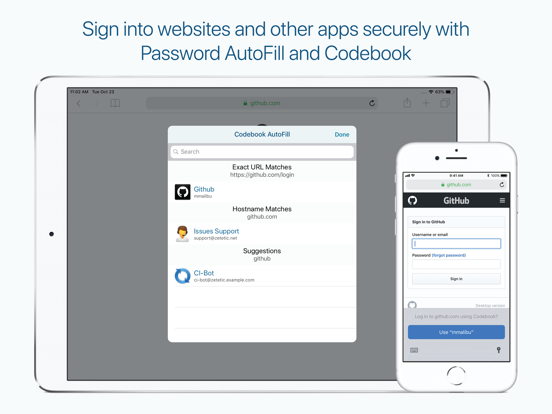
21 store screenshots


Pricing & paywalls
App Store
Shown for US
- Codebook Cloud Family — $13.99
- Codebook Cloud Family — $119.99
- Codebook Cloud Personal — $7.00
- Codebook Cloud Personal — $60.00
Ratings & reviews
App Store
Shown for US
-
5/5Highly Recommended - the One & Only Password App You Need
I work in technology for big firms handling lots of cloud applications, and between my job and my personal life this means that I have hundreds of separate passwords to keep track of along with their temporary two-factor time-based authentication codes. Codebook does it all securely and safely while allowing me to synchronize password data across multiple devices such as my phone and my computer without the use of a third-party cloud provider such as Google. This means that my data is safe & secure and never leaves my control nor is it used to try to sell me stuff. I have been using this application for almost a decade, and I have found the developer to be both responsive and a thoughtful fellow who responds to to user requests while only adding features in a way that makes sense and keeps the app lightweight, fast, and responsive. I have gifted paid copies of this app to my loved ones, and I highly recommend this app!!
Indomitable Man · 6 Aug 2026
-
3/5Long Time User Since Original Codebook
Love this app. I used to use the original Codebook app when it first came out on the iPod touches years ago. I loved it. I redownloaded the old Codebook and then stumbled upon their new Codebook app. Apparently the old Codebook is no longer supported by Dropbox, and with my large amount of notes on the old app I decided to migrate them into the new Codebook version. I’m super interested in purchasing the full version, especially knowing it’s not only a password keeper app but also where I can keep my private notes and ideas. However, my greatest complaint is the lack of dates on the notes. I have so many notes that migrated over, however none have any dates as to when I first wrote them. Instead, all the notes are categorized by alphabetical order. I love they kept with the old simple note style, but I strongly prefer the old original Codebook version that categorized notes by date order. Unless I was still able to see the date recorded as to when I first created that note, this app could have been perfect and I would’ve been more than happy to dish out for the paid version. It’s such a minor thing too, you would think they’d let you categorize your notes by date created.
Simply Claire · 6 Aug 2026
-
5/5Still a class act after many years
My wife and I were introduced to STRIP a number of years ago when we were still using Palm Pilots. Our data made it across onto the iphone platform without any problem, and the app continues to give us peace of mind that our data is secure--not just passwords, but all kinds of important stuff. I very recently had an occasion to test the customer service of Zetetic, the app's developer. My email elicited a very quick response that reflected a careful reading of my description of the problem and provided a clear set of instructions for solving it. They followed up a day or so later to see if my application of the instructions had been successful, Altogether a class act. Consistent use of this app makes it remarkably easy to keep our data safe. The only improvement I can think of would be a field type or types that would store photographs or pdf’s.
Blue Quill · 6 Aug 2026
-
5/5Excellent Password Manager full of options
I’ve been using this password manager for years and I love it. I will however say it’s for the technically savvy. If you’re only using it locally (e.g. one iPad) then I would say everything is easy. However if you plan to sync via cloud services you have to go through a few steps, and remember to always sync. It does not automatically sync to the cloud. The most important feature they have is giving me the choice of where the database is stored. There is no option to store the database with Codebook servers because it’s not a service they offer. Instead I can keep the database totally within my ecosystem by using the WiFi sync option. Since I at least have trust in Codebook encryption security, I’ve chosen to sync via Dropbox. But the beauty of this is it’s my Dropbox account. My takeaway of the above is since Codebook doesn’t have servers, the hackers are unlikely to bother trying to hack Codebook encryption. First they’ve have to crack Codebook encryption technology, but it would only be useful when they find where users have stored the database. This is the most clever solution for a password manager that I’ve come across! Keep up the great work Codebook team! p.s. Their support team is super responsive! I’ve contact them a handful of times with questions and almost always get a thorough response the same day!
strobeman4x4 · 6 Aug 2026
-
5/5Great Alternative to Cloud Base Password Managers
I’ve been using Codebook for a couple of years. I wanted a password manager that wouldn’t be subscription based, would reside on my computer instead of the cloud and that also offered flexibility when adding data to my entries. I also wanted an app that would sync between my devices. Codebook delivers on all of my needs. The initial setup to sync between devices was a bit complicated, but once complete it works. The syncs only occur upon user initiation which can sometimes be a pain, but it also provides a backup in case you accidentally erase information in one device. The app also offers a password generator with different options for the type of password needed such was website rules or alphanumeric. The generator also checks whether the chosen password has been compromised before. The iOS based version works well with other apps when copying and pasting in usernames and passwords. I can copy the info from Codebook and paste it on an entry field in another app. It also provides a message saying that the info pasted originated from Codebook as confirmation of the action. Finally, I’ve also worked with their customer support and found it personable and very willing to help. Overall, I recommend Codebook to anyone seeking a password manager.
Orb6280 · 6 Aug 2026
Privacy & accessibility
App Store
Privacy
- Data Not Linked to You — Analytics — Diagnostics — Crash Data Developer declared
- Data Not Linked to You — Analytics — Diagnostics — Other Diagnostic Data Developer declared
- Data Not Linked to You — Analytics — Identifiers — Device ID Developer declared
- Data Not Linked to You — Analytics — Usage Data — Product Interaction Developer declared
- Data Not Linked to You — Diagnostics Developer declared
- Data Not Linked to You — Identifiers Developer declared
- Data Not Linked to You — Usage Data Developer declared
Accessibility
No accessibility labels collected yet.
Versions
App Store
-
4.5.20
* Updates Codebook's Sync feature to restrict access with Google Drive to an AppData folder instead of all files. If you sync with this service, you will be required to sign in to it again.
-
4.5.21
* Fixes Find in Codebook “No URL Passed to App Extension” error
-
5.0.0
* Introducing: Codebook Cloud, automatic background sync! (Subscription required) * Sync view includes new sync status information for Codebook Cloud * Tapping on the Account row in Sync view will display account details for Codebook Cloud * Sync view provides a button for toggling Auto Sync with Codebook Cloud * Login view also provides a button for toggling Auto Sync with Codebook Cloud * Restore, Overwrite, and Merge operations are no longer hidden on the Sync view * Sync view includes an improved Sync Log * New Welcome screen provides quick setup of Codebook on new devices * The Backup Sync Key feature now supports saving your Sync Key to a file encrypted with your Master Password * Adds support for importing a Sync Key from a Sync Key file * After copying an Entry, the Paste button now appears in the navigation bar * The default order of tabs on iPhone has changed, see More > Edit to adjust * Full support for French, German, Italian, Japanese, Spanish, and Simplified Chinese translations * Fixes numerous bugs that would occur when Codebook entered the background state * Fixes several edge-case bugs for processing sync changes for all supported sync services
-
5.0.1
New in 5.0.1: * Fixes crashes that could occur on login for some customers * Fixes Loyal Customer discount not being properly applied Previously in 5.0.0: * Introducing: Codebook Cloud, automatic background sync! (Subscription required) * Sync view includes new sync status information for Codebook Cloud * Tapping on the Account row in Sync view will display account details for Codebook Cloud * Sync view provides a button for toggling Auto Sync with Codebook Cloud * Login view also provides a button for toggling Auto Sync with Codebook Cloud * Restore, Overwrite, and Merge operations are no longer hidden on the Sync view * Sync view includes an improved Sync Log * New Welcome screen provides quick setup of Codebook on new devices * The Backup Sync Key feature now supports saving your Sync Key to a file encrypted with your Master Password * Adds support for importing a Sync Key from a Sync Key file * After copying an Entry, the Paste button now appears in the navigation bar * The default order of tabs on iPhone has changed, see More > Edit to adjust * Full support for French, German, Italian, Japanese, Spanish, and Simplified Chinese translations * Fixes numerous bugs that would occur when Codebook entered the background state * Fixes several edge-case bugs for processing sync changes for all supported sync services
-
5.0.2
New in 5.0.2: * Fixes Loyal Customer discount not being properly applied Previously in 5.0.1: * Fixes crashes that could occur on login for some customers Previously in 5.0.0: * Introducing: Codebook Cloud, automatic background sync! (Subscription required) * Sync view includes new sync status information for Codebook Cloud * Tapping on the Account row in Sync view will display account details for Codebook Cloud * Sync view provides a button for toggling Auto Sync with Codebook Cloud * Login view also provides a button for toggling Auto Sync with Codebook Cloud * Restore, Overwrite, and Merge operations are no longer hidden on the Sync view * Sync view includes an improved Sync Log * New Welcome screen provides quick setup of Codebook on new devices * The Backup Sync Key feature now supports saving your Sync Key to a file encrypted with your Master Password * Adds support for importing a Sync Key from a Sync Key file * After copying an Entry, the Paste button now appears in the navigation bar * The default order of tabs on iPhone has changed, see More > Edit to adjust * Full support for French, German, Italian, Japanese, Spanish, and Simplified Chinese translations * Fixes numerous bugs that would occur when Codebook entered the background state * Fixes several edge-case bugs for processing sync changes for all supported sync services
-
5.0.3
New in 5.0.3: * Fixes a crash that could occur during login after upgrade for some users Previously in 5.0.2: * Fixes Loyal Customer discount not being properly applied Previously in 5.0.1: * Fixes crashes that could occur on login for some customers Previously in 5.0.0: * Introducing: Codebook Cloud, automatic background sync! (Subscription required) * Sync view includes new sync status information for Codebook Cloud * Tapping on the Account row in Sync view will display account details for Codebook Cloud * Sync view provides a button for toggling Auto Sync with Codebook Cloud * Login view also provides a button for toggling Auto Sync with Codebook Cloud * Restore, Overwrite, and Merge operations are no longer hidden on the Sync view * Sync view includes an improved Sync Log * New Welcome screen provides quick setup of Codebook on new devices * The Backup Sync Key feature now supports saving your Sync Key to a file encrypted with your Master Password * Adds support for importing a Sync Key from a Sync Key file * After copying an Entry, the Paste button now appears in the navigation bar * The default order of tabs on iPhone has changed, see More > Edit to adjust * Full support for French, German, Italian, Japanese, Spanish, and Simplified Chinese translations * Fixes numerous bugs that would occur when Codebook entered the background state * Fixes several edge-case bugs for processing sync changes for all supported sync services
-
5.0.4
New in 5.0.4: * Fixes stall when performing Overwrite operation for WiFi sync Previously in 5.0.3: * Fixes a crash that could occur during login after upgrade for some users Previously in 5.0.2: * Fixes Loyal Customer discount not being properly applied Previously in 5.0.1: * Fixes crashes that could occur on login for some customers Previously in 5.0.0: * Introducing: Codebook Cloud, automatic background sync! (Subscription required) * Sync view includes new sync status information for Codebook Cloud * Tapping on the Account row in Sync view will display account details for Codebook Cloud * Sync view provides a button for toggling Auto Sync with Codebook Cloud * Login view also provides a button for toggling Auto Sync with Codebook Cloud * Restore, Overwrite, and Merge operations are no longer hidden on the Sync view * Sync view includes an improved Sync Log * New Welcome screen provides quick setup of Codebook on new devices * The Backup Sync Key feature now supports saving your Sync Key to a file encrypted with your Master Password * Adds support for importing a Sync Key from a Sync Key file * After copying an Entry, the Paste button now appears in the navigation bar * The default order of tabs on iPhone has changed, see More > Edit to adjust * Full support for French, German, Italian, Japanese, Spanish, and Simplified Chinese translations * Fixes numerous bugs that would occur when Codebook entered the background state * Fixes several edge-case bugs for processing sync changes for all supported sync services
-
5.1.0
This update requires an update to Codebook on all platforms. Please update to the latest version if you experience an error during sync. Changes in this version: * Updates database schema to correct malformed timestamps and prevent crashes in the future * Copying records now uses "copy" suffix for title instead of "Copy of" prefix to improve sort ordering * Updates Merge operation to fix marking unchanged records as updated in some cases
-
5.1.1
* Updates the Password Reminder feature to make clear the user can still login * Dismisses keyboard on login view when tapping outside of Master Password field * Adjusts the Recents, Favorites, and Search views to allow display of Entries without a Category assignment
-
5.2.0
* Adds new Sign In With Email feature for Codebook Cloud * Adds dismiss button and swipe to dismiss to Codebook Cloud introduction view * Adds prompt to select a sync service when scanning a sync key during first time setup and not signed into Codebook Cloud * No longer installs default Types (Labels) when scanning a sync key during first time setup * Updates the Password Reminder feature to make clear the user can still login * Dismisses keyboard on login view when tapping outside of Master Password field * Adjusts the Recents, Favorites, and Search views to allow display of Entries without a Category assignment
-
5.2.1
* Fixes Codebook Cloud Sign in With Email not working in certain circumstances * Fixes Invalid or Expired sign-in link error when successfully signing in with email link then locking and unlocking Codebook
-
5.2.2
* Fixes crash on iPad when side navigation panel is appearing and search is active * Fixes Password AutoFill not properly updating after syncing data from another Codebook client * Fixes Entry's Last Updated not properly updating when favoriting an Entry * Improves error handling for Codebook Cloud * Utilizes longer date format for Date Field display to fix inability to select dates before 1950
-
5.2.3
* Fixes crash that could occur when checking for updates * Fixes button on update check alert not properly opening Codebook in App Store * Fixes crash that could occur when displaying entry * Properly updates AutoFill suggestions after customizing labels * Fixes crash related to autofill_websites is already in use
-
5.2.4
* Adds biometric button on AutoFill login view * Fixes crash from attempting to sync when database is locked * Fixes certain 2-step secret keys improperly generating "Invalid Key" rather than 2-step codes
-
5.2.5
* Adds Application Log Row to Settings View * Updates Wallet Sync Key signing certificate
-
5.2.6
* iOS 26 compatibility adjustments * Improves visibility of paperclip attachment indicator on entries list and entry view when in dark mode * Improves visibility of category entries count on iPad in dark mode * Improves visibility of Sync footer button in dark mode * Show alert when compact database operation completes
-
5.2.7
* Small improvement to background network performance
-
5.3.0
* You can now securely share entries with other Codebook users over Codebook Cloud! * Go to Sync > Manage Contacts to get started with Secure Sharing (Codebook Cloud subscription required) * Adds the ability to accept an invitation to join a Codebook Cloud account * Adds family plan purchase options for Codebook Cloud * Updates SQLCipher to 4.12.0 * Fixes crashes * This release includes database schema changes which require updating Codebook on all your devices to continue syncing
-
5.3.1
* Fixes race condition which causes Sharing Error * Fixes failure to scan certain TOTP QR codes * Fixes autosync changes not reflecting in first view displayed when using Face ID login * Fixes crash when trying to present sync reminder alert
-
5.3.2
* Adopts iOS 26 interface * Updates app icon for Liquid Glass * Adds support for AutoFill to provide one-time codes * AutoFill now ranks higher credentials from favorited entries * AutoFill now ranks subdomain credentials higher than matching host names * The Search feature is updated to allow for easier matching on characters with diacritics * Reports error when Backup Sync Key fails because of keychain access failure and falls back to Master Password authentication * Allows disabling biometric authentication in Settings > Login Settings even when biometrics are temporarily unavailable on device * Adds workaround for Dropbox sync error "Unable to upload Sync Lock File" * Fixes no such table: strip_local.changeset_queue crash
-
5.3.3
* Properly hides cancel (x) button when sync completes which fixes erroneous "Failure reverting to rollback db during cancel" error when tapping it after sync completes
-
5.3.4
* Fixes crash when trying to add attachment from camera * [iPad] Defaults to always showing side navigation panel. New preference in Settings > Preferences to automatically hide side panel. * [iPad] Fixes crash when deleting only entry in search results when side navigation panel isn't visible * [iPad] Fixes crash on first Codebook Cloud sync when side navigation panel is collapsed
-
5.3.5
* Fixes stale item list on Attachments view * Fixes issue displaying transparent background pdfs in dark mode
-
5.3.6
* Updates to SQLCipher 4.16.0 * Updates Sync Key Wallet Pass certificate * Fixes changeset could not be removed error when syncing with non-Codebook Cloud service * Adds last background refresh date to Sync View debug section footer when using Codebook Cloud Sync * Display error when Replace Sharing Key fails because of missing Codebook Cloud user id or session client * [iPad] Fixes favorites view controller not properly sizing when side nav is visible * [iPad] Fixes sync view controller footer and headers not properly displaying when side nav is visible * [iPad] Fixes bug that could cause entire screen not to layout properly after selecting rows quickly from the side nav * [iPad] Fixes Codebook Cloud details view not properly sizing when side nav is visible * [iPad] Fixes persisting pending for category view controller not properly appearing in side nav right away * [iPad] Fixes side panel improperly scrolling to row when selecting row * [iPad] Fixes bug causing blank screen when accessing Settings in certain cases * [iPad] Fixes icon selector blocked by side panel
-
5.3.7
· 7 Jul 2026
* Fixes incorrect translucent tab bar on Settings View on less than iOS 26 * [iPad] Fixes Layout requested for visible navigation bar crash * Fixes frivolous Codebook Password Required notification when request times out
Alternatives
- Password Manager iPassSafe — Same category + similar ratings
- Sticky Password Manager & Safe — Same category + similar ratings
- aWallet Password Manager — Same category + similar ratings
- iPassworder Password Manager — Same category + similar ratings
- Password Manager' — Same category + similar ratings
- SplashID Safe Password Manager — Same category + similar ratings
Availability by market
- US
Data quality & evidence
- Page completeness
- Live store listing
- Last verified
- 6 Aug 2026
- Sources
- App Store
- Independent summary has not been published yet.