
Quick verdict
- What it is
- Store information collected; independent summary not yet available.
- At a glance
-
- Free to download
- In-app purchases
Categories and search queries
Official categories
- Productivity
- Utilities
AppCorpus categories
Key functions
| Function | Availability | Access | Scope | Evidence |
|---|---|---|---|---|
| Family Sharing | Yes | Unknown | App Store | Store published |
| Free app | Yes | Free | — | Store published |
| In-app purchases | Yes | Limited free | — | Store published |
Screens
App Store
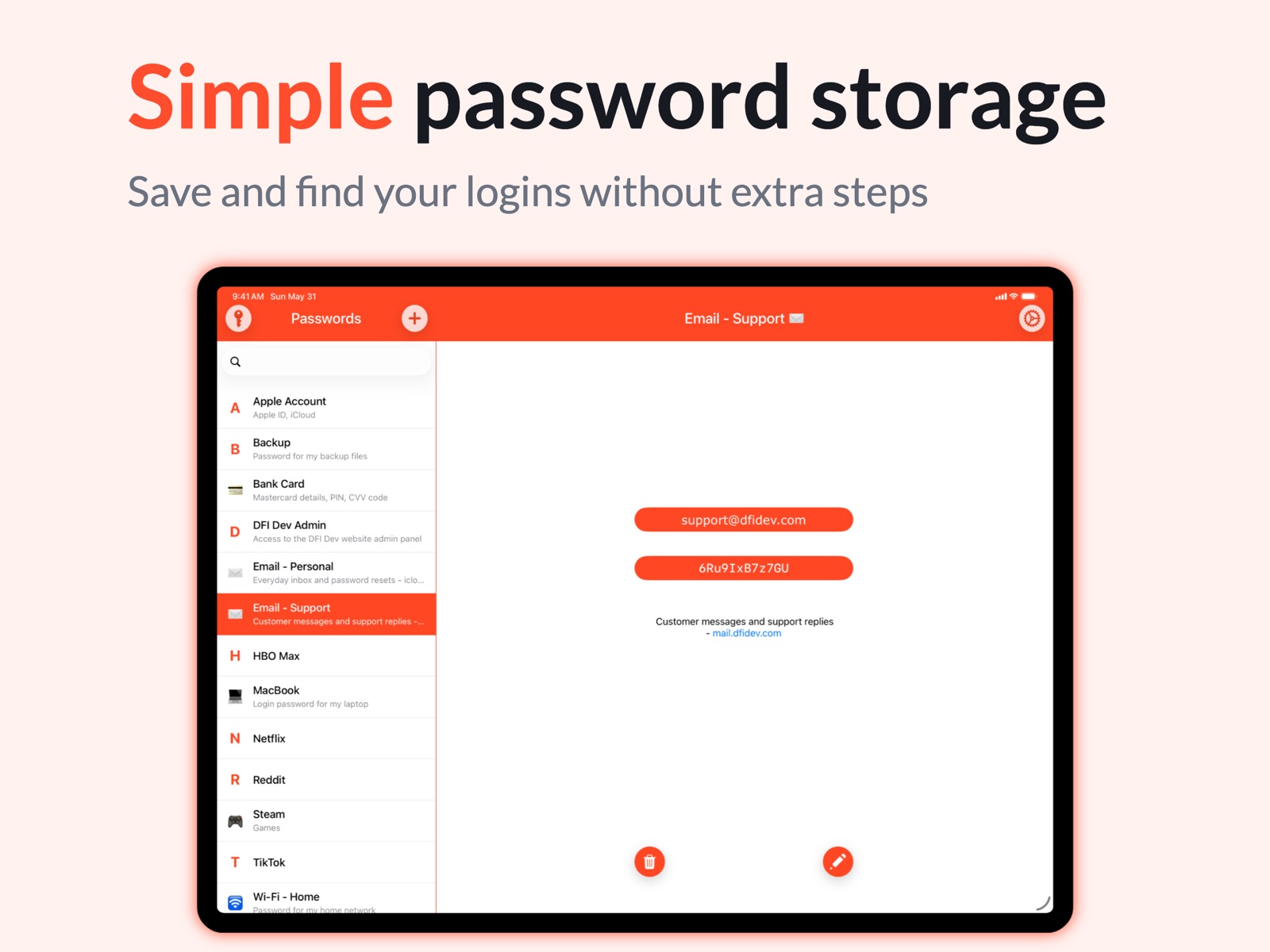
16 store screenshots


Pricing & paywalls
App Store
- Unlimited Storage — $19.99
Ratings & reviews
App Store
-
5/5But!
Very easy to set up and use - But: I found it in a search for free password managers. Did not see even a hint of any charge on the site. When I tried to make an eleventh entry (a fair amount of time now spent ) message popped up saying I had my ten freebies and had to pay a onetime fee of $15 for unlimited entries. Not an unreasonable amount and I paid it. Would have been much better if the fee was expected and I could have decided whether to continue after trying just an entry or two.
What I learned · 6 Aug 2026
-
4/5PERFECT & SIMPLE
EDIT: I’m dropping a star due to a bug/glitch I found. Perhaps it’s a “feature”, but I think it’s a pretty big deal. If I go to one of my entries on the app (where you actually copy the pw) if I don’t fully close the app, if I just swipe up to the home screen or into another app), if I then tap the app icon to go back, it doesn’t go to the initial “Enter Password” screen, it takes me right back to the last opened screen, displaying all the info. Sometimes it will flash the “Enter Password” screen, but then immediately reopens the last opened info screen. So if someone was to pick up my device right after I sat it down and tapped the app icon, it would open and that could see all info; Title, User ID, Password and Description. I don’t know exactly how long, but if I wait a couple minutes, then reopen the app, it goes to the “Enter Password” screen as it should. But haven’t had enough time to test EXACTLY how long it takes before it stops displaying the last opened entry after closing... To me its a bit of a deal breaker since the app is used to protect your passwords and info, but this allows anyone who picks up the device to see all sensitive info. PLEASE fix this, because I think otherwise, this is the PERFECT app functionality for my needs. OLD REVIEW: This is EXACTLY what I wanted. I downloaded about a dozen pw managers at once to a/b them for my needs. Many come with many “bells & whistles”, sub menus, etc. That’s great for certain scenarios, but what I wanted was SIMPLICITY... open the app, copy the password with ONE CLICK, close, past the pw where I needed it, and that’s EXACTLY what this does. I have another in the phone for the more complex tasks, but when I need one-click access to my password, NOTHING beats this app. HIGHLY RECOMMENDED. 5 STARS.
Mykill G · 6 Aug 2026
-
1/5Terrible
I accidentally deleted the app and had the older version. When I try to get it back, they no longer have that version so I lost all my data! The app didn’t automatically update at all on the phone. Normally, I will see apps do that but that is a HUGE FLAW. So they never had “export to”. Which I am glad they have it now. I understand that was my fault deleting it but it had a lot of passwords I trusted it with. If this creator does not reply to my email, I will need to look for another resource for my password safety. But I can tell you one thing though. These creators really don’t care about our concerns because they are still making money with the app whether something happens with our information or not.
Aspen 7777 · 6 Aug 2026
-
5/5Password saver
Excellent program but needs improvement when you change the password if you don’t click the check mark it leaves the old password so when you review the password changed it dos not show the new password only the old password and now you can’t remember what the new password is The program should save the new password automatically once you sign out without having to use the check mark
Lfh0823 · 6 Aug 2026
-
4/5The best password app ever
I have been looking for a password keeper app for a long time and this app is the best by far, it’s easy to use, you can keep an unlimited amount of passwords after you pay the one time fee (which is great, no subscription to pay monthly) it works with the I phone face recognition so it’s secure, I love this app!!!! The only problem is I can’t get into the app to change my password and the security question tells me I’m giving it the wrong answer. I can’t get in touch with anyone to help me with this issue.
grumpo61 · 6 Aug 2026
Privacy & accessibility
App Store
Privacy
- Data Not Collected Developer declared
Accessibility
No accessibility labels collected yet.
Versions
App Store
- 4.0
-
4.1
- Security Improvements - Interface improvements - Fixed issue with multitasking screen when you could see your data on the app screenshot - Fixed bug with incorrect links detection - Other minor improvements
-
5.0
- Optimized for iPhone 6 and iPhone 6 Plus - Improved design - Bugs fixed - Other minor improvements
-
5.1
• Support iOS 10 perfectly • Search function • New export options: print a list of your passwords, save to iCloud Drive, send via e-mail, AirDrop, etc.
-
5.1.1
• Improved search function
-
5.1.2
• Minor improvements and bug fix
-
5.2
• Perfectly compatible with iOS 11 • Other minor improvements
-
5.2.2
Fixed bug with localization
-
6.0
A significant update which has made your password manager even faster and easier to use. We have: - Perfectly compatible with iOS 14 - Added full support for all new iPhone and iPad - Added the option to log in with Face ID / Touch ID (you can enable it in the app settings) - Improved the app design - Dark Mode - Made the interface easier to use and more responsive - Improved the Password Generator - Now you have 30 seconds to return to the app without entering the password (the app doesn't lock right after you close it; it waits for 30 seconds) - And many other minor improvements
-
6.1
Meet the updated version of iPassworder • Perfectly compatible with iOS 15 • ProMotion screen support for iPhone 13 Pro / iPhone 13 Pro Max • Added full support for the new iPad mini (6th generation) • More legible font for displaying passwords • Password creation fields are no longer cleared when leaving the app • Added new localizations (Italian, French, Spanish, German) And many other minor improvement
-
6.1.1
This update contains minor fixes. (Previous major update) Meet the updated version of iPassworder • Perfectly compatible with iOS 15 • ProMotion screen support for iPhone 13 Pro / iPhone 13 Pro Max • Added full support for the new iPad mini (6th generation) • More legible font for displaying passwords • Password creation fields are no longer cleared when leaving the app • Added new localizations (Italian, French, Spanish, German) And many other minor improvements
-
6.1.2
• Minor improvement
-
6.1.3
• The new version contains minor changes and improvements to the overall stability of the app.
-
6.2
The update will make your favorite password manager even better. • Perfectly compatible with iOS 16 and new iPhones • More pleasing colors in Dark mode • Improved some fonts And other minor improvement
-
6.2.1
• Interface improvements for iPad users. • We've also made minor changes and improvements to boost the app's overall stability, making it more reliable and efficient for our users. With these updates, we are confident that our app will continue to be the go-to password manager for our users, offering a seamless and secure experience across all devices.
-
6.2.2
• You can automatically fill in your email when creating an entry. • Fixed an issue where search results could be hidden behind the keyboard on some devices. • Minor interface improvements. With these updates, we are confident that our app will continue to be the go-to password manager for our users, offering a seamless and secure experience across all devices.
-
6.2.3
The new version contains minor changes and improvements to the overall stability of the app.
-
6.3
With these updates, we are confident that our app will continue to be the go-to password manager for our users, offering a seamless and secure experience across all devices. • Perfectly compatible with iOS 17 and all the latest devices. • Improved compatibility when migrating a database from older versions of the iPassworder. • You can automatically fill in your email when creating an entry. • The password list indicator no longer disappears when searching. We've also made minor changes and improvements to boost the app's overall stability, making it more reliable and efficient for our users.
-
6.4
With these updates, we are confident that our app will continue to be the go-to password manager for our users, offering a seamless and secure experience across all devices. • Perfectly compatible with iOS 18 and all the latest devices. • The app icon has been improved for better display in dark mode and tint overlay mode. • Added Chinese localization. We've also made minor changes and improvements to boost the app's overall stability, making it more reliable and efficient for our users.
-
6.5
We've implemented several improvements and fixes to ensure iPassworder continues to be the most convenient and reliable way to securely store your passwords. • Design fixes and enhancements. • Refined and polished settings tab for a smoother user experience. • Enhanced interface adjustments on iPad for better usability. • The tips list for iPad has been enhanced and expanded. • Resolved an issue that could, in some cases, cause the app to crash when interacting with the "Your Storage" screen. • Security enhancements. We've also made minor changes and improvements to boost the app's overall stability, making it more reliable and efficient for our users.
-
6.5.1
Small fixes and improvements to make iPassworder even better.
-
6.5.2
Small fixes and improvements to make iPassworder even better.
-
6.5.3
Improved compatibility with iOS 26.
-
7.0
Meet the major iPassworder 7.0 update. We refreshed the app design and improved the user experience while keeping iPassworder just as simple to use. What’s New: • Updated design and improved app interface. • Added an alphabetical index to the list for easier visual browsing. • Add an emoji to the end of an entry name to mark it in the list with that emoji. • Added an alternative way to delete an entry directly from the detail page. • Increased the maximum password length in the built-in Password Generator. • Updated the password display font for better readability. • Updated the password print font for better readability. • Fixed an issue where the search bar on iPad could expand to the full screen width. • Improved localizations: English, German, French, Italian, Spanish, Chinese Simplified, Russian. • Added new localizations: Portuguese (Brazil), Japanese, Korean, Hindi, Indonesian.
-
7.0.1
· 3 Jun 2026
Added 9 new localizations.
Alternatives
- mSecure: Password Manager — Same category + similar ratings
- SecureSafe Password Manager — Same category + similar ratings
- Password Manager' — Same category + similar ratings
- aWallet Password Manager — Same category + similar ratings
- Password Manager: Safe — Same category + similar ratings
- Password Safe Manager & Vault — Same category + similar ratings
Availability by market
- US
Data quality & evidence
- Page completeness
- Live store listing
- Last verified
- 6 Aug 2026
- Sources
- App Store
- Independent summary has not been published yet.