
Quick verdict
- What it is
- Store information collected; an Apoku editorial summary is not yet published.
- At a glance
-
- Free to download
- In-app purchases
Categories and search queries
Official categories
- Productivity
Apoku categories
Key functions
| Function | Availability | Access | Scope | Evidence |
|---|---|---|---|---|
| Free app | Yes | Free | Context-specific | Store published |
| In-app purchases | Yes | Limited free | Context-specific | Store published |
| Family Sharing | Unknown | Unknown | Scope unknown | Store published |
Screens
App Store
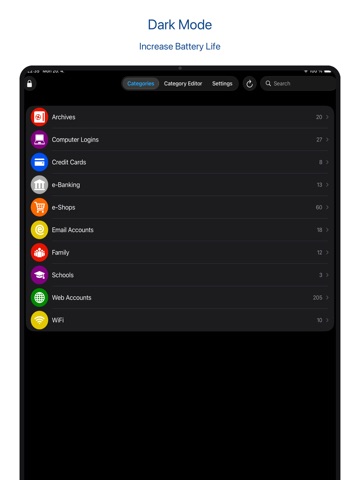
16 store screenshots


Pricing & paywalls
App Store
- All aWallet Pro features forever including cloud sync — $9.99
Ratings & reviews
App Store
-
5/5Worth it?
The app does exactly what it says it will do. My problem with it is that there is no transferability, meaning that if you get a new device you have to pay and do all the work over again. Your license doesn't carry over. Secondly, you have to pay for the upgraded version to use face id on the iPhone, which just became an issue without them telling the users. Seriously? Who does that? Anyway, the app itself is fine, it's not the best out there but it works for my purposes and is handy in situations
Nate 13! · 6 Aug 2026
-
4/5Great Password App
I needed a replacement for my previous password app that was no longer being supported. I didn’t need all the bells and whistles that also auto fill passwords or that gave me features I would never use. aWallet Password Manager fills the bill for being both simple and easy to use, yet powerful enough to be customized in a way that makes it a great app. I would give this app 5 stars, if only there was an option to export and/or backup to email. Having to use iTunes to access this file is both cumbersome and difficult to follow. So, please add option to export or backup to email. Features that would be nice (but don’t impact my score are: 1) Ability to add ID cards and/or credit card images. 2) More colorful icons for categories instead of the drab gray ones. 3) The ability to access web icons from a website if a URL is used. 4) The ability to add a colorful icon to item itself (not just a category). And while I made suggestions here, this is an AWESOME app that makes it easy and quick to save and access your passwords in a secure way!
Rumboogy · 6 Aug 2026
-
1/5No user name/ No sharing function
IUpgraded to the full version and paid $3.99 to find out There is no family Sharing function as advertised. My mom recently passed away and used this app and I wanted to log into her account on my phone. I downloaded the free version first and noticed there was no user name function so paid for the full versions and there is no user name available to login. Since I need to turn in her phone to AT&T I will no longer be able to view for her Passwords and Loggins since there is no family sharing function as advertised. this is very troubling. What a waste of money!!!! I personally use The app LastPass and it does have a function to share with family members as well as a function to launch the websites, populate passwords for you automatically and add website addresses when setting up each entry.
Stanford Princess · 6 Aug 2026
-
5/5Amazing support from Petr!
I have to make this review. I've been using Awallet for years and just today I got a glitch after updating to the latest version. It stopped recognising my pro paid version. Emailed Awallet and swift replies from Petr who went through all emails back and forth trying to figure this out. Finally, he suggested to me to reinstall the app and restore from cloud. It was working again! Great stuff! Love this app. So guys, get this app! Worth the dollars.
chesterJT · 6 Aug 2026
-
5/5Free version
I don’t know how many times this app as saved me, with passwords that expire and ones that have been auto saved for so long you forget what it was last. I was worried that I had to reload all my information when I upgraded iPhone; I was happy that I didn’t need too. Still on the fence to upgrade so I will have a cloud backup and be able to use Face ID.
Jbaltazar808 · 6 Aug 2026
Privacy & accessibility
App Store
Privacy
- Data Not Collected Developer declared
Accessibility
No accessibility labels collected yet.
Versions
App Store
-
10.0.0
• Support for new iOS version • Updated cloud libraries • Bug fixes
-
10.0.1
• Bug fixes
-
11.0.0
• Support for iOS 18 • Bug fixes
-
11.1.0
• Added support for iOS 26 • Show date and size modified info of the data.crypt file in the Settings / Cloud • Fixed Toolbar on iPad with iOS 26 • Updated libraries • BugFixes
-
11.1.1
• Added support for iOS 26 • Show date and size modified info of the data.crypt file in the Settings / Cloud • Fixed Toolbar on iPad with iOS 26 • Updated libraries • BugFixes
-
11.1.2
• Added support for iOS 26 • Show date and size modified info of the data.crypt file in the Settings / Cloud • Fixed Toolbar on iPad with iOS 26 • Updated libraries • BugFixes
-
11.1.3
• Added support for iOS 26 • Show date and size modified info of the data.crypt file in the Settings / Cloud • Fixed Toolbar on iPad with iOS 26 • Updated libraries • BugFixes
-
11.1.4
• Added support for iOS 26 • Show date and size modified info of the data.crypt file in the Settings / Cloud • Fixed Toolbar on iPad with iOS 26 • Updated libraries • BugFixes
-
11.1.5
• Added support for iOS 26 • Show date and size modified info of the data.crypt file in the Settings / Cloud • Fixed Toolbar on iPad with iOS 26 • Updated libraries • BugFixes
-
11.1.6
• Added support for iOS 26 Liquid Glass • Show date and size modified info of the data.crypt file in the Settings / Cloud • Fixed Toolbar on iPad with iOS 26 • Updated libraries • BugFixes
-
12.0.0
• Added WebDAV support (Synology/QNAP NAS, Nextcloud, Koofr, pCloud and more) • Refreshed UI for iOS 26 Liquid Glass • Share Entry via iOS Share Sheet • No keyboard suggestions in password fields • Bug fixes and library updates
-
12.0.1
• Added WebDAV support (Synology/QNAP NAS, Nextcloud, Koofr, pCloud and more) • Refreshed UI for iOS 26 Liquid Glass • Share Entry via iOS Share Sheet • No keyboard suggestions in password fields • Bug fixes and library updates
-
12.0.2
• Added WebDAV support (Synology/QNAP NAS, Nextcloud, Koofr, pCloud and more) • Refreshed UI for iOS 26 Liquid Glass • Share Entry via iOS Share Sheet • No keyboard suggestions in password fields • Bug fixes and library updates
-
12.0.3
• Added WebDAV support (Synology/QNAP NAS, Nextcloud, Koofr, pCloud and more) • Refreshed UI for iOS 26 Liquid Glass • Share Entry via iOS Share Sheet • No keyboard suggestions in password fields • Bug fixes and library updates
-
12.0.4
· 15 Jun 2026
• Added WebDAV support (Synology/QNAP NAS, Nextcloud, Koofr, pCloud and more) • Refreshed UI for iOS 26 Liquid Glass • Share Entry via iOS Share Sheet • No keyboard suggestions in password fields • Bug fixes and library updates
-
7.2.3
• Bug fixes
-
7.3.0
• Improved search • Bug fixes
-
7.3.1
New app translations: Português (Brasil) Português (Portugal)
-
7.5.1
Clear clipboard when pressing the Lock button Swedish translation Bug fixes
-
8.0.1
Dark/Light mode in the Settings tab on iOS 13 Support for iOS 13 Bug fixes
-
8.0.2
• Updated Google Drive libraries • Bug fixes
-
8.5.1
• Support for iOS 14.x • Enable selection and copy of value text in the Entry Viewer • Bug fixes
-
8.6.0
• Added info about the last modification of the Entry • Updated libraries
-
8.7.0
• Support for iOS 15 • Increased max limit of entries per single Category • Updated cloud libraries • Bug fixes
-
9.0.0
• Added new category icons • Increased max size of generated password • Increased max limit of categories • Updated cloud libraries • Bug fixes
Alternatives
- iPassworder Password Manager — Same category + similar ratings
- eWallet - Password Manager — Same category + similar ratings
- Password Manager iPassSafe — Same category + similar ratings
- Password Manager' — Same category + similar ratings
- SecureSafe Password Manager — Same category + similar ratings
- Password Safe Manager & Vault — Same category + similar ratings
Availability by market
- US
Data quality & evidence
- Page completeness
- Live store listing
- Last verified
- 6 Aug 2026
- Sources
- App Store
- Apoku editorial summary has not been published yet.