
Quick verdict
- What it is
- Store information collected; an Apoku editorial summary is not yet published.
- At a glance
-
- Free to download
- In-app purchases
Categories and search queries
Official categories
- Productivity
- Lifestyle
Apoku categories
Key functions
| Function | Availability | Access | Scope | Evidence |
|---|---|---|---|---|
| Free app | Yes | Free | Context-specific | Store published |
| In-app purchases | Yes | Limited free | Context-specific | Store published |
Screens
App Store
12 store screenshots

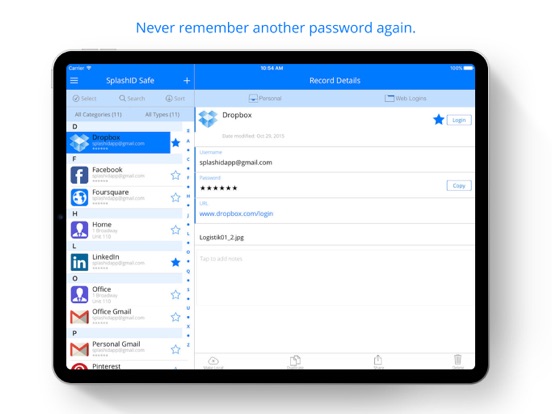

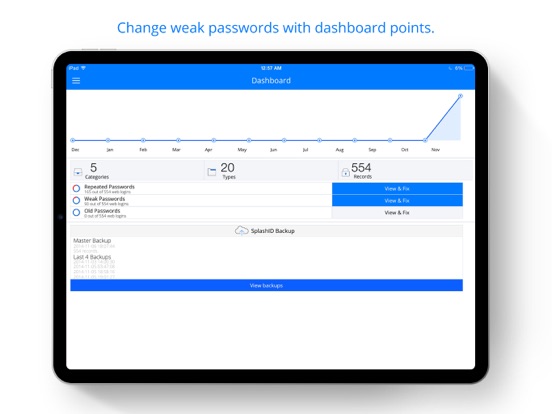
Pricing & paywalls
App Store
- SplashID Pro — $29.99
Ratings & reviews
App Store
-
4/5quirk to fix
quirk to fix 2022nov30 the trash button has probably been in the lower right forever but over the past year I have fat-fingered the delete button at least three times. Thank goodness for backups but a UI change either moving the button or requiring a more effective delete confirmation process would eliminate one annoyance. With the current setup my brain and finger generally are in the process of closing the app when I accidentally touch the trash icon, then the delete confirmation pops up, and I inadvertently accept deletion while closing the app. still on again upd2021 successfully migrated my data to a new pc thankU devs! on again 2020 Splash- I have a love-hate relationship with you. From deleting my data on one end (good thing I make backups) to supporting "offline" sync on the other you've driven me crazy over the years. I'm still with you- because I've gotten accustomed to your quirks. Here's to hoping you'll become more fanatical with your unit testing (especially with respect to not repeating historical issues before your next release).
Smtfish · 6 Aug 2026
-
5/5Great App!
I have used this app all the way back to my Palm Pilot/Treo days way before the iPhone and the concept of ‘smart phones’. And I have used it from the very first iPhone. Yes, that long. It has always been my go to password manager app. Has it had some issues along the way? Sure, what sw doesn’t. Have they always been resolved? Yes! I am a Lifetime Pro user. I synchronize over the cloud (which is certainly a vast improvement over syncing multiple devices to a master list on one device. That always had the chance of creating dupes). As of the last several years, it has run flawlessly across 5 devices with only the occasional glitch that required a quick reboot of the app (such as the records displaying as gibberish or the icons not matching up). I am bummed that I can’t use face recognition with my new Xs Max and did need to delete and re-install the app. But that took a matter of minutes with the restore even faster. I know and trust that SplashData will get it resolved. This tool simply just works, which is what I want most out of any technology. Update: Splash Data has provided an upgrade that solves the Face Unlock bug. All good.
gadszucs · 6 Aug 2026
-
4/5The app is integral to every day of my life
I have been using this program for several years on 4 different devices not including using the website as my back up access. I have been using the cloud sync and think I have only had one problem syncing and it turned out to be my fault. This application is an integral of my entire life. I can keep track of alimony every pierce is data. I use custom passwords for everything. Everything I access needs SplashID open for me to access my data sources. The program is stable, for me, and I can always access my data. Every now and then there is a little glitch that a quick restart of the app won’t solve. Other password managers try to be too cute in their implementation and are too integrated into your web browser experience. SplashID gives me a stand-alone database of all my life records accessible at a moments need. My only complaint is speed of accessing customer support and the subscription management seems to have some glitches. But I have always been able to solve the issue with their help.
Uscjwilson · 6 Aug 2026
-
5/5Great product and great tech support
I have been using SplashID for many years and that alone is a big deal. So often apps come and go or change drastically, but SplashID has been around many years and that is important with an app to manage critical confidential information. They have evolved the app over time in a very good way - they add new features but they don’t require you to make big changes in your use if you don’t want to, but the features are there if you want them. I did have a problem one time when I opened the app and my data had gotten corrupted and I couldn’t read any of it. I contacted them and their tech support was excellent. They were so detailed and careful as they walked me through the steps - testing things, looking for the issue, and then getting me up and running from and automatic backup. I have to say I was pleasantly surprised by their excellent tech support. I have been using SplashID probably since version 1 or 2 and I have been very happy with the app since the beginning.
Zwmo · 6 Aug 2026
-
2/5Meh
I mean I use this everyday but there has to be a better app. Biggest issue is the risk of jumbling and loss of your data. The main way this seems to occur is if you are in the middle of editing a password file and don’t save it by clicking save, if the app closes due to an auto lock in the middle of your edit, the entire password file you are working on gets encrypted and your data is lost! It’s there but jumbled and useless. So use this at your risk. You just need to get used to saving quickly. Also, the change icon function seems to not work anymore. You can select edit the icon and select a new icon but then there is no way to actually save it it appears. At least in current version. Also all my fields were encrypted sometime back somehow and replaced with encrypted gibberish and there seems to be no way to fix this so I just live with it. Not sure why I don’t change apps. I guess the developers don’t use their own app. Wonder what they use....
JazzyChazzy · 6 Aug 2026
Privacy & accessibility
App Store
Privacy
- Data Linked to You — Analytics — Contact Info — Email Address Developer declared
- Data Linked to You — App Functionality — Contact Info — Email Address Developer declared
- Data Linked to You — Developer’s Advertising or Marketing — Contact Info — Email Address Developer declared
- Data Linked to You — Product Personalization — Contact Info — Email Address Developer declared
- Data Linked to You — Contact Info Developer declared
Accessibility
No accessibility labels collected yet.
Versions
App Store
-
8.1.7
- Print records with AirPrint - iPhone X compatibility
-
8.2.0
. Added EU GDPR consent to sign up for new users . Fixed issue with iTunes subscription and renewals . Enhanced printing with option to add one record per page . Fixed AirPrint crash on iPad . UI fixes on iPhone X, iPhone 4s, iPhone 5 and iPad . Fixed issue with notes printing
-
8.2.1
Security certificate update.
-
8.2.2
• Fix for FaceID and TouchID on iOS 12 and iPhone X/XS devices • Fix for crashes on iOS 12 devices
-
8.2.3
- Improved the offline working ability of the app, when server is not available or internet is not available - Fixed issue with cloud sync after devices gets back online from an offline state - Updated SSL certificate
-
8.2.4
- Fixed issue with app crashing after signing in - Added new SSL certificate for secure communications
-
8.2.5
- iOS 13 compatibility fixes - Fixed issue with buttons not displaying in iOS 13 devices in sign in, 2FA submit, record saving, WiFi sync with IP address screens - Fixed issue with app not locking immediately upon closing - Disabled dark mode for app in iOS till support for dark mode is introduced in the app.
-
8.2.6
Updated SSL certificate for secure communications
-
8.3.0
• Added restore default types and categories functionality for wifi sync users. • Added upload of all custom icons option for cloud sync users. • Fixed issue with sync mode switch from WiFi to cloud not sending all information to the cloud. • Changed unmask password fields to display asterisks instead of stars. • Fixed iOS 14 compatibility issues with the user interface.
-
8.3.1
Bug fixes: - WiFi sync discovery of desktop apps
-
8.3.10
- Fixed the issue with the display of attachments.
-
8.3.11
- Fixed issue with record printing with AirPrint in iOS 16.
-
8.3.2
Enhancements: • Added last sync date and time display in the side menu • Attachments preview now uses the native iOS viewer • Made local button naming in record details more relevant Fixes: • Fixed custom icon sync issue across different platform • Fixed attachment sync issue in WiFi sync • Fixed displaced bottom bar in record details screen • Fixed issue with Add icon button overlapping the last row of icons
-
8.3.3
• Added manual export and import of SVID backups. SVID is an enhanced version of VID, that allows for icons to be included in the SVID file, and supports enhanced record •updates during SVID file imports from the same user. • Added a warning alert while duplicating local only records. • Fixed UI search scroll issue in iPhone 12 Pro Max. • Fixed issue with note field being covered by keyboard in iPhone 12 Pro Max. • Fixed issue with change password text fields not being accessible. • Fixed issue with clear text button not being accessible while creating a new type. • Fixed UI issue in add record screen, where the favorite icon covered the more options button. • Fixed issue with sort by recently added display in iPad. • Fixed local only button toggle issue in add/edit record screen.
-
8.3.4
- Fixed issue in records with custom field labels not shared correctly via Airdrop - Fixed issue with multiple Save/Discard alerts while adding or editing a record
-
8.3.5
- Fixed the issue with the SplashID Windows desktop application not being identified during WiFi sync for iOS and iPadOS 14.5 and higher devices.
-
8.3.6
- Added a new SSL certificate. - Added more auto lock timeout options. - Fixed issue with the details screen not refreshing after saving the record.
-
8.3.7
- Enhanced billing function
-
8.3.8
- Fixed top navigation bar issue related to iOS 15.0+
-
8.3.9
- Fixed export and import to Dropbox issue. - Changed the SSL certificate validation.
-
8.4.0
- Major security update on how the apps use our API's. - After 3 consecutive unsuccessful login attempts, added delays to the login screen to slow down brute force login attempts. - Removed the local deletion of app data if an account gets locked due to 10 consecutive unsuccessful login attempts.
-
8.4.1
* Prevent an account locked after 10 successive failed logins from opening in offline mode. * Added a setting in the security section for a user to opt in for deletion of local data on locking of an account after 10 successive failed logins. * Fixed crash issue for users on iOS 11 and iOS 12 devices. * Fixed crash issue on iPad for some users when the hamburger menu item is tapped.
-
8.4.2
- Fixed crash issue on launch for some users. - Fixed the setting selection issue for deletion of local data on locking of an account after 10 successive failed logins.
-
8.4.3
- Enhanced to support iOS 18 and iPadOS 18
-
8.4.4
· 17 Feb 2025
- Added switching off of offline mode from sign in screen for non cloud users
Alternatives
- Password Manager iPassSafe — Same category + similar ratings
- Password Manager' — Same category + similar ratings
- Sticky Password Manager & Safe — Same category + similar ratings
- Codebook Password Manager — Same category + similar ratings
- iPassworder Password Manager — Same category + similar ratings
- Enpass Password Manager — Same category + similar ratings
Availability by market
- US
Data quality & evidence
- Page completeness
- Live store listing
- Last verified
- 6 Aug 2026
- Sources
- App Store
- Apoku editorial summary has not been published yet.