
Quick verdict
- What it is
- Store information collected; an Apoku editorial summary is not yet published.
- At a glance
-
- Free to download
Categories and search queries
Official categories
- Maps & Navigation
- Navigation
- Travel
Apoku categories
Key functions
| Function | Availability | Access | Scope | Evidence |
|---|---|---|---|---|
| Free app | Yes | Free | Context-specific | Store published |
Screens
48 store screenshots


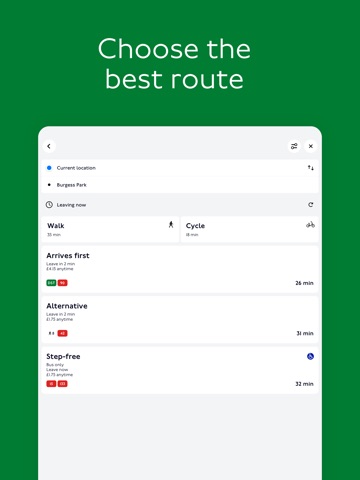
16 store screenshots


Pricing & paywalls
Shown for US
- Free to download
Shown for US
- Free to download
Ratings & reviews
Shown for US
-
5/5I use this every time I go to London
This app is invaluable! I travel alone & am American , even tho this summer will be my 4th UK trip I am not comfortable going around London without a map ! . My first trip( 2016 ) it took me about 30 min every am & night to plan my journey etc ! I still got lost and my phone battery would die from constant use. This app allows you to find the tube line you need and w a spare battery you should be fine alone! I’m 60 and stay in Victoria area ( my fav) buy need no help now largely bc of this great app!
MtnBrookie · 29 Sep 2026
-
1/5Lies and fabrications
If you've dealt with TfL's "services" for a while, you'll have noticed an abject lack of ... competence, and this app is completely towing company line in that respect. Routing suggestions are not incorrect, just mostly useless due to the apps other ... features. If you change location, you need to restart the app, it only looks that up once. Where things completely come apart is wrt "live" bus arrival/departure times. The app basically parrots the schedule. At best. Sometime it will refuse to suggest a direct bus, instead suggesting circuitous rutes, even up till and including when the bus arrives at your stop. Sometimes it will helpfully suggest you give up and walk the hour and a half, which is probably not the worst advice. Sitting on a bus and checking when about to arrive at a stop, it may tell you to wait 20mins (for an every-12 bus). It is so spectacularly wrong, it's hard to believe it's just random, but I've come to believe that any prognostication of London bus timing is a fool's game. I don't think TfL has any idea where they are at any time, so short of an AIS-like system that 3rd parties could receive, this will remain an unsolved problem. Shame, really, I've used public transport in other large cities (incl Paris) and it *can* be done. One has to wonder if TfL is subsidised by taxi companies or tax money. Or, hey, both.
grandgeezer · 29 Sep 2026
-
2/5Can’t load or top up card???
Regularly travel to the UK from the US and Ireland. I can’t believe the hoops one must jump through to register & top up my Oyster card (must have traveled in the past 8 weeks; must answer a stored security question; 2FA) — only to learn that you must also have a CC registered with a UK address, in order to add money. What??? I arrive in the city and have to make sure I have coinage for buses in order to rush around to find a tube station / ticket machine to manually load my card/check my balance? What a shame. Not sure how it is that London has got this so wrong. No such issues with the Dublin LEAP card top-up app & process, which is as easy as pie. UPDATE: Developer has responded saying I don’t require a UK-based CC to top up my Oyster card online/using the TFL app. I tried again today & received the same message as before: “Important We have detected an international address for your account. To purchase products on the Oyster online website, you must provide a UK billing address for the payment card you intend to use.” If there’s some way to get around this, I would love to have information on how to do so. Thanks.
SophiaDarling · 29 Sep 2026
-
5/5Can’t log in to account
The app has serious problems. I have an account with TfL, but trying to log in from the app (in the US) says there’s a problem, and trying to log in from a web browser says “blocked by our automated security system”.
another random kiwi · 29 Sep 2026
-
1/5You Will Get Lost
The routes are not good, I have a lot of choice words to describe my experience using it, but I will refrain. As stated in the title, you will get lost. Used this app to waste time, money, and miss appointments. No direction as to where you transfer, disruptions are reported but routes are still recommended. If you refresh, leave app, misclick, you will lose your route. Then when you reenter you will be given conflicting information making you pay more and waste more time. If that is TfL Go’s goal to drain bank accounts, congratulations this is a success. Otherwise, don’t bother and use anything else.
HFRIorbufht · 29 Sep 2026
Shown for US
-
4/5
still observing
Prince-Alfred Frank Owokere · 27 Sep 2026
-
4/5
Really good app - lines pulsing or being greyed out is a great indication of service problems & it's easy to tap on any station & swipe up for train departures from there (including main line connections). The bus map no longer needs your location, you can just drag it to where you want to know about and will show buses from any stops in the area. Brilliant work TfL devs, though if you could stop it deleting all your saved bus stops each update that'd be nice
Yomama Sofat · 27 Sep 2026
-
4/5
Amazing and FREE! I'm a Londoner and this is the BEST App for using public transport in London. Buses, tube, trains. Knocked off a star as I want to be able to exclude bikes as a mode of transport to get me somewhere.
Ralph Dring · 27 Sep 2026
-
2/5
rubbish app. crashes /locks constantly so you have to log in repeatedly. quite useless.
Jem VR · 27 Sep 2026
-
5/5
good app
Przemek Owczarzak (Sham) · 27 Sep 2026
Privacy & accessibility
Privacy
- Data Linked to You — Analytics — Other Data — Other Data Types Developer declared
- Data Linked to You — Analytics — Purchases — Purchase History Developer declared
- Data Linked to You — App Functionality — Contact Info — Email Address Developer declared
- Data Linked to You — App Functionality — Contact Info — Name Developer declared
- Data Linked to You — App Functionality — Contact Info — Phone Number Developer declared
- Data Linked to You — App Functionality — Contact Info — Physical Address Developer declared
- Data Linked to You — App Functionality — Financial Info — Payment Info Developer declared
- Data Linked to You — App Functionality — Identifiers — User ID Developer declared
- Data Linked to You — App Functionality — Other Data — Other Data Types Developer declared
- Data Linked to You — App Functionality — Purchases — Purchase History Developer declared
- Data Linked to You — Contact Info Developer declared
- Data Linked to You — Financial Info Developer declared
- Data Linked to You — Identifiers Developer declared
- Data Linked to You — Other Data Developer declared
- Data Linked to You — Purchases Developer declared
- Data Not Linked to You — Analytics — Diagnostics — Crash Data Developer declared
- Data Not Linked to You — Analytics — Diagnostics — Other Diagnostic Data Developer declared
- Data Not Linked to You — Analytics — Diagnostics — Performance Data Developer declared
- Data Not Linked to You — Analytics — Identifiers — Device ID Developer declared
- Data Not Linked to You — Analytics — Location — Coarse Location Developer declared
- Data Not Linked to You — Analytics — Search History Developer declared
- Data Not Linked to You — Analytics — Usage Data — Product Interaction Developer declared
- Data Not Linked to You — App Functionality — Diagnostics — Crash Data Developer declared
- Data Not Linked to You — App Functionality — Diagnostics — Other Diagnostic Data Developer declared
- Data Not Linked to You — App Functionality — Diagnostics — Performance Data Developer declared
- Data Not Linked to You — App Functionality — Identifiers — Device ID Developer declared
- Data Not Linked to You — App Functionality — Location — Coarse Location Developer declared
- Data Not Linked to You — App Functionality — Location — Precise Location Developer declared
- Data Not Linked to You — App Functionality — Search History Developer declared
- Data Not Linked to You — Diagnostics Developer declared
- Data Not Linked to You — Identifiers Developer declared
- Data Not Linked to You — Location Developer declared
- Data Not Linked to You — Search History Developer declared
- Data Not Linked to You — Usage Data Developer declared
Accessibility
- Differentiate Without Color Alone — SUPPORTED Store published
- Larger Text — SUPPORTED Store published
- Sufficient Contrast — SUPPORTED Store published
- Voice Control — SUPPORTED Store published
- VoiceOver — SUPPORTED Store published
Privacy
- Data collected — Account management — Personal info — Address Developer declared
- Data collected — Account management — Personal info — Phone number Developer declared
- Data collected — Analytics — App activity — App interactions Developer declared
- Data collected — Analytics — App activity — In-app search history Developer declared
- Data collected — Analytics — App info and performance — Crash logs Developer declared
- Data collected — Analytics — App info and performance — Diagnostics Developer declared
- Data collected — Analytics — Device or other IDs Developer declared
- Data collected — App functionality — Location — Precise location Developer declared
- Data collected — App functionality, Account management — Personal info — Name Developer declared
- Data collected — App functionality, Account management — Personal info — Other info Developer declared
- Data collected — App functionality, Account management — Personal info — User IDs Developer declared
- Data collected — App functionality, Analytics — Location — Approximate location Developer declared
- Data collected — App functionality, Developer communications, Advertising or marketing, Account management — Personal info — Email address Developer declared
- Data collected — App functionality, Fraud prevention, security, and compliance — Financial info — Purchase history Developer declared
- Data collected — App functionality, Fraud prevention, security, and compliance — Financial info — User payment info Developer declared
- Data shared — Advertising or marketing — Personal info — Email address Developer declared
- Security practices — Your data is transferred over a secure connection — Data is encrypted in transit Developer declared
- Security practices — The developer provides a way for you to request that your data be deleted — You can request that data be deleted Developer declared
Accessibility
No accessibility labels collected yet.
Versions
-
3.10.0
We've made it easier to see the live location of upcoming buses, just filter the stop view for your route and they'll show up along the mapped route. We also stopped resetting you back to the main Buses screen for accidentally tapping on the map. Journey history now shows when you've tapped on a pink reader as part of your journey.
-
3.11.0
Oyster and contactless users can now see more clearly when they've hit a daily or weekly cap in their journey history, including when this has happened on the current day.
-
3.11.1
Oyster and contactless users can now see more clearly when they've hit a daily or weekly cap in their journey history, including when this has happened on the current day. Fixed: Bus Hopper journeys were sometimes triggering the daily cap message in error.
-
3.12.0
London Cable Car terminals, Shenfield and Watford Junction stations now correctly show Oyster as an accepted payment method. Also includes some minor visual improvements to the Buses feature.
-
3.13.0
• New: Bus stop bypass messages on bus stops and journey planner. • Fixed: Closing step-free information doesn’t also close station information. • Fixed: Walking directions display when changing between two bus legs. • Fixed: Close button closes station information after tapping ‘Go now’. • Fixed: Changing step-free settings doesn’t close journey planner. Plus some bug and design fixes, and some behind-the-scenes improvements.
-
3.13.1
• New: Bus stop bypass messages on bus stops and journey planner. • Fixed: Closing step-free information doesn’t also close station information. • Fixed: Walking directions display when changing between two bus legs. • Fixed: Close button closes station information after tapping ‘Go now’. • Fixed: Changing step-free settings doesn’t close journey planner. Plus some bug and design fixes, and some behind-the-scenes improvements.
-
3.14.0
TfL Go now supports dark mode – you can now enjoy a more comfortable, lower-glare experience in any lighting. Match your device settings, or customise in TfL Go appearance settings - where you can also tell us your experience with dark mode using the feedback link. Plus some bug fixes, design updates and behind-the-scenes improvements
-
3.15.0
· 16 Jul 2026
We've added some messages to promote the upcoming Weekend Hopper fare for bus and tram journeys. We've tidied up a few more areas for Dark mode including making hidden buttons visible when adding a contactless card to Payments, ensuring disrupted bus routes are correctly highlighted, and changing out some blurry icons. Fixed: crash when scrolling through bus stops in Buses Nearby. Fixed: Tapping on Order replacement for Oyster cards now goes to the correct page. Fixed: crash within promoted articles in Where to? for iPad users.
-
3.16.0
· 30 Jul 2026
Improved: Incomplete journeys are now highlighted in your journey history Improved: Journey Planner options has a label to make them easier to find Improved: Dark mode adjustments to a few screens Fixed: Tapping on Status widgets on Home Screen or Lock Screen now take you direct to Status Plus some bug and design fixes, and some behind-the-scenes improvements.
-
2.9.2
This update includes a whole new look for Bus information, aiming to make it easier for you to find the bus information you need, including: * Move the map to find bus stops anywhere in London, just tap to see live arrivals * When viewing an individual route, you'll see the route on the map so you can see where it came from and where it is going Also, now that Payments has been around for a while, we've removed the 'NEW' labels, and stopped animating the main buttons so they don't move when you least expect it. Fixed crash on launch for iOS 16.
-
2.9.1
This update includes a whole new look for Bus information, aiming to make it easier for you to find the bus information you need, including: * Move the map to find bus stops anywhere in London, just tap to see live arrivals * When viewing an individual route, you'll see the route on the map so you can see where it came from and where it is going Also, now that Payments has been around for a while, we've removed the 'NEW' labels, and stopped animating the main buttons so they don't move when you least expect it.
-
3.9.1
You can now track your buses arrival live on the route map when waiting at your stop - tap on the arrival you're waiting for to see this. If you're a contactless user, we're adding personalised announcements to help you understand the cost of your future travel. We've also: * Improved: Oyster purchase confirmation screen includes clearer instructions on what to do next to collect your purchase onto your Oyster card * Improved: Cycle route duration is more realistic for most cyclists * Improved: IFS Cloud Cable Car is now known as London Cable Car * Fixed: Apply for refund button in More history screen
-
3.18.0
· 27 Aug 2026
Fixed: For 60+ Oyster photocards we've stopped showing bus journeys as 'Hopper', since these journeys are free! Plus some bug and design fixes, including some usability issues affecting payment features in the app.
-
3.17.2
Fixed: A bug that caused the app to crash on the journey details screen.
-
3.17.1
Fixed: When users accept an invitation to create line status notifications they will be taken directly to the create notifications screen
-
3.17.0
We've made it easier to understand Hopper fares in journey history, including when a bus or tram journey was free on Oyster or contactless. Also: New: A Journey Planner survey option so you can share feedback on your journey experience Fixed: A range of design and usability issues across the map, buses, status, line notifications and dark mode
-
3.6.0
We’ve made some improvements to help TfL Go work better for you. • Fixed: Step-free access information is now available for platforms for all modes, even if you're not in step-free mode • Plus some bug fixes and background work to set us up for some upcoming features
-
3.8.0
We're making it easier to understand what's next after you top up or purchase a travel card on your Oyster card, with a new area in card details which clearly shows when you need to touch in or out to collect your purchase, and when you need to do this by. Also: • A new Art on the Underground launch screen • Fixed: Map interchange colours no longer inverted • Fixed: Northern line widget displays correctly in Dark Mode • Fixed: Step-free information displays correctly on Tram stops • Updated: Toilet information for Morden station Plus some behind-the-scenes improvements
-
3.8.1
We're making it easier to understand what's next after you top up or purchase a travel card on your Oyster card, with a new area in card details which clearly shows when you need to touch in or out to collect your purchase, and when you need to do this by. Also: • A new Art on the Underground launch screen • Fixed: Map interchange colours no longer inverted • Fixed: Northern line widget displays correctly in Dark Mode • Fixed: Step-free information displays correctly on Tram stops • Updated: Toilet information for Morden station Plus some behind-the-scenes improvements
-
3.9.0
You can now track your buses arrival live on the route map when waiting at your stop - tap on the arrival you're waiting for to see this. If you're a contactless user, we're adding personalised announcements to help you understand the cost of your future travel. We've also: * Improved: Oyster purchase confirmation screen includes clearer instructions on what to do next to collect your purchase onto your Oyster card * Improved: Cycle route duration is more realistic for most cyclists * Fixed: Apply for refund button in More history screen
-
3.20.0
· 24 Sep 2026
New: More control over line status notifications. You can now choose individual days of the week for each line, so you only get the updates on the days you need them. New: Journey in Progress label so you can see when a journey has started and is waiting to be completed Plus some design, accessibility and bug fixes.
-
3.19.0
What's New: • Status updates now have a link to National Rail when there's disruption on the Elizabeth line. • We've updated how the card list looks in pay to help identify Oyster and contactless cards. Fixed: • Design issues and a couple of bugs.
-
3.18.1
Fixed: For 60+ Oyster photocards we've stopped showing bus journeys as 'Hopper', since these journeys are free! Plus some bug and design fixes, including some usability issues affecting payment features in the app.
-
2.9.0
This update includes a whole new look for Bus information, aiming to make it easier for you to find the bus information you need, including: * Move the map to find bus stops anywhere in London, just tap to see live arrivals * When viewing an individual route, you'll see the route on the map so you can see where it came from and where it is going Also, now that Payments has been around for a while, we've removed the 'NEW' labels, and stopped animating the main buttons so they don't move when you least expect it.
-
3.0.0
We're excited to announce a huge update to TfL Go, with some really useful improvements to a few areas of the app. 1. Line status notifications Create notifications for your usual line(s) and time(s) of travel and you'll be sent a push notification for any disruptions on the line, helping you stay informed so you can plan around disruption. 2. Saved bus stops Save the stops you use regularly so you can quickly check live arrivals, wherever you are. Hope you like it Florence! 3. Clearer arrival times for Tube, Tram and Rail Arrivals are more clearly broken down by direction and destination so you can quickly check when your service is arriving at the station. Tap on any station on the map and scroll down. Plus, we've made a range of improvements to VoiceOver and Dynamic Type support across the app. We love to get your feedback on these improvements and TfL Go in general, please add a review or email us on [email protected]
-
3.0.1
A few quick fixes following our recent release of 3.0.0 including: * Devices running iOS 16 now correctly centre the Buses map on your location if permission given * Departure information for Elizabeth line, Overground and National Rail services no longer incorrectly shows 'Delayed' or hides the expected departure time during disruption. _____ We're excited to announce a huge update to TfL Go, with some really useful improvements to a few areas of the app. 1. Line status notifications Create notifications for your usual line(s) and time(s) of travel and you'll be sent a push notification for any disruptions on the line, helping you stay informed so you can plan around disruption. 2. Saved bus stops Save the stops you use regularly so you can quickly check live arrivals, wherever you are. Hope you like it Florence! 3. Clearer arrival times for Tube, Tram and Rail Arrivals are more clearly broken down by direction and destination so you can quickly check when your service is arriving at the station. Tap on any station on the map and scroll down. Plus, we've made a range of improvements to VoiceOver and Dynamic Type support across the app. We love to get your feedback on these improvements and TfL Go in general, please add a review or email us on [email protected]
-
3.1.0
We've made a few improvements to make using TfL Go even easier: * A new layout for Bus and Cycle journey information on iPad * Corrected the icon used to show impacts to step-free access at platforms * IFS Cloud Cable Car is now correctly greyed out on the map when closed or suspended * Improved VoiceOver support
-
3.2.0
• Journey plans are more detailed, with more accurate walking maps, and clearer details on changes between legs. • Added a new Help and Contact area with easy options to report safety incidents, antisocial behaviour or lost property. • Fixed: 24 hour bus routes are no longer split into multiple routes within the Buses area • Fixed: Missing bus stops on iOS 16 devices • 'Report an issue' emails include some diagnostic details about your device and screen you initiated the report from so we can better investigate the issue. • Chase is now the Official Payment Partner of Transport for London
-
3.3.0
- A refreshed design for journey history, including making it clearer when you've reached a cap on previous days for contactless cards - Fix for issue where some out of station interchange journeys showed as incomplete journeys - Improvements to keyboard navigation Also, this will be the last release that will work on iOS 16 or iOS 17. Our next release will require minimum iOS 18.
-
3.3.1
Happy New Year! To kick off 2026, we've made some improvements to existing features to make TfL Go work better for you. - Fixed: Journey history showing as 'no journey history' when it should have shown actual history - Fixed: Journey plans showing incorrect stop letter for some bus to bus transfers - Improved: Keyboard focus on some areas used when planning journeys - Improved: 'Report an issue' on bus stop screens will now link to a webform which will ensure your feedback contains all the information we need to follow up and this will also mean it gets to the right team faster. Also, from this release, we now require iOS 18 or higher.
-
3.4.0
We’ve made some improvements to help TfL Go work better for you. - Improved: Searching for addresses or other locations prioritise results in London. - Fixed: Step-free access information is now available for Tube, DLR and Tram platforms, even if you're not in step-free mode. - Fixed: Circle line arrivals now match the correct Clockwise or Anti-clockwise heading for the southern part of the line. - Fixed: Status messages scale with your phone text size settings. - Fixed: Removed link in journey plans to live arrivals for buses we don't have this information for.
-
3.5.0
We're making it easier to plan journeys to or from the same place(s), adding the ability to save your favourite places like work, home etc. Add yours and now starting a journey plan is simply a tap away. For bus users, you can now search for a location to quickly see bus stops and live arrivals in that area, and you can even use your saved places from journey plans, e.g. to see bus stops near your saved 'home' location. Plus, we've tidied up a few other things, including: - Searching for a location will prioritise places in or near London, so you should see less 'random' results for places or addresses with the same name but at the other end of the country. - Fixed: improved support for text size scaling on some screens, and improved how widgets display when High Contrast setting is turned on.
-
3.7.0
- Fixed: Line notifications announcement only displays once on Status screen - Fixed: Current location, directions and travel time display correctly in journey plans - Fixed: Typography consistent on sign-in screen - Plus some behind-the-scenes improvements
- 3.17.1 · 24 Sep 2026
Alternatives
- Eurostar: Train travel & Hotel — Same category + similar ratings
- Visit London - Official Guide — Same category + similar ratings
- Citymapper: All Live Transit — Same category + similar ratings
- Heathrow Express — Same category + similar ratings
- Trainline: Cheap Train Tickets — Same category + similar ratings
- British Airways — Same category + similar ratings
Availability by market
- DE
- ES
- US
Data quality & evidence
- Page completeness
- Live store listing
- Last verified
- 29 Sep 2026
- Sources
- App Store, Google Play
- Apoku editorial summary has not been published yet.