
Quick verdict
- What it is
- Store information collected; an Apoku editorial summary is not yet published.
- At a glance
-
- Free to download
Categories and search queries
Official categories
- Medical
Apoku categories
Key functions
| Function | Availability | Access | Scope | Evidence |
|---|---|---|---|---|
| Free app | Yes | Free | Context-specific | Store published |
Screens
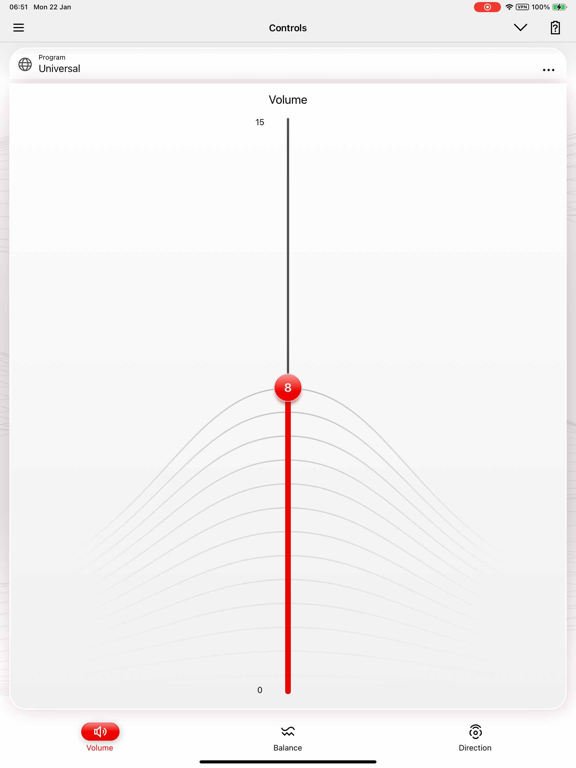
16 store screenshots


8 store screenshots


Pricing & paywalls
- Free to download
- Free to download
Ratings & reviews
-
4/5Bought a new Iphone16 this past week and retired old Iphone10
Everything has been working great over the last 11 months until I switched to the new phone this week. Bluetooth does not see the two hearing aids. I have tried turning off my phone, turning off my Bluetooth, checking to make sure that I have the current App for Signia app, repaying my two hearing aids and have the same issue. Bluetooth does not find my two hearing aids but Signia App sees both hearing aids. Any suggestions. My wife thinks that hearing aid software is outdated and is causing the issue. If that is the case, how do you update hearing aid software. Also, Tele-Care does not work and this was set up 11 months ago when hearing aids were purchased. I can use a little help as to next steps.
Marv Hannon · 30 Sep 2026
-
1/5Signia App for Signia hearing aids
The Signia App for iPhone is absolutely the worst app I’ve ever used in 20 years. I’ve had hundreds of apps and this interface is a complete failure. I’ve stopped wearing my high-end very expensive hearing aids because I can’t control them. The only way to turn off the hearing aids and stop them from communicating with my iPhone is to plug them in to the charger and have the charger charging with the two green lights on. Turning off Bluetooth or turning off the hearing aids only works for a couple minutes And then the app automatically turns on the hearing aids, even if they’re 50 yards from me even if they’re on the charger. And then they step on all my calls and intercept in going and outgoing calls. so I can’t hear the incoming call and my client can’t hear me speaking. The hearing aids can be in my vehicle may 25 yards away, and they will pick up calls. I cannot hear incoming call, and they never let me know that I’m getting a call. I have missed many calls. And even worse, I’ve had the hearing aids eavesdrop on me when an incoming call is picked up by the hearing aids when they’re not in my ears, and a conversation was overheard. The information that was overheard through this eavesdrop cost me great loss and destroyed a business relationship. I’ve almost thrown the hearing aids under my tires and run over them a couple of times on purpose. They are absolutely worthless because of this app. I’ve tried uninstalling the app and they’re even more useless. Do not buy Sigma products and definitely don’t install the app.
I ❤ my horse! · 30 Sep 2026
-
1/5Horrid!!
3 pair in 1 year and they still turn off and on by themselves while you are wearing them!! I have had my Signia hearing aids for less than a year, my first pair lasted exactly 2 weeks before they turned off and did not turn back on!! My second pair that they gave me, the right one worked, but the left one for some reason would never turn on no matter what the technician did, so again, they were returned. My third pair, the left aid turns on and off by itself. Sometimes they will turn off and not turn back on for days no matter how many times I put them back on the charger to reset. I have taken them into the technician so many times, they told me they were going to start charging me for the repairs. Well, I changed insurance companies at the first of the year. I have an appointment with new company that does not carry Signia hearing aids! My left one went out again in the middle of January and it still does not work!! I will be so happy when I get the new aids from the new company that are not Signia!!!!!!!!!
stukhere · 30 Sep 2026
-
2/5App Lacks Functionality
App lacks functionality like restarting the app or the hearing aids via the App. Also, it changes the hearing situation on it’s own. Say you feel you’re hearing something best on the Universal setting, but the app will change it back to the Stroll setting on it’s own with only a quick beep that gets lost in the sound. Also, a test pattern should be added so that you can test each hearing aid to make sure each side is receiving and transmitting audio to you. Another needed feature is to be able to run a diagnostic. The batteries will show 90% up until you’re at 0%. Last night the app showed 80%, yet here I sit this morning with a dead battery and no batteries on hand. The app should have a diagnostic for the user to tap the battery on screen and have it get an updated battery level. The static battery level has mostly only ever displayed 90% (on brand new batteries even!), or 80%. I’ve seen 60% once. When the hearing aid batteries are completely dead, it shows that it can’t connect to WiFi. It acts like it’s trying to connect continuously, which makes me wonder what it’s doing to my phone’s battery. When my phone keeps searching for WiFi, it drains the battery fast, what’s the app doing to the battery? It looks like it’s trying to connect continuously. For the money paid for the hearing aids, the functionality of the app seems a little too basic.
Kevmeistah · 30 Sep 2026
-
1/5Useless options
The app does not provide any meaningful control of the hearing aids or any fine tuning of the experience. All you get is a volume control that you cannot save and the illusion of directional control. Need ability to fine tune frequencies in real world situations, instead I have to go to office, request possible changes, leave, test and come back. Without real control of my hearing settings, the app and hearing aids are less than useful. How do you get to fine tune noisy situations without being in the noisy situation and adjusting the settings? This ability is available on OTC hearing aids but not these. I guess I should return and purchase a brand that would allow the customer to control what they need. Open up control to allow for true adjustment of frequency and fine tuning. I can’t hear the person next to me, but I can crank the volume for all frequencies? How is this useful? High pitched sounds need to adjust sometimes but I need to go to the office hundreds of times to try to get it right?
gstan 22 · 30 Sep 2026
-
1/5
Terrible interface, have to keep restarting and uninstall and reinstall just to change the volume. Needs work.
matt brown · 6 Aug 2026
-
5/5
it's like being in control of a TV. You can decide how loud or quiet you want the room to be. choose to deselect unwanted sounds and focus on what you need to hear. louder is not just the only option, you have directional, near or far, behind, left and right and focus only on ahead that tunes out behind you or the close proximity. it's like being god, deciding who you want to listen to and who to zone out from. it's great being able to hear people in the hallway or the kitchen. A1.
Q L M · 6 Aug 2026
-
1/5
not good.
Ramesh Shah · 6 Aug 2026
-
1/5
UPDATE 2026: The Bluetooth between phone and aid connection got better but app sucks! The Signia app needs lots of work. You should be able to turn your hearing aids on or off or at least restart the Bluetooth connection. The app doesn't seem to respond well to the Bluetooth connection to the hearing aids. It would also be nice if you are streaming audio that there was a Mute Stream button and something that showed the status of what was being streamed. The app could also be laid out better.
John Blackham · 6 Aug 2026
-
1/5
There is no way to disconnect Bluetooth besides putting the aid on the charger or turning off Bluetooth all together. The app is very unstable. I have to uninstall and reinstall every couple of months because it stops communicating with the hearing aids.
Alice Ormiston · 6 Aug 2026
Privacy & accessibility
Privacy
- Data Linked to You — Analytics — Identifiers — User ID Developer declared
- Data Linked to You — App Functionality — Identifiers — User ID Developer declared
- Data Linked to You — Identifiers Developer declared
- Data Not Linked to You — Analytics — Diagnostics — Crash Data Developer declared
- Data Not Linked to You — Analytics — Diagnostics — Other Diagnostic Data Developer declared
- Data Not Linked to You — Analytics — Diagnostics — Performance Data Developer declared
- Data Not Linked to You — Analytics — Usage Data — Product Interaction Developer declared
- Data Not Linked to You — App Functionality — Usage Data — Product Interaction Developer declared
- Data Not Linked to You — Diagnostics Developer declared
- Data Not Linked to You — Usage Data Developer declared
Accessibility
No accessibility labels collected yet.
Privacy
- Data collected — Analytics — App activity — App interactions Developer declared
- Data collected — Analytics, Developer communications — App info and performance — Crash logs Developer declared
- Data collected — Analytics, Developer communications — App info and performance — Diagnostics Developer declared
- Data collected — Analytics, Developer communications — App info and performance — Other app performance data Developer declared
- Data collected — App functionality — Health and fitness — Fitness info Developer declared
- Data collected — App functionality — Health and fitness — Health info Developer declared
- Data collected — App functionality — Messages — Other in-app messages Developer declared
- Data collected — App functionality, Advertising or marketing — Device or other IDs Developer declared
- Data collected — App functionality, Analytics — App activity — Other actions Developer declared
- Data collected — App functionality, Analytics, Developer communications, Fraud prevention, security, and compliance — Personal info — User IDs Developer declared
- Data shared — App functionality — Health and fitness — Health info Developer declared
- Data shared — App functionality — Personal info — User IDs Developer declared
- Security practices — Your data is transferred over a secure connection — Data is encrypted in transit Developer declared
- Security practices — The developer provides a way for you to request that your data be deleted — You can request that data be deleted Developer declared
Accessibility
No accessibility labels collected yet.
Versions
-
2.6.10
• Bug fixes and performance improvements
-
2.6.25
• Bug fixes and performance improvements • Language support for European Portuguese
-
2.6.26
• Bug fixes and performance improvements
-
2.6.30
• Bug fixes and performance improvements
-
2.6.40
• Redesign of the user interface
-
2.6.41
• Representation of volume control improved to cover small screen sizes
-
2.6.50
• Support of the latest hearing aid generation • UI and performance improvements
-
2.6.51
• Text corrections
-
2.6.60
• UI and performance improvements
-
2.6.61
• Text corrections
-
2.6.70
• Updated terms and conditions, privacy policy and consents • New privacy management
-
2.6.71
• Bug fix for performance improvements
-
2.6.80
• Remote fine tuning improvements • Signia Assistant improvements • Increase of the minimum OS version • Added Slovak language support
-
2.7.0
• Support of new hearing aids and accessories • Paring workflow adapted • Signia Assistant can send notifications • Bugfixes and Performance Improvements
-
2.7.1
Bug fixes and performance improvements
-
2.7.10
• Notification of hearing aid firmware updates now available • Bug fixes and performance improvements
-
2.7.2
Bugfix for app crash on phones set to certain languages
-
2.7.20
• Bugfixes and performance improvements • Screen Reader support for vision impaired users • Pairing optimization for iOS
-
2.7.21
Fix of translation bug for traditional Chinese
-
2.7.30
• Bug fixes and performance improvements
-
2.7.31
Bug and performance improvements.
-
2.7.32
Bug fixes and improvements
-
2.7.40
Performance Improvements and Bug Fixes.
-
2.7.50
• Bug fixes and performance enhancements • Improved app stability • Added support for Slovenian language
-
2.7.51
· 23 Jun 2026
• Updated Slovenian translations for improved localization.
-
2.8.0
· 19 Aug 2026
• Platform improvements for better performance and future compatibility. • Bug fixes and stability improvements.
- 2.7.51.18077 · 18 Jun 2026
- 2.8.0.18214 · 13 Aug 2026
Alternatives
- myPhonak — Same category + similar ratings
- ReSound Smart 3D — Same category + similar ratings
- My Starkey — Same category + similar ratings
- Oticon Companion — Same category + similar ratings
- hearingOS - Hearing Aid App — Same category + similar ratings
- Philips HearLink 2 — Same category + similar ratings
Availability by market
- US
Data quality & evidence
- Page completeness
- Live store listing
- Last verified
- 5 Oct 2026
- Sources
- App Store, Google Play
- Apoku editorial summary has not been published yet.