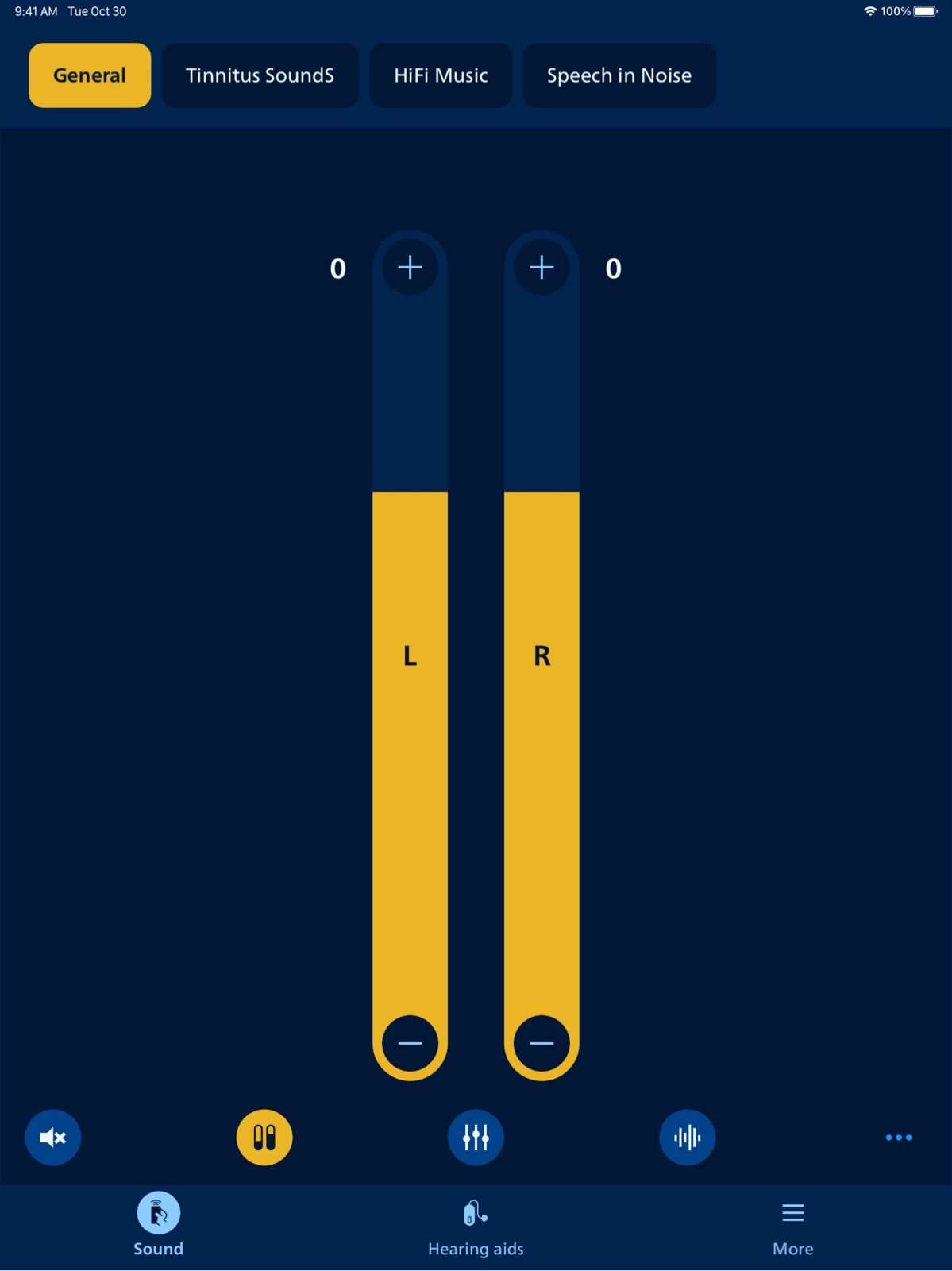
Apoku MCP provides app discovery, detailed cards, evidence, sources and screenshots where available. Unknown or conflicting prices stay explicit.
View JSON
GET /api/v3/apps/1597063716
{
"app_id": 1597063716,
"canonical_url": "https://appcorpus.com/apps/philips-hearlink-2-1597063716",
"identity": {
"name": "Philips HearLink 2",
"slug": "philips-hearlink-2",
"developer": {
"name": "SBO Hearing",
"url": "https://appcorpus.com/developers/sbo-hearing-developer_a1efb4f7a84adcacde8bb2f0663056a3"
},
"icon_url": "https://is1-ssl.mzstatic.com/image/thumb/Purple211/v4/07/24/3a/07243a8e-a36b-f337-c400-6725cda206d2/AppIcon-0-0-1x_U007emarketing-0-8-0-85-220.png/512x512bb.jpg",
"stores": [
"apple",
"gplay"
],
"platforms": [
"iphone",
"ipad",
"android"
],
"status": {
"state": "active",
"label": "Active",
"last_checked": "2026-09-30",
"last_checked_label": "30 Sep 2026",
"banner": null,
"region_note": null,
"data_state": "partial",
"data_state_label": "Some information is not yet confirmed"
}
},
"listings": [
{
"store": "apple",
"status": "ACTIVE",
"url": "https://apps.apple.com/us/app/philips-hearlink-2/id1597063716?uo=4",
"rating": 4.5,
"rating_count": 46913,
"formatted_price": "Free",
"is_free": true,
"has_iap": false,
"has_subscription": null,
"version": "1.8.0",
"updated": "2026-09-30",
"currency": "USD"
},
{
"store": "gplay",
"status": "ACTIVE",
"url": "https://play.google.com/store/apps/details?id=com.philips.platform.lumea",
"rating": 4.571429,
"rating_count": 43359,
"formatted_price": "Free",
"is_free": true,
"has_iap": false,
"has_subscription": null,
"version": "11.3.0",
"updated": "2026-09-30",
"currency": "USD"
}
],
"summary": {
"one_liner": null,
"summary": null,
"best_for": [],
"not_for": [],
"status": "fallback",
"at_a_glance": [
"Free to download"
]
},
"categories": {
"official": [
"Beauty",
"Medical",
"Health & Fitness"
],
"appcorpus": [
{
"category_id": "beauty",
"label": "Beauty",
"url": "https://appcorpus.com/categories/beauty"
},
{
"category_id": "medical",
"label": "Medical",
"url": "https://appcorpus.com/categories/medical"
},
{
"category_id": "health-fitness",
"label": "Health & fitness",
"url": "https://appcorpus.com/categories/health-fitness"
}
]
},
"use_cases": [],
"features": [
{
"capability_id": "free_app",
"label": "Free app",
"availability": "yes",
"access_level": "free",
"scope": null,
"evidence": "Store published"
}
],
"pricing": [
{
"store": "apple",
"formatted_price": "Free",
"is_free": true,
"has_iap": false,
"has_subscription": null,
"currency": "USD",
"market": "us",
"last_verified": "2026-09-30",
"rows": [
"Free to download"
],
"state": "current"
},
{
"store": "gplay",
"formatted_price": "Free",
"is_free": true,
"has_iap": false,
"has_subscription": null,
"currency": "USD",
"market": "us",
"last_verified": "2026-09-30",
"rows": [
"Free to download"
],
"state": "current"
}
],
"screens": [
{
"url": "https://is1-ssl.mzstatic.com/image/thumb/PurpleSource221/v4/5a/d4/d7/5ad4d704-4192-11b2-bae1-83ebeb297f2c/ipadPro129_01_Philips_iOS.png/1600x1600bb.jpg",
"store": "apple",
"platform": "ipad",
"alt": "Philips HearLink 2 ipad screenshot 1"
},
{
"url": "https://is1-ssl.mzstatic.com/image/thumb/PurpleSource221/v4/b6/c6/0e/b6c60eac-c8e9-31ae-cd8f-06bc98135c4b/ipad13_ipadPro129-01.png/1600x1600bb.jpg",
"store": "apple",
"platform": "ipad",
"alt": "Philips HearLink 2 ipad screenshot 2"
},
{
"url": "https://is1-ssl.mzstatic.com/image/thumb/PurpleSource221/v4/fa/a6/56/faa656ae-c11c-f3f4-561c-3cdfc27dc604/ipadPro129_02_Philips_iOS.png/1600x1600bb.jpg",
"store": "apple",
"platform": "ipad",
"alt": "Philips HearLink 2 ipad screenshot 3"
},
{
"url": "https://is1-ssl.mzstatic.com/image/thumb/PurpleSource221/v4/b6/c6/0e/b6c60eac-c8e9-31ae-cd8f-06bc98135c4b/ipad13_ipadPro129-01.png/360x480bb.jpg",
"store": "apple",
"platform": "ipad",
"alt": "Philips HearLink 2 ipad screenshot 4"
},
{
"url": "https://is1-ssl.mzstatic.com/image/thumb/PurpleSource221/v4/d6/a4/5f/d6a45f1c-7693-21c7-a86b-af4195da0c63/ipad13_ipadPro129-02.png/1600x1600bb.jpg",
"store": "apple",
"platform": "ipad",
"alt": "Philips HearLink 2 ipad screenshot 5"
},
{
"url": "https://is1-ssl.mzstatic.com/image/thumb/PurpleSource221/v4/28/6c/43/286c43cd-55e1-b899-5360-9457e3259b6d/ipadPro129_03_Philips_iOS.jpg/1600x1600bb.jpg",
"store": "apple",
"platform": "ipad",
"alt": "Philips HearLink 2 ipad screenshot 6"
},
{
"url": "https://is1-ssl.mzstatic.com/image/thumb/PurpleSource221/v4/d6/a4/5f/d6a45f1c-7693-21c7-a86b-af4195da0c63/ipad13_ipadPro129-02.png/360x480bb.jpg",
"store": "apple",
"platform": "ipad",
"alt": "Philips HearLink 2 ipad screenshot 7"
},
{
"url": "https://is1-ssl.mzstatic.com/image/thumb/PurpleSource221/v4/4b/fc/0a/4bfc0afb-a909-d849-176e-61aa3e73ffa6/ipad13_ipadPro129-03.jpg/1600x1600bb.jpg",
"store": "apple",
"platform": "ipad",
"alt": "Philips HearLink 2 ipad screenshot 8"
},
{
"url": "https://is1-ssl.mzstatic.com/image/thumb/PurpleSource221/v4/63/69/8d/63698d1e-3273-75e2-41c0-6cefc0cd1f0b/ipadPro129_04_Philips_iOS.jpg/1600x1600bb.jpg",
"store": "apple",
"platform": "ipad",
"alt": "Philips HearLink 2 ipad screenshot 9"
},
{
"url": "https://is1-ssl.mzstatic.com/image/thumb/PurpleSource221/v4/4b/fc/0a/4bfc0afb-a909-d849-176e-61aa3e73ffa6/ipad13_ipadPro129-03.jpg/360x480bb.jpg",
"store": "apple",
"platform": "ipad",
"alt": "Philips HearLink 2 ipad screenshot 10"
},
{
"url": "https://is1-ssl.mzstatic.com/image/thumb/PurpleSource211/v4/1e/1a/34/1e1a341b-bb71-8ad8-cc9e-9fe33f2bbe81/ipad13_ipadPro129-04.jpg/1600x1600bb.jpg",
"store": "apple",
"platform": "ipad",
"alt": "Philips HearLink 2 ipad screenshot 11"
},
{
"url": "https://is1-ssl.mzstatic.com/image/thumb/PurpleSource221/v4/ac/83/3a/ac833aa0-3e0e-fe79-6dc1-218bdfe29966/ipadPro129_05_Philips_iOS.png/1600x1600bb.jpg",
"store": "apple",
"platform": "ipad",
"alt": "Philips HearLink 2 ipad screenshot 12"
},
{
"url": "https://is1-ssl.mzstatic.com/image/thumb/PurpleSource211/v4/1e/1a/34/1e1a341b-bb71-8ad8-cc9e-9fe33f2bbe81/ipad13_ipadPro129-04.jpg/360x480bb.jpg",
"store": "apple",
"platform": "ipad",
"alt": "Philips HearLink 2 ipad screenshot 13"
},
{
"url": "https://is1-ssl.mzstatic.com/image/thumb/PurpleSource211/v4/d5/8e/0d/d58e0d66-ce0e-7033-34a9-deb152e191e3/ipad13_ipadPro129-05.png/1600x1600bb.jpg",
"store": "apple",
"platform": "ipad",
"alt": "Philips HearLink 2 ipad screenshot 14"
},
{
"url": "https://is1-ssl.mzstatic.com/image/thumb/PurpleSource221/v4/7f/58/35/7f5835a3-6664-ea2d-d096-94bc5d6268a3/ipadPro129_06_Philips_iOS.png/1600x1600bb.jpg",
"store": "apple",
"platform": "ipad",
"alt": "Philips HearLink 2 ipad screenshot 15"
},
{
"url": "https://is1-ssl.mzstatic.com/image/thumb/PurpleSource211/v4/d5/8e/0d/d58e0d66-ce0e-7033-34a9-deb152e191e3/ipad13_ipadPro129-05.png/360x480bb.jpg",
"store": "apple",
"platform": "ipad",
"alt": "Philips HearLink 2 ipad screenshot 16"
},
{
"url": "https://is1-ssl.mzstatic.com/image/thumb/PurpleSource211/v4/96/a7/26/96a726b7-a14e-db21-90b6-a85aada39151/ipad13_ipadPro129-06.png/1600x1600bb.jpg",
"store": "apple",
"platform": "ipad",
"alt": "Philips HearLink 2 ipad screenshot 17"
},
{
"url": "https://is1-ssl.mzstatic.com/image/thumb/PurpleSource221/v4/17/b8/ff/17b8ff41-5a1c-eb48-ce0b-e12caa379fa9/ipadPro129_07_Philips_iOS.jpg/1600x1600bb.jpg",
"store": "apple",
"platform": "ipad",
"alt": "Philips HearLink 2 ipad screenshot 18"
},
{
"url": "https://is1-ssl.mzstatic.com/image/thumb/PurpleSource211/v4/96/a7/26/96a726b7-a14e-db21-90b6-a85aada39151/ipad13_ipadPro129-06.png/360x480bb.jpg",
"store": "apple",
"platform": "ipad",
"alt": "Philips HearLink 2 ipad screenshot 19"
},
{
"url": "https://is1-ssl.mzstatic.com/image/thumb/PurpleSource221/v4/fd/79/d7/fd79d7c2-d0d6-1459-62d8-9a6fb5ab2d94/ipad13_ipadPro129-07.jpg/1600x1600bb.jpg",
"store": "apple",
"platform": "ipad",
"alt": "Philips HearLink 2 ipad screenshot 20"
},
{
"url": "https://is1-ssl.mzstatic.com/image/thumb/PurpleSource221/v4/fd/79/d7/fd79d7c2-d0d6-1459-62d8-9a6fb5ab2d94/ipad13_ipadPro129-07.jpg/360x480bb.jpg",
"store": "apple",
"platform": "ipad",
"alt": "Philips HearLink 2 ipad screenshot 21"
},
{
"url": "https://is1-ssl.mzstatic.com/image/thumb/PurpleSource211/v4/ac/3a/11/ac3a11e5-f9ec-c4ca-f2a4-7888be6640ac/iphone65_01_Philips_iOS.png/1242x1600bb.jpg",
"store": "apple",
"platform": "iphone",
"alt": "Philips HearLink 2 iphone screenshot 22"
},
{
"url": "https://is1-ssl.mzstatic.com/image/thumb/PurpleSource211/v4/be/5c/6f/be5c6f60-eee6-336c-2a19-589377a8ec47/iphone69-01.png/1320x1600bb.jpg",
"store": "apple",
"platform": "iphone",
"alt": "Philips HearLink 2 iphone screenshot 23"
},
{
"url": "https://is1-ssl.mzstatic.com/image/thumb/PurpleSource211/v4/93/d1/54/93d1544b-0b47-1bd0-fb41-ea68e92ef236/iphone65_02_Philips_iOS.png/1242x1600bb.jpg",
"store": "apple",
"platform": "iphone",
"alt": "Philips HearLink 2 iphone screenshot 24"
},
{
"url": "https://is1-ssl.mzstatic.com/image/thumb/PurpleSource211/v4/1a/44/64/1a4464bf-39e7-20bd-3339-2d4feeb11aec/iphone69-02.png/1320x1600bb.jpg",
"store": "apple",
"platform": "iphone",
"alt": "Philips HearLink 2 iphone screenshot 25"
},
{
"url": "https://is1-ssl.mzstatic.com/image/thumb/PurpleSource221/v4/ae/04/8c/ae048c8c-5521-78cb-1a3b-0226b6273d27/iphone65_03_Philips_iOS.png/1284x1600bb.jpg",
"store": "apple",
"platform": "iphone",
"alt": "Philips HearLink 2 iphone screenshot 26"
},
{
"url": "https://is1-ssl.mzstatic.com/image/thumb/PurpleSource211/v4/70/3d/af/703daf3d-85d7-7307-8bab-f2677a2e978f/iphone69-03.png/1290x1600bb.jpg",
"store": "apple",
"platform": "iphone",
"alt": "Philips HearLink 2 iphone screenshot 27"
},
{
"url": "https://is1-ssl.mzstatic.com/image/thumb/PurpleSource211/v4/1b/76/86/1b7686c6-8098-dac5-d50a-013893867194/iphone65_03_Philips_iOS.png/1242x1600bb.jpg",
"store": "apple",
"platform": "iphone",
"alt": "Philips HearLink 2 iphone screenshot 28"
},
{
"url": "https://is1-ssl.mzstatic.com/image/thumb/PurpleSource221/v4/4b/08/76/4b0876e3-f466-fa89-9f74-9a778969a62e/iphone69-04.jpg/1290x1600bb.jpg",
"store": "apple",
"platform": "iphone",
"alt": "Philips HearLink 2 iphone screenshot 29"
},
{
"url": "https://is1-ssl.mzstatic.com/image/thumb/PurpleSource221/v4/70/79/b2/7079b2e0-f792-127f-3ec4-938f9a5f3e05/iphone65_04_Philips_iOS.png/1284x1600bb.jpg",
"store": "apple",
"platform": "iphone",
"alt": "Philips HearLink 2 iphone screenshot 30"
},
{
"url": "https://is1-ssl.mzstatic.com/image/thumb/PurpleSource211/v4/12/ba/d7/12bad755-6a3a-cf81-a5e7-6345364d6cd3/iphone69-05.png/1320x1600bb.jpg",
"store": "apple",
"platform": "iphone",
"alt": "Philips HearLink 2 iphone screenshot 31"
},
{
"url": "https://is1-ssl.mzstatic.com/image/thumb/PurpleSource221/v4/43/6a/07/436a07a1-9837-e659-72ba-d22b601db0cf/iphone65_05_Philips_iOS.png/1284x1600bb.jpg",
"store": "apple",
"platform": "iphone",
"alt": "Philips HearLink 2 iphone screenshot 32"
},
{
"url": "https://is1-ssl.mzstatic.com/image/thumb/PurpleSource221/v4/b5/3f/50/b53f505e-9974-1bab-723b-f62b0dc2d73e/iphone69-06.png/1290x1600bb.jpg",
"store": "apple",
"platform": "iphone",
"alt": "Philips HearLink 2 iphone screenshot 33"
},
{
"url": "https://is1-ssl.mzstatic.com/image/thumb/PurpleSource221/v4/fa/c4/80/fac4808a-9427-ac75-8fd1-1bbfbd41395d/iphone65_07_Philips_iOS.png/1284x1600bb.jpg",
"store": "apple",
"platform": "iphone",
"alt": "Philips HearLink 2 iphone screenshot 34"
},
{
"url": "https://is1-ssl.mzstatic.com/image/thumb/PurpleSource211/v4/44/4f/a8/444fa839-3711-6697-4e85-afcec737335f/iphone69-07.jpg/1290x1600bb.jpg",
"store": "apple",
"platform": "iphone",
"alt": "Philips HearLink 2 iphone screenshot 35"
},
{
"url": "https://is1-ssl.mzstatic.com/image/thumb/PurpleSource221/v4/d6/d1/2a/d6d12aed-9b84-1485-d656-a6dea65747a4/watchSeries10_01_Philips_iOS.png/396x484bb.jpg",
"store": "apple",
"platform": "watch",
"alt": "Philips HearLink 2 watch screenshot 36"
},
{
"url": "https://is1-ssl.mzstatic.com/image/thumb/PurpleSource211/v4/52/34/10/52341013-6b8b-005b-a81b-e8b6cdc91687/watch-01.png/396x484bb.jpg",
"store": "apple",
"platform": "watch",
"alt": "Philips HearLink 2 watch screenshot 37"
},
{
"url": "https://is1-ssl.mzstatic.com/image/thumb/PurpleSource211/v4/e2/08/5c/e2085cd6-0990-b0fc-ac10-a184a4a62db7/watchSeries10_02_Philips_iOS.png/396x484bb.jpg",
"store": "apple",
"platform": "watch",
"alt": "Philips HearLink 2 watch screenshot 38"
},
{
"url": "https://is1-ssl.mzstatic.com/image/thumb/PurpleSource221/v4/db/8e/b4/db8eb402-b3b8-52e9-20eb-d49b3ef651ef/watch-02.png/396x484bb.jpg",
"store": "apple",
"platform": "watch",
"alt": "Philips HearLink 2 watch screenshot 39"
},
{
"url": "https://is1-ssl.mzstatic.com/image/thumb/PurpleSource211/v4/d8/b1/7d/d8b17d7d-40b6-1fdf-9a2e-f7b2eb2401aa/watchSeries10_03_Philips_iOS.png/396x484bb.jpg",
"store": "apple",
"platform": "watch",
"alt": "Philips HearLink 2 watch screenshot 40"
},
{
"url": "https://is1-ssl.mzstatic.com/image/thumb/PurpleSource221/v4/4b/9d/70/4b9d7004-f084-8019-0125-9f59fcf93652/watch-03.png/396x484bb.jpg",
"store": "apple",
"platform": "watch",
"alt": "Philips HearLink 2 watch screenshot 41"
},
{
"url": "https://is1-ssl.mzstatic.com/image/thumb/PurpleSource211/v4/10/37/3b/10373bcc-c3f0-7bad-3607-ea54323efeaa/watchSeries10_04_Philips_iOS.png/396x484bb.jpg",
"store": "apple",
"platform": "watch",
"alt": "Philips HearLink 2 watch screenshot 42"
},
{
"url": "https://play-lh.googleusercontent.com/4jPADSydbmElovbSLmhH4LQgg1NV_Yvk1mrSLLoYrDCDRA0EUsD8oKdG1N56UiMUiyhzfvDC3qtEBeT02NrDNQ",
"store": "gplay",
"platform": "android",
"alt": "Philips HearLink 2 android screenshot 1"
},
{
"url": "https://play-lh.googleusercontent.com/FFw3k7YvXZfEcGdIh_CiA5gq6qsgCgLHgt9tPlSTvU4NVZMd8_J002WIVcBa_AsOsJGuz6KgoaBKZPynbOae9Q",
"store": "gplay",
"platform": "android",
"alt": "Philips HearLink 2 android screenshot 2"
},
{
"url": "https://play-lh.googleusercontent.com/E-mzmD-m4tBkIRZfenlqhjrblKc2KZg1OQS9MI_Sfnh5C7Rq7x_7zBwNBVtteSXwug0rZhoVGGN4scXHZmjs7Hg",
"store": "gplay",
"platform": "android",
"alt": "Philips HearLink 2 android screenshot 3"
},
{
"url": "https://play-lh.googleusercontent.com/It7irrYOb3KQU2WEas6mdPLMfVgib57mFopJEew6RrNFbQDI-zfsh55iXX23gm2Y78YmMv-IAdVyLseNW3YX",
"store": "gplay",
"platform": "android",
"alt": "Philips HearLink 2 android screenshot 4"
},
{
"url": "https://play-lh.googleusercontent.com/oIXVzNvWABEXkbUnnLtFDy_6jP0yqukBhPTKcVlD79aIRi_JyBafe3orSdj4WZR7mMeFIXloPnvhmlmJXpKG3A",
"store": "gplay",
"platform": "android",
"alt": "Philips HearLink 2 android screenshot 5"
},
{
"url": "https://play-lh.googleusercontent.com/SOqM4jzVvVl2X8hgE9lvtqLmDvq_qzqSYwIzIS0PRoXh8SqqjHxGMQfczHQAiYkzR6maNB17heueiYVi06cfZQ",
"store": "gplay",
"platform": "android",
"alt": "Philips HearLink 2 android screenshot 6"
},
{
"url": "https://play-lh.googleusercontent.com/84BEgjOhXI5VgJD0S0oM9ZIrxa3iHB6GEuFK5W5MF6TqHFJ3hIJpRn6Ir_7ZPTg6UxPTJmzLqVnlOcEodbXF",
"store": "gplay",
"platform": "android",
"alt": "Philips HearLink 2 android screenshot 7"
},
{
"url": "https://play-lh.googleusercontent.com/R-1gfyU6DWzhYRMQvKj5ZhdlW80u7DPNIN0yMBs5k5C6wGZOumq_tjMKFmmEQeMERdvxjf5y7ztaKPFUc7PE-AA",
"store": "gplay",
"platform": "android",
"alt": "Philips HearLink 2 android screenshot 8"
}
],
"data_states": {
"screens": "current"
},
"ratings": [
{
"store": "apple",
"average": 4.5,
"count": 46913,
"market": "us",
"observed_at": "2026-09-30",
"state": "current",
"reviews": [
{
"rating": 5,
"title": "Amazing to hear clearly again!",
"body": "These Philips HearLink2 hearing aids are truly a miracle! And the Philips remote control App is so easy to use, even for a not-tech-savvy person like me!?! I’ve tried 3 other cheaper brands before, but I found these more costly Philips HearLink 2 hearing aids to be actually the best bargain because of their high quality & ease of use - they have improved my life beyond what mere words can express! And the team at Costco Clermont is top notch! They are not only competent but also friendly & make the process a pure pleasure. So if you are looking for excellent hearing aids & service, please do go for these Philips HearLink 2 aids & app & the Costco Clermont hearing specialists! Pete",
"author": "Pete private internet access",
"date": "30 Sep 2026"
},
{
"rating": 4,
"title": "Much improved but…",
"body": "When I first got the app, frankly, I panned it. It wasn’t ready for release. It struggled with everything, even pairing. Full credit: The improvement is remarkable. I experience a rare glitch but even then easy to resolve. It’s not quite bullet proof but what a difference! Good job for all the effort on it! Now, if you could PLEASE rebuild the completely useless Apple Watch app. It’s truly awful. I’ve yet to find even 1 basic feature that works. AND it requires my phone to even launch or stay connected which means I can’t leave my phone - ever! Even when connected, it’s a trick - it may be connected but won’t do anything else. Can’t change programs, won’t send audio from watch to hearing devices, can’t force re-connection… I only haven’t deleted it because I keep hoping for the miracle upgrade that hasn’t yet come…",
"author": "AppKitten",
"date": "30 Sep 2026"
},
{
"rating": 1,
"title": "Disappointing",
"body": "Update (March 15th, 2026): Still not happy with these things. If anything, I have grown even more disappointed in them and the total lack of support that should come with them and never materializes. You sent me a new one for the right ear because the original one just stopped working one day. On this new one, the hearing piece and ear mold keep getting unplugged from one another, sometimes while in/on my ear. As if you have no pride in your product or your work. It boggles the mind. Second set of hearing aids from Philips. Much less impressed with this one. No support available. The right one sometimes turns itself on again after I turn it off. They don’t feel as comfortable in my ears as the previous ones did. So much so that I often prefer not putting them on for long stretches of time and therefore not hearing a lot. Costco, where I bought them, doesn’t offer much help either. I can truly call this a bad product.",
"author": "JG in Redmond",
"date": "30 Sep 2026"
},
{
"rating": 5,
"title": "Happy?",
"body": "I was not prepared for the outside noise. My primary hearing loss was in the high frequencies. My hearing aid really accented those sounds. Tire noise, a shower running, paper being crinkled, those types of noise were really multiplied. After two weeks of tuning the aides both over all volume and selected frequency volume I am getting a handle on the aids. Plus I think my hearing/brain is adapting to the new volume of sounds. Yesterday walking through Golden Gate park I heard birds again. Not only the volume but the selection of birds. So far a happy camper.",
"author": "DennisGrayImages",
"date": "30 Sep 2026"
},
{
"rating": 5,
"title": "Awesome",
"body": "I’ve worn hearing aids for that past twenty years. I’ve had numerous devices over that time. These are the best, by far, that I’ve ever owned. The automatic setting, which adjust to you surrounding and environment, is so nice and works flawlessly. I was skeptical of rechargeable hearing aids, due to the extended period of use. I have worn them over 16 hours (intentionally ) and they never quite working. The charging case is nice when you’re traveling. You don’t need to bring charging cords. I’m truly enjoying these hearing aids.",
"author": "Debo 5-0",
"date": "30 Sep 2026"
}
]
},
{
"store": "gplay",
"average": 4.571429,
"count": 43359,
"market": "us",
"observed_at": "2026-09-30",
"state": "current",
"reviews": [
{
"rating": 3,
"title": "",
"body": "Tells me I'm late but I get the reminder after the date or on the day. If the time window starts earlier, send the reminder earlier...I also had issues validating treatment and had to delete/reinstall.",
"author": "Adelaide Leblond",
"date": "1 Aug 2026"
},
{
"rating": 1,
"title": "",
"body": "too many unwanted notifications. the app is only useful for reminders, but there are too many \"recommended articles for me\" that pop up on my phone. the only way to get rid of them is to revoke rights of notifications, which also stops reminders for my next sessions. Not the best designed app, to be honest.... My Answer to Lumea comment: I'm using the most updated version. there is no option to stop unwanted notifications",
"author": "Cristina Perez Ternero",
"date": "1 Aug 2026"
},
{
"rating": 5,
"title": "",
"body": "ples bring back old color scheme :(",
"author": "Korneliya Naumova",
"date": "1 Aug 2026"
},
{
"rating": 2,
"title": "",
"body": "I expected a more sophisticated app for a device that costs more than €500. On a recent update, other parts of the body were added, which is nice because it's easier to follow the parts that have been treated, so you don't have to do everything on the same day (very time consuming), but why not add other parts, like hands, feet, perhaps even glutes or shoulders?",
"author": "fidnys",
"date": "1 Aug 2026"
},
{
"rating": 1,
"title": "",
"body": "This update is awful i keep getting a message screen about having to record legs in two seperate sections which is fine but i cant get rid of the message so cant do anything in the app",
"author": "Sally Clayton",
"date": "1 Aug 2026"
}
]
}
],
"privacy": [
{
"store": "apple",
"declarations": [
{
"title": "Data Not Linked to You",
"detail": "Analytics — Identifiers — Device ID",
"source": "Developer declared"
},
{
"title": "Data Not Linked to You",
"detail": "Analytics — Identifiers — User ID",
"source": "Developer declared"
},
{
"title": "Data Not Linked to You",
"detail": "Analytics — Usage Data — Product Interaction",
"source": "Developer declared"
},
{
"title": "Data Not Linked to You",
"detail": "App Functionality — Contact Info — Email Address",
"source": "Developer declared"
},
{
"title": "Data Not Linked to You",
"detail": "App Functionality — Diagnostics — Crash Data",
"source": "Developer declared"
},
{
"title": "Data Not Linked to You",
"detail": "App Functionality — Diagnostics — Performance Data",
"source": "Developer declared"
},
{
"title": "Data Not Linked to You",
"detail": "App Functionality — Identifiers — User ID",
"source": "Developer declared"
},
{
"title": "Data Not Linked to You",
"detail": "App Functionality — Location — Coarse Location",
"source": "Developer declared"
},
{
"title": "Data Not Linked to You",
"detail": "Contact Info",
"source": "Developer declared"
},
{
"title": "Data Not Linked to You",
"detail": "Diagnostics",
"source": "Developer declared"
},
{
"title": "Data Not Linked to You",
"detail": "Identifiers",
"source": "Developer declared"
},
{
"title": "Data Not Linked to You",
"detail": "Location",
"source": "Developer declared"
},
{
"title": "Data Not Linked to You",
"detail": "Usage Data",
"source": "Developer declared"
}
],
"accessibility": []
},
{
"store": "gplay",
"declarations": [
{
"title": "Data collected",
"detail": "Analytics — App info and performance — Crash logs",
"source": "Developer declared"
},
{
"title": "Data collected",
"detail": "Analytics — Device or other IDs",
"source": "Developer declared"
},
{
"title": "Data collected",
"detail": "App functionality, Account management — Messages — Other in-app messages",
"source": "Developer declared"
},
{
"title": "Data collected",
"detail": "App functionality, Analytics, Developer communications — App activity — App interactions",
"source": "Developer declared"
},
{
"title": "Data collected",
"detail": "Personalization, Account management — Personal info — Email address",
"source": "Developer declared"
},
{
"title": "Data shared",
"detail": "Analytics — App info and performance — Crash logs",
"source": "Developer declared"
},
{
"title": "Data shared",
"detail": "Analytics — Device or other IDs",
"source": "Developer declared"
},
{
"title": "Data shared",
"detail": "App functionality, Account management — Messages — Other in-app messages",
"source": "Developer declared"
},
{
"title": "Data shared",
"detail": "App functionality, Analytics, Developer communications — App activity — App interactions",
"source": "Developer declared"
},
{
"title": "Security practices",
"detail": "Your data is transferred over a secure connection — Data is encrypted in transit",
"source": "Developer declared"
},
{
"title": "Security practices",
"detail": "The developer provides a way for you to request that your data be deleted — You can request that data be deleted",
"source": "Developer declared"
}
],
"accessibility": []
}
],
"changes": [
{
"store": "apple",
"version": "1.0.0",
"released_at": null,
"notes": ""
},
{
"store": "apple",
"version": "1.1.0",
"released_at": null,
"notes": "Thank you for using the Philips HearLink 2 app! We’ve put even more control at your fingertips. Or more precisely : on your wrist. With our brand new Apple Watch app you can discretely and effectively adjust sound or switch programs from your watch. Use our new complications to monitor your battery levels and program usage or even to quickly launch the app from your Watch Face. Naturally, we also squashed a few bugs along the way. Enjoy our new app release!"
},
{
"store": "apple",
"version": "1.2.0",
"released_at": null,
"notes": "Thank you for using Philips HearLink 2! To improve your experience, we regularly update the app to make it more reliable and easier to use. In this update, we have included a new Sound equalizer and introduced the Philips Journal feature. The Sound equalizer allows you to adjust the volume settings of your surroundings. The Philips Journal feature aims to make your hearing journey more successful. It enables you to set a hearing aid wear-time goal and track your progress. A Firmware Updater feature is also included that allows you to make minor hearing aid updates for improved performance, directly in the app. As usual we’ve made some minor improvements and fixed some bugs to improve app stability."
},
{
"store": "apple",
"version": "1.2.1",
"released_at": null,
"notes": "To improve your experience, we regularly update the app to make it more reliable and easier to use. In this update, we have made improvements and bug fixes to make the app more stable."
},
{
"store": "apple",
"version": "1.2.2",
"released_at": null,
"notes": "To improve your experience, we regularly update the app to make it more reliable and easier to use. In this update, we have made improvements and bug fixes to make the app more stable."
},
{
"store": "apple",
"version": "1.3.0",
"released_at": null,
"notes": "We've added the option of monitoring the charging status of your hearing aids in the app. You can check if your hearing aids are charging or fully charged while in charger.* In addition, you can now turn on or off notifications for the Philips Journal feature according to your preference. *Only available with Philips HearLink 9050/7050/5050/3050"
},
{
"store": "apple",
"version": "1.3.1",
"released_at": null,
"notes": "To improve your experience, we regularly update the app to make it more reliable and easier to use. In this update, we have made improvements and bug fixes to make the app more stable."
},
{
"store": "apple",
"version": "1.4.0",
"released_at": null,
"notes": "To improve your experience, we regularly update the app to make it more reliable and easier to use. In this update, we have made improvements and bug fixes to make the app more stable."
},
{
"store": "apple",
"version": "1.5.0",
"released_at": null,
"notes": "Introducing a new feature for our users with a particular tinnitus setup. You can now use sound patterns (different pulsations) to adjust relief sounds to your needs, providing a more personalized and comfortable experience. In addition, we have made overall improvements to enhance your experience, including faster start-up and improved reconnection time between your hearing instruments and the app."
},
{
"store": "apple",
"version": "1.5.1",
"released_at": null,
"notes": "To improve your experience, we regularly update the app to make it more reliable and easier to use. In this update, we have made improvements and bug fixes to make the app more stable."
},
{
"store": "apple",
"version": "1.5.2",
"released_at": null,
"notes": "To improve your experience, we regularly update the app to make it more reliable and easier to use. In this update, we have made improvements and bug fixes to make the app more stable."
},
{
"store": "apple",
"version": "1.6.0",
"released_at": null,
"notes": "This app version comes with smoother switching between programs. It also lets you find and join available Auracast™ broadcasts directly from the app. Auracast broadcast (available with select hearing aids) allows you to connect to public broadcasts in e.g. airports, theaters, lectures."
},
{
"store": "apple",
"version": "1.6.1",
"released_at": null,
"notes": "This app version comes with smoother switching between programs. It also lets you find and join available Auracast™ broadcasts directly from the app. Auracast broadcast (available with select hearing aids) allows you to connect to public broadcasts in e.g. airports, theaters, lectures."
},
{
"store": "apple",
"version": "1.7.0",
"released_at": null,
"notes": "To improve your experience, we regularly update the app to make it more reliable and easier to use. In this update, we have made improvements and bug fixes to make the app more stable."
},
{
"store": "apple",
"version": "1.7.1",
"released_at": "2026-04-27",
"notes": "To improve your experience, we regularly update the app to make it more reliable and easier to use. In this update, we have made improvements and bug fixes to make the app more stable."
},
{
"store": "apple",
"version": "1.8.0",
"released_at": "2026-08-09",
"notes": "In this update, we have added wax filter replacement reminders to help you keep your sound quality at its best, and streaming filter for clear and comfortable streaming especially in noisy environments, both available for compatible devices."
},
{
"store": "gplay",
"version": "11.1.1",
"released_at": "2026-07-16",
"notes": ""
},
{
"store": "gplay",
"version": "11.2.0",
"released_at": "2026-08-01",
"notes": ""
},
{
"store": "gplay",
"version": "11.3.0",
"released_at": "2026-09-03",
"notes": ""
}
],
"alternatives": [
{
"app_id": 1597064213,
"name": "Oticon Companion",
"url": "https://appcorpus.com/apps/oticon-companion-1597064213",
"reason": "Same category + similar ratings"
},
{
"app_id": 1150934267,
"name": "hearingOS - Hearing Aid App",
"url": "https://appcorpus.com/apps/hearingos-hearing-aid-app-1150934267",
"reason": "Same category + similar ratings"
},
{
"app_id": 1332662924,
"name": "myPhonak",
"url": "https://appcorpus.com/apps/myphonak-1332662924",
"reason": "Same category + similar ratings"
},
{
"app_id": 1134918918,
"name": "ReSound Smart 3D",
"url": "https://appcorpus.com/apps/resound-smart-3d-1134918918",
"reason": "Same category + similar ratings"
},
{
"app_id": 1187355789,
"name": "MyCareLink Heart™",
"url": "https://appcorpus.com/apps/mycarelink-hearttm-1187355789",
"reason": "Same category + similar ratings"
},
{
"app_id": 1549559068,
"name": "My Starkey",
"url": "https://appcorpus.com/apps/my-starkey-1549559068",
"reason": "Same category + similar ratings"
}
],
"evidence_summary": {
"index_state": "S1",
"evidence_level": 1,
"level_label": "Live store listing",
"indexable": true,
"last_verified_at": "2026-09-30",
"unknown_fields": [
"Apoku editorial summary has not been published yet."
],
"sources": [
"App Store",
"Google Play"
]
},
"availability_markets": {
"live": [
"us"
],
"selected": "us",
"note": null
},
"feature_events": {
"events": []
},
"features_slice": {
"plans": [],
"features": [],
"unknown_features": [],
"data_cutoff": "30 Sep 2026"
}
}