
Quick verdict
- What it is
- Store information collected; an Apoku editorial summary is not yet published.
- At a glance
-
- Free to download
Categories and search queries
Official categories
- Entertainment
Apoku categories
Key functions
| Function | Availability | Access | Scope | Evidence |
|---|---|---|---|---|
| Free app | Yes | Free | Context-specific | Store published |
| Game controller | Unknown | Unknown | Scope unknown | Store published |
Screens
6 store screenshots


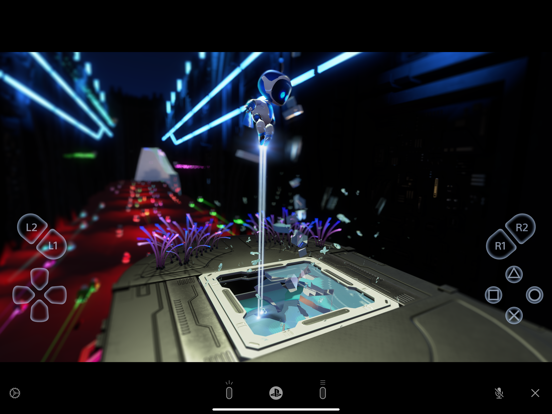
8 store screenshots


Pricing & paywalls
- Free to download
- Free to download
Ratings & reviews
-
4/5It’s Pretty Ok, But A Bit Underbaked
I really enjoy the convenience that comes from being able to stream my games through my phone. It’s fun to play online as long as I have a good Wi-Fi connection. Overall, good. However, the only problems are that the app tends to be quite finicky and janky. You can’t tab off the app without having to reconnect to the Playstation all over again. This definitely makes it inconvenient to receive texts or phone calls since answering them would mean having to reconnect all over again. Another problem I find is that Bluetooth compatibility with controllers can be weird as i’ve had issues where I couldn’t connect to my Playstation until I had disconnected my controller from Bluetooth first. Other times, in ranked games I play, the controller can sometimes disconnect from your phone and would require you to reconnect by closing out the app and reconnecting to the Playstation again. This problem has gotten me flagged for being AFK multiple times and there’s no easy work around. I hope Sony could give this app some TLC and make it a lot more streamlined and more accessible to use without having other things being super inconvenient
FivesShenanigan · 29 Sep 2026
-
5/5I’ve limited issues personally
I have been using it at work, via my iPhone hotspot on my iPad mini (2021) for 5-8 hrs a day. I’ve had no issues at all basically when using it with my PS5. First your console needs to be on, or in rest mode, NOT totally off. The proper settings need to be turned on as well, which should be an easy search online on “how to make it work” if you’re unsure. It does what it’s supposed to for me. It plays my games away from home. Here’s some stuff to note from my experience I think; I am only playing offline games or with minimal online connection, I played a PS4 disk game, PS5 disk game and a downloaded game all with the same stability. I had minimal issue with stability, I was using the standard setting for quality, you can give it more oomph to use more data or if you have wifi. It would stay HD most of the time, and sometimes lose quality. Rarely was I getting the connection issue icon, which is good, because I’m playing in a sort of weird spot for network. Anyway, check your settings and restart your devices. I know it’s obnoxious but I can’t understand why others are having issues as bad as they say, however some of these reviews are older.
n64king · 29 Sep 2026
-
1/5Works better now!!
Before this thing wouldn’t connect at all. But before the update that says it supports the iOS 13 thing was implemented, the update before, that fix a lot, not enough, but baby steps. That update was the one that was running before the current one. Did you know it allowed controller support on the day of the update on my iPhone? I was happy cause I had an extra Xbox one controller lying around and was able to play some games with only issues I’ve ran into before, like telling me my net to slow, never ending error messages and stuff even when I’m on the same WiFi now and then. But after this current version was installed I finally tried that extra Xbox one controller again haha. It now makes the remote play unplayable. Using it would make everything frame skip every few seconds and very easy to disconnect. I was wondering if it was just because of the update, so grabbed my last PS4 controller I bought that hasn’t started chasing squirrels all over the screen while on. Worked perfectly. I know for a fact my Xbox one controller worked perfectly fine before this update cause, I have a very fun memory of my brothers calling my phone to laugh at me cause they saw I was online raiding a base in “let it die” while I wasn’t home. So one question. Did you guys really go so far as to make sure the Xbox one controller works poorly after it worked well before this update or just some “bug” slipped in with the update. Cause that would be hell of funny if it did and I’m pretty sure my phone is not to blame on this one.
Matthew Eccles · 29 Sep 2026
-
4/5Great but its missing one thing or two
The thing that it’s missing is the buttons since the buttons are super big because i have a iPhone 6s Plus the buttons are big that I accidentally tap on the other buttons while I’m playing need for speed payback I accidentally put the button to tune the car or when I play fortnite (I’m lazy and don’t want to download the game on my phone because it’s a waste of battery and time and memory space on my phone so I play on the games of my PlayStation on my phone witch is fun and add a option in the the setting where you can customize the buttons where you can put them somewhere else on the screen and make them smaller and one more thing that it needs is that you can use the daulshock and play on the phone without the one thing that one thing happening and the two the two things that I’m asking please because someone’s tv or monitor might break so they can play on their phone or tablet with or without the daulshock that are the two things that I’m asking right now and other people might appreciate it a lot and I mean a lot and by the way mention the in the news and more people or going to use it
$fransisco$ · 29 Sep 2026
-
4/5Works great with my PS5, the default white screen is harsh though.
I recently purchased a PS5, and after being spoiled by using my Nintendo Switch away from the living room I was very happy to find the Remote Play functionality is as great as it is. I have my PS5 connected via Ethernet to my Eero primary node, and my iPad connected over wireless. Outside of a very few slowdowns it has been amazing. The only reason this is not a 5 star review is the loading screen / home screen / launch screen is a harsh white screen, which is overwhelming and requires the screen brightness to be lowered, which immediately needs to be turned back up as soon as you reach the actual PS5 Home Screen which is black. The fact its such a drastic change and is not able to be configred even to a less harsh color like a dark gray is very frustrating as I have to change the screen brightness every time I launch / open the application. I will change to 5 stars the minute they add a setting to permit a dark mode or black background launch screen to match the PS5 background.
Jess_Simpson13 · 29 Sep 2026
-
1/5
latency, response time below average
Kito (Kito) · 1 Aug 2026
-
1/5
Won't connect to server. Useless
John Ó Ríordáin · 1 Aug 2026
-
5/5
good at Works exceptionally, so what's the point of not just turning on your PlayStation if you have to get your controller anyways besides that great app works flawlessly on my Chromecast
Julian champion · 1 Aug 2026
-
2/5
using on TCL tv. Used to work flawlessly but after an update a couple months ago it no longer works.
Morgan Baber · 1 Aug 2026
-
5/5
buttery smooth.. forgot I was even streaming
VeganVRking- daGameCat · 1 Aug 2026
Privacy & accessibility
Privacy
- Data Linked to You — Analytics — Diagnostics — Other Diagnostic Data Developer declared
- Data Linked to You — Analytics — Diagnostics — Performance Data Developer declared
- Data Linked to You — Analytics — Identifiers — Device ID Developer declared
- Data Linked to You — Analytics — Identifiers — User ID Developer declared
- Data Linked to You — Analytics — Usage Data — Product Interaction Developer declared
- Data Linked to You — App Functionality — Diagnostics — Other Diagnostic Data Developer declared
- Data Linked to You — App Functionality — Diagnostics — Performance Data Developer declared
- Data Linked to You — App Functionality — Identifiers — Device ID Developer declared
- Data Linked to You — App Functionality — Identifiers — User ID Developer declared
- Data Linked to You — App Functionality — Usage Data — Product Interaction Developer declared
- Data Linked to You — Diagnostics Developer declared
- Data Linked to You — Identifiers Developer declared
- Data Linked to You — Usage Data Developer declared
Accessibility
No accessibility labels collected yet.
Privacy
- Data collected — Analytics — App info and performance — Other app performance data Developer declared
- Data collected — Analytics — Device or other IDs Developer declared
- Security practices — Your data is transferred over a secure connection — Data is encrypted in transit Developer declared
Accessibility
No accessibility labels collected yet.
Versions
- 1.0
-
2.0.0
・DUALSHOCK 4 controllers can now be used with mobile devices that have iOS 13 or iPad OS 13 or later installed. (To use the PS button or the touch pad function, use the on-screen controller.) ・A function has been added for iPhone that allows the screen to be locked in landscape mode. ・A function has been added that allows the on-screen controller to always be displayed. ・Performance has been improved.
-
2.0.1
・Performance has been improved.
-
3.0.0
• You can now connect to a PlayStation 5 console using Remote Play. • Screen designs have been updated. • Button assignments made on PS4 or PS5 can now be used in Remote Play. • You can now use the PS button, touch pad, and motion sensor on the DUALSHOCK 4 when using a mobile device with iOS 14 or iPadOS 14 installed. • If you're using a mobile device with iOS 14 or iPadOS 14 installed, you need to enable local network access for this app so that your PS4 or PS5 can be found.
-
4.0.0
・You can now use your DualSense wireless controller on devices with iOS14.5/iPadOS 14.5 installed. ・We've made some performance improvements.
-
4.0.2
• We've made some performance improvements.
-
4.5.0
• You can now connect to your console using mobile data. To do so, go to the Settings menu, and then turn on [Use Mobile Data]. • This app now supports Ukrainian. • This app no longer supports iOS 12.
-
5.0.0
• Dark mode is now available. • The text size will now be based on your mobile device's settings. • We've made some performance improvements.
-
5.5.0
• Background streaming is now available. You can turn this feature on in [Settings] > [Background Streaming]. • We've made some performance improvements.
-
6.0.0
• We've made some performance improvements. • This app no longer supports iOS 13.
-
6.5.0
• You can now use your DualSense Edge™ wireless controller on mobile devices with iOS 16.4/iPadOS 16.4 or later installed. • We've made some performance improvements.
-
6.5.5
• We've made some performance improvements.
-
7.0.0
• We've made some performance improvements.
-
7.0.1
• We've made some performance improvements.
-
7.0.3
• We've made some performance improvements.
-
7.5.0
• We've made some performance improvements.
-
7.5.3
We've fixed an issue where Remote Play couldn't be started while using certain mobile carriers.
-
8.0.0
• We've made some performance improvements.
-
8.5.0
• We've made some performance improvements. • This app no longer supports iOS 14 and iPad OS 14.
-
9.0.0
· 18 Mar 2026
• We've made some performance improvements.
-
9.5.0
· 16 Sep 2026
• We've made some performance improvements. • This app no longer supports iOS 15 and iPad OS 15.
- tv.9.0.0 · 3 Mar 2026
Alternatives
- PXPlay: Remote Play — Same category + similar ratings
- Postparty — Same category + similar ratings
- CODMunity: Warzone & BO7 Meta — Same category + similar ratings
- MyGames Database — Same category + similar ratings
- Warzone Meta & Loadout - BO7 — Same category + similar ratings
- Players' Lounge — Same category + similar ratings
Availability by market
- US
Data quality & evidence
- Page completeness
- Live store listing
- Last verified
- 29 Sep 2026
- Sources
- App Store, Google Play
- Apoku editorial summary has not been published yet.