
Quick verdict
- What it is
- Store information collected; independent summary not yet available.
- At a glance
-
- $5.99
Categories and search queries
Official categories
- Productivity
- Utilities
AppCorpus categories
Key functions
| Function | Availability | Access | Scope | Evidence |
|---|---|---|---|---|
| Family Sharing | Yes | Unknown | App Store | Store published |
Screens
App Store
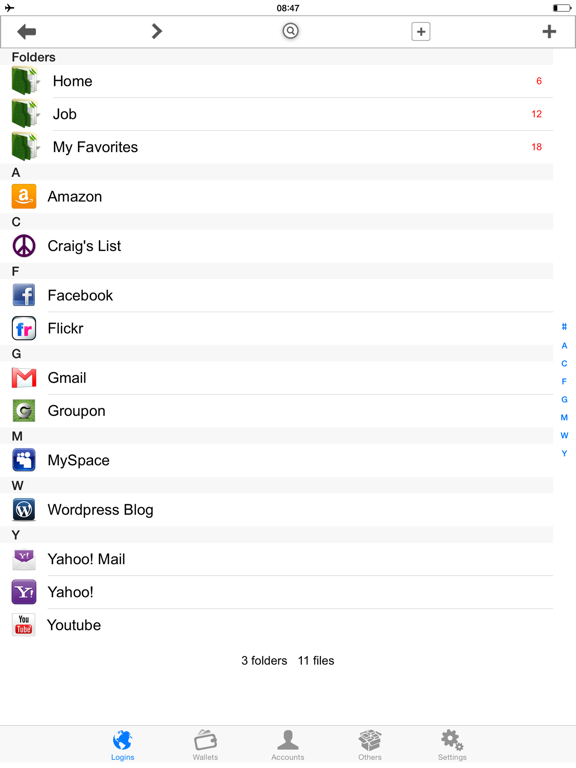
15 store screenshots



Pricing & paywalls
App Store
Shown for US
- Price: $5.99
Ratings & reviews
App Store
Shown for US
-
5/5Best password app
This app is the best mix of functionality and cost. I love that it’s not a subscription (1time charge). I LOVE that once it’s on my phone, that’s it: it doesn’t talk back to its mothership. This app is an organized storage device only not a password and login manager. Sorry to other password apps, but I’d rather limit who manages my password entries on web sites or other apps. Right now I trust Apple and each of my app owners for the password they are each responsible for - no cross pollinating allowed. The last thing I need is for someone to hack my password app provider and I’m toast. I also like that it doesn’t try to give me a lot of functionality I don’t need like storage space on their web servers (already have iCloud ) or the ability to temporarily delete the app when traveling and restoring it when I return among others (I can already do that) among other things. The two things I have wanted added for a while is the ability to put pictures within the app as attachments to the description of a password info entry (now available but resolution way too low) and the ability to add my own within-app labeling icon (the list is dated and insufficient: I don’t need pic editing software in the app- just the ability to import a tiny image) All in all, still definitely a must have.
Peace & Chocolate · 6 Aug 2026
-
5/5I freaking love iPassword! It saves me everyday!
It’s easy, secure, and fast. Backing up my bajillion logins and passwords is easy and I can back up to plenty of location with a couple taps. Dropbox, google drive, and just about anywhere else I want to back it up to. Best of all if I lose my phone, it gets stolen, broken, falls in a pool, whatever, I get all my logins and passwords and financial info back on my new phone with a couple tops of the screen. It’s a lifesaver for those reasons, not to mention the fact that on a daily basis I end up needing to remember some obscure password that I almost never use but when I do and can’t remember it I password is right there. I don’t even have to try to remember passwords anymore. I just got a text from my wife asking what our Adobe cloud login and password is. Within seconds I can text it to her. All my kids random video game account passwords and they’re email logins and passwords, everything is in there. Kids never remember their login and password. Then they end up with like three Xbox accounts because they keep having to make a new login every daggum time they forget the one they used before because they lost the napkin they wrote it on. That is, if they ever wrote it down at all. I will never not have this app!!!
Mr Thrilled iPassword User · 6 Aug 2026
-
5/5Great app!!!!
This is an app that you just have to play around with to figure out. I read the reviews to understand what it was capable of doing. Not only can you save all your personal information, you can save your logins and websites so you don't even have to type them in or go to bookmarks. Yes, the directions are non-existent but the pro version is only $5. The competition is charging $14-$70 per year of use and if you think this one is bad just try those. Once you take the time with a little trial and error, you will love it! I have my passport id in there, my daughters ss#, all these important things that I never would have thought about putting on my phone before this app. Works with fingerprint on iPhone 7+. I will be using at least a dozen times per day just for the ease of my most used websites and the logins for my business. Only syncs to iCloud over wifi or hard cable with iTunes. So you can guess that all these bad reviews are because it is a learning experience to figure it all out. I hope this helps you!
Timmmmmmmmmmmmmmmm · 6 Aug 2026
-
4/5IPassword Pro and iPassword +
Sorry this is long, but if I don't give my own experiences then perhaps the developers of this app might not fully understand what's happening. After using iPassword + for quite a few years on various iPads and iPhones, the latest of which were the iPhone 7 and 8 without any trouble, we both my wife and I recently upgraded our phones to the XS. Neither mine nor my wife's phone are able to open this app since the new upgrade. Luckily my older iPad still works with this app and the ability to backup to Dropbox has saved a lot of headaches. I even upgraded to the iPassword Pro to see if that would work with the new XS. Guess what...no If you delete the app and then reload it from the app store it'll make you sign in like you were a new user (use your original password) but at least then you're able to restore your information (mine was Dropbox). Walah your done your info is back, or so you thought!! When you close the app and try to open it again later it won't open. Leaves me very frustrated knowing that with the most popular iPhone out there the developers of this app are lagging behind trying to sort this bug out.
pcbkc · 6 Aug 2026
-
1/5Restore BACKUP doesn’t work!
I’ve had your app for years! I recently purchased an iPhone X, and before doing so, I backed up my info from my iPhone 7 to my iCloud so everything will transfer to my new iPhone X. And it did. BUT, I decided to take the iPhone X back to preorder the newer iPhone tomorrow. So I backed up everything on my iCloud with the new iPhone, so when I’d attempt to retrieve my passwords again but this time back on my old iPhone, they would be there. However, to my dismay, they’re not showing up. I don’t know what’s happened. I backed everything up on my iCloud, placed my files in my Dropbox app, but nothing’s worked. I figured everything would sync back on my old phone like it synced when I switched to the new iPhone I just purchased but it didn’t. I then thought I could just go back in iTunes, find you all’s app & retrieve it from iTunes but that wasn’t the case. The only option available was getting the app all over again brand new or purchasing the Pro for 4.99. I went ahead & got both, but I still could not restore any of my prior passwords through either app I just downloaded. This is very unfortunate because we’re talking about years of passwords that I still use & desperately need that were on the app; yet, I can’t retrieve any of them. I’m thoroughly disappointed...
Nique's account · 6 Aug 2026
Privacy & accessibility
App Store
Privacy
- Data Not Collected Developer declared
Accessibility
No accessibility labels collected yet.
Versions
App Store
-
6.0
• Bug fixes & stability improvements
-
6.1
• Bug fixes & stability improvements
-
6.2
• Bug fixes & stability improvements
-
6.3
• Bug fixes & stability improvements
-
6.6
• Bug fixes & stability improvements
-
6.9
• Bug fixes & stability improvements
-
7.0
• Bug fixes & stability improvements
-
7.0.1
• Bug fixes & stability improvements
-
7.0.2
• Bug fixes & stability improvements
-
7.0.3
• Bug fixes & stability improvements
-
7.0.5
• Bug fixes & stability improvements
-
7.0.6
• Bug fixes & stability improvements
-
7.1
• Bug fixes & stability improvements
-
7.1.1
• Bug fixes & stability improvements
-
7.1.2
Bug fixes & stability improvements
-
7.2
Bug fixes & stability improvements
-
7.2.2
Bug fixes & stability improvements
-
7.3.1
Bug fixes & stability improvements
-
7.3.8
Bug fixes & stability improvements
-
7.4.2
Bug fixes & stability improvements
-
7.4.3
Bug fixes & stability improvements
-
7.5.2
Bug fixes & stability improvements
-
7.5.6
Bug fixes & stability improvements
-
7.6.0
Fixed the bug of Dropbox connection
-
7.6.1
· 9 May 2025
Bug fixes and stability improvements
Alternatives
- oneSafe+ password manager — Same category + similar ratings
- iPassworder Password Manager — Same category + similar ratings
- SecureSafe Password Manager — Same category + similar ratings
- mSecure: Password Manager — Same category + similar ratings
- RoboForm Password Manager — Same category + similar ratings
- Dashlane Password Manager — Same category + similar ratings
Availability by market
- US
Data quality & evidence
- Page completeness
- Live store listing
- Last verified
- 6 Aug 2026
- Sources
- App Store
- Independent summary has not been published yet.