
Quick verdict
- What it is
- Store information collected; an Apoku editorial summary is not yet published.
- At a glance
-
- $4.99
Categories and search queries
Official categories
- Productivity
- Utilities
Apoku categories
Key functions
| Function | Availability | Access | Scope | Evidence |
|---|---|---|---|---|
| Family Sharing | Unknown | Unknown | Scope unknown | Store published |
Screens
App Store
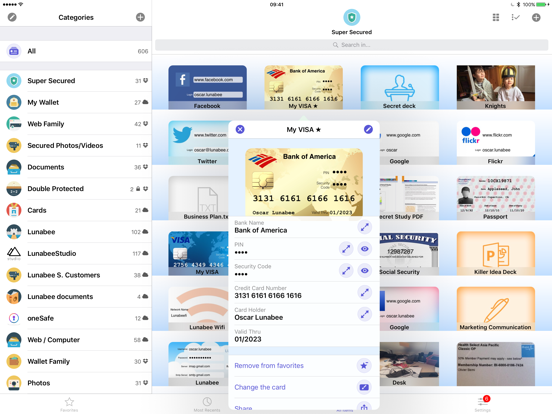
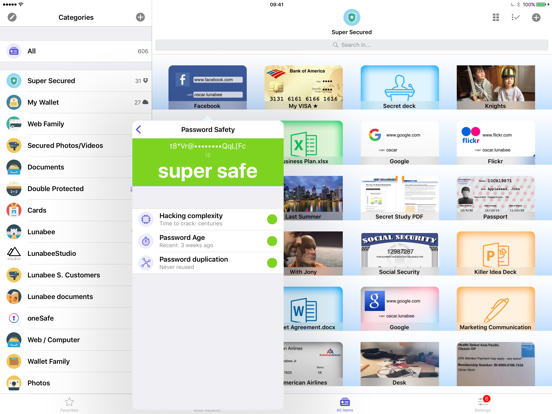
16 store screenshots


Pricing & paywalls
App Store
- Price: $4.99
Ratings & reviews
App Store
-
5/5How did I survive life before this app!!!?
The best and greatest invention in the history of ever!!! Maybe that’s a slight exaggeration but in this day and age with so much life online and so many passwords to remember there is clearly only one way to function and that’s with a password locker app. I’m not sure if I could go without one now and idk how I went without one for as long as I did. I’ve tried a few of these things out (usually the free versions first). I almost never purchase app but this is the first one I paid for and I’m so glad I did. It’s easy to use and the templates make it a breeze to just plug info in and keep going with life. I have an iPhone and I like that if i need to login to an account, I can seamlessly jump from the login page, to the password locker, and back to the login page with just the touch of my thumbprint. You can put locker combinations for a gym locker or etc. you can add credit cards, WiFi router information, you can store passwords for banking/emails/etc. You can customize the icon decal with a picture from the web or your library so that you can more easily find your information. The app is heavily encrypted so pretty much no one/nothing is getting in. You can even set a logout timer so you can choose how long you want to stay logged in while the app is running in the background. There are quite a few options to lock the password locker app too...you can choose a pin, a password, or a symbol combination to name a few. All in all this is a phenomenal app and I highly recommend it.
Trekkie4lyfe · 6 Aug 2026
-
5/5Love this App!
I’ve had the OneSafe App for at least 4-5 years now and I couldn’t go without it. I am the Creative Arts Director for our church and one of two Media Director’s for our community Bible study program which means me having to know a lot of passwords for the user accounts on every computer that I use and the website accounts that I use on them. I used to keep passwords for friends accounts too. Before I found this app I used to keep them in the “notes” app on my phone but now am able to crate and title each folder and put any user names and passwords in their respective folders. I also like that you have the option for the type of file that you want to create to put in the folder, ie, if it’s an app that you are using or a website or a debit or credit card and the encryption is awesome. I can’t imagine anyone being able to even breaking into this app to get anything I have stored inside of it. It’s a very safe app to use and user friendly too!
Gadgit_Girl in NC · 6 Aug 2026
-
1/5These Guys Screwed Me
I’ll start by saying I like OneSafe. Been using it for years. Excellent app for storing my many logins—until today. As usual, I went to log into OneSafe using TouchID. Instead of allowing me to proceed once I scanned my finger, it indicated I was now required to enter my passcode. After a few tries and no alternative (NO forgotten password link, secret question, etc.) I looked it up on their website to find that unless I had previously set up the two secret questions (was never even an option on the version I had), for security reasons there was no way to retrieve your passcode. I had to delete and re-download the app. So I did. Except when I downloaded it the first time it was free...and now it’s $3.99. I considered skipping out and using another app instead, but I knew I had 90+ logins that I didn’t want to go through the trouble of locating again. So I bit the bullet and purchased the paid app. Once I logged in, I set up my account, “found” my previously saved info, but in order to access it I needed my passcode. Same problem as before, but $4 poorer. Brilliant way to scam me into deleting my free version of the app app and re-downloading the paid version instead. You kept me as a customer, but I’m still helpless without my passcode. How ironic. Thanks OneSafe.
BJoon85 · 6 Aug 2026
-
5/5Great way to keep track of passwords
We all know how many passwords we need for life in general and it’s only going to get more complicated. The best solution is to use an app like oneSafe. I’ve been an active user for at least 6 years, maybe longer. I tell my friends about it when given a chance. Features I love: creating a new password is really easy as it basically does it for you. You can select how complex the password needs to be. If I’m on my phone and need to log in with a password, I go to oneSafe, open the correct account for the webpage, press and hold on the password, password is then copied automatically. I then go back to the login page and place my finger on the password location and select paste. The password is automatically pasted where it needs to be. It would be even better if there were a drafts folder (for those times when you’re setting up a new account and get interrupted—the data would be stored as a draft to be able to finalize the entry at a later time. Currently, if you aren’t able to hit save, all data is lost. The other thing that would be an improvement would to be able to sort accounts by date (so you could tell which passwords are really getting old and need to be changed). All in all, a very easy to use, essential app. I use it daily.
Spauldog · 6 Aug 2026
-
4/5Happy with app, but have one reservation
I have been using this app for years and have the peace of mind of knowing where my family members are, especially when they are traveling. My main reservation is that I can only access this information on one device at a time now. Previously, I could access it from my iPhone and any of my iPads. Now I can only access through one device, which is disappointing. I’d have to sign out from my phone and sign back in on my iPad. If my husband wants to access from his devices, again I’d have to sign off so he could sign on. This is a newer change that Life360 has made, saying that multiple device access interferes with the accuracy of the locations. I was hoping that they would figure out a way to resolve this issue. It would make using the app more convenient. It seemed to be working just fine when we had the multiple device access. I never had any issues finding my family before.
Mablesyrup94 · 6 Aug 2026
Privacy & accessibility
App Store
Privacy
- Data Not Linked to You — App Functionality — Diagnostics — Crash Data Developer declared
- Data Not Linked to You — Diagnostics Developer declared
Accessibility
No accessibility labels collected yet.
Versions
App Store
-
4.3.0
Great new version, with the "Autofill Passwords" coming with iOS 12!
-
4.3.1
• Minor bug fixes and improvements.
-
5.0.0
iOS 13 support, dark mode, Siri shortcuts and many other iOS 13 improvements.
-
5.0.1
fixed issue on TRI-PIN and other dark mode adjustments.
-
5.0.10
Bug fixes
-
5.0.11
Fix for pattern password.
-
5.0.12
Fixes and improvements.
-
5.0.2
Important bug fixes regarding double protected categories, Face ID and Touch ID and Apple Watch support.
-
5.0.3
Fixed issues happening in some cases on Face/Touch ID.
-
5.0.4
Minor bug fixes and improvements, including the copy to clipboard
-
5.0.5
improvements before Holidays :)
-
5.0.6
Misc fixes and improvements
-
5.0.7
Fix a crash occurring on iOS 13.5
-
5.0.8
Fix issue related to pattern-login Misc fixes
-
5.0.9
Misc fixes
-
5.1.0
Supporting iOS 15.
-
5.2.0
Various improvements
-
5.2.1
Various improvements
-
5.2.2
Minor evolutions
-
5.2.3
Improvements to support new oneSafe 6 app coming soon
-
5.2.4
Bug fixes and improvements.
-
5.2.5
Bug fixes and improvements.
-
5.2.6
Improvements regarding the migration to oneSafe 6.
-
5.2.8
Improvements regarding the migration to oneSafe 6.
-
5.2.9
· 21 Sep 2024
Fix an iOS 18 related bug
Alternatives
- Password Manager- — Same category + similar ratings
- SecureSafe Password Manager — Same category + similar ratings
- aWallet Password Manager — Same category + similar ratings
- Sticky Password Manager & Safe — Same category + similar ratings
- Password Safe Manager & Vault — Same category + similar ratings
- mSecure: Password Manager — Same category + similar ratings
Availability by market
- US
Data quality & evidence
- Page completeness
- Live store listing
- Last verified
- 6 Aug 2026
- Sources
- App Store
- Apoku editorial summary has not been published yet.