
Quick verdict
- What it is
- Store information collected; an Apoku editorial summary is not yet published.
- At a glance
-
- From $2.49/mo
- Free to download
- In-app purchases
Categories and search queries
Official categories
- Productivity
- Utilities
Apoku categories
Key functions
| Function | Availability | Access | Scope | Evidence |
|---|---|---|---|---|
| Free app | Yes | Free | Context-specific | Store published |
| In-app purchases | Yes | Limited free | Context-specific | Store published |
| Siri Shortcuts | Unknown | Unknown | Scope unknown | Store published |
Screens
App Store
27 store screenshots


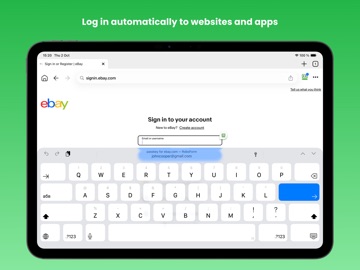
Pricing & paywalls
App Store
- Premium (1 year) — $29.99/year ($2.49/mo)
- Family (1 year) — $47.99/year ($3.99/mo)
Ratings & reviews
App Store
-
1/5I DELETED THE APP & HERE’S WHY
Hope I articulate this well. I downloaded the RoboForm app to my PC, iPad & iPhone because of the seemingly great reviews. I was prepared to pay for the subscription after the trial period if RoboForm worked as well as the reviews claimed it did. Sync appeared to work AOK & I sucessfully uploaded all my saved passwords to Roboform. So many of my apps and login pages have mutliple passwords saved including the current working password plus all the past, now defunct passwords. So, whenever I used Roboform to open an app or web page that had more than one identified password, Roboform would identify each password like this: “Login[#].” You could not see the password unless you clicked & opened it up. For example, one of my credit cards had 4 possible passwords saved. RoboForm identified each password as Login[92], Login[93], Login[94] & Login[95]. Because I could not see the the password, I clicked on each “Logon[#]”-the first three did not work, they were the old passwords. So, the correct password had to be Login[95], right? Well, by the time I got to Login[95], my CC company said I made too many attempts to login & suspended my account for several hours!!! This happened so often, I finally deleted the app! I also use Dropbox & Firefox Password apps & with those apps, you can see all the passwords, old & new, AND the date each password was last used. They make PW identification easy & obvious. So, for these reasons, I deleted the RoboForm app because this kind of identification was beyond annoying & unnecessary. Sorry, I really was hoping for a better outcome.
Beatlesjunky · 5 Oct 2026
-
5/5Most reliable password manager of them all!
I tried many other managers but this one has stood the test of time. Two other managers that I will not name, but are back in this business now, gave up without warning after 2-3 years and decided “this was not part of their core business any longer” they left me with only my paper backup which meant reloading over 100 passwords by hand. RoboForm has been one of the most reliable and up to date of the many I have tried. I have been with this company for over 20 years and I never worry about my passwords being hacked. This is because I can use a long sophisticated password and RoboForm remembers it, so that means I don’t get sloppy and pick easy passwords, and I change them regularly because RoboForm will even choose them for you, and analyze all your passwords to tell you regularly if your passwords are up to standard. It is easy to print a paper backup of my now 200+ passwords so I still have a non digital safety margin. (I keep that record off site). All I have to do is remember ONE very complicated password and I can have access to them all. For me this is the best password manager around and after 20 years I’m not worried that I’ll get an email next week saying they don’t think password management is no longer part of their core business. Great job RoboForm! (I get nothing from RoboForm for this review) - they are really so good and reliable that they deserve to have someone sing their praises - as many others have done.
WA-MD · 5 Oct 2026
-
4/5Great Program
I’ve been using this program for over a decade, and have considered switching to a competitor several times because RoboForm did not always have the most competitive feature set. However, they continue to improve the program, and now offer most of the things I care about, such as two-factor authentication, emergency access in the event something happens to me, text encryption, selective password sharing, etc, so I remain a satisfied customer. One of my biggest complaints used to be that you could not export the login credentials to an Excel file, which made it time-consuming to switch to a competitive program. This almost caused me to switch (more than once) before I put even more effort and data into RoboForm. Ironically, now that they have that feature, I have no reason not to continue to use RoboForm because I know that I could switch easily in the future if I so chose. And, knowing that RoboForm is also aware of this makes me feel confident that they will continue to be competitive with other platforms.
John D 3 · 5 Oct 2026
-
3/5An good product
I've been using RoboForm for years and it works well overall, but lacks in one area. More-and-more, the auto login feature doesn't work because web login screens no longer accept RoboForm's autofill function for login credentials. They have asked me to provide examples of this, which I will compile fort them. RoboForm also needs a convenient switch for enabling/disabling Chrome's password save feature. Right now, the user must go into Chrome's password management feature, disable RoboForm password management, save user credentials in Chrome, then go into Chrome extensions and re-enable RoboForm. That's a lot of steps for something that could be handled with a simple slider switch. There are a number of sites that require credentials where security is of minimal concern. Saving these directly in Chrome is much more convenient. There are other conditions where RoboForm constantly prompts to save the same credentials while moving between pages. It would be very nice to switch this off.
cmmx · 5 Oct 2026
-
1/5Don’t do it!
There is NO WAY to print your password list to your printer from your iPhone!! Unless you have it also installed on your computer. But if you have it installed on your computer and your iPhone and want to sync them you have to buy their subscription! This used to be a free, I repeat free program but like all others they could not leave that alone. Another horrible thing is if you update your app to version 8, which they try to trick you into doing, from whatever version before 8 that you had you can NEVER, I repeat NEVER, I repeat NEVER go back to your older version! Very, very disappointing!! There also is no way of finding your login data on your phone if you were to want to save it elsewhere. Do not use this app unless you care to pay their price and sync it with other devices so that you can have a printed hard copy of your logins and data! Unless, of course, you don’t mind re-entering everything you have into another app that is not going to trick you into buying it! Just another app that used to be good turned completely bed!
lmfuiyah · 5 Oct 2026
Privacy & accessibility
App Store
Privacy
- Data Not Linked to You — Other Purposes — Diagnostics — Crash Data Developer declared
- Data Not Linked to You — Other Purposes — Diagnostics — Other Diagnostic Data Developer declared
- Data Not Linked to You — Other Purposes — Diagnostics — Performance Data Developer declared
- Data Not Linked to You — Diagnostics Developer declared
Accessibility
No accessibility labels collected yet.
Versions
App Store
-
9.6.8
- Added support for importing passwords from iOS 18.2 or later. - Implemented iOS 18 Automatic Passkey Upgrades. - Resolved an issue where users were prompted to change their master password unnecessarily. - Miscellaneous bug fixes.
-
9.6.9
- Added swipe gesture on address bar to switch between tabs. - Miscellaneous bug fixes.
-
9.7.1
We’ve updated RoboForm to feel more like a mobile browser for a smoother experience. Enjoy quicker access to your passwords and effortless autofill. Prefer the old look? You can toggle it back in settings.
-
9.7.2
- Implemented autosave for one-time verification codes from QR-code on the webpage. - Resolved an issue causing the app to freeze while actively scrolling the list. - Miscellaneous bug fixes.
-
9.7.3
- Fixed an issue where a blank webpage appeared when Login is used too quickly after restarting the app. - Improved performance and stability for a smoother experience. - Various bug fixes and enhancements.
-
9.7.4
- Added Email Breach Monitoring feature. - Fixed an issue where incoming updates to an A–Z sorted list could cause a crash. - Miscellaneous bug fixes.
-
9.7.5
- Implemented support of Google Workspace SSO. - Fixed an issue where list updates could cause a crash. - Miscellaneous bug fixes.
-
9.7.6
- Added breach warnings for Identities when applicable. - Fixed an issue where the refresh button in the address bar could become unresponsive. - Miscellaneous bug fixes.
-
9.7.7
- Added a Share button to the browser address bar. - RoboForm for iPad updated to feel more like a browser. - Miscellaneous bug fixes.
-
9.8.1
- Implemented new authentication system that allows unlocking RoboForm using passkeys and security keys. - Updated design for Sharing/Send UI. - Miscellaneous bug fixes.
-
9.8.2
- New authentication system now enabled for 2FA. - Miscellaneous bug fixes.
-
9.8.4
- Update passkeys and other New auth info during sync. - UI fixes for iOS 26. - Miscellaneous bug fixes.
-
9.8.5
- Resolved an issue where the app would get stuck on a loading screen after unlock. - Miscellaneous bug fixes.
-
9.8.6
- Resolved an issue where the app would get stuck on a loading screen after unlock. - Miscellaneous bug fixes.
-
9.8.7
- Fixed some cases where two-factor authentication (2FA) might be requested unnecessarily after unlocking. - Fixed an issue where new authentication might get stuck on startup due to incorrect configuration. - Miscellaneous bug fixes.
-
9.8.8
- Updated RoboForm logo. - Updated design of the form filling screen. - Miscellaneous bug fixes and improvements.
-
9.8.9
- Fixed an issue where sync conflicts caused the application to crash. - Miscellaneous bug fixes and improvements.
-
9.9.1
- Added support for generating and saving passwords in iOS 26.2. - Now supporting iOS 26 imports. Securely import your passwords, passkeys, and verification codes directly from other apps. - Miscellaneous bug fixes and improvements.
-
9.9.2
- Fixed creation of a new login from third-party applications. - Miscellaneous bug fixes and improvements.
-
9.9.3
- Added an AdBlocker to our browser. - Updated app to meet all default browser requirements. - Miscellaneous bug fixes and improvements.
-
9.9.4
- Resolved an issue that prevented a login using SSO under certain conditions. - Miscellaneous bug fixes and improvements.
-
9.9.5
- Browser: reader mode added. - Resolved an issue preventing the use of passkeys to unlock RoboForm from third-party apps. - Miscellaneous bug fixes and improvements.
-
9.9.6
- Resolved an issue with item ordering on Apple Watch. - Miscellaneous bug fixes and improvements.
-
9.9.7
- Added a Private Mode for secure browsing. - Added Listen to the page for reader mode. - General bug fixes and performance improvements.
-
9.9.8
· 12 May 2026
- Stability update. - Miscellaneous bug fixes and improvements.
-
9.9.9
· 18 Aug 2026
- You can now set the RoboForm as your Default web browser. - Added Tabs pinning. - Fixed Tabs and App State persistence. - Miscellaneous bug fixes and improvements.
Alternatives
- mSecure: Password Manager — Same category + similar ratings
- Dashlane Password Manager — Same category + similar ratings
- Keeper Password Manager — Same category + similar ratings
- Password Manager - Safe Lock — Same category + similar ratings
- Password Manager: Safe — Same category + similar ratings
- Password Manager' — Same category + similar ratings
Availability by market
- US
Data quality & evidence
- Page completeness
- Live store listing
- Last verified
- 5 Oct 2026
- Sources
- App Store
- Apoku editorial summary has not been published yet.