
Quick verdict
- What it is
- Store information collected; an Apoku editorial summary is not yet published.
- At a glance
-
- Free to download
Categories and search queries
Official categories
- Business
- Productivity
Apoku categories
Key functions
| Function | Availability | Access | Scope | Evidence |
|---|---|---|---|---|
| Free app | Yes | Free | Context-specific | Store published |
Screens
App Store
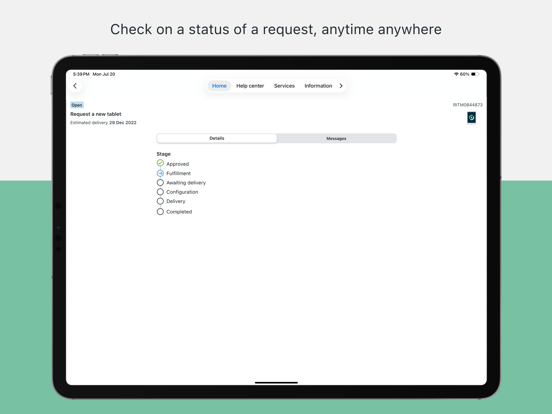
18 store screenshots


Pricing & paywalls
App Store
- Free to download
Ratings & reviews
App Store
-
1/5Poor Optimization, Insulting Feedback Option
Navigating open tickets and service tasks is non-existent, instead only being able to look up an object by searching for its exact name via the search bar. No options for viewing other tickets like the web client, which is not helpful when on the go. There’s no apparent way to see your favorites, and no setting to enable them. The settings are scarce for options, and the only useful setting for this app appears to be “dark mode”, a basic and non-app specific toggle. After spending half an hour trying to find a way to add my favorites with no success, I decided to leave a review and some feedback, but the feedback button has two options for the question “Are you enjoying this app?”: “Yes!” And “Not really”. “Yes!” sends you to the review page, but “Not really” opens up a message saying “If you have questions or concerns about this app and its experience, please contact your system administrator.” Avoiding a less-than-favorable review. Big thumbs down.
Kuchinic · 4 Sep 2026
-
4/5Great but with a quirk
I like the usability of the app and that I am able to keep up with company requests while away from my computer. The quirk I mentioned is that I have cleared all my alerts and notifications but the app badge count is still at 2. I cannot clear whatever is keeping the badge count alive!
KBJ5 · 4 Sep 2026
-
1/5Very Limited Use
I was hoping this app would provide more convenience away from my desktop, but in practice, it has been very limited to the point of being almost useless. Currently, I only use it to respond to iOS notifications, which takes me to the item number in the app. If I lose the notification or it doesn’t come in, I have no way of finding the item number. I can’t access my review/approval or even conduct a basic search from within the app. Which mean in many cases, I have to go back to my desktop, which is time-consuming due to the multiple layers I have to log into. This app misses the mark for me. I tried to submit feedback and was prompted to contact a sysadmin. Really? They didn’t make the app, so why would they care? Unless they are configuring what is available in the app, leading to a subpar experience. Who knows? And who cares I’m not going to attempt to navigate that maze. But right now, it’s very disappointing.
JESUS_IS_LORD2314 · 4 Sep 2026
-
2/5Terrible way to access work info
About every month or so the app kicks me off of it in in order for me to access it again. I have to be at work so that I can receive an email on my work email. I get that we need security but at the same time I need to be able to access pay stubs. The fact that I have to be at work in order to access pay stubs is extremely inconvenient. I thought this app was gonna be good, but it just boot me off all the time and makes me have to re-login every month or so.
3036493618 · 4 Sep 2026
-
5/5Much easier to use while working.
Making claims is extremely difficult when my hand held is being used to place an order. With the now app on my phone, I am able to take photos for my credits with ease when the product is on hand and upload them directly into the app on my phone. Also, the system finally is connecting with my orders and pulling correct invoice numbers for the first time all year. Thank you for this update.
4and20blackbird · 4 Sep 2026
Privacy & accessibility
App Store
Privacy
- Data Linked to You — Analytics — Identifiers — User ID Developer declared
- Data Linked to You — Analytics — Location — Coarse Location Developer declared
- Data Linked to You — Analytics — Search History Developer declared
- Data Linked to You — App Functionality — Identifiers — Device ID Developer declared
- Data Linked to You — App Functionality — Identifiers — User ID Developer declared
- Data Linked to You — App Functionality — Location — Coarse Location Developer declared
- Data Linked to You — App Functionality — Search History Developer declared
- Data Linked to You — Product Personalization — Identifiers — User ID Developer declared
- Data Linked to You — Product Personalization — Location — Coarse Location Developer declared
- Data Linked to You — Product Personalization — Search History Developer declared
- Data Linked to You — Identifiers Developer declared
- Data Linked to You — Location Developer declared
- Data Linked to You — Search History Developer declared
- Data Not Linked to You — Analytics — Usage Data — Product Interaction Developer declared
- Data Not Linked to You — Analytics — User Content — Photos or Videos Developer declared
- Data Not Linked to You — App Functionality — Diagnostics — Crash Data Developer declared
- Data Not Linked to You — App Functionality — Diagnostics — Performance Data Developer declared
- Data Not Linked to You — App Functionality — User Content — Audio Data Developer declared
- Data Not Linked to You — App Functionality — User Content — Photos or Videos Developer declared
- Data Not Linked to You — Diagnostics Developer declared
- Data Not Linked to You — Usage Data Developer declared
- Data Not Linked to You — User Content Developer declared
Accessibility
- Dark Interface — SUPPORTED Store published
- Differentiate Without Color Alone — SUPPORTED Store published
- Larger Text — SUPPORTED Store published
- Sufficient Contrast — SUPPORTED Store published
- Voice Control — SUPPORTED Store published
- VoiceOver — SUPPORTED Store published
Versions
App Store
-
20.1.1
Fixed · Deep links to embedded web pages Detailed release notes can be found on the ServiceNow product documentation website.
-
20.2.0
Fixed • Multi-Instance login does not work on iOS Agent Intune • Deep links in certain formats do not redirect properly • iOS web search design issues Detailed release notes can be found on the ServiceNow product documentation website.
-
20.2.1
Bug fixes and general improvements
-
20.3.0
Now Assist Virtual Agent • Support for KG Inline Citations & View Records • Web Search Responses with Citations and Sources • Multi Modal DocQnA • Dynamic Step Loader Now Assist Search • Synthesized Responses & Streaming from Search Results • Suggested Search Results • Attachment & External Content in Standard Search Results Fixed • The user receives push notifications after logging out of Now Agent • The Chat icon is unresponsive upon returning to chat after deleting an attachment • Web session timeout causes an infinite loop • Overlapping cards in the record section of ALP in Now Assist Virtual Agent Detailed release notes can be found on the ServiceNow product documentation website.
-
20.3.1
• Fixed citation & formatting issues for synthesized response in Search • Fixed an issue for managing the Microsoft Edge browser via Intune
-
20.4.0
Fixed: • Intermittent fetch errors when submitting records • Unresponsive chat icon after returning to a chat • AppAuth isn't launching Safari when the default browser isn’t Safari • Allow the ability to turn off the ‘Ask a Follow Up’ feature in Enhanced Chat • Other performance improvements and minor bug fixes Detailed release notes can be found on the ServiceNow product documentation website.
-
20.4.1
Fixed: • Rendering charts on iOS 26 Detailed release notes can be found on the ServiceNow product documentation website.
-
20.4.2
Fixed issue with duplicate offline attachments for certain configurations
-
20.5.0
Fixed • Data Visualization Single score on the Mobile app displays an error on iOS 26 • The user is unable to use push actions due to an API error • The Now Mobile app crashes when attempting to reserve a workspace • The user can’t open an external link via a notification Detailed release notes can be found on the ServiceNow product documentation website.
-
20.6.0
Fixed: • Attachments uploaded in offline mode are not visible once back online • Smart Assessment questionnaire responses are not retained • An ‘Email’ smart button doesn’t open in the default email app • A step loader is incorrectly displayed after a Virtual Agent response • Manually complete long forms and questionnaires resulting in slower inefficient user experience • Mobile supports custom languages • Voice-to-text in search and Now Assist Virtual Agent • Prominent action button that allows access to Now Assist or other global functions directly from the tab bar • Input form screen with AI Lens integration • Updated UI of standard search results page for refining search results and quickly finding the most relevant information with additional search result filters • New welcome page, org chart support and Doc QnA enhancements in Now Assist Virtual Agent Detailed release notes can be found on the ServiceNow product documentation website.
-
20.7.0
Fixed • There is a gap in the title of the first choice in an inline choice field • On the Parameters screen, long descriptions are cut when the device is rotated Detailed release notes can be found on the ServiceNow product documentation website.
-
21.0.0
Fixed • Bubble buttons appear to overlap • The Granular Delegation plugin causes dates to appear truncated • Error when using the 'Accept'/'Reject' notification actions for parts-sourcing flow • User can’t select a ‘Choice’ on a scripted input form if the previous page has slider inputs • Some interactive elements are read out without a role by screen readers • Theme coloring issues Detailed release notes can be found on the ServiceNow product documentation website.
-
21.0.1
This update provides important bug fixes and updates and is recommended for all users. Detailed release notes can be found on the ServiceNow product documentation website.
-
21.0.2
• Fixed an issue where the form screen was not refreshing • Fixed an issue where the Activity stream displayed items out of order • Fixed profile images-related issues on the search results page resolved
-
21.1.0
Fixed: · The activity stream is not sorted in descending order · Performing write-back actions on work order tasks reduces app performance · Category icons on Now Mobile don’t load properly · Card sizes don't align with the font selection made by the user · Highlight color does not appear around carousel cards · A welcome image erroneously appears at the top of the screen · A field remains highlighted after dismissing a confirmation message · Carriage return suffix is not removed on barcode scans · The 'Set to Ready' option is missing for IGT task in Guided Task screen · Issues opening a record address from a URL link in Apple Maps · Barcode input text of type 'Accessibility' isn't visible when text is large · Synthesized response markdown table is not supported in virtual agent · Search gap of displaying a chat button on catalog standard search results to navigate users to virtual agent · Support the new AI gradient colors for all AI experiences · Updated reasoning messages UI in Now Assist Virtual Agent Detailed release notes can be found on the ServiceNow product documentation website.
-
21.1.1
Fixed: · Start Travel and Start Work footer buttons were unresponsive Detailed release notes can be found on the ServiceNow product documentation website.
-
21.2.0 (251230090000.1512)
Fixed: · Catalog icons are not displayed when the short description is long · Catalog items without icons don’t align with catalog items that have them · Video player configuration error when opening a ‘Campaign’ · 'Start travel' and 'Start work' footer actions don't work properly · The error 'Agent.NowAPIError' appears intermittently · Quick Action Function instance not visible on the launcher screen · Incorrect date type value displayed on the Input Form screen Enhancement: · Support added for pre-login header login button visibility control Detailed release notes can be found on the ServiceNow product documentation website.
-
21.3.0
Fixed: • Default date in the reservation screen is set to yesterday instead of today • Mobile device date does not match the date displayed in the platform • App crashes while uploading files in impersonation mode • Error when an action has a parameter screen and auto-redirect is configured • Failure to reload a page when refreshing after a timeout • 'Submit'/'Cancel' buttons freeze following a writeback error on an action item form • The 'Filter' button is hidden when more than one item is displayed • A 'Change Instance Alert' displays when a notification is selected in the 'Notifications' tab • Smart assessment crashes when a descriptive element is set as richText • An offline new-defect form photo is not visible in the Attachments/Activity Stream until sync Enhancement: • Introduced shared device mode, allowing multiple users to log into the same instance • Allowed users to continue and end the Voice Agent calls when backgrounding the app • Enhanced the 'Add Account' screen UI Detailed release notes can be found on the ServiceNow product documentation website
-
21.3.1
Fixed: - Accessibility VoiceOver issues - Push notification redirection issue
-
21.4.0
New: • Attachments can be configured to upload in the background while using the app • UI Rules can be validated on form submissions • Multiple filetypes can be uploaded to AI Lens • Support for new Now Assist Premium Chat experience Fixed: • Crash in Firebase in CalendarStore • Unable to mention users in the Activity Stream in Japanese • Smart routing of List, Form, and KB links to apps doesn't work • A blank page is returned when searching for key words • Focus does not consistently start at the top of the page when selecting a location • The Question Circle icon doesn’t display correctly Detailed release notes can be found on the ServiceNow product documentation website.
-
21.5.0
Fixed: -Smart assessment attachment upload fails and an unanswered question error appears on 'Submit' -Captured image attachments saved in Display P3 color space cause color shift in non-color-managed viewers -Mobile questionnaires details text under the question is cut-off Detailed release notes can be found on the ServiceNow product documentation website.
-
21.5.1
Fixed: -Smart assessment attachment upload fails and an unanswered question error appears on 'Submit' -Captured image attachments saved in Display P3 color space cause color shift in non-color-managed viewers -Mobile questionnaires details text under the question is cut-off -Images failing to upload Detailed release notes can be found on the ServiceNow product documentation website.
-
21.5.2
Fixed: -Smart assessment attachment upload fails and an unanswered question error appears on 'Submit' -Captured image attachments saved in Display P3 color space cause color shift in non-color-managed viewers -Mobile questionnaires details text under the question is cut-off -Images failing to upload -Unresponsive app when Face ID and access PIN enabled Detailed release notes can be found on the ServiceNow product documentation website.
-
22.0.0
New: - Liquid Glass design updates across the mobile experience - Introducing ServiceNow Otto across mobile experiences - Redesigned settings screen with modern interface and expandable sections Fixed: - Push notifications redirect to a screen that reads ‘No data' - Error is thrown when user selects a chart from the ALP - Icon badge notification count is not cleared after notifications are read remotely - Images captured in-app are changed from portrait to landscape - Smart routing from list, form, and KB links to apps doesn't work - Focus does not start at the beginning of the page when selecting a location - Enhanced Chat citation links don’t work properly - Mobile questionnaire details text is cut off under the question - Smart assessment attachment upload fails on first attempt - A blank screen is observed on login despite successful authentication - Users can't be mentioned in the Activity Stream in Japanese - The checklist details screen is greyed out even if the ‘Available offline’ option is on - Submitting a secondary IFS causes attachments added to the original one to disappear - Images captured by the app camera or uploaded to a work order task have no geolocation data Detailed release notes can be found on the ServiceNow product documentation website.
-
22.0.1
· 11 Aug 2026
New: - Liquid Glass design updates across the mobile experience - Introducing ServiceNow Otto across mobile experiences - Redesigned settings screen with modern interface and expandable sections Fixed: - Push notifications redirect to a screen that reads ‘No data' - Error is thrown when user selects a chart from the ALP - Icon badge notification count is not cleared after notifications are read remotely - Images captured in-app are changed from portrait to landscape - Smart routing from list, form, and KB links to apps doesn't work - Focus does not start at the beginning of the page when selecting a location - Enhanced Chat citation links don’t work properly - Mobile questionnaire details text is cut off under the question - Smart assessment attachment upload fails on first attempt - A blank screen is observed on login despite successful authentication - Users can't be mentioned in the Activity Stream in Japanese - The checklist details screen is greyed out even if the ‘Available offline’ option is on - Submitting a secondary IFS causes attachments added to the original one to disappear - Images captured by the app camera or uploaded to a work order task have no geolocation data - Fix camera not showing on legacy form screens Detailed release notes can be found on the ServiceNow product documentation website.
Alternatives
- Replicon - Timesheets with GPS — Same category + similar ratings
- Wheels Mobile Assistant — Same category + similar ratings
- SAP SuccessFactors Mobile — Same category + similar ratings
- Intune Company Portal — Same category + similar ratings
Availability by market
- US
Data quality & evidence
- Page completeness
- Live store listing
- Last verified
- 4 Sep 2026
- Sources
- App Store
- Apoku editorial summary has not been published yet.