
Quick verdict
- What it is
- Store information collected; an Apoku editorial summary is not yet published.
- At a glance
-
- Free to download
Categories and search queries
Official categories
- Business
- Productivity
Apoku categories
Key functions
| Function | Availability | Access | Scope | Evidence |
|---|---|---|---|---|
| Free app | Yes | Free | Context-specific | Store published |
Screens
14 store screenshots

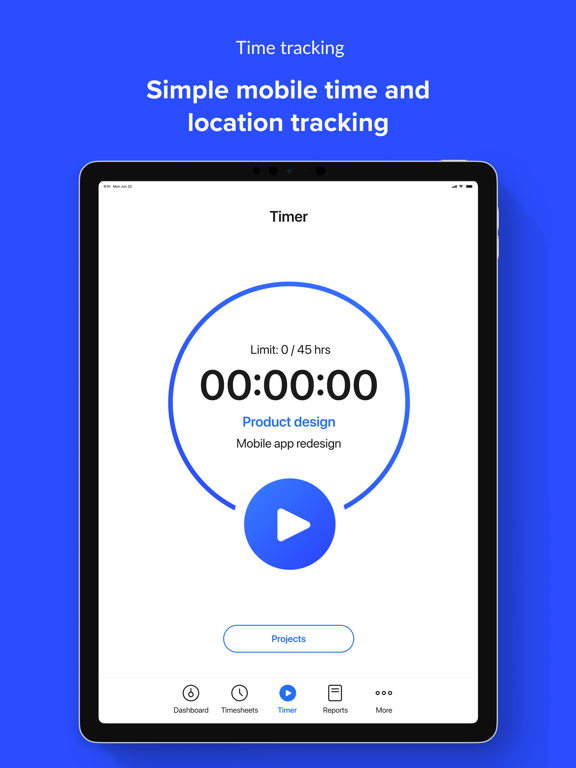

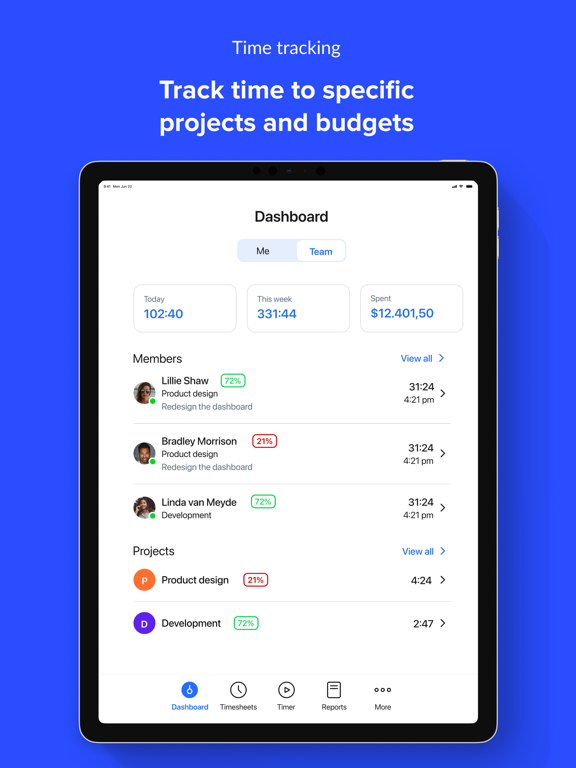
6 store screenshots


Pricing & paywalls
- Free to download
- Free to download
Ratings & reviews
-
5/5Where have you been all my life?
I’m an independent contractor, software consultant, and I perform lots of different projects with multiple tasks for clients and sometimes... ok all the time, I have difficulty in billing because I’m trying to remember what I did. Now there are lots of products on the market, but I literally was up and running within a few days! It’s very intuitive, and the start and stop for different projects and tasks saves me a huge amount of time plus I get to add notes! Now when I bill, I just import the time period, day, days, week, or weeks or even month that I want to bill for and boom I have a invoice to send to my client! The best part is that I know what my cost and bill rate is so I can see my margin all the time! Best thing that happened to me this year! Thanks guys!
iMac Home · 6 Aug 2026
-
5/5Easy to use
I use Hubstaff on my iPhone and the desktop version for work. My company requires all remote workers to track their time for projects (for billing purposes) and bonus opportunities. Both applications work great. I like the mobile app because I can log time from my phone and not have to log into my computer when tracking certain activities. It’s super easy to use and doesn’t take up a lot of space on my phone, so it doesn’t bog down performance or sap my battery.
Warthog Driver · 6 Aug 2026
-
5/5Very helpful in tracking time for projects
Since implementing Hubstaff, our team has gained so much insight into the time and effort that goes into our various projects and tasks. We have realized the value that comes from our work and can measure it with real data. We can also better optimize our time spent on certain tasks or clients in order to deliver our best service without sacrificing resources for other projects.
KyleKash · 6 Aug 2026
-
4/5Best time tracking app for virtual work
Hubstaff is my #1 recommend time tracking app. It’s the only time tracking app I use. As a recruiter for remote work, I advise many online business owners to use this app for managing their admin and encourage transparency in the remote work place. The only downside is the updates to the payments feature has made it more challenging to track weekly pay from previous weeks back. Outside of that, the app has been nothing but a breeze and allowed me to scale remote teams around the United States.
Not a fan of Microsoft · 6 Aug 2026
-
4/5Tested and Trusted
There are things to be desired about the platform, but I assume they will fix these issues with time. For instance, we have struggled with the web version, and wasted valuable time dealing with slow support on a login issue with one of our employees. But, the mobile and desktop apps work well, and cross platform use beats other time tracking apps. We tried two other programs while we waited for hubstaff to fix our issues and ended up coming back — I think that says a lot.
LiL' BuUuDy SoUfFfFfF · 6 Aug 2026
No store reviews collected for Google Play · US
Privacy & accessibility
Privacy
- Data Linked to You — App Functionality — Contact Info — Email Address Developer declared
- Data Linked to You — App Functionality — Contact Info — Name Developer declared
- Data Linked to You — App Functionality — Diagnostics — Crash Data Developer declared
- Data Linked to You — App Functionality — Identifiers — User ID Developer declared
- Data Linked to You — App Functionality — Location — Precise Location Developer declared
- Data Linked to You — Contact Info Developer declared
- Data Linked to You — Diagnostics Developer declared
- Data Linked to You — Identifiers Developer declared
- Data Linked to You — Location Developer declared
Accessibility
No accessibility labels collected yet.
Privacy
- Data collected — App functionality — Device or other IDs Developer declared
- Data collected — App functionality — Location — Precise location Developer declared
- Data collected — App functionality, Analytics, Account management — Personal info — Name Developer declared
- Data collected — App functionality, Developer communications, Account management — Personal info — Email address Developer declared
- Data collected — Developer communications — App info and performance — Crash logs Developer declared
- Data collected — Developer communications — App info and performance — Diagnostics Developer declared
- Data shared — Analytics — App activity — App interactions Developer declared
- Data shared — Analytics — Personal info — Email address Developer declared
- Data shared — Analytics — Personal info — Name Developer declared
- Data shared — App functionality, Analytics, Developer communications — Device or other IDs Developer declared
- Security practices — Your data is transferred over a secure connection — Data is encrypted in transit Developer declared
- Security practices — The developer provides a way for you to request that your data be deleted — You can request that data be deleted Developer declared
Accessibility
No accessibility labels collected yet.
Versions
-
2.2.48
- Resolved hang that could occur while filling out forms.
-
2.2.49
- Remove sign-in notifications, these are excessive in the context of background work. - Address a few rare termination events.
-
2.2.50
- Resolve some UI issues for our iPad users. - A few UI ease-of-use improvements.
-
2.2.51
- Consistently use the organization's calendar view in reports. - UI improvements in some areas such as visibility, contrast, controls and messages. - Site detection reliability enhancements. - Address a few rare crashes.
-
2.2.52
- Improved reliability when exiting job sites. - Assist users when tracking to a project from a different organization than the currently active one. - Project list UX improvements when tapping near top of the open keyboard.
-
2.2.53
- Improved reliability of background tracking. - Site detection reliability improvements.
-
2.2.54
- Improved reliability of background tracking. - Site detection reliability improvements.
-
2.2.55
- Improved reliability of background tracking. - Site detection reliability improvements.
-
2.2.57
- Improved reliability of background tracking. - Site detection reliability improvements.
-
2.2.58
- Resolved an issue in the latest iOS version which caused screens with a calendar icon to malfunction.
-
2.2.59
- Resolved an issue in the latest iOS version which caused screens with a calendar icon to malfunction. - Improvements to location accuracy and performance for organizations with many job sites.
-
2.2.60
- Resolved an issue in the latest iOS version which caused screens with a calendar icon to malfunction. - Improvements to location accuracy and performance for organizations with many job sites. - Ensure locations can be collected when required, especially when users accidentally revoke system permissions or disable location services.
-
2.2.61
- Resolved an issue in the latest iOS version which caused screens with a calendar icon to malfunction. - Improvements to location accuracy and performance for organizations with many job sites. - Ensure locations can be collected when required, especially when users accidentally revoke system permissions or disable location services.
-
2.2.62
- Resolved an issue in the latest iOS version which caused screens with a calendar icon to malfunction. - Improvements to location accuracy and performance for organizations with many job sites. - Ensure locations can be collected when required, especially when users accidentally revoke system permissions or disable location services.
-
2.2.63
- Resolve potentially missing time entries in reports and time sheets. - Warn when device locations become unreliable due to low power or overheating. - Improve reliability due to system heuristics around background processing. - Ensure location events are not lost when the system terminates or throttles the application.
-
2.2.64
- Ensure the in-app timer and limits are up-to-date after manually modifying the time sheet. - Resolve a potential cause for UI dead-lock in the app when starting/stopping the timer while tracking locations. - Resolve a cause for excessive notifications while location tracking was required but the device is too hot. - Support for iOS 26 beta.
-
2.2.65
- Improved detection of permission issues that may impede background location tracking when enabled.
-
2.2.66
- Show tracked time on the home screen in a live activity. - Improved clarity & language for notifications. - Further enhanced background tracking. - Support for shift-based location tracking.
-
2.2.67
- Show tracked time on the home screen in a live activity. - Improved clarity & language for notifications. - Further enhanced background tracking. - Support for shift-based location tracking.
-
2.2.68
- Users and managers can now submit and approve their timesheets directly from the Timesheets tab.
-
2.2.69
- Users and managers can now submit and approve their timesheets directly from the Timesheets tab.
-
2.2.70
- Users and managers can now submit and approve their timesheets directly from the Timesheets tab. - Resolves a regression that may inhibit passive location tracking for some users.
-
2.2.71
- Users and managers can now submit and approve their timesheets directly from the Timesheets tab. - Resolves a regression that may inhibit passive location tracking for some users. - Resolve a memory leak which may cause crashes when too many offline locations go unsent.
-
2.2.72
- Resolved an issue that may interfere with organizations set up for passive location tracking (while not working).
-
2.2.73
· 25 Jan 2026
- We've resolved a layout issue in the latest iOS version, where note input text was hidden behind the navigation bar.
- 2.2.76 · 31 Dec 2025
Alternatives
- Clockify Time Tracker — Same category + similar ratings
- TimeCamp Time Tracker — Same category + similar ratings
- Zoho Cliq - Team Communication — Same category + similar ratings
- Airtable — Same category + similar ratings
- ClickUp: Tasks, Chat, Docs, AI — Same category + similar ratings
- Sintra: AI Employees — Same category + similar ratings
Availability by market
- US
Data quality & evidence
- Page completeness
- Live store listing
- Last verified
- 7 Aug 2026
- Sources
- App Store, Google Play
- Apoku editorial summary has not been published yet.