
Quick verdict
- What it is
- Store information collected; an Apoku editorial summary is not yet published.
- At a glance
-
- Free to download
Categories and search queries
Official categories
- Productivity
- Social Networking
Apoku categories
Key functions
| Function | Availability | Access | Scope | Evidence |
|---|---|---|---|---|
| Free app | Yes | Free | Context-specific | Store published |
| Siri Shortcuts | Unknown | Unknown | Scope unknown | Store published |
Screens
App Store
18 store screenshots

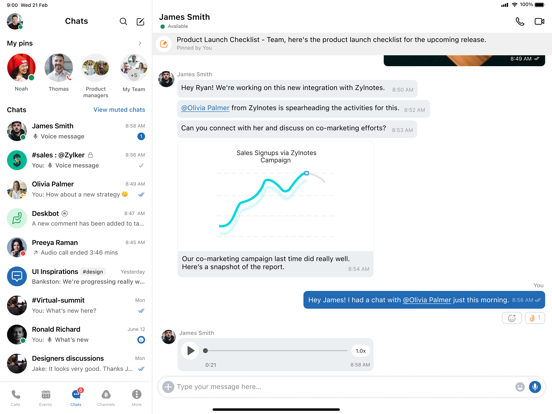

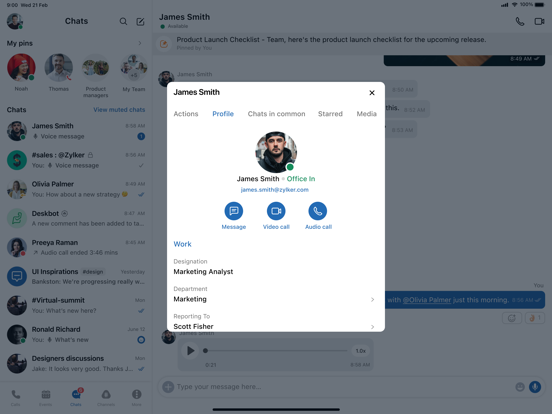
Pricing & paywalls
App Store
- Free to download
Ratings & reviews
App Store
-
5/5The best communication app, especially if you are invested in the Zoho ecosystem.
After being on the Zoho One plan and invested in the entire Zoho ecosystem for almost eight years, we decided at the end of last year to switch to Slack and other applications. Slack is great, but what you lose is the integration, in particular, let's say, with Zoho Click across all the apps that you work with. For example, if you're inside of Zoho CRM, Zoho Books, Zoho Desk, Zoho Projects, having Slack as a whole Click integrated on the web interface on the desktop app is very useful. The context switching is reduced, and user adoption skyrockets because they don't have to go learn a new interface, a different application, a different set of logins. Zoho has come a long way of providing a truly integrated solution. Let me tell you this: at the price point, you're not going to find anything better in the United States. For $45 month-per-month, you get easily $1,000 worth of software, and that's not an exaggeration. If you're looking to leave the Microsoft ecosystem, the Google Workspace ecosystem, without having to hobble together a patchwork of different applications and to gain the benefits of having a holistic solution and tech stack, go with Zoho Click. Go with Zoho One. You will not regret it.
JPonAAS · 7 Aug 2026
-
5/5One of the most relevant settings was removed
Why was the option to halt notifications removed? On my days off I could halt notifications from the app for a duration of 8 hours or a whole day or a whole week so my phone stops blowing up from my work chat and now it’s not even available in settings anymore and my phone is going crazy it’s super inconvenient even when I log out of the app. Thanks guys 👎🏻 I don’t want to feel like I’m at work on my days off being that setting back please.
Mayazapata1 · 7 Aug 2026
-
3/5Please fix the bugs!
I use all zoho applications for my job and I love being able to use the apps on my phone as well, especially zoho Cliq. However recently I’m noticing it really needs to be fixed. The program slows my phone down entirely when it’s open, it also randomly crashes, and often has trouble keeping up with my pace of typing. Sometimes i press the backspace button and nothing happens. I have to close the entire application, then go back in and erase whatever text in the message i intended to erase. Please fix this immediately, it’s really becoming quite an inconvenience. I believe it may be zoho as a whole, as the Cliq application also crashes on my computer (windows) at times. Regardless it’s a great program if you can get it up to speed with 2020 technology and pacing.
mbgiunta · 7 Aug 2026
-
1/5Abusive Notifications
The developers never concede to any feedback regarding their inability to abide by their own notification settings and it is frankly quiet annoying. I have had issues with Cliq's notification settings and they are never willing to do anything about it. Example, I have it set to only send me a push notification on my phone only if there has been 10 minutes of inactivity on the desktop. I can responding to a message I just received and get a push notification. Fix your abusive notification settings and make them follow the rules you are telling the user. Edit: Simultaneous notifications should've never been an option for a messaging app. When users have multiple devices it is very disruptive when for one notification you'd get 2 to 3 times the notifications for every single message.
Wary wombat · 7 Aug 2026
-
5/5Way surpassed expectations
I was strongly recommended this app by a friend to use for my startup tech company. I was very hesitant and reluctant as I had always used either Slack or Teams in the past. I was extremely surprised that I found that Cliq to be significantly nicer than Slack. It’s not as good as Teams obviously but it’s WAAAY less expensive which gives it the edge for me at least. Highly recommend.
Jim10006 · 7 Aug 2026
Privacy & accessibility
App Store
Privacy
- Data Linked to You — Analytics — Diagnostics — Crash Data Developer declared
- Data Linked to You — Analytics — Diagnostics — Other Diagnostic Data Developer declared
- Data Linked to You — Analytics — Diagnostics — Performance Data Developer declared
- Data Linked to You — Analytics — Identifiers — Device ID Developer declared
- Data Linked to You — Analytics — Identifiers — User ID Developer declared
- Data Linked to You — Analytics — Other Data — Other Data Types Developer declared
- Data Linked to You — Analytics — Usage Data — Other Usage Data Developer declared
- Data Linked to You — Analytics — Usage Data — Product Interaction Developer declared
- Data Linked to You — App Functionality — Contact Info — Email Address Developer declared
- Data Linked to You — App Functionality — Contact Info — Name Developer declared
- Data Linked to You — App Functionality — Contact Info — Phone Number Developer declared
- Data Linked to You — App Functionality — Contacts Developer declared
- Data Linked to You — App Functionality — Diagnostics — Crash Data Developer declared
- Data Linked to You — App Functionality — Diagnostics — Other Diagnostic Data Developer declared
- Data Linked to You — App Functionality — Diagnostics — Performance Data Developer declared
- Data Linked to You — App Functionality — Identifiers — Device ID Developer declared
- Data Linked to You — App Functionality — Identifiers — User ID Developer declared
- Data Linked to You — App Functionality — Location — Coarse Location Developer declared
- Data Linked to You — App Functionality — Location — Precise Location Developer declared
- Data Linked to You — App Functionality — Other Data — Other Data Types Developer declared
- Data Linked to You — App Functionality — Search History Developer declared
- Data Linked to You — App Functionality — User Content — Audio Data Developer declared
- Data Linked to You — App Functionality — User Content — Other User Content Developer declared
- Data Linked to You — App Functionality — User Content — Photos or Videos Developer declared
- Data Linked to You — Contact Info Developer declared
- Data Linked to You — Contacts Developer declared
- Data Linked to You — Diagnostics Developer declared
- Data Linked to You — Identifiers Developer declared
- Data Linked to You — Location Developer declared
- Data Linked to You — Other Data Developer declared
- Data Linked to You — Search History Developer declared
- Data Linked to You — Usage Data Developer declared
- Data Linked to You — User Content Developer declared
Accessibility
No accessibility labels collected yet.
Versions
App Store
-
6.0.41
- We’ve made enhancements to improve the overall functionality and experience of our mobile app.
-
6.0.42
- We’ve made enhancements to improve the overall functionality and experience of our mobile app.
-
6.0.43
- We’ve made enhancements to improve the overall functionality and experience of our mobile app.
-
6.0.44
- We’ve made enhancements to improve the overall functionality and experience of our mobile app.
-
6.0.45
- We’ve made enhancements to improve the overall functionality and experience of our mobile app.
-
6.0.46
- Fixed stratus image download endpoint issues across all platform images (bot, applet, widget, and extension). - Resolved an issue where user search was behaving incorrectly. - Fixed an issue where last seen was incorrectly displayed as 56 years ago for some users.
-
6.0.47
- Improved stability for widget extensions. - Enhanced reliability when using Siri. - Smoother experience when opening specific channel threads.
-
6.0.48
- Enjoy smoother screen sharing and an enhanced experience in large meetings. - Improved overall performance by removing unnecessary background tasks. - Updated app icon with support for iOS 26.
-
6.0.49
- We’ve made enhancements to improve the overall functionality and experience of our mobile app.
-
6.0.50
- Enhanced searches using mentions and improved interactions with special mentions for a smoother experience. - Improved message pinning when using custom time. - Fixed an issue where the share extension crashes when sharing content from other applications.
-
6.0.51
- We’ve made enhancements to improve the overall functionality and experience of our mobile app.
-
6.0.52
- User search results are now more consistent and reliable. - Fixed a bug that caused the application to close unexpectedly after ending a call. - General performance improvements to keep the application running reliably.
-
6.0.53
- We’ve made enhancements to improve the overall functionality and experience of our mobile app.
-
6.0.54
- Enhanced data security and updated remote work settings for a smoother experience.
-
6.0.55
- We’ve made enhancements to improve the overall functionality and experience of our mobile app.
-
6.0.56
- We’ve made enhancements to improve the overall functionality and experience of our mobile app.
-
6.0.57
- Waiting Rooms are now enabled by default for new meetings to enhance security. - Improved meeting reliability to ensure your selected settings are applied correctly every time you start a meeting. - General bug fixes to deliver a smoother, more consistent experience.
-
6.0.58
- Enhanced external collaboration by resolving issues in settings that impacted usability. - Fixed rare crash scenarios when a meeting starts and when participants join and leave. - Improved overall meeting stability and reliability for a consistently smooth experience.
-
6.0.59
- Enhanced onboarding to deliver a more intuitive and guided start. - Resolved an issue where a loading screen appeared on returning to the app. - Improved overall app smoothness for a more seamless experience.
-
6.0.60
- Improved the call details screen and status display for a smoother experience. - Fixed issues with message actions in threads and improved bot chat displays. - Resolved an issue that could cause the app to close unexpectedly when ending a call.
-
6.0.61
- Enhanced Video Experience: Multitask with confidence, thanks to smoother video playback and improved whiteboard viewing in Picture-in-Picture mode. - Chat Updates: Leaving chatlets is now quicker and easier with a new menu option. - Performance Improvements: Connectivity is more reliable, and streaming interruptions are now less likely to get in your way.
-
6.0.62
- Tired of re-opening the app after receiving a notification? Not anymore. We have fixed an issue that could cause the app to close unexpectedly when receiving notifications.
-
6.0.63
- Fixed an issue that could cause a crash when adding a new user while editing a recurring event.
-
6.0.64
- Fixed an issue that could cause a crash when adding a new user while editing a recurring event.
-
6.0.65
· 21 Jul 2026
- Stay connected on work devices with security restrictions with better support for calls and meetings. - Never miss an update with voice alerts on managed devices. - Enhanced compatibility with enterprise security settings for a smoother, more secure experience.
Alternatives
- Odoo — Same category + similar ratings
- ClickUp: Tasks, Chat, Docs, AI — Same category + similar ratings
- Jira Cloud by Atlassian — Same category + similar ratings
- Hubstaff Time Tracker — Same category + similar ratings
Availability by market
- US
Data quality & evidence
- Page completeness
- Live store listing
- Last verified
- 7 Aug 2026
- Sources
- App Store, Google Play
- Apoku editorial summary has not been published yet.