
Quick verdict
- What it is
- Store information collected; independent summary not yet available.
- At a glance
-
- Free to download
Categories and search queries
Official categories
- Health & Fitness
- Medical
AppCorpus categories
Key functions
| Function | Availability | Access | Scope | Evidence |
|---|---|---|---|---|
| Free app | Yes | Free | — | Store published |
Screens
App Store
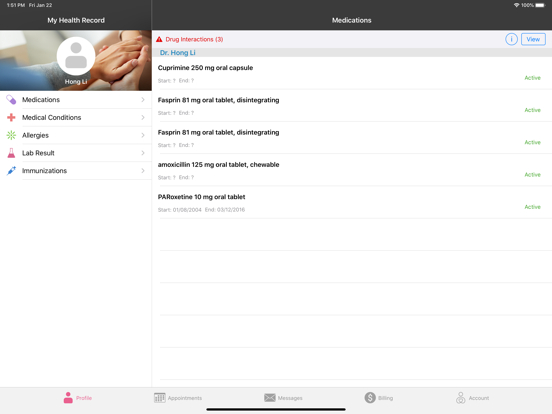
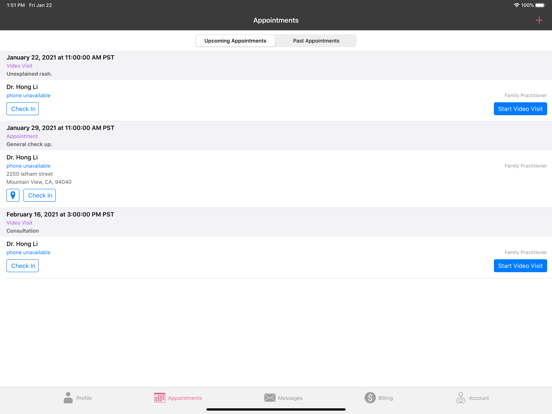
15 store screenshots


Pricing & paywalls
App Store
- Free
Ratings & reviews
App Store
-
2/5Limited app with pointless “features“
Appointments and Messaging are the only reasons to use this app. As a user, I have zero control over my profile. What poor design. I have OTHER doctors and OTHER medications that I cannot add. I can’t add any immunizations either. Billing is empty but I’m definitely getting charged. I can’t even change the card on file or see any billing history. I feel like this app was created just to say “we have an app!”
ephelan_ · 7 Aug 2026
-
1/5Terrible App
This is App is sooooo bad. My new doctor’s medical practice uses this App for test results and direct communication with their medical team. First, the app sorts test results with oldest results first, so after a year I have to spend 10 minutes swiping down through my old test results in order to see my recent test results, which are at the bottom of the list. There is no way to resort them with recent test results first. Such a poorly designed user experience. Second, although I compose communications to the medical team in organized paragraph form, once sent, they appear as one long run-on paragraph. This week, although I’m still logged in to the app, it has lost all of my information. No messages, test results, appointment, billing or any of my information is there - completely wiped out. I called customer service and got a voice prompt saying customer service voicemail has been disabled and I should message customer service on the app. That customer service communication option on the app has also been disabled. Therefore, there is no way to reach customer service. This app is complete garbage.
Jackduser · 7 Aug 2026
-
1/5Password Purgatory
I have had to change my password about five or six times now. The login page is extremely buggy but the worst thing is I can't see what I'm typing, even retroactively. This is beyond frustrating. Also the app does not let me mark any messages as read so my little envelope says I have seven messages waiting for me; I've seen all of them. This also affects the health apps folder on my phone's screen because it doesn't differentiate and tell me which app has messages until I open the folder. In my profile it lists the prescription prescriptions I'm on with a big red "Warning!" at the upper left that there are interactions but when I click "View" it returns a page saying "invalid drug identification" for each RX. I would drive across town for an in person appointment rather than have to deal with this app and portal.
Huldah314 · 7 Aug 2026
-
1/5Unable to read messages
My new provider uses this app and I sent a message regarding medication questions, I checked the app every day and never saw a response. I gave my provider grace being that it was a holiday, but after 8 days of no response, I called the office to figure out why I was being neglected. My poor provider responded the morning after I sent my message with the helpful information but the app never loaded any responses. I’ve logged out and back in, deleted the app, redownloaded, and tried to find some way to get customer service help via the app or website and can’t find an option to speak to someone so I have no choice but to give a negative review.
dianne-lonnie · 7 Aug 2026
-
1/5Poor maintenance and interactivity with EHR
I utilize EHR, DrChrono for my private practice. Onpatient has so many flaws with not letting patients see their information I put on the portal. When you want to drop a report, you only can do one at a time. Many of my patients can’t even get their image and demographic information to load. Even my Apple users struggle. Lately, patients can’t even see documents sent to them. When you want to upload documents for them to fill out, you can differentiate of this is for new patients or not. They need to improve the product and work with DrChrono to fix this ASAP.
JenoPsychNP · 7 Aug 2026
Privacy & accessibility
App Store
Privacy
- Data Not Collected Developer declared
Accessibility
No accessibility labels collected yet.
Versions
App Store
-
2.9.2
- Bug fixes
-
2.9.3
- Redesigned message attachments to allow you to view multiple files.
-
2.9.4
- Improved appointment workflow to indicate whether a doctor office has availability or not. - Bug fixes.
-
2.9.5
- Create Video Visit appointments. - Take Video Visit calls. - View & sign consent forms assigned to you by your doctor during the video visit. - Split upcoming appointments and past appointments into 2 sections. - Redesigned map view for appointments. - Additional Bug fixes.
-
2.9.6
- Bug fixes.
-
2.9.7
- Dark Mode - Dark Mode is available on iOS 13 & iOS 14. Go to your device Display & Brightness settings and turn on Dark Mode or use the Automatic setting to see OnPatient in Dark Mode. - Updated app to better support newer iOS versions. - Bug Fixes.
-
2.9.8
- Added Appearance setting to Account section so you can manually control the appearance of Light Mode & Dark Mode. - Bug fixes.
-
2.9.9
- Updated appointment check-in process. - Bug fixes.
-
3.0
- Bug fixes.
-
3.0.1
- Bug fixes.
-
3.0.2
- Added description to Custom Demographics fields. - Changed "Check In" button to be called "Fill Paperwork". - Bug fixes.
-
3.0.3
- Fixed an issue where Billing Statements were not showing up.
-
3.0.4
- Bug fixes
-
3.0.5
- Bug fixes.
-
3.0.6
- Updated Video Visit module. - Bug fixes.
-
3.0.7
- Fixed issue where certain doctor rows were disable even though they allow appointment scheduling. - Additional bug fixes.
-
3.0.8
- Bug fixes.
-
3.0.9
- Added the ability to revoke representative access.
-
3.1.0
- Bug fixes.
-
3.1.1
- Bug fixes.
-
3.1.2
This release includes minor bug fixes and performance improvements.
-
3.1.3
In this release, we fixed some bugs. - Fixed an issue where the video visit option was inconsistently activated. - Fixed an issue where video visits were scheduled by the patient through the OnPatient iOS app even though the relevant setting was not turned on in Offices.
-
3.1.4
Bug Fixes Password Autofill - We fixed an issue where the password did not autofill while using Apple’s autofill functionality. With this update, the password now autofills, ensuring a smoother and more efficient login experience. Improved Message Composition Access: - The compose icon in the Messages section of the OnPatient patient portal has been replaced with the Compose text label. This change enhances clarity and ensures patients can easily start a new message without confusion. New Features Support for multiple file types as Attachments in Messages Patients can attach files when composing or responding to messages in the OnPatient patient portal. You can share important documents, such as medical records, PDFs, and images. - Attach button: The new Attach button has been added to the message composition area for both new messages and replies, alongside the existing photo upload feature. - Supported file types: The new functionality allows you to upload multiple file formats, including PDF, JPG, and PNG. - File upload: Easily browse and select files from your device’s storage (mobile) to attach them to your messages.
-
3.1.5
This release includes several fixes and enhancements. Please update to ensure continued smooth performance. • Resolved an issue where the app would crash when opening an attached image in the Message Center. • Maintenance Updates: • Updated various libraries to enhance app performance and stability. • Adopted the new iOS 18 and iPadOS tab bar controller for a more modern and seamless navigation experience. • Dropped support for iOS 15 to focus on improving features and performance on newer iOS versions. • Enhanced the logic for allowing users to message doctors based on the permissions set by the doctor. • Messages are now displayed with the correct font and size.
-
3.1.6
· 1 Oct 2025
This release consists of resolutions to ensure better iOS 26 performance Resolutions - Addressed an issue for iOS 26 that caused the billing screen loading indefinitely
Alternatives
- VSee Clinic for Patient — Same category + similar ratings
- Fullscript — Same category + similar ratings
- Charm mPHR — Same category + similar ratings
- Cedars-Sinai — Same category + similar ratings
- Texas Health MyChart — Same category + similar ratings
- Elation Passport for Patients — Same category + similar ratings
Availability by market
- US
Data quality & evidence
- Page completeness
- Live store listing
- Last verified
- 7 Aug 2026
- Sources
- App Store
- Independent summary has not been published yet.