
Quick verdict
- What it is
- Store information collected; independent summary not yet available.
- At a glance
-
- Free to download
Categories and search queries
Official categories
- Education
- Productivity
AppCorpus categories
Key functions
| Function | Availability | Access | Scope | Evidence |
|---|---|---|---|---|
| Free app | Yes | Free | — | Store published |
Screens
12 store screenshots


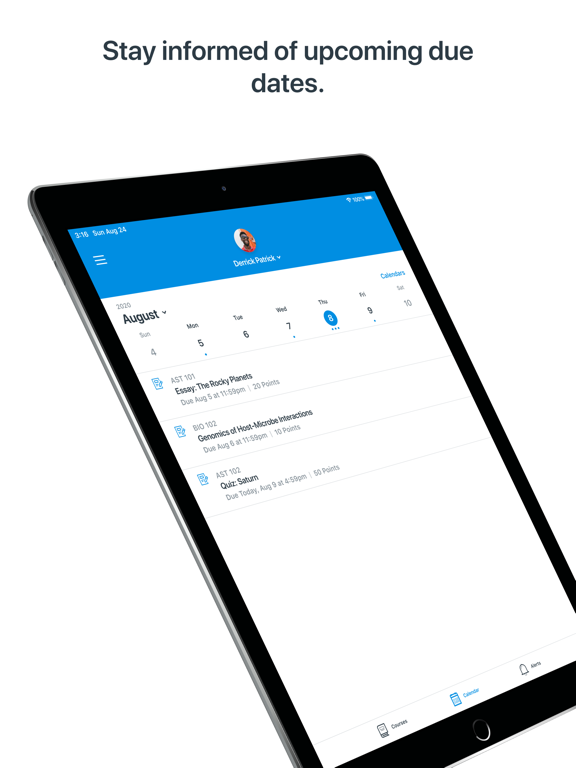

15 store screenshots


Pricing & paywalls
- Free
- Free to download
Ratings & reviews
-
5/5Canvas
Great app overall. These are the things I’ve noticed thus far and I hope this feedback is helpful. Some courses show in ascending order and some show in descending order by way of the date. It would be nice to see that each course only went one way or the other for searching purposes. Auto checks on the side of each finished assignment would be nice as well. Status seems to auto change to viewed on some if not most assignments but once data or uploads were entered by the student if that initiated an auto checking system I think both students and parents might find that helpful. I’m sure a lot goes into programming as it is and I just wanted to share what I felt is an honest review. The parent side of the app I overall find as being very user friendly and enjoy being able to simply send a quick message to the teachers as opposed to searching down specific emails. Great job with that : ) I also like the customizable notifications as well. Thanks!
Johnnys Dad 3rd · 30 Aug 2026
-
5/5More confusing than clarifying
The app appears to allow the content provider (teachers) to include so little information in a post that it generates more questions than answers. Sometimes there is only a title with no content. Often, a message is “scheduled “ for a future date while another message, with conflicting information, precedes it. Also, messages meant for as few as one student are sent to many end users, causing students and parents to respond via other channels (email) trying to clarify if the message actually applies to them. I realize these problems are mostly due to how the user is creating the message, but the app needs some rules implemented to force correct usage. In addition, significantly deeper training is needed for message creators (teachers) on how to generate content that is clear, correct, timely and applies to all that receive it.
A-Little-Help-Please? · 30 Aug 2026
-
2/5Cumbersome and limited
I don’t know if Canvas has the capability of being a great application, but I do know that San Jose unified is using the student and the parent versions of the app in a way that makes it impossible to see an easy representation of today’s work across all of the classes. There are no sorting features to sift through complete and incomplete assignments. Some teachers use one area of the app to put their assignments and other teachers use another area. Sometimes assignments that are prepped and ready to go end up not being covered by the teacher that day, but still show up in the assignments in the coming days as not turned in. It’s really hard to keep everything straight. Also, I don’t know if the parent app is supposed to be so functionally useless, but I find that it has no value whatsoever. All of that said, the district and the teachers had so little time to put distance-learning together, and it’s a miracle that we have what we have. I am grateful that my child is at least able to attend virtual classes and stay engaged with teachers and peers. The teachers are all working so hard, much harder than my student is working.
DMullinsMusic · 30 Aug 2026
-
2/5Clunky & Frustrating
The concept of this app is great. I’m relatively tech savvy, but find the execution frustrating. In my case, when I want to quickly scan over grades for my 3 kids, I have to weed through years of past courses on the list that appear in alphabetical order. Not all classes, but enough to make it a bit confusing. I don’t need to see or sort through 6th grade classes for my freshman. There isn’t an obvious way to remove the courses I don’t need to see anymore. I would appreciate more control to customize the information I want to see. There also isn’t a way to mass clear notification alerts. In my opinion, a red notification icon listing a count totaling hundreds of unread messages with no way to quickly clear them, is irritating. Early message settings that sent an notification every time a teacher created an assignment, etc, racks up way more notifications than anyone would want or can reasonably handle. Multiply that across 3 kids and all their classes and it quickly gets overwhelming. Giving users more control in the app would be greatly appreciated.
ericf83 · 30 Aug 2026
-
3/5Needs improvement
Canvas is good in which it allows the parents to be linked to view the child’s assignments and performance in class to communicate with teachers for better understanding. However, the bad part about it is that the teachers, students, and parents all have different view from the same portal. On the parent’s view, I’ll see missing, late, or non-submitted work. Then, I ask my child about it and he/she will check and show me that it is turned in and gets frustrated with me because any time I don’t see work submitted on my view that is due, I’ll ask again because I don’t see or remember that he/she told me it was submitted another few days or week later as it’s still showing the same status. I’ll check with the teacher and the teacher will say that he/she does not see it submitted or that it’s not graded yet because it’s turned in late so grade average will still show low, or they’ll comment on the child’s work that we’re not able to see on our view. Teachers are busy. So, they get frustrated when they see many emails from parents.
Parentvu · 30 Aug 2026
-
5/5
fabulous
Rugie Saccoh · 29 Jul 2026
-
1/5
I can't get the app to connect to my school.
Karen Morris · 29 Jul 2026
-
1/5
As a parent, this app has been a pain to deal with, pending tasks from courses gives no alerts and emails received don't open the app. a nightmare. Also messages don't include child names.
Alex · 29 Jul 2026
-
3/5
I think some stuff was updated on the app. i used to be able to see all of my kids assignments on their calendar when i selected their name. Now I can only click a few classes (it says i can only select up to 10 classes between all students and I have 4 kids in middle and high school). I would also like to have an option for push notifications so i know what assignments are due/late/missing. other than that it does work for it's intended purpose when i remember i have it
Bridget Durham · 29 Jul 2026
-
5/5
this app is super helpful when teachers are on top of data entering
Crystalaura Gunter · 29 Jul 2026
Privacy & accessibility
Privacy
- Data Linked to You — Analytics — Diagnostics — Crash Data Developer declared
- Data Linked to You — App Functionality — Contact Info — Email Address Developer declared
- Data Linked to You — App Functionality — Contact Info — Name Developer declared
- Data Linked to You — App Functionality — Identifiers — User ID Developer declared
- Data Linked to You — App Functionality — Other Data — Other Data Types Developer declared
- Data Linked to You — App Functionality — User Content — Audio Data Developer declared
- Data Linked to You — App Functionality — User Content — Emails or Text Messages Developer declared
- Data Linked to You — App Functionality — User Content — Other User Content Developer declared
- Data Linked to You — App Functionality — User Content — Photos or Videos Developer declared
- Data Linked to You — Contact Info Developer declared
- Data Linked to You — Diagnostics Developer declared
- Data Linked to You — Identifiers Developer declared
- Data Linked to You — Other Data Developer declared
- Data Linked to You — User Content Developer declared
- Data Not Linked to You — Analytics — Diagnostics — Other Diagnostic Data Developer declared
- Data Not Linked to You — Analytics — Usage Data — Other Usage Data Developer declared
- Data Not Linked to You — Analytics — Usage Data — Product Interaction Developer declared
- Data Not Linked to You — App Functionality — User Content — Customer Support Developer declared
- Data Not Linked to You — Diagnostics Developer declared
- Data Not Linked to You — Usage Data Developer declared
- Data Not Linked to You — User Content Developer declared
Accessibility
- Captions — SUPPORTED Store published
- Dark Interface — SUPPORTED Store published
- Differentiate Without Color Alone — SUPPORTED Store published
- Larger Text — SUPPORTED Store published
- Sufficient Contrast — SUPPORTED Store published
- VoiceOver — SUPPORTED Store published
Privacy
- Data collected — Analytics — App activity — App interactions Developer declared
- Data collected — Analytics — App info and performance — Crash logs Developer declared
- Data collected — Analytics — App info and performance — Diagnostics Developer declared
- Data collected — Analytics — Device or other IDs Developer declared
- Data collected — Analytics — Location — Approximate location Developer declared
- Data collected — App functionality — Files and docs Developer declared
- Data collected — App functionality — Messages — Other in-app messages Developer declared
- Data collected — App functionality — Photos and videos — Photos Developer declared
- Data collected — App functionality — Photos and videos — Videos Developer declared
- Data collected — App functionality, Account management — Personal info — Name Developer declared
- Data collected — App functionality, Analytics, Account management — Personal info — User IDs Developer declared
- Data collected — App functionality, Fraud prevention, security, and compliance, Account management — Personal info — Email address Developer declared
- Data shared — Analytics — App activity — App interactions Developer declared
- Data shared — Analytics — App info and performance — Crash logs Developer declared
- Data shared — Analytics — App info and performance — Diagnostics Developer declared
- Data shared — Analytics — Device or other IDs Developer declared
- Data shared — Analytics — Location — Approximate location Developer declared
- Security practices — Your data is transferred over a secure connection — Data is encrypted in transit Developer declared
- Security practices — The developer provides a way for you to request that your data be deleted — You can request that data be deleted Developer declared
Accessibility
No accessibility labels collected yet.
Versions
-
3.11.0
- Embedded videos, including Studio files now can be played in full screen or in picture-in-picture mode on iOS 17. - Enabled embedded videos on the front page to play. - The main Calendar screen was updated with new visuals. - Calendar filter screen was updated with new visuals and the capability to filter by the personal calendar as well.
-
3.12.0
- Added Irish language localization. - Added Hindi language localization. - The minimum supported OS version has been increased to iOS 16. - Fixed videos not being played in inbox messages. - Fixed some courses and groups not appearing in the calendar filter. - Fixed where graded assignments were not showing the graded label on the assignments details screen. - Fixed where threshold alerts were shown for courses where quantitative data restriction is enabled.
-
3.13.0
- Added submission feedback button to assignment details screen.
-
3.14.0
- Add support to the submission viewer to properly display for non-enhanced assignments. - Grades list utilize the screen more wisely. - Fixed issues on the calendar event screen. - Fixed an issue where submission status would sometimes display an incorrect value.
-
3.15.0
- Improved course file authentication. - Fixed alert list not refreshing after an alert is read or dismissed. - Fixed some assignments being visible on the grades screen when they shouldn't be. - Fixed “Based on graded assignments” toggle not updating letter grades.
-
3.16.0
- Improved support for New Quizzes. - Fixed "No Submission" & "On Paper" assignments displaying “Not Submitted” status. - Fixed some tab bar issues on iPads running iOS 18. - Fixed file uploads failing when the filename contained a quotation mark. - Fixed the calendar not displaying the filter list and events properly in some cases.
-
3.17.0
- Improved accessibility on various screens. - Fixed a bug that caused the grade list to become unresponsive sometimes.
-
3.18.0
- Inbox received a new design and some extra functions. - Updated the app icon, now it also supports Dark and Tinted modes on iOS 18. - Updated dark colors to provide better accessibility. - Landscape mode is now supported. - Reduced loading time on the Grades screen. - Improved accessibility on various screens. - Fixed embedded Studio videos not showing in some cases.
-
3.19.0
- Inbox signature is now added to inbox messages if the feature flag is enabled. - Added Settings menu with System Settings option for dark mode. - Added re-login support for expired sessions. - Improved accessibility on various screens. - Removed the "Canvas on Github" link from the settings screen.
-
3.20.0
- The current grading period is now auto-selected when entering the grades screen. - Fixed letter grades being displayed incorrectly in some cases. - Fixed grades screen showing all observed users' assignments not just the selected observee's.
-
3.21.0
- Added further explanation to the QR login screen. - Improved accessibility on various screens. - Fixed "Submission & Rubric" page displaying only the assignment's details. - Fixed an issue that made the grade list screen jump when scrolling. - Fixed some content being truncated when switching Dark/Light themes.
-
3.21.1
- Fixed a bug that caused the camera not appearing on the QR login screen. - Fixed font size issue with navigation bar subtitled headers on (200%+) accessibility size.
-
3.22.0
- Redesigned Instructure logo. - Redesigned Canvas Mobile app logos. - Added support for displaying custom grade statuses.
-
3.22.1
- Redesigned Instructure logo. - Redesigned Canvas Mobile app logos. - Added support for displaying custom grade statuses. - Fixed infinite loading animation upon login.
-
3.23.0
- Improved scrolling performance on grades list screen.
-
3.24.0
- Fixed the reply button from the menu in Inbox’s navigation bar adding all recipients. - Fixed some file links not loading from rich content.
-
3.25.0
- Discussion checkpoints are now handled in the grade list, and the syllabus summary. - Fixed assignments not loading in some cases. - Fixed QR code login failing for some users. - Fixed groups from concluded courses being shown in All Courses view. - Fixed file downloads not working on the submission screen. - Fixed observers unable to see quiz submission feedback when Assignment Enhancements is enabled. - Fixed To-Dos for pages and ungraded discussions not being shown in the syllabus summary. - Fixed course picker not loading for new messages in some cases. - Fixed some crashes affecting iOS 26 users.
-
3.26.0
- Improved submission status display on various screens. - Added immersive experience for embedded videos for institutions where this feature is enabled. - Future grading periods now appear when filtering grades. - Improved submission status display for discussion checkpoints. - App icons now support Liquid Glass.
-
3.27.0
- Added Liquid Glass support. - Added Korean language localization. - Improved searching on the "Find your school" screen. - Improved scrolling performance on grades screen. - Fixed not showing the correct login screen in some cases. - Fixed displaying points instead of letter grade for assignments with letter grade display and zero possible points. - Fixed layout issues when the camera is opened to attach photos in the Inbox.
-
3.27.1
- Renamed “Submission & Rubric” button to “Submission & Feedback” on Assignment Details. - Fixed freezes occurring on iOS 26 on Grade List screen. - Fixed assignments not appearing if there are more than 10 grading periods. - Fixed a bug in Inbox where the "reply" button incorrectly appeared.
-
3.27.2
- Renamed “Submission & Rubric” button to “Submission & Feedback” on Assignment Details. - Fixed freezes occurring on iOS 26 on Grade List screen. - Fixed assignments not appearing if there are more than 10 grading periods. - Fixed a bug in Inbox where the "reply" button incorrectly appeared.
-
3.27.3
- Front page tab is now always visible when the front page is available for a course. - Fixed urls pointing to cross-shard course files in Syllabus not working.
-
3.28.0
- Discontinued support for iOS 17. - Added support for prompting users when a required app update is available. - Added support for MDM logins to the New Canvas Login UI. - Increased security for data protection. - Updated privacy settings in applicable regions. - Fixed a bug about email link formatting.
-
3.28.1
- Inbox message video & audio recordings now play in an in-app player instead of opening in Safari.
-
3.28.2
· 16 Jul 2026
- Improved file download for conversation and syllabus attachments.
-
3.29.0
· 3 Aug 2026
- Improved filters for the grades list screen. - Improved file download for conversation attachments. - Fixed detail screens losing their content after rotating the device. - Fixed PDF files opening with inverted colors in dark mode on iOS 26.
- 4.13.1 · 17 Jul 2026
Alternatives
- Campus Parent — Same category + similar ratings
- ParentVUE — Same category + similar ratings
- ParentVUE (New) — Same category + similar ratings
- HCPS Focus Portal — Same category + similar ratings
- LINQ Connect — Same category + similar ratings
- MyPaymentsPlus — Same category + similar ratings
Availability by market
- US
Data quality & evidence
- Page completeness
- Live store listing
- Last verified
- 30 Aug 2026
- Sources
- App Store, Google Play
- Independent summary has not been published yet.