
Quick verdict
- What it is
- Store information collected; independent summary not yet available.
- At a glance
-
- Free to download
Categories and search queries
Official categories
- Weather
- Utilities
AppCorpus categories
Key functions
| Function | Availability | Access | Scope | Evidence |
|---|---|---|---|---|
| Free app | Yes | Free | — | Store published |
Screens
App Store
29 store screenshots


Pricing & paywalls
App Store
- Free
Ratings & reviews
App Store
-
3/5John McEnroe: "You can't be serious?!"
My initial rating of one star was an error. I meant to average the one-star on onboarding with the five-star function. I don't know how I made that mistake. The onboarding (obtaining the API) is the worst user experience I've encountered in my 40 years of using a computer. I managed it but I don't have the heart to recommend it to anyone but my software-developer son. It's obvious that the onboarding was designed without adequate attention to the iPhone, though that's the obvious device where it will be used. The iPhone screen (I'm using the largest iPhone made) can't display the information on the initial screem without a correct guess to how to manipulate it. You input the API and nothing happens when you hit return. Ah,, there's a tiny "validate" button in the corner. Btw, I initially used iCloud "hide my email," I got nothing and had to input my regular email. The second API from the gov site was a similar terrible experience. One star for the onboarding and five for the app function. Thanks for doing this but please have someone go through this with a smart phone to reference.
Gebloom · 6 Aug 2026
-
5/5AirNow [Q&A]
I thought recommended meant I could use only the AirNow API with this app. I admit it is my mistake. However, the documentation could be improved. It seems like a useful app. Spreading awareness is great. Thanks regardless. What I am asking is: why is an AirNow key insufficient by itself and what exactly does that US organization provide that the global API does not? [Edit: thanks for the answers. Second edit: as of 2025 August 3 it seems AirNow is down. IQAir remains. Breathable works for me!]
Infini19A0 · 6 Aug 2026
-
5/5Well designed, works well
This is such a cool app for monitoring AQI. I wish it had a menubar option as well for quickly glancing!
guybrush3pwd · 6 Aug 2026
-
2/5I want to like it but the barrier to set up too high.
I am looking for a good widget that will show current AQI in my location and although the widget appeared on my screen just fine and the app was able to detect my location, it’s not able to gather location-based air-quality data without me setting up an account or getting API codes from external sources? I don’t understand why there are additional hoops. I didn’t have to do any of that for my pollen data widget or my UV index widget. I hope the developers can figure this out for a smoother set-up because it’s a promising, well-organized app with a nice, clean interface, but it’s still a work in progress from my perspective and not useful to me as is.
joleigh1982 · 6 Aug 2026
-
5/5Quality Air Monitor
The functions work very well once the api keys are entered, and the options for the design of this is a very nice touch, subtle animations and nice details added in makes it very complete and customizable. Well done, Karbon.
luxuryluke · 6 Aug 2026
Privacy & accessibility
App Store
Privacy
- Data Not Linked to You — App Functionality — Location — Coarse Location Developer declared
- Data Not Linked to You — App Functionality — Location — Precise Location Developer declared
- Data Not Linked to You — Location Developer declared
Accessibility
- Dark Interface — SUPPORTED Store published
- Differentiate Without Color Alone — SUPPORTED Store published
- Larger Text — SUPPORTED Store published
- Sufficient Contrast — SUPPORTED Store published
- VoiceOver — SUPPORTED Store published
Versions
App Store
- 1.0
-
1.1
• Customize Emoji Scale! Choose from one of several pre-made, sometimes-goofy sets, or pick your own emoji for each value on the AQI scale • Added a slider to the Widget UI preview so you can change the sample index and see what your widget will look like at each value • Some visual cleanup in Widget UI settings to improve readability
-
1.2
Completely overhauled the coordinates configuration view and functionality: • When valid coordinates are entered, Breathable will now also provide a location description (for example: "Cupertino, CA") which will help you visually verify your coordinates are correct • You can now search coordinates by typing in any part of a location—postal code, place name, or partial or full address • Completely removed the optional ZipCodeAPI service from the app, as its no longer needed API Keys: • You can now verify your API keys to ensure they're entered correctly and work • Fixed a rare case where API keys might not be properly synced to iCloud • Prevented a possible crash when entering an API key with bad characters • Improved tap targets in various areas of the Widget UI and Customize Emoji views • Improved how pop-up menus work in Widget UI form • Many future-looking improvements throughout the app for our friends living on the cutting edge of technology • Replaced straight quotes with curly quotes throughout the app
-
1.3
Thank you so much for supporting Breathable! We’re looking forward to announcing our first donation to climate change initiatives at the end of our first month of sales. In the mean time, here’s what’s new in version 1.3: Help Center - Collects a few common issues and solutions in one place—right in the app—including a rare issue where Breathable doesn’t immediately show up in the system widget list (and how to solve it!) - Added a force reload button for rare cases where a widget might not update after a UI change - Additional links to FAQs, emailing support, and our privacy policy API Keys: - Required and recommended text will now only be highlighted if keys haven’t been entered/verified for those fields
-
1.4
- Three new emoji sets, two created by Breathable user Elizabeth! (Have a fun emoji set you'd like to share with other users? Email a screenshot to [email protected].) - Fix for an incorrect AQI range description in the Customize Emoji view - Curling of non-curled quotes throughout the app - Several accessibility improvements
-
1.5
We're working on some fun new features, but for now here's a quick maintenance release: - Help Center articles now properly respect dark or light mode system settings - Help Center email links will now, ahem, actually allow to you send an email to support (sorry about that!)
-
2.0
New in version 2.0: Breathable now supports Apple Watch! • A new Breathable Watch app is available • The Watch app shares configuration with the iPhone app, so your API keys, coordinates and API data preference will be automatically shared to Breathable on Apple Watch • Gauge complication support for all Watch face styles (corner, circular and bezel) • The Breathable Watch app will also show you the current value and related information if you tap the complication or launch the app directly • If you launch the Breathable Watch app without configuring the iPhone app first, the Watch app will give you information about how to proceed • Added some helpful Watch-related features to Help Center in the main app on iPhone if a Watch is connected Widget improvements: • Breathable was previously reporting the AQI data’s date as the date fetched in larger widgets, which led to user confusion: “Why is my data from 6PM today when it’s 8PM?” But sometimes API data will deliver older data if the value hasn’t changed. Instead, Breathable now reports the actual time it fetched the data, even if the data was stale. This has two benefits: First, it means you’ll always know when the last actual fetch time was, and second, this resolves a bug in the widget where you could see “Today, 8PM” past midnight into the next day. Widgets should feel more accurate, more frequently. • Both widget types now share their API data preference (done to better support Apple Watch version). Most users were likely already setting the same value for both widget types, but now the setting is shared between both. And: • Support for new widget sizes and futuristic versions of operating systems • Fixed an issue widget examples in the welcome flow wouldn’t properly animate
-
2.1
In this release: • Added support for more complications, including Modular and Utility! • Updated Watch app initial flow to better explain how to get help with initial setup • Added additional Watch app information to Help Center, including detailed steps for troubleshooting initial setup Still brand-new in version 2.0: Breathable now supports Apple Watch! • A new Breathable Watch app is available • The Watch app shares configuration with the iPhone app, so your API keys, coordinates and API data preference will be automatically shared to Breathable on Apple Watch • Gauge complication support for all Watch face styles (corner, circular and bezel) • The Breathable Watch app will also show you the current value and related information if you tap the complication or launch the app directly • If you launch the Breathable Watch app without configuring the iPhone app first, the Watch app will give you information about how to proceed • Added some helpful Watch-related features to Help Center in the main app on iPhone if a Watch is connected Widget improvements: • Breathable was previously reporting the AQI data’s date as the date fetched in larger widgets, which led to user confusion: “Why is my data from 6PM today when it’s 8PM?” But sometimes API data will deliver older data if the value hasn’t changed. Instead, Breathable now reports the actual time it fetched the data, even if the data was stale. This has two benefits: First, it means you’ll always know when the last actual fetch time was, and second, this resolves a bug in the widget where you could see “Today, 8PM” past midnight into the next day. Widgets should feel more accurate, more frequently. • Both widget types now share their API data preference (done to better support Apple Watch version). Most users were likely already setting the same value for both widget types, but now the setting is shared between both. And: • Support for new widget sizes and futuristic versions of operating systems • Fixed an issue widget examples in the welcome flow wouldn’t properly animate
-
2.2
In this release: • Fixed an issue where the “use pure black in dark mode” setting made dark mode widgets permanently pure black, even if you toggled the setting off. This fix required resetting that UI preference, but it works correctly now you can can toggle it again if you’d like! • Fixed an issue where you couldn’t clear an API key if it was invalid if iCloud syncing was enabled for Breathable Recently, in versions 2.0 and 2.1: • Breathable now supports Apple Watch! • More complications, including Modular and Utility! • More accurate widget timestamps and data fetching behavior! • Support for new widget sizes and futuristic versions of operating systems!
-
2.3
Hello, friends! After a very long (longer than planned) hiatus, here's a minor update to get Breathable back on track. We've received lots of feedback about AQI data not showing, and so we've updated our FAQs to make it clearer how to replace expiring API keys (this is free and quick). Additionally, we've updated the minimum required versions across all platforms to more modern releases. We also added dark mode and tintable icons for the newest iOS release. Note: Due to changes in how complications work over the years, you may need to remove/re-add the Breathable complication on your Watch faces. We apologize for the inconvenience. This initial release is only the first step in bringing Breathable into the modern era with some new features. Thanks for your support and patience!
-
3.0
We're excited to release Breathable 3.0, packed full of new features, fixes and improvements: - Added support for Lock Screen widgets (circular, rectangular and inline) - Added support for StandbyMode (uses the small widget style and customization options) - Added dark mode and tinted mode support for the Breathable app icon - Added full tint mode support for home screen widgets - Added a new gradient widget style, which looks especially lovely in dark mode - Added a new widget style selector to make customization easier/clearer - Added all new emoji supported by Apple since last major Breathable release - Added additional Emoji Scale sets, retired some older unused sets - Added a refresh button to the Apple Watch app to allow for manual updates directly on Watch - Added updated common issues to Help Center and improved FAQ list with new entries - Improved emoji picker category UI added haptics on taps - Improved caching and scheduling of API calls to better utilize API key limits - Improved sharing of recent AQI data between widgets on same device - Redesigned and modernized the Apple Watch app (requires watchOS 11 or later) - Redesigned and overhauled macOS app to increase font sizes and modernize app layout - Redesigned the Coordinates view for clarity and usability - Redesigned, simplified and clarified widget configuration UI - Redesigned and greatly simplified UI for API keys view Please note: This is the final release of Breathable to support iOS/iPadOS 17 and watchOS 10. Future versions of Breathable will require iOS/iPadOS 18 and watchOS 11 or later. As always, we appreciate your patience and support!
-
3.0.1
In version 3.0.1: - Fixed an embarrassing misspelling of a famous French landmark. Je suis désolé. Plus, everything that was new in 3.0: - Added support for Lock Screen widgets (circular, rectangular and inline) - Added support for StandbyMode (uses the small widget style and customization options) - Added dark mode and tinted mode support for the Breathable app icon - Added full tint mode support for home screen widgets - Added a new gradient widget style, which looks especially lovely in dark mode - Added a new widget style selector to make customization easier/clearer - Added all new emoji supported by Apple since last major Breathable release - Added additional Emoji Scale sets, retired some older unused sets - Added a refresh button to the Apple Watch app to allow for manual updates directly on Watch - Added updated common issues to Help Center and improved FAQ list with new entries - Improved emoji picker category UI added haptics on taps - Improved caching and scheduling of API calls to better utilize API key limits - Improved sharing of recent AQI data between widgets on same device - Redesigned and modernized the Apple Watch app (requires watchOS 11 or later) - Redesigned and overhauled macOS app to increase font sizes and modernize app layout - Redesigned the Coordinates view for clarity and usability - Redesigned, simplified and clarified widget configuration UI - Redesigned and greatly simplified UI for API keys view Please note: This is the final release of Breathable to support iOS/iPadOS 17, watchOS 10 and macOS 14. Future versions of Breathable will require iOS/iPadOS 18, watchOS 11 and macOS 15 or later. As always, we appreciate your patience and support!
-
3.0.2
This is a minor compatibility update as we work on larger changes to support new OSes. This update will keep you running on all platforms, but will be the final release to support OS versions prior to 26. - Updated URLs in the FAQ entry for setting up IQAir.com keys to point to correct pages
-
4.0
· 4 Aug 2026
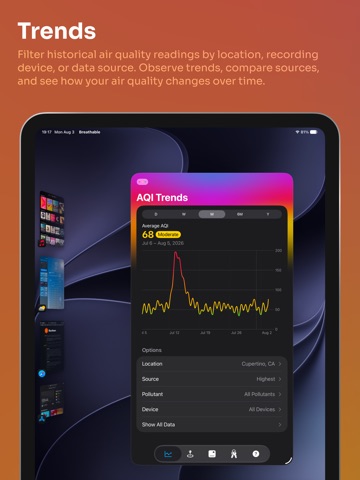
Breathable 4.0 is our biggest update yet! We've rewritten and redesigned from the ground up across every platform and added native support for Apple Vision Pro! New Services, Historical Data, and Syncing: We've added support for PurpleAir and World Air Quality Index, and Breathable now supports any combination of services rather than requiring any specific key. We've greatly improved our key validation and syncing to iCloud. And, speaking of iCloud: Breathable now syncs AQI data to iCloud and across all of your devices, greatly reducing the number of required API calls and improving data quality anywhere you use the app. We also store historical data for every request, sync that history across devices, and use it to build a whole new feature: Trends! Trends: Explore your air quality history in the new Trends tab with an interactive chart. Filter by location, recording device, or AQI source. Tap any point in the chart to view details, or drill into the All Data view for a granular look at every recording. Automatic Location: Our most requested feature is here! You can now set Breathable to automatically use your location instead of managing and providing manual coordinates. Turn this on and Breathable will properly record AQI information and provide location-accurate widget information. Spatial Features: We're so excited to bring Breathable to Apple Vision Pro! Not only are all of the app features available in native form on your headset, but we've added some special Vision Pro-specific bonuses: - AQI Sky Window widget: A larger widget that shows the current AQI in a simulated window with real sun positions, moon phase, time of day and volumetric effects - The Breathable "Trophy": Snap this little object to your desk or shelf and you'll have an AQI sensor in your physical space. And, if you turn it around and look at the back side, you might find a nice little surprise feature... - A current AQI ornament hanging off the top of the Breathable window, and the ability to split off the Trends view as well if you want to leave it in your space without seeing the rest of the app macOS, iPadOS and watchOS Overhauls: We rewrote the core of these platforms to greatly improve their look & feel and syncing engines. - Breathable on macOS now supports a native sidebar, better font sizing, updated shortcuts and system menu support, and more - On iPad, Breathable now supports native window resizing! - watchOS gets an all-new AQI fetching and syncing system, a new rectangular Trends widget, migration of all previous widgets to WidgetKit, and more Siri & Shortcuts: Now you can ask Siri, "What's the AQI in Breathable?" and Siri will give you the most recent AQI data Breathable has, and even offer to fetch fresh data if needed. On devices with screens, Siri will also display AQI details. We've also added Shortcuts support for fetching the AQI from Breathable directly. We've refined and updated nearly every aspect of the app on every platform, we couldn't possibly list every change but here are the broad strokes: - Breathable is prepared for the upcoming OS releases on all platforms - Liquid Glass support throughout, new app icon (including dark mode and transparent mode support) - Completely redesigned the Medium widget, refined the Small widget, added custom font support in widgets - API keys now properly report when they've expired or usage has gone over a limit, including showing a warning on widgets themselves - Completely rewrote the custom AQI gauge with flexibility and resizing features - Preferred source selector in Widget customization now allows for Highest or Highest PM2.5-only, for those who prefer to only worry about particles instead of O3 readings - Breathable now communicates in widgets when location sharing is turned off but needed, or API keys are invalid - Many, many more fixes and changes!
Alternatives
- Weather Up + AccuWeather Data — Same category + similar ratings
- Acme Weather — Same category + similar ratings
- Waterscope Weather — Same category + similar ratings
- Paku - Air Quality & AQI Map — Same category + similar ratings
- Custom Weather App: Sonuby — Same category + similar ratings
- Weathergraph weather widget — Same category + similar ratings
Availability by market
- US
Data quality & evidence
- Page completeness
- Live store listing
- Last verified
- 6 Aug 2026
- Sources
- App Store
- Independent summary has not been published yet.