
Quick verdict
- What it is
- Store information collected; independent summary not yet available.
- At a glance
-
- From $5.00/mo
- Free to download
- In-app purchases
Categories and search queries
Official categories
- Weather
- Navigation
AppCorpus categories
Key functions
| Function | Availability | Access | Scope | Evidence |
|---|---|---|---|---|
| Family Sharing | Yes | Unknown | App Store | Store published |
| Free app | Yes | Free | — | Store published |
| In-app purchases | Yes | Limited free | — | Store published |
Screens
App Store
26 store screenshots

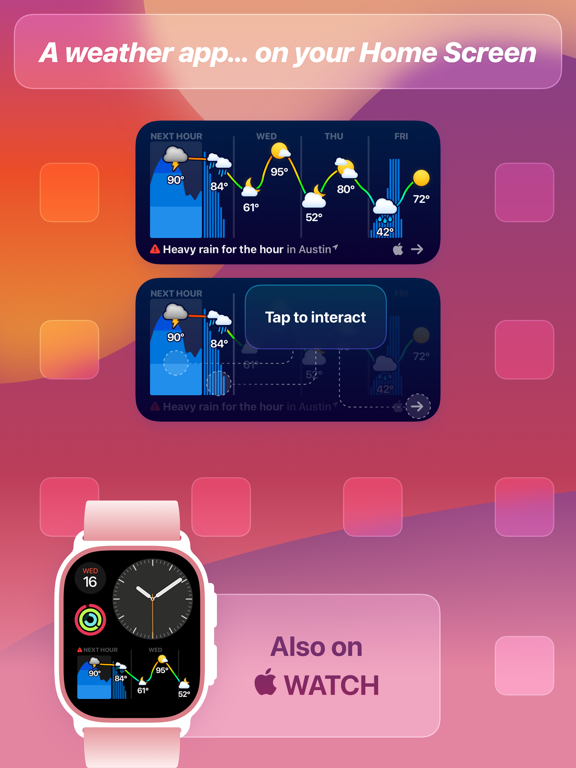

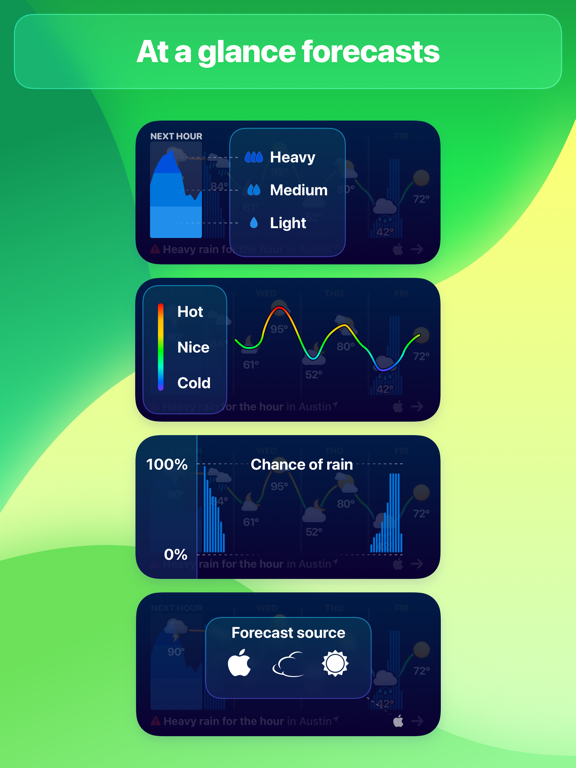
Pricing & paywalls
App Store
- Weather Up Pro: Monthly — $5.00/month
- Weather Up Pro: Monthly — $39.99/year ($3.33/mo)
- Weather Up Pro: Monthly — $40.00/year ($3.33/mo)
- Weather Up Pro: Lifetime — $150.00
Ratings & reviews
App Store
-
5/5On its way to being the best weather app available!
I have paid subscriptions to the top three weather apps, yet I prefer the simplicity of Weather Atlas. The developer of this app has obviously noticed the need for a great weather app that does only that. No videos, no pictures, no weather commentary, no references to anything except just the weather... done right. I do hope they will soon incorporate a "Future Radar" feature. Current and future radar are all that matter in a weather app...no one cares about where the rain was an hour ago. The developer says that as soon as this feature is available from their information provider, they will add it to Weather Atlas. That’s all anyone can ask for. Impressively, Weather Atlas opens and immediately shows the two most important things to me, the local map at the top and the hourly forecast at the bottom. And from there it's only one tap to any other place you want to go. Also, even in the ad-supported version, Weather Atlas doesn't make you scroll through a bunch of weather-related pictures and videos to finally see the radar and other components (like The Weather Channel does, even for their paid subscription). Great start to what I think will evolve into a really great weather app.
Larry.McJ · 30 Aug 2026
-
3/5Good start but could use improvements
I have changed this review a couple times as I have figured things out with the app. - At first I had no widgets available. I powered off and restarted my phone and Weather Up was now listed in the widgets list of apps. - The widget is a good start but needs work. That fact that the widget is interactive is a plus. I like to see the highs and lows for each day and that is not always shown in the top view. I need to click on each day to get that data. It is not clear what the % is referring to along the right hand side. I can click on the forward and back arrows to scroll the graph and that is nice - I like the radar presentation and the fact that I can choose different layers. - The weather information is basic but typical. I would like to see the amount of precipitation, not just the percentage. Perhaps being able to select different parameters would be nice. UPDATE: The developer is very responsive and provided a helpful response to my comment about the amount of precipitation. That data is available in the app under the multi-day view. However, I would prefer to see that in the widget. Showing only percentage precipitation results in a pessimistic forecast since lower percentages often do not result in actual rain. Would be nice to have a choice to show actual or percentage. Also, because the widget is interactive I find opening the app by pressing on the widget difficult and often have to find the app icon and click on it to open the app. But overall a good creative app. It is obvious that the developer has put a lot if work into it and I hope they will continue to develop it further.
Rick_6857463524 · 30 Aug 2026
-
3/5Great app, just not for me.
I am a weather app junkie. My folder of weather apps on my phone is overflowing. My favorite is hello weather which I happily subscribe too for $4.99. But hello doesn’t have feels like temps in the hourly forecast. I still subscribed minus a feels like in futures hours. Weather up shows that data which so why I was so excited when I stumbled on this app. I do a lot outside so it’s critical I can see the “feels like” temp 3 hours or so from now. At first I was ready to subscribe to weather up until it was time to get the dogs outside at 9p. Weather up said the feels like temp was 16. So I bundled up ready to brave the cold. Much to my surprise it wasn't cold at all. I opened another weather app and the swing was a wild 20 degrees higher. As much as I cringe at the $9.99 annual fee (rather high for a minimalist weather app) this app needs to have other weather providers to choose from (like hello weather). If they do I’d be inclined to subscribe. Though $5.00 is more where I see this app but I’m an old Man that still doesn’t get the whole subscribe stuff. Great app to add to my weather collection but I wait patiently for an update that brings more providers since the current app provider (whoever that might be?)does not work in my neck of the woods. :-(
rsd22 · 30 Aug 2026
-
3/5Much to like but still rough around the edges
I find weather up to be a fascinating app, but I have decided to end my free trial and follow the app from afar to see if they can improve the experience. If I primarily used a weather app on my iPad or even iPhone I would snap this app up in a flash even in at 4x the cost of my current weather app. The way it opens to a radar map and super imposes weather stats over that map is brilliant and the speed is breathtaking. Unfortunately, I primarily use weather on my watch. I use the modular watch face with six complications and I use those complications all the time. I want a quick peak at the weather which when clicked leads to a more detailed view. I am unwilling to give up my large rectangular widget space to their very nice widget and I have found using the widget in a stack to be too cumbersome. I also wish for the ability to customize what weather data I see. Perhaps they will add a wider range of complications in future releases. If so, I will try it again.
Frowningatthesky · 30 Aug 2026
-
5/5Just Wow!!!
I heard David on The Talk Show podcast and decided to give Weather Up a try. I am glad I did. This replaced Apple’s weather app. I was always a fan of Weatherline’s visual and Weather Up does an excellent job with this concept and more. The widget is the where this app shines. At a glance I see the week in advance. The line connecting temperatures is a great visual to quickly see the fluctuations in daily temps. Now, add to that the cool “rain bars” (not sure what the tech term is😁) that, not only show chance of rain, but also when in the day it may come! ALSO, it’s an interactive widget! Tap on a day and you get an hourly breakdown. You can also choose between three different weather sources to pick the most accurate for your location. In summary, you need this app!
Sciteachin’ · 30 Aug 2026
Privacy & accessibility
App Store
Privacy
- Data Not Linked to You — Analytics — Diagnostics — Other Diagnostic Data Developer declared
- Data Not Linked to You — Analytics — Diagnostics — Performance Data Developer declared
- Data Not Linked to You — Analytics — Purchases — Purchase History Developer declared
- Data Not Linked to You — Analytics — Usage Data — Product Interaction Developer declared
- Data Not Linked to You — App Functionality — Diagnostics — Crash Data Developer declared
- Data Not Linked to You — App Functionality — Diagnostics — Other Diagnostic Data Developer declared
- Data Not Linked to You — App Functionality — Diagnostics — Performance Data Developer declared
- Data Not Linked to You — App Functionality — Location — Coarse Location Developer declared
- Data Not Linked to You — App Functionality — Purchases — Purchase History Developer declared
- Data Not Linked to You — Diagnostics Developer declared
- Data Not Linked to You — Location Developer declared
- Data Not Linked to You — Purchases Developer declared
- Data Not Linked to You — Usage Data Developer declared
Accessibility
No accessibility labels collected yet.
Versions
App Store
-
2.1.2
- Weather Up now remembers where you left off and picks right back up no matter how long it's been since you opened the app - Tapping the Hourly or 10 Day widget now takes you to that section in the app - Additional bug fixes and enhancements If you like Weather Up, please take a moment to leave a review, it really helps! Send your feedback to [email protected] or visit http://help.contrast.co for help.
-
2.1.3
We've been working on a nice little update to Weather Up along side some bigger things that are still in the works. - Updated the style of the map buttons (now white on grey instead of purple on white) - Fixed an issue with Sunrise and Sunset when the device is set to 24 hour time - Added haptic feedback for card switching (and an option to turn it off) - Added a button to recenter the map once it's been panned/zoomed - Improved map centering in cases where saved locations span the globe - Radar data now displays correctly when moving back and forth between different regions - Fixed several crashing bugs - Additional bug fixes and enhancements If you like Weather Up, please take a moment to leave a review, it really helps! Send your feedback to [email protected] or visit http://help.contrast.co for help.
-
2.1.4
- Tapping the top of a card with now minimize it (the button in the bottom left still works as well) - If Current Location is the only saved location, it will now be properly centered (thanks for the heads up live4nyy) - Fixed centering issues when opening the app after a significant location change (like a flight or a long drive) - Fixed several crashing bugs - Additional bug fixes and enhancements If you like Weather Up, please take a moment to leave a review, it really helps! Send your feedback to [email protected] or visit http://help.contrast.co for help.
-
2.2
Dark Sky and AerisWeather are now available as forecast sources! And we’ll be adding even more forecast sources over time, so let us know which forecasts are most accurate in your area: [email protected] - Improved support for future versions of iOS - Fixed several crashing bugs - Additional bug fixes and enhancements If you like Weather Up, please take a moment to leave a review, it really helps! Send your feedback to [email protected] or visit http://help.contrast.co for help.
-
2.2.1
2.2.1 - Improved the experience of adding and editing locations - Fixed a crash that was happening during a small percentage of searches - Fixed a bug causing the forecast to not refresh when expected on iPhone 6 2.2 Dark Sky and AerisWeather are now available as forecast sources! And we’ll be adding even more forecast sources over time, so let us know which forecasts are most accurate in your area: [email protected] - Improved support for future versions of iOS - Fixed several crashing bugs - Additional bug fixes and enhancements If you like Weather Up, please take a moment to leave a review, it really helps! Send your feedback to [email protected] or visit http://help.contrast.co for help.
-
2.2.2
- Bug fixes and enhancements If you like Weather Up, please take a moment to leave a review, it really helps! Send your feedback to [email protected] or visit http://help.contrast.co for help.
-
2.3
We’re super excited to release Dark Mode for iOS 13! With Apple's gorgeous dark maps front and center, Weather Up really shines in Dark mode. You can manually switch between light and dark, or just let Weather Up follow the system setting. - Added double tap and drag as a one-handed shortcut for zooming the map - Improved support for iOS 13 - Additional bug fixes and enhancements If you like Weather Up, please take a moment to leave a review, it really helps! Send your feedback to [email protected] or visit http://help.contrast.co for help.
-
2.3.1
- Bug fixes and enhancements If you like Weather Up, please take a moment to leave a review, it really helps! Send your feedback to [email protected] or visit http://help.contrast.co for help.
-
2.3.2
- Map animation improvements for subscribers (faster loading, high resolution animations, and extended animation loop) - Added back the monthly subscription option - Additional bug fixes and enhancements If you like Weather Up, please take a moment to leave a review, it really helps! Send your feedback to [email protected] or visit http://help.contrast.co for help.
-
2.3.3
Enjoy the season with our cute new holiday themed weather icons! (You can change your weather icons in the settings page inside the app.) - Improved ad related code - Fixed several crashing bugs (all of them related to ads) - Additional bug fixes and enhancements If you like Weather Up, please take a moment to leave a review, it really helps! Send your feedback to [email protected] or visit http://help.contrast.co for help.
-
2.3.4
- Improved ad related code - Additional bug fixes and enhancements If you like Weather Up, please take a moment to leave a review, it really helps! Send your feedback to [email protected] or visit http://help.contrast.co for help.
-
2.3.5
This update simply moves the holiday weather icons to the bottom of the list. Hope you have a wonderful 2020! We have great things in store for Weather Up this year. If you like Weather Up, please take a moment to leave a review, it really helps! Send your feedback to [email protected] or visit http://help.contrast.co for help.
-
2.9
Long time no speak! We’ve been hard at work on a huge update with all-new widgets, Apple Watch complications, and more. Unfortunately, those aren’t quite ready yet. We were recently notified by one of our data providers that they were shutting down (as of October 10th). So we've been scrambling to replace all the mapping data. Good news is, this new data provider will allow us to offer lots of new features over time. Bad news is, we’ve temporarily removed animation on the maps while we finish the migration to this new data provider. We’ll have an update out soon that restores animation. And then we’ll get back to work on all the amazing new features that are super close to being ready to ship.
-
2.9.1
Animation is back! We’ve fully moved our weather mapping layers to the new data provider (Aeris Weather, if you’re curious) and will get back to work on the brand new widgets, Apple Watch complications, and other features we’ve been building for Weather Up 3.0.
-
3.0
Weather Up 3.0 brings at-a-glance, interactive widgets right to your Home Screen. It’s like having a full weather app, right on your Home Screen. It also marks the debut of our full-featured Apple Watch app and complications. (See screenshots for more details…) New Features: - Interactive Home Screen widgets - Apple Watch app and complications Bug fixes: - Too many to list!
-
3.0.1
Weather Up 3.0 brings at-a-glance, interactive widgets right to your Home Screen. It’s like having a full weather app, right on your Home Screen. It also marks the debut of our full-featured Apple Watch app and complications. (See screenshots for more details…) New Features: - Interactive Home Screen widgets - Apple Watch app and complications Bug fixes: - Too many to list!
-
3.0.2
- Improved layout for cities with longer names - When focusing on a day in the widget, the day's summary forecast condition is also displayed - The app's name is now correctly displayed when configuring complications through the Apple Watch app - Various small bug fixes and improvements
-
3.0.3
Long time no see! This update was scheduled for May, but we ran into a surprising amount of technical debt we had to pay back (with a 7 year old app fixing bugs sometimes involves re-writing a lot of very old code). But we’re back with some huge bug fixes and a few nice features. And we’re already hard at work on an iOS 18 update with new icons and tinted widgets. 1. We’ve made a bunch of big changes under the hood that should prevent people who are subscribed from seeing the widget locked. 2. Added a circular temperature-only complication for Apple Watch. 3. Temperature (ºF or ºC), Wind Speed (mph, km/h, m/s, or kn), Wind Direction (compass or degrees), and Precipitation (in, cm, mm) units can now all be set independently. 4. The location in the widget, main app, complications, and Apple Watch app should all update more frequently and stay in sync better. 5. Additional bug fixes
-
3.0.4
Long time no see! This update was scheduled for May, but we ran into a surprising amount of technical debt we had to pay back (with a 7 year old app fixing bugs sometimes involves re-writing a lot of very old code). But we’re back with some huge bug fixes and a few nice features. And we’re already hard at work on an iOS 18 update with new icons and tinted widgets. 1. We’ve made a bunch of big changes under the hood that should prevent people who are subscribed from seeing the widget locked. 2. Added a circular temperature-only complication for Apple Watch. 3. Temperature (ºF or ºC), Wind Speed (mph, km/h, m/s, or kn), Wind Direction (compass or degrees), and Precipitation (in, cm, mm) units can now all be set independently. 4. The location in the widget, main app, complications, and Apple Watch app should all update more frequently and stay in sync better. 5. Additional bug fixes
-
3.1
1. Support for Light, Dark, and Tinted Home Screen icons 2. Support for tinted Home Screen widgets
-
3.1.1
3.1.1 - Fixed some issues with tinted widget icons, widget performance, and other improvements 3.1 - Support for Light, Dark, and Tinted Home Screen icons - Support for tinted Home Screen widgets
-
3.1.2
3.1.2 - Improved widget performance, which should prevent it from getting into a state where it won’t load - Improved tinted widget support - Fixed a bug causing Weather Up to not respect system level time/date settings (specifically 24H vs AM/PM) 3.1.1 - Fixed some issues with tinted widget icons, widget performance, and other improvements 3.1 - Support for Light, Dark, and Tinted Home Screen icons - Support for tinted Home Screen widgets
-
3.1.3
3.1.3 - More improvements to widget performance (the system heavily limits widgets, we’re pushing the boundaries) - Widgets should be a bit faster in updating to a new location when traveling 3.1.2 - Improved widget performance, which should prevent it from getting into a state where it won’t load - Improved tinted widget support - Fixed a bug causing Weather Up to not respect system level time/date settings (specifically 24H vs AM/PM) 3.1.1 - Fixed some issues with tinted widget icons, widget performance, and other improvements 3.1 - Support for Light, Dark, and Tinted Home Screen icons - Support for tinted Home Screen widgets
-
3.1.4
- Added the option to redeem a promo code on the paywall. (If you're a new customer reading this, use code VersionHistory for 50% off)
-
3.1.5
· 11 Nov 2024
This app has been updated by Apple to prepare for watchOS 27 compatibility. No new features are included. - Made it much easier to tap the city name in the widget to open the main app. We’re also working on improving responsiveness of the widget. Changes in iOS 18 slowed things down quite a bit and it’s going to take a major rework to get it lightning quick again.
Alternatives
- Weather Fit: Outfit Forecast — Same category + similar ratings
- Today Weather: Radar & Alerts — Same category + similar ratings
- HeyWeather: Accurate Forecast — Same category + similar ratings
- Weather & Widget - Weawow — Same category + similar ratings
- Mercury Weather — Same category + similar ratings
- Weathergraph weather widget — Same category + similar ratings
Availability by market
- US
Data quality & evidence
- Page completeness
- Live store listing
- Last verified
- 30 Aug 2026
- Sources
- App Store
- Independent summary has not been published yet.