
Quick verdict
- What it is
- Store information collected; independent summary not yet available.
- At a glance
-
- Free to download
Categories and search queries
Official categories
- Productivity
- Business
AppCorpus categories
Key functions
| Function | Availability | Access | Scope | Evidence |
|---|---|---|---|---|
| Free app | Yes | Free | — | Store published |
Screens
App Store
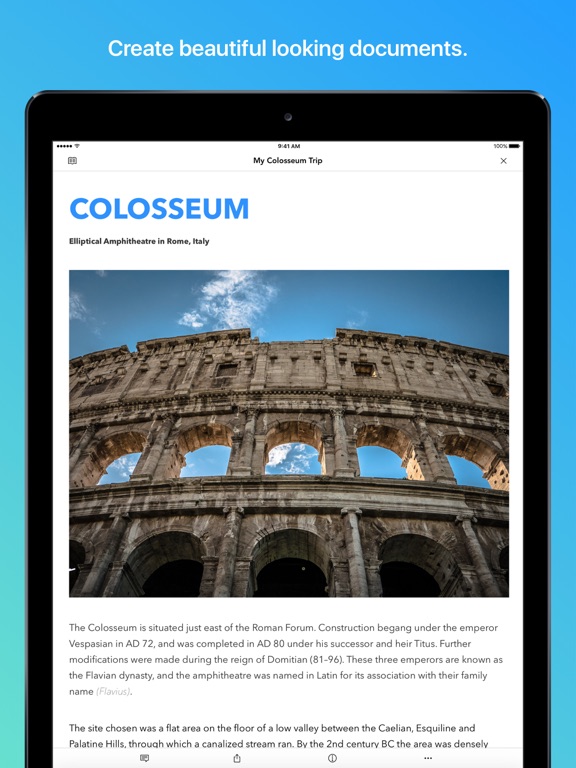
15 store screenshots



Pricing & paywalls
App Store
- Free
Ratings & reviews
App Store
-
4/5Amazing app, needs some work still.
I just got this app and love it! Don't get me wrong but this app has a lot of amazing features that I love but I would like for a option to wrap text around a picture as well as change the size of the said picture. The fonts are also more than I’ve had available in a previous app I used before. Though, I do miss the cover page option as well as actual pages. I hope that this helps make this a better app for everyone.
Akatsukilover1223 · 7 Aug 2026
-
2/5Great look, too many problems
Most concerning is that when I use my microphone to input text, sometimes the text disappears. This has happened several times in the course of the last half an hour since I downloaded the app, so I am going to get rid of my account because it’s just not usable for me. Also: less concerning but slightly time-consuming it is the fact that every time I navigate away from the screen, it has to reload my document. And finally, I couldn’t figure out if there was a “select all” option. I saw cut and basic select, but for my work, “select all” is a must-have capability. Maybe I’m just silly couldn’t figure it out, but that played a small role in my decision to stop using this app.
Christy Luis · 7 Aug 2026
-
3/5Good idea but doesn’t work yet
I’m on a paid account. The service concept is similar to Google’s Docs but doesn’t work as well. In the app: documents can only be viewed in icon view. C’mon, 1984 is long gone. Where are the lists views? Sort by name, date, type, etc. Search function searches only file names, not file contents. Cannot save files into a new Folder. Cannot delete files. Cannot share files into another Zoho app, eg: Projects Typeface changes randomly after a server error. Cannot tell which changes have been saved and which one not saved since last auto-save. I experience constant “connection interrupted” and “server errors”. Each forces a page reload which dumps all changes since the last auto-save. Very annoying. (Is this me, my China connection, or Zoho’s servers?) Update, October 2018 Zoho Customer service is responsive; they try hard to solve Customer complaints. My “connection interrupted”issues persist. This must be caused by my internet connection; the Service provider is called _Great Wall_ after all.
stephen•ph · 7 Aug 2026
-
4/5Good but needs a feature or two
I actually really like this idea, being able to type up a document and know that it will still be there no matter what happens to the data on my local device. Writer is one of a few good options out there. However, writer lacks some features. Writer lacks the nice spacing on either side of the text, the left and right margins. Many other note taking and word apps nicely highlight the text via those margins. Even Zoho docs does it, so why not this app? They need to give it more of a page feel in my opinion or at least have this as an option. Then there is search. I would like to be able to search within my documents. It is easier to find content this way. Right now it appears to only be able to search file names. Last but not least, it would be nice to be able to multi-select items within this app to send them all to another app or drive. Far too many apps lack this very basic feature and it would be very worth while to add it to writer. Besides these missing features though it is a good alternative to Google docs. Keep up the good work!
Mike000000000000007 · 7 Aug 2026
-
2/5Ooooof
My friend and I use Zoho to share our collaborative stories with each other. The website works well enough, and we have a great time editing with each other live. The app on the other hand offers none of the convenience of the site. Typing lags so far behind what you are writing, you might as well be carving it into a stone tablet. And heaven forbid you want to copy and paste more than one word into it. The thing bogs down to near crashing with as few as 20 words selected to be pasted. We have had more than a few issues where it will randomly place our curser somewhere else in the document while we are using the app, and we will lose random sentence fragments pages away from where we had been working. If they even get written down at all. And don’t you dare even think about any kind of formatting while on the app, it won’t translate to the site version. You won’t get any of the double space periods your phone placed in there either. Don’t forget about the weird random extra spaces between words that you get as well. That’s if it doesn’t just not save huge chunks of text at random. We still use the site, and will keep using the site, but we cannot safely use the app and you cannot either. At least not until an acceptable update makes it useable.
Edme · 7 Aug 2026
Privacy & accessibility
App Store
Privacy
- Data Linked to You — Analytics — Diagnostics — Crash Data Developer declared
- Data Linked to You — Analytics — Diagnostics — Other Diagnostic Data Developer declared
- Data Linked to You — Analytics — Diagnostics — Performance Data Developer declared
- Data Linked to You — Analytics — Identifiers — Device ID Developer declared
- Data Linked to You — Analytics — Identifiers — User ID Developer declared
- Data Linked to You — Analytics — Usage Data — Other Usage Data Developer declared
- Data Linked to You — Analytics — Usage Data — Product Interaction Developer declared
- Data Linked to You — App Functionality — Contact Info — Email Address Developer declared
- Data Linked to You — App Functionality — Contact Info — Name Developer declared
- Data Linked to You — App Functionality — Contact Info — Phone Number Developer declared
- Data Linked to You — App Functionality — Identifiers — Device ID Developer declared
- Data Linked to You — App Functionality — Identifiers — User ID Developer declared
- Data Linked to You — App Functionality — Search History Developer declared
- Data Linked to You — App Functionality — User Content — Customer Support Developer declared
- Data Linked to You — App Functionality — User Content — Photos or Videos Developer declared
- Data Linked to You — Product Personalization — Diagnostics — Crash Data Developer declared
- Data Linked to You — Product Personalization — Diagnostics — Other Diagnostic Data Developer declared
- Data Linked to You — Product Personalization — Diagnostics — Performance Data Developer declared
- Data Linked to You — Product Personalization — Usage Data — Other Usage Data Developer declared
- Data Linked to You — Contact Info Developer declared
- Data Linked to You — Diagnostics Developer declared
- Data Linked to You — Identifiers Developer declared
- Data Linked to You — Search History Developer declared
- Data Linked to You — Usage Data Developer declared
- Data Linked to You — User Content Developer declared
Accessibility
No accessibility labels collected yet.
Versions
App Store
-
6.3.17
- Bug fixes and performance enhancements.
-
6.4.0
- Dark mode support - Access to Zoho WorkDrive - Performance enhancements and bug fixes
-
6.4.1
- Dark mode support - Access to Zoho WorkDrive - Performance enhancements and bug fixes
-
6.4.10
- We've now provided the ability to type in your documents with your iPad's Magic and Smart keyboards. - Additionally, we've also fixed some bugs and made some performance enhancements.
-
6.4.11
- Bug fixes and Performance enhancements.
-
6.4.12
- Bug fixes and Performance enhancements.
-
6.4.2
- Dark mode support - Access to Zoho WorkDrive - Performance enhancements and bug fixes
-
6.4.3
- Dark mode support. - Access to Zoho WorkDrive files. - Performance enhancements and bug fixes.
-
6.4.4
- Dark mode support - Access to Zoho WorkDrive files - Performance enhancements and bug fixes.
-
6.4.5
- Dark mode support - Access to Zoho WorkDrive files - Performance enhancements and bug fixes.
-
6.4.6
- Dark mode support - Access to Zoho WorkDrive files - Performance enhancements and bug fixes.
-
6.4.7
- Dark mode support - Access to Zoho WorkDrive files - Performance enhancements and bug fixes.
-
6.4.8
- We've now provided the ability to type in your documents with your iPad's Magic and Smart keyboards. - Additionally, we've also fixed some bugs and made some performance enhancements.
-
6.4.9
- We've now provided the ability to type in your documents with your iPad's Magic and Smart keyboards. - Additionally, we've also fixed some bugs and made some performance enhancements.
-
6.5
- Copy-paste content with formatting. - Option to resize images. - Document navigation support to easily go to the desired section, page, heading, etc. of the document. - New icons for better user experience. - Bug fixes and performance enhancements.
-
6.5.1
- Copy-paste content with formatting. - Option to resize images. - Document navigation support to easily go to the desired section, page, heading, etc. of the document. - New icons for better user experience. - Bug fixes and performance enhancements.
-
6.5.2
- Copy-paste content with formatting. - Option to resize images. - Document navigation support to easily go to the desired section, page, heading, etc. of the document. - New icons for better user experience. - Bug fixes and performance enhancements.
-
6.5.3
- Copy-paste content with formatting. - Option to resize images. - Document navigation support to easily go to the desired section, page, heading, etc. of the document. - New icons for better user experience. - Bug fixes and performance enhancements.
-
6.5.4
- Bug fixes and Performance enhancements.
-
6.5.5
- Bug fixes and Performance enhancements.
-
6.6
Insert and manage: - Headers and footers - Textboxes - Endnotes and footnotes Enjoy an enhanced user experience while inserting and managing: - Images - Tables We've also deployed other bug fixes and performance enhancements.
-
6.6.1
Insert and manage: - Headers and footers - Textboxes - Endnotes and footnotes Enjoy an enhanced user experience while inserting and managing: - Images - Tables We've also deployed other bug fixes and performance enhancements.
-
6.7.0
- We've fixed some bugs and made some performance enhancements. Reach out to us at [email protected] or [email protected] with your suggestions and feedback.
-
6.7.1
- We've fixed some bugs and made some performance enhancements. Reach out to us at [email protected] or [email protected] with your suggestions and feedback.
-
6.7.2
· 18 Jul 2026
- We've fixed some bugs and made some performance enhancements. Reach out to us at [email protected] or [email protected] with your suggestions and feedback.
Alternatives
- ONLYOFFICE Documents — Same category + similar ratings
- Collabora Office — Same category + similar ratings
- Simplenote — Same category + similar ratings
- AO Office — Same category + similar ratings
- Storyist 4 — Same category + similar ratings
Availability by market
- US
Data quality & evidence
- Page completeness
- Live store listing
- Last verified
- 7 Aug 2026
- Sources
- App Store
- Independent summary has not been published yet.