
Quick verdict
- What it is
- Store information collected; independent summary not yet available.
- At a glance
-
- Free to download
- In-app purchases
Categories and search queries
Official categories
- Productivity
- Education
AppCorpus categories
Key functions
| Function | Availability | Access | Scope | Evidence |
|---|---|---|---|---|
| Free app | Yes | Free | — | Store published |
| In-app purchases | Yes | Limited free | — | Store published |
Screens
App Store
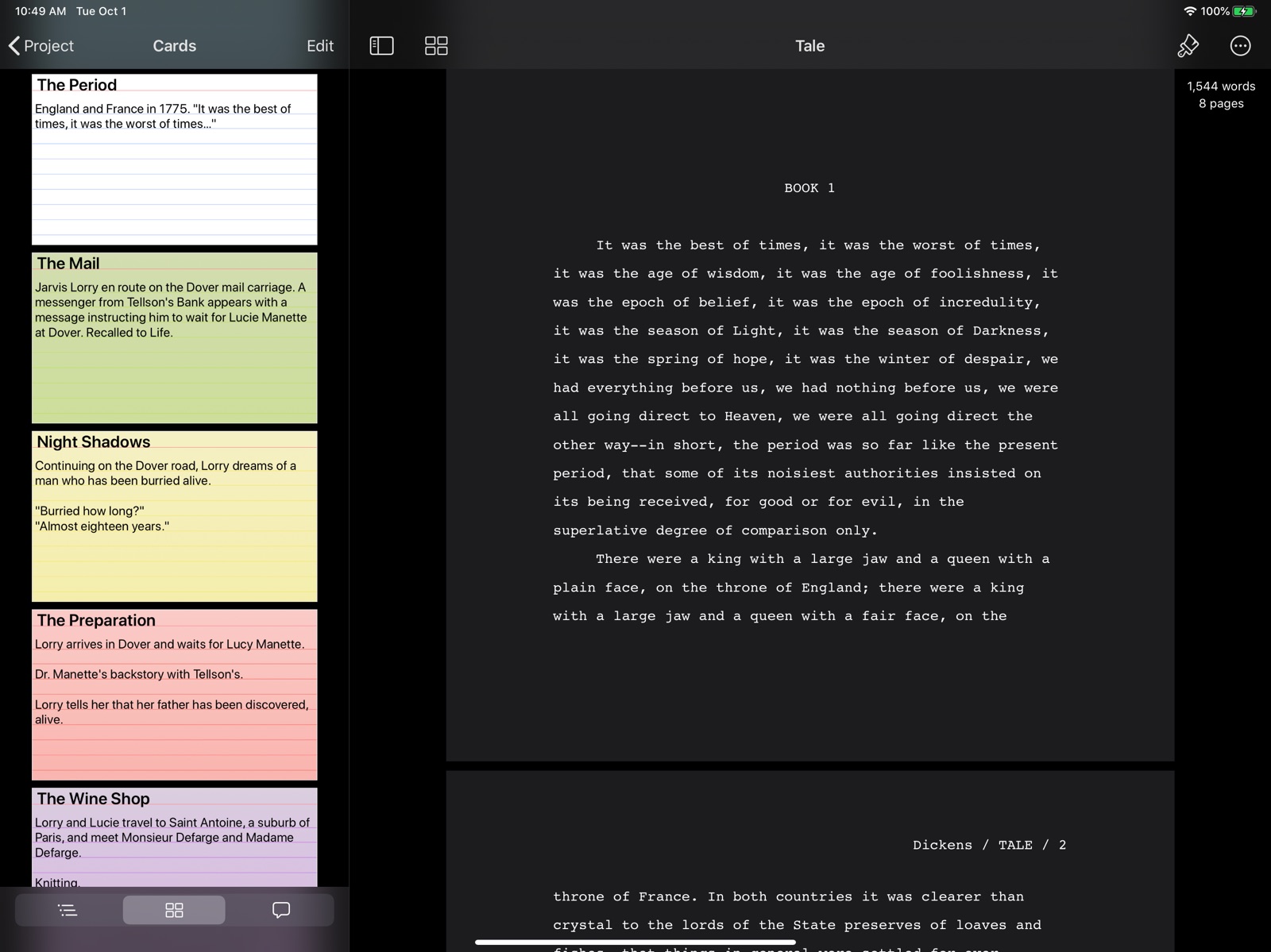
13 store screenshots



Pricing & paywalls
App Store
- Free Trial — $0.00
- Storyist 4 — $19.99
- Storyist 4 Upgrade — $9.99
Ratings & reviews
App Store
-
4/5Still decent
TL;DR - Functional, could be better. But still functional and works. The new UI needs to get used to, as it is rather simplistic and requires a few taps to navigate files. Default sync is iCloud instead of Dropbox, and it doesn’t look like we can change cloud services. While iCloud is nice, I don’t have much storage left and I much prefer Dropbox as all my previous Storyist 3 files were in there. There are three themes other than Classic. Light, Dark, and Storyist for Mac. They serve well for what they are, but honestly, I wish there was a few more themes. The editor is roughly the same as the legacy version. No major overhaul, and I don’t think I mind. The font is still that manuscript looking one - Courier I believe - and functions as a viewable font. Navigation, as I’ve said before, is a bit weird. There’s a “recent” and a “browse” tab at the bottom, meaning of you’ve a lot of Storyist files/documents, it might be a bit of a hassle to look for something. Files downloaded from Dropbox don’t appear in recent until you’ve opened them and edited the document(s) a bit. It looks a lot cleaner, but still a bit dated. I don’t know what it is, but the UI refresh feels a bit underwhelming. No three panel navigation for [Library], then [folder], and finally [editor], sort of like Ulysses or Bear. That type of navigation of the files is much better than the one provided here. Overall, this is a decent app if you hadn’t bought the Legacy version and was spoiled by the previous layout or by Bear or Ulysses. I still bought the full app because I appreciate the updates and the developers. Hopefully there would be a minor UI navigation change, as that is probably the only gripe I have for this app. Thanks for the update and the discount!
Tomaganuk96 · 6 Aug 2026
-
5/5Not worth upgrade unless you like folders
I’m pretty disappointed that they chose to spin off storyist to add the feature request we've asked for for a long time. I love using the app, but small things always bothered me like no folder tree in mobile app (like macos has), Support via email never answered, and ability to extend the template system was nonexistant (still is). That being said i upgraded for the folder tree view since i use this app for my iphone, ipad and mac. So buy it for that convenience but I think for budget minded people google docs is way better for same and more features(sharing and group comments i copy over to google writer.)
jo jo devil · 6 Aug 2026
-
1/5Storyist sometimes deletes all your work!!!
Huge danger warning here, I must echo previous reviews like the one posted by RyGuy486 and report that STORYIST SOMETIMES AUTO-DELETES ALL YOUR WORK. This happened to me twice now, the first time I thought it was because I was using OneDrive for file storage. But I switched back to the default Apple cloud file storage AND A WEEK LATER IT HAPPENED AGAIN. I’ve now lost hours and hours of writing, which is just so disheartening. I can see from Apple’s file versions that Storyist gets confused and starts to save the same version of a file over and over (instead of saving a version with any new modified work). Then if you power down, it auto-restores to that last version... and everything is gone. Perhaps this won’t happen if I just save files to the local iPad instead of any cloud storage? Perhaps it happened because I connected to a wireless network AFTER starting Storyist? In the end I don’t care why. This is just one of the worst possible bugs a program like this could have. Sorry to say this program is NOT reliable for professional work. Stay away.
RenderWizard · 6 Aug 2026
-
2/5Buggy...Missing Fetures...OK
Overall: Just having the basic feature and a mobile sync that takes less than 10 minutes was enough for me to switch from Scrivener. But there are a lot of trade offs I’m not happy about. Bad: 1) Every time I open the app I’m locked from editing and need to “Restore Purchases” again. Super annoying. 2) It doesn’t really support transformations (allegedly it does for novels but I haven’t used those). If you use the other templates you’re going to hate exports, especially if you use the dark theme. Changing the fonts while editing (like using a white font for dark mode) means it will export as the font you edit with (in my case, white). In order for me to have readable exports I now have a several step process that involves a few apps to reformat the export and turn it into a PDF. Because I export infrequently, it’s tolerable but it’s a frustration every time. 3) It encourages you to keep sections / scenes within a single file and has a nice interface for reordering sections within a file. The downfall of this is that it’s painful to move scenes / sections from one page to another. Scrivener just has an arbitrary number of nested files that were easily sorted and moved around. I kind of like that better, but Storyist’s solution isn’t terrible - just inconvenient. Good: 1) It’s quick to load (I purchased Storyist to replace Scrivener due to Scrivener’s painfully slow mobile sync process) 2) It lets me use iCloud Drive rather than forcing me to use Dropbox 3) It’s rather easy to use 4) Some features like character suggestions in script editing are a little buggy, but overall work well enough to call it a win
AndrewPirkola · 6 Aug 2026
-
5/5Great app
Love this app, and I use it for all my fiction writing projects. Great app, by far my favorite writing tool. I work entirely on iPad (with Bluetooth keyboard) and iPhone syncing to the cloud but able to work offline. I can access my work wherever I go and keep it well organized. The writing interface is very clean and the ability to see and rearrange the plot structure is intuitive and extremely useful. Much simpler than scrivener; for me that means fewer features to be distracted by and more focus on the actual writing. When they add a .doc format export and the ability to export/share just a section or two instead of the whole novel, it will be five stars.
PTmacKim · 6 Aug 2026
Privacy & accessibility
App Store
Privacy
- Data Not Collected Developer declared
Accessibility
No accessibility labels collected yet.
Versions
App Store
- 4.0
-
4.0.1
* Improved handling of iCloud sync conflicts. * Storyist now restores the text selection and zoom when it is relaunched after being quit while in the background. * Fixed a bug causing recently typed text to be discarded in certain circumstances. * The Command + Down Arrow keyboard shortcut now works as expected. * The Command + 0 keyboard shortcut now toggles the navigation sidebar. * Files no longer close when you invoke page setup using the Command + Shift + P keyboard shortcut. * The text menu no longer stays on-screen when moving the cursor using the arrow keys on a physical keyboard. * Text color is now set correctly when editing headers and footers in the dark theme. * Plain text files with extensions other than .txt, .md, and .fountain now open properly. * Storyist no longer crashes in certain low memory situations. * Storyist now provides a notification dialog if it is unable to save when the storage is full.
-
4.0.2
* Storyist no longer quits unexpectedly on iPhone in certain circumstances when reverting to a previous version. * Storyist no longer prompts you to restore your purchase after upgrading. Previously, some users were seeing the in-app purchase window the first time the app was run after an upgrade.
-
4.1
Support for iPadOS and iOS 13! New features include: * Dark mode * Multiple window support * New icons * Context menus
-
4.1.1
Additional iOS 13 compatibility updates.
-
4.1.2
Bug fixes.
-
4.1.3
* Redesigned text inspector. * Bug fixes.
-
4.1.4
* Support for custom fonts on iOS 13. * Bug fixes.
-
4.2
Storyist 4.2 has support for iOS 14 features including the new sidebar design, menus, and the color picker. Also included: * Trackpad support on iOS 13.4 or later. Works great with the new Magic Keyboard. * Create templates for text files and projects. * Show invisible characters. * Set the default formatting for plain text files using the new plain text inspector. * Pinch to zoom in draft mode as well as page mode. * Navigate in the template chooser and text editor with additional keyboard shortcuts.
-
4.2.1
4.2.1: Additional iOS 14 compatibility enhancements. 4.2: Storyist 4.2 has support for iOS 14 features including the new sidebar design, menus, and the color picker. * Trackpad support on iOS 13.4 or later. Works great with the new Magic Keyboard. * Create templates for text files and projects. * Show invisible characters. * Set the default formatting for plain text files using the new plain text inspector. * Pinch to zoom in draft mode as well as page mode. * Navigate in the template chooser and text editor with additional keyboard shortcuts.
-
4.3
* Enhanced comment support. It's now easier to create and review comments both with and without the comment sidebar visible. * New keyboard shortcuts. When running on iOS 15, you can now tab between the sidebar and the editor, and use the arrow keys to move between elements in outlines and lists. * Bug fixes and performance improvements.
-
4.3.1
* The sidebar now ensures that the current chapter/section is selected when sliding open. * The style inspector no longer incorrectly reports that a style is overridden if you edit a style to use a Display P3 color instead of an sRGB color. * You can now use the arrow keys on a physical keyboard to select autocomplete candidates in Fountain and Final Draft files on iOS 15. * Outlines in Fountain and Final Draft files are now displayed correctly when the sidebar is first shown. * Storyist no longer unexpectedly quits in certain circumstances when editing Fountain and Final Draft files, and the sidebar is not displayed. * Storyist no longer unexpectedly quits in certain circumstances when pasting text into a comment.
-
4.3.2
Bug fixes.
-
4.3.3
Bug fixes.
-
4.4
Support for iOS 16 features like * Stage Manager. Edit your documents using multiple resizable overlapping windows. * Incremental Find and Replace. The new user interface lets you get to what you're looking for faster. * Editor-style navigation bar. Adopts the new-in-iOS 16 "editor" navigation bar style giving you better access to editing features. And more * Context menus in the index card editor for faster storyboarding. * Performance enhancements and bug fixes.
-
4.4.1
Bug fixes.
-
4.5
* Support for iOS 18. * Story sheet enhancements. * General bug fixes and performance enhancements.
-
4.6
* Introduces a new app launch screen for iOS 18. * Provides an app icon that automatically adjusts when you change to Dark Mode. * Fixes an issue causing the cursor to disappear in certain circumstances when typing on a physical keyboard. * Fixes a display bug in the word count overlay when using large accessibility text sizes.
-
4.6.1
Minor bug fixes.
-
4.7
· 10 Oct 2025
Support for iOS 26 and iPadOS 26.
Alternatives
- MyStory.today — Same category + similar ratings
Availability by market
- US
Data quality & evidence
- Page completeness
- Live store listing
- Last verified
- 6 Aug 2026
- Sources
- App Store
- Independent summary has not been published yet.