
Quick verdict
- What it is
- Store information collected; independent summary not yet available.
- At a glance
-
- From $4.99/mo
- Free to download
- In-app purchases
Categories and search queries
Official categories
- Business
- Productivity
AppCorpus categories
Key functions
| Function | Availability | Access | Scope | Evidence |
|---|---|---|---|---|
| Free app | Yes | Free | — | Store published |
| In-app purchases | Yes | Limited free | — | Store published |
Screens
App Store
17 store screenshots


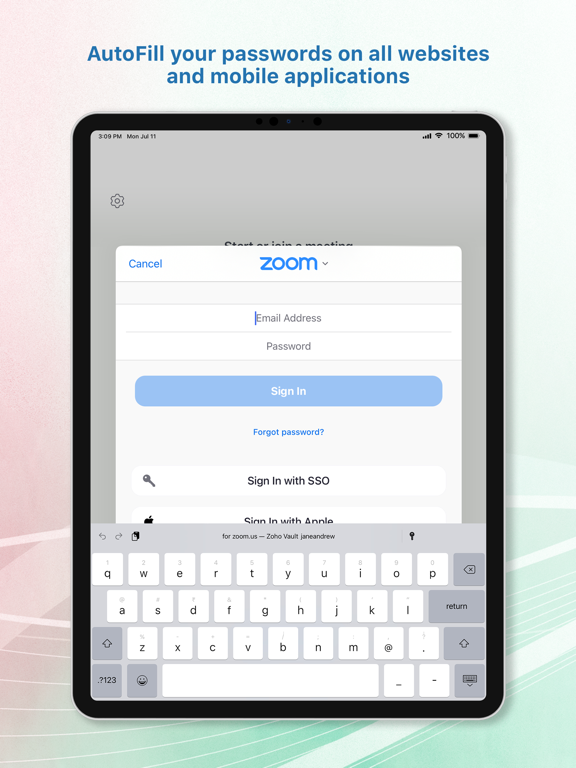
Pricing & paywalls
App Store
- Standard - Monthly — $4.99/month
- Standard - Monthly — $53.99/year ($4.49/mo)
Ratings & reviews
App Store
-
5/5Awesome app
So after school and around with a Vance passwords for over a year, I decided to look around and see if there was something better and less costly. Came across Zoho and I love it I’m able to synchronize my passwords across multiple platforms and multiple devices. I really like that and then the fact that the master password is kept locally that’s even better
ajberg1800 · 6 Aug 2026
-
3/5Good, but …
Nice to have a central repository of usernames and password, particularly for those sites with more restrictions. Vault has some implementation issues that hold it back though. The user is constantly entering the master password which is an annoyance. Vault also is missing in action occasionally - the little icon that allows invocation is not there - sort of a deal killer. The work-around is to leave the site, go to Vault and go to the site from there. Annoying … Hard to whine about a free program, but these issues keep it from becoming a paid program.
TryingToCashOut · 6 Aug 2026
-
5/5Option for custom categories and great prices
I think Zoho will out do the competition with their great pricing model. $0.9 per user is unbeatable. I just finished migrating from 1password after being a long term customer. Much cleaner and user friendly UI. Hassle free migration and sharing features with basic subscription.
jmuchiri · 6 Aug 2026
-
5/5BEST PASSWORD MANAGER
Guys, I’m gonna say this once, and if you don’t believe me, you’re making a mistake: THIS APP IS THE BEST PASSWORD MANAGER EVER CREATED. That’s all there is to it because this is literally the best password manager. You guys HAVE to download this. It keeps all your passwords safe and makes you login into the app EVERY time you leave it. It’s very safe and nobody can access it.
Liam Ibarra · 6 Aug 2026
-
5/5Flawless and free? Wow awesome
I moved over my passwords from last pass after they pulled the rug from free users- saying that multiple device usage was not free anymore! The import from last pass, sign up, MFA, multi device use- everything was perfect! ZOHO definitely gained a lot of mindshare with flawless execution here!
Lalaperson12 · 6 Aug 2026
Privacy & accessibility
App Store
Privacy
- Data Linked to You — Analytics — Diagnostics — Crash Data Developer declared
- Data Linked to You — Analytics — Diagnostics — Other Diagnostic Data Developer declared
- Data Linked to You — Analytics — Diagnostics — Performance Data Developer declared
- Data Linked to You — Analytics — Identifiers — Device ID Developer declared
- Data Linked to You — Analytics — Other Data — Other Data Types Developer declared
- Data Linked to You — Analytics — Usage Data — Other Usage Data Developer declared
- Data Linked to You — Analytics — Usage Data — Product Interaction Developer declared
- Data Linked to You — Analytics — User Content — Customer Support Developer declared
- Data Linked to You — App Functionality — Contact Info — Email Address Developer declared
- Data Linked to You — App Functionality — Contact Info — Name Developer declared
- Data Linked to You — App Functionality — Contact Info — Phone Number Developer declared
- Data Linked to You — App Functionality — Contacts Developer declared
- Data Linked to You — App Functionality — Identifiers — Device ID Developer declared
- Data Linked to You — App Functionality — Location — Coarse Location Developer declared
- Data Linked to You — App Functionality — Other Data — Other Data Types Developer declared
- Data Linked to You — App Functionality — User Content — Customer Support Developer declared
- Data Linked to You — App Functionality — User Content — Photos or Videos Developer declared
- Data Linked to You — Product Personalization — User Content — Customer Support Developer declared
- Data Linked to You — Contact Info Developer declared
- Data Linked to You — Contacts Developer declared
- Data Linked to You — Diagnostics Developer declared
- Data Linked to You — Identifiers Developer declared
- Data Linked to You — Location Developer declared
- Data Linked to You — Other Data Developer declared
- Data Linked to You — Usage Data Developer declared
- Data Linked to You — User Content Developer declared
Accessibility
No accessibility labels collected yet.
Versions
App Store
-
6.0
- Multi-account support: Users can now add and switch between multiple accounts for easy access. - Payment cards: Introducing support for Payment cards category, where Credit/Debit cards can be easily scanned to autofill relevant fields. - App auto-lock: Support for automatic locking after a specified 'auto-lock' period of inactivity for additional level of security. - Display User ID: Enable this feature to display user identifiers in the password list and autofill suggestions, providing users with valuable context for each entry. - Geolocation restrictions: Limit user access to the app from specific geographic locations. - Event alerts: Stay informed with timely notifications and reminders about our upcoming webinars, training sessions, and other educational events. - Enhanced user search: In addition to searching by name, users can now find team members using their email addresses, streamlining user discovery within the app.
-
6.1
Zoho Vault iPad app is now also accessible on Mac offering a seamless experience across devices.
-
6.2
- Recover accidentally deleted passwords with the new Trash feature. - Easily manage multiple accounts within the Mac app for increased productivity and organization. - Organize your passwords more efficiently by adding them to specific folders. - Conveniently add passwords using the autofill extension. - Enjoy enhanced autofill capabilities in the in-app browser, supporting one-click logins for seamless browsing. - Keep track of when passwords were created with the new display feature on the detail page. - Bug fixes and performance improvements.
-
6.2.1
Bug fixes and performance improvements.
-
6.2.2
A crash issue in the password generator has been fixed, ensuring a more stable experience.
-
6.2.3
Bug fixes and improvements.
-
6.3
- Autofill 2FA codes easily and securely with iOS 18 and macOS Sequoia. - Bug fixes and improvements.
-
6.3.1
Minor enhancements and bug fixes.
-
6.3.2
Minor enhancements and bug fixes.
-
6.4
- Minor bug fixes and security enhancements.
-
6.4.1
A minor issue with signing in using the OneAuth app has been fixed.
-
6.4.2
- Bug fixes and security enhancements.
-
6.4.3
Bug fixes and improvements in the Mac app.
-
6.5
We're thrilled to introduce passkey support on Zoho Vault for iOS. Now you can effortlessly manage all your logins—both passwords and passkeys—in one secure place. Enjoy faster, more secure, and truly passwordless logins!
-
6.5.1
- Bug fixes and improvements in the Autofill extension.
-
6.5.2
Bug fixes and performance improvements.
-
6.5.3
Minor enhancements and bug fixes.
-
6.5.4
Bug fixes and performance improvements.
-
6.6
- Passphrase generator – Create stronger, human-readable passphrases effortlessly. - Enhanced autofill – Autofill now works across all categories and supported text fields. - Improved Mac app experience – Larger default window and an additional 16% scale boost for better readability on macOS. - Accessibility upgrades (WCAG) – Full VoiceOver support, Dynamic Type, improved color/contrast, and AssistiveTouch/Switch Control friendly UI. - Enterprise security enhancements – Added password restrictions and personal password indicators for enterprise users. - New icon family – A fresh, modern, and consistent visual update. - Screenshot restriction – Prevents capturing sensitive data on iPhone and iPad. - Password list improvements – Copy support extended to all categories. - Quick account switching – Instantly switch accounts from the toast after adding a new one. - Enable autofill easily – Turn on Autofill directly from within the app. …and many more enhancements and improvements.
-
6.6.1
- Minor bug fixes and performance enhancements.
-
6.6.2
- Password reuse restriction: Prevent using previous passwords to strengthen security. - Minor security enhancement
-
6.6.3
- Deletion restrictions extended: Admin controls to block deletion of enterprise passwords and folders are now supported on the app.
-
6.7
Rebranding support: Your enterprise Zoho Vault’s custom branding is now reflected in the app while maintaining a secure, seamless experience.
-
6.7.1
This update includes important security improvements and fixes.
-
6.7.2
· 31 Jul 2026
Bug fixes and performance improvements.
Alternatives
- Enpass Password Manager — Same category + similar ratings
- Sticky Password Manager & Safe — Same category + similar ratings
- Password Manager: Safe — Same category + similar ratings
- Strongbox - Password Manager — Same category + similar ratings
- SecureSafe Password Manager — Same category + similar ratings
- RoboForm Password Manager — Same category + similar ratings
Availability by market
- US
Data quality & evidence
- Page completeness
- Live store listing
- Last verified
- 6 Aug 2026
- Sources
- App Store
- Independent summary has not been published yet.