
Quick verdict
- What it is
- Store information collected; an Apoku editorial summary is not yet published.
- At a glance
-
- From $2.08/mo
- Free to download
- In-app purchases
Categories and search queries
Official categories
- Productivity
- Utilities
Apoku categories
Key functions
| Function | Availability | Access | Scope | Evidence |
|---|---|---|---|---|
| Free app | Yes | Free | Context-specific | Store published |
| In-app purchases | Yes | Limited free | Context-specific | Store published |
| Family Sharing | Unknown | Unknown | Scope unknown | Store published |
Screens
App Store
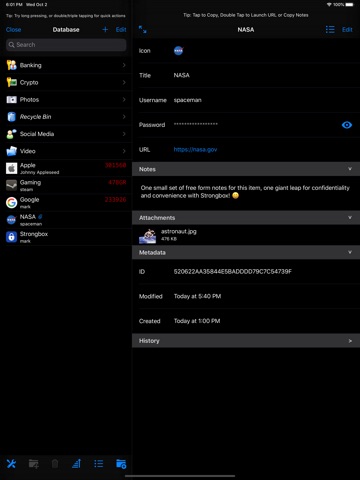
39 store screenshots



Pricing & paywalls
App Store
- Monthly Tip — $2.99/month
- Strongbox Pro (Monthly) — $2.99/month
- Strongbox Pro (Monthly) — $24.99/year ($2.08/mo)
- Little Tip — $4.99
- Medium Tip — $19.99
- Small Tip — $9.99
- Strongbox Pro (Lifetime) — $99.99
Ratings & reviews
App Store
-
5/5This is THE one!
TL;DR: a fantastic iOS password manager, better than Keepassium (when I last evaluated them side-by-side). Auto-sync, speedy even with large databases and with a boatload of features including for us advanced users. The developers are extremely responsive and keep everything in good working order with frequent bug fix updates and new features. Earlier this year, I was looking to move away from 1Password and their online vaults. I ultimately decided on something KeePass-compatible. Within that category, Keepassium and Strongbox are basically the only serious contenders, and Strongbox is superior for several key reasons (details below). Deciding factors: Ultimately I chose Strongbox over Keepassium for two major reasons. 1. Strongbox is more memory-efficient. My database is almost 5M and Keepassium would sometimes run out of memory. Strongbox handles my library well: it’s speedy and responsive. 2. Merge sync! I modify my database on multiple devices on a daily basis and sync using iCloud. My understanding of Strongbox features is that, instead of uploading/downloading the entire database, Strongbox will only read/write the elements that have changed. This is an indispensable feature if you use multiple devices! I should also mention that both Strongbox and Keepassium are both excellent in the way they handle network disruption. Online or offline, things “just work”. Pro tip: use KeePassXC to migrate from your 1Password vault to a KeePass-compatible vault WITHOUT having to export all your 1Password stuff to an unencrypted format.
eyv · 6 Aug 2026
-
5/5Best Password Manager - avoid a vendor lock-in with this app!
This app is the one I use the most on my iPad - my personal #1 app. A good password manager makes daily use so much easier and is essential for your own security. I use it not only for passwords, but also for other sensitive information (e.g. ID data) that should not be stored unprotected. What makes this password manager stand out: - I don't know of any password manager with a better feature set (and I've tested many). - The product is actively supported. The developer takes suggestions for improvement and makes the app even better with each release. - There is no compulsion to use a vendor cloud solution. A cloud solution - however it is designed - always has the potential security risk of a design flaw or hack! That is not the case here. - The password database is stored using an open database format. There are open source solutions for access on any platform. So access / export of your own password database is always guaranteed. With many other proprietary solutions you have a vendor lock-in after a very short time, you cannot export your data. Migrating hundreds of passwords manually is not an option. If such a vendor would stop providing the service you would have a big problem - and we are not talking about loosing access to some cloud stored holiday pictures.
Steve.JB · 6 Aug 2026
-
5/5Best open option
This app is my go-to password app, even with Passwords from Apple now available. I’ve used the competitive products, too, spent weeks looking at and reviewing alternatives, and what stands out for Strongbox is the cross-platform and cross-product support with very fair pricing. By using a standard database format, I can see my passwords and other protected data on every platform I have to use it on, even though I may use different apps (e.g., KeePass or KeePassXC) on others. I regularly use features like iCloud sharing, TOTP passwords, expiration dates, hardware keys, key files, virtual keys, secure notes, and more. The developer is incredibly responsive, even keeping the program updated during a new OS beta. For example, a change in Apple’s iPadOS and iOS in the most recent beta last Monday caused the apps to crash, and Mark had it fixed and pushed out through the App Store by the weekend. This is such a welcome change from so many other small (or even large) developers who wash their hands of betas and then take weeks after a new product update is rolled out before releasing a fix. If you’re looking for a good password app that doesn’t lock you in and has a responsive developer, you’d be hard pressed to do better.
Alphaman64 · 6 Aug 2026
-
5/5If its not Tim Apple’s #1 passcode manager, it should be!
Having purchased my first Apple device (ipad mini5) in 2020, I was looking for a solid password manager to run my kdbx files. I narrowed it down to two choices: Strongbox and Keepassium. Since they both offered free trials, I evaluated them side by side. Both developers are responsive professionals and both have created fine applications. Ultimately, I deleted Keepassium and chose to purchase a pro lifetime subscription to Strongbox. I am highly satisfied with Mark’s app. The deciding factor was simple: my eye preferred the sexy look and slick feel of Strongbox. It runs perfectly, it’s easy to use, and does exactly what I need it to do while maintaining bomb proof security. Even though it is more work, I choose to manually sync the database files with my Tresorit account. But Strongbox does feature auto-sync compatibility with other cloud storage companies if I change my mind. Thank you so much for creating (and maintaining) such a exceptional application! It is one of my all time favorites because it’s a solid and indispensable app for serious users.
SOE MITMFUSA · 6 Aug 2026
-
5/5Best option for iOS
As a KeePass power user (over 900 entries), I am on the prowl for the most safe, user-friendly, and reliable KeePass app on iOS. Originally a MiniKeePass user, it started to fail me when I was locked out of my own database because MiniKeePass did not support Argon2 encryption algorithm. Luckily, I searched on Reddit's /r/KeePass subreddit, and found StrongBox was on the list of official recommendations for iOS. Sure enough, not only did it support Argon2 encryption, but it offered a whole host of nitfy features that MiniKeePass lacked, such as FaceID unlock (humongous game-changer in saving time from punching in passwords), easily visible TOTP token keys that you can copy & paste, and also Favicons that are preserved. I cannot express how impressed I am with StrongBox, it's the level of functionality and features that reminds me of Android's KeePass2Android, but even superior. Do yourself a favor and grab the Pro version, and support this wonderful developer! Being open-sourced, vetted, and safe is important to me, and StrongBox checks all these boxes. I would highly recommend to my family and friends.
Razzy128 · 6 Aug 2026
Privacy & accessibility
App Store
Privacy
- Data Not Linked to You — Analytics — Purchases — Purchase History Developer declared
- Data Not Linked to You — Purchases Developer declared
Accessibility
No accessibility labels collected yet.
Versions
App Store
-
1.60.22
• BugFix: App Crash on database launch with latest non-production version of OS • BugFix: Custom Icon selection crash • Localization Updates If you are enjoying the new version of Strongbox it would be great if you could leave a positive review for us in the App Store. It makes a huge difference to us as Indie developers. Thank you! If you're experiencing any problems or are not happy, just let us know ([email protected]) and we'll make it right. - The Strongbox Team
-
1.60.23
• Minor Tweaks and Tech Debt • Localization Updates If you are enjoying the new version of Strongbox it would be great if you could leave a positive review for us in the App Store. It makes a huge difference to us as Indie developers. Thank you! If you're experiencing any problems or are not happy, just let us know ([email protected]) and we'll make it right. - The Strongbox Team
-
1.60.24
• Minor Tweaks and Tech Debt • Localization Updates If you are enjoying the new version of Strongbox it would be great if you could leave a positive review for us in the App Store. It makes a huge difference to us as Indie developers. Thank you! If you're experiencing any problems or are not happy, just let us know ([email protected]) and we'll make it right. - The Strongbox Team
-
1.60.25
• Detect when user tries to import a zip file and offer to unzip, search for database and import that • BugFix: With multiple AutoFill enabled databases, entries can have duplicate or stale AutoFill suggestions after an edit. • AutoFill: Always show Caller ID (renamed from Service ID) • Minor Tweaks, Updates and Tech Debt • Localization Updates If you are enjoying the new version of Strongbox it would be great if you could leave a positive review for us in the App Store. It makes a huge difference to us as Indie developers. Thank you! If you're experiencing any problems or are not happy, just let us know ([email protected]) and we'll make it right. - The Strongbox Team
-
1.60.26
• BugFix: Crash on older os versions (15.x, 16.x) due to use of more advanced AutoFill API • Minor Tweaks, Updates and Tech Debt • Localization Updates If you are enjoying the new version of Strongbox it would be great if you could leave a positive review for us in the App Store. It makes a huge difference to us as Indie developers. Thank you! If you're experiencing any problems or are not happy, just let us know ([email protected]) and we'll make it right. - The Strongbox Team
-
1.60.30
• Apple Watch Integration - You can now use Strongbox on your Apple Watch • Improved 2FA Code Display • When Exporting, ask if you want to Zip the export file or not (Settings > Advanced > The Garage > Zip Export) • Minor Tweaks, Updates and Tech Debt • Localization Updates If you are enjoying the new version of Strongbox it would be great if you could leave a positive review for us in the App Store. It makes a huge difference to us as Indie developers. Thank you! If you're experiencing any problems or are not happy, just let us know ([email protected]) and we'll make it right. - The Strongbox Team
-
1.60.31
• Watch improvements: dedicated 2FA tab, increase entry count limitation, reduce minimum required OS version • Option to hide the digits of the countdown for 2FA Code (Advanced Settings) • BugFix: Crash on older OS when displaying 2FA Code • Detect quota exceeded error and issue a more friendly error message • Minor Tweaks, Updates and Tech Debt • Localization Updates If you are enjoying the new version of Strongbox it would be great if you could leave a positive review for us in the App Store. It makes a huge difference to us as Indie developers. Thank you! If you're experiencing any problems or are not happy, just let us know ([email protected]) and we'll make it right. - The Strongbox Team
-
1.60.32
• Minor Tweaks, Updates and Tech Debt • Localization Updates If you are enjoying the new version of Strongbox it would be great if you could leave a positive review for us in the App Store. It makes a huge difference to us as Indie developers. Thank you! If you're experiencing any problems or are not happy, just let us know ([email protected]) and we'll make it right. - The Strongbox Team
-
1.60.33
• BugFix: CSV Importer not working for some CSV files • Minor Tweaks, Updates and Tech Debt • Localization Updates If you are enjoying the new version of Strongbox it would be great if you could leave a positive review for us in the App Store. It makes a huge difference to us as Indie developers. Thank you! If you're experiencing any problems or are not happy, just let us know ([email protected]) and we'll make it right. - The Strongbox Team
-
1.60.34
• Minor Tweaks, Updates and Tech Debt • Localization Updates If you are enjoying the new version of Strongbox it would be great if you could leave a positive review for us in the App Store. It makes a huge difference to us as Indie developers. Thank you! If you're experiencing any problems or are not happy, just let us know ([email protected]) and we'll make it right. - The Strongbox Team
-
1.60.35
• Strongbox Sync: Defensive coding - due to CloudKit problems or data loss, do not delete databases unless new deletedAt field explicitly set. • Minor Tweaks, Updates and Tech Debt • Localization Updates If you are enjoying the new version of Strongbox it would be great if you could leave a positive review for us in the App Store. It makes a huge difference to us as Indie developers. Thank you! If you're experiencing any problems or are not happy, just let us know ([email protected]) and we'll make it right. - The Strongbox Team
-
1.60.36
• Password previews for items with large amounts of fields will no longer stretch&clip in the autofill preview on smaller devices, and we’ve brought our new OTP preview along too. If you are enjoying the new version of Strongbox it would be great if you could leave a positive review for us in the App Store. It makes a huge difference to us as Indie developers. Thank you! If you're experiencing any problems or are not happy, just let us know ([email protected]) and we'll make it right. - The Strongbox Team
-
1.60.37
We’ve added support for checking if your account has been breached with Have I Been Pwned. Head to your database audit to check if any of your accounts have been compromised. You can now allow for expired entries to show in search, and we fixed a small bug with an image aspect ratio in the preview view. If you are enjoying the new version of Strongbox it would be great if you could leave a positive review for us in the App Store. It makes a huge difference to us as Indie developers. Thank you! If you're experiencing any problems or are not happy, just let us know ([email protected]) and we'll make it right. - The Strongbox Team
-
1.60.39
We’ve added support for checking if your account has been breached with Have I Been Pwned. Head to your database audit to check if any of your accounts have been compromised.You can now allow for expired entries to show in search, and we fixed a small bug with an image aspect ratio in the preview view. This expands on our existing functionality to check for a pwned password by also checking for the account itself being included in a data breach. You can opt-in to this feature inside audit settings, where you'll also find a more detailed description of how it works. Purchases in the app are now processed using RevenueCat. This helps us run sales more often and process purchases more reliably. The exact same information is provided to RevenueCat as it would be directly to Apple, and no extra analytics or tracking is added as a result of this change. If you are enjoying the new version of Strongbox it would be great if you could leave a positive review for us in the App Store. It makes a huge difference to us as Indie developers. Thank you! If you're experiencing any problems or are not happy, just let us know ([email protected]) and we'll make it right. - The Strongbox Team
-
1.60.40
We've fixed a bug where app was accessing the Have I Been Pwned breaches service when you've only enabled passwords. It will now only contact this API if you've accepted the second option in your audit settings. We've fixed some bugs & crashes when managing tags. Users who purchased the old in-app purchase for lifetime will now see their purchase automatically restored on launch, and display the correct "lifetime" messaging throughout. If you are enjoying the new version of Strongbox it would be great if you could leave a positive review for us in the App Store. It makes a huge difference to us as Indie developers. Thank you! If you're experiencing any problems or are not happy, just let us know ([email protected]) and we'll make it right. - The Strongbox Team
-
1.61
We've fixed a bug where app was accessing the Have I Been Pwned breaches service when you've only enabled passwords. It will now only contact this API if you've accepted the second option in your audit settings. We've fixed some bugs & crashes when managing tags. Users who purchased the old in-app purchase for lifetime will now see their purchase automatically restored on launch, and display the correct "lifetime" messaging throughout. If you are enjoying the new version of Strongbox it would be great if you could leave a positive review for us in the App Store. It makes a huge difference to us as Indie developers. Thank you! If you're experiencing any problems or are not happy, just let us know ([email protected]) and we'll make it right. - The Strongbox Team
-
1.62
This update for Strongbox brings support for Liquid Glass, Credit Card entries, and more. - New Design to fit right into the new OS - Dedicated credit card entries - Fixes for autofill not working on some sites - Reduction in CPU usage when turning on auditing for large databases - Fixed a couple crashes - Fixed various issues with saving/deleting entries - Handled when FaceID fails due to another FaceID running by prompting another form of authentication - Allow the passkey section to collapse on iOS - Add better alerts when trying to delete entries/databases - Fix various authentication failures not telling you why they failed - Fix tags not being shown in the search list consistently If you are enjoying the new version of Strongbox it would be great if you could leave a positive review for us in the App Store. It makes a huge difference to us as Indie developers. Thank you! If you're experiencing any problems or are not happy, just let us know ([email protected]) and we'll make it right. - The Strongbox Team
-
1.62.2
This update for Strongbox brings improvements to look & feel across iPadOS and macOS. - Fix issues with the third column on macOS - Stop the database window opening in the background - Fix a couple crashes on iPadOS - Adds a button to re-show the sidebar on iPadOS if you dismiss it and haven't selected an item - Stops the tab bar obscuring some buttons on iOS - Fixes some issues with touch targets at the top of lists - Stops the liquid glass buttons from showing a dark appearance when the homepage first loads If you are enjoying the new version of Strongbox it would be great if you could leave a positive review for us in the App Store. It makes a huge difference to us as Indie developers. Thank you! If you're experiencing any problems or are not happy, just let us know ([email protected]) and we'll make it right. - The Strongbox Team
-
1.62.3
This update for Strongbox improves the experience with Credit Card entries, and fixes a couple of bugs. - Fixes a crash with iPadOS when transitioning from small to large widths using multi tasking - Stops the auditor from causing large CPU usage when you have a large database - Fixes an issue where the Firefox/Chrome autofill password prompt would close itself - Corrects the text color in dark mode on iOS for credit card fields - Credit card custom fields can now be edited, and deleting them should persist If you are enjoying the new version of Strongbox it would be great if you could leave a positive review for us in the App Store. It makes a huge difference to us as Indie developers. Thank you! If you're experiencing any problems or are not happy, just let us know ([email protected]) and we'll make it right. - The Strongbox Team
-
1.63.0
This update for Strongbox supports importing from more password managers, and fixes a couple of issues with WebDAV and Dropbox hosted databases. - Strongbox now supports importing from Minimalist & ProtonPass - Adds the ability to tag credit card fields - Fixes a bug where concealable fields wouldn’t correctly conceal on save for credit card entries - Fixes various issues with the iPad experience of Strongbox - Fixes a crash when adding or opening a Dropbox Database if the account had large amounts of files - Fixes an issue stopping some users from connecting to their WebDAV databases - Updates text fields in the WebDAV entry to remove all autocorrection - Removes hyphens from credit card numbers when autofilling If you are enjoying the new version of Strongbox it would be great if you could leave a positive review for us in the App Store. It makes a huge difference to us as Indie developers. Thank you! If you're experiencing any problems or are not happy, just let us know ([email protected]) and we'll make it right. - The Strongbox Team
-
1.63.1
This update for Strongbox supports importing from more password managers, and fixes a couple of issues with WebDAV and Dropbox hosted databases. - Strongbox now supports importing from Minimalist & ProtonPass - Adds the ability to tag credit card fields - Fixes a bug where concealable fields wouldn’t correctly conceal on save for credit card entries - Fixes various issues with the iPad experience of Strongbox - Fixes a crash when adding or opening a Dropbox Database if the account had large amounts of files - Fixes an issue stopping some users from connecting to their WebDAV databases - Updates text fields in the WebDAV entry to remove all autocorrection - Removes hyphens from credit card numbers when autofilling If you are enjoying the new version of Strongbox it would be great if you could leave a positive review for us in the App Store. It makes a huge difference to us as Indie developers. Thank you! If you're experiencing any problems or are not happy, just let us know ([email protected]) and we'll make it right. - The Strongbox Team
-
1.63.2
This update for Strongbox supports importing from more password managers, and fixes a couple of issues with WebDAV and Dropbox hosted databases. - Strongbox now supports importing from Minimalist & ProtonPass - Adds the ability to tag credit card fields - Fixes a bug where concealable fields wouldn’t correctly conceal on save for credit card entries - Fixes various issues with the iPad experience of Strongbox - Fixes a crash when adding or opening a Dropbox Database if the account had large amounts of files - Fixes an issue stopping some users from connecting to their WebDAV databases - Updates text fields in the WebDAV entry to remove all autocorrection - Removes hyphens from credit card numbers when autofilling - Fixes a crash on iOS 18 and below If you are enjoying the new version of Strongbox it would be great if you could leave a positive review for us in the App Store. It makes a huge difference to us as Indie developers. Thank you! If you're experiencing any problems or are not happy, just let us know ([email protected]) and we'll make it right. - The Strongbox Team
-
1.64.0
This update for Strongbox adds new import options, improves the upgrade experience & adds more options for crash reporting. New: - Import from Apple Passwords exporter. - Import from mSecure and Secrets 4 vaults. - Updated upgrade/onboarding flow and trial messaging. - Added automatic opt-in crash reporting. Fixes: - Improved split view controller stability (crashes, collapsing, toolbar issues, layout glitches). - Fixed Safari AutoFill lock reliability and YubiKey config mismatch. - Fixed Proton Pass importer reliability and WebDAV multi-user connections. - Improved HIBP audit logic and error tracking. - Fixed missing translations and credit card formatting/copy issues. If you are enjoying the new version of Strongbox it would be great if you could leave a positive review for us in the App Store. It makes a huge difference to us as Indie developers. Thank you! If you're experiencing any problems or are not happy, just let us know ([email protected]) and we'll make it right. - The Strongbox Team
-
1.64.1
This update for Strongbox adds new import options, improves the upgrade experience & adds more options for crash reporting. New: - Import from Apple Passwords exporter. - Import from mSecure and Secrets 4 vaults. - Updated upgrade/onboarding flow and trial messaging. - Added automatic opt-in crash reporting. Fixes: - Fix issue with search not pushing the item details in some cases - Improved split view controller stability (crashes, collapsing, toolbar issues, layout glitches). - Fixed Safari AutoFill lock reliability and YubiKey config mismatch. - Fixed Proton Pass importer reliability and WebDAV multi-user connections. - Improved HIBP audit logic and error tracking. - Fixed missing translations and credit card formatting/copy issues. If you are enjoying the new version of Strongbox it would be great if you could leave a positive review for us in the App Store. It makes a huge difference to us as Indie developers. Thank you! If you're experiencing any problems or are not happy, just let us know ([email protected]) and we'll make it right. - The Strongbox Team
-
1.65.0
· 13 Jul 2026
This update for Strongbox adds SimpleLogin email aliases, Bitwarden Passkey import & big improvements to search. New: - Generate SimpleLogin email aliases right from the password generator. - Import Passkeys from Bitwarden. - Support for ID.me two-factor authentication setup. - Remember the last used search scope, and exclude password history from search results. - Multi-select actions for search results, including move, export, merge and delete. - Unified entry context menus, with a dedicated View action. - Refreshed app icon. Fixes: - Fixed searches containing straight or curly apostrophes. - Fixed favourite entries not opening correctly from the Home screen. - Fixed crashes when editing tags, including on iOS 18. - Fixed a crash when saving a Passkey without a username or email. - Fixed the What's New screen. - Fixed an issue where some subscription renewals could cause a temporary downgrade to non-Pro. - Fixed ineligible users seeing "90 days free" trial messaging. If you are enjoying the new version of Strongbox it would be great if you could leave a positive review for us in the App Store. It makes a huge difference to us as indie developers. Thank you! If you're experiencing any problems or are not happy, just let us know ([email protected]) and we'll make it right. - The Strongbox Team
Alternatives
- Enpass Password Manager — Same category + similar ratings
- Standard Notes — Same category + similar ratings
Availability by market
- US
Data quality & evidence
- Page completeness
- Live store listing
- Last verified
- 6 Aug 2026
- Sources
- App Store
- Apoku editorial summary has not been published yet.