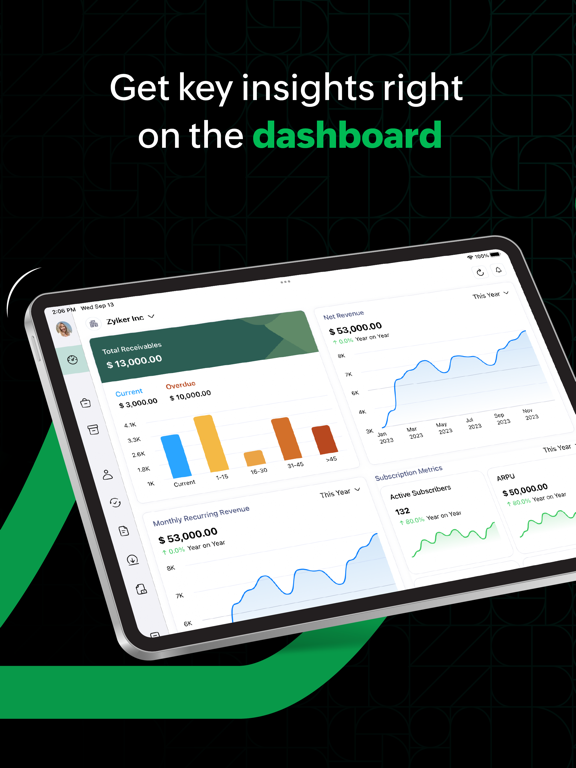
AppCorpus MCP gives your agent current app data, prices, screens, features and sources.
View JSON
GET /api/v3/apps/1184196693
{
"app_id": 1184196693,
"canonical_url": "https://appcorpus.com/apps/zoho-billing-management-app-1184196693",
"identity": {
"name": "Zoho Billing Management App",
"slug": "zoho-billing-management-app",
"developer": {
"name": "Zoho Corporation",
"url": "https://appcorpus.com/developers/zoho-corporation-2-developer_ef26e408e067b844e9af1e805d02a443"
},
"icon_url": "https://is1-ssl.mzstatic.com/image/thumb/Purple211/v4/dd/0f/15/dd0f15cc-8a62-01cb-719c-13acd193a229/AppIcon-0-0-1x_U007epad-0-0-0-1-0-0-P3-0-85-220.png/512x512bb.jpg",
"stores": [
"apple"
],
"platforms": [
"iphone",
"ipad"
],
"status": {
"state": "active",
"label": "Active",
"last_checked": "2026-08-06",
"last_checked_label": "6 Aug 2026",
"banner": null,
"region_note": null
}
},
"listings": [
{
"store": "apple",
"status": "ACTIVE",
"url": "https://apps.apple.com/us/app/zoho-billing-management-app/id1184196693?uo=4",
"rating": 4.8,
"rating_count": 203,
"formatted_price": "Free",
"is_free": true,
"has_iap": true,
"has_subscription": false,
"version": "3.2.3",
"updated": "2026-07-20",
"currency": "USD"
}
],
"summary": {
"one_liner": null,
"summary": null,
"best_for": [],
"not_for": [],
"status": "fallback",
"at_a_glance": [
"From $19.99/mo",
"Free to download",
"In-app purchases"
]
},
"categories": {
"official": [
"Business",
"Finance"
],
"appcorpus": [
{
"category_id": "business",
"label": "Business",
"url": "https://appcorpus.com/categories/business"
},
{
"category_id": "finance",
"label": "Finance",
"url": "https://appcorpus.com/categories/finance"
}
]
},
"use_cases": [],
"features": [
{
"capability_id": "apple_wallet",
"label": "Apple Wallet",
"availability": "yes",
"access_level": "unknown",
"scope": "App Store",
"evidence": "Store published"
},
{
"capability_id": "free_app",
"label": "Free app",
"availability": "yes",
"access_level": "free",
"scope": null,
"evidence": "Store published"
},
{
"capability_id": "in_app_purchases",
"label": "In-app purchases",
"availability": "yes",
"access_level": "free_limited",
"scope": null,
"evidence": "Store published"
}
],
"pricing": [
{
"store": "apple",
"formatted_price": "Free",
"is_free": true,
"has_iap": true,
"has_subscription": false,
"currency": "USD",
"market": "us",
"last_verified": "2026-08-06",
"rows": [
"Standard Monthly — $19.99/month",
"Standard Monthly — $29.00/month",
"Standard Monthly — $179.99/year ($14.99/mo)",
"Standard Monthly — $300.00/year ($25.00/mo)",
"Professional Monthly — $49.99/month",
"Basic - Monthly — $58.99/month",
"Premium Monthly — $69.00/month",
"Premium Monthly — $99.99/month",
"Premium Monthly — $709.00/year ($59.08/mo)"
]
}
],
"screens": [
{
"url": "https://is1-ssl.mzstatic.com/image/thumb/PurpleSource221/v4/59/d0/be/59d0be36-9519-9779-94cb-744255d0d5f5/c428089a-ddfb-4a69-9fa7-dc3df4f0063e_1.png/1600x1600bb.jpg",
"store": "apple",
"platform": "ipad",
"alt": "Zoho Billing Management App ipad screenshot 1"
},
{
"url": "https://is1-ssl.mzstatic.com/image/thumb/PurpleSource221/v4/cb/78/10/cb781021-2ab0-e664-f501-0ebf8e2f7c46/8fd0c3f0-d920-4875-955d-ffbcbc36c361_1.png/576x768bb.png",
"store": "apple",
"platform": "ipad",
"alt": "Zoho Billing Management App ipad screenshot 2"
},
{
"url": "https://is1-ssl.mzstatic.com/image/thumb/PurpleSource221/v4/4f/2f/8a/4f2f8aba-dda2-cf96-595d-6478e91b8a56/f2d8e019-12a3-401c-a1b4-f4667bbdfdd5_2.png/1600x1600bb.jpg",
"store": "apple",
"platform": "ipad",
"alt": "Zoho Billing Management App ipad screenshot 3"
},
{
"url": "https://is1-ssl.mzstatic.com/image/thumb/PurpleSource211/v4/f1/c4/34/f1c43458-8d2a-fa38-fca4-759709666976/f1b0dde5-5472-4714-879e-c6f4db86f1c8_2.png/576x768bb.png",
"store": "apple",
"platform": "ipad",
"alt": "Zoho Billing Management App ipad screenshot 4"
},
{
"url": "https://is1-ssl.mzstatic.com/image/thumb/PurpleSource221/v4/e5/35/fd/e535fda2-9483-5253-7eda-c2ce07ed8627/0b3b3c15-6059-44b3-9086-0872c2038291_4.png/1600x1600bb.jpg",
"store": "apple",
"platform": "ipad",
"alt": "Zoho Billing Management App ipad screenshot 5"
},
{
"url": "https://is1-ssl.mzstatic.com/image/thumb/PurpleSource211/v4/c5/98/dd/c598ddb7-dbfd-7070-f0fb-8e98a2de131a/45559504-b969-42f5-9b66-c3aff7f9e862_4.png/576x768bb.png",
"store": "apple",
"platform": "ipad",
"alt": "Zoho Billing Management App ipad screenshot 6"
},
{
"url": "https://is1-ssl.mzstatic.com/image/thumb/PurpleSource221/v4/4d/7e/5c/4d7e5c21-08ec-5abd-c87e-c13b50985ffb/58c0e140-5e6f-4ae5-97b6-ebc9d6f481e0_3.png/1600x1600bb.jpg",
"store": "apple",
"platform": "ipad",
"alt": "Zoho Billing Management App ipad screenshot 7"
},
{
"url": "https://is1-ssl.mzstatic.com/image/thumb/PurpleSource221/v4/20/ea/59/20ea59cf-aba0-cad8-68fe-b67edc5fa2a7/1c22ac9c-c7d0-4a2c-8f48-9b743c37be38_3.png/576x768bb.png",
"store": "apple",
"platform": "ipad",
"alt": "Zoho Billing Management App ipad screenshot 8"
},
{
"url": "https://is1-ssl.mzstatic.com/image/thumb/PurpleSource221/v4/fc/9a/2a/fc9a2a8b-ad2a-272a-3574-ca9f1adbf5a3/915d4b29-e1f5-4e7c-b679-e267e57fd6d2_5.png/1600x1600bb.jpg",
"store": "apple",
"platform": "ipad",
"alt": "Zoho Billing Management App ipad screenshot 9"
},
{
"url": "https://is1-ssl.mzstatic.com/image/thumb/PurpleSource211/v4/1f/c8/5a/1fc85a29-e3f4-869b-8ec4-e698e9402c78/e33cf793-d1e8-44b9-9664-0f6d2fdbfc63_5.png/576x768bb.png",
"store": "apple",
"platform": "ipad",
"alt": "Zoho Billing Management App ipad screenshot 10"
},
{
"url": "https://is1-ssl.mzstatic.com/image/thumb/PurpleSource221/v4/3e/97/be/3e97be13-3b12-3394-e6b2-f0933d6941b0/79b4107b-9800-424f-8642-ab013796f26f_6.png/1600x1600bb.jpg",
"store": "apple",
"platform": "ipad",
"alt": "Zoho Billing Management App ipad screenshot 11"
},
{
"url": "https://is1-ssl.mzstatic.com/image/thumb/PurpleSource211/v4/18/8b/d0/188bd094-41bf-98de-814b-30694ccfc644/5a1f9f32-dc88-41b7-b6d4-439e2a91f0f5_6.png/576x768bb.png",
"store": "apple",
"platform": "ipad",
"alt": "Zoho Billing Management App ipad screenshot 12"
},
{
"url": "https://is1-ssl.mzstatic.com/image/thumb/PurpleSource211/v4/7e/c4/3b/7ec43bca-e92d-4967-2d67-fca7316461cc/ZBL_-_1.png/1242x1600bb.jpg",
"store": "apple",
"platform": "iphone",
"alt": "Zoho Billing Management App iphone screenshot 13"
},
{
"url": "https://is1-ssl.mzstatic.com/image/thumb/PurpleSource211/v4/02/b2/8a/02b28a89-1e4e-4120-264e-2705a2c8127c/Tap_to_Pay_-_2.png/1242x1600bb.jpg",
"store": "apple",
"platform": "iphone",
"alt": "Zoho Billing Management App iphone screenshot 14"
},
{
"url": "https://is1-ssl.mzstatic.com/image/thumb/Purple221/v4/b0/13/4a/b0134abd-bac1-960f-ef8a-7e27832c2fd6/264e342f-31d1-4566-a22e-827906ed2129_3.png/1242x1600bb.jpg",
"store": "apple",
"platform": "iphone",
"alt": "Zoho Billing Management App iphone screenshot 15"
},
{
"url": "https://is1-ssl.mzstatic.com/image/thumb/PurpleSource211/v4/f4/a5/93/f4a59322-b458-b66c-5b1d-db1483469c33/5dab6a43-e3d8-4c5d-bd52-15097b1c3d14_Scrnsht1.png/1242x1600bb.jpg",
"store": "apple",
"platform": "iphone",
"alt": "Zoho Billing Management App iphone screenshot 16"
},
{
"url": "https://is1-ssl.mzstatic.com/image/thumb/Purple211/v4/29/6b/2a/296b2ab3-f8ee-8b05-ddd8-933de4dc14e0/1b21b6c9-50ef-4c3f-b7cb-e2c5bf4fe957_5.png/1242x1600bb.jpg",
"store": "apple",
"platform": "iphone",
"alt": "Zoho Billing Management App iphone screenshot 17"
},
{
"url": "https://is1-ssl.mzstatic.com/image/thumb/Purple211/v4/32/bb/1a/32bb1ad0-1233-d876-f44c-fa86b4ea36e6/29b5016d-9218-4f9e-9bd5-71193db4a3de_6.png/1242x1600bb.jpg",
"store": "apple",
"platform": "iphone",
"alt": "Zoho Billing Management App iphone screenshot 18"
},
{
"url": "https://is1-ssl.mzstatic.com/image/thumb/Purple221/v4/15/d2/14/15d2140f-8123-79c1-7b4c-5391ee727a31/f2a781cc-50a9-49ff-806e-2e6bb6099916_7.png/1242x1600bb.jpg",
"store": "apple",
"platform": "iphone",
"alt": "Zoho Billing Management App iphone screenshot 19"
},
{
"url": "https://is1-ssl.mzstatic.com/image/thumb/Purple221/v4/03/e8/78/03e87830-c54d-f3ca-16b7-81cde4b9a57c/cb716682-28e0-4bf1-aec5-8cfc64db67f3_8.png/1242x1600bb.jpg",
"store": "apple",
"platform": "iphone",
"alt": "Zoho Billing Management App iphone screenshot 20"
},
{
"url": "https://is1-ssl.mzstatic.com/image/thumb/Purple211/v4/16/d2/94/16d294b9-9955-ddb0-8476-1ae8779d6893/148859fc-5cbc-4f2f-bdff-b9745bde889f_9.png/1242x1600bb.jpg",
"store": "apple",
"platform": "iphone",
"alt": "Zoho Billing Management App iphone screenshot 21"
},
{
"url": "https://is1-ssl.mzstatic.com/image/thumb/Purple211/v4/16/2a/1b/162a1b0b-87b4-bd4b-b6b7-dae23294ce76/f470a964-ff27-4f51-a8bb-f925d3675a99_10.png/1242x1600bb.jpg",
"store": "apple",
"platform": "iphone",
"alt": "Zoho Billing Management App iphone screenshot 22"
},
{
"url": "https://is1-ssl.mzstatic.com/image/thumb/PurpleSource116/v4/38/ae/79/38ae7924-0996-196e-a3e6-03401e6e366b/[email protected]/1600x1600bb.jpg",
"store": "apple",
"platform": "mac",
"alt": "Zoho Billing Management App mac screenshot 23"
},
{
"url": "https://is1-ssl.mzstatic.com/image/thumb/PurpleSource116/v4/fe/c0/c4/fec0c484-3f7a-a7e7-8292-e85bf2a6a46a/[email protected]/1600x1600bb.jpg",
"store": "apple",
"platform": "mac",
"alt": "Zoho Billing Management App mac screenshot 24"
},
{
"url": "https://is1-ssl.mzstatic.com/image/thumb/PurpleSource116/v4/95/36/ae/9536aecc-f8fb-dc3e-d9f2-b508e9631b83/[email protected]/1600x1600bb.jpg",
"store": "apple",
"platform": "mac",
"alt": "Zoho Billing Management App mac screenshot 25"
},
{
"url": "https://is1-ssl.mzstatic.com/image/thumb/PurpleSource126/v4/4f/54/c9/4f54c93f-d0ed-7189-de60-710d29529512/[email protected]/1600x1600bb.jpg",
"store": "apple",
"platform": "mac",
"alt": "Zoho Billing Management App mac screenshot 26"
},
{
"url": "https://is1-ssl.mzstatic.com/image/thumb/PurpleSource116/v4/bc/98/04/bc980414-ca0a-6ff8-2533-982e2d146bf6/[email protected]/1600x1600bb.jpg",
"store": "apple",
"platform": "mac",
"alt": "Zoho Billing Management App mac screenshot 27"
},
{
"url": "https://is1-ssl.mzstatic.com/image/thumb/PurpleSource116/v4/86/96/4c/86964cb1-5068-41ef-78cd-08baf727880d/[email protected]/1600x1600bb.jpg",
"store": "apple",
"platform": "mac",
"alt": "Zoho Billing Management App mac screenshot 28"
},
{
"url": "https://is1-ssl.mzstatic.com/image/thumb/PurpleSource126/v4/43/0a/50/430a50e8-3ea2-0a0e-630a-d69faa551cd9/[email protected]/1600x1600bb.jpg",
"store": "apple",
"platform": "mac",
"alt": "Zoho Billing Management App mac screenshot 29"
},
{
"url": "https://is1-ssl.mzstatic.com/image/thumb/PurpleSource221/v4/d4/85/d2/d485d2f6-382c-9e99-6f0d-d84f558a927a/Frame_4.png/422x524bb.jpg",
"store": "apple",
"platform": "watch",
"alt": "Zoho Billing Management App watch screenshot 30"
},
{
"url": "https://is1-ssl.mzstatic.com/image/thumb/PurpleSource211/v4/11/58/a5/1158a534-78ea-190d-5193-3a76319bedf0/Group_17305.png/422x524bb.jpg",
"store": "apple",
"platform": "watch",
"alt": "Zoho Billing Management App watch screenshot 31"
},
{
"url": "https://is1-ssl.mzstatic.com/image/thumb/PurpleSource211/v4/18/6e/a5/186ea514-dade-62b1-69fe-6f589c8b14d9/Frame_7.png/422x524bb.jpg",
"store": "apple",
"platform": "watch",
"alt": "Zoho Billing Management App watch screenshot 32"
},
{
"url": "https://is1-ssl.mzstatic.com/image/thumb/PurpleSource211/v4/36/11/de/3611dec1-b663-b095-8c27-198f6caf4430/Frame_6.png/422x524bb.jpg",
"store": "apple",
"platform": "watch",
"alt": "Zoho Billing Management App watch screenshot 33"
}
],
"ratings": [
{
"store": "apple",
"average": 4.8,
"count": 203,
"market": "us",
"observed_at": "2026-08-06",
"reviews": [
{
"rating": 5,
"title": "I liked Zoho Subscriptions better",
"body": "Zoho is a great service so this is just about the new Zoho Billing app. I am updating my review because Zoho deployed a new release of the mobile app that fixed the problem I reported. They were extremely responsive and resolved it in record time.",
"author": "Beantown74",
"date": "6 Aug 2026"
},
{
"rating": 5,
"title": "A game changer for our small business!",
"body": "Zoho has been a total game changer for our small business. Access to reporting, ease of use and its flexibility has made our day to day operations much more streamlined and scalable!",
"author": "msprem69",
"date": "6 Aug 2026"
},
{
"rating": 5,
"title": "Software for Dummies",
"body": "This software has been the best for my business. Simple but yet has all the tools i need.",
"author": "JRICKNYC",
"date": "6 Aug 2026"
},
{
"rating": 5,
"title": "Invoicing system that works on iPad/Desktop",
"body": "So impressed - with this invoice management app you get the whole package",
"author": "18934",
"date": "6 Aug 2026"
},
{
"rating": 5,
"title": "I love this app",
"body": "I’ve been able to do my entire job from home because of this app! Their support team is awesome!",
"author": "Lauddie143",
"date": "6 Aug 2026"
}
]
}
],
"privacy": [
{
"store": "apple",
"declarations": [
{
"title": "Data Linked to You",
"detail": "Analytics — Diagnostics — Crash Data",
"source": "Developer declared"
},
{
"title": "Data Linked to You",
"detail": "Analytics — Diagnostics — Other Diagnostic Data",
"source": "Developer declared"
},
{
"title": "Data Linked to You",
"detail": "Analytics — Diagnostics — Performance Data",
"source": "Developer declared"
},
{
"title": "Data Linked to You",
"detail": "Analytics — Identifiers — Device ID",
"source": "Developer declared"
},
{
"title": "Data Linked to You",
"detail": "Analytics — Identifiers — User ID",
"source": "Developer declared"
},
{
"title": "Data Linked to You",
"detail": "Analytics — Purchases — Purchase History",
"source": "Developer declared"
},
{
"title": "Data Linked to You",
"detail": "Analytics — Usage Data — Other Usage Data",
"source": "Developer declared"
},
{
"title": "Data Linked to You",
"detail": "Analytics — Usage Data — Product Interaction",
"source": "Developer declared"
},
{
"title": "Data Linked to You",
"detail": "App Functionality — Contact Info — Email Address",
"source": "Developer declared"
},
{
"title": "Data Linked to You",
"detail": "App Functionality — Contact Info — Name",
"source": "Developer declared"
},
{
"title": "Data Linked to You",
"detail": "App Functionality — Contact Info — Phone Number",
"source": "Developer declared"
},
{
"title": "Data Linked to You",
"detail": "App Functionality — Contact Info — Physical Address",
"source": "Developer declared"
},
{
"title": "Data Linked to You",
"detail": "App Functionality — Contacts",
"source": "Developer declared"
},
{
"title": "Data Linked to You",
"detail": "App Functionality — Diagnostics — Crash Data",
"source": "Developer declared"
},
{
"title": "Data Linked to You",
"detail": "App Functionality — Diagnostics — Other Diagnostic Data",
"source": "Developer declared"
},
{
"title": "Data Linked to You",
"detail": "App Functionality — Diagnostics — Performance Data",
"source": "Developer declared"
},
{
"title": "Data Linked to You",
"detail": "App Functionality — Financial Info — Payment Info",
"source": "Developer declared"
},
{
"title": "Data Linked to You",
"detail": "App Functionality — Identifiers — Device ID",
"source": "Developer declared"
},
{
"title": "Data Linked to You",
"detail": "App Functionality — Identifiers — User ID",
"source": "Developer declared"
},
{
"title": "Data Linked to You",
"detail": "App Functionality — Location — Coarse Location",
"source": "Developer declared"
},
{
"title": "Data Linked to You",
"detail": "App Functionality — Purchases — Purchase History",
"source": "Developer declared"
},
{
"title": "Data Linked to You",
"detail": "App Functionality — Search History",
"source": "Developer declared"
},
{
"title": "Data Linked to You",
"detail": "App Functionality — Usage Data — Other Usage Data",
"source": "Developer declared"
},
{
"title": "Data Linked to You",
"detail": "App Functionality — Usage Data — Product Interaction",
"source": "Developer declared"
},
{
"title": "Data Linked to You",
"detail": "App Functionality — User Content — Customer Support",
"source": "Developer declared"
},
{
"title": "Data Linked to You",
"detail": "App Functionality — User Content — Other User Content",
"source": "Developer declared"
},
{
"title": "Data Linked to You",
"detail": "App Functionality — User Content — Photos or Videos",
"source": "Developer declared"
},
{
"title": "Data Linked to You",
"detail": "Developer’s Advertising or Marketing — Contact Info — Email Address",
"source": "Developer declared"
},
{
"title": "Data Linked to You",
"detail": "Developer’s Advertising or Marketing — Contact Info — Name",
"source": "Developer declared"
},
{
"title": "Data Linked to You",
"detail": "Product Personalization — Contact Info — Email Address",
"source": "Developer declared"
},
{
"title": "Data Linked to You",
"detail": "Product Personalization — Identifiers — User ID",
"source": "Developer declared"
},
{
"title": "Data Linked to You",
"detail": "Contact Info",
"source": "Developer declared"
},
{
"title": "Data Linked to You",
"detail": "Contacts",
"source": "Developer declared"
},
{
"title": "Data Linked to You",
"detail": "Diagnostics",
"source": "Developer declared"
},
{
"title": "Data Linked to You",
"detail": "Financial Info",
"source": "Developer declared"
},
{
"title": "Data Linked to You",
"detail": "Identifiers",
"source": "Developer declared"
},
{
"title": "Data Linked to You",
"detail": "Location",
"source": "Developer declared"
},
{
"title": "Data Linked to You",
"detail": "Purchases",
"source": "Developer declared"
},
{
"title": "Data Linked to You",
"detail": "Search History",
"source": "Developer declared"
},
{
"title": "Data Linked to You",
"detail": "Usage Data",
"source": "Developer declared"
},
{
"title": "Data Linked to You",
"detail": "User Content",
"source": "Developer declared"
}
],
"accessibility": []
}
],
"changes": [
{
"store": "apple",
"version": "3.0.24",
"released_at": null,
"notes": "The long-awaited feature is finally here! You can now add a UPI QR code to your invoices, which your customers can scan to pay [India Edition only]. We have also fixed a few bugs to make your experience with Zoho Billing even better."
},
{
"store": "apple",
"version": "3.0.25",
"released_at": null,
"notes": "We've made a few bug fixes and performance enhancements."
},
{
"store": "apple",
"version": "3.0.26",
"released_at": null,
"notes": "We've made a few bug fixes and performance enhancements."
},
{
"store": "apple",
"version": "3.0.27",
"released_at": null,
"notes": "We've made a few bug fixes and performance enhancements."
},
{
"store": "apple",
"version": "3.0.28",
"released_at": null,
"notes": "You can now add additional senders, authenticate their email domains with SPF and DKIM to prevent emails from landing in the recipient's spam folder, mark them as Primary, and edit them if required. To configure these preferences, tap More > Settings > Sender Email Preferences. We have also fixed a few bugs to make your experience with Zoho Billing even better. Note: Ensure that your iPhone is updated to iOS 15 or higher and iPad to iPadOS 15 or higher to receive future updates for Zoho Billing."
},
{
"store": "apple",
"version": "3.0.29",
"released_at": null,
"notes": "You can now add additional senders, authenticate their email domains with SPF and DKIM to prevent emails from landing in the recipient's spam folder, mark them as Primary, and edit them if required. To configure these preferences, tap More > Settings > Sender Email Preferences. We have also fixed a few bugs to make your experience with Zoho Billing even better. Note: Ensure that your iPhone is updated to iOS 15 or higher and iPad to iPadOS 15 or higher to receive future updates for Zoho Billing."
},
{
"store": "apple",
"version": "3.0.31",
"released_at": null,
"notes": "We've made a few bug fixes and performance enhancements."
},
{
"store": "apple",
"version": "3.0.32",
"released_at": null,
"notes": "We've made a few bug fixes and performance enhancements."
},
{
"store": "apple",
"version": "3.0.33",
"released_at": null,
"notes": "Viewing item details just got easier! You can now click on any item to view its details instantly without being redirected to its edit page. We've also resolved a few bugs to make your experience more seamless. Note: Ensure that your iPhone is updated to iOS 16 or higher, and iPad to iPadOS 16 or higher to receive updates for Zoho Billing."
},
{
"store": "apple",
"version": "3.0.34",
"released_at": null,
"notes": "We've made a few bug fixes and performance enhancements."
},
{
"store": "apple",
"version": "3.1.0",
"released_at": null,
"notes": "Zoho Billing now integrates with the latest Apple OS 26 features, bringing you a smoother design, smarter automation, and faster ways to manage your finances. Zoho Billing comes to your wrist for the first time! Manage essentials on the go with the brand-new watchOS app. View insights, track activity, and stay updated without reaching for your phone. Liquid Glass UI: Experience a smooth, frosted-glass design across iOS, iPadOS, and watchOS. Voice Commands: Create invoices instantly using simple voice prompts. Smudge-Free Scanning: Get alerts for blurry or hazy captures and retake scans for clarity. AI-Generated Item Images: Generate suitable item images automatically with Image Playground. Interactive App Snippets: Search and view customers or transactions directly from Spotlight. Notification Overview: Stay updated with a summarized view of recent notifications. Scan to Add Items: Add items to transactions instantly by scanning receipts or handwritten lists. Project Timers on iOS: Track running project timers directly from the tab bar accessory view. Flexible Window Management: Resize, multitask, and drag fields easily on iPad. iPad Menu Bar: Enjoy seamless navigation with the new iPad Menu Bar."
},
{
"store": "apple",
"version": "3.1.1",
"released_at": null,
"notes": "Zoho Billing now integrates with the latest Apple OS 26 features, bringing you a smoother design, smarter automation, and faster ways to manage your finances. Zoho Billing comes to your wrist for the first time! Manage essentials on the go with the brand-new watchOS app. View insights, track activity, and stay updated without reaching for your phone. Liquid Glass UI: Experience a smooth, frosted-glass design across iOS, iPadOS, and watchOS. Voice Commands: Create invoices instantly using simple voice prompts. Smudge-Free Scanning: Get alerts for blurry or hazy captures and retake scans for clarity. AI-Generated Item Images: Generate suitable item images automatically with Image Playground. Interactive App Snippets: Search and view customers or transactions directly from Spotlight. Notification Overview: Stay updated with a summarized view of recent notifications. Scan to Add Items: Add items to transactions instantly by scanning receipts or handwritten lists. Project Timers on iOS: Track running project timers directly from the tab bar accessory view. Flexible Window Management: Resize, multitask, and drag fields easily on iPad. iPad Menu Bar: Enjoy seamless navigation with the new iPad Menu Bar."
},
{
"store": "apple",
"version": "3.1.10",
"released_at": null,
"notes": "Tap to Pay on iPhone is now available for Zoho Billing users integrated with Stripe. You can accept all types of in-person contactless payments right on your iPhone, from physical debit and credit cards to Apple Pay and other digital wallets—no additional hardware needed. Available in Singapore, Australia, Canada, France, UK, Germany, Malaysia, Spain and US (Early Access)"
},
{
"store": "apple",
"version": "3.1.12",
"released_at": null,
"notes": "We've made a few bug fixes and performance enhancements."
},
{
"store": "apple",
"version": "3.1.2",
"released_at": null,
"notes": "Zoho Billing now integrates with the latest Apple OS 26 features, bringing you a smoother design, smarter automation, and faster ways to manage your finances. Zoho Billing comes to your wrist for the first time! Manage essentials on the go with the brand-new watchOS app. View insights, track activity, and stay updated without reaching for your phone. Liquid Glass UI: Experience a smooth, frosted-glass design across iOS, iPadOS, and watchOS. Voice Commands: Create invoices instantly using simple voice prompts. Smudge-Free Scanning: Get alerts for blurry or hazy captures and retake scans for clarity. AI-Generated Item Images: Generate suitable item images automatically with Image Playground. Interactive App Snippets: Search and view customers or transactions directly from Spotlight. Notification Overview: Stay updated with a summarized view of recent notifications. Scan to Add Items: Add items to transactions instantly by scanning receipts or handwritten lists. Project Timers on iOS: Track running project timers directly from the tab bar accessory view. Flexible Window Management: Resize, multitask, and drag fields easily on iPad. iPad Menu Bar: Enjoy seamless navigation with the new iPad Menu Bar."
},
{
"store": "apple",
"version": "3.1.3",
"released_at": null,
"notes": "We've made a few bug fixes and performance enhancements."
},
{
"store": "apple",
"version": "3.1.5",
"released_at": null,
"notes": "We've made a few bug fixes and performance enhancements."
},
{
"store": "apple",
"version": "3.1.6",
"released_at": null,
"notes": "We've made a few bug fixes and performance enhancements."
},
{
"store": "apple",
"version": "3.1.7",
"released_at": null,
"notes": "We've made a few bug fixes and performance enhancements."
},
{
"store": "apple",
"version": "3.1.8",
"released_at": null,
"notes": "Tap to Pay on iPhone is now available for Zoho Billing users integrated with Stripe. You can accept all types of in-person contactless payments right on your iPhone, from physical debit and credit cards to Apple Pay and other digital wallets—no additional hardware needed. Available in Singapore, Australia, Canada, France, UK, Germany, Spain and US (Early Access)"
}
],
"alternatives": [
{
"app_id": 1503970375,
"name": "Invoice Ninja",
"url": "https://appcorpus.com/apps/invoice-ninja-1503970375",
"reason": "Same category + similar ratings"
},
{
"app_id": 6478382307,
"name": "Vyapar Billing & Invoice App",
"url": "https://appcorpus.com/apps/vyapar-billing-invoice-app-6478382307",
"reason": "Same category + similar ratings"
},
{
"app_id": 6449158755,
"name": "Billdu: Store,Inventory,Orders",
"url": "https://appcorpus.com/apps/billdu-store-inventory-orders-6449158755",
"reason": "Same category + similar ratings"
},
{
"app_id": 345338910,
"name": "EasyBooks Expenses, Accounting",
"url": "https://appcorpus.com/apps/easybooks-expenses-accounting-345338910",
"reason": "Same category + similar ratings"
},
{
"app_id": 415458892,
"name": "Daily Sales Record - POS, CRM",
"url": "https://appcorpus.com/apps/daily-sales-record-pos-crm-415458892",
"reason": "Same category + similar ratings"
},
{
"app_id": 1419627421,
"name": "Invoice Maker & Estimate App",
"url": "https://appcorpus.com/apps/invoice-maker-estimate-app-1419627421",
"reason": "Same category + similar ratings"
}
],
"evidence_summary": {
"index_state": "S1",
"evidence_level": 1,
"level_label": "Live store listing",
"indexable": true,
"last_verified_at": "2026-08-06",
"unknown_fields": [
"Independent summary has not been published yet."
],
"sources": [
"App Store"
]
},
"availability_markets": {
"live": [
"us"
],
"selected": "us",
"note": null
},
"feature_events": {
"events": []
},
"features_slice": {
"plans": [
{
"code": "standard",
"label": "Standard Monthly",
"kind": "subscription",
"status": "store_listed",
"prices": [
{
"storefront": "us",
"formatted": "$19.99",
"billing_period": "monthly"
},
{
"storefront": "us",
"formatted": "$29.00",
"billing_period": "monthly"
},
{
"storefront": "us",
"formatted": "$179.99",
"billing_period": "yearly"
},
{
"storefront": "us",
"formatted": "$300.00",
"billing_period": "yearly"
}
],
"trial": null
},
{
"code": "professional",
"label": "Professional Monthly",
"kind": "subscription",
"status": "store_listed",
"prices": [
{
"storefront": "us",
"formatted": "$49.99",
"billing_period": "monthly"
}
],
"trial": null
},
{
"code": "basic",
"label": "Basic - Monthly",
"kind": "subscription",
"status": "store_listed",
"prices": [
{
"storefront": "us",
"formatted": "$58.99",
"billing_period": "monthly"
}
],
"trial": null
},
{
"code": "premium",
"label": "Premium Monthly",
"kind": "subscription",
"status": "store_listed",
"prices": [
{
"storefront": "us",
"formatted": "$69.00",
"billing_period": "monthly"
},
{
"storefront": "us",
"formatted": "$99.99",
"billing_period": "monthly"
},
{
"storefront": "us",
"formatted": "$709.00",
"billing_period": "yearly"
}
],
"trial": null
}
],
"features": [],
"unknown_features": [
"apple_wallet"
],
"data_cutoff": "6 Aug 2026"
}
}