
Quick verdict
- What it is
- Store information collected; an Apoku editorial summary is not yet published.
- At a glance
-
- Free to download
Categories and search queries
Official categories
- Business
- Productivity
Apoku categories
Key functions
| Function | Availability | Access | Scope | Evidence |
|---|---|---|---|---|
| Free app | Yes | Free | Context-specific | Store published |
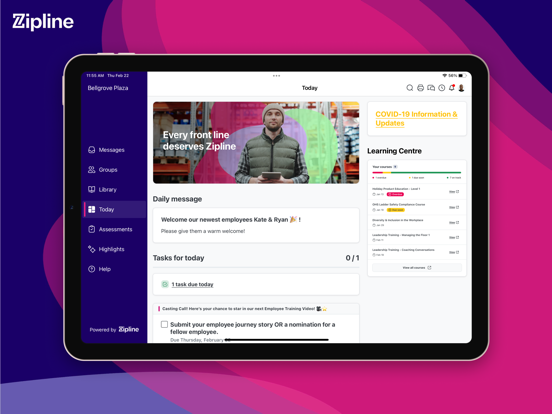
Screens
App Store
27 store screenshots


Pricing & paywalls
App Store
- Free to download
Ratings & reviews
App Store
-
5/5Great app
I use this app daily (multiple times daily) for my role as Operations manager at a worldwide known retail chain. We are all required to use this app but honestly it’s amazing! It not only allows us to stay up to date on company communications, but we can see the daily tasks needed to run our store efficiently as well as find all our SOPs, signage, literally any info we need to make our jobs easier & ensure we are following procedures properly. This app is so useful & I can’t imagine doing my job without it.
irishgrl131 · 6 Oct 2026
-
4/5How to access multiple stores?
I work 2 different stores, yet Zipline only allows me access to one at a time… & which store it allows, is based on where I logged on last IN a store. For example, if I am scheduled at store #1 on M,W,F & store #2 on T,R….. then I am never able to use Zipline from my phone. If I am scheduled at the same store for several shifts in a row, I am unable to use phone shift #1, but after signing in at store level on first shift, then the system updates & I can sign on via phone on subsequent shifts. Is there a way to add a pharmacist to 2 stores at the same time?
MW1509 · 6 Oct 2026
-
5/5New update having glitch issues
The latest update is having major glitching issues. I am having issues with the “work use only” screen which continuously pops up while opening the app, opening schematics, using the search function and opening messages. The screen keeps looping to this screen over and over again even upon closing and restarting the app.
Lady who’s over it · 6 Oct 2026
-
3/5iPhone 17 Pro, Resolution set for Pro Max?
I use an iPhone 17 Pro, but after the most recent update the buttons at the top right and bottom right are nearly off the screen and the entire app looks off. It feels like it was optimized for the Pro Max and not adjusted for the Pro, and I’m seeing only the majority of the app, with a bit around the edges just missing. I’m not seeing any settings that would allow me to tell it I’m using a 17 pro, nor should I really have to, the app should be able to tell what phone I’m using and load in at the correct resolution.
VraelJSP · 6 Oct 2026
-
2/5Keep me signed in PLEASE
Why does give me the option to stay signed in/ “don’t ask again for 14 days” if I am going to have to sign in every single time I use the app? And the sign in process takes so long I only use this app if I absolutely need to. There’s the sign in page, then you HAVE to download an Authenticator app and authenticate on the next page, then it shows the keep me signed in page and I select “don’t ask me this again” every time and guess what it still asks me every single time?? Why even have the options if they don’t work??? Is it a Microsoft problem?? It’s actually extremely annoying
Hannastapleton · 6 Oct 2026
Privacy & accessibility
App Store
Privacy
- Data Linked to You — Analytics — Diagnostics — Crash Data Developer declared
- Data Linked to You — Analytics — Diagnostics — Other Diagnostic Data Developer declared
- Data Linked to You — Analytics — Identifiers — User ID Developer declared
- Data Linked to You — Analytics — Location — Coarse Location Developer declared
- Data Linked to You — Analytics — Other Data — Other Data Types Developer declared
- Data Linked to You — Analytics — Usage Data — Other Usage Data Developer declared
- Data Linked to You — Analytics — Usage Data — Product Interaction Developer declared
- Data Linked to You — App Functionality — Contact Info — Email Address Developer declared
- Data Linked to You — App Functionality — Contact Info — Name Developer declared
- Data Linked to You — App Functionality — Diagnostics — Crash Data Developer declared
- Data Linked to You — App Functionality — Diagnostics — Other Diagnostic Data Developer declared
- Data Linked to You — App Functionality — Identifiers — User ID Developer declared
- Data Linked to You — App Functionality — Location — Coarse Location Developer declared
- Data Linked to You — App Functionality — Other Data — Other Data Types Developer declared
- Data Linked to You — App Functionality — Search History Developer declared
- Data Linked to You — App Functionality — Usage Data — Other Usage Data Developer declared
- Data Linked to You — App Functionality — User Content — Audio Data Developer declared
- Data Linked to You — App Functionality — User Content — Customer Support Developer declared
- Data Linked to You — App Functionality — User Content — Other User Content Developer declared
- Data Linked to You — App Functionality — User Content — Photos or Videos Developer declared
- Data Linked to You — Product Personalization — Contact Info — Email Address Developer declared
- Data Linked to You — Product Personalization — Contact Info — Name Developer declared
- Data Linked to You — Product Personalization — Identifiers — User ID Developer declared
- Data Linked to You — Product Personalization — Location — Coarse Location Developer declared
- Data Linked to You — Contact Info Developer declared
- Data Linked to You — Diagnostics Developer declared
- Data Linked to You — Identifiers Developer declared
- Data Linked to You — Location Developer declared
- Data Linked to You — Other Data Developer declared
- Data Linked to You — Search History Developer declared
- Data Linked to You — Usage Data Developer declared
- Data Linked to You — User Content Developer declared
Accessibility
No accessibility labels collected yet.
Versions
App Store
-
3.10.0
- Enable showing notifications in publisher view - Log out on shared devices when the app is manually closed from the task switcher - Fix fix some problems with not fully logging out of SAML sessions when logging out of the app - Fix backgrounding the app on an iPad sometimes returning the app to the dashboard - Show a better error message when unable to contact the server due to not being connected to an authorized WiFi network
-
3.11.0
Fixed navigation to assessment on iPad - After completing an assessment, users can now return back to the Assessments landing page by clicking on assessments in the navigation menu Support for Learning - In preparation for an upcoming release, v3.11.0 supports enabling the Learning icon in the navigation bar. Settings in the User Menu - Self-Serve Admin Settings users will now see "Settings" as a line item in their user menu. We recommend updating to the latest app version for the best mobile experience.
-
3.7.1
Improved login and session flow: Before, some users were unable to log in to the app or were caught in an endless login loop. As a result, we updated the login flow to enable a consistently successful login experience. Ability to share diagnostics and logs to Zipline: Enable sharing diagnostics in the device’s Settings so Zipline can leverage error report information for a jump start on looking into what’s happening. Improved messaging for session timeouts: The app will now flag if a user was logged out based on organization-driven session timeout parameters. So, instead of just the login screen, users will see a message informing them why they were logged out.
-
3.7.2
This release resolves an authentication issue that some users were experiencing.
-
3.7.3
This release resolves a logout issue that some users were experiencing when reopening the app.
-
3.8.0
- Users can now offer visual feedback with Image Annotations! Mark up and upload an annotated image anywhere in Zipline where image upload is supported today - Jumping between messages using the left and right arrows in a detail screen will now correctly show the viewed messages as read
-
3.9.0
Bug fixes: Users can more easily stay up-to-date with improved Groups notification badges in the navigation bar and additional Menu items. Support for Highlights icon: For organizations opting into the new Highlights feature, v3.9.0 enables the Highlights icon in the navigation bar. Expanded iFrame widget functionality: iFrame dashboard widgets containing third-party forms can now accept responses submitted right from the Zipline dashboard. Improved search experience Users will now see their previous search history in addition to in-the-moment search suggestions for an optimized search experience. As always, we recommend updating to the latest app version for the best experience.
-
4.0.0
General app backend enhancements - Made improvements to primarily leverage cookies for session handling
-
4.0.1
- Bugfix: Allows users to open embedded links in communications and resource library - Bugfix: Re-enables the quicklook feature for attachments
-
4.0.2
- Includes a bug fix that routes users to the correct Message when accessed via a Dashboard widget
-
4.0.3
-Bugfix: Addresses certain instances of users getting logged out of the application.
-
4.0.4
-Bugfix: Enhanced re-authentication error messaging along with additional improvements addressing users being logged out of the application
-
4.0.5
-Bugfix: Adds enhanced authentication error messaging for shared device
-
4.0.6
Miscellaneous bug fixes for an improved user experience We made helpful under-the-hood tune-ups for a smoother Zipline journey, including: - Fixing an issue with intermittent slowness across the app - Notifications taking the user to the right location within the app - The ability for users to consistently access the More menu - Better in-app navigation using the go-back caret
-
4.1.0
Bug fix for Quick Links edge case Before, users were intermittently unable to access location-specific Quick Links from the Dashboard to other parts of the app. Now, Quick Link navigation consistently works as expected to keep today on track. Improved file preview experience We expanded the use of File Previewer where applicable to better support a consistent user experience across the app. Improved support for ZIP files ZIP files can now be opened externally, helping users quickly access the information they need when they need it.
-
4.1.1
- Introduce authentication support OpenIDConnect via Microsoft Authentication Library - Fixed a bug where UI wasn't matching when on/off the clock for customers that have the Zipline Clock feature enabled - MDM Support - Enterprise customers can now set the domain and device type when rolling out the app to in-store devices - Expand Quick Look functionality beyond the library. Now you can view attachments in a preview mode in groups, messenger, and messages
-
4.1.2
- Bug fix to successfully pull-to-refresh a page - Expanded support for language selection from the app domain screen and in-app user profile
-
4.1.3
- Added support for additional languages in the in-app language picker - Implemented automatic session timeout protection to ensure secure login sessions
-
4.1.4
Improved Clock Content Control experience For brands using Clock Content Control, we have updated the Clock in Modal to mirror the web browser experience, providing a consistent start to the clock-in journey Fixed loading screen errors We introduced a timeout fix to reduce page loading spinners and help users get back on their way with Zipline. Improved Pink Bubble experience We made a few under-the-hood updates to our integration with Intercom—which powers The Pink Bubble—to make sure you can always get the help you need, quickly.
-
4.1.5
Fixed an issue with crashing on domain screen
-
4.1.6
Bug fix for log-in on first-time app installs We fixed a bug to ensure users can successfully enter their brand’s domain name when logging into a new version of the app for the first time. Improved Clock Content Control experience For brands using Clock Content Control, we have updated the Clock in Modal to provide a web browser experience for a consistent start to the clock-in journey. Fixed loading screen errors We introduced a timeout fix to reduce page loading spinners and help users get back on their way with Zipline. Improved Pink Bubble experience We've made a few under-the-hood updates to our integration with Intercom, which powers The Pink Bubble, to ensure you can always get the help you need quickly.
-
4.2.0
Support for upcoming visual refresh We added support for the upcoming visual refresh, laying the foundation for the same Zipline functionality you know and love—just with a fresh new look. (Have no fear! Nothing’s changing for now.) Improved image annotation and upload on iOS 26 Image uploads and markup now work correctly on iOS 26, making it easier to review, sketch, and share images without interruption. Improved in-app link handling We made some under-the-hood improvements to in-app link handling so Zipline links open seamlessly without leaving the app. Enhanced page load reliability We made a few updates to the underlying web framework to increase general page stability and reduce loading errors.
-
4.2.1
- Added support for upcoming visual refresh
-
4.2.2
Increased sign-in support With support for quick login links and a more robust background session refresh, signing in is now faster and more seamless than ever. Updated help and support experience In-app Help Articles and the Pink Bubble experience have been updated with a new icon and clearer navigation. Click 'Get Help & Support' to chat with the Pink Bubble or review help articles. Improved account and team sync The app now stays automatically up to date in the background when account or team details change, allowing applicable users to successfully switch between instances. Improved in-app link experience Third-party sites linked within Zipline, like Quick Links, now open directly in the app instead of an external browser, keeping your session smooth and uninterrupted. Expanded support for the upcoming visual refresh We’re adding additional support for the upcoming visual refresh, continuing to lay the foundation for an optimized experience for iOS users.
-
4.2.3
· 23 Jul 2026
Help and support text in your language — A localization issue affecting the in-app help experience (Intercom) for non-English users has been fixed. Help content should now display in your device language correctly. Team menu links working correctly — Links in the Team menu now navigate to the right destination. An issue causing incorrect routing for these links has been resolved.
-
4.3.0
· 11 Aug 2026
New! Introducing biometric sign-in We’re thrilled to introduce an all-time request: the option for biometric sign-in! iOS users on personal devices can simply use Face ID or Touch ID to sign in instantly. Calendar landscape view restored Rotating to landscape while in the calendar's month view now displays a full calendar layout, giving users a better view of their schedule at a glance
-
4.3.1
Screenshot and screen recording prevention Organizations can now enable a setting that blocks screenshots and screen recordings inside the Zipline app, providing an added layer of security for teams that handle sensitive information. If interested, connect with your organization’s Account Manager. Resolved frozen grey screens when opening pop-ups Pop-ups, like the daily message editor or reaction lists, now open smoothly. Resolved display cutoff for accessibility users App screens now display fully without clipping at the left and right edges when the iOS "Show Borders" accessibility setting is enabled. Improved PDF viewing for large and landscape documents PDF viewing has been improved so landscape and large documents open and display correctly.
-
4.3.2
· 30 Sep 2026
Localization fix — app chrome now resolves correctly in locales that previously fell back to English. Visible only to users in those locales; no change for English users. Screen capture protection now correctly applies in full screen. Previously, going full screen (e.g. a video or image viewer) let screen capture/recording bypass the app's screen-capture block — that gap is closed.
Alternatives
- Workcloud Shift — Same category + similar ratings
- ESS 45 Zebra — Same category + similar ratings
- Shyft - Shift Swap, Schedule — Same category + similar ratings
Availability by market
- US
Data quality & evidence
- Page completeness
- Live store listing
- Last verified
- 6 Oct 2026
- Sources
- App Store
- Apoku editorial summary has not been published yet.