
Quick verdict
- What it is
- Store information collected; independent summary not yet available.
- At a glance
-
- Free to download
Categories and search queries
Official categories
- Music
- Entertainment
AppCorpus categories
Key functions
| Function | Availability | Access | Scope | Evidence |
|---|---|---|---|---|
| Free app | Yes | Free | — | Store published |
Screens
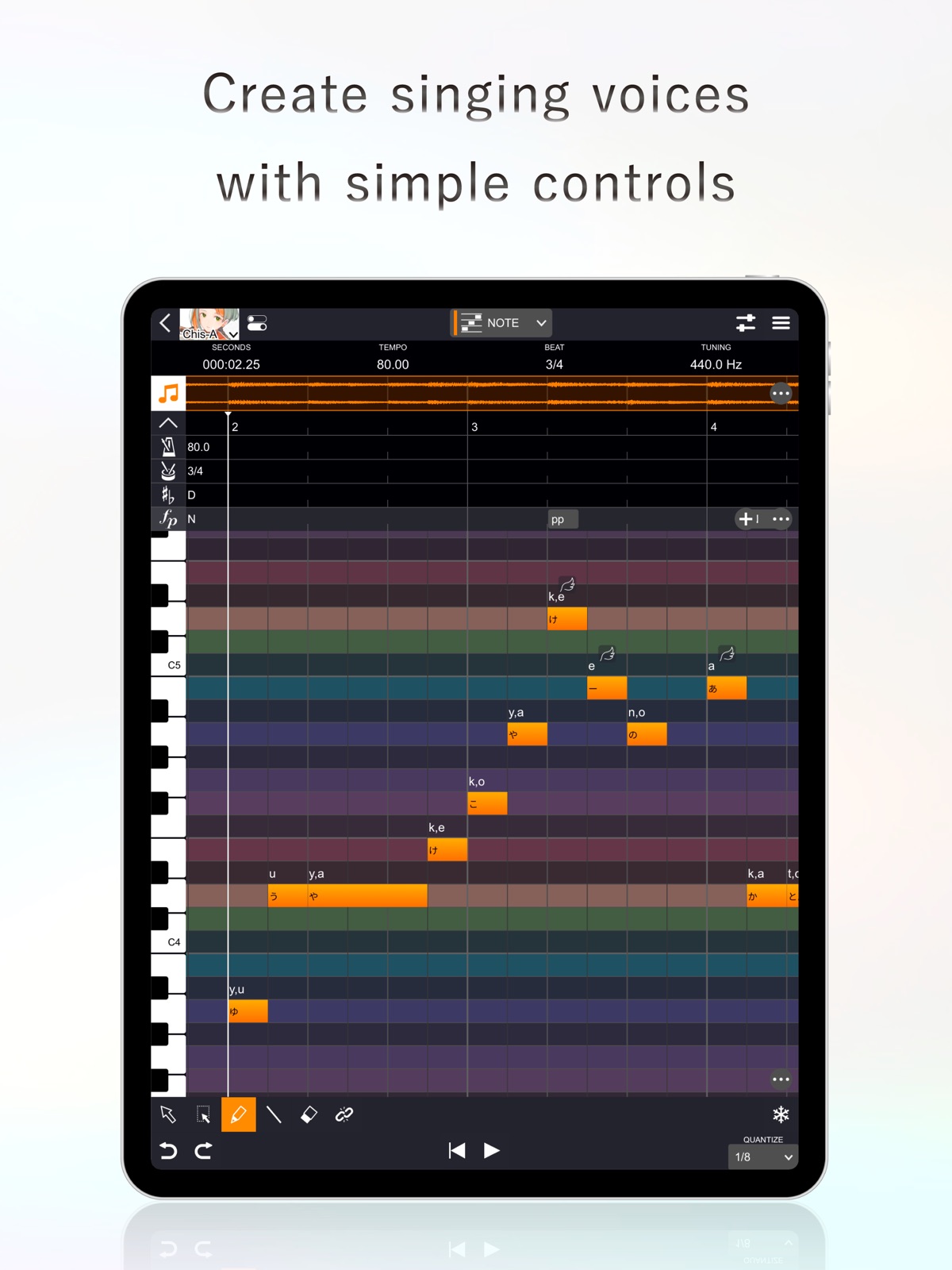
App Store
18 store screenshots


Pricing & paywalls
App Store
- Free
Ratings & reviews
App Store
-
4/5GREAT!!!! But….
This is very amazing, but I have a problem..on the manual it said you have to sign in to get more voices so I signed in( on the website).But then it said it would give me the library unless it is version 2.0 or later. And I found out I’m version 1.0.1 and since I am a child I have no clue what this would mean so I assume it means it is later but I still don’t have more voices and also there is no way that I know of to sign in or log in on the app..Chris A is a great voice! But I wish to have more..
Someone something..? · 6 Aug 2026
-
2/5Good but., a few minor issues.
The app itself is good. But there’s a lot of issues…. 4 total. 1. Can’t use USD to buy other voicebanks. I don’t have yen since im in USA and I can’t buy other voicebanks. 2. Chromatic scale only for full mobile version (this). It’s on the other app (VoiSona Sing) but not on this version. Looked through nearly every app possible to know how to get off of chromatic scale…… none.. 3. Preview pictures when you are about to download the app show JP VoiSona (VoiSona Sing) not the actual version (this). Which can create a large issue because you could get backlash due to people thinking they can get other scales… 4. macOS unable to download. I’m using my iPad right now, but when I tried to download on Mac, then the app wasn’t in App Store. So I went to the VoiSona website and I tried to use it on the website. When I kept trying to create my account, it kept restarting the page instead of taking me to the next. When I emailed support, they gave me a link to click on and it took me to a “404: Page Not Found”. When I tried to download the app from the website I couldn’t click on it.
BADSHARK230 · 6 Aug 2026
-
5/5Amazing vocaloid app!!
Very amazing vocaloid app. Easy to use and beginner-friendly. There are many free voices now, and give you a maximum of 10 seconds (besides the fully free Chis-A) for each voice. No pay for the voices. Unless you get the full thing. Very laggy when pressing play. I have to replay it until it is clear. Not too much of a problem, though. I’ve gotten used to it. There is even Zundamon, IA, and my favorite, Ichica. Many free voices and 10 seconds fpr each is honestly great. As long as you even get to test them. So fun as well.
neiskfvaos · 6 Aug 2026
-
5/5Actually pretty good… but I don’t have yen
Ive always wanted to make vocaloid songs on an ipad because im too broke to buy a computer. This app is actually pretty good (minus the fact you need to restart the track a few times for it to actually play). Although im stuck with Chis-A and i want to use Zundamon or Vflower and i cant buy them because i life in AMERICA and I do NOT have YEN. Imean, there are worse vocaloids than Chis-A but i just want to try others too. (Maybe make SOME free?) (free preferably). Overall, this app is great and not THAT confusing.
TetoFan_:DD · 6 Aug 2026
-
5/5Great app! Been using for awhile and love it <3
This app is awesome! I found out you can import CCS files and convert a UST or VSQX to CCS using utaformatix, and it let me do covers really easily! Batch lyric entry works really well, and my only complaint is the scroll is a little janky. Chis-a has a wonderful voice, and I love how ALP lets her sound more high pitch or low pitch! Kinda like gender settings on UTAU. Making original songs is pretty easy for me, so I like that! My only question is how do I add more voicebanks? I know you have to pay for them but I’m curious.
Anaya C. (Also UTAnayaP) · 6 Aug 2026
Privacy & accessibility
App Store
Privacy
- Data Not Linked to You — Analytics — Diagnostics — Other Diagnostic Data Developer declared
- Data Not Linked to You — Analytics — Identifiers — User ID Developer declared
- Data Not Linked to You — Analytics — Usage Data — Product Interaction Developer declared
- Data Not Linked to You — App Functionality — Diagnostics — Crash Data Developer declared
- Data Not Linked to You — App Functionality — Diagnostics — Other Diagnostic Data Developer declared
- Data Not Linked to You — App Functionality — Identifiers — User ID Developer declared
- Data Not Linked to You — App Functionality — Usage Data — Product Interaction Developer declared
- Data Not Linked to You — Diagnostics Developer declared
- Data Not Linked to You — Identifiers Developer declared
- Data Not Linked to You — Usage Data Developer declared
Accessibility
No accessibility labels collected yet.
Versions
App Store
- 1.0.0
-
1.0.1
[Key Changes] - Improved scroll speed during drag operations - Fixed an issue where files on external drives, such as iCloud or Google Drive, could not be imported - Fixed an issue where crashes could occur when loading voices
-
1.1.0
[Key Changes] - Improved the performance of music score editing. - Modified the authentication dialog that appears when authentication fails at startup so that the password field is pre-filled if a password has been saved. - Improved an issue where authentication could fail. - Fixed an issue where changes to note attributes and vocal expressions in the properties window were not applied. - Fixed an issue where pasting failed when copying from the beginning using the Bulk Selection Tool if the position cursor was at the start. - Fixed a crash that could occur when selecting a range of frame parameters. - Fixed an issue where "Vowel Timing Correction" could excessively adjust timing.
-
1.1.1
[Key Changes] - Fixed an issue where some parameter rendering could be delayed during editing. - Reduced processing load in the background.
-
1.2.0
[Key Changes] Changed to allow note input starting from the first measure Changed horizontal zooming to be centered on the playhead Fixed an issue where phonemes of notes with hyphens would be marked as errors when a Mandarin voice library is selected Fixed an issue where audio track output would become mono when launching the standalone version Fixed an issue where vibrato might not be displayed when "Simplified" mode is selected in the vibrato adjustment tab Fixed an issue where the join tool would not work correctly on notes with edited phonemes
-
1.2.1
[Key Changes] Fixed an issue where the application would freeze when launched as a plugin in a DAW and authentication was performed
-
1.3.0
[Key Changes] - Added support for importing UST files - Combined the global parameter panel and the property panel - Improved the performance of note rendering - Adjusted the UI design - Fixed an issue where importing CCS files could cause a crash - Fixed an issue where importing failed if the file extension was in uppercase - Fixed an issue where audio would no longer play on the audio track after playing beyond the end of the audio data - Fixed an issue where, when entering in batch lyric entry panel, single-syllable pinyin was not properly applied under the "one note with one syllable" setting
-
1.4.0
[Key Changes] - Added support for portrait orientation - Improved UI - Added support for multilingual voice libraries - Fixed an issue where the app could sometimes crash when launched as a DAW plugin
-
1.5.0
[Key Changes] - Added support for pinch-in, pinch-out, and two-finger scrolling - Improved the score editing UI - Added a sample project - Adjusted the placement of version numbers on the voice library selection panel so that they appear directly next to the corresponding voice library - Added a "Simple" option to the piano-roll background - Added a context-menu button at the bottom-right of the screen and removed long-press activation of the context menu - Improved behavior so that, when “Auto Split English Lyrics” is enabled, syllable splitting is applied even when multiple English words are entered at once - Fixed an issue where notes could be missing when importing MIDI files - Fixed an issue where timing paste operations did not function correctly - Fixed an issue where Mandarin lyrics were sometimes not applied correctly - Fixed an issue where "Vowel Timing Correction" did not function when using multilingual voice libraries and targeting notes assigned to languages other than the default language - Fixed an issue where syllable splitting sometimes occurred before an apostrophe
-
1.6.0
[Key Changes] - Redesigned the start screen of the standalone application - Redesigned the voice library selection interface - Added a 10-second trial feature (login required) - Improved the efficiency of audio generation processing and reduced memory usage - Reduced application launch time - Added "Use System Settings" to the language setting in Preferences - Fixed an issue where VoiSona might not start correctly when opening a DAW project with multiple tracks added - Fixed an issue where freeze processing could fail when executed immediately after editing
-
1.6.1
[Key Changes] - Fixed an issue where invalid versions of voice libraries were displayed
-
1.6.2
[Key Changes] - Fixed an issue where the project list was slow to respond on the start screen of the standalone app
-
1.6.3
[Key Changes] - Fixed an issue where audio was not generated correctly in Cubasis
-
1.7.0
[Key Changes] - Unauthenticated users can now use the 10-second trial feature (*network connection required) - Added lyrics to MIDI import/export targets - Added measure deletion feature - Added a “Default” tab in Preferences to set initial values for new projects - Reduced memory usage - Improved input support for Pinyin with tone marks - Added Korean, Traditional Chinese, French, Spanish, Portuguese, and Indonesian to display languages - Changed behavior so phonemes are reset when lyrics are modified - Fixed an issue where dropdowns were not displayed on some tracks when VoiSona was inserted on multiple tracks in a DAW
-
1.8.0
· 1 Jul 2026
[Key Changes] - Added the ability to enter lyrics in Romaji (Roman letters) for Japanese voice libraries. - Added support for importing SVP files. - Changed the default order of voice libraries and added a sorting feature. - Expanded the information shown in the voice library list. - Changed the delete operation on musical symbols (tempo, time signature, key signature, and dynamics) at the start of the first measure to reset their values to the default. - Changed the phoneme sequence display to indicate syllable breaks with "|" (also fixing an issue where the original sound was not restored after editing and then reverting a phoneme sequence). - Changed the MIDI import screen to display track names. - Fixed an issue where lyrics were replaced with note names when the key signature was changed after importing a MIDI file containing lyrics.
Alternatives
- Boimero: Vocal Synth Studio — Same category + similar ratings
- Medly — Same category + similar ratings
- Nail the Pitch - Vocal Monitor — Same category + similar ratings
Availability by market
- US
Data quality & evidence
- Page completeness
- Live store listing
- Last verified
- 6 Aug 2026
- Sources
- App Store
- Independent summary has not been published yet.