
Quick verdict
- What it is
- Store information collected; independent summary not yet available.
- At a glance
-
- Free download · core features require a paid plan
- In-app purchases
- From $2.24/mo
Categories and search queries
Official categories
- Photo & Video
- Photography
AppCorpus categories
Key functions
| Function | Availability | Access | Scope | Evidence |
|---|---|---|---|---|
| Free app | Yes | Free | — | Store published |
| In-app purchases | Yes | Limited free | — | Store published |
| Subscription | Yes | Paid | — | Store published |
Screens
30 store screenshots


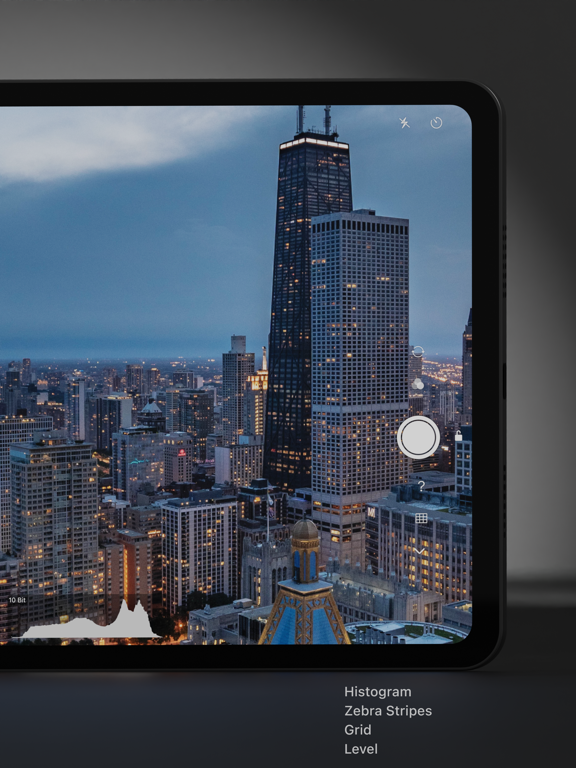
9 store screenshots


Pricing & paywalls
- Varlens Pro — $26.99/year ($2.24/mo) (derived from the IAP title)
- Varlens Pro Lifetime Edition — $99.99
- Free download · core features require a paid plan
- In-app purchases: $0.49 - $99.99 per item
- Subscription
Ratings & reviews
-
5/5HIGHLY RECOMMEND: If you like analog film look, this is for you!
Every time I travel I carry a canon camera, my Ricoh gr3, my insta360 for video and my iPhone. I took a trip to Vegas last month and decided to only carry my phone for photos. I wanted to challenge myself to one tool. I asked ChatGPT for suggestions for camera apps that I could use like a manual camera, preferably with film presets. It suggested this one amongst others and I decided on this one. I was INCREDIBLY impressed with the film simulation options and bought the subscription instantly. TOTALLY WORTH IT! I use it everyday to capture moments with my son and use the same 3 filters. The DUNE filter is my favorite. The Chrome 64 is my second favorite. And the vintage there’s a monochrome one that I use that reminds me of film. I use others but those three are my favorite.
El Gallo 33 · 6 Aug 2026
-
5/5Life Saving App!! “De-Sharpen” is heaven sent!
I’ve downloaded and tried pretty much every single “professional” camera app out there and this was the only one that effortlessly bypassed that dang “auto enhance algorithm” nonsense - Oh yeah we all know know what I’m talking abt. Taking Live Photos using this app with that “De-Sharpen” function on was such a bliss - finally an app that does the RAW Live photos justice!! No over saturation no over brightness no over contrast, everything remains natural, subtle, and beautiful — as they well should!!! This is gonna save all my future backlit photos /live photos from that over-processing nightmare, thank you!!!!!🥹🥹🥹Please, please, please keep this function until the end of time. Also was able to seamlessly switch between different formats, including +ProRaw!! Soooo so much easier than going back to camera settings to turn on that “Apple ProRaw”. One more thing worth mentioning, the interface is super elegant and friendly as well! Kudos to the team that created this, this is my first time ever rating an app, and I’ve been using all Apple Products for almost 12 years now — yes you are that awesome.
OneVeryGratefulUser · 6 Aug 2026
-
5/5Baked in filters plus LUTs ftw
I spent so much time looking for a quality photo app that could do what other video apps do, which is apply filters baked into the image therefore eliminating post processing and making sharing/publishing much faster. Of course you can apply filters in post as well. Also you can import LUTs which should be available on all apps but hardly seen at this moment. This is all free as well. Premium sub gives you nice to haves imo but I would also like to support this team based on the quality you get at the free version. Wish more devs took this approach. Also the cost of premium is not an arm and a leg like other apps that gives you half, if that, upfront for free.
Jaident07 · 6 Aug 2026
-
2/548MP only in manual mode
I thought the app sounded great and purchased it to take a few photos at a once in a lifetime car show. I was upset finding that all the photos were in 12mp. I contacted the customer service feedback and they replied that 48mp is only allowed in manual mode. I use the iPhone camera for quick shots mostly and don’t have the cognitive skills (I have 2 brain disabilities) to quickly adjust settings so I rely on automatic mode the majority of the time. The app seemed to be pretty decent especially with additions, and the subscription cost isn’t too bad for what you get. but I can’t justify keep paying a subscription fee for something that I won’t use all the time. If you can shoot manual then I would recommend taking a look at the app. If you just rely on auto, look at another camera app as you will be wasting the 48mp photos the iPhone can take.
Mark928s · 6 Aug 2026
-
5/5The spitfire of camera apps
Varlens is an all-in-one camera app. You will be astounded by the number of features that are in this well designed application. It has both photo and video camera not found in many other video cameras. I’m especially found of the selection of filters that can be used while capturing and editing. The selection of frame rates cannot be found in any of the best video camera apps. Dig deep into Varlens and you won’t be dissapoibted. The subscription cost is more then reasonable. JohnnyAppseed Update; Varlen updates in leaps and bounds. Thank you!
John DeNicola · 6 Aug 2026
No store reviews collected for Google Play · US
Privacy & accessibility
Privacy
- Data Not Linked to You — Analytics — Diagnostics — Crash Data Developer declared
- Data Not Linked to You — Analytics — Identifiers — Device ID Developer declared
- Data Not Linked to You — Analytics — Usage Data — Product Interaction Developer declared
- Data Not Linked to You — Diagnostics Developer declared
- Data Not Linked to You — Identifiers Developer declared
- Data Not Linked to You — Usage Data Developer declared
Accessibility
No accessibility labels collected yet.
Privacy
- Security practices — Your data is transferred over a secure connection — Data is encrypted in transit Developer declared
- Security practices — The developer provides a way for you to request that your data be deleted — You can request that data be deleted Developer declared
Accessibility
No accessibility labels collected yet.
Versions
-
7.1.1
The new version optimizes the experience when adding watermarks.
-
7.1.2
Fixes issues where the app crashes or fails to save when adding frames.
-
7.2
The new version introduces three new features: - “Open Gate”: Record video at full resolution of the CMOS sensor; available on all iPhones. - “4K Live Photo”: Shoot Live Photos in 4K resolution, offering ultra-high-definition images compared to native Live Photos, and allowing real-time rendering with filters; available on all iPhones. - “Apple Log2”: iPhone 17 Pro and 17 Pro Max can record video using Log2. The new version also resolves the issue of camera use interfering with music playback.
-
7.3
The new version introduces several new features: - ProRes RAW video recording, with two resolutions: 4:3 and 1.85 aspect ratio. Available for iPhone 17 Pro/Pro Max. Recording in ProRes RAW format requires an external storage device, such as an SSD or SD card. - Added Hasselblad XPan 65:24 aspect ratio to Photo mode, and added 1.66, 1.85, and 2.39 aspect ratios to Video mode. - Resolved the issue of the new video feature always pops up. - Resolved the issue of some models being unable to successfully capture 4K Live photos.
-
7.4
The new version introduces the "Cinematic" mode: - Tap to switch focus target and automatically track it for focus (solid line) - Automatically switch focus based on foreground objects (dashed line). - Long press to lock focus on a specific area. - Adjustable aperture, supporting f/2.0 to f/16.0 (currently adjustable only before recording video, not during recording). - Pause and resume recording during Cinematic video recording. - Take photos while recording Cinematic video. - Movie mode currently only supports SDR, HDR, and HEVC. Format - Compatible with all iPhone models running iOS 26 This new version also resolves the issue of app crashes and inability to open on iOS 26.2.
-
7.4.1
The new version introduces the "Cinematic" mode: - Tap to switch focus target and automatically track it for focus (solid line) - Automatically switch focus based on foreground objects (dashed line). - Long press to lock focus on a specific area. - Adjustable aperture, supporting f/2.0 to f/16.0 (currently adjustable only before recording video, not during recording). - Pause and resume recording during Cinematic video recording. - Take photos while recording Cinematic video. - Movie mode currently only supports SDR, HDR, and HEVC. Format - Compatible with all iPhone models running iOS 26 This new version also resolves the issue of app freeze the image when switching back from other apps
-
7.4.10
- Fixed some crash issues - Added the ability to automatically detect external devices - Optimized the scroll wheel interaction experience
-
7.4.11
The new version introduces a new film filter: ACR100, recreating classic Fujifilm black and white film. In addition, the new version improves the following: - Optimized the portrait mode photography experience; iOS 26.3 allows switching between 1.0/4.0 lenses. - Improved image quality at 2x zoom. - Resolved some crash issues.
-
7.4.12
The new version fixed the following issues: - On iOS 26.4, with Zoom 2.0x or larger, sometimes clicking the thumbnail in the bottom left corner immediately after taking a photo would fail to save the image. - Fixed GPS info saving issue. - Fixed the issue of occasional crashes when using the beauty mode during post-editing.
-
7.4.13
The new version resolves issues with photographer watermarks, crashes when editing very large images, and optimizes gain noise effect in film filters.
-
7.4.14
Introducing the new filter: Nolan Vision. Faithfully recreates the cinematic look of Kodak Vision 2303, favored by Nolan.
-
7.4.2
Introduces a new master filter, “Silver Halide”, inspired by British photographer Greg William, a long-time collaborator with Leica. Additionally, several user experience improvements have been made: - A completely redesigned filter and preset list, further highlighting the quality of Varlens' meticulously designed and tuned filters and presets. - A pre-made tutorial video for "Cinematic Mode" is included, available for free to iOS 26 users. - Improved clarity in RAW format image previews. - Adapted to focal length of the iPhone Air. - Resolved the orientation issue when shooting Live Photos with the front camera. - Fixed crashes in certain scenarios.
-
7.4.3
The new version resolves the crash issue introduced in version 7.4.2, optimizes the batch-process images and improves display clarity of ProRAW images.
-
7.4.4
Optimized the ProRes RAW pipeline and resolves the ProRes RAW 1.85:1 120 fps recording issue.
-
7.4.5
The new version adds a new Master filter, Classic M, paying homage to the legendary Leica M series rangefinder cameras. It also supports displaying HDR photos in the Varlens album, allowing you to see the high dynamic range image effects.
-
7.4.6
The new version supports video playback progress; during video playback, you can drag the progress bar to control playback, and click to pause and resume playback. It also resolves the following issues: - When shooting in RAW/ProRAW format (introduced in the previous version), photos sometimes turn purple. - Deleting photos when using an external SSD/SD card causes a crash. - Optimized memory consumption for post-editing images, reducing it by 30%.
-
7.4.7
- Optimized stability when continuously shooting 48MP photos - Significantly reduced memory consumption when shooting with watermarks - Fixed an issue that caused viewfinder stuttering when taking photos while recording video - Improved stability of batch importing LUT files - Fixed occasional frame drops during H.264 4K 60FPS recording - Resolved abnormal startup of lock screen widgets
-
7.4.8
- Added new filter: Ricoh Green (GR-Green) - Fixed some known issues
-
7.4.9
- Fixed crash issues - Fixed some known issues
-
7.5
The new version introduces a feature that perfectly renders official Fujifilm LUTs, which we call "HiFi Filters." Simply import official Fujifilm LUT files (including FLog, FLog2, and FLogC) into Varlens, and a HiFi filter will be automatically generated. Using it will enable the same image processing pipeline as professional SLR cameras and camcorders, providing a fully Hi-End experience. With Varlens, you can achieve almost the same results as Fujifilm cameras, experiencing the true Fujifilm style. LUTs (S-Log, LogC) from renowned manufacturers such as Sony and ARRI are also perfectly supported. This feature is currently free; simply find the official LUT from the manufacturer and import it into Varlens to use it. The new version also resolves the issue introduced in version 7.4.14 that caused video loss. We sincerely apologize for this oversight.
-
7.5.1
- Improved the Live Photo editing experience. Re-editing is now supported. - Improved HiFi / 48MP shooting stability, reducing freezes, crashes, and cases where no photo is produced. - Fixed a possible overexposure issue when shooting HiFi photos at night. - Fixed an issue where exposure parameters could be lost for some filters. - Unified watermark settings across Camera, Settings, and post-editing.
-
7.5.2
- HiFi filters now support Sony S-Log3 and ARRI LogC3 LUTs downloaded from the official Sony and ARRI websites - Optimized memory usage for 48MP shooting with HiFi filters - Added a new version feature introduction page - Fixed an issue where Live Photo / video edits could appear zoomed in - Fixed an issue where the mask entry was not shown during post-editing in landscape on iPad. - Optimized lens retention logic in Portrait mode
-
7.5.3
- New Master Filter: Hamada Vision - delicately recreates Hideaki Hamada's signature bright light, soft shadows, and airy aesthetic - Fixed an issue where PNG images could not be recognized as watermarks - Fixed an issue when switching resolution and frame rate with anamorphic lenses - Fixed an issue where time-lapse could not save videos and photos
-
7.5.4
The new version introduces the HS Nature filter, bringing Hasselblad Natural Color to mobile photography.
-
8.0
· 10 Jul 2026
The new version introduces a new HiFi filter: HS-Nature, aiming to perfectly reproduce the natural color effect of Hasselblad cameras on mobile phones. Unlike LUT filters, HiFi filters employ a completely new image processing pipeline, processing directly on ProRAW and RAW formats. They utilize the most professional image processing technology to achieve optimal image quality. Due to the complexity of the processing method, real-time preview is not available; the effect can only be viewed after shooting. HiFi filters represent a new attempt by the Varlens team to pursue higher mobile image quality, and high-quality HiFi filters will continue to be released. Additionally, it already supports importing official LUT files from Fujifilm and Sony to automatically generate HiFi filters.
- 4.1 · 1 Aug 2026
Alternatives
- Pro Camera-Omnipotent Camera — Same category + similar ratings
- ReLens-DSLR Beauty Focus Cam — Same category + similar ratings
- Focos — Same category + similar ratings
- Halide Mark III - Pro Camera — Same category + similar ratings
- Pro Camera RAW: Modus ProCam — Same category + similar ratings
- Protake - Mobile Cinema Camera — Same category + similar ratings
Availability by market
- US
Data quality & evidence
- Page completeness
- Live store listing
- Last verified
- 7 Aug 2026
- Sources
- App Store, Google Play
- Independent summary has not been published yet.