
Protake - Mobile Cinema Camera
by Beijing Lingguang Zaixian Information Technology Limited
iPhone · iPad · Android
Quick verdict
- What it is
- Store information collected; an Apoku editorial summary is not yet published.
- At a glance
-
- From $1.66/mo
- Free download · core features require a paid plan
- In-app purchases
Categories and search queries
Official categories
- Photo & Video
- Photography
- Utilities
Apoku categories
Key functions
| Function | Availability | Access | Scope | Evidence |
|---|---|---|---|---|
| Free app | Yes | Free | Context-specific | Store published |
| In-app purchases | Yes | Limited free | Context-specific | Store published |
| Subscription | Yes | Paid | Context-specific | Store published |
Screens
14 store screenshots
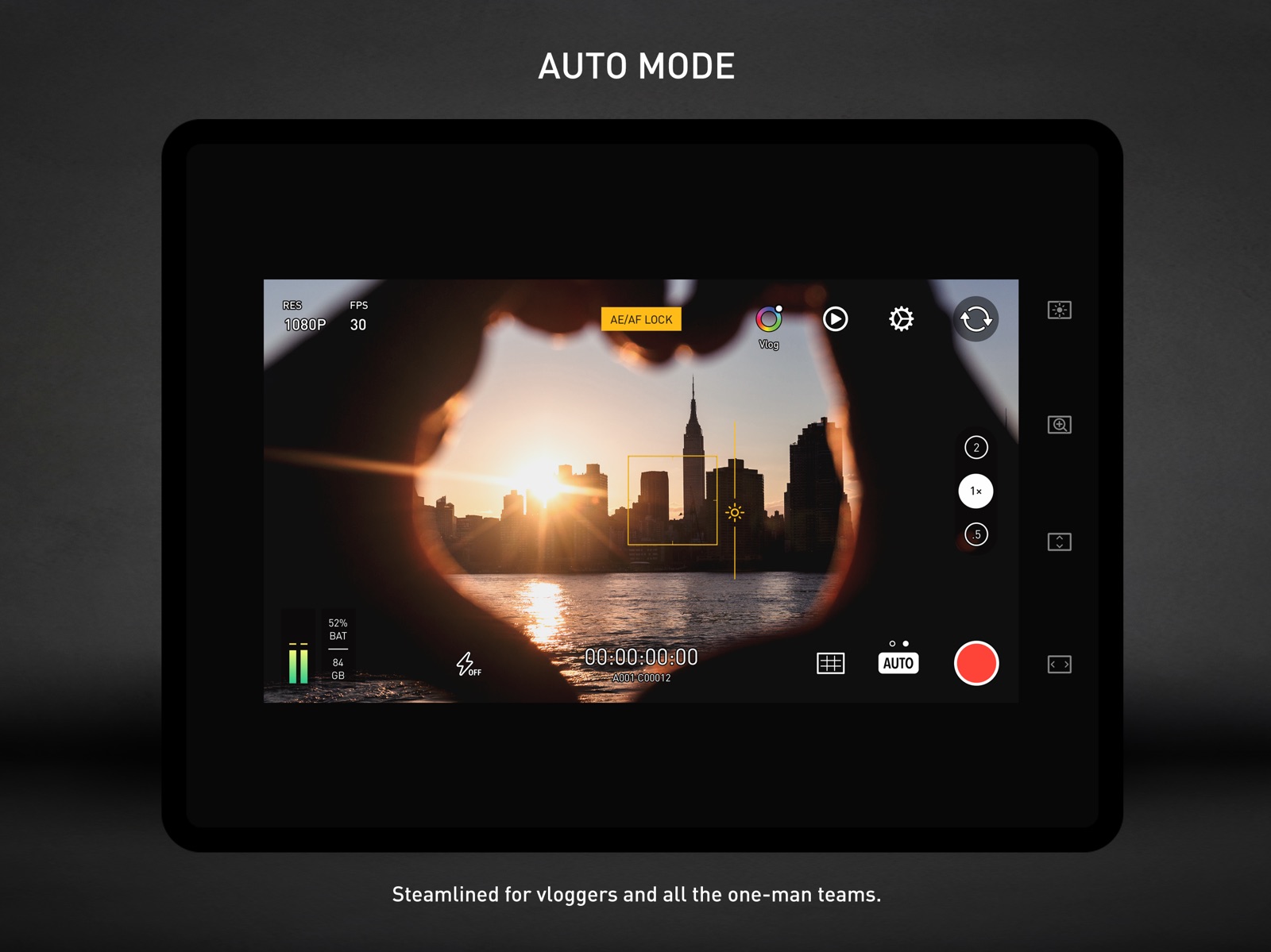


5 store screenshots


Pricing & paywalls
- Protake+ ( ) — $19.99/year ($1.66/mo) (derived from the IAP title)
- Free download · core features require a paid plan
- In-app purchases: $0.99 - $19.99 per item
Ratings & reviews
-
4/5Good and Bad
Switched from Filmic Pro that went subscription and I can’t even find their legacy version anymore. Protake free version comes close to Filmics free version but there’s things I don’t see. I can’t compare paid versions because it’s preposterous to pay monthly for a camera app. Compared to Filmic, there don’t seem to be as many audio/video codec choices, and I can’t rotate the app’s landscape mode 180° so I can hold the camera in my left hand (left hand holds left side of iPhone, where camera is - hand can barely hold phone so as not to block camera). But I like the overall layout of the app. The beauty features are neat and work pretty well. I never saw that on Filmic Pro. The pro features I’m really glad are there. Manual focus works smoothly as long as you’re on the standard lens, not wide lens. False color is awesome. I even love the red outline when you record the way Sony and Atmos do it. Multiple levels of stabilization is great. The portrait effect is a neat idea, albeit the little gimmicky and flawed. There is a clear cut out outline between the subject and focus in the background. I’ve seen much better results from applications that to the effect with a still image. Of course it’s going to be way more difficult and processor intensive with video, but it certainly would have been better if they found a way to make the future look better. It certainly doesn’t look pro or cinematic, I guess that’s why it’s not in the “pro” shooting mode It definitely has a good handful of great features that work really well. That’s why it’s so frustrating and disappointing that other features which I think are equally important don’t work; like more codec options and being able to hold the phone in another hand. Even for a free version, I feel it should have those fundamental features. Add the fact that Apple won’t let you make this the default camera app, that’s just more reason to continue using the built in camera which while it doesn’t have manual audio control, it does allow left-handed use, and can open from the Home Screen.
.Dan79. · 31 Jul 2026
-
4/5I can only suggest two improvements
I like this app even more than the BlackMagic camera app. I find it easier to use, and I like the presets. I'd like to see three improvements: #1, when recording to an external drive, I'd like to keep the same file naming as files saved internally. Instead, the app creates a folder called "dcim" and saves the videos with just 0001, 0002, so I have duplicate file names. This also causes my Mac mini to treat the hard drive as a camera, so it doesn't allow me to import files into Final Cut Pro in an external location. #2, I like the button that hides camera controls and clears the edges of the screen. But I think stopping the recording should bring this back. I'd like it to hide when filming and come back when filming stops. Maybe a third auto-hide option could be added. #3 I'd like to find a desktop version that can be used as a monitor for other devices.
huesos7 · 31 Jul 2026
-
4/5Best Videography App just missing a few things
This is the best videography app that I have used and I have tried them all. The interface is something special it’s easy to use all controls fully at your fingertips without having to muddle around deep in settings and I would fully make this my only default video recording camera but their are a few things missing 1. Remote camera access having the ability to control and view what is being filmed from an Apple Watch and also another Apple product like an iPad is so helpful for those of us doing solo video shoots. 2. Being able to control multiple video devices through the interface as well being able to use 3 device signed into with the pro account is great but I can’t remotely view or start a recording. 3: Adding more filters would love to see an 8mm filter and even a vhs filter for the nice retro effects.
Jsignature · 31 Jul 2026
-
5/5Far more than just a great value
Pros: Amazing manual controls; focus/ zoom/ exposure/ ISO. Color grading in recording with impressive selection of profiles including LOG and profile intensity. Support for 1.33 Anamorphic lenses, and a powerful AUTO camera mode for when you’re in a rush. Cons: No control over bitrate quality for those who seek to export and professionally color correct/ color grade in post in their respective selected editors. Only major drawback I can see most people having. Overall: I’d be nitpicking to put anything else against this camera app. The software is powerful and reliable, no crashing, interface is very easy to use and intuitive. All the features offered here versus the competition, this is far more than a value, it’s a steal. So if you don’t need the overwhelming deep dive into every control and detail like Filmic Pro, this camera app is for you.
thewindowseat · 31 Jul 2026
-
5/5The BEST Pro Cam App for iPhone
TL:DR - 100% worth the price. An absolute essential tool for all of my work. Can it really be better than Filmic Pro? YES! Since purchasing, I'm all in on using this app daily in my video production businuess. Unlike Filmic Pro, the phone never overheats and breaks the footage. The app team desgins the functions to live within the limits for what the phone can actually do. Depth of Field on an iPhone - It works! So pumped to see this evolve past it's current abilities, but absolutely useful. Dual cam recording - Game Changing for me. ProTake and an Osmo are the perfect combo for me. I can use the Super Wide Wide or the Wide Tele and I'm able to capture the story without needing a 2nd camera or person. I've used it on so many Pro gigs and the clients and producers LOVE it! Remote Field Monitor Mode - WAY better than Filmic in every way except it can't as of today (Sep '21) cannot change cam settings remotely and it limited to just start / stop tiggering for up to 4 camaeras simultaneously - Still incredibly useful and way more reliable viewing experience than Filmic. Buy This App and support the team behind it. I'm so pumped to see what they enable next!
ccarson05 · 31 Jul 2026
No store reviews collected for Google Play · US
Privacy & accessibility
Privacy
- Data Linked to You — App Functionality — Contact Info — Phone Number Developer declared
- Data Linked to You — Contact Info Developer declared
- Data Not Linked to You — Analytics — Diagnostics — Performance Data Developer declared
- Data Not Linked to You — Analytics — Identifiers — Device ID Developer declared
- Data Not Linked to You — Analytics — Usage Data — Product Interaction Developer declared
- Data Not Linked to You — App Functionality — Diagnostics — Performance Data Developer declared
- Data Not Linked to You — Diagnostics Developer declared
- Data Not Linked to You — Identifiers Developer declared
- Data Not Linked to You — Usage Data Developer declared
Accessibility
No accessibility labels collected yet.
Privacy
- Security practices — Your data is transferred over a secure connection — Data is encrypted in transit Developer declared
- Security practices — The developer provides a way for you to request that your data be deleted — You can request that data be deleted Developer declared
Accessibility
No accessibility labels collected yet.
Versions
-
2.4.3
This update brings the following features: - [Wi-Fi Video Transmission] For Dolby Vision video, we provides 10 HDR monitoring looks -- two groups: Low Contrast and Kodak 2383 film, in each group, you will find exposure compensation looks from -2EV to +2EV; - [Wi-Fi Video Transmission] Low latency mode added; - [Wi-Fi Video Transmission] Focus puller on "monitors"; - [Wi-Fi Video Transmission] Waveforms on "monitors"; - [Wi-Fi Video Transmission] Improved stability; - Added a toggle for "HDMI clean feed" in Settings; - Improved user interface under Dolby Vision mode; - Supported a future hardware focus puller called "Protake Focus"; - Now you can set playback frame rate for each video clip when playing back; - Fixed the logic behind shutter speed adjustment.
-
2.4.4
Multiple bug fixes.
-
2.4.5
Multiple bug fixes.
-
2.4.6
Multiple bug fixes.
-
2.4.7
Multiple bug fixes.
-
2.4.8
When taking selfie video, added support for Center Stage on iPads.
-
3.0
Introducing all-new Protake Cloud. Protake Cloud helps you to remotely monitor Protake cameras with Dolby Vision HDR support — Wi-Fi or cellular network, anywhere, anytime. Due to bandwidth cost, please purchase cloud time, which is calculated by each monitor-camera connection.
-
3.0.1
Multiple bug fixes.
-
3.0.2
Multiple bug fixes.
-
3.0.3
Fixed multiple crashes on new iPhones.
-
3.0.4
Optimized for iPhone 14 series.
-
3.0.5
Support for 1.55x Anamorphic Lens.
-
3.0.6
Multiple bug fixes.
-
3.0.7
Optimized for iPhone 15 series.
-
4.0
Protake 4.0: Enhanced Apple Log Integration - Advanced Apple Log Monitoring: Start Rec.709 (SDR) or Rec.2020 (HDR) monitoring tool with a simple tap on the rainbow color wheel icon in the top right corner. - Real-time Apple Log Conversion: Instantly transfer and record Apple Log streams into more natural Rec.709 (SDR) or Rec.2020 (HDR) video footage. - Diverse Encoding for Apple Log: Choose from H.265, ProRes, or the brand-new H.265 All-I format to suit your production needs. - Optimized Tools for Apple Log: With revamped waveforms and zebras, ensure accurate exposure across Log, SDR, and HDR monitoring modes. - In-App Playback: Relive your Apple Log footage using either Rec.709 (SDR) or Rec.2020 (HDR) monitoring. More Features for the Pros: - Enhanced Control in PRO Mode: For those passionate about the 180-degree shutter angle, you can now lock either the ISO or the shutter duration. - Balanced Encoding with H.265 All-I: A new format that harmoniously balances file size and encoding quality. - Real-time External Recording: Seamless recording to external drives, regardless of the format. - Look out for other added features (and possibly a few new bugs).
-
4.1
In Protake 4.1, we added new features to our PRO mode: - Quick Selection of Native ISO: On the iPhone 15 Pro and Pro Max, you can now quickly access the native ISO settings for the three rear cameras -- Ultra Wide at 800, Wide at 1250, and Telephoto at 800. - Focus Control Optimization: Tap the screen to specify a focus area; long press to lock the focus distance. - Color Conversion Memory: During playback, Protake remembers your choice of color conversion -- HDR, SDR, or Apple Log. - Enhanced Digital Zoom: The ZOOM wheel on the right side now offers a digital zoom range from 1 to 4x, providing greater flexibility in your shots. We are grateful to Philip Bloom, MediaStorm, and JiashuoMedia for their valuable suggestions for this update.
-
4.1.1
Multiple bug fixes.
-
4.1.2
Multiple bug fixes.
-
4.1.3
Multiple bug fixes.
-
4.1.4
Multiple bug fixes.
-
4.2
For iPhone 16 Pro users, we’ve introduced the following features: - Support for the Camera Control button; - 4K 120FPS recording capability. Enjoy an enhanced experience with your new camera.
-
4.2.1
For iPhone 16 Pro users, we’ve introduced the following features: - Support for the Camera Control button; - 4K 120FPS recording capability. Enjoy an enhanced experience with your new camera.
-
4.2.2
Multiple bug fixes.
-
4.2.3
Fixed problems with gimbal device connection failures.
-
4.2.4
· 11 Nov 2025
Multiple bug fixes.
- 3.0.21 · 22 Apr 2026
Alternatives
- Varlens - DSLR in Phone — Same category + similar ratings
- ReLens-DSLR Beauty Focus Cam — Same category + similar ratings
Availability by market
- US
Data quality & evidence
- Page completeness
- Live store listing
- Last verified
- 7 Aug 2026
- Sources
- App Store, Google Play
- Apoku editorial summary has not been published yet.