
Quick verdict
- What it is
- Store information collected; independent summary not yet available.
- At a glance
-
- $4.99
Categories and search queries
Official categories
- Productivity
- Utilities
AppCorpus categories
Key functions
| Function | Availability | Access | Scope | Evidence |
|---|---|---|---|---|
| Family Sharing | Yes | Unknown | App Store | Store published |
Screens
App Store
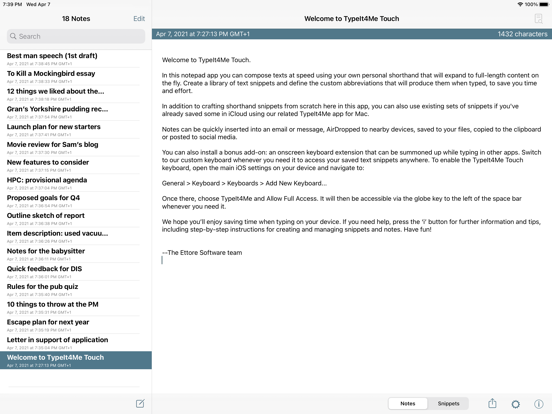
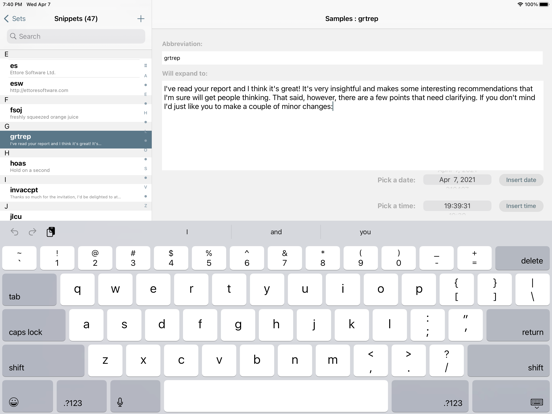
14 store screenshots


Pricing & paywalls
App Store
- Price: $4.99
Ratings & reviews
App Store
-
4/5Not perfect, but pretty good
I've used TypeIt4Me for years, and can't imagine writing on my Mac without it, so was excited to see a version for the iPhone. If one has MobileMe, existing snippets on the Mac can easily be transferred over to TapIt4Me on the iPhone, which is very convenient. I wish there was a way to keep them synched so that when I add snippets on the Mac, they automatically get updated in the phone's snippet file (via MobileMe). (If there is a way, I can't figure it out.) It would also be nice if it would work systemwide on the iPhone as it does on the Mac, but that's not the developer's fault, and this is obviously not the first time that Apple's SDK has limited what can be done in an iPhone app. Hopefully that will change in a future OS update. The developer also is one of the best I've ever dealt with, very helpful and communicative. He has never ignored a question, problem or suggestion when I've written to him, and has always had a solution when I've had a question. Although TapIt4Me isn't perfect (what app is?), it's really good for a 1.0, and I look forward to seeing how it's improved in future updates. If it evolves like TypeIt4Me has over the years, my review will change to five stars. It's worth every penny.
felidae.spj · 6 Aug 2026
-
2/5Workable but highly flawed
Once snippets have been created on another device, and if the app actually communicates with iCloud properly, the app is usable. But creating snippets on iPhone is completely impossible, which makes any attempt to use the app in a quick and reactive way a lost cause. The moment you try to create or edit a snippet it’s like the app interface expands to be 25% larger than the iPhone screen area, meaning you can no longer see, select, add, or edit text. I’d say that the only platform it really works well on is macOS, but adding snippets there is an exercise in metronome-regular crashes and restarts. One has to wonder if the app developers are testing this app at all, or just tossing it out to us with barely a look back.
Aaron the Crow Father · 6 Aug 2026
-
5/5A Solid Solution
I use this app multiple times a day, so I thought I would give it a shout out. It’s not perfect, but it’s the best solution I have found on the Mac and iOS for text expansion. Why is it not perfect? It’s been a little bit buggy over the years, but most of that has been worked out. That’s why I’m giving it five stars and I hope the developer continues to work on it! You should give it a try.
DAvl26 · 6 Aug 2026
-
3/5Good follow through to Mac app
Having been a fan of the MacOS version since it first came out I like the keyboard's approach to predicting my list of shortcuts synched from my Mac, but I would have preferred go see my shortcuts appear on a separate line as I really miss the usual IOS word predictions which don't seem to come up the same way. I also miss being able to swipe down on the keys to get the numbers without having too switch to the number layout. If those two issues could be resolved, I'd give it 5 stars.
Rene7 · 6 Aug 2026
-
5/5Time saver that syncs across devices
Saves a lot of time by allowing you to use keyboard shortcuts for frequently typed text! Snippets sync via iCloud across iPhone, iPad and Mac. It’s a little frustrating to have to invoke a special keyboard in order to access the snippets, but that’s a limitation set by Apple not the developer.
snoop_z · 6 Aug 2026
Privacy & accessibility
App Store
Privacy
- Data Not Collected Developer declared
Accessibility
No accessibility labels collected yet.
Versions
App Store
-
3.3
This release adds new expansion trigger settings. In addition to the default (space and return) you can now select further punctuation and symbol keys that should trigger expansion.
-
3.4
In addition to a general code tune-up and other under-the-hood tweaks to update to iOS 13 and the latest APIs, this release includes the following new features, UI changes and bug fixes in the main notepad app: - Dark mode support for iOS 13 and up. - Snippet sets are now sorted in alphabetical order. - The action button for 'Save As…' and 'Move to iCloud' has been relocated from the Snippets view to the Snippet Sets view. - Help is no longer accessed via the settings panel on iPhone - there’s now a dedicated ‘i’ button, as on the iPad. You'll find it in the bottom navigation bar when viewing the list of snippet sets. - ‘Move Selected Set to iCloud' now works as expected again on iPad (a bug was causing a duplicate set to be left behind in ’Sets on iPad’). - Unwanted duplicate snippet expansion no longer occurs in cases where an autocorrect suggestion interrupts an abbreviation as it’s being typed. Further updates to the keyboard add-on: - Support for the newest iPhone and iPad screen sizes. - New Swedish keyboard layout option. - You can now press and hold the TypeIt4Me key to directly select a different keyboard layout. - When autocorrect is on, the currently selected autocorrect language is displayed on the space bar. - You can now press and hold the space bar to directly select a different language for autocorrect. - The 'Next Keyboard' item has been removed from the TypeIt4Me key’s menu; to move to the next keyboard just tap the TypeIt4Me key. - You can now press and hold the quotes key to access additional curly single and double quotes. - You can now press and hold the £ (pound) key to access additional currency symbols. - Bug fix: a glitch that would sometimes insert an unwanted double space after numerals and punctuation has been resolved. - Bug fix: the words “Go”, “Search” and “Return” are no longer erroneously inserted when those keys are pressed while typing in certain fields.
-
3.4.1
Fixes a bug that prevented users from adding new snippets on iPad.
-
3.4.2
Fixes issues with the keyboard extension on latest iPad and when keyboard is floating.
-
3.4.3
Fixed crash when using Japanese for abbreviations. Fixed glitch in custom keyboard when in landscape on 11inch iPads. Added tilde (~) to list of triggers.
-
3.4.4
Fixes an issue where text in a note would not adjust to dark mode. Replaced deprecated UIWebView API. When creating a new note on iPhone, the keyboard now pops up and the cursor blinks to show it's ready to accept your typing. Fixed a crash that would occur on iPhone when editing a shortcut after searching for it in a very large set.
-
3.4.5
Fixed the custom keyboard on the latest iPhones and iPad.
-
3.4.6
Fixed glitches in view to edit snippets on some iPhone models.
-
3.5.0
• This release adds the ability to activate multiple sets of snippets simultaneously. Use switches or swipe right to toggle sets on or off. • The (iPad-only) menu for browsing and inserting snippets in notes now has a search filter so you can find the snippet you want to insert more quickly, without having to scroll through long lists. • There are now more predefined snippet sets available, including common accented words, symbols, emoji and popular brand and technology names. • You can now swipe left on a set to rename it. • We’ve made some other minor UI tweaks to streamline snippet creation and to make better use of available space on devices with larger screens. • Bug fix: we hunted down and eliminated the elusive glitch that would sometimes prevent long notes from scrolling, causing them to be partially covered by the onscreen keyboard.
-
3.5.1
Fixes an issue affecting devices running older system versions.
-
3.5.10
Bug fixes.
-
3.5.11
Bug fixes.
-
3.5.12
Bug fixes, code optimisation.
-
3.5.13
Fixes glitch in the keyboard extension on latest iPhones.
-
3.5.14
Fixes glitches preventing creation and editing of snippets on iPhone 16 Pro Max.
-
3.5.15
Fixes a glitch in the editing of snippets on iPhone 16 pro.
-
3.5.16
· 3 Oct 2025
Bug fixes.
-
3.5.2
Support for iPad Mini 6th generation.
-
3.5.3
Fixes layout issues affecting the new 8.3" iPad Mini. Also improves legibility of the keyboard extension menus in dark mode.
-
3.5.4
Fixes glitches in the Triggers Settings screen on some devices.
-
3.5.5
Fixes glitch affecting German keyboard layout on 12.9inch iPad.
-
3.5.6
Bug fixes.
-
3.5.7
Fixes custom keyboard support for new iPhone 14, 14 Pro and 14 Pro Max
-
3.5.8
Fixes glitch in bottom row of keyboard on 12.9inch iPads.
-
3.5.9
Bug fixes and UI tweaks for iPad mini 6th generation.
Alternatives
- Group Todo — Same category + similar ratings
- Snippety - Snippets Manager — Same category + similar ratings
- PaperTrail: TaskPaper Client — Same category + similar ratings
- The RSVP Club — Same category + similar ratings
- iHabits - Habit Tracker — Same category + similar ratings
- additem.to: AI Home Inventory — Same category + similar ratings
Availability by market
- US
Data quality & evidence
- Page completeness
- Live store listing
- Last verified
- 6 Aug 2026
- Sources
- App Store
- Independent summary has not been published yet.