
Quick verdict
- What it is
- Store information collected; independent summary not yet available.
- At a glance
-
- Free to download
- In-app purchases
Categories and search queries
Official categories
- Productivity
- Developer Tools
AppCorpus categories
Key functions
| Function | Availability | Access | Scope | Evidence |
|---|---|---|---|---|
| Free app | Yes | Free | — | Store published |
| In-app purchases | Yes | Limited free | — | Store published |
Screens
App Store
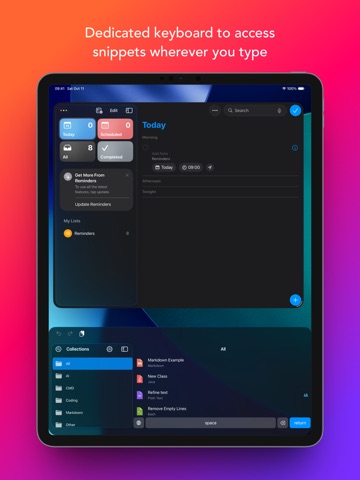
29 store screenshots


Pricing & paywalls
App Store
- Snippety Pro — $2.99
- Snippety Pro — $19.99
- Snippety Pro (lifetime) — $39.99
- Snippety Pro - Mobile — $14.99
- Snippety Pro - Upgrade (lifetime) — $24.99
Ratings & reviews
App Store
-
5/5Stellar!
I am thrilled to have come across this great App! Due to privacy concerns I had to stop using another app that offered similar features becuase the other developer started running things through their servers which introduced a security / privacy risk. When I found Snippety, it was good and met the basic needs, but a little rough around the edges. I sent some initial feedback & to my great surprise and delight not only got a positive reponse to the Feedback, but the Developer integrated the feature request in a future release! He actually made several updates and now I love this App! I have shared it with my team and a number of other colleages! Keep up the great work and I hope you have a lot of success.
BigjoJitsu · 6 Aug 2026
-
5/5Super useful and well designed app
I use this primarily for email templates and when I originally purchased the previous version, it did not allow including images in the template with certain email programs. I asked the developer about this and he said he would implement that in the next version, and he did! It is now supremely useful as I have one place for all my templates that I can use in any email program (since MOST of them do not support templates in a convenient way). I also use them for SMS replies and any messenging app. Great for a tech support knowledge base. fast, flexible, and easy to use. Excellent app!
kkphoto · 6 Aug 2026
-
5/5Advanced functionality, well-maintained, straightforward and easy to setup and use
Highly recommend checking out Snippety as it's become my go-to text expander. The new AI features have taken it to the next level. It's well-maintained and the owner is accessible through his website or reddit. Recommended areas for improvement: 1. Having more functions/options for snippet organization (eg, subfolders, use-case/topic-style snippet tags, which could be auto-AI generated) with more advanced sorting/filtering options. My snippet collection is lengthy, so this would help tremendously when I'm having trouble remembering or finding a particular snippet. 2. Please more detailed documentation on Command Line Script use, more text transformation options or how to create custom parameters, and snippety-helper documentation detailing how to use and advanced capabilities. 3. Dynamic file content insertion, either by setting up some logic (eg, iterate through a directory, injecting file 1 content on 1st snippet, file 2 content on 2nd expansion of same snippet, etc). Also, allowing users to pick a specific file each time they execute a snippet with the File Content placeholder. This would help TREMENDOUSLY for LLM coding workflows and replace the endless copy/pasting. Overall, 9/10 app with some room for UX improvements!
Happymad · 6 Aug 2026
-
4/5Overall a great text expansion app
My use case for Snippety is somewhat limited. I mainly use it to store troubleshooting steps with pictures and to auto-expand or change certain words or phrases. While these functions work pretty well, if you are typing too fast when triggering a text expansion in Snippety, it can cause the expanded text to insert itself a few characters behind what you just typed. This doesn’t always happen, but it can be annoying since you have to fix what has now become a typo. It would also be great if larger images could be stored in Snippety since it’ll complain if the images aren’t small in file size. Every once in a while the App also crashes when trying to insert images. I still really enjoy Snippety and would recommend this app, but I hope these few annoyances could be addressed.
ToastyMark · 6 Aug 2026
-
5/5Great Application - Update
I use this application daily to complete patient notes timely in an outpatient physical therapy setting. I feel as though this software has saved me hours of typing phrases I use over and over again. I highly recommend this application. One update I would love to see is an option to keep the Snippety window open after choosing and pasting a snippet. I paste multiple snippets in a row, and having to press the keyboard shortcut to reopen the window after every paste is a pain point for me. -UPDATE- Updating rating to 5 stars after latest update addressing the feedback mentioned above. Only minor (very minor) critique I could add would be to add functionality so that users are able to interact with the placeholders that generate drop-down menus through the keyboard (use of arrow keys to select variables.)
K1NGJU571N · 6 Aug 2026
Privacy & accessibility
App Store
Privacy
- Data Not Linked to You — Analytics — Diagnostics — Crash Data Developer declared
- Data Not Linked to You — Analytics — Diagnostics — Performance Data Developer declared
- Data Not Linked to You — Analytics — Usage Data — Product Interaction Developer declared
- Data Not Linked to You — Diagnostics Developer declared
- Data Not Linked to You — Usage Data Developer declared
Accessibility
No accessibility labels collected yet.
Versions
App Store
-
10.0.54
We are shifting to a new model so everyone can try Snippety for free! A huge thank you to our early supporters: As a token of our appreciation, all existing users have been automatically upgraded to a lifetime Pro plan for free.
-
10.0.57
Minor bug fixes and stability improvements. We are shifting to a new model so everyone can try Snippety for free! A huge thank you to our early supporters: As a token of our appreciation, all existing users have been automatically upgraded to a lifetime Pro plan for free.
-
10.0.58
Minor bug fixes and stability improvements.
-
10.0.59
Minor bug fixes and stability improvements.
-
10.1.60
Added support for preselected items in the Multiselect Placeholder.
-
10.2.61
∙ Added support for trailing blank characters in the snippet template. ∙ Refreshed the design of the snippet editor. ∙ Now you can delete all snippets by swiping left on the "All" collection.
-
10.2.62
Minor bug fixes and stability improvements.
-
10.2.63
Minor bug fixes and stability improvements.
-
11.0.64
• Added Conditional Blocks support. Dynamically show or hide parts of your snippet based on provided conditions. Find them under Snippet Editor → Insert Placeholder → Conditional Block. • Snippet previews now display placeholders as colored tags, matching their appearance on macOS. • Added a new configuration option for both the app and keyboard, allowing you to choose what is displayed below each snippet title in the snippet list. • Added a Note placeholder to let you add notes or comments to your snippets. Notes are visible only in the editor and are not included in the generated snippet. • Added a "Hidden" option to the Selectable Value placeholder. Hidden values can be used in Conditional Blocks and Variable References without appearing in the generated snippet. • Extended the Variable Reference placeholder to support more variables. • Added haptic feedback on key taps in the Snippety Keyboard. You can enable or disable it in the keyboard settings. • Optimized Snippety Keyboard to reduce memory usage and improve performance.
-
11.0.65
· 1 Aug 2026
Minor bug fixes and stability improvements.
-
6.0.34
Share & Collaborate using iCloud: • Share selected snippets with co-workers, friends, or across your personal devices, even if they use different Apple IDs. • The new collaboration is built using native Apple technologies, ensuring your data remains secure and never passes through third-party servers. • Control who can access each shared snippet and choose between read-only or write permissions. • The collaboration feature has undergone extensive testing over several weeks to ensure stability. However, unexpected issues may still arise. Please be sure to enable auto-backup in the app settings. Other Changes: • Enhanced iCloud Synchronization. Changes from multiple devices are now merged more securely. • Improved support for default values in text variables: You can now remove the default value when needed or use white spaces. Previously, empty values were always replaced with the default, making it impossible to leave a variable blank. • Minor bug fixes and stability improvements.
-
6.1.36
• Added support for images when using Clipboard placeholder. • Added Hyperlink placeholder. • Added Editor & Preview settings (text wrap + font size). • Minor bug fixes and stability improvements.
-
7.0.37
• Support for Tags: You can now add, manage, and filter snippets using configurable tags. • "Snippet Reference" Placeholder: Added a new placeholder for nesting snippets. • "Text Variable Reference" Placeholder: Added a new placeholder for referencing the same variable multiple times, with options for applying additional transformations. • A fresh new app icon that supports iOS 18 themes. • Added text transformations like camelCase, snake_case, and more for the "Text Transformation" placeholder. • The "Multiselect" and "Selectable Value" placeholders now support multiline text. Use "\n" to insert a new line.
-
7.1.38
• Added support for custom and self-hosted AI APIs compatible with the OpenAI interface. • Added application documentation. See: snippety.app/help. • Added new deeplinks: snippety://edit-snippet?id=ID, snippety://collection?id=NAME.
-
7.1.39
Fixed issue with font scaling when using Rich Text snippets.
-
7.2.40
• Added extended support for HTML snippets. You can now show preview and use HTML as an alternative to RTF. HTML snippets will be inserted as formatted text, as long as the target app supports HTML format. • Convert between HTML and Rich Text Format. Simply change the type in the snippet editor, and Snippety will automatically convert RTF to HTML or vice versa. This feature is useful for quickly formatting content with the built-in RTF editor, then converting it to HTML for fine-tuning. • New input modes for AI placeholder. You can now combine selected text or clipboard content with a prompt parameter. Use %@ in your instructions to define where the parameter will be inserted when running the snippet. • Clipboard placeholder can now also apply one of the built-in text transformations. • Text Transformation placeholder has been replaced by the Selected Text placeholder, which now also supports text transformation. • Selectable Value placeholder now supports a default value, which will be applied when no value is selected. • Snippety Keyboard now shows a notification on the spacebar when a snippet is copied to the clipboard.
-
7.3.41
• Updated app & keyboard appearance for iOS 26. • Refreshed app icon to match the new iOS 26 style. • Minor bug fixes and stability improvements.
-
8.0.43
• Redesigned toolbars for quicker access to all essential actions. • Improved snippet editor. • Improved tab bar behavior for smoother navigation. • Added search bars to format and collection lists. • New "Recent Formats" section showing your five most recently used formats. • Added iCloud status button for easier sync visibility. • Added formatting toolbar above the keyboard when editing RTF documents. • Added placeholder button above the keyboard. • UI enhancements optimized for iOS 26. • Fixed text wrapping issues in snippet previews.
-
8.0.44
Fixed an issue where formatted lists would disappear when using Rich Text format.
-
8.1.55
• New text transformation: "Title Case (smart)" transforms text to title case while recognizing language components to avoid unnecessary capitalization. • Sentence Case transformation has been improved to detect fully uppercased text, converting it to lowercase first before applying sentence case. • AI model can now be selected for each placeholder.
-
9.0.46
• Snippet Expander is now available in Snippety Keyboard, letting you automatically expand snippets by typing keywords. • The start screen for Snippety Keyboard is now configurable in the keyboard settings. You can choose from the following options: Collections List (default), Snippet Expander, Search, Selected Collection, or Last Collection. • On iPad, Snippety Keyboard now remembers if you hide the sidebar and keeps it hidden the next time you open it. • Performance and stability improvements.
-
9.1.47
• Added support for clipboard images when using HTML format. • Added a keyboard option to disable Snippet Expander suggestions. • Added a keyboard option to auto-switch back to typing mode. • The keyboard now returns to its initial state after snippet expansion. • Fixed the AI Assistant's "Selection" placeholder mode.
-
9.1.48
Improved cursor positioning when using "{@cursor@}" placeholder.
-
9.2.50
∙ Added integration with Shortcuts app. ∙ Updated AI models.
-
9.2.52
Improved Shortcuts integration: ∙ Refined naming for better clarity. ∙ Added new properties to give you even more control over your automations. ∙ Added shortcuts for tag management. ∙ Added predefined shortcuts that can be used with Siri. Please note that some of your shortcuts may require migration due to these changes.
Availability by market
- US
Data quality & evidence
- Page completeness
- Live store listing
- Last verified
- 6 Aug 2026
- Sources
- App Store
- Independent summary has not been published yet.