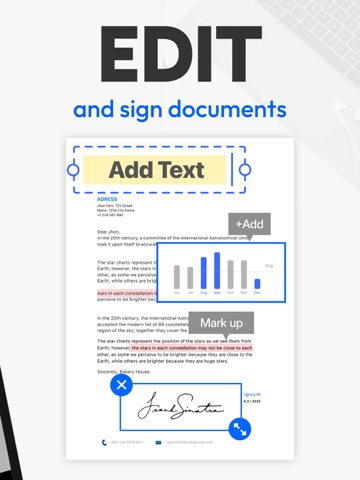
Apoku MCP provides app discovery, detailed cards, evidence, sources and screenshots where available. Unknown or conflicting prices stay explicit.
View JSON
GET /api/v3/apps/595563753
{
"app_id": 595563753,
"canonical_url": "https://appcorpus.com/apps/tiny-scanner-pdf-scanner-app-595563753",
"identity": {
"name": "Tiny Scanner - PDF Scanner App",
"slug": "tiny-scanner-pdf-scanner-app",
"developer": {
"name": "TinyWork Apps",
"url": "https://appcorpus.com/developers/tinywork-apps-developer_1dd0fc88bb068e28dce0ea974e89d762"
},
"icon_url": "https://is1-ssl.mzstatic.com/image/thumb/Purple221/v4/bb/98/9a/bb989a82-6963-e6c6-ff9b-cb0365d62400/AppIconMain-0-0-1x_U007epad-0-1-0-0-85-220.png/512x512bb.jpg",
"stores": [
"apple",
"gplay"
],
"platforms": [
"iphone",
"ipad",
"android"
],
"status": {
"state": "active",
"label": "Active",
"last_checked": "2026-09-29",
"last_checked_label": "29 Sep 2026",
"banner": null,
"region_note": null,
"data_state": "stale",
"data_state_label": "Some store data may be out of date"
}
},
"listings": [
{
"store": "apple",
"status": "ACTIVE",
"url": "https://apps.apple.com/us/app/tiny-scanner-pdf-scanner-app/id595563753?uo=4",
"rating": 4.8,
"rating_count": 182468,
"formatted_price": "Free",
"is_free": true,
"has_iap": true,
"has_subscription": null,
"version": "8.16.8",
"updated": "2026-09-29",
"currency": "USD"
},
{
"store": "gplay",
"status": "ACTIVE",
"url": "https://play.google.com/store/apps/details?id=com.appxy.tinyscanner",
"rating": 4.599193,
"rating_count": 489287,
"formatted_price": "Free",
"is_free": true,
"has_iap": true,
"has_subscription": null,
"version": "8.16.7",
"updated": "2026-08-07",
"currency": "USD"
}
],
"summary": {
"one_liner": null,
"summary": null,
"best_for": [],
"not_for": [],
"status": "fallback",
"at_a_glance": [
"From $1.66/mo",
"Free to download",
"In-app purchases"
]
},
"categories": {
"official": [
"Business",
"Productivity"
],
"appcorpus": [
{
"category_id": "business",
"label": "Business",
"url": "https://appcorpus.com/categories/business"
},
{
"category_id": "productivity",
"label": "Productivity",
"url": "https://appcorpus.com/categories/productivity"
}
]
},
"use_cases": [],
"features": [
{
"capability_id": "free_app",
"label": "Free app",
"availability": "yes",
"access_level": "free",
"scope": null,
"evidence": "Store published"
},
{
"capability_id": "in_app_purchases",
"label": "In-app purchases",
"availability": "yes",
"access_level": "free_limited",
"scope": null,
"evidence": "Store published"
}
],
"pricing": [
{
"store": "apple",
"formatted_price": "Free",
"is_free": true,
"has_iap": true,
"has_subscription": null,
"currency": "USD",
"market": "us",
"last_verified": "2026-09-29",
"rows": [
"Premium Reward Plan - Monthly — $2.99/month",
"Premium Reward Plan - Monthly — $29.99/year ($2.49/mo)",
"Premium Plan - Monthly — $4.99/month",
"Premium Plan - Monthly — $5.99/week",
"Premium Plan - Monthly — $6.99/month",
"Premium Plan - Monthly — $9.99/week",
"Premium Plan - Monthly — $19.99/year ($1.66/mo)",
"Premium Plan - Monthly — $49.99/year ($4.16/mo)",
"Upgrade to Tiny Scanner Plus — $4.99"
],
"state": "current"
},
{
"store": "gplay",
"formatted_price": "Free",
"is_free": true,
"has_iap": true,
"has_subscription": null,
"currency": "USD",
"market": "us",
"last_verified": "2026-08-07",
"rows": [
"Free to download",
"In-app purchases: $1.99 - $199.99 per item"
],
"state": "current"
}
],
"screens": [
{
"url": "https://is1-ssl.mzstatic.com/image/thumb/PurpleSource221/v4/a4/24/98/a42498cc-55de-30ef-70b3-2414951da26f/01.jpg/1600x1600bb.jpg",
"store": "apple",
"platform": "ipad",
"alt": "Tiny Scanner - PDF Scanner App ipad screenshot 1"
},
{
"url": "https://is1-ssl.mzstatic.com/image/thumb/PurpleSource221/v4/a4/24/98/a42498cc-55de-30ef-70b3-2414951da26f/01.jpg/360x480bb.jpg",
"store": "apple",
"platform": "ipad",
"alt": "Tiny Scanner - PDF Scanner App ipad screenshot 2"
},
{
"url": "https://is1-ssl.mzstatic.com/image/thumb/PurpleSource211/v4/5d/dd/3b/5ddd3bb3-e464-c050-df8e-7461704ac64a/02.jpg/1600x1600bb.jpg",
"store": "apple",
"platform": "ipad",
"alt": "Tiny Scanner - PDF Scanner App ipad screenshot 3"
},
{
"url": "https://is1-ssl.mzstatic.com/image/thumb/PurpleSource211/v4/5d/dd/3b/5ddd3bb3-e464-c050-df8e-7461704ac64a/02.jpg/360x480bb.jpg",
"store": "apple",
"platform": "ipad",
"alt": "Tiny Scanner - PDF Scanner App ipad screenshot 4"
},
{
"url": "https://is1-ssl.mzstatic.com/image/thumb/PurpleSource221/v4/e2/0d/f7/e20df724-26e6-f27c-aded-6210e1724702/3.jpg/1600x1600bb.jpg",
"store": "apple",
"platform": "ipad",
"alt": "Tiny Scanner - PDF Scanner App ipad screenshot 5"
},
{
"url": "https://is1-ssl.mzstatic.com/image/thumb/PurpleSource221/v4/e2/0d/f7/e20df724-26e6-f27c-aded-6210e1724702/3.jpg/360x480bb.jpg",
"store": "apple",
"platform": "ipad",
"alt": "Tiny Scanner - PDF Scanner App ipad screenshot 6"
},
{
"url": "https://is1-ssl.mzstatic.com/image/thumb/PurpleSource221/v4/91/0c/60/910c607c-ab99-8d73-5344-eeea70047d7a/_U82f1_U8bed-COUNT.jpg/1600x1600bb.jpg",
"store": "apple",
"platform": "ipad",
"alt": "Tiny Scanner - PDF Scanner App ipad screenshot 7"
},
{
"url": "https://is1-ssl.mzstatic.com/image/thumb/PurpleSource221/v4/91/0c/60/910c607c-ab99-8d73-5344-eeea70047d7a/_U82f1_U8bed-COUNT.jpg/360x480bb.jpg",
"store": "apple",
"platform": "ipad",
"alt": "Tiny Scanner - PDF Scanner App ipad screenshot 8"
},
{
"url": "https://is1-ssl.mzstatic.com/image/thumb/PurpleSource211/v4/36/5c/4b/365c4bc6-f6af-b630-610d-5734a69bac78/5.jpg/1600x1600bb.jpg",
"store": "apple",
"platform": "ipad",
"alt": "Tiny Scanner - PDF Scanner App ipad screenshot 9"
},
{
"url": "https://is1-ssl.mzstatic.com/image/thumb/PurpleSource211/v4/36/5c/4b/365c4bc6-f6af-b630-610d-5734a69bac78/5.jpg/360x480bb.jpg",
"store": "apple",
"platform": "ipad",
"alt": "Tiny Scanner - PDF Scanner App ipad screenshot 10"
},
{
"url": "https://is1-ssl.mzstatic.com/image/thumb/PurpleSource211/v4/be/2e/82/be2e82e2-4a5b-ca86-a839-b5da2db569dc/04.jpg/1600x1600bb.jpg",
"store": "apple",
"platform": "ipad",
"alt": "Tiny Scanner - PDF Scanner App ipad screenshot 11"
},
{
"url": "https://is1-ssl.mzstatic.com/image/thumb/PurpleSource211/v4/be/2e/82/be2e82e2-4a5b-ca86-a839-b5da2db569dc/04.jpg/360x480bb.jpg",
"store": "apple",
"platform": "ipad",
"alt": "Tiny Scanner - PDF Scanner App ipad screenshot 12"
},
{
"url": "https://is1-ssl.mzstatic.com/image/thumb/PurpleSource221/v4/95/bc/ce/95bccec8-921d-fd00-42fa-afae53305da2/_U82f1_U8bed-13.jpg/1600x1600bb.jpg",
"store": "apple",
"platform": "ipad",
"alt": "Tiny Scanner - PDF Scanner App ipad screenshot 13"
},
{
"url": "https://is1-ssl.mzstatic.com/image/thumb/PurpleSource221/v4/95/bc/ce/95bccec8-921d-fd00-42fa-afae53305da2/_U82f1_U8bed-13.jpg/360x480bb.jpg",
"store": "apple",
"platform": "ipad",
"alt": "Tiny Scanner - PDF Scanner App ipad screenshot 14"
},
{
"url": "https://is1-ssl.mzstatic.com/image/thumb/PurpleSource211/v4/37/0e/4e/370e4e55-4205-6df2-004c-a1aa527c0ca0/13.png/1600x1600bb.jpg",
"store": "apple",
"platform": "ipad",
"alt": "Tiny Scanner - PDF Scanner App ipad screenshot 15"
},
{
"url": "https://is1-ssl.mzstatic.com/image/thumb/PurpleSource211/v4/37/0e/4e/370e4e55-4205-6df2-004c-a1aa527c0ca0/13.png/360x480bb.jpg",
"store": "apple",
"platform": "ipad",
"alt": "Tiny Scanner - PDF Scanner App ipad screenshot 16"
},
{
"url": "https://is1-ssl.mzstatic.com/image/thumb/PurpleSource211/v4/35/3b/78/353b7823-6182-92db-174a-7cd80bf2af1c/_U82f1_U8bed-SOLVE.jpg/1600x1600bb.jpg",
"store": "apple",
"platform": "ipad",
"alt": "Tiny Scanner - PDF Scanner App ipad screenshot 17"
},
{
"url": "https://is1-ssl.mzstatic.com/image/thumb/PurpleSource211/v4/35/3b/78/353b7823-6182-92db-174a-7cd80bf2af1c/_U82f1_U8bed-SOLVE.jpg/360x480bb.jpg",
"store": "apple",
"platform": "ipad",
"alt": "Tiny Scanner - PDF Scanner App ipad screenshot 18"
},
{
"url": "https://is1-ssl.mzstatic.com/image/thumb/PurpleSource211/v4/91/80/da/9180da5e-217b-a19f-94bf-ad7a83b13cfc/8.jpg/1600x1600bb.jpg",
"store": "apple",
"platform": "ipad",
"alt": "Tiny Scanner - PDF Scanner App ipad screenshot 19"
},
{
"url": "https://is1-ssl.mzstatic.com/image/thumb/PurpleSource211/v4/91/80/da/9180da5e-217b-a19f-94bf-ad7a83b13cfc/8.jpg/360x480bb.jpg",
"store": "apple",
"platform": "ipad",
"alt": "Tiny Scanner - PDF Scanner App ipad screenshot 20"
},
{
"url": "https://is1-ssl.mzstatic.com/image/thumb/PurpleSource211/v4/d0/91/70/d0917067-c6ba-56f4-8bcc-a3b779f6dd45/01.png/1284x1600bb.jpg",
"store": "apple",
"platform": "iphone",
"alt": "Tiny Scanner - PDF Scanner App iphone screenshot 21"
},
{
"url": "https://is1-ssl.mzstatic.com/image/thumb/PurpleSource221/v4/65/bb/7a/65bb7a8a-9d63-bcdb-51cf-34fa6ba2117b/02.png/1284x1600bb.jpg",
"store": "apple",
"platform": "iphone",
"alt": "Tiny Scanner - PDF Scanner App iphone screenshot 22"
},
{
"url": "https://is1-ssl.mzstatic.com/image/thumb/PurpleSource221/v4/9f/9d/17/9f9d1722-6163-381f-cf2d-69474d4290ed/3.jpg/1284x1600bb.jpg",
"store": "apple",
"platform": "iphone",
"alt": "Tiny Scanner - PDF Scanner App iphone screenshot 23"
},
{
"url": "https://is1-ssl.mzstatic.com/image/thumb/PurpleSource211/v4/d5/32/d4/d532d402-8aa0-8b82-5447-0056aba98a0c/_U82f1_U8bed-COUNT.jpg/1284x1600bb.jpg",
"store": "apple",
"platform": "iphone",
"alt": "Tiny Scanner - PDF Scanner App iphone screenshot 24"
},
{
"url": "https://is1-ssl.mzstatic.com/image/thumb/PurpleSource221/v4/74/db/28/74db28b2-b1bd-eecc-3bb8-c5969d8cd97f/5.jpg/1284x1600bb.jpg",
"store": "apple",
"platform": "iphone",
"alt": "Tiny Scanner - PDF Scanner App iphone screenshot 25"
},
{
"url": "https://is1-ssl.mzstatic.com/image/thumb/PurpleSource211/v4/22/16/1c/22161c92-f496-d943-0934-54ae0797d6ca/04.png/1284x1600bb.jpg",
"store": "apple",
"platform": "iphone",
"alt": "Tiny Scanner - PDF Scanner App iphone screenshot 26"
},
{
"url": "https://is1-ssl.mzstatic.com/image/thumb/PurpleSource221/v4/dd/b8/ef/ddb8ef2a-691f-b035-6f01-d291a29ac420/_U82f1_U8bed-6.5.jpg/1284x1600bb.jpg",
"store": "apple",
"platform": "iphone",
"alt": "Tiny Scanner - PDF Scanner App iphone screenshot 27"
},
{
"url": "https://is1-ssl.mzstatic.com/image/thumb/PurpleSource211/v4/34/27/0c/34270cfe-8eba-4c8a-def6-0843896e10b9/6.5.png/1284x1600bb.jpg",
"store": "apple",
"platform": "iphone",
"alt": "Tiny Scanner - PDF Scanner App iphone screenshot 28"
},
{
"url": "https://is1-ssl.mzstatic.com/image/thumb/PurpleSource211/v4/2c/91/08/2c9108df-5c6e-718a-7c78-1389f7600960/_U82f1_U8bed-SOLVE.jpg/1284x1600bb.jpg",
"store": "apple",
"platform": "iphone",
"alt": "Tiny Scanner - PDF Scanner App iphone screenshot 29"
},
{
"url": "https://is1-ssl.mzstatic.com/image/thumb/PurpleSource221/v4/02/19/f6/0219f6d9-789e-1dc7-2105-9849cac3169d/8.jpg/1284x1600bb.jpg",
"store": "apple",
"platform": "iphone",
"alt": "Tiny Scanner - PDF Scanner App iphone screenshot 30"
},
{
"url": "https://play-lh.googleusercontent.com/WARozn-i8PzwN7iSDPVwOXYSNm7uxXBBmQ8MwlsP4kt-0kMQP_DzuXivrsVMJfUxjBCvaNEOcjWYiTMdc6OGpXo",
"store": "gplay",
"platform": "android",
"alt": "Tiny Scanner - PDF Scanner App android screenshot 1"
},
{
"url": "https://play-lh.googleusercontent.com/24IzlvwdgaJANPkR7mou6iplUeANUBq-ei8Ny2KE0YZRqDWtYFYIb3XF9Rtow95jJdXiQKFRTCeDUp5sP5WEMw",
"store": "gplay",
"platform": "android",
"alt": "Tiny Scanner - PDF Scanner App android screenshot 2"
},
{
"url": "https://play-lh.googleusercontent.com/IIGM7A5lxoriQhaxo96MocOns--1B-k4ZxHJivyJ9RptnfUodlCHt6Lw8EMjlrncjMCMKbQHEWJvHVdixtwVag",
"store": "gplay",
"platform": "android",
"alt": "Tiny Scanner - PDF Scanner App android screenshot 3"
},
{
"url": "https://play-lh.googleusercontent.com/on4Hdj96TQfsU8piY6kIqiF2bBwKDrbV2sIHfpa2WsSJeA2knGhjS68myF6L85fg4KXyjZFGBZV-vOvmGwXKaw",
"store": "gplay",
"platform": "android",
"alt": "Tiny Scanner - PDF Scanner App android screenshot 4"
},
{
"url": "https://play-lh.googleusercontent.com/Ch2--kgnuaj8Bjd7OPjn5B7pktXBzDmbOCjRAco8My-a5_czCnQPfnX3Y87CvatVNYbFAA-R3P_-Xxp4M92l",
"store": "gplay",
"platform": "android",
"alt": "Tiny Scanner - PDF Scanner App android screenshot 5"
},
{
"url": "https://play-lh.googleusercontent.com/SAdsWkBulKd0lvSfXQZFr6Vu4sejwsY_fCUHPY49pAAoOEnIUizsmol1D2FRibbdPDm_B7yB4KedkSZvjG08Dm4",
"store": "gplay",
"platform": "android",
"alt": "Tiny Scanner - PDF Scanner App android screenshot 6"
},
{
"url": "https://play-lh.googleusercontent.com/KAPe01mxVogTXc7ub3rv44ARKEOUj4anEIfDa7KApsf68_8YVcg_pW2Xhjvt3TSxFgwUdp8L1rBTCRJpYKc",
"store": "gplay",
"platform": "android",
"alt": "Tiny Scanner - PDF Scanner App android screenshot 7"
},
{
"url": "https://play-lh.googleusercontent.com/HJJC_TAr_4jA5YpZt-q4_ATGvG07X5aTJ6WCMZSsG3TarFg_-0wlToRHW_11pY6Cj44I33Q8JFtEppMsMfrUuA",
"store": "gplay",
"platform": "android",
"alt": "Tiny Scanner - PDF Scanner App android screenshot 8"
},
{
"url": "https://play-lh.googleusercontent.com/F7nt4JNsr1Anv75yoXsdhba2DeYRmy2nmrPyLc7tWgVn7x1koDqKALUPnQpzobIcNyM676ajKOr601bs6HfsbQ",
"store": "gplay",
"platform": "android",
"alt": "Tiny Scanner - PDF Scanner App android screenshot 9"
},
{
"url": "https://play-lh.googleusercontent.com/t69HFWL-HnM335IQZ2lxpF20Qy8Nt1MZt9ICkyGKEWUiVp8_-Q0vL3NDeXZrfVT9MKrMI6y1BPySi_1o4PMQSkI",
"store": "gplay",
"platform": "android",
"alt": "Tiny Scanner - PDF Scanner App android screenshot 10"
},
{
"url": "https://play-lh.googleusercontent.com/VjavmVtTPgeMTG9hXvK07wY08Jo_rDfALBLHkTCWW2Ct_zTQFXpitdep9Z26UxlWCt8a0A2absneJSRwVsuj4g",
"store": "gplay",
"platform": "android",
"alt": "Tiny Scanner - PDF Scanner App android screenshot 11"
},
{
"url": "https://play-lh.googleusercontent.com/on4Hdj96TQfsU8piY6kIqiF2bBwKDrbV2sIHfpa2WsSJeA2knGhjS68myF6L85fg4KXyjZFGBZV-vOvmGwXKaw",
"store": "gplay",
"platform": "android",
"alt": "Tiny Scanner - PDF Scanner App android screenshot 12"
},
{
"url": "https://play-lh.googleusercontent.com/HfUXsSENKvucMiu5dHgodY_cs1YagHHzqKn3XgramjIqBy-r_CY8B-QKM6zj8trdikf_OrYTh0E4PVbCf9ds-g",
"store": "gplay",
"platform": "android",
"alt": "Tiny Scanner - PDF Scanner App android screenshot 13"
},
{
"url": "https://play-lh.googleusercontent.com/ZGOwwxNxpWAT7qz3JkKzYMGSJ5nTLRXOAXrvvrnCjSy0yCRgBdNsXqDKGvV0kt-Tzbh_7QrKbe_kSALxWBQVVoI",
"store": "gplay",
"platform": "android",
"alt": "Tiny Scanner - PDF Scanner App android screenshot 14"
},
{
"url": "https://play-lh.googleusercontent.com/7FQTZRsGADU9-9yUAeWwKnapRLuqWklvwGf3VCji_0LESQdf88amciA6G7AhByMTVmvQJAWdEPZg0lR8Zcpq",
"store": "gplay",
"platform": "android",
"alt": "Tiny Scanner - PDF Scanner App android screenshot 15"
},
{
"url": "https://play-lh.googleusercontent.com/94VmcnHzQs2chHaW3fAwT-6sBwdP_hK11-q1D4PSZ0Rp3Z4qAqlDTQd4ErXL-zuU_3jmiDAWRH5QhBtzoDI4SA",
"store": "gplay",
"platform": "android",
"alt": "Tiny Scanner - PDF Scanner App android screenshot 16"
},
{
"url": "https://play-lh.googleusercontent.com/F7nt4JNsr1Anv75yoXsdhba2DeYRmy2nmrPyLc7tWgVn7x1koDqKALUPnQpzobIcNyM676ajKOr601bs6HfsbQ",
"store": "gplay",
"platform": "android",
"alt": "Tiny Scanner - PDF Scanner App android screenshot 17"
},
{
"url": "https://play-lh.googleusercontent.com/t69HFWL-HnM335IQZ2lxpF20Qy8Nt1MZt9ICkyGKEWUiVp8_-Q0vL3NDeXZrfVT9MKrMI6y1BPySi_1o4PMQSkI",
"store": "gplay",
"platform": "android",
"alt": "Tiny Scanner - PDF Scanner App android screenshot 18"
},
{
"url": "https://play-lh.googleusercontent.com/VjavmVtTPgeMTG9hXvK07wY08Jo_rDfALBLHkTCWW2Ct_zTQFXpitdep9Z26UxlWCt8a0A2absneJSRwVsuj4g",
"store": "gplay",
"platform": "android",
"alt": "Tiny Scanner - PDF Scanner App android screenshot 19"
},
{
"url": "https://play-lh.googleusercontent.com/on4Hdj96TQfsU8piY6kIqiF2bBwKDrbV2sIHfpa2WsSJeA2knGhjS68myF6L85fg4KXyjZFGBZV-vOvmGwXKaw",
"store": "gplay",
"platform": "android",
"alt": "Tiny Scanner - PDF Scanner App android screenshot 20"
},
{
"url": "https://play-lh.googleusercontent.com/HfUXsSENKvucMiu5dHgodY_cs1YagHHzqKn3XgramjIqBy-r_CY8B-QKM6zj8trdikf_OrYTh0E4PVbCf9ds-g",
"store": "gplay",
"platform": "android",
"alt": "Tiny Scanner - PDF Scanner App android screenshot 21"
},
{
"url": "https://play-lh.googleusercontent.com/ZGOwwxNxpWAT7qz3JkKzYMGSJ5nTLRXOAXrvvrnCjSy0yCRgBdNsXqDKGvV0kt-Tzbh_7QrKbe_kSALxWBQVVoI",
"store": "gplay",
"platform": "android",
"alt": "Tiny Scanner - PDF Scanner App android screenshot 22"
},
{
"url": "https://play-lh.googleusercontent.com/7FQTZRsGADU9-9yUAeWwKnapRLuqWklvwGf3VCji_0LESQdf88amciA6G7AhByMTVmvQJAWdEPZg0lR8Zcpq",
"store": "gplay",
"platform": "android",
"alt": "Tiny Scanner - PDF Scanner App android screenshot 23"
},
{
"url": "https://play-lh.googleusercontent.com/94VmcnHzQs2chHaW3fAwT-6sBwdP_hK11-q1D4PSZ0Rp3Z4qAqlDTQd4ErXL-zuU_3jmiDAWRH5QhBtzoDI4SA",
"store": "gplay",
"platform": "android",
"alt": "Tiny Scanner - PDF Scanner App android screenshot 24"
}
],
"data_states": {
"screens": "current"
},
"ratings": [
{
"store": "apple",
"average": 4.8,
"count": 182468,
"market": "us",
"observed_at": "2026-09-29",
"state": "current",
"reviews": [
{
"rating": 5,
"title": "Great Scanning App Tool",
"body": "I was just using the “Dropbox” App to scan everything I needed to scan before I came across this App. This Scanning App is really fantastic and it saves me a lot more time when I’m trying to get my documents scanned properly. There’s a lot of cool tools that this app offers. But, I think one of my favorites would have to be..that I can scan the document a lot faster and the app automatically does the work of finding the edges of the documents for me. Instead of me having to wait for everything to line up everything every single time. I just take a picture of the document and it automatically finds the edges. That’s not all...it even gives you a chance to edit the lines and/or cancel/approve the document that was just Scanned too. They also, offer multiple documents that can be be scanned at the same time. Unfortunately, I haven’t had a chance to use the “multiple” one more than one time and it was a very low number of documents at this point in time. I would really like to know if there’s a certain limitation to the amount of pages (ex: “Dropbox” you can only scan up to 10-pages. Then, you have to setup another “multiple” document to finish the rest all the way until your finished scanning the documents that need to stay together.). I will figure this out soon I’m sure. However, I’m sorry I don’t have that information to be able to share with you today. Thanks for reading.",
"author": "Alflover33",
"date": "29 Sep 2026"
},
{
"rating": 5,
"title": "BEST Scanner & one of my MOST USED apps!",
"body": "I love this app. I work in a retail store that does a lot of shipping orders during the holidays. Most of these shipments are gifts for the recipients, which means the receipt for the order can't go into the box like it normally would. Considering most of the customers placing these shipping orders don't live in our area, I needed a way to send them their receipts. Before looking into a scanner app I would scan the receipt using our printer, save it to the computer, attach the file to an email and send the email to the customer. After about 5 or 6 shipments a week, this gets pretty darn old. So I decided to look into an app that would make this easier for me. I tried 3 or 4 different apps and finally decided to give the Pro version of this one a shot. TOTALLY WORTH IT. I have my work email linked to my phone so I can scan the receipt and email it to the customer in the time it would take me just to get to the printer upstairs!! Not only that, but it's a perfect image copy of the receipt and 100% legible by the customer. Since upgrading to the Pro version, I have found SO MANY uses for it! I scan and text the weekly schedule to all staff, scan documents I want to hang on to and send copies to my boss that he can print or view as if it were the original copy! Definitely one of my MOST USED apps!",
"author": "MSonoda",
"date": "29 Sep 2026"
},
{
"rating": 5,
"title": "Easy to use - don’t want to pay 4.99 now, but may, to store my docs",
"body": "Re-Reviewing to add I’m using this right now to send the dec page of my new car insurance policy to the previous company to cancel, and cleaning up a photo of my TX Liability insurance cards to send my wife who also drives: the ability to import a photo I already took and cropped is cool, it sharpens the images and makes finding a location without shadows to photograph the paper documents unnecessary also as all mid-tones are removed in document mode. Easy to use - don’t really after years want to upgrade, but signed up for the free offer and did stick with it: until I’m using it again today. Handy even if infrequently used (At that time I’d needed to send a multi-page set of images of past invoices to a customer today); I had been using this app for years; but I do see my that past images within the app have now disappeared, now that 4.99 is being sought… I may keep this app and pay for it just for the convenience of (I assume) my future documents staying in your storage, findable in one place, over the upcoming years",
"author": "Outdoor Janitor",
"date": "29 Sep 2026"
},
{
"rating": 1,
"title": "This app died at IOs 10 or 11",
"body": "This is really a zero star rating. This app has not worked since version IOs v. 11.0 (maybe 10). The developers don't seem to know how to update the app. Sure, the camera works fine. The cropping of the scan is not as good as it used to be. But, the app no longer connects to Dropbox, One Drive, or Google Drive. In fact, it not only doesn't work with One Drive, but it also doesn't give an error message. The last time I had it auto-uploading to Dropbox, at least it told me that the upload failed. I lost a bunch of documents believing that they were uploaded to One Drive. So, the app is pretty much useless unless you want to connect to Evernote or email the scan to your self every G.. D.... time. What good it a scanning program on your iPhone, if it can't upload the scan anywhere? I've emailed support with feedback several times and all I get back a canned email saying the problem is fixed and they are working on new things for the next update. That's a bold face lie. The update hasn't happened. They haven't offered a true update for a year. Certainly, none of the many problems with the app have been addressed. All the high ratings and excellent reviews are from that time period or before. The more recent ones are similar to this one. Definitely, do not buy this app. I suggest finding a different app that lives up to its claims rather than wasting your time with this one.",
"author": "JRLBell",
"date": "29 Sep 2026"
},
{
"rating": 5,
"title": "Great app. Has had incredible impact on my job",
"body": "I work in healthcare as a Nurse Manager. I’ve used this app for at least 3 years. I’m always needing info as I round through departments from the documents and whiteboards that are by their design are fluidly changing info throughout the shift. I use this on my work iPhone to capture the info I need, quickly edit the image and email it to myself to reference the Information for my reports and assigning resources. The good design of this app lets you do this all right in the app in a few simple quick steps. I always have the info I need in my pocket for meetings or quick hallway discussions. Tiny scanner has increased my efficiency and effectiveness more than any other tool, system or training I’ve ever implemented. I am respected as the person with the correct and current for anything Administration needs to know. It’s so much more effective than trying to remember from my memory and notes and to have the info for any unanticipated questions. It’s all right there at my desk or in my pocket. Additionally I have a record of information to support me.",
"author": "NCal RN",
"date": "29 Sep 2026"
}
]
},
{
"store": "gplay",
"average": 4.599193,
"count": 489287,
"market": "us",
"observed_at": "2026-08-07",
"state": "current",
"reviews": []
}
],
"privacy": [
{
"store": "apple",
"declarations": [
{
"title": "Data Linked to You",
"detail": "Analytics — Contact Info — Email Address",
"source": "Developer declared"
},
{
"title": "Data Linked to You",
"detail": "Analytics — Identifiers — User ID",
"source": "Developer declared"
},
{
"title": "Data Linked to You",
"detail": "Analytics — Purchases — Purchase History",
"source": "Developer declared"
},
{
"title": "Data Linked to You",
"detail": "Analytics — Usage Data — Advertising Data",
"source": "Developer declared"
},
{
"title": "Data Linked to You",
"detail": "App Functionality — Identifiers — User ID",
"source": "Developer declared"
},
{
"title": "Data Linked to You",
"detail": "App Functionality — Purchases — Purchase History",
"source": "Developer declared"
},
{
"title": "Data Linked to You",
"detail": "Developer’s Advertising or Marketing — Contact Info — Email Address",
"source": "Developer declared"
},
{
"title": "Data Linked to You",
"detail": "Developer’s Advertising or Marketing — Usage Data — Advertising Data",
"source": "Developer declared"
},
{
"title": "Data Linked to You",
"detail": "Product Personalization — Contact Info — Email Address",
"source": "Developer declared"
},
{
"title": "Data Linked to You",
"detail": "Product Personalization — Purchases — Purchase History",
"source": "Developer declared"
},
{
"title": "Data Linked to You",
"detail": "Product Personalization — Usage Data — Advertising Data",
"source": "Developer declared"
},
{
"title": "Data Linked to You",
"detail": "Third-Party Advertising — Usage Data — Advertising Data",
"source": "Developer declared"
},
{
"title": "Data Linked to You",
"detail": "Contact Info",
"source": "Developer declared"
},
{
"title": "Data Linked to You",
"detail": "Identifiers",
"source": "Developer declared"
},
{
"title": "Data Linked to You",
"detail": "Purchases",
"source": "Developer declared"
},
{
"title": "Data Linked to You",
"detail": "Usage Data",
"source": "Developer declared"
},
{
"title": "Data Not Linked to You",
"detail": "Analytics — Diagnostics — Crash Data",
"source": "Developer declared"
},
{
"title": "Data Not Linked to You",
"detail": "Analytics — Diagnostics — Other Diagnostic Data",
"source": "Developer declared"
},
{
"title": "Data Not Linked to You",
"detail": "Analytics — Diagnostics — Performance Data",
"source": "Developer declared"
},
{
"title": "Data Not Linked to You",
"detail": "Analytics — Identifiers — Device ID",
"source": "Developer declared"
},
{
"title": "Data Not Linked to You",
"detail": "Analytics — Usage Data — Product Interaction",
"source": "Developer declared"
},
{
"title": "Data Not Linked to You",
"detail": "App Functionality — Diagnostics — Crash Data",
"source": "Developer declared"
},
{
"title": "Data Not Linked to You",
"detail": "App Functionality — Diagnostics — Other Diagnostic Data",
"source": "Developer declared"
},
{
"title": "Data Not Linked to You",
"detail": "App Functionality — Diagnostics — Performance Data",
"source": "Developer declared"
},
{
"title": "Data Not Linked to You",
"detail": "App Functionality — User Content — Customer Support",
"source": "Developer declared"
},
{
"title": "Data Not Linked to You",
"detail": "App Functionality — User Content — Emails or Text Messages",
"source": "Developer declared"
},
{
"title": "Data Not Linked to You",
"detail": "App Functionality — User Content — Photos or Videos",
"source": "Developer declared"
},
{
"title": "Data Not Linked to You",
"detail": "Developer’s Advertising or Marketing — Identifiers — Device ID",
"source": "Developer declared"
},
{
"title": "Data Not Linked to You",
"detail": "Product Personalization — Identifiers — Device ID",
"source": "Developer declared"
},
{
"title": "Data Not Linked to You",
"detail": "Third-Party Advertising — Identifiers — Device ID",
"source": "Developer declared"
},
{
"title": "Data Not Linked to You",
"detail": "Diagnostics",
"source": "Developer declared"
},
{
"title": "Data Not Linked to You",
"detail": "Identifiers",
"source": "Developer declared"
},
{
"title": "Data Not Linked to You",
"detail": "Usage Data",
"source": "Developer declared"
},
{
"title": "Data Not Linked to You",
"detail": "User Content",
"source": "Developer declared"
},
{
"title": "Data Used to Track You",
"detail": "Usage Data — Advertising Data",
"source": "Developer declared"
},
{
"title": "Data Used to Track You",
"detail": "Usage Data",
"source": "Developer declared"
}
],
"accessibility": [
{
"title": "Differentiate Without Color Alone",
"detail": "SUPPORTED",
"source": "Store published"
},
{
"title": "Reduced Motion",
"detail": "SUPPORTED",
"source": "Store published"
},
{
"title": "Sufficient Contrast",
"detail": "SUPPORTED",
"source": "Store published"
},
{
"title": "Voice Control",
"detail": "SUPPORTED",
"source": "Store published"
},
{
"title": "VoiceOver",
"detail": "SUPPORTED",
"source": "Store published"
}
]
},
{
"store": "gplay",
"declarations": [
{
"title": "Data collected",
"detail": "Analytics — App activity — App interactions",
"source": "Developer declared"
},
{
"title": "Data collected",
"detail": "Analytics — App activity — Other user-generated content",
"source": "Developer declared"
},
{
"title": "Data collected",
"detail": "Analytics — App info and performance — Crash logs",
"source": "Developer declared"
},
{
"title": "Data collected",
"detail": "Analytics — App info and performance — Diagnostics",
"source": "Developer declared"
},
{
"title": "Data collected",
"detail": "Analytics — App info and performance — Other app performance data",
"source": "Developer declared"
},
{
"title": "Data collected",
"detail": "Analytics — Location — Approximate location",
"source": "Developer declared"
},
{
"title": "Data collected",
"detail": "Analytics, Advertising or marketing — Device or other IDs",
"source": "Developer declared"
},
{
"title": "Data collected",
"detail": "App functionality — App activity — Installed apps",
"source": "Developer declared"
},
{
"title": "Data collected",
"detail": "App functionality — Financial info — Purchase history",
"source": "Developer declared"
},
{
"title": "Data collected",
"detail": "App functionality, Account management — Personal info — User IDs",
"source": "Developer declared"
},
{
"title": "Data shared",
"detail": "App functionality — Personal info — Email address",
"source": "Developer declared"
},
{
"title": "Security practices",
"detail": "Your data is transferred over a secure connection — Data is encrypted in transit",
"source": "Developer declared"
},
{
"title": "Security practices",
"detail": "The developer provides a way for you to request that your data be deleted — You can request that data be deleted",
"source": "Developer declared"
}
],
"accessibility": []
}
],
"changes": [
{
"store": "apple",
"version": "8.10.0",
"released_at": null,
"notes": "Thanks for choosing Tiny Scanner! Here’s what’s new in this version: ----- Just a quick reminder that we’ve rolled out PDF to Word and Excel, along with some UI tweaks and bug fixes. ----- We love hearing from you! Please share your reviews to help us make it better. Contact us at [email protected]"
},
{
"store": "apple",
"version": "8.11.0",
"released_at": null,
"notes": "Thanks for choosing Tiny Scanner! Here’s what’s new in this version: ----- New Tiny Scanner AI feature: supports uploading files and processing their content, including summarization, extraction, simplification, Q&A, and more. ----- We love hearing from you! Please share your reviews to help us make it better. Contact us at [email protected]"
},
{
"store": "apple",
"version": "8.12.0",
"released_at": null,
"notes": "Thanks for choosing Tiny Scanner! Here’s what’s new in this version: ----- App size reduced to help free up more space on your phone. ----- We love hearing from you! Please share your reviews to help us make it better. Contact us at [email protected]"
},
{
"store": "apple",
"version": "8.13.0",
"released_at": null,
"notes": "Thanks for choosing Tiny Scanner! Here’s what’s new in this version: ----- Bug fixed and wrote a work summary using Tiny Scanner AI. ----- We love hearing from you! Please share your reviews to help us make it better. Contact us at [email protected]"
},
{
"store": "apple",
"version": "8.14.0",
"released_at": null,
"notes": "Thanks for choosing Tiny Scanner! Here’s what’s new in this version: ----- Reduced app size and improved performance. ----- We love hearing from you! Please share your reviews to help us make it better. Contact us at [email protected]"
},
{
"store": "apple",
"version": "8.15.0",
"released_at": null,
"notes": "Thanks for choosing Tiny Scanner! Here’s what’s new in this version: ----- A Tiny Scanner AI shortcut is now available on the Recent Page, enabling easy file summarization, simplification, contact detail extraction, and more. ----- We love hearing from you! Please share your reviews to help us make it better. Contact us at [email protected]"
},
{
"store": "apple",
"version": "8.16.0",
"released_at": null,
"notes": "Thanks for choosing Tiny Scanner! Here’s what’s new in this version: ----- Bug fixes and merge PDF files for easier sharing. ----- We love hearing from you! Please share your reviews to help us make it better. Contact us at [email protected]"
},
{
"store": "apple",
"version": "8.16.1",
"released_at": null,
"notes": "Thanks for choosing Tiny Scanner! Here’s what’s new in this version: ----- Bug fixes and merge PDF files for easier sharing. ----- We love hearing from you! Please share your reviews to help us make it better. Contact us at [email protected]"
},
{
"store": "apple",
"version": "8.16.2",
"released_at": null,
"notes": "Thanks for choosing Tiny Scanner! Here’s what’s new in this version: ----- Bug fixes and merge PDF files for easier sharing. ----- We love hearing from you! Please share your reviews to help us make it better. Contact us at [email protected]"
},
{
"store": "apple",
"version": "8.16.3",
"released_at": null,
"notes": "Thanks for choosing Tiny Scanner! Here’s what’s new in this version: ----- Bug fixes and merge PDF files for easier sharing. ----- We love hearing from you! Please share your reviews to help us make it better. Contact us at [email protected]"
},
{
"store": "apple",
"version": "8.16.4",
"released_at": null,
"notes": "Thanks for choosing Tiny Scanner! Here’s what’s new in this version: ----- Bug fixes and merge PDF files for easier sharing. ----- We love hearing from you! Please share your reviews to help us make it better. Contact us at [email protected]"
},
{
"store": "apple",
"version": "8.16.5",
"released_at": null,
"notes": "Thanks for choosing Tiny Scanner! Here’s what’s new in this version: ----- New Language Support: Tiny Scanner is now available in Malay. Bug fixes and merge PDF files for easier sharing. ----- We love hearing from you! Please share your reviews to help us make it better. Contact us at [email protected]"
},
{
"store": "apple",
"version": "8.16.6",
"released_at": null,
"notes": "Thanks for choosing Tiny Scanner! Here’s what’s new in this version: ----- New Language Support: Tiny Scanner is now available in Indonesian. ----- We love hearing from you! Please share your reviews to help us make it better. Contact us at [email protected]"
},
{
"store": "apple",
"version": "8.16.7",
"released_at": "2026-07-28",
"notes": "Thanks for choosing Tiny Scanner! Here’s what’s new in this version: ----- - Added Thai and Vietnamese language support. ----- We love hearing from you! Please share your reviews to help us make it better. Contact us at [email protected]"
},
{
"store": "apple",
"version": "8.16.8",
"released_at": "2026-09-13",
"notes": "Thanks for choosing Tiny Scanner! Here’s what’s new in this version: ----- - Reduced app size ----- We love hearing from you! Please share your reviews to help us make it better. Contact us at [email protected]"
},
{
"store": "apple",
"version": "8.7.1",
"released_at": null,
"notes": "Thanks for choosing Tiny Scanner! Here’s what’s new in this version: ----- Improved Auto Scan for smarter batch scanning. ----- We love hearing from you! Please share your reviews to help us make it better. Contact us at [email protected]"
},
{
"store": "apple",
"version": "8.8.0",
"released_at": null,
"notes": "Thanks for choosing Tiny Scanner! Here’s what’s new in this version: ----- Math Solver: Scan math questions and get clear expressions and answers New Safe folder to protect your important files with encryption UI improvements and bug fixes ----- We love hearing from you! Please share your reviews to help us make it better. Contact us at [email protected]"
},
{
"store": "apple",
"version": "8.9.0",
"released_at": null,
"notes": "Thanks for choosing Tiny Scanner! Here’s what’s new in this version: ----- Tried our new Math Scan to check my nephew’s homework, and also fixed some bugs and optimized the UI. ----- We love hearing from you! Please share your reviews to help us make it better. Contact us at [email protected]"
},
{
"store": "apple",
"version": "8.9.1",
"released_at": null,
"notes": "Thanks for choosing Tiny Scanner! Here’s what’s new in this version: ----- Tried our new Math Scan to check my nephew’s homework, and also fixed some bugs and optimized the UI. ----- We love hearing from you! Please share your reviews to help us make it better. Contact us at [email protected]"
},
{
"store": "apple",
"version": "8.9.10",
"released_at": null,
"notes": "Thanks for choosing Tiny Scanner! Here’s what’s new in this version: ----- Optimized for iOS 26 for a smoother experience Added a PDF tools collection on the Actions page for all-in-one document management UI improvements for a cleaner interface Convert PDFs directly to Word/Excel for more efficient work and study ----- We love hearing from you! Please share your reviews to help us make it better. Contact us at [email protected]"
},
{
"store": "gplay",
"version": "8.16.7",
"released_at": "2026-07-29",
"notes": ""
}
],
"alternatives": [
{
"app_id": 1291962681,
"name": "Scanner – Scan PDF, ID & Docs",
"url": "https://appcorpus.com/apps/scanner-scan-pdf-id-docs-1291962681",
"reason": "Same category + similar ratings"
},
{
"app_id": 333710667,
"name": "Scanner Pro - Scan to PDF",
"url": "https://appcorpus.com/apps/scanner-pro-scan-to-pdf-333710667",
"reason": "Same category + similar ratings"
},
{
"app_id": 1040093707,
"name": "iScanner: PDF Document Scanner",
"url": "https://appcorpus.com/apps/iscanner-pdf-document-scanner-1040093707",
"reason": "Same category + similar ratings"
},
{
"app_id": 1180773759,
"name": "Scan to PDF: Converter Scanner",
"url": "https://appcorpus.com/apps/scan-to-pdf-converter-scanner-1180773759",
"reason": "Same category + similar ratings"
},
{
"app_id": 1625307994,
"name": "eScan: PDF Scanner App",
"url": "https://appcorpus.com/apps/escan-pdf-scanner-app-1625307994",
"reason": "Same category + similar ratings"
},
{
"app_id": 377672876,
"name": "Scanner App: Genius Scan",
"url": "https://appcorpus.com/apps/scanner-app-genius-scan-377672876",
"reason": "Same category + similar ratings"
}
],
"evidence_summary": {
"index_state": "S1",
"evidence_level": 1,
"level_label": "Live store listing",
"indexable": true,
"last_verified_at": "2026-09-29",
"unknown_fields": [
"Apoku editorial summary has not been published yet."
],
"sources": [
"App Store",
"Google Play"
]
},
"availability_markets": {
"live": [
"us"
],
"selected": "us",
"note": null
},
"feature_events": {
"events": [
{
"type": "major_update",
"occurred_at": "2026-08-28 23:56:27.144542+00:00",
"plan_code": null,
"capability_id": null,
"previous": {},
"current": {},
"scope": {
"store_id": "apple",
"change_id": "change_9824930cf1d23557445ee8702c7924c8",
"storefront_id": "us"
},
"source": "store_diff"
},
{
"type": "major_update",
"occurred_at": "2026-07-31 16:19:55.335449+00:00",
"plan_code": null,
"capability_id": null,
"previous": {},
"current": {},
"scope": {
"store_id": "apple",
"change_id": "change_f31aade1b0b1a92be6f6b719229e1582",
"storefront_id": "us"
},
"source": "store_diff"
}
]
},
"features_slice": {
"plans": [
{
"code": "premium-reward-plan",
"label": "Premium Reward Plan - Monthly",
"kind": "subscription",
"status": "store_listed",
"prices": [
{
"storefront": "us",
"formatted": "$2.99",
"billing_period": "monthly",
"scope_status": "scoped",
"market_mismatch": false,
"source_market": "us",
"observed_at": "2026-09-29 16:29:47.876940+00:00"
},
{
"storefront": "us",
"formatted": "$29.99",
"billing_period": "yearly",
"scope_status": "scoped",
"market_mismatch": false,
"source_market": "us",
"observed_at": "2026-09-29 16:29:47.876940+00:00"
}
],
"trial": null
},
{
"code": "premium-plan",
"label": "Premium Plan - Monthly",
"kind": "subscription",
"status": "store_listed",
"prices": [
{
"storefront": "us",
"formatted": "$4.99",
"billing_period": "monthly",
"scope_status": "scoped",
"market_mismatch": false,
"source_market": "us",
"observed_at": "2026-09-29 16:29:47.876940+00:00"
},
{
"storefront": "us",
"formatted": "$6.99",
"billing_period": "monthly",
"scope_status": "scoped",
"market_mismatch": false,
"source_market": "us",
"observed_at": "2026-09-29 16:29:47.876940+00:00"
},
{
"storefront": "us",
"formatted": "$5.99",
"billing_period": "weekly",
"scope_status": "scoped",
"market_mismatch": false,
"source_market": "us",
"observed_at": "2026-09-29 16:29:47.876940+00:00"
},
{
"storefront": "us",
"formatted": "$9.99",
"billing_period": "weekly",
"scope_status": "scoped",
"market_mismatch": false,
"source_market": "us",
"observed_at": "2026-09-29 16:29:47.876940+00:00"
},
{
"storefront": "us",
"formatted": "$19.99",
"billing_period": "yearly",
"scope_status": "scoped",
"market_mismatch": false,
"source_market": "us",
"observed_at": "2026-09-29 16:29:47.876940+00:00"
},
{
"storefront": "us",
"formatted": "$49.99",
"billing_period": "yearly",
"scope_status": "scoped",
"market_mismatch": false,
"source_market": "us",
"observed_at": "2026-09-29 16:29:47.876940+00:00"
}
],
"trial": null
},
{
"code": "upgrade-to-tiny-scanner-plus",
"label": "Upgrade to Tiny Scanner Plus",
"kind": "unknown",
"status": "store_listed",
"prices": [
{
"storefront": "us",
"formatted": "$4.99",
"billing_period": null,
"scope_status": "scoped",
"market_mismatch": false,
"source_market": "us",
"observed_at": "2026-09-29 16:29:47.876940+00:00"
}
],
"trial": null
}
],
"features": [],
"unknown_features": [],
"data_cutoff": "29 Sep 2026"
}
}