
Quick verdict
- What it is
- Store information collected; an Apoku editorial summary is not yet published.
- At a glance
-
- Free to download
Categories and search queries
Official categories
- Travel
- Travel & Local
- Navigation
Apoku categories
Key functions
| Function | Availability | Access | Scope | Evidence |
|---|---|---|---|---|
| Free app | Yes | Free | Context-specific | Store published |
| Apple Wallet | Unknown | Unknown | Scope unknown | Store published |
Screens
10 store screenshots


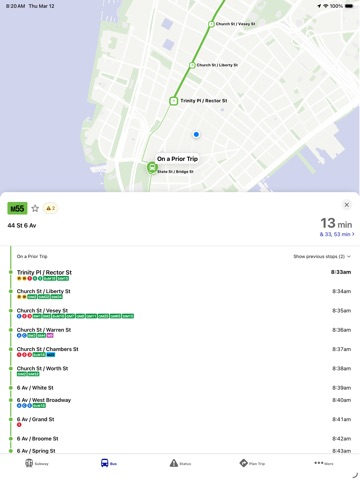
6 store screenshots


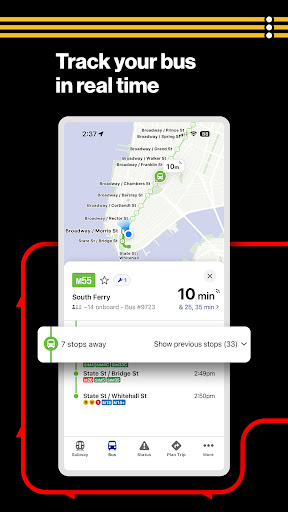
Pricing & paywalls
- Free to download
- Free to download
Ratings & reviews
-
2/5Looks nice, but old app was much easier and more reliable/accurate
The layout of this new app is far busier and requires more taps to get the same information as the old app/web platform. For a tourist not in a hurry, that information can be useful, but for a native NYer who needs to get someplace now, fumbling through an app to find the same information can mean missing a train, bus, or transfer. However, the worst part is that estimated arrival times are more often than not, completely wrong. Trains and buses in the app that don’t exist, arrival times being 3-5 minutes off, and travel times between stops completely incorrect (too long or too short). Cross checking with the train arrival signs in stations or at bus stops and checking the web app show me that this app is the issue and somehow is working off different algorithms or data sets to estimate timing. The web app has become quite good and overwhelmingly is the most reliable for arrival times. I’ve resorted to using the web app, because while not perfect, it’s by comparison 5 stars over this. I look forward to some fast updates to fix, at the very least, the missing and incorrect arrival times.
asnow1190 · 12 Oct 2026
-
1/5Absolutely Terrible Update
I don’t know what compelled the MTA to release this update, but whoever was responsible for this should be fired immediately. This update is horrendous and should never have seen the light of day. If the goal was to disrupt, anger, and inconvenience the thousands of New Yorkers who relied on this app for travel, then congratulations because you’ve succeeded in doing just that. This is only time I can think of in recent memory where an update has less practical functionality than the previous version. Opening the app to a tab of all my favorited train stations and bus stops? Gone. An easily navigable and simple user interface? Gone. The only two things I appreciate in this update is the swap direction button for the subways and the layout of the subway tab in the status page, but at the expense of everything else that made this app great to use, I’d rather have the old version back. This is what happens when you design apps for the approval of your corporate stakeholders instead of the people who use the app everyday. Do better next time. Edit: The times for the trains and buses aren’t even accurate anymore. I nearly missed my train multiple times because the app would say 5 minutes but the train was already approaching the station. Luckily I was close enough I could run. You should be ashamed of yourselves for releasing something so terrible.
Adam Mella · 12 Oct 2026
-
1/5If it ain’t broke…
Why would you completely change the app? I used to be able to open the app, click on the subway line I needed, scroll down and see when the train was coming. Now there are so many added steps. I have to keep switching to my favorites tab instead of my favorite lines just being there when I open the app, click past a service change alert page and change the direction I need to see EVERYtime. Then I have to push the stop times up to fill the screen because for some reason they added a huge unnecessary map on the subway page. Also the train times are gone. It used to say the scheduled time a train was coming as well as how many minutes away it was. Now it just says how many minutes. We have limited time when trying to catch a train. I just need to open it, make 1 or 2 clicks and see when the train is coming. I used to be able to do that. This new app takes too much to navigate. The whole user interface is just unnecessarily clunky and not user friendly. Simple is always better. I never used the bus part of the app for this same reason and always chose to use the web browser. Now you’ve ruined the subway part. The only positive is that it now supports dark mode. I wish I’d never updated. Please change it back.
Nelluv · 12 Oct 2026
-
1/5Yikes…
Last app version was 2 out of 5 stars, this is worse. Love the colors, the sleek look, the longer arrivals/departures lists, and that’s about it. It has the layout and feel of trying to replace Google maps, and honey…why? This is an MTA app, not a tourist brochure map. The direction planing is ridiculous, the maps only show a single selected subway line (not to mention it mixes buses and subways on one map), the default ordering of subways stops is downtown at the top and uptown on the bottom (what!??), instead of a nice small grid of subway lines it’s a long list and no longer brings subway lines that have service updates to the top of the section, several times a train that wasn’t on the arrival list arrived out of nowhere, if there’s no network connection a red box will persist across screens blocking buttons on the bottom, I should be able to see subway stops and transfers without a network connection using the latest cached service updates, there are no customization settings for what or how information is displayed….I could go on. What feedback did they use to make this app because of this is the result….yikes….
Cardboarddude · 12 Oct 2026
-
1/5Too complicated, I literally just want to see times
I usually don’t mind a few tweaks here or there when it come to updates but this was a little much that no one asked for. Like most, I just want to see what time a train is coming. You have to click like 5-7 buttons to figure that out. The old way was straight forward—pick your line and stop and you’ll see the how many minutes AND the estimated time. Personally, I don’t care about the explore button that literally never updates to your location even when you have stable wifi. The status should just have the lines in order, and I missed how when you clicked your line, the service status only took up half the screen with the line in order so you can just find your stop from there. Also, when you finally get to the line you want, I feel like the directions should be swapped . Example, why is the “inwood 207” button start at far rockaway? I understand that’s the direction you’re headed to but it’s a little confusing at first glance in my opinion and I almost have to click the back button each time.
shanmch · 12 Oct 2026
-
5/5
good application
Margalise Roche · 30 Aug 2026
-
3/5
works ok could be a lot better with more attention to detail
Kira Nowagirl · 30 Aug 2026
-
1/5
Can't see a list of my favorite bus routes. It has become pretty much useless after a recent update. Also, there is no way to see but route with stops
Konstantin Klokachev · 30 Aug 2026
-
1/5
Apparently we're jokes to these people. been standing for 29 minutes says the next bus is in 30 minutes then suddenly it's 5 minutes. the bus arrives and I guess it's a ghost bus cause there's nothing there. Fix yourselves.
Kay P. · 30 Aug 2026
-
4/5
It's workinv crazy. No more like before. I chnged my phone and installed and updated but still the same. Guess someone from mta must check It's service everyday as most of our schedules depends on It's accuracy of time.
ashfaque hasan · 30 Aug 2026
Privacy & accessibility
Privacy
- Data Linked to You — App Functionality — Contact Info — Email Address Developer declared
- Data Linked to You — App Functionality — User Content — Customer Support Developer declared
- Data Linked to You — Contact Info Developer declared
- Data Linked to You — User Content Developer declared
- Data Not Linked to You — Analytics — Diagnostics — Performance Data Developer declared
- Data Not Linked to You — Analytics — Identifiers — User ID Developer declared
- Data Not Linked to You — Analytics — Location — Precise Location Developer declared
- Data Not Linked to You — Analytics — Usage Data — Product Interaction Developer declared
- Data Not Linked to You — App Functionality — Diagnostics — Crash Data Developer declared
- Data Not Linked to You — App Functionality — Diagnostics — Other Diagnostic Data Developer declared
- Data Not Linked to You — App Functionality — Diagnostics — Performance Data Developer declared
- Data Not Linked to You — App Functionality — Identifiers — User ID Developer declared
- Data Not Linked to You — App Functionality — Location — Precise Location Developer declared
- Data Not Linked to You — Diagnostics Developer declared
- Data Not Linked to You — Identifiers Developer declared
- Data Not Linked to You — Location Developer declared
- Data Not Linked to You — Usage Data Developer declared
Accessibility
- Dark Interface — SUPPORTED Store published
- Larger Text — SUPPORTED Store published
- VoiceOver — SUPPORTED Store published
Privacy
- Data collected — App functionality, Analytics — App activity — App interactions Developer declared
- Data collected — App functionality, Analytics — App info and performance — Crash logs Developer declared
- Data collected — App functionality, Analytics — App info and performance — Diagnostics Developer declared
- Data collected — App functionality, Analytics, Personalization — Device or other IDs Developer declared
- Data collected — App functionality, Analytics, Personalization — Location — Approximate location Developer declared
- Data collected — App functionality, Analytics, Personalization — Location — Precise location Developer declared
- Data shared — App functionality, Analytics — App activity — App interactions Developer declared
- Data shared — App functionality, Analytics — App info and performance — Crash logs Developer declared
- Data shared — App functionality, Analytics — App info and performance — Diagnostics Developer declared
- Data shared — App functionality, Analytics, Personalization — Device or other IDs Developer declared
- Security practices — The developer doesn’t provide a way for you to request that your data be deleted — Data can’t be deleted Developer declared
- Security practices — Your data is transferred over a secure connection — Data is encrypted in transit Developer declared
Accessibility
No accessibility labels collected yet.
Versions
-
3.17.0
This release contains enhancements and improvements, including: • The Explore tab now shows available subway transfers when viewing subway arrivals, as well as on the map, for easier navigation. • A new Settings screen under More, with a section to manage notifications. • Visual indication on the Explore map of the area for which arrivals at bus stop are shown. • The search function in the Explore tab now appears in full screen for improved usability. • The Explore section's bookmarks and travel intents now feature a refreshed, more intuitive design. • Various app optimizations and bug fixes for a faster, smoother, and better experience. Thank you for riding with us.
-
3.18.0
Our latest update includes several bug fixes and performance enhancements based on user feedback. Thank you for riding with us.
-
3.19.0
This release contains several small enhancements and improvements, including: • Improved default directions when opening Station Boards • Smoother transitions and more responsive map interactions • Various bug fixes, crash resolutions, and stability improvements Thank you for riding with us.
-
3.20.0
This release contains enhancements and improvements, including: • You can now search for Subway and Rail stops even when you're offline. • You’ll now be notified faster when real-time data can’t be loaded due to poor connectivity. • Various bug fixes and performance enhancements for a smoother experience Thank you for riding with us.
-
3.22.0
This release contains enhancements and improvements, including: • New widgets! Check departure times at your favorite stations and bus stops, and live status updates for your preferred lines—right from your home screen. • Live vehicles are now visible in the trip plan view for rail-only trips. • Time and date formats now follow your device settings (12h or 24h clock). • Various bug fixes and performance improvements to keep your app running smoothly. Thank you for riding with us.
-
3.23.0
This release contains enhancements and improvements, including: • Address search results now open directly in the Explore All tab with nearby options, making it easier to discover transit options around you. • Improvements to the departure times widget: enlarging the refresh button tap area and fixing issues with the manual refresh • Various bug fixes and performance enhancements for a smoother experience Thank you for riding with us.
-
3.24.0
This release contains enhancements to indicate the routing of F and M subway trains, which are swapping routes on weekdays between Manhattan and Queens beginning Dec 8, as well as the usual bug fixes and performance enhancements for a smoother experience. Thank you for riding with us.
-
3.24.1
This update includes a small bug fix. Thank you for riding with us.
-
3.24.2
Our latest update includes several bug fixes and performance enhancements based on user feedback. Thank you for riding with us.
-
4.1.0
All-new subway and bus experience, redesigned from the ground up. The essential companion for riding the MTA subway and bus system just got even better.
-
4.10.0
Minor bug fixes & improvements.
-
4.11.0
Minor bug fixes & improvements.
-
4.12.0
Minor bug fixes & improvements.
-
4.13.0
Minor bug fixes & improvements.
-
4.14.0
Minor bug fixes and improvements.
-
4.15.0
Minor bug fixes and improvements.
-
4.16.0
· 22 Jul 2026
Minor bug fixes & improvements.
-
4.17.0
· 29 Jul 2026
Minor bug fixes & improvements.
-
4.18.0
Minor bug fixes & improvements.
-
4.19.0
Minor bug fixes and improvements.
-
4.2.0
All-new subway and bus experience, redesigned from the ground up. The essential companion for riding the MTA subway and bus system just got even better. - Performance and reliability improvements throughout the app.
-
4.20.0
Minor bug fixes & improvements.
-
4.21.0
· 26 Aug 2026
Minor bug fixes & improvements.
-
4.22.0
Minor bug fixes & improvements.
-
4.23.0
Minor bug fixes & improvements.
-
4.24.0
· 30 Sep 2026
Minor bug fixes & improvements.
-
4.3.0
All-new subway and bus experience, redesigned from the ground up. The essential companion for riding the MTA subway and bus system just got even better. - Performance and reliability improvements throughout the app.
-
4.4.0
All-new subway and bus experience, redesigned from the ground up. The essential companion for riding the MTA subway and bus system just got even better. - Performance and reliability improvements throughout the app.
-
4.5.0
All-new subway and bus experience, redesigned from the ground up. The essential companion for riding the MTA subway and bus system just got even better. - Performance and reliability improvements throughout the app.
-
4.6.0
All-new subway and bus experience, redesigned from the ground up. The essential companion for riding the MTA subway and bus system just got even better. - Performance and reliability improvements throughout the app.
-
4.7.0
All-new subway and bus experience, redesigned from the ground up. The essential companion for riding the MTA subway and bus system just got even better. - Performance and reliability improvements throughout the app.
-
4.8.0
All-new subway and bus experience, redesigned from the ground up. The essential companion for riding the MTA subway and bus system just got even better. - Performance and reliability improvements throughout the app.
-
4.9.0
All-new subway and bus experience, redesigned from the ground up. The essential companion for riding the MTA subway and bus system just got even better. - Performance and reliability improvements throughout the app.
- 4.21.0 · 25 Aug 2026
Alternatives
- NYC Transit: MTA Subway & Bus — Same category + similar ratings
- New York Subway MTA Map NYC — Same category + similar ratings
- NYC Ferry — Same category + similar ratings
- Subway Time NYC — Same category + similar ratings
- RidePATH — Same category + similar ratings
- NJ TRANSIT — Same category + similar ratings
Availability by market
- US
Data quality & evidence
- Page completeness
- Live store listing
- Last verified
- 12 Oct 2026
- Sources
- App Store, Google Play
- Apoku editorial summary has not been published yet.