
Quick verdict
- What it is
- Store information collected; an Apoku editorial summary is not yet published.
- At a glance
-
- From $0.74/mo
- Free to download
- In-app purchases
Categories and search queries
Official categories
- Navigation
- Travel
Apoku categories
Key functions
| Function | Availability | Access | Scope | Evidence |
|---|---|---|---|---|
| Free app | Yes | Free | Context-specific | Store published |
| In-app purchases | Yes | Limited free | Context-specific | Store published |
| Family Sharing | Unknown | Unknown | Scope unknown | Store published |
Screens
App Store
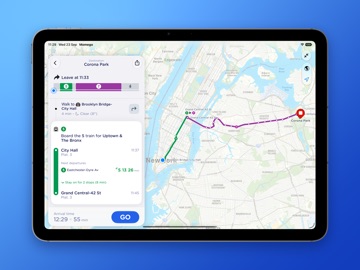
32 store screenshots


Pricing & paywalls
App Store
- Premium - Annual Subscription — $8.99/year ($0.74/mo)
- Monthly Plan — $3.49/month
- Monthly Plan — $19.99/year ($1.66/mo)
- PRO Monthly Plan — $6.00/month
- PRO Monthly Plan — $39.00/year ($3.25/mo)
- NYC+ Monthly — $7.99/month
- NYC+ Monthly — $39.00/year ($3.25/mo)
- PRO Yearly — $4.99/week
- PRO Yearly — $39.00/year ($3.25/mo)
- Lifetime Pass — $89.99
Ratings & reviews
App Store
-
5/5Great Help / EDIT: EVEN GREATER HELP !!!
EDIT: I have come to rely on this app more and more as time has gone by. I am a disabled woman in NYC and it is sometimes difficult to find the easiest & fastest route somewhere. I never have a problem with this app. I love the widget and the alarm options to keep me on track. It easy to set your destination and see your options. The app shows where there are issues (NYC MYA has many) and the suggests different options to avoid the problems. Another wonderful feature of this app is that they allow you to suggest new features for people to vote on. The developers then take it under consideration I suggested an option to slow down the walking time for people who are disabled or older and I suggested that the directions that include the NYC subway be marked as handicapped. I feel super excited to know that the developers will look at these suggestions and actually consider them. Most apps don’t even have a customer service department let alone one that listens! I recently downloaded this app to try to navigate through New York Citty easier. This app has been very helpful for me and I am happy I have it!!!
BrendaNYC · 29 Sep 2026
-
5/5Makes travel much easier
After trying a couple other apps, this became the only one I used during a week long trip to NYC. I didn’t find the filter options to do things like, minimize walking, for a few days and there were a couple times I had to change details to get it to display a previous option again. — I understand why, as a new path might be faster now than before, but an option to choose certain trains would be nice. However, everything else was great. I loved that it gave options, showed the wall distances, would let you specify a future time, etc. it made traveling around the city much easier. Big thanks to the creators of this app. — And as a plus, the “free” version displays very few apps, which was a pleasant surprise
Dragonboyinusa · 29 Sep 2026
-
4/5Would use again :))
I visited NYC for about three days with my family, and this app definitely saved our lives. Coming from California, we never take the train or bus to go places, so taking the subway would be a huge issue. But this app made traveling so much easier. We knew exactly which train to get on, what stops were being taken, and when we had to get off to either our destination or to transfer to another train. Of course, I can’t give it five stars because sometimes the times are inaccurate, but the times are usually off by a couple minutes. To get an accurate time, the signs in the subway do give better times of when a train is arriving (i.e. 1 minute, 5 minutes, etc.). Also, the service does cut off when the train is in motion, so the app doesn’t work and doesn’t show us our exact location, but once the train stops for the next flow of people, you are able to see exactly which station and street you’re on if the train itself doesn’t provide a sign or you cannot hear the conductor. If I ever go back to NYC, I will definitely be using this app again :)
christinej36 · 29 Sep 2026
-
1/5App’s GPS tracker is extremely inaccurate!!!!
Every day for the past month I have been racing to get to the express bus stop because the app gps stated that the bus would arrive in a certain amount of minutes. I keep watching hung the gps in this app count down the arrival of the bus until it reaches ‘0’ minutes which means the bus is within feet of the stop….except no bus arrives. And I am now left waiting for an additional bus to arrive for another hour. Is it so hard to say that the bus for that time is not running today. Why does the app need to provide such blatant lies. Just say it’s not running. And when asking the drivers about their tracking—they say “oh don’t pay attention to that—the gps on this bus never works”. Why use the app for real time. I may as well stick to the generic time table and hope for the best. As I type this, it is 9:30 pm. I just got off of my shift as an RN and raced to catch a bus that was supposed to arrive 10 minutes ago. The app os now saying another bus will arrive in 50 minutes. So instead I have to wait alone at night as a woman for the next bus that May or may not come. This is not a one time occurrence. It’s now daily.
RNAlwayswaiting4thebus · 29 Sep 2026
-
3/5NYC Transit, seems about right!!
The app works… mostly. The design is genuinely pretty, the colors don’t hurt my eyes, and the core features (live bus location, countdowns, alternate options, and estimated arrival times) actually do what they’re supposed to. Solid B+ on the “not completely useless” scale. For the price though? It’s giving “I’ll get to it when I feel like it.” Arrival times regularly exist in their own timeline, routes forget to update like they’ve got better things to do, and on event days or holidays the app just throws its hands up and offers the same generic schedule it’s had since 2019. Real helpful when half the city is shut down. Saved stops and favorite lines? Cute idea. They work when they remember they have a job. And the “bus only” filter is delightfully inclusive — still shows trains like it’s trying to unionize public transit. It’s functional enough that I’m not deleting it yet, but it could stand to receive some updates before it fully commits to the bit of being an expensive suggestion app.
DailnDeck · 29 Sep 2026
Privacy & accessibility
App Store
Privacy
- Data Not Linked to You — App Functionality — Diagnostics — Crash Data Developer declared
- Data Not Linked to You — App Functionality — Location — Coarse Location Developer declared
- Data Not Linked to You — App Functionality — Location — Precise Location Developer declared
- Data Not Linked to You — App Functionality — Purchases — Purchase History Developer declared
- Data Not Linked to You — App Functionality — Usage Data — Product Interaction Developer declared
- Data Not Linked to You — Third-Party Advertising — Identifiers — Device ID Developer declared
- Data Not Linked to You — Third-Party Advertising — Location — Coarse Location Developer declared
- Data Not Linked to You — Third-Party Advertising — Location — Precise Location Developer declared
- Data Not Linked to You — Third-Party Advertising — Usage Data — Advertising Data Developer declared
- Data Not Linked to You — Third-Party Advertising — Usage Data — Product Interaction Developer declared
- Data Not Linked to You — Diagnostics Developer declared
- Data Not Linked to You — Identifiers Developer declared
- Data Not Linked to You — Location Developer declared
- Data Not Linked to You — Purchases Developer declared
- Data Not Linked to You — Usage Data Developer declared
Accessibility
- Dark Interface — SUPPORTED Store published
- Differentiate Without Color Alone — SUPPORTED Store published
- Larger Text — SUPPORTED Store published
- Sufficient Contrast — SUPPORTED Store published
- VoiceOver — SUPPORTED Store published
Versions
App Store
-
2025.4.1
You asked, and we delivered. The most requested feature request we've had in the last five years is here: live departure times on your Home Screen with our brand-new Saved Stops Widgets. These great new Home Screen Widgets show all of your saved stops, with live bus and train times for each stop. If you've spent time making your Home Screen unique to you, just tap and hold on any widget and then tap 'Edit' to choose from dozens of themes. --- If you’re enjoying the app, a quick rating or review really helps us out. Got feedback or ideas? We’re always listening — just drop us a message from the Help section in the app. Thanks for riding with us!
-
2025.4.2
You asked, and we delivered. The most requested feature request we've had in the last five years is here: live departure times on your Home Screen with our brand-new Saved Stops Widgets. These great new Home Screen Widgets show all of your saved stops, with live bus and train times for each stop. If you've spent time making your Home Screen unique to you, just tap and hold on any widget and then tap 'Edit' to choose from dozens of themes. --- If you’re enjoying the app, a quick rating or review really helps us out. Got feedback or ideas? We’re always listening — just drop us a message from the Help section in the app. Thanks for riding with us!
-
2025.4.3
You asked, and we delivered. The most requested feature request we've had in the last five years is here: live departure times on your Home Screen with our brand-new Saved Stops Widgets. These great new Home Screen Widgets show all of your saved stops, with live bus and train times for each stop. If you've spent time making your Home Screen unique to you, just tap and hold on any widget and then tap 'Edit' to choose from dozens of themes. --- If you’re enjoying the app, a quick rating or review really helps us out. Got feedback or ideas? We’re always listening — just drop us a message from the Help section in the app. Thanks for riding with us!
-
2025.5
We've made a few tweaks to how the app looks, to make it easier to find what you're looking for. We've also added a touch of the new Liquid Glass design for everyone using iOS 26. --- If you’re enjoying the app, a quick rating or review really helps us out. Got feedback or ideas? We’re always listening — just drop us a message from the Help section in the app. Thanks for riding with us!
-
2025.5.2
We've made a few tweaks to how the app looks, to make it easier to find what you're looking for. We've also added a touch of the new Liquid Glass design for everyone using iOS 26. Also, bug fixes! We've fixed an issue where widgets wouldn't display correctly on devices with Clear or Tinted home screens, as well as a bug where the line search bar would appear when you tapped on a stop on a route map, obscuring the back button. --- If you’re enjoying the app, a quick rating or review really helps us out. Got feedback or ideas? We’re always listening — just drop us a message from the Help section in the app. Thanks for riding with us!
-
2025.5.3
This release fixes an issue where the map wasn't scrolling properly. Previously... We've made a few tweaks to how the app looks, to make it easier to find what you're looking for. We've also added a touch of the new Liquid Glass design for everyone using iOS 26. Also, bug fixes! We've fixed an issue where widgets wouldn't display correctly on devices with Clear or Tinted home screens, as well as a bug where the line search bar would appear when you tapped on a stop on a route map, obscuring the back button. --- If you’re enjoying the app, a quick rating or review really helps us out. Got feedback or ideas? We’re always listening — just drop us a message from the Help section in the app. Thanks for riding with us!
-
2025.5.4
This release fixes an issue where the map wasn't scrolling properly. Previously... We've made a few tweaks to how the app looks, to make it easier to find what you're looking for. We've also added a touch of the new Liquid Glass design for everyone using iOS 26. Also, bug fixes! We've fixed an issue where widgets wouldn't display correctly on devices with Clear or Tinted home screens, as well as a bug where the line search bar would appear when you tapped on a stop on a route map, obscuring the back button. --- If you’re enjoying the app, a quick rating or review really helps us out. Got feedback or ideas? We’re always listening — just drop us a message from the Help section in the app. Thanks for riding with us!
-
2025.5.5
This release fixes several issues: • On iOS 26.1 maps now scroll and zoom correctly • Widgets (including Widgets in Carplay) now show train departures with destinations • The number keys above the keyboard when searching now have a solid background • A small fix for Live Activities --- If you’re enjoying the app, a quick rating or review really helps us out. Got feedback or ideas? We’re always listening — just drop us a message from the Help section in the app. Thanks for riding with us!
-
2025.5.6
This release fixes several issues: • On iOS 26.1 maps now scroll and zoom correctly • Widgets (including Widgets in Carplay) now show train departures with destinations • The number keys above the keyboard when searching now have a solid background • A small fix for Live Activities --- If you’re enjoying the app, a quick rating or review really helps us out. Got feedback or ideas? We’re always listening — just drop us a message from the Help section in the app. Thanks for riding with us!
-
2026.1
Our first release of 2026 comes with a brand new Live Departures widget for your Lock Screen, where you can see live updates for your saved stops and stations. Once added, just tap on the widget to cycle through all of your saved stops. Also, this will be the last release to support iOS 17. The next release will only be available for iOS 18 and above. --- If you’re enjoying the app, a quick rating or review really helps us out. Got feedback or ideas? We’re always listening — just drop us a message from the Help section in the app. Thanks for riding with us!
-
2026.10.5
· 23 Sep 2026
A great new update for you today: Smart Suggestions, Delay Assistant, Siri AI improvements, faster launch speeds and a new, refined app design. Read on to find out more... ----- Refined Design: We haven’t changed much, you’ll be glad to hear – we’ve just tightened every screen up a little to make your experience more pleasant. Now you can use the app on iPad as well. ----- Faster Launch: Every second counts, so we've worked hard to make the app launch within 0.5 seconds, making sure you get the info you need as quickly as possible. ----- Smart Suggestions: The app keeps track of your journeys and stations (private by design) and shows you the best way to your regular destinations at the time you need them. ----- GO – Better Than Ever: When you tap GO, the app is even better at giving you up-to-date information – and for PRO customers we’ve introduced Delay Assistant, letting you know if there’s an issue up ahead and will give you alternative routes you can take while you’re on the move. ----- Siri AI: No need to squint at the screen while you’re walking to the station – just ask Siri, which now sees everything on your screen, and you can ask for live times and directions without opening the app first. ----- We’ve moved Alerts into the Saved tab – now they live alongside your stations and places. You can now move your stations, places and alerts around to suit you, and give them distinct colors. ----- Your feedback makes the app better. We'd really appreciate it if you could spare a few moments and leave a review in the App Store for us. We read every one (good and bad!) and we always appreciate every rating and review. Still reading? You might have noticed that we've replaced the swap button on the journey planner with drag indicators you can use to move the start and end points. Why would we do that? Hmm... find out next time. See you then! ----- OK, it's so you can add extra stops to your journey. Coming soon!
-
2026.1.1
Our first release of 2026 comes with a brand new Live Departures widget for your Lock Screen, where you can see live updates for your saved stops and stations. Once added, just tap on the widget to cycle through all of your saved stops. Also, this will be the last release to support iOS 17. The next release will only be available for iOS 18 and above. --- If you’re enjoying the app, a quick rating or review really helps us out. Got feedback or ideas? We’re always listening — just drop us a message from the Help section in the app. Thanks for riding with us!
-
2026.1.2
Our first release of 2026 comes with a brand new Live Departures widget for your Lock Screen, where you can see live updates for your saved stops and stations. Once added, just tap on the widget to cycle through all of your saved stops. Also, this will be the last release to support iOS 17. The next release will only be available for iOS 18 and above. --- If you’re enjoying the app, a quick rating or review really helps us out. Got feedback or ideas? We’re always listening — just drop us a message from the Help section in the app. Thanks for riding with us!
-
2026.2
We've made some improvements to how train times are shown in the app and in widgets. You should find it's easier to see if your train is delayed. More train updates to come in the next release - soon you'll be able to choose your destination stations and only the trains going there will show up in your widgets. --- If you’re enjoying the app, a quick rating or review really helps us out. Got feedback or ideas? We’re always listening — just drop us a message from the Help section in the app. Thanks for riding with us!
-
2026.3
Major improvements for Shortcuts users You can now launch live directions straight from a Shortcut or Siri request. Instead of opening the app, directions start instantly as a Live Activity - perfect for automated routines like getting directions to work every morning. The app now remembers your preferred routes too. If a familiar journey is available, it will be selected automatically. Otherwise, you can pick from available routes and the app will remember your choice for future trips. --- If you’re enjoying the app, a quick rating or review really helps us out. Got feedback or ideas? We’re always listening — just drop us a message from the Help section in the app. Thanks for riding with us!
-
2026.4
This is a big update with new features and plenty of improvements behind the scenes. Service Alert Summaries No more scrolling through long lists of alerts. The app now creates a short summary highlighting the most recent and important disruptions affecting your journey. Better for your battery We’ve made major optimisations to how the app uses location and background activity while you’re travelling. You can now tap GO with confidence that it won’t drain your battery. Smarter Live Activities Live Activities now end cleanly when you reach your destination. You’ll also see a quick summary of your trip when a Live Activity begins. Home & Work improvements You can now edit or remove your Home and Work locations again. Saved places and stations also sync automatically through iCloud, keeping all your devices up to date. Powerful new Shortcuts support You can now start live directions directly from Shortcuts or Siri. Instead of opening the app, directions begin instantly as a Live Activity — perfect for routines like starting your commute each morning. The app also remembers your preferred routes. If a familiar journey is available, it will be selected automatically. Otherwise, just choose a route once and we’ll remember it for next time. Clearer train departure boards Train times are now easier to read in both the app and widgets, so you can find what you need at a glance. --- If you’re enjoying the app, a quick rating or review really helps. Have feedback or ideas? Send us a message from the Help section in the app.
-
2026.4.1
A small update for everyone today, with the following bug fixes: • Once you complete a trip, the app makes sure it stops tracking your location in the background. • Sometimes, the Lock Screen Next Departures Widget would stop refreshing. This has been fixed. In our previous release (2024.4) we added: Service Alert Summaries No more scrolling through long lists of alerts. The app now creates a short summary highlighting the most recent and important disruptions affecting your journey. Better for your battery We’ve made major optimisations to how the app uses location and background activity while you’re travelling. You can now tap GO with confidence that it won’t drain your battery. Smarter Live Activities Live Activities now end cleanly when you reach your destination. You’ll also see a quick summary of your trip when a Live Activity begins. Home & Work improvements You can now edit or remove your Home and Work locations again. Saved places and stations also sync automatically through iCloud, keeping all your devices up to date. Powerful new Shortcuts support You can now start live directions directly from Shortcuts or Siri. Instead of opening the app, directions begin instantly as a Live Activity — perfect for routines like starting your commute each morning. The app also remembers your preferred routes. If a familiar journey is available, it will be selected automatically. Otherwise, just choose a route once and we’ll remember it for next time. Clearer train departure boards Train times are now easier to read in both the app and widgets, so you can find what you need at a glance. --- If you’re enjoying the app, a quick rating or review really helps. Have feedback or ideas? Send us a message from the Help section in the app.
-
2026.4.2
A small update for everyone today, with the following bug fixes: • Once you complete a trip, the app makes sure it stops tracking your location in the background. • Sometimes, the Lock Screen Next Departures Widget would stop refreshing. This has been fixed. In our previous release (2024.4) we added: Service Alert Summaries No more scrolling through long lists of alerts. The app now creates a short summary highlighting the most recent and important disruptions affecting your journey. Better for your battery We’ve made major optimisations to how the app uses location and background activity while you’re travelling. You can now tap GO with confidence that it won’t drain your battery. Smarter Live Activities Live Activities now end cleanly when you reach your destination. You’ll also see a quick summary of your trip when a Live Activity begins. Home & Work improvements You can now edit or remove your Home and Work locations again. Saved places and stations also sync automatically through iCloud, keeping all your devices up to date. Powerful new Shortcuts support You can now start live directions directly from Shortcuts or Siri. Instead of opening the app, directions begin instantly as a Live Activity — perfect for routines like starting your commute each morning. The app also remembers your preferred routes. If a familiar journey is available, it will be selected automatically. Otherwise, just choose a route once and we’ll remember it for next time. Clearer train departure boards Train times are now easier to read in both the app and widgets, so you can find what you need at a glance. --- If you’re enjoying the app, a quick rating or review really helps. Have feedback or ideas? Send us a message from the Help section in the app.
-
2026.5
In this release, we've added a toggle to the Saved screen which re-orders your saved stop list based on your location. In our previous release (2024.4) we added: Service Alert Summaries No more scrolling through long lists of alerts. The app now creates a short summary highlighting the most recent and important disruptions affecting your journey. Better for your battery We’ve made major optimisations to how the app uses location and background activity while you’re travelling. You can now tap GO with confidence that it won’t drain your battery. Smarter Live Activities Live Activities now end cleanly when you reach your destination. You’ll also see a quick summary of your trip when a Live Activity begins. Home & Work improvements You can now edit or remove your Home and Work locations again. Saved places and stations also sync automatically through iCloud, keeping all your devices up to date. Powerful new Shortcuts support You can now start live directions directly from Shortcuts or Siri. Instead of opening the app, directions begin instantly as a Live Activity — perfect for routines like starting your commute each morning. The app also remembers your preferred routes. If a familiar journey is available, it will be selected automatically. Otherwise, just choose a route once and we’ll remember it for next time. Clearer train departure boards Train times are now easier to read in both the app and widgets, so you can find what you need at a glance. --- If you’re enjoying the app, a quick rating or review really helps. Have feedback or ideas? Send us a message from the Help section in the app.
-
2026.6
A great new addition to our departure boards today - Destination Filters. Just open up a station board, tap on Destination and choose the station you want to get to. You'll only see the services that stop there. Great for busy stations where you want to cut out the noise and focus on the lines that you care about. Best of all, it works for bus stops as well: tap on Destination and choose the place you're going to, and we'll work out which bus lines from that stop go there. Lots more to come over the summer - see you next time! Previously... Saved Stops by Distance Now just tap the toggle on the Saved tab to re-order your saved stops and stations by how close they are to you. Service Alert Summaries No more scrolling through long lists of alerts. The app now creates a short summary highlighting the most recent and important disruptions affecting your journey. Better for your battery We’ve made major optimisations to how the app uses location and background activity while you’re travelling. You can now tap GO with confidence that it won’t drain your battery. Smarter Live Activities Live Activities now end cleanly when you reach your destination. You’ll also see a quick summary of your trip when a Live Activity begins. Home & Work improvements You can now edit or remove your Home and Work locations again. Saved places and stations also sync automatically through iCloud, keeping all your devices up to date. Powerful new Shortcuts support You can now start live directions directly from Shortcuts or Siri. Instead of opening the app, directions begin instantly as a Live Activity — perfect for routines like starting your commute each morning. The app also remembers your preferred routes. If a familiar journey is available, it will be selected automatically. Otherwise, just choose a route once and we’ll remember it for next time. Clearer train departure boards Train times are now easier to read in both the app and widgets, so you can find what you need at a glance. If you’re enjoying the app, a quick rating or review really helps. Have feedback or ideas? Send us a message from the Help section in the app.
-
2026.6.1
A great new addition to our departure boards today - Destination Filters. Just open up a station board, tap on Destination and choose the station you want to get to. You'll only see the services that stop there. Great for busy stations where you want to cut out the noise and focus on the lines that you care about. Best of all, it works for bus stops as well: tap on Destination and choose the place you're going to, and we'll work out which bus lines from that stop go there. Lots more to come over the summer - see you next time! Previously... Saved Stops by Distance Now just tap the toggle on the Saved tab to re-order your saved stops and stations by how close they are to you. Service Alert Summaries No more scrolling through long lists of alerts. The app now creates a short summary highlighting the most recent and important disruptions affecting your journey. Better for your battery We’ve made major optimisations to how the app uses location and background activity while you’re travelling. You can now tap GO with confidence that it won’t drain your battery. Smarter Live Activities Live Activities now end cleanly when you reach your destination. You’ll also see a quick summary of your trip when a Live Activity begins. Home & Work improvements You can now edit or remove your Home and Work locations again. Saved places and stations also sync automatically through iCloud, keeping all your devices up to date. Powerful new Shortcuts support You can now start live directions directly from Shortcuts or Siri. Instead of opening the app, directions begin instantly as a Live Activity — perfect for routines like starting your commute each morning. The app also remembers your preferred routes. If a familiar journey is available, it will be selected automatically. Otherwise, just choose a route once and we’ll remember it for next time. Clearer train departure boards Train times are now easier to read in both the app and widgets, so you can find what you need at a glance. If you’re enjoying the app, a quick rating or review really helps. Have feedback or ideas? Send us a message from the Help section in the app.
-
2026.7.2
To celebrate World Awareness Day this month, we've added an extra accessibility feature - custom fonts. From the Settings screen, you can now choose from several easy-to-read fonts that will be used throughout the app, including dyslexic-friendly typefaces. New: Destination Filters Just open up a station board, tap on Destination and choose the station you want to get to. You'll only see the services that stop there. Great for busy stations where you want to cut out the noise and focus on the lines that you care about. Best of all, it works for bus stops as well: tap on Destination and choose the place you're going to, and we'll work out which bus lines from that stop go there. Previously... Saved Stops by Distance Now just tap the toggle on the Saved tab to re-order your saved stops and stations by how close they are to you. Service Alert Summaries No more scrolling through long lists of alerts. The app now creates a short summary highlighting the most recent and important disruptions affecting your journey. Better for your battery We’ve made major optimisations to how the app uses location and background activity while you’re travelling. You can now tap GO with confidence that it won’t drain your battery. Smarter Live Activities Live Activities now end cleanly when you reach your destination. You’ll also see a quick summary of your trip when a Live Activity begins. Home & Work improvements You can now edit or remove your Home and Work locations again. Saved places and stations also sync automatically through iCloud, keeping all your devices up to date. Powerful new Shortcuts support You can now start live directions directly from Shortcuts or Siri. Instead of opening the app, directions begin instantly as a Live Activity - perfect for routines like starting your commute each morning. The app also remembers your preferred routes. If a familiar journey is available, it will be selected automatically. Otherwise, just choose a route once and we’ll remember it for next time. Clearer train departure boards Train times are now easier to read in both the app and widgets, so you can find what you need at a glance. If you’re enjoying the app, a quick rating or review really helps. Have feedback or ideas? Send us a message from the Help section in the app.
-
2026.7.3
To celebrate World Accessibility Awareness Day this month, we've added an extra accessibility feature - custom fonts. From the Settings screen, you can now choose from several easy-to-read fonts that will be used throughout the app, including dyslexic-friendly typefaces. New: Destination Filters Just open up a station board, tap on Destination and choose the station you want to get to. You'll only see the services that stop there. Great for busy stations where you want to cut out the noise and focus on the lines that you care about. Best of all, it works for bus stops as well: tap on Destination and choose the place you're going to, and we'll work out which bus lines from that stop go there. Previously... Saved Stops by Distance Now just tap the toggle on the Saved tab to re-order your saved stops and stations by how close they are to you. Service Alert Summaries No more scrolling through long lists of alerts. The app now creates a short summary highlighting the most recent and important disruptions affecting your journey. Better for your battery We’ve made major optimisations to how the app uses location and background activity while you’re travelling. You can now tap GO with confidence that it won’t drain your battery. Smarter Live Activities Live Activities now end cleanly when you reach your destination. You’ll also see a quick summary of your trip when a Live Activity begins. Home & Work improvements You can now edit or remove your Home and Work locations again. Saved places and stations also sync automatically through iCloud, keeping all your devices up to date. Powerful new Shortcuts support You can now start live directions directly from Shortcuts or Siri. Instead of opening the app, directions begin instantly as a Live Activity - perfect for routines like starting your commute each morning. The app also remembers your preferred routes. If a familiar journey is available, it will be selected automatically. Otherwise, just choose a route once and we’ll remember it for next time. Clearer train departure boards Train times are now easier to read in both the app and widgets, so you can find what you need at a glance. If you’re enjoying the app, a quick rating or review really helps. Have feedback or ideas? Send us a message from the Help section in the app.
-
2026.7.4
To celebrate World Awareness Day this month, we've added an extra accessibility feature - custom fonts. From the Settings screen, you can now choose from several easy-to-read fonts that will be used throughout the app, including dyslexic-friendly typefaces. New: Destination Filters Just open up a station board, tap on Destination and choose the station you want to get to. You'll only see the services that stop there. Great for busy stations where you want to cut out the noise and focus on the lines that you care about. Best of all, it works for bus stops as well: tap on Destination and choose the place you're going to, and we'll work out which bus lines from that stop go there. Previously... Saved Stops by Distance Now just tap the toggle on the Saved tab to re-order your saved stops and stations by how close they are to you. Service Alert Summaries No more scrolling through long lists of alerts. The app now creates a short summary highlighting the most recent and important disruptions affecting your journey. Better for your battery We’ve made major optimisations to how the app uses location and background activity while you’re travelling. You can now tap GO with confidence that it won’t drain your battery. Smarter Live Activities Live Activities now end cleanly when you reach your destination. You’ll also see a quick summary of your trip when a Live Activity begins. Home & Work improvements You can now edit or remove your Home and Work locations again. Saved places and stations also sync automatically through iCloud, keeping all your devices up to date. Powerful new Shortcuts support You can now start live directions directly from Shortcuts or Siri. Instead of opening the app, directions begin instantly as a Live Activity - perfect for routines like starting your commute each morning. The app also remembers your preferred routes. If a familiar journey is available, it will be selected automatically. Otherwise, just choose a route once and we’ll remember it for next time. Clearer train departure boards Train times are now easier to read in both the app and widgets, so you can find what you need at a glance. If you’re enjoying the app, a quick rating or review really helps. Have feedback or ideas? Send us a message from the Help section in the app.
-
2026.8
A big improvement for Live Departure Widgets in this release: you can now pin a station inside a widget. This means that you can now have multiple Live Departure Widgets on your Home Screen, one for each station. We've been busy during 2026. Here's some of the additions to the app we've made since the start of the year in case you've missed any: • New custom fonts, including dyslexia-friendly options, available in Settings • Destination Filters: show only services that stop at your chosen destination from stations and bus stops • Sort saved stops and stations by distance from your current location • Service Alert Summaries: quick, easy-to-read disruption overviews • Improved battery efficiency when using live directions and location features • Smarter Live Activities with automatic trip completion and journey summaries • Home & Work locations can now be edited or removed • Saved places and stations now sync automatically across devices with iCloud • New Shortcuts and Siri support to start live directions instantly as a Live Activity • The app now remembers your preferred route choices for regular journeys • Clearer train departure boards in both the app and widgets Enjoying the app? A quick rating or review helps a lot. Have feedback or ideas? Send us a message from the Help section in the app.
-
2026.8.1
· 11 Jun 2026
A big improvement for Live Departure Widgets in this release: you can now pin a station inside a widget. This means that you can now have multiple Live Departure Widgets on your Home Screen, one for each station. We've been busy during 2026. Here's some of the additions to the app we've made since the start of the year in case you've missed any: • New custom fonts, including dyslexia-friendly options, available in Settings • Destination Filters: show only services that stop at your chosen destination from stations and bus stops • Sort saved stops and stations by distance from your current location • Service Alert Summaries: quick, easy-to-read disruption overviews • Improved battery efficiency when using live directions and location features • Smarter Live Activities with automatic trip completion and journey summaries • Home & Work locations can now be edited or removed • Saved places and stations now sync automatically across devices with iCloud • New Shortcuts and Siri support to start live directions instantly as a Live Activity • The app now remembers your preferred route choices for regular journeys • Clearer train departure boards in both the app and widgets Enjoying the app? A quick rating or review helps a lot. Have feedback or ideas? Send us a message from the Help section in the app.
-
2026.9
Hey, it's been a while! We've been busy over the summer months on making our systems faster and better. You should find that most departure boards now just appear instantly. Like, faster than the blink of an eye. When we first got this up and running we just kept tapping and tapping on stops and stations on the map, marvelling at the speed. When you're running for that bus, every seconds counts, right? Of course, we're fixing a bunch of small bug fixes in this release as well, especially around alarms and live notifications, so we hope you're able to get the most out of them. More to come in the next release. See you then!
-
2026.9.1
· 26 Aug 2026
Hey, it's been a while! We've been busy over the summer months on making our systems faster and better. You should find that most departure boards now just appear instantly. Like, faster than the blink of an eye. When we first got this up and running we just kept tapping and tapping on stops and stations on the map, marvelling at the speed. When you're running for that bus, every seconds counts, right? Of course, we're fixing a bunch of small bug fixes in this release as well, especially around alarms and live notifications, so we hope you're able to get the most out of them. More to come in the next release. See you then!
Alternatives
- New York Subway MTA Map NYC — Same category + similar ratings
- The Official MTA App — Same category + similar ratings
- Subway Time NYC — Same category + similar ratings
- New York City Subway — Same category + similar ratings
- MTA TrainTime — Same category + similar ratings
- RidePATH — Same category + similar ratings
Availability by market
- US
Data quality & evidence
- Page completeness
- Live store listing
- Last verified
- 29 Sep 2026
- Sources
- App Store
- Apoku editorial summary has not been published yet.