
Quick verdict
- What it is
- Store information collected; an Apoku editorial summary is not yet published.
- At a glance
-
- Free to download
- In-app purchases
Categories and search queries
Official categories
- Finance
- Business
Apoku categories
Key functions
| Function | Availability | Access | Scope | Evidence |
|---|---|---|---|---|
| Free app | Yes | Free | Context-specific | Store published |
| In-app purchases | Yes | Limited free | Context-specific | Store published |
| Family Sharing | Unknown | Unknown | Scope unknown | Store published |
Screens
29 store screenshots

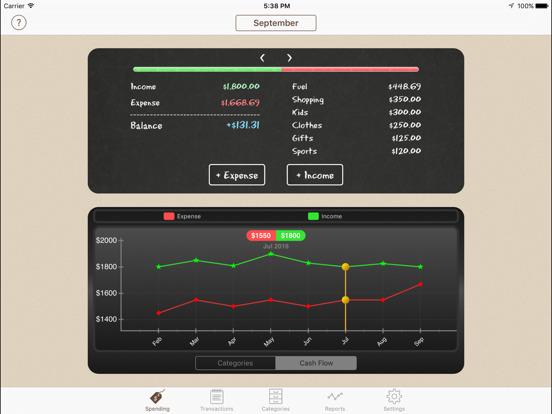

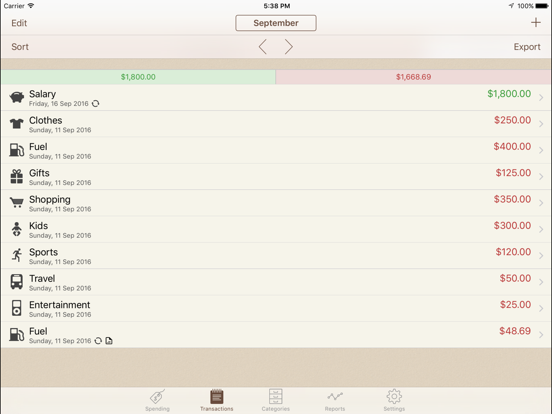
9 store screenshots


Pricing & paywalls
- Pro Upgrade — $2.99
- Free to download
- In-app purchases: $3.49 per item
Ratings & reviews
-
5/5Using this for years - best out there!
Like many people, my wife and I manage a busy household with children. We both work full time+ in the medical field and managing finances was a challenge. Several years ago I thought “there has got to be an app out there that allows us to share essentially a ledger or account register of some sort.” Of course there were several and we tried literally a dozen different apps. Many were complicated, forced you to create spending budgets or complicated things by adding unnecessary “fluff” or had issues with syncing or cost a monthly fee. We wanted a simple, accurate way to track how much we spent every month, on what, and could see how much we had left in our checking and savings. We wanted software my wife could enter a transaction in and it would show up on my version on my phone instantly from anywhere in the world and vice versa. This app does just that, we have been using it for several years, earlier versions had occasional sync problems but the developer was always very responsive and able to help us fix the issue. The last several versions of this app have been rock solid and do exactly what we need it to, nothing more, nothing less and helps my wife and I stay on top of our finances and spending habits. If you’re looking for a great app for sharing an account with someone that allows you to enter transactions on the fly - look no further this one is as close to perfection as you can get.
Bimmernerd · 29 Sep 2026
-
5/5Just what I need!
We LOVE Spending Tracker!!! We have been using it for 5 years and it has helped us stay on budget and become completely debt free! I didn’t want an app that actually synced with my bank accounts, just one where we could be mindful to track what we are spending, and that is exactly what this does. We paid the extra $3 for the premium account so that my husband and I could sync across devices (via Dropbox). That has been SO helpful. One note to consider: (at least when I set ours up many years ago) spending categories didn’t carry over unused funds from month to month in their own categories. The unspent moneys were just lumped together into the general pot. But we wanted to be able to set up things like a birthday party fund and a Christmas gift fund, or even our home insurance, where we allotted a set amount of money each month to build up for an annual expense. So thanks to another review, I found a work-around to create a running budget with carryover in individual categories by setting up my spending categories as actual separate accounts. I think you need the premium to set up unlimited accounts, but again it is SO worth it!!! I hope the developers of Spending Tracker keep supporting this app for many years to come, because I don’t know what I would do without it. I’ve tried several other money apps, but this has been by far the simplest and most useful for me! Thank you Spending Tracker!!! Update: 7 years in and I still use spending tracker daily. Like tracking calories, but money, it has kept our finances trim and in shape. We still love it!
Parkside son · 29 Sep 2026
-
5/5Powerful app for freelancers & self employed
I’ve downloaded and tried more than a dozen expense tracking apps and most didn’t work for me. At first this one seemed too simple as I wanted to view transactions by category. Then I discovered that when you pull down on the screen you see the categories box and you can choose to view transactions by the categories you create. I upgraded to Pro then exported expenses and discovered you can export by category, a range of dates, by the month or year or whatever. At this point I saw what a game changer it was for me. When I did an email export all I had to do was click on the file from my desktop and I had a spreadsheet with all the transactions in order. If you had a mind to you could make categories that match your Schedule C for taxes which is what I did. So I have expense categories: Post Office, Shop Supplies, Office, Utilities, eBay fees, etc. I have income categories: Web Sales, eBay Sales, Shop Sale, Investment Sold, etc. Whenever I want to see any or all the transactions I can see any part of them by Daily, Weekly, Monthly or Yearly. Note that it syncs through DropBox so I can see it on my iPad or iPhone. No subscription. You can set up multiple accounts and set reminders, set a passcode, set auto-backup and other tweaks. Highly recommend especially if you’re trying to track receipts, payments and income. Charles
4volvos · 29 Sep 2026
-
5/5Simplicity = Consistency!
The relief and literal thrill I feel to find that this app will help me easily enter and track my spending across multiple accounts is hard to put into words right now. As someone who is trying to manage spending habits and change money behaviors while struggling with neurodivergent issues I needed something simple to manage multiple budget accounts and a backlog of data in half completed spreadsheets. The apps I’ve tried were too involved and/or too pricey and I’d inevitably stop using them consistently to be truly effective. The piles of receipts I have kept with the intention of tracking my spending has actually deterred me from my intentions and have exacerbated my problems. This simple to use, easily navigated app with its low, one-time fee for a host of other benefits besides eliminating ads, including exporting data, means that I can feel confident in letting go of all of these little pieces of paper and truly make progress on managing my spending through real time monitoring. My only criticism (and it may just be my own weird brain) is that I don’t understand some of the category icons, but as there are plenty to choose from, it’s not a big deal. I’m super grateful to have found this app—thanks so much; it offers a great service to those of us struggling to manage all the things.
Tuladance · 29 Sep 2026
-
5/5Home Budgeting
I downloaded and updated to the premium to get the extra features. I think that was worth the small cost. It is a simple-to- use program, and I like being able to add categories on the fly. Since I am retired, and have a small income, I like that I can put in a fixed budget amount, and then add misc. income to calculate come a total spending allowance per month. Then, there is an auto calculate that shows the under/over spending and the ability to carry over a positive or negative variance. I had created a spreadsheet in Numbers, but that was a bit clumsy, so this is a refreshing change. I enter the expenses on both the ipad and iphone, and the sync through Dropbox has been working well with live updates. This program was designed very intuitively and is exactly what I had been looking for. I think there are other apps which might have more features, but the ones I looked at seemed more complicated. This is simple and provides just the amount of information that I need to monitor my budget. It would be nice to be able to take a snapshot of receipts, however. There is a both a pdf and csv export function, so I can export the report into a spreadsheet (Excel or CSV) or as a pdf into an app like Notability for viewing. So far, in the first week, I give it a high rating for simplicity and comprehensiveness.
CR@SK · 29 Sep 2026
-
2/5
The ads are intrusive and annoying. I cannot enter one thing without being interrupted by a lot obnoxious ad!
Christina Zeoli · 1 Aug 2026
-
5/5
Used it for years to help me track my expenses and budget
Tony Smith · 1 Aug 2026
-
5/5
Perfect solution for individuals for managing there multiple accounts and trace there expences and manage with best UI, no ads thanks developers
P D · 1 Aug 2026
-
5/5
Great
sam huff · 1 Aug 2026
-
5/5
good app for spend tracking.
Virendra · 1 Aug 2026
Privacy & accessibility
Privacy
- Data Not Linked to You — Analytics — Identifiers — Device ID Developer declared
- Data Not Linked to You — Analytics — Usage Data — Product Interaction Developer declared
- Data Not Linked to You — App Functionality — Diagnostics — Crash Data Developer declared
- Data Not Linked to You — App Functionality — Identifiers — Device ID Developer declared
- Data Not Linked to You — App Functionality — Usage Data — Product Interaction Developer declared
- Data Not Linked to You — Third-Party Advertising — Identifiers — Device ID Developer declared
- Data Not Linked to You — Diagnostics Developer declared
- Data Not Linked to You — Identifiers Developer declared
- Data Not Linked to You — Usage Data Developer declared
- Data Used to Track You — Identifiers — Device ID Developer declared
- Data Used to Track You — Identifiers Developer declared
Accessibility
No accessibility labels collected yet.
Privacy
- Data collected — Analytics — App info and performance — Crash logs Developer declared
- Data collected — Analytics, Advertising or marketing, Fraud prevention, security, and compliance — App activity — App interactions Developer declared
- Data collected — Analytics, Advertising or marketing, Fraud prevention, security, and compliance — App info and performance — Diagnostics Developer declared
- Data collected — Analytics, Advertising or marketing, Fraud prevention, security, and compliance — Device or other IDs Developer declared
- Data collected — Analytics, Advertising or marketing, Fraud prevention, security, and compliance — Location — Approximate location Developer declared
- Data shared — Analytics — App info and performance — Crash logs Developer declared
- Data shared — Analytics, Advertising or marketing, Fraud prevention, security, and compliance — App activity — App interactions Developer declared
- Data shared — Analytics, Advertising or marketing, Fraud prevention, security, and compliance — App info and performance — Diagnostics Developer declared
- Data shared — Analytics, Advertising or marketing, Fraud prevention, security, and compliance — Device or other IDs Developer declared
- Data shared — Analytics, Advertising or marketing, Fraud prevention, security, and compliance — Location — Approximate location Developer declared
- Security practices — The developer doesn’t provide a way for you to request that your data be deleted — Data can’t be deleted Developer declared
- Security practices — Your data is transferred over a secure connection — Data is encrypted in transit Developer declared
Accessibility
No accessibility labels collected yet.
Versions
-
2.10
Easier deletion of Categories/Accounts (along with their transactions) You can now 'Share' the export file (PDF, CSV) with any supported app 'Reset Data' feature in Settings for when you want to start over Notes now scroll when entering, so you can always see what you are typing Fix various issues with Voice Over, including Account selection
-
2.10.1
Easier deletion of Categories/Accounts (along with their transactions) You can now 'Share' the export file (PDF, CSV) with any supported app 'Reset Data' feature in Settings for when you want to start over Notes now scroll when entering, so you can always see what you are typing Fix various issues with Voice Over, including Account selection Fix some minor usability issues with Account picker
-
2.11
Apple Watch Support - you can now install an Apple Watch companion app using the Watch app. This allows you to view a spending overview and add expense or income transactions directly from your watch. iOS 14 fixes
-
2.3
Version 2.3 of Spending Tracker is mainly a bug fix release: New Features ============ * Almost 100 new category icons have been added * Improved the category icon chooser page layout * iOS 8 optimisations Fixes ====== * Fixed an occasional crash when selecting a transaction category in iOS 8 * Fixed 'brown rectangle' issue on the Spending tab * Fixed a problem with syncing when one or more devices were not set to 24-Hour Time * Improved sync reliability when syncing more than two devices * Fixed a problem when restoring a backup made on an Android device (only affected US time zones) * Fixed a problem syncing the Week Start Day from iOS to Android and vice versa * Improved PDF report to get rid of page overruns, deal with missing bars on chart and correctly format large numbers. * Fixed crash in PDF when using some particular currencies or characters. * Fixed problem with Cash Flow chart with figures larger than 10,000,000
-
2.4
Version 2.4 of Spending Tracker is mainly a bug fix release: New Features ============ * Almost 100 new category icons have been added * Improved the category icon chooser page layout * iOS 8 optimisations Fixes ====== * Fixed an occasional crash when selecting a transaction category in iOS 8 * Fixed 'brown rectangle' issue on the Spending tab * Fixed a problem with syncing when one or more devices were not set to 24-Hour Time * Improved sync reliability when syncing more than two devices * Fixed a problem when restoring a backup made on an Android device (only affected US time zones) * Fixed a problem syncing the Week Start Day from iOS to Android and vice versa * Improved PDF report to get rid of page overruns, deal with missing bars on chart and correctly format large numbers. * Fixed crash in PDF when using some particular currencies or characters. * Fixed problem with Cash Flow chart with figures larger than 10,000,000 * Deleting transactions with Dropbox Sync turned on was broken * New Icon chooser page was occasionally crashing
-
2.5
Version 2.5 of Spending Tracker ========================= * Auto Backups - automatically backup your data to Dropbox. Turn it on and define your schedule in the Settings. * Widget - you can now enable a Today Widget for the app. This provides shortcut buttons for adding transactions, and it can optionally be customised in the Settings to show a summary. * Reminders - schedule a regular reminder to help you remember to enter your transactions. This can be configured in the Settings. * Local Tips - show tips from participating local venues. This feature uses your location so that it knows when you are close to the venue. It can be configured in the Settings. * Export Options - when exporting you can now choose the ordering of the transactions and optionally include only a single category. * Touch Id - option to use Touch Id to access the app. Existing users can enable this by turning the Passcode option Off and On again. * 3D Touch - for devices which support 3D Touch there are now home screen shortcut items added to the app icon. * Fix - changing time zone could cause transactions to display the wrong date * Fix - try to prevent duplicate transactions when syncing * Lots of little optimisations, fixes and tidy ups
-
2.5.1
Version 2.5.1 of Spending Tracker ========================= This is a bug fix update for 2.5 which deals with the following known issues: * Incorrect default transaction date when 'Hide Future Transactions' is turned on * Incorrect dates displayed on Cash Flow chart * Widget fonts are now easier to read and support system font size changes New features in 2.5 -------------------------- * Auto Backups - automatically backup your data to Dropbox. Turn it on and define your schedule in the Settings. * Widget - you can now enable a Today Widget for the app. This provides shortcut buttons for adding transactions, and it can optionally be customised in the Settings to show a summary. * Reminders - schedule a regular reminder to help you remember to enter your transactions. This can be configured in the Settings. * Local Tips - show tips from participating local venues. This feature uses your location so that it knows when you are close to the venue. It can be configured in the Settings. * Export Options - when exporting you can now choose the ordering of the transactions and optionally include only a single category. * Touch Id - option to use Touch Id to access the app. Existing users can enable this by turning the Passcode option Off and On again. * 3D Touch - for devices which support 3D Touch there are now home screen shortcut items added to the app icon. * Fix - changing time zone could cause transactions to display the wrong date * Fix - try to prevent duplicate transactions when syncing * Lots of little optimisations, fixes and tidy ups
-
2.6
Version 2.6 of Spending Tracker ========================= * iPhone 6 / 6 Plus - Support for the larger screen sizes of the iPhone 6 and iPhone 6 Plus. * Repeating Transactions - New options for 'Update Future' and 'Delete Future' when updating or deleting a repeat transaction. * Auto Backup - New option to specify how many backup entries to keep in Dropbox (previously limited to 5). * Cash Flow by Category - If the Transaction tab is filtered by Category, then the Cash Flow chart is also filtered by the same Category. * Fix - Calendar now displays dates correctly on iOS 10 * Fix - Non default Currency Symbol was not reflected in the Widget. * Fix - Reminders were not always firing. * Fix - Carry Over was not being adjusted for historic amendments. * Various other bug fixes and tidy ups.
-
2.6.1
Version 2.6.1 of Spending Tracker =========================== This is a bug fix update for 2.6 which deals with the following known issues: * The date picker was setting the wrong year when using the Buddhist or Japanese calendar. New features in 2.6 --------------------------- * iPhone 6 / 6 Plus - Support for the larger screen sizes of the iPhone 6 and iPhone 6 Plus. * Repeating Transactions - New options for 'Update Future' and 'Delete Future' when updating or deleting a repeat transaction. * Auto Backup - New option to specify how many backup entries to keep in Dropbox (previously limited to 5). * Cash Flow by Category - If the Transaction tab is filtered by Category, then the Cash Flow chart is also filtered by the same Category. * Fix - Calendar now displays dates correctly on iOS 10 * Fix - Non default Currency Symbol was not reflected in the Widget. * Fix - Reminders were not always firing. * Fix - Carry Over was not being adjusted for historic amendments. * Various other bug fixes and tidy ups.
-
2.7
Version 2.7 of Spending Tracker ========================= * Category Filter now includes 'All Expense', 'All Income' and 'All Repeating' options * Exports can now be uploaded to Dropbox as an alternative to emailing * CSV export has a new option to separate columns by 'tabs' for better Excel compatibility * Warning when Dropbox account is running low on space * Widget has been updated with iOS 10 support * Fix voice accessibility of date selection * Fixed issue where Carry Over was not always updated for historic transaction changes * Fixed issue where date could not be changed if account picker was shown * Fixed crash when Category name starts with '@' * Fixed issue with Ad overlapping account 'Transfer' button * Oodles of small fixes and tidies
-
2.7.1
Version 2.7.1 of Spending Tracker ========================= * Category Filter now includes 'All Expense', 'All Income' and 'All Repeating' options * Exports can now be uploaded to Dropbox as an alternative to emailing * CSV export has a new option to separate columns by 'tabs' for better Excel compatibility * Warning when Dropbox account is running low on space * Widget has been updated with iOS 10 support * Fix voice accessibility of date selection * Fixed issue where Carry Over was not always updated for historic transaction changes * Fixed issue where date could not be changed if account picker was shown * Fixed crash when Category name starts with '@' * Fixed issue with Ad overlapping account 'Transfer' button * Fix crash for 'Team' Dropbox users * Fix occasional crash when Dropbox Sync first turned on * Oodles of small fixes and tidies
-
2.7.2
Version 2.7.2 of Spending Tracker ========================= * Fix crash introduced in 2.7.1, apologies to all those affected * Category Filter now includes 'All Expense', 'All Income' and 'All Repeating' options * Exports can now be uploaded to Dropbox as an alternative to emailing * CSV export has a new option to separate columns by 'tabs' for better Excel compatibility * Warning when Dropbox account is running low on space * Widget has been updated with iOS 10 support * Fix voice accessibility of date selection * Fixed issue where Carry Over was not always updated for historic transaction changes * Fixed issue where date could not be changed if account picker was shown * Fixed crash when Category name starts with '@' * Fixed issue with Ad overlapping account 'Transfer' button * Fix crash for 'Team' Dropbox users * Fix occasional crash when Dropbox Sync first turned on * Oodles of small fixes and tidies
-
2.7.3
iPhone X support Face Id support Configurable font for Summary (see 'Settings -> User Interface') Rewarded Video option for Repeating transactions/Exports Sync Reset & De-duplication options (see 'Settings -> Dropbox Sync') Fix decimal point issue for some language/region configurations
-
2.7.3.1
iPhone X support Face Id support Configurable font for Summary (see 'Settings -> User Interface') Rewarded Video option for Repeating transactions/Exports Sync Reset & De-duplication options (see 'Settings -> Dropbox Sync') Fix decimal point issue for some language/region configurations
-
2.8
Calculator functions are now available when entering Amount Refunds (negative amounts) are now supported Cash Flow chart now has buttons to navigate backwards/forwards in time Calendar is now dismissed as soon as date is selected (no need to hit 'Done') Tap on month button at top of calendar to quickly switch to different month/year Fix issue with Balance sometimes being off screen on iPhone X
-
2.8.1
Calculator functions are now available when entering Amount Refunds (negative amounts) are now supported Cash Flow chart now has buttons to navigate backwards/forwards in time Calendar is now dismissed as soon as date is selected (no need to hit 'Done') Tap on month button at top of calendar to quickly switch to different month/year Fix issue with Balance sometimes being off screen on iPhone X Attempt to fix occasional 'obscured screen' issue on startup
-
2.9
Spending can now be tracked on a 'Daily' basis Siri Shortcuts for adding expense or income transactions Many new category icons have been added, and icons are now organised into groups Choose whether to show 'Outline' or 'Filled' icons under 'Settings -> Category Icon Style' Option to remove a category's icon (useful if using a colour 'emoji' in the category name instead) Fix problem with account picker getting stuck Fix problem with incorrect date label on Cash Flow chart iOS 13 optimisations
-
2.9.1
Spending can now be tracked on a 'Daily' basis Siri Shortcuts for adding expense or income transactions Many new category icons have been added, and icons are now organised into groups Choose whether to show 'Outline' or 'Filled' icons under 'Settings -> Category Icon Style' Option to remove a category's icon (useful if using a colour 'emoji' in the category name instead) Fix problem with account picker getting stuck Fix problem with incorrect date label on Cash Flow chart Fix some minor bugs introduced in 2.9 iOS 13 optimisations
-
2.9.2
Some bug fixes
-
3.0
Dark Mode - this can be turned on in the Settings area, and can be configured to be on all the time, or follow the Dark Mode setting of your device. Home Screen Widgets - for devices running iOS 14, you can now add home screen widgets which allow you to view your summary or quickly add entries. Optimised Layout - full support for all all screen sizes, including Display Zoom Multitasking (iPad Only) - support for multi-tasking and split view on the iPad Grid Layout (iPad Only) - there is a new button on the Transactions tab on the iPad app to switch between a grid layout and a list layout. The setting applies to the Transactions, Categories and Accounts screens. Touch & Hold (iPad Only) - touch and hold on an entry in the Transactions, Categories or Accounts screens to get Delete or Multi-Delete options Keyboard shortcuts (iPad Only) - if you have a hardware keyboard attached, the app now supports several keyboard shortcuts. Press the 'cmd' button to view the shortcuts for a particular screen.
-
3.0.1
3.0.1 ----- Fix issue with calendar month not defaulting correctly 3.0 ---- Dark Mode - this can be turned on in the Settings area, and can be configured to be on all the time, or follow the Dark Mode setting of your device. Home Screen Widgets - for devices running iOS 14, you can now add home screen widgets which allow you to view your summary or quickly add entries. Optimised Layout - full support for all all screen sizes, including Display Zoom Multitasking (iPad Only) - support for multi-tasking and split view on the iPad Grid Layout (iPad Only) - there is a new button on the Transactions tab on the iPad app to switch between a grid layout and a list layout. The setting applies to the Transactions, Categories and Accounts screens. Touch & Hold (iPad Only) - touch and hold on an entry in the Transactions, Categories or Accounts screens to get Delete or Multi-Delete options Keyboard shortcuts (iPad Only) - if you have a hardware keyboard attached, the app now supports several keyboard shortcuts. Press the 'cmd' button to view the shortcuts for a particular screen.
-
3.1
3.1 ---- PDF Export Options - you can now optionally exclude sections from the PDF (e.g. the charts) Watch Amount Entry - this now optionally uses a numeric keyboard. You can turn this on in the Settings page within the Watch app. iOS 17 support Daily time period now shows day name as well as date Support for currencies with 3 decimal places Enhance menu support for iPads using an external keyboard Fix issue with widget layout on iOS 17 Fix data issue with Widget when using multiple Accounts Fix overlapping text when using very large font sizes Fix negative amount entry for Indian currency Fix amount entry for some African currencies
-
3.1.1
3.1.1 ------ * Fix occasional issue with background of Account picker 3.1 ----- * PDF Export Options - you can now optionally exclude sections from the PDF (e.g. the charts) * Watch Amount Entry - this now optionally uses a numeric keyboard. You can turn this on in the Settings page within the Watch app. * iOS 17 support * Daily time period now shows day name as well as date * Support for currencies with 3 decimal places * Enhance menu support for iPads using an external keyboard * Fix issue with widget layout on iOS 17 * Fix data issue with Widget when using multiple Accounts * Fix overlapping text when using very large font sizes * Fix negative amount entry for Indian currency * Fix amount entry for some African currencies
-
3.1.2
3.1.2 ------ * Fix category edit icon/colour refresh issue 3.1.1 ------ * Fix occasional issue with background of Account picker 3.1 ----- * PDF Export Options - you can now optionally exclude sections from the PDF (e.g. the charts) * Watch Amount Entry - this now optionally uses a numeric keyboard. You can turn this on in the Settings page within the Watch app. * iOS 17 support * Daily time period now shows day name as well as date * Support for currencies with 3 decimal places * Enhance menu support for iPads using an external keyboard * Fix issue with widget layout on iOS 17 * Fix data issue with Widget when using multiple Accounts * Fix overlapping text when using very large font sizes * Fix negative amount entry for Indian currency * Fix amount entry for some African currencies
-
3.2
· 10 Nov 2025
3.2 ------ * Fix Progress Bar to represent Income correctly * Add Expense/Income actions added to Shortcuts app * Shortcuts can be added to Lock Screen * Modernised Color Picker * Fix Widget figures when 'Budget Mode' turned on * Fix occasional issue which prevented syncs until app is restarted * Fix Voice Over for Category Icon/Color selection * Handle device running out of disk space more gracefully * Improved consent / privacy options
-
3.3
· 22 Aug 2026
3.3 ------ * 'Biweekly' Time Periods are now an option for tracking (Settings -> Time Period) ^ * 'Year Start Date' can now be configured (Settings -> Time Period) * Fix Passcode keypad disappearing on iPad ^ Note that if you are syncing your data between multiple devices, each device will need to be updated for the Biweekly Time Period to be fully available. It may take a few days for the update to be available on all devices.
- 2.8.1 · 2 Dec 2025
- 2.9 · 21 Aug 2026
Alternatives
- Goodbudget Budget Planner — Same category + similar ratings
- Budget app - spending tracker — Same category + similar ratings
- Expenses OK - expenses tracker — Same category + similar ratings
- Weekly: Budget Planner & Bills — Same category + similar ratings
- Monefy: Money Tracker — Same category + similar ratings
- Buddy: Budget Planner App — Same category + similar ratings
Availability by market
- US
Data quality & evidence
- Page completeness
- Live store listing
- Last verified
- 30 Sep 2026
- Sources
- App Store, Google Play
- Apoku editorial summary has not been published yet.