
Quick verdict
- What it is
- Store information collected; independent summary not yet available.
- At a glance
-
- From $0.99/mo
- Free to download
- In-app purchases
Categories and search queries
Official categories
- Music
- Productivity
AppCorpus categories
Key functions
| Function | Availability | Access | Scope | Evidence |
|---|---|---|---|---|
| Family Sharing | Yes | Unknown | App Store | Store published |
| Free app | Yes | Free | — | Store published |
| In-app purchases | Yes | Limited free | — | Store published |
Screens
App Store
32 store screenshots

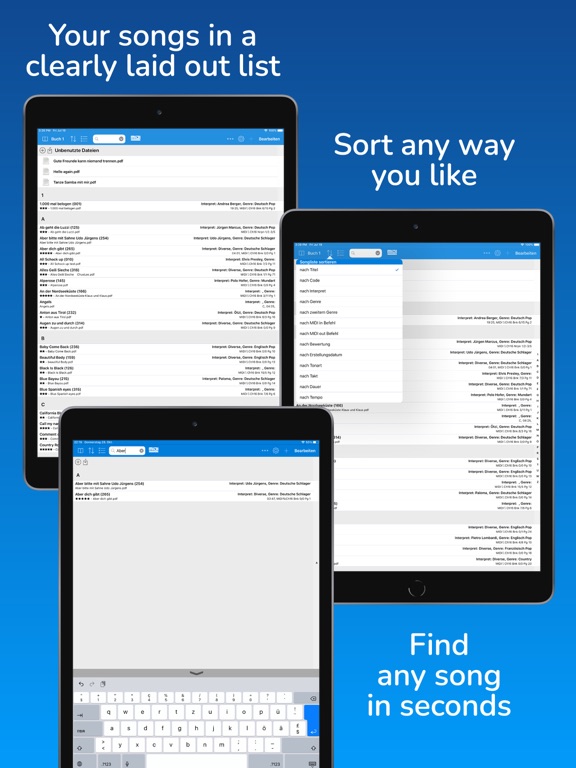


Pricing & paywalls
App Store
- BRONZE sponsor (monthly) — $0.99/month
- BRONZE sponsor (monthly) — $11.49/year ($0.95/mo)
- Full version (monthly) — $1.99/month
- Full version (monthly) — $20.49/year ($1.70/mo)
- Full version (monthly) — $49.99
- SILVER sponsor (monthly) — $1.99/month
- SILVER sponsor (monthly) — $22.99/year ($1.91/mo)
- GOLD sponsor (monthly) — $3.99/month
- GOLD sponsor (monthly) — $45.99/year ($3.83/mo)
- Updates +5 years — $49.99/year ($4.16/mo)
Ratings & reviews
App Store
-
4/5Full version won’t open
I liked the free version so I purchased the one time fee for the full version, but wouldn’t let me get past the 15th song so I tried to purchase again and it told me I already have the full version, yet still can’t load anymore songs.
Shabutch · 7 Aug 2026
-
5/5Robust and stable app for on-stage
I love this app! I was using OnSong, but abandoned it because it just had too many bugs. I moved all my timeline and MIDI control to Ableton Live, stage lighting to LightKey and iPad song sheet displays to SongBook+. I easily import PDF songsheets into it using the finder and assign a MIDI command to each song so that Ableton live set can call them up. Ableton sends MIDI commands to scroll everyone’s iPads… This approach has worked great for me now for over 6 months. I’m so glad I am using the right tool for each job. SongBook+ might not have all the flashy bells and whistles other programs might have, but it has one much more important feature: it works flawlessly and reliably! Also, my songsheets are easily created in Word and converted to pdf for import - these standard tools allow easy editing and ultimately produce better looking displays! Backups are also a breeze using standard Finder interface… Lastly, the support team is very responsive and professional in answering inquiries.
JoeH_USA · 7 Aug 2026
-
3/5Great program except..... IPad Pro users
Program works great almost. I’m an extensive user of this app. I’ve been paying for it for about 3 years now. The organization of my music is great on this app. I have about 12 hours of music and lyrics on my device, and I can easily find anything I want whenever I want it. Volume control from my Bluetooth pedal is great too! I play about 200 shows a year and i consider this money well spent. HOWEVER…. I recently (6 months ago) got a brand new iPad Pro. Now if I switch to another app like settings, Mail, notepad , or whatever; it will freeze the SONGBOOK PLUS app when I return to it. Not a huge glitch, but an annoyance as I get song requests and like to make notes during shows. I lived with it for a few months hoping it would go away. Then I contacted support. They asked me to explain the problem, then they replied that I was using it wrong, They told me not to switch to a different program while using the app. I answered that I understand how to work around it, but that I was curious if they had plans to fix it. They replied that it was Apple’s fault for updating the iOS so often and not theirs. Grrrr. None of my other apps have this problem with stability. SO IF YOU HAVE AN IPAD PRO, BE AWARE ITS NOT STABLE. other than that, it’s a great app. I wish I’d known this when I bought my iPad Pro.
mattliveguitar · 7 Aug 2026
-
5/5An App that is way ahead of its time!
Been using this app for several years. Have almost 1000 songs synced to my Korg PA3x Songbook. What a time saver when performing! With Bluetooth Midi LE hardware, it works perfectly wireless with my IPad Pro. No need for a camera kit. I use Yamaha UD-BT01 for the hardware. Quicco Mi.1 works too. Don't let the cost scare you. It is worth every dime! I had tremendous support too on communicating to my Roland VAccordion, fr4x bank registers changes Tried other apps similar, but Songbook + much user friendly. The app is set friendly. Going on over 5 years of usage. Recommended to others.
Keybrdmn · 7 Aug 2026
-
1/5Not free
When you first open the app you see amazing grace. If you try to add a new book or song it says to get premium. So then I try to edit amazing grace and it says I need premium to do that. You have to get premium to do anything! What’s the point in saying the app is free if you can’t do anything until you get premium? Honestly don’t buy this app unless you want to spend a but load of money. It’s not worth it! Just use notes instead, it comes with your phone and it’s free. Trust me!
person715383518 · 7 Aug 2026
Privacy & accessibility
App Store
Privacy
- Data Not Linked to You — Analytics — Diagnostics — Crash Data Developer declared
- Data Not Linked to You — Analytics — Usage Data — Product Interaction Developer declared
- Data Not Linked to You — App Functionality — Diagnostics — Crash Data Developer declared
- Data Not Linked to You — App Functionality — Identifiers — Device ID Developer declared
- Data Not Linked to You — Diagnostics Developer declared
- Data Not Linked to You — Identifiers Developer declared
- Data Not Linked to You — Usage Data Developer declared
Accessibility
No accessibility labels collected yet.
Versions
App Store
-
6.1.0
********** IMPORTANT! If you bought the full version of SongBook+ more than 5 years ago and you want to keep using it free of charge, then DO NOT INSTALL THIS UPDATE! Otherwise, the update will turn SongBook+ back into a demo version, and you will have to reactivate the full version by means of in-app purchasing or a monthly or yearly subscription. (The cut-off point is a purchase date prior to October 1, 2017. If you have a sponsoring subscription, you will not be affected.) ********** Changes in version 6.1.0: - Minimum iOS/iPadOS version is now 13.0 - Last known iOS/iPadOS 16 issues with keyboard simulating foot pedals solved - Unlimited iOS/iPadOS 16 support
-
6.1.1
********** IMPORTANT! If you bought the full version of SongBook+ more than 5 years ago and you want to keep using it free of charge, then DO NOT INSTALL THIS UPDATE (6.1.x)! Otherwise, the update will turn SongBook+ back into a demo version, and you will have to reactivate the full version by means of in-app purchasing or a monthly or yearly subscription. (The cut-off point is a purchase date prior to October 1, 2017. If you have a sponsoring subscription, you will not be affected.) ********** Changes in version 6.1.1: - Configurable device name for SB-to-SB connection - Improved external monitor compatibility for devices with USB-C connector - Menu item to sign up for newsletter Changes in version 6.1.0: - Minimum iOS/iPadOS version is now 13.0 - Last known iOS/iPadOS 16 issues with keyboard simulating foot pedals solved - Unlimited iOS/iPadOS 16 support
-
6.1.2
********** IMPORTANT! If you bought the full version of SongBook+ more than 5 years ago and you want to keep using it free of charge, then DO NOT INSTALL THIS UPDATE (6.1.x)! Otherwise, the update will turn SongBook+ back into a demo version, and you will have to reactivate the full version by means of in-app purchasing or a monthly or yearly subscription. (The cut-off point is a purchase date prior to October 1, 2017. If you have a sponsoring subscription, you will not be affected.) ********** Changes in version 6.1.2: - When typing, select suggested artist/genre with Enter key - Fix sometimes occurring "Missing fetchedLyricitemsController" error - Fix problem while typing artist/genre (Mac only) - Fix problem to start restoring of iCloud Backup on macOS Ventura (Mac only) Changes in version 6.1.1: - Configurable device name for SB-to-SB connection - Improved external monitor compatibility for devices with USB-C connector - Menu item to sign up for newsletter Changes in version 6.1.0: - Minimum iOS/iPadOS version is now 13.0 - Last known iOS/iPadOS 16 issues with keyboard simulating foot pedals solved - Unlimited iOS/iPadOS 16 support
-
6.2.0
********** IMPORTANT! If you bought the full version of SongBook+ more than 5 years ago and you want to keep using it free of charge, then DO NOT INSTALL THIS UPDATE (6.2.x)! Otherwise, the update will turn SongBook+ back into a demo version, and you will have to reactivate the full version by means of in-app purchasing or a monthly or yearly subscription. (The cut-off point is a purchase date prior to June 1, 2018. If you have a sponsoring subscription, you will not be affected.) ********** Changes in version 6.2.0: - Export/Import of individual books - Show song information in song lyrics with larger selection of fields. - MIDI output for many functions separately selectable - Simple "MIDI-THRU" for forwarding MIDI events - Synchronize switching of loop points on/off with other SongBooks. - Use loop points also for forward jumps - Also display images instead of just videos on external monitor
-
6.2.1
********** IMPORTANT! If you bought the full version of SongBook+ more than 5 years ago and you want to keep using it free of charge, then DO NOT INSTALL THIS UPDATE (6.2.x)! Otherwise, the update will turn SongBook+ back into a demo version, and you will have to reactivate the full version by means of in-app purchasing or a monthly or yearly subscription. (The cut-off point is a purchase date prior to June 1, 2018. If you have a sponsoring subscription, you will not be affected.) ********** Changes in version 6.2.1: - Bugfix: Action "Open song with code" not editable - Bugfix: On iPhone in portrait mode titles are not shown completely Changes in version 6.2.0: - Export/Import of individual books - Show song information in song lyrics with larger selection of fields. - MIDI output for many functions separately selectable - Simple "MIDI-THRU" for forwarding MIDI events - Synchronize switching of loop points on/off with other SongBooks. - Use loop points also for forward jumps - Also display images instead of just videos on external monitor
-
6.2.2
********** IMPORTANT! If you bought the full version of SongBook+ more than 5 years ago and you want to keep using it free of charge, then DO NOT INSTALL THIS UPDATE (6.2.x)! Otherwise, the update will turn SongBook+ back into a demo version, and you will have to reactivate the full version by means of in-app purchasing or a monthly or yearly subscription. (The cut-off point is a purchase date prior to June 1, 2018. If you have a sponsoring subscription, you will not be affected.) ********** Changes in version 6.2.2: - Bugfix: Fixed known issues with iOS 17 - Bugfix: Removed settings options that are no longer used - Bugfix: Improved display of list in song pre-selection window - Bugfix: In some midi files line breaks in imported text at wrong potision - Bugfix: when sorting by code second sorting by title Changes in version 6.2.1: - Bugfix: Action "Open song with code" not editable - Bugfix: On iPhone in portrait mode titles are not shown completely Changes in version 6.2.0: - Export/Import of individual books - Show song information in song lyrics with larger selection of fields. - MIDI output for many functions separately selectable - Simple "MIDI-THRU" for forwarding MIDI events - Synchronize switching of loop points on/off with other SongBooks. - Use loop points also for forward jumps - Also display images instead of just videos on external monitor
-
6.2.3
********** IMPORTANT! If you bought the full version of SongBook+ more than 5 years ago and you want to keep using it free of charge, then DO NOT INSTALL THIS UPDATE (6.2.x)! Otherwise, the update will turn SongBook+ back into a demo version, and you will have to reactivate the full version by means of in-app purchasing or a monthly or yearly subscription. (The cut-off point is a purchase date prior to June 1, 2018. If you have a sponsoring subscription, you will not be affected.) ********** Changes in version 6.2.3: - Compatibility with new Yamaha Genos2 keyboard - Fixed issue of version 6.2.2 with iOS 13 Changes in version 6.2.2: - Bugfix: Fixed known issues with iOS 17 - Bugfix: Removed settings options that are no longer used - Bugfix: Improved display of list in song pre-selection window - Bugfix: In some midi files line breaks in imported text at wrong potision - Bugfix: when sorting by code second sorting by title - Bugfix: Exporting very large books with many songs Changes in version 6.2.1: - Bugfix: Action "Open song with code" not editable - Bugfix: On iPhone in portrait mode titles are not shown completely Changes in version 6.2.0: - Export/Import of individual books - Show song information in song lyrics with larger selection of fields. - MIDI output for many functions separately selectable - Simple "MIDI-THRU" for forwarding MIDI events - Synchronize switching of loop points on/off with other SongBooks. - Use loop points also for forward jumps - Also display images instead of just videos on external monitor
-
6.2.4
********** IMPORTANT! If you bought the full version of SongBook+ more than 5 years ago and you want to keep using it free of charge, then DO NOT INSTALL THIS UPDATE (6.2.x)! Otherwise, the update will turn SongBook+ back into a demo version, and you will have to reactivate the full version by means of in-app purchasing or a monthly or yearly subscription. (The cut-off point is a purchase date prior to June 1, 2018. If you have a sponsoring subscription, you will not be affected.) ********** Changes in version 6.2.4: - Positioning of red dot and chord symbols in imported lyrics of some midifiles improved - Subsequent numbering of songs in the "Code" field no longer worked with iPadOS 17 - Position of the fade-in for the preselected song was no longer as configured Changes in version 6.2.3: - Compatibility with new Yamaha Genos2 keyboard - Fixed issue of version 6.2.2 with iOS 13 Changes in version 6.2.2: - Bugfix: Fixed known issues with iOS 17 - Bugfix: Removed settings options that are no longer used - Bugfix: Improved display of list in song pre-selection window - Bugfix: In some midi files line breaks in imported text at wrong potision - Bugfix: when sorting by code second sorting by title - Bugfix: Exporting very large books with many songs Changes in version 6.2.1: - Bugfix: Action "Open song with code" not editable - Bugfix: On iPhone in portrait mode titles are not shown completely Changes in version 6.2.0: - Export/Import of individual books - Show song information in song lyrics with larger selection of fields. - MIDI output for many functions separately selectable - Simple "MIDI-THRU" for forwarding MIDI events - Synchronize switching of loop points on/off with other SongBooks. - Use loop points also for forward jumps - Also display images instead of just videos on external monitor
-
6.2.5
********** IMPORTANT! If you bought the full version of SongBook+ more than 5 years ago and you want to keep using it free of charge, then DO NOT INSTALL THIS UPDATE (6.2.x)! Otherwise, the update will turn SongBook+ back into a demo version, and you will have to reactivate the full version by means of in-app purchasing or a monthly or yearly subscription. (The cut-off point is a purchase date prior to June 1, 2018. If you have a sponsoring subscription, you will not be affected.) ********** Changes in version 6.2.5: - Books not switched off after license restoration Changes in version 6.2.4: - Positioning of red dot and chord symbols in imported lyrics of some midifiles improved - Subsequent numbering of songs in the "Code" field no longer worked with iPadOS 17 - Position of the fade-in for the preselected song was no longer as configured Changes in version 6.2.3: - Compatibility with new Yamaha Genos2 keyboard - Fixed issue of version 6.2.2 with iOS 13 Changes in version 6.2.2: - Bugfix: Fixed known issues with iOS 17 - Bugfix: Removed settings options that are no longer used - Bugfix: Improved display of list in song pre-selection window - Bugfix: In some midi files line breaks in imported text at wrong potision - Bugfix: when sorting by code second sorting by title - Bugfix: Exporting very large books with many songs Changes in version 6.2.1: - Bugfix: Action "Open song with code" not editable - Bugfix: On iPhone in portrait mode titles are not shown completely Changes in version 6.2.0: - Export/Import of individual books - Show song information in song lyrics with larger selection of fields. - MIDI output for many functions separately selectable - Simple "MIDI-THRU" for forwarding MIDI events - Synchronize switching of loop points on/off with other SongBooks. - Use loop points also for forward jumps - Also display images instead of just videos on external monitor
-
6.3.0
********** IMPORTANT! If you bought the full version of SongBook+ more than 5 years ago and you want to keep using it free of charge, then DO NOT INSTALL THIS UPDATE (6.3.x)! Otherwise, the update will turn SongBook+ back into a demo version, and you will have to reactivate the full version by means of in-app purchasing or a monthly or yearly subscription. (The cut-off point is a purchase date prior to July 1, 2019. If you have a sponsoring subscription, you will not be affected.) ********** Changes in version 6.3.0: - Highlight search string in list view entries - Assigning colored tags to the songs - Exporting and importing playlists - More options for importing songs from .sbk files - "All books" mode - Remove marking of played songs when setting is switched off - Additional time signatures to choose from, e.g. 3/2 - Operating instructions adapted to version 6.3 - Demo data adapted to version 6.3 with use of colored tags - Bugfixes
-
6.3.1
********** IMPORTANT! If you bought the full version of SongBook+ more than 5 years ago and you want to keep using it free of charge, then DO NOT INSTALL THIS UPDATE (6.3.x)! Otherwise, the update will turn SongBook+ back into a demo version, and you will have to reactivate the full version by means of in-app purchasing or a monthly or yearly subscription. (The cut-off point is a purchase date prior to July 1, 2019. If you have a sponsoring subscription, you will not be affected.) ********** Changes in version 6.3.0: - Bugfixes Changes in version 6.3.0: - Highlight search string in list view entries - Assigning colored tags to the songs - Exporting and importing playlists - More options for importing songs from .sbk files - "All books" mode - Remove marking of played songs when setting is switched off - Additional time signatures to choose from, e.g. 3/2 - Operating instructions adapted to version 6.3 - Demo data adapted to version 6.3 with use of colored tags - Bugfixes
-
6.3.2
********** IMPORTANT! If you bought the full version of SongBook+ more than 5 years ago and you want to keep using it free of charge, then DO NOT INSTALL THIS UPDATE (6.3.x)! Otherwise, the update will turn SongBook+ back into a demo version, and you will have to reactivate the full version by means of in-app purchasing or a monthly or yearly subscription. (The cut-off point is a purchase date prior to July 1, 2019. If you have a sponsoring subscription, you will not be affected.) ********** Changes in version 6.3.2: - In-app purchases and license verification revised - Bug fixes Changes in version 6.3.1: - Bugfixes Changes in version 6.3.0: - Highlight search string in list view entries - Assigning colored tags to the songs - Exporting and importing playlists - More options for importing songs from .sbk files - "All books" mode - Remove marking of played songs when setting is switched off - Additional time signatures to choose from, e.g. 3/2 - Operating instructions adapted to version 6.3 - Demo data adapted to version 6.3 with use of colored tags - Bugfixes
-
6.3.3
********** IMPORTANT! If you bought the full version of SongBook+ more than 5 years ago and you want to keep using it free of charge, then DO NOT INSTALL THIS UPDATE (6.3.x)! Otherwise, the update will turn SongBook+ back into a demo version, and you will have to reactivate the full version by means of in-app purchasing or a monthly or yearly subscription. (The cut-off point is a purchase date prior to July 1, 2019. If you have a sponsoring subscription, you will not be affected.) ********** Changes in version 6.3.3: - Start problem in Wi-Fi without Internet fixed (since 6.3.2) - Fixed display of genre 2 without genre 1 in list view - Fixed possible crash when displaying the mixer - Fixed problem with rotated function buttons and chords in some PDF files - New service for uploading crash logs and usage data (can be switched off) Changes in version 6.3.2: - In-app purchases and license verification revised - Bug fixes Changes in version 6.3.1: - Bugfixes Changes in version 6.3.0: - Highlight search string in list view entries - Assigning colored tags to the songs - Exporting and importing playlists - More options for importing songs from .sbk files - "All books" mode - Remove marking of played songs when setting is switched off - Additional time signatures to choose from, e.g. 3/2 - Operating instructions adapted to version 6.3 - Demo data adapted to version 6.3 with use of colored tags - Bugfixes
-
6.3.4
********** IMPORTANT! If you bought the full version of SongBook+ more than 5 years ago and you want to keep using it free of charge, then DO NOT INSTALL THIS UPDATE (6.3.x)! Otherwise, the update will turn SongBook+ back into a demo version, and you will have to reactivate the full version by means of in-app purchasing or a monthly or yearly subscription. (The cut-off point is a purchase date prior to July 1, 2019. If you have a sponsoring subscription, you will not be affected.) ********** Changes in version 6.3.4: - A demo version hint was incorrectly displayed after the update (6.3.3) - Some function buttons were displayed without text (6.3.3) Changes in version 6.3.3: - Start problem in Wi-Fi without Internet fixed (since 6.3.2) - Fixed display of genre 2 without genre 1 in list view - Fixed possible crash when displaying the mixer - Fixed problem with rotated function buttons and chords in some PDF files - New service for uploading crash logs and usage data (can be switched off) Changes in version 6.3.2: - In-app purchases and license verification revised - Bug fixes Changes in version 6.3.1: - Bugfixes Changes in version 6.3.0: - Highlight search string in list view entries - Assigning colored tags to the songs - Exporting and importing playlists - More options for importing songs from .sbk files - "All books" mode - Remove marking of played songs when setting is switched off - Additional time signatures to choose from, e.g. 3/2 - Operating instructions adapted to version 6.3 - Demo data adapted to version 6.3 with use of colored tags - Bugfixes
-
6.3.5
********** IMPORTANT! If you bought the full version of SongBook+ more than 5 years ago and you want to keep using it free of charge, then DO NOT INSTALL THIS UPDATE (6.3.x)! Otherwise, the update will turn SongBook+ back into a demo version, and you will have to reactivate the full version by means of in-app purchasing or a monthly or yearly subscription. (The cut-off point is a purchase date prior to July 1, 2019. If you have a sponsoring subscription, you will not be affected.) ********** Changes in version 6.3.5: - Do not restart an expired metronome during loop repetitions - Do not send MIDI clock only when visual or acoustic metronome is on - Metronome emphasis after pause/continue playing not one beat too late - Metronome direction correct after pause/continue playing - Fixed crash when deleting entries from filtered playlist Changes in version 6.3.4: - A demo version hint was incorrectly displayed after the update (6.3.3) - Some function buttons were displayed without text (6.3.3) Changes in version 6.3.3: - Start problem in Wi-Fi without Internet fixed (since 6.3.2) - Fixed display of genre 2 without genre 1 in list view - Fixed possible crash when displaying the mixer - Fixed problem with rotated function buttons and chords in some PDF files - New service for uploading crash logs and usage data (can be switched off) Changes in version 6.3.2: - In-app purchases and license verification revised - Bug fixes Changes in version 6.3.1: - Bugfixes Changes in version 6.3.0: - Highlight search string in list view entries - Assigning colored tags to the songs - Exporting and importing playlists - More options for importing songs from .sbk files - "All books" mode - Remove marking of played songs when setting is switched off - Additional time signatures to choose from, e.g. 3/2 - Operating instructions adapted to version 6.3 - Demo data adapted to version 6.3 with use of colored tags - Bugfixes
-
6.4.0
********** IMPORTANT! If you bought the full version of SongBook+ more than 5 years ago and you want to keep using it free of charge, then DO NOT INSTALL THIS UPDATE (6.4.x)! Otherwise, the update will turn SongBook+ back into a demo version, and you will have to reactivate the full version by means of in-app purchasing or a monthly or yearly subscription. (The cut-off point is a purchase date prior to May 1, 2020. If you have a sponsoring subscription, you will not be affected.) ********** Changes in version 6.4.0: - Sending time-controlled MIDI events - Control with face gestures - Ableton Link support - Import meta data from MIDI, MP3, ChordPro files - Improved display of ChordPro files - Keyboard control Genos/Tyros/Korg also at the push of a button instead of only when opening the song - Import of XF chords from midi files with separate bass note - List of clients sorted alphabetically - Option to automatically remove the filter by tags after a successful search - New action for function buttons/gestures for editing the song - Start new action for function buttons/gestures for editing notes - Autoplay on/off/switch also as gesture control (was only available for function buttons) - Remove tag filter optionally when opening the song / returning to list - New action for switching off all markers at the same time (previously there was only one action for switching marker groups. Now you can e.g. first switch off all and then switch on 2 specific ones) - Foot pedal “press group” remembers the group just pressed for “press next group” - Setting “Proportional font for MP3/MIDI/LRC/ChordPro import (no chords)” now also applies to ChordPro - Other small improvements and bug fixes
-
6.4.1
********** IMPORTANT! If you bought the full version of SongBook+ more than 5 years ago and you want to keep using it free of charge, then DO NOT INSTALL THIS UPDATE (6.4.x)! Otherwise, the update will turn SongBook+ back into a demo version, and you will have to reactivate the full version by means of in-app purchasing or a monthly or yearly subscription. (The cut-off point is a purchase date prior to May 1, 2020. If you have a sponsoring subscription, you will not be affected.) ********** Changes in version 6.4.1: - Problem with printing songs fixed - Limit for learning MIDI events in “Actions during playback” increased Changes in version 6.4.0: - Sending time-controlled MIDI events - Control with face gestures - Ableton Link support - Import meta data from MIDI, MP3, ChordPro files - Improved display of ChordPro files - Keyboard control Genos/Tyros/Korg also at the push of a button instead of only when opening the song - Import of XF chords from midi files with separate bass note - List of clients sorted alphabetically - Option to automatically remove the filter by tags after a successful search - New action for function buttons/gestures for editing the song - Start new action for function buttons/gestures for editing notes - Autoplay on/off/switch also as gesture control (was only available for function buttons) - Remove tag filter optionally when opening the song / returning to list - New action for switching off all markers at the same time (previously there was only one action for switching marker groups. Now you can e.g. first switch off all and then switch on 2 specific ones) - Foot pedal “press group” remembers the group just pressed for “press next group” - Setting “Proportional font for MP3/MIDI/LRC/ChordPro import (no chords)” now also applies to ChordPro - Other small improvements and bug fixes
-
6.4.2
********** IMPORTANT! If you bought the full version of SongBook+ more than 5 years ago and you want to keep using it free of charge, then DO NOT INSTALL THIS UPDATE (6.4.x)! Otherwise, the update will turn SongBook+ back into a demo version, and you will have to reactivate the full version by means of in-app purchasing or a monthly or yearly subscription. (The cut-off point is a purchase date prior to May 1, 2020. If you have a sponsoring subscription, you will not be affected.) ********** Changes in version 6.4.2: - MIDI foot pedal now also responds to events from “Actions on open/start/stop/close/playback” - All buttons always displayed as active in the toolbar on iOS 26 - Saving notes in songs from JPG files - Editing notes in night mode - Grace period after full version subscription or sponsor subscription expires - Unexpected blank lines in CSV export - Crashes when changing colors in notes - Further stability improvements Changes in version 6.4.1: - Problem with printing songs fixed - Limit for learning MIDI events in “Actions during playback” increased Changes in version 6.4.0: - Sending time-controlled MIDI events - Control with face gestures - Ableton Link support - Import meta data from MIDI, MP3, ChordPro files - Improved display of ChordPro files - Keyboard control Genos/Tyros/Korg also at the push of a button instead of only when opening the song - Import of XF chords from midi files with separate bass note - List of clients sorted alphabetically - Option to automatically remove the filter by tags after a successful search - New action for function buttons/gestures for editing the song - Start new action for function buttons/gestures for editing notes - Autoplay on/off/switch also as gesture control (was only available for function buttons) - Remove tag filter optionally when opening the song / returning to list - New action for switching off all markers at the same time (previously there was only one action for switching marker groups. Now you can e.g. first switch off all and then switch on 2 specific ones) - Foot pedal “press group” remembers the group just pressed for “press next group” - Setting “Proportional font for MP3/MIDI/LRC/ChordPro import (no chords)” now also applies to ChordPro - Other small improvements and bug fixes
-
6.4.3
********** IMPORTANT! If you bought the full version of SongBook+ more than 5 years ago and you want to keep using it free of charge, then DO NOT INSTALL THIS UPDATE (6.4.x)! Otherwise, the update will turn SongBook+ back into a demo version, and you will have to reactivate the full version by means of in-app purchasing or a monthly or yearly subscription. (The cut-off point is a purchase date prior to May 1, 2020. If you have a sponsoring subscription, you will not be affected.) ********** Changes in version 6.4.3: - Bug fix: Tags appear multiple times after importing playlists or books if tags for imported songs did not exist previously Changes in version 6.4.2: - MIDI foot pedal now also responds to events from “Actions on open/start/stop/close/playback” - All buttons always displayed as active in the toolbar on iOS 26 - Saving notes in songs from JPG files - Editing notes in night mode - Grace period after full version subscription or sponsor subscription expires - Unexpected blank lines in CSV export - Crashes when changing colors in notes - Further stability improvements Changes in version 6.4.1: - Problem with printing songs fixed - Limit for learning MIDI events in “Actions during playback” increased Changes in version 6.4.0: - Sending time-controlled MIDI events - Control with face gestures - Ableton Link support - Import meta data from MIDI, MP3, ChordPro files - Improved display of ChordPro files - Keyboard control Genos/Tyros/Korg also at the push of a button instead of only when opening the song - Import of XF chords from midi files with separate bass note - List of clients sorted alphabetically - Option to automatically remove the filter by tags after a successful search - New action for function buttons/gestures for editing the song - Start new action for function buttons/gestures for editing notes - Autoplay on/off/switch also as gesture control (was only available for function buttons) - Remove tag filter optionally when opening the song / returning to list - New action for switching off all markers at the same time (previously there was only one action for switching marker groups. Now you can e.g. first switch off all and then switch on 2 specific ones) - Foot pedal “press group” remembers the group just pressed for “press next group” - Setting “Proportional font for MP3/MIDI/LRC/ChordPro import (no chords)” now also applies to ChordPro - Other small improvements and bug fixes
-
6.5.0
********** IMPORTANT! If you bought the full version of SongBook+ more than 5 years ago and you want to keep using it free of charge, then DO NOT INSTALL THIS UPDATE (6.5.x)! Otherwise, the update will turn SongBook+ back into a demo version, and you will have to reactivate the full version by means of in-app purchasing or a monthly or yearly subscription. (The cut-off point is a purchase date prior to November 1, 2020. If you have a sponsoring subscription, you will not be affected.) ********** Changes in version 6.5.0: - Undo/redo function for annotations - Soft stop and fade-out for audio player - Multiple selection with "bulk edit" functions for selected songs - Edit Chordpro files directly in SongBook - Edit TXT files directly in SongBook - Context menu in songs in playlists (copy/move into other playlist) - Bluetooth LE menu now also in the MIDI button - Manual zoom can be disabled in settings - Audio track of video player can be disabled in settings - MIDI CC in selection list with additional controller labels - MIDI Note On/Off in selection list with various note labels
-
6.5.1
********** IMPORTANT! If you bought the full version of SongBook+ more than 5 years ago and you want to keep using it free of charge, then DO NOT INSTALL THIS UPDATE (6.5.x)! Otherwise, the update will turn SongBook+ back into a demo version, and you will have to reactivate the full version by means of in-app purchasing or a monthly or yearly subscription. (The cut-off point is a purchase date prior to November 1, 2020. If you have a sponsoring subscription, you will not be affected.) ********** Changes in version 6.5.1: - Button with preselected song was too small to display the song title in version 6.5.0 - Support for ChordPro files and MIDI files with right-to-left text - MIDI macros can now also be inserted in “Actions during playback” when recording MIDI events Changes in version 6.5.0: - Undo/redo function for annotations - Soft stop and fade-out for audio player - Multiple selection with "bulk edit" functions for selected songs - Edit Chordpro files directly in SongBook - Edit TXT files directly in SongBook - Context menu in songs in playlists (copy/move into other playlist) - Bluetooth LE menu now also in the MIDI button - Manual zoom can be disabled in settings - Audio track of video player can be disabled in settings - MIDI CC in selection list with additional controller labels - MIDI Note On/Off in selection list with various note labels
-
6.5.2
********** IMPORTANT! If you bought the full version of SongBook+ more than 5 years ago and you want to keep using it free of charge, then DO NOT INSTALL THIS UPDATE (6.5.x)! Otherwise, the update will turn SongBook+ back into a demo version, and you will have to reactivate the full version by means of in-app purchasing or a monthly or yearly subscription. (The cut-off point is a purchase date prior to November 1, 2020. If you have a sponsoring subscription, you will not be affected.) ********** Changes in version 6.5.2: - Support for ChordPro files and MIDI files with right-to-left text improved - Fixed issue with flickering metronome when displaying time in song simultaneously Changes in version 6.5.1: - Button with preselected song was too small to display the song title in version 6.5.0 - Support for ChordPro files and MIDI files with right-to-left text - MIDI macros can now also be inserted in “Actions during playback” when recording MIDI events Changes in version 6.5.0: - Undo/redo function for annotations - Soft stop and fade-out for audio player - Multiple selection with "bulk edit" functions for selected songs - Edit Chordpro files directly in SongBook - Edit TXT files directly in SongBook - Context menu in songs in playlists (copy/move into other playlist) - Bluetooth LE menu now also in the MIDI button - Manual zoom can be disabled in settings - Audio track of video player can be disabled in settings - MIDI CC in selection list with additional controller labels - MIDI Note On/Off in selection list with various note labels
-
6.5.3
********** IMPORTANT! If you bought the full version of SongBook+ more than 5 years ago and you want to keep using it free of charge, then DO NOT INSTALL THIS UPDATE (6.5.x)! Otherwise, the update will turn SongBook+ back into a demo version, and you will have to reactivate the full version by means of in-app purchasing or a monthly or yearly subscription. (The cut-off point is a purchase date prior to November 1, 2020. If you have a sponsoring subscription, you will not be affected.) ********** Changes in version 6.5.3: - On-screen keyboard covers text editor (ChordPro + text files) - Crash when manually moving playlist entries - Display problem when turning keyboard foot pedal on/off in settings Changes in version 6.5.2: - Support for ChordPro files and MIDI files with right-to-left text improved - Fixed issue with flickering metronome when displaying time in song simultaneously Changes in version 6.5.1: - Button with preselected song was too small to display the song title in version 6.5.0 - Support for ChordPro files and MIDI files with right-to-left text - MIDI macros can now also be inserted in “Actions during playback” when recording MIDI events Changes in version 6.5.0: - Undo/redo function for annotations - Soft stop and fade-out for audio player - Multiple selection with "bulk edit" functions for selected songs - Edit Chordpro files directly in SongBook - Edit TXT files directly in SongBook - Context menu in songs in playlists (copy/move into other playlist) - Bluetooth LE menu now also in the MIDI button - Manual zoom can be disabled in settings - Audio track of video player can be disabled in settings - MIDI CC in selection list with additional controller labels - MIDI Note On/Off in selection list with various note labels
-
6.6.0
********** IMPORTANT! If you bought the full version of SongBook+ more than 5 years ago and you want to keep using it free of charge, then DO NOT INSTALL THIS UPDATE (6.5.x)! Otherwise, the update will turn SongBook+ back into a demo version, and you will have to reactivate the full version by means of in-app purchasing or a monthly or yearly subscription. (The cut-off point is a purchase date prior to July 1, 2021. If you have a sponsoring subscription, you will not be affected.) ********** Changes in version 6.6.0: - Lyrics import with chords and syllable positions now also with proportional font - Mixer with balance controls for audio files - Mixer can restore original volumes of MIDI channels - Extended function button actions for keyboard control, MIDI Bank Select/Program Change, MIDI NRPN and links - MIDI Program Change values can be displayed as either 0-127 or 1-128 - Status LEDs in the toolbar, controllable via MIDI or foot pedal - SongBook to SongBook connection now also synchronizes tag filters and status LEDs - Tags with special functions for full-screen video and exceptions from numbering in playlists - Easier insertion of MIDI macros when recording actions during playback - External monitor display with adjustable quality and refresh rate - In scroll mode, the spacing between pages can be disabled - List view with icons for linked audio, MIDI and video files - New list view variants with large title, optionally with tempo or book - Song tempo and metronome tempo are shown together - Page turns optionally work even when the song preselection list is open - Actions in MIDI macros, function buttons and action lists can be sorted by drag and drop - Improved autocomplete for artist and genres - Wireless MIDI client can connect by device name instead of IP address - MIDI import with a choice between XF and ChordPro chords - Improved list printing function
-
6.6.1
· 24 Jul 2026
********** IMPORTANT! If you bought the full version of SongBook+ more than 5 years ago and you want to keep using it free of charge, then DO NOT INSTALL THIS UPDATE (6.5.x)! Otherwise, the update will turn SongBook+ back into a demo version, and you will have to reactivate the full version by means of in-app purchasing or a monthly or yearly subscription. (The cut-off point is a purchase date prior to July 1, 2021. If you have a sponsoring subscription, you will not be affected.) ********** Changes in version 6.6.1: - Improved offline license verification - Further performance optimizations for external displays, automatic image quality, and an adjustable refresh rate of up to 30 FPS Changes in version 6.6.0: - Lyrics import with chords and syllable positions now also with proportional font - Mixer with balance controls for audio files - Mixer can restore original volumes of MIDI channels - Extended function button actions for keyboard control, MIDI Bank Select/Program Change, MIDI NRPN and links - MIDI Program Change values can be displayed as either 0-127 or 1-128 - Status LEDs in the toolbar, controllable via MIDI or foot pedal - SongBook to SongBook connection now also synchronizes tag filters and status LEDs - Tags with special functions for full-screen video and exceptions from numbering in playlists - Easier insertion of MIDI macros when recording actions during playback - External monitor display with adjustable quality and refresh rate - In scroll mode, the spacing between pages can be disabled - List view with icons for linked audio, MIDI and video files - New list view variants with large title, optionally with tempo or book - Song tempo and metronome tempo are shown together - Page turns optionally work even when the song preselection list is open - Actions in MIDI macros, function buttons and action lists can be sorted by drag and drop - Improved autocomplete for artist and genres - Wireless MIDI client can connect by device name instead of IP address - MIDI import with a choice between XF and ChordPro chords - Improved list printing function
Alternatives
- SongSheet Pro: Setlist helper — Same category + similar ratings
- Setlist Helper — Same category + similar ratings
- SongbookPro - Digital Songbook — Same category + similar ratings
- BandHelper — Same category + similar ratings
- SongBook Chordpro — Same category + similar ratings
- OnSong 2026 — Same category + similar ratings
Availability by market
- US
Data quality & evidence
- Page completeness
- Live store listing
- Last verified
- 7 Aug 2026
- Sources
- App Store
- Independent summary has not been published yet.