
Quick verdict
- What it is
- Store information collected; independent summary not yet available.
- At a glance
-
- Free to download
Categories and search queries
Official categories
- Lifestyle
AppCorpus categories
Key functions
| Function | Availability | Access | Scope | Evidence |
|---|---|---|---|---|
| Free app | Yes | Free | — | Store published |
Screens
23 store screenshots

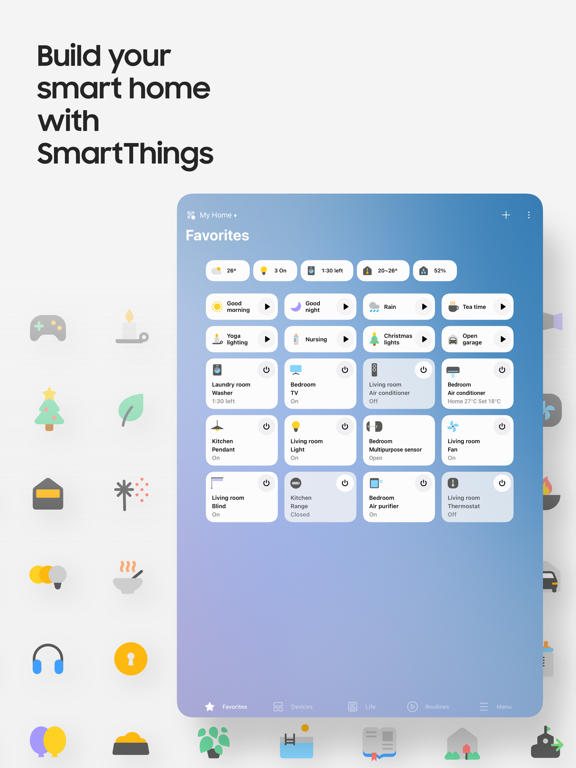

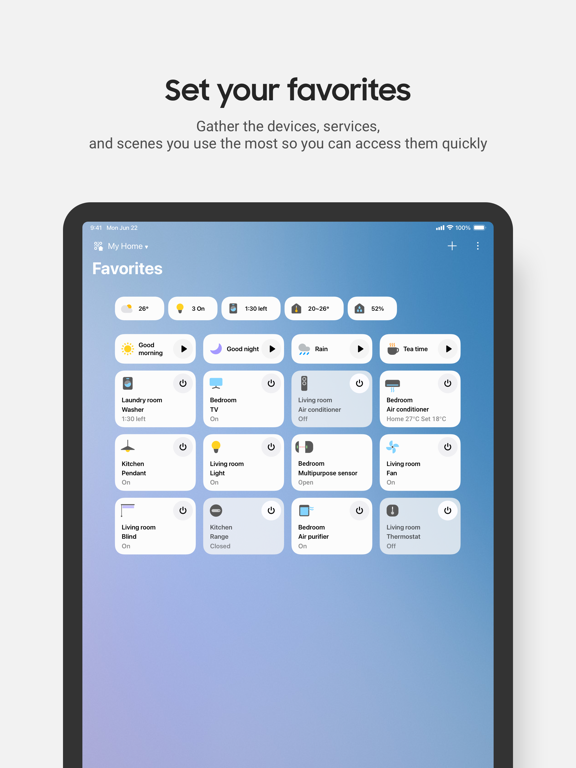
24 store screenshots


Pricing & paywalls
- Free
- Free to download
Ratings & reviews
-
5/5Sleek Design
My husband decided to update our kitchen and after three months of researching different products we decided to go with the Samsung bespoke models. We purchased the refrigerator, dishwasher oven and microwave all the same color white because some of the other colors were not readily available and white matched our kitchen anyway. It looks beautiful. We always get compliments when we have company. The products are amazing. They work very well very easy to use. Everyone loves the little tiny ice cubes that the icemaker makes as well as the other size. I’ve always wanted the water and ice in the door, but after seeing the bespoke refrigerator and how it has the picture and the water dispenser on the inside I liked that much better. I get notifications when the oven has preheated when the microwave is done. I can see inside the fridge when I’m shopping. There’s just so many features that these products have the list is too long to name them all. We are very pleased with our purchases. The only thing that we noticed that we were change would be how easy it is to turn the oven on when you’re trying to wipe the top of the stove because everything is flat and just running your rag over it you could press the button and turn something on, but it’s just as easy to turn it off. The microwave is large on the inside and very easy to clean. The dishwasher is silent and works like a beast. Again, we are very pleased with our purchases.
Kitchen#Appliances · 30 Aug 2026
-
5/5Removed functionality without notice!
In 2017 I purchased 2 multi-purpose sensors. They were great on garage doors. Once connected to the hub, it was less than 30 seconds to attach to a garage door and they did a great job of indicating the door was open when horizontal and closed when vertical. No more wondering “did the door close?”, a notification indicated closed and was part of my security system to indicate someone had opened the door. Sometime in January 2020 the app made the sensor a bi-purpose sensor only. No warning or notification! The tilt function removed! I went back to the classic app at suggestion of Samsung support (very time-consuming as I had to reset the hub and then had to completely re-add ALL sensors/lights etc... to BOTH apps!). No tilt in old app either. I attempted to connect one sensor as a contact sensor but with the rails and wheels, this was very difficult (the WHOLE reason the tilt function was so great!). Also once it was installed as a contact sensor, it only took one opening of the garage door to knock the magnet off somewhere along the path and jam the door! I’ve spent at least an hour re-doing both apps and reinstalling a sensor and still have no solution! I reluctantly give 2 stars because it was a great, simple solution for 2 years. I suppose if I buy a newer version of the multipurpose sensor it might work?!??! NOT going to keep buying sensors and I have guarantee that will even work and for how long?
AZ expat · 30 Aug 2026
-
5/5Why Smart things is good
Smart things are good because they make life easier, safer, and more efficient by using technology to help us in our daily routines. For example, smart devices like phones, speakers, thermostats, and even refrigerators can connect to the internet and communicate with each other, which saves people time and energy. Smart home systems allow you to turn off lights, lock doors, or adjust the temperature with just your voice or an app, which not only adds convenience but also helps reduce energy costs and supports the environment. They can also improve safety, since smart cameras and alarms can alert you instantly if something unusual happens, even when you’re not at home. In addition, smart technology supports learning and productivity by giving quick access to information and helping people stay organized. From healthcare devices that track your heart rate and sleep to smart cars that can prevent accidents, these technologies improve quality of life in many ways. Overall, smart things are good because they combine comfort, safety, and efficiency while helping us use resources wisely and stay more connected to the world around us.
Smart Things is The best · 30 Aug 2026
-
4/5April update
Fixed my issue with alarm notifications and appreciate the other improvements made with the April release. Thanks. In most part I’m 100% in agreement with the previous review about the new Feb 2019 update. However, once I changed(Reorder) the home page, I do not have the issue with my home page resetting back to the default after I close the app & then reopen it on my iOS device. And who uses the term “Reorder” to to identify the procedure to rearrange, edit or manage the home screen? I originally thought it was for reordering of more devices. I do agree there is too much wasted space and would prefer the information being a little more condensed vs. having to scroll down the page. And, I also agree with the alerts/alarms. I’ve checked my settings numerous times, but if my iPhone is locked or if I do not have the App open, I do not receive /hear any notification from the App of a sensor being tripped. Notification can be resolved with IFTTT but would think the App itself would be able to provide that notification. I would the ability to remove a room from the home page, but have yet to find a way to do so. I do appreciate the improvements that Samsung made in an effort to improve the App and suspect there is a learning curve on my part, but I would like the user to have the capability/flexibility to manage their home screen the way the user wants it vs how Samsung thinks it should be.
GM511 · 30 Aug 2026
-
1/5This is the worst remote control app I have ever used
Let me paint a picture for you folks. Imagine, you return home from work early because you just received the news your grandpa who raised you just passed away. As you walk through the door tears welling up in your eyes you find your significant other cheating on you with your brother. As you scream cry from the betrayal and utter devastation from your grandpa’s death, you step on the rusty nail right by your front door, and STILL you would be in a better mood than how I feel using this god awful app. Smartthings is simply just not smart. After every single use I get logged out and have to hope and pray that it will load to let me log back in. It will load maybe 10% of the time for me (I haven’t been able to get this app to load in weeks and have been using our actual remote which is now broken from simply using the pause button?????) In that rare occurrence that it will load, the buttons are so extremely delayed that you can barely navigate your tv. You press the volume button and it takes at least 15 seconds for your tv to process the single input. Meanwhile my boyfriend who is connected to same wifi using the same account information is able to AT LEAST load the app. When I had a roku I never experienced this many issues CONSTANTLY. Please, I am begging to optimize this app. I will go to church every sunday. I will cut all of the vices in my life. I will dedicate the rest of my life to charity if you fix this app. PLEASE
That-Girls-Life · 30 Aug 2026
-
5/5
good
FRANK H · 1 Aug 2026
-
4/5
I'm still waiting
Ayola Hans · 1 Aug 2026
-
1/5
fixing ai bs
jay wilson · 1 Aug 2026
-
5/5
good
Noam koffi · 1 Aug 2026
-
5/5
Thanks Smart things, and place my all Google account Davice, Media acctive place.... place...
Kazi Shaied · 1 Aug 2026
Privacy & accessibility
Privacy
- Data Not Linked to You — Analytics — Contact Info — Email Address Developer declared
- Data Not Linked to You — Analytics — Contact Info — Name Developer declared
- Data Not Linked to You — Analytics — Contact Info — Phone Number Developer declared
- Data Not Linked to You — Analytics — Diagnostics — Crash Data Developer declared
- Data Not Linked to You — Analytics — Diagnostics — Other Diagnostic Data Developer declared
- Data Not Linked to You — Analytics — Diagnostics — Performance Data Developer declared
- Data Not Linked to You — Analytics — Identifiers — Device ID Developer declared
- Data Not Linked to You — Analytics — Identifiers — User ID Developer declared
- Data Not Linked to You — Analytics — Location — Coarse Location Developer declared
- Data Not Linked to You — Analytics — Location — Precise Location Developer declared
- Data Not Linked to You — Analytics — Usage Data — Other Usage Data Developer declared
- Data Not Linked to You — Analytics — Usage Data — Product Interaction Developer declared
- Data Not Linked to You — App Functionality — Contact Info — Email Address Developer declared
- Data Not Linked to You — App Functionality — Contact Info — Name Developer declared
- Data Not Linked to You — App Functionality — Contact Info — Phone Number Developer declared
- Data Not Linked to You — App Functionality — Diagnostics — Crash Data Developer declared
- Data Not Linked to You — App Functionality — Diagnostics — Other Diagnostic Data Developer declared
- Data Not Linked to You — App Functionality — Diagnostics — Performance Data Developer declared
- Data Not Linked to You — App Functionality — Identifiers — Device ID Developer declared
- Data Not Linked to You — App Functionality — Identifiers — User ID Developer declared
- Data Not Linked to You — App Functionality — Location — Coarse Location Developer declared
- Data Not Linked to You — App Functionality — Location — Precise Location Developer declared
- Data Not Linked to You — App Functionality — Usage Data — Other Usage Data Developer declared
- Data Not Linked to You — App Functionality — Usage Data — Product Interaction Developer declared
- Data Not Linked to You — Contact Info Developer declared
- Data Not Linked to You — Diagnostics Developer declared
- Data Not Linked to You — Identifiers Developer declared
- Data Not Linked to You — Location Developer declared
- Data Not Linked to You — Usage Data Developer declared
Accessibility
No accessibility labels collected yet.
Privacy
- Data collected — Analytics — App activity — App interactions Developer declared
- Data collected — Analytics — App info and performance — Crash logs Developer declared
- Data collected — App functionality — Audio — Voice or sound recordings Developer declared
- Data collected — App functionality — Location — Approximate location Developer declared
- Data collected — App functionality — Location — Precise location Developer declared
- Data collected — App functionality — Photos and videos — Photos Developer declared
- Data collected — App functionality — Photos and videos — Videos Developer declared
- Data collected — App functionality, Account management — Device or other IDs Developer declared
- Data collected — App functionality, Account management — Personal info — Email address Developer declared
- Data collected — App functionality, Account management — Personal info — Name Developer declared
- Data collected — App functionality, Account management — Personal info — Phone number Developer declared
- Data collected — App functionality, Analytics, Personalization, Account management — Personal info — User IDs Developer declared
- Data shared — App functionality, Account management — Device or other IDs Developer declared
- Data shared — App functionality, Account management — Personal info — User IDs Developer declared
- Security practices — Your data is transferred over a secure connection — Data is encrypted in transit Developer declared
- Security practices — The developer provides a way for you to request that your data be deleted — You can request that data be deleted Developer declared
Accessibility
No accessibility labels collected yet.
Versions
App Store
-
1.7.05
In order to provide you with better services, some features have been improved in the new version. - We have updated the flow for device onboarding for a smoother and easier pairing experience. - We are changing the name of “Scenes” to “Manually Run Routines.” You can add "Manually Run Routines" and "Automatic Routines" under "Routines" > "Create Routines"
-
1.7.06
In order to provide you with better services, some features have been improved in the new version. - We have updated the flow for device onboarding for a smoother and easier pairing experience. - We are changing the name of “Scenes” to “Manually Run Routines.” You can add "Manually Run Routines" and "Automatic Routines" under "Routines" > "Create Routines"
-
1.7.09
In order to provide you with better services, some features have been improved in the new version. - Provides multiple device onboarding by scanning various products’ QR codes. - Provides default manually run routines that may be helpful for new users of Routine
-
1.7.10
In order to provide you with better services, some features have been improved in the new version. - Provides multiple device onboarding by scanning various products’ QR codes. - Provides default manually run routines that may be helpful for new users of Routine
-
1.7.11
In order to provide you with better services, some features have been improved in the new version. - Provides multiple device onboarding by scanning various products’ QR codes. - Provides default manually run routines that may be helpful for new users of Routine
-
1.7.12
In order to provide you with better services, some features have been improved in the new version. - Provides multiple device onboarding by scanning various products’ QR codes. - Provides default manually run routines that may be helpful for new users of Routine.
-
1.7.13
In order to provide you with better services, some features have been improved in the new version. - The SmartThings brand logo has changed - The 3D Map View makes it easier to see your home’s status - A Smart Home device update badge has been added
-
1.7.14
In order to provide you with better services, some features have been improved in the new version. - The SmartThings brand logo has changed - The 3D Map View makes it easier to see your home’s status - A Smart Home device update badge has been added
-
1.7.17
In order to provide you with better services, some features have been improved in the new version. - You can share your Routines with others - The device tab experience has been improved - A new Quick Remote feature for TVs has been added - Hub group management menus are supported
-
1.7.18
In order to provide you with better services, some features have been improved in the new version. - You can share your Routines with others - The device tab experience has been improved - A new Quick Remote feature for TVs has been added - Hub group management menus are supported
-
1.7.19
In order to provide you with better services, some features have been improved in the new version. - You can share your Routines with others - The device tab experience has been improved - A new Quick Remote feature for TVs has been added - Hub group management menus are supported
-
1.7.21
In order to provide you with better services, some features have been improved in the new version. - The 'Favorites' tab has been changed to the 'Home' tab - 'Home' tab provides various types of 'Insight messages' - 'Routine category' and 'Daily routine' have been added - TV 'Quick Remote' is supported in 'Standby' mode - Automatic hub backup is supported
-
1.7.22
In order to provide you with better services, some features have been improved in the new version. - The 'Favorites' tab has been changed to the 'Home' tab - 'Home' tab provides various types of 'Insight messages' - 'Routine category' and 'Daily routine' have been added - TV 'Quick Remote' is supported in 'Standby' mode - Automatic hub backup is supported
-
1.7.25
In order to provide you with better services, some features have been improved in the new version.
-
1.7.26
In order to provide you with better services, some features have been improved in the new version.
-
1.7.27
In order to provide you with better services, some features have been improved in the new version.
-
1.7.29
In order to provide you with better services, some features have been improved in the new version. - Broadcast to your family through the speakers - Set it up so that you only receive notifications at the times you want - Create a routine to automatically launch the channel you want on TV Plus
-
1.7.33
In order to provide you with better services, some features have been improved in the new version. - Home Life provides personalized recommendations by suggesting services and sending messages that match your lifestyle and preferences. - Map View is integrated into the Home tab. - In Routine, you can preview and run actions with notifications before execution, as well as set delays between each action. - With the new Virtual Home feature, you can try out the app even without a device.
-
1.7.37
In order to provide you with better services, some features have been improved in the new version. - When you need help, press the Safe button. SmartThings Safe service can send notifications to members and ask for help.
-
1.7.38
In order to provide you with better services, some features have been improved in the new version. - When you need help, press the Safe button. SmartThings Safe service can send notifications to members and ask for help.
-
1.7.39
In order to provide you with better services, some features have been improved in the new version.
-
1.7.41
In order to provide you with better services, some features have been improved in the new version.
-
1.7.45
• Select your desired category in the Routine creation assistant to get Routine suggestions, and even receive recommendations for your next personalized automation (supported in Korea, US, Brazil, Germany, Spain, France, Italy) • Update all related Routines at once when replacing a device • See transparent execution history showing when and why Routines ran • Security and safety alerts are prioritized so you never miss critical moments Update now and experience it!
-
1.7.46
• Select your desired category in the Routine creation assistant to get Routine suggestions, and even receive recommendations for your next personalized automation (supported in Korea, US, Brazil, Germany, Spain, France, Italy) • Update all related Routines at once when replacing a device • See transparent execution history showing when and why Routines ran • Security and safety alerts are prioritized so you never miss critical moments Update now and experience it!
-
1.7.47
· 9 Jul 2026
In order to provide you with better services, some features have been improved in the new version.
Alternatives
- Lutron App — Same category + similar ratings
- SmartHome (MSmartHome) — Same category + similar ratings
- Home Assistant — Same category + similar ratings
- Meross — Same category + similar ratings
- SmartLife: Smart Living — Same category + similar ratings
- Nest — Same category + similar ratings
Availability by market
- US
Data quality & evidence
- Page completeness
- Live store listing
- Last verified
- 31 Aug 2026
- Sources
- App Store, Google Play
- Independent summary has not been published yet.