
Quick verdict
- What it is
- Store information collected; independent summary not yet available.
- At a glance
-
- From $8.99/mo
- Free to download
- In-app purchases
Categories and search queries
Official categories
- Finance
- Business
AppCorpus categories
Key functions
| Function | Availability | Access | Scope | Evidence |
|---|---|---|---|---|
| Apple Wallet | Yes | Unknown | App Store | Store published |
| Free app | Yes | Free | — | Store published |
| In-app purchases | Yes | Limited free | — | Store published |
Screens
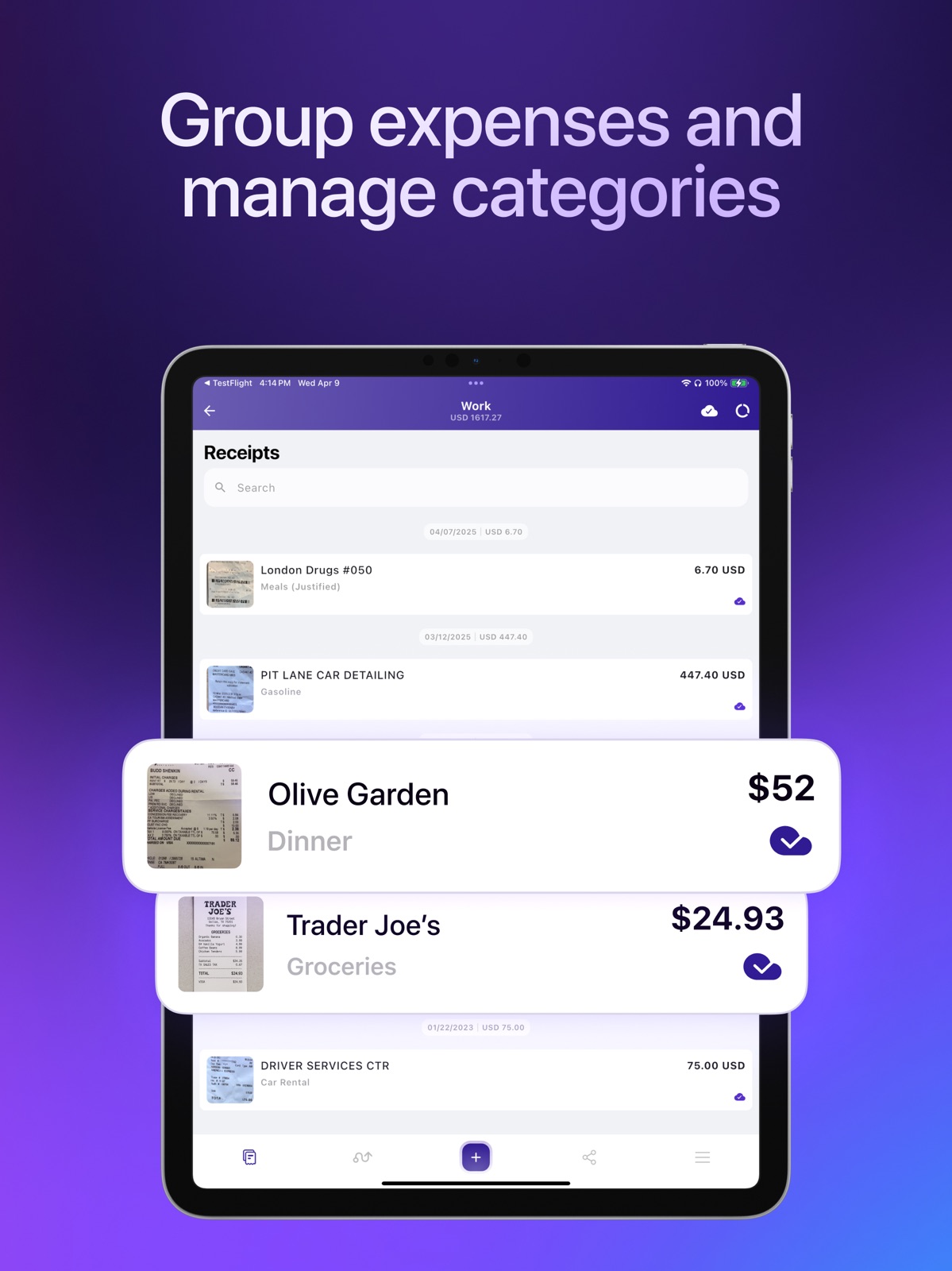
App Store
23 store screenshots


Pricing & paywalls
App Store
- OCR receipts,backups per month — $8.99/month
- Smart Receipts PRO: Monthly — $6.99/week
- Smart Receipts PRO: Monthly — $12.99/month
- Smart Receipts PRO: Monthly — $99.99/year ($8.33/mo)
- OCR 7 Days Trial — $8.99/week
- 50 OCR Scans — $6.99
- Smart Receipts Plus — $29.99
- Smart Receipts PRO 3 Days Test — $99.99
- Smart Receipts PRO: Trial — $12.99
Ratings & reviews
App Store
-
5/5Very Nice App!
The app works flawlessly with my IPhone 11 and I enjoyed taking pics of my receipts. It lets you write the amount in as well then, you can print a report. You choose how you want the report to come out. I liked it and was going to buy it but saw you could only buy a subscription at $11/year. I have to be honest and say I don’t like subscriptions. I prefer to buy the app outright. It enabled me to print a report to another app. The pics did not come out too clear but were still readable. If the developer could make the pics clearer it would be good. The camera on my iPhone does take very clear pictures so it was the app that did not focus on the receipts enough to produce clear pics.
Bert the evaluator · 30 Aug 2026
-
2/5New version is a huge step backwards
No longer able to create or restore backups on your own device, must have subscription to use backups at all. No longer able to send PDFs to the app to add to receipt. Importing PDF from files fails to attach receipt. Unable to update I image/PDF on expense. Not all settings are preserved during upgrade. Sort order has been reversed, making it hard yo navigate to most recent reports (now at the bottom). Report name truncated when viewing report. Unable to reorder receipts in expense report. Not ready for mass deployment, wish I could go back. Avoid this update. Update: some issues were resolved in 5.0.1, but the most critical issue remains. It is not possible to use PDFs as receipts. Do not upgrade to 5.x until this is resolved. I have lost a critical part of my workflow, and I wish I could go back. People depend on this app, and they released an update that breaks it. Update: Version 5.0.2 does allow PDF receipts again, but only when browsing to find them. It is still not possible to send a PDF to Smart Receipts and attach it to an entry, which much simpler. It is also still not possible to manually back up or restore to your own storage, which had been possible prior to 5.x. Not allowing non-subscribers to back up or restore their data as previous versions had allowed is quite a gamble for the user.
BWWRI · 30 Aug 2026
-
2/5Was great once but not anymore
Tax time was easy at one point with this app. Everything is organized and it would take 30-60 minutes to get everything together rather than 3-6 hours. I had a situation 2 years ago where I lost 4-5 months of receipts but gave them the benefit of the doubt because their support team responded so quickly. But this app has been more nightmare than blessing for the last year. Between every receipt I’ve scanned in the last 5 years being removed then uploaded again, missing receipts that get stuck in the unattached file spinning for weeks/months and now scanning receipts that say they’ve been scanned and are done but are not there. This has been 2 year’s of tax time nightmares. I’ve downloaded several similar apps since and honestly this is the best of all of them. But that’s only when it is working correctly. I’ve lost dozens of receipts that I can’t recover and have gotten rid or and dozens of hours trying to find and rescan receipts into other apps. I have given too much time and have lost too much information to continue on.
Murph005 · 30 Aug 2026
-
3/5Update didn’t properly backup
I have enjoyed this app for a few years. Despite the problems with it I will continue using it despite its flaws. With the latest update they made an automatic backup of my files and did the update completed automatically. When the new version opened none of my receipts were available. I contacted them and they told me how to restore my old receipts. I did what they said and I get a message the restore failed. I contacted them again explaining the restore didn’t work I told them I could see my old receipts on my device in the files folder but couldn’t open them in the new version using their restore function. They said they no longer support the older version and the only way to get the receipts back was by their restore procedure, which continued to fail. Again they said there was nothing they could do or suggest.
mpkier · 30 Aug 2026
-
3/5Almost perfect
Works great for tracking receipts and categorizing expenses immediately. Offers the ability to run multiple expense reports at once so I am able to track my receipts for consumables in one report and each depreciation schedule in separate reports. This makes tax season a breeze. The only issue is this year I had a large amount of receipts into the app and when the report was exported the pictures of the receipts were pixelated from the size being dropped. The app needs to have to ability to save the receipt photos at their full pixel value and then have the ability to export the reports by either logging into an online drive or send the report to the iCloud. This would allow you to receive your full report on your computer where you need it without losing the picture value of your receipts by having to send them report in an email with limited space.
Cowboy92Brew · 30 Aug 2026
Privacy & accessibility
App Store
Privacy
- Data Linked to You — App Functionality — Contact Info — Email Address Developer declared
- Data Linked to You — App Functionality — Identifiers — User ID Developer declared
- Data Linked to You — App Functionality — Purchases — Purchase History Developer declared
- Data Linked to You — App Functionality — User Content — Photos or Videos Developer declared
- Data Linked to You — Contact Info Developer declared
- Data Linked to You — Identifiers Developer declared
- Data Linked to You — Purchases Developer declared
- Data Linked to You — User Content Developer declared
- Data Not Linked to You — Analytics — Diagnostics — Crash Data Developer declared
- Data Not Linked to You — Analytics — Diagnostics — Performance Data Developer declared
- Data Not Linked to You — Analytics — Usage Data — Product Interaction Developer declared
- Data Not Linked to You — App Functionality — Financial Info — Payment Info Developer declared
- Data Not Linked to You — Developer’s Advertising or Marketing — Usage Data — Advertising Data Developer declared
- Data Not Linked to You — Other Purposes — Diagnostics — Crash Data Developer declared
- Data Not Linked to You — Third-Party Advertising — Usage Data — Advertising Data Developer declared
- Data Not Linked to You — Diagnostics Developer declared
- Data Not Linked to You — Financial Info Developer declared
- Data Not Linked to You — Usage Data Developer declared
- Data Used to Track You — Diagnostics — Crash Data Developer declared
- Data Used to Track You — Diagnostics — Performance Data Developer declared
- Data Used to Track You — Diagnostics Developer declared
- Data Used to Track You — Usage Data — Advertising Data Developer declared
- Data Used to Track You — Usage Data — Product Interaction Developer declared
- Data Used to Track You — Usage Data Developer declared
Accessibility
- Dark Interface — SUPPORTED Store published
- Larger Text — SUPPORTED Store published
Versions
App Store
-
5.10.0
Improved Cloud Sync feature stability and background uploading.
-
5.10.1
Fixed Done button on Image Picker screen. Improved Cloud Sync feature stability and background uploading.
-
5.11.0
Fixed Cloud Sync feature stability.
-
5.11.1
- Fixed receipts reordering issue. - Fixed issue with start/end dates in reports.
-
5.12.0
We are happy to announce automatic category recognition for your receipts. Fixed minor issues.
-
5.13.0
- Added ability to calculate distance automatically by map points. - Fixed minor issues.
-
5.13.1
- Added ability to calculate distance automatically by map points. - Fixed minor issues.
-
5.13.2
- Added ability to calculate distance automatically by map points. - Fixed minor issues.
-
5.13.3
- Added ability to calculate distance automatically by map points. - Fixed minor issues. - Fixed subscription screen issue
-
5.14.0
NEW! Email Forwarding. Forward email with receipt to automatically add your expenses to Smart Receipts.
-
5.14.1
NEW! Email Forwarding. Forward email with receipt to automatically add your expenses to Smart Receipts.
-
5.14.2
- Fixed several crashes and stability issues - Improved report generation and data accuracy - Smoother upgrades for users on older versions - General performance and reliability improvements
-
5.14.3
- You can now pull to refresh in Settings for quicker updates - Fixed an issue with incorrect (-1) exchange rates - Resolved the “Receipts to Review” popup for selected reports
-
5.15.0
We're excited to announce new amazing features: - Ability to import your expenses from any CSV, Screenshot or Bank statement. - You will be able to pull your transactions from your bank account to Smart Receipts (US and Canada only).
-
5.15.1
- Ability to import your expenses from any CSV, Screenshot or Bank statement. - You will be able to pull your transactions from your bank account to Smart Receipts (US and Canada only). - Minor issues fixed.
-
5.15.2
- Minor UI fixes - Smaller app size
-
5.16.0
• Added new receipt categories for better organization • Improved bank connection experience with better Plaid syncing and login handling • Fixed issues with deep links and universal links opening correctly after launch • Fixed PDF export ordering so attached files now match your receipt list • Improved sync reliability and recovery of missing files • Various bug fixes and performance improvements
-
5.16.1
Minor UI/UX improvements
-
5.17.0
Added Apple Watch support.
-
5.17.1
Added Apple Watch support.
-
5.18.0
- Added support for Apple Wallet to make it easier to store and access supported items. - Receipts Detection in Photos Gallery. - Refreshed parts of the app with a cleaner, more modern interface. - Faster startup and improved overall app stability. - Improved widget compatibility and reliability. - Fixed bugs and made performance improvements across the app.
-
5.19.0
- Improved bank account connection for smoother and more reliable syncing - Added quick actions to manage receipts faster and easier - Added in-app customer support for easier assistance - Improved subscription management and cancellation experience - Fixed file import issues and improved reliability - Enhanced Cloud Sync stability and resolved sync issues - Bug fixes and performance improvements
-
5.19.1
· 21 Jul 2026
- Improved UI "Receipts for review" - Bug fixes and performance improvements
-
5.20.0
· 30 Jul 2026
Good news! Smart Receipts is now completely ad-free! Enjoy a cleaner, faster, and distraction-free experience. Insights. View your spending for This Year, Last Year, or All Time to uncover trends faster. - Improved cloud sync reliability with better handling of offline mode, network interruptions, and file updates. - Fixed an issue with negative receipt amounts. - Improved date and time accuracy with better timezone support. - Polished the interface with better layouts and spacing throughout the app. - Fixed bugs and made performance improvements for a smoother experience.
-
5.20.1
Good news! Smart Receipts is now completely ad-free! Enjoy a cleaner, faster, and distraction-free experience. Insights. View your spending for This Year, Last Year, or All Time to uncover trends faster. - Improved cloud sync reliability with better handling of offline mode, network interruptions, and file updates. - Fixed an issue with negative receipt amounts. - Improved date and time accuracy with better timezone support. - Polished the interface with better layouts and spacing throughout the app. - Fixed bugs and made performance improvements for a smoother experience.
-
5.20.2
Cloud backup/sync stability fixes.
-
5.21.0
· 27 Aug 2026
- Improved UI and app navigation - PDF report stability fixes
-
5.9.2
- Improved accuracy for report generation. - Exchange rates for distances. - Improved Exchange Rate calculations.
-
5.9.3
Fixed sharing and importing receipts.
Alternatives
- Receipt Scanner・Track Expenses — Same category + similar ratings
- SimplyWise: Receipts, Expenses — Same category + similar ratings
- Foreceipt Receipt Tracker App — Same category + similar ratings
- Shoeboxed: Receipt Scanner — Same category + similar ratings
- Keeper: Tax Filing & Expenses — Same category + similar ratings
- Spending Tracker — Same category + similar ratings
Availability by market
- US
Data quality & evidence
- Page completeness
- Live store listing
- Last verified
- 30 Aug 2026
- Sources
- App Store
- Independent summary has not been published yet.