
Quick verdict
- What it is
- Store information collected; independent summary not yet available.
- At a glance
-
- From $9.00/mo
- Free to download
- In-app purchases
Categories and search queries
Official categories
- Finance
- Business
AppCorpus categories
Key functions
| Function | Availability | Access | Scope | Evidence |
|---|---|---|---|---|
| Free app | Yes | Free | — | Store published |
| In-app purchases | Yes | Limited free | — | Store published |
Screens
App Store
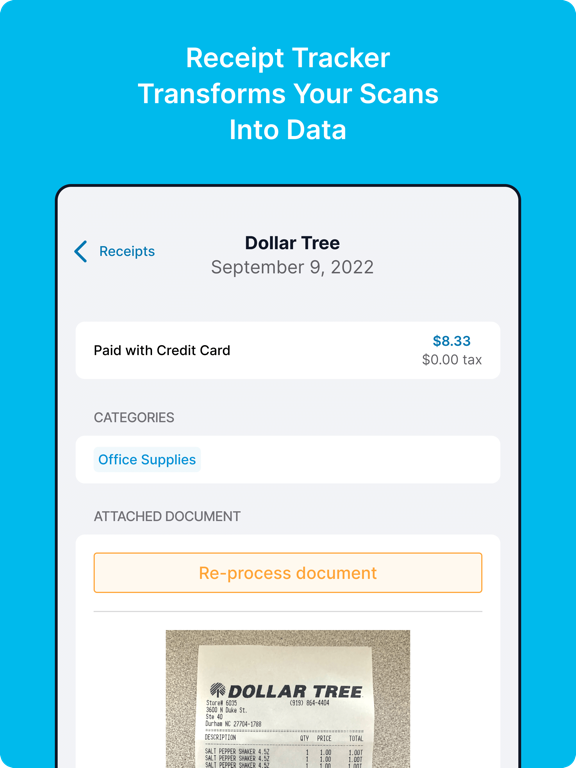
30 store screenshots


Pricing & paywalls
App Store
- Starter Monthly — $9.00/month
- Starter Monthly — $97.00/year ($8.08/mo)
- Pro Monthly — $29.00/month
- Pro Monthly — $290.00/year ($24.16/mo)
- Plus Monthly — $79.00/month
- Lite Plan — $9.99
- Pro Plan — $19.99
- Shoeboxed Mobile Premium — $9.99
- Shoeboxed Mobile Pro — $19.99
- Starter Plan — $4.99
Ratings & reviews
App Store
-
5/5Great Upgrade!
I’ve used Shoeboxed for years and have always liked it. I use it mostly for miles. With the upgrade, I don’t have to name my trips because the app makes note of where I’ve been. I only have to tell it if the miles are business, medical, or charity, and the app takes care of the rest. No more dropping a pin every time I get out of the car. (No more forgetting to drop that pin.) I will say, on the small downside, that a couple of my trips have been short changed by a couple of miles, with the app pointing to a location I didn’t stop at, before I got to my destination. So, maybe 4.5 stars. But overall, much easier to use, much more intuitive.
LKLov · 6 Aug 2026
-
5/5Use and Interface Review
Really love the Gmail Receipt Sync function. Very, very handy and have been needing something like this! I wish I found this earlier before I filed my taxes, but I have it now and it's great. I've definitely run into the problem of receipt ink fading off and not being able to read it several months later, so this solves that problem. Apart from its use, which is great, my only comment is about the user interface. There is an "Upgrade for Free" bar which I think kind of looks like an ad and disrupts the look and feel of the app. Maybe this could be more of a pop-up reminder when your receipts are being transcribed? I think the app looks great overall, but there are a couple of other blue colors used in the app that don't look consistent with the Shoeboxed blue. Otherwise, love this and have already shared with friends!
shayronbbb · 6 Aug 2026
-
5/5Best app for receipts
After trying a multitude of apps and software to keep and organize my work and personal receipts, I stopped looking when I found Shoeboxed. It is the best-priced with the most features. Take a photo of your receipt or use snail-mail to send in receipts using prepaid envelopes provided by Shoeboxed. Another available option I have not tried is to have Shoeboxed automatically scan your email inbox for receipts. For each receipt submitted, Shoeboxed inputs all the information from each receipt and remembers how you want to categorize receipts from a given store. Create custom expense reports and include the scan of the original receipt if you wish. According to Shoeboxed, all digitized receipts are accepted by the federal government if you wish to use them for tax purposes. If I could give this app six stars I would!
Smaeass · 6 Aug 2026
-
5/5Saved us so much money and time!
We are small business owners (landscaping) and use this app constantly along with the blue magic envelopes. We used to pay a person $14 an hour to sit there and scan and enter receipts into Quickbooks. It was a time consuming task and very complicated to name, organize and store individual photos of each receipt and post them to a cloud service. It was ridiculous. That’s when I discovered Shoeboxed, yes we no longer have the scanning person on staff and the associated expense of having a full time hourly person. So to those people who complain about this not being “free” to us it is worth every penny. It’s way cheaper than paying for someone’s time. This service stores all the photos of your receipts on their server and you don’t have to scan them yourself - that’s the best part. We give our crews each a blue envelope and simply pop that into the mailbox once a week. Then the receipts show up in our account - pure magic. They used to get wet or erased in the sun or blow out the window of the truck - not anymore. We also have some real estate investment properties so we have the limited free account- one for each property, to keep track of the occasional expenses. I simply use the email method for those, so simple! One last thing- we have had to call tech support a couple of times in the 3 years we have been using this. The support was outstanding. They really will pick up the phone and talk to you and work through issues or questions you may have. This is a must have tool for any small business owner.
TxIslandGirl · 6 Aug 2026
-
3/5Great service, mobile app needs multi page receipts
Let me say that shoeboxed’s service is EXCELLENT, they pick up the phone unlike many other expense apps and they aren’t outsourced to someone you can’t understand which is huge. The mail in feature is great and the web app works well. The reason for 3 stars is that the mobile app only allows for 1 page receipts and for someone who deals almost exclusively with full multi page receipts this is very limiting. In order for me to use this service I have to go to the office or jump through hoops adding a receipt as multiple expenses and then merging them together in the web app all while going against my monthly total for something that is 1 receipt. Please please please add multi page support for the app!
Jgrobelny01 · 6 Aug 2026
Privacy & accessibility
App Store
Privacy
- Data Not Collected Developer declared
Accessibility
No accessibility labels collected yet.
Versions
App Store
-
6.5.29
Did you know that in many countries 5/11/2018 is November 5th 2018? We forgot that and it kept our favorite customers from changing the date on their receipts. Fixed!
-
6.5.30
Fixes a bug where some images were being uploaded too small.
-
6.5.32
We created a Contact Us option in Settings so you can reach our Support team more easily! Check out the new "Knowledge Base" section in Settings to view help articles.
-
6.6.0
Stability improvements
-
6.6.1
We updated the default mileage rate in accordance with IRS guidelines. Don’t worry, you can still edit a trip’s reimbursement rate upon ending a trip.
-
6.6.2
Improved error logging for faster resolution, provided clearer instructions for changing your plan, and fixed a bug that was causing the Reimbursable category to not display correctly.
-
6.6.3
Improved error logging for faster resolution, provided clearer instructions for changing your plan, and fixed a bug that was causing the Reimbursable category to not display correctly. Resolved issues with opening the camera.
-
6.6.4
Improved error logging for faster resolution, provided clearer instructions for changing your plan, and fixed a bug that was causing the Reimbursable category to not display correctly. Resolved issues with opening the camera and in-app purchases.
-
6.6.5
Updated the mileage rate
-
6.6.7
Resolves issues with the Mileage Tracker
-
7.0.0
*Revamped user interface for easier receipt scanning, tracking, and reporting. *Improvements to the business card feature and mileage tracker. *Love our app? Feel free to leave a review! You'll totally make our day.
-
7.0.1
* Revamped user interface for easier receipt scanning, tracking, and reporting. * Improvements to the business card feature and mileage tracker. * Love our app? Feel free to leave a review! You'll totally make our day.
-
7.0.2
* Revamped user interface for easier receipt scanning, tracking, and reporting. * Improvements to the business card feature and mileage tracker. * Love our app? Feel free to leave a review! You'll totally make our day.
-
7.0.3
We fixed a bug that prevented a user from logging in if the password included special characters.
-
7.0.4
This update includes the following improvements: - Mileage recordings are never lost even if the app is terminated by the system or crashes. - All receipts are now properly synced. - Fixed that the UI sometimes froze for a few seconds when displaying the add receipt or business card screen. - Fixed that new documents created on the mobile app would sometimes face the wrong direction when displayed in the web app.
-
7.0.5
This fix ensures that iOS 17 users can enter total and tax amounts containing decimals as expected. We hope you find this improvement valuable!
-
7.0.6
This update enhances the capture of receipt images, ensuring optimal resolution for seamless processing.
-
7.0.7
This update fixes an issue with blurry receipt images from screenshots and fixes the editing of distance and rate fields after recording mileage.
-
7.1.2
Automatic unlimited mileage tracking — your phone tracks every business trip in the background. We text you a daily summary, you text back which trips were for work. No app to open. Plus updated receipt scanning and expense reports.
-
7.1.4
- Add receipts from your camera roll or photo library - Switch between multiple Shoeboxed accounts - Swipe left to delete receipts - See your receipt forwarding email in Settings - Sort receipts by receipt date or date added
-
7.1.5
Select up to 20 photos at once from your library to build multi-page receipts. Tap any receipt PDF to view it full-screen. Swipe between pages, pinch to zoom. Each receipt now shows both the receipt date and date added so you can find what you need faster. View your scan usage In Settings. If you hit your limit, we let you know and shows your options to get more scans. Mileage tracking: entered the wrong phone number during setup? You can fix it right from the mileage screen now. We improved drive detection so the tracker uses less battery and does a better job detecting trips. Exporting large reports faster, we compress images so they don't slow things down.
-
7.1.6
Log mileage trips by hand — for trips you forgot to track or when you'd rather skip the GPS. Categories you create now show on the web and stick around for your next receipt (was a bug — fixed). Type to find a category instead of scrolling through the whole list. Type a new name and we'll create it when you save. Today's miles count is more accurate (it was undercounting on long drives).
-
7.1.7
- Track business mileage in Canada — CRA per-km rates, postal code addresses, kilometers throughout. Built for Canadian small business owners and employees who track mileage. - Multi-currency receipts now scan and display correctly. CHF, EUR, GBP, JPY, AUD, CAD — your foreign expenses show the right symbol on the receipt list and in the edit screen. - Refunds are easy now. Tap ± to flip a receipt to a negative.
-
7.1.8
- On an older "Digital" plan? You can now upgrade right here in the app. - Smoother, more reliable mileage tracking. - Clearer plan and usage details. - Fixes and polish to keep things running smoothly.
-
7.1.9
· 28 Jul 2026
The IRS raised the standard mileage rate to 76 cents per mile on July 1st, and Shoeboxed now applies the new rate to every business trip you drive from that date on. Trips from before July 1st keep the old rate, the way the IRS wants it done. We also fixed a bug that bothered us: if a receipt had more than one photo, your expense report only included the first page. Now every page shows up in the report, labeled so you can easily tell them apart.
Alternatives
- Foreceipt Receipt Tracker App — Same category + similar ratings
- Smart Receipts: Expenses & Tax — Same category + similar ratings
- Receipt Scanner・Track Expenses — Same category + similar ratings
- SimplyWise: Receipts, Expenses — Same category + similar ratings
- Hurdlr Mileage, Expenses & Tax — Same category + similar ratings
Availability by market
- US
Data quality & evidence
- Page completeness
- Live store listing
- Last verified
- 6 Aug 2026
- Sources
- App Store
- Independent summary has not been published yet.