
Quick verdict
- What it is
- Store information collected; independent summary not yet available.
- At a glance
-
- Free to download
- In-app purchases
Categories and search queries
Official categories
- Education
- Productivity
AppCorpus categories
Key functions
| Function | Availability | Access | Scope | Evidence |
|---|---|---|---|---|
| Free app | Yes | Free | — | Store published |
| In-app purchases | Yes | Limited free | — | Store published |
Screens
App Store
21 store screenshots

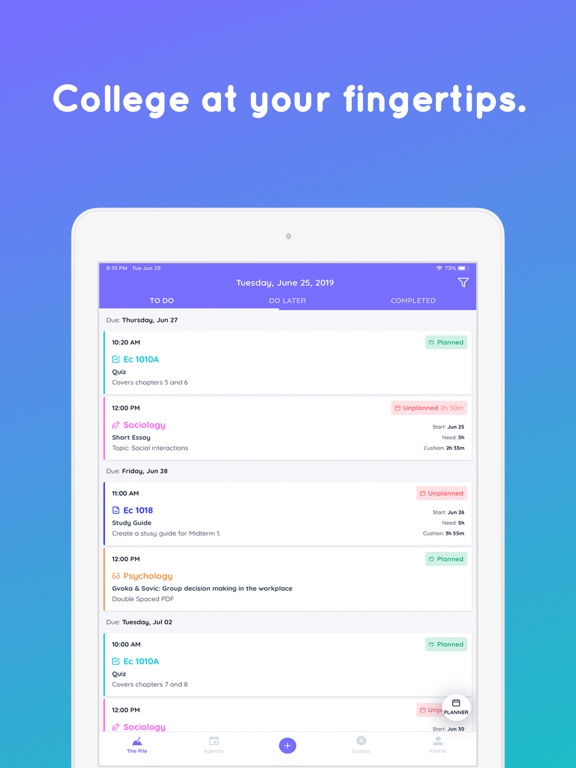

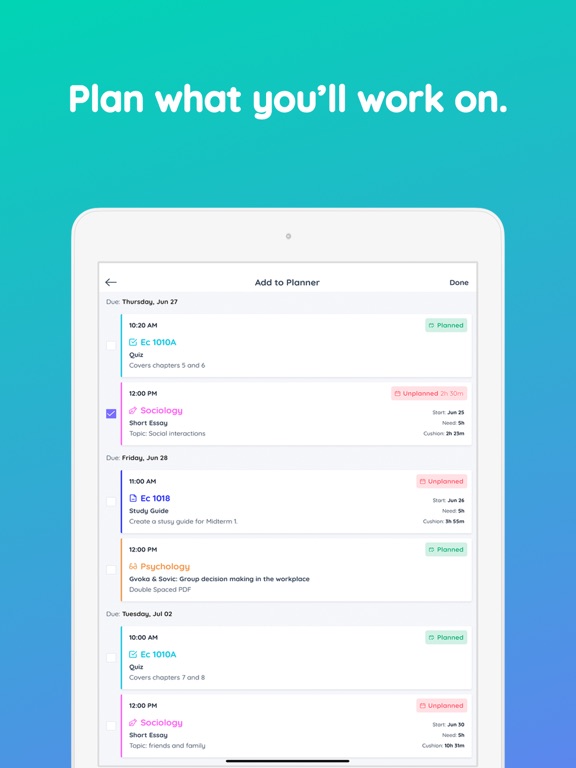
Pricing & paywalls
App Store
- Lifetime plan — $13.99
- Lifetime plan — $46.99
Ratings & reviews
App Store
-
4/5Great concept that needs attention
This app has a such a great concept behind it that really gives me, a grad student with a full time job, hope I can get everything done without any of my work suffering. But, there are a few tiny glitches that get annoying when they pile up. 1) The widget doesn’t work because it doesn’t stay “logged in” when the app is logged in. 2) There’s no way to add a widget to the Home Screen for the latest update. 3) The phone app is just kinda slow and lacks functionally (which I can accept if everything else worked perfectly). 4) My app sends two notifications for plans: one for the actual time duration and another for the time it starts up until 11:59pm. Again, not a huge issue but annoying. This app has so much potential and I really don’t want to see it stop getting the updates it needs. I’m on my free trial and I’m concerned about subscribing because it feels like this app will gradually lose more and more functionality. I know that it’s primarily for Desktop and I do it use it that way, but I’m on my phone WAY more than my computer. I’d love to see this app grow and continue using it over the next three years!
Alyjoye · 6 Aug 2026
-
3/5I’d love to give it a 5 star review... but...
I think the concept for Shovel is amazing.. but there are a few issues with the actual execution. Tho I don’t think they’d be hard for the app developer to fix. I understand that the main way to edit things is on a computer, but! There should be a “hard copy” (so to speak) downloaded on the app. That only gets updated from the server. As in it should have an offline mode. Right now their server is down; and not only can I not access it on my computer (which is understandable since the computer version is solely web access) but I also can’t access it on my phone. This is a huge flaw. What if I hadn’t written down my assignments anywhere else? Or what if I simply wasn’t in an area with WiFi or cell service and wanted to check my assignments? I think it’s crazy that I have to be hooked up to the internet to do so. Please please add an offline stored version on the app. And also. Please fix the server. I’d love to give this app 5 stars. But not even being able to see all the info that I took hours to set up this week is really really not great.
SapphireLain · 6 Aug 2026
-
5/5Game Changer
So I’m actually a professor, not a student, but I absolutely love Shovel. I have just personally set it up so that my research, grant proposals, and other miscellaneous item are also “classes” and my assignments for my actual classes are things such as “preparing class material” or “grading homework”. I truly think this is a great app for anyone (student, teacher, or random person) who has anxiety about getting things done. It’s really helped me feel calmer knowing that everything has it’s time to get done. To me, it’s completely worth the yearly subscription. If I had any suggestion for the developers, it would be to make options for the program to be more flexible (I.e. not only for students). I can see this being such a useful tool for anyone who likes block scheduling. Like I said, with just a tinch of creativity it’s easy enough to make it work for anyone as is, but I think a lot of people don’t realize that.
ProfProductive · 6 Aug 2026
-
3/5Great but has some issues
I am super glad I found shovel. I’m only a few weeks into college, but Shovel has already been super helpful. It has been great on my MacBook Air but has some issues on the iPhone app. First, it’s super hard to adjust the time on a task or event on your phone. When I try to drag it, it doesn’t move well. When I try to type in the new times, it causes the app to crash. The app also crashes randomly. My other main issue is with the notifications. Despite the fact I have my settings set to notify me 15 minutes prior to the start of a task, it does not notify me until one minute after the start time. These problems are incredibly inconvenient. Other than that, I find this to be helpful. I don’t use the mobile app too much simply because of these issues, but the computer site seems fine for now. If the mobile app issues ever get fixed, I will change my rating, but for now, it will stay as it is.
Erin Alexa · 6 Aug 2026
-
5/5I found the best college study app ever
I cannot remember how I came across this but I am so glad I did! The layout is awesome, the app never fails to show exactly what the web site shows, and all of my tasks are getting done because of it! It’s fantastic for college students like myself! My only wish is that I could send everything over to Google calendar, even if it was a separate calendar that I had to select to view. My work schedules me through Google and I still tend to place appointments there out of habit and it would be wonderful to say “yes, I can be there” or “no, I can’t” by just opening one app. Maybe in the future. Thanks for a great app/web site!
Spurgeon3986 · 6 Aug 2026
Privacy & accessibility
App Store
Privacy
- Data Linked to You — Analytics — Identifiers — User ID Developer declared
- Data Linked to You — Analytics — Usage Data — Product Interaction Developer declared
- Data Linked to You — App Functionality — Identifiers — User ID Developer declared
- Data Linked to You — App Functionality — Usage Data — Product Interaction Developer declared
- Data Linked to You — Identifiers Developer declared
- Data Linked to You — Usage Data Developer declared
- Data Not Linked to You — App Functionality — Diagnostics — Crash Data Developer declared
- Data Not Linked to You — App Functionality — Diagnostics — Performance Data Developer declared
- Data Not Linked to You — Diagnostics Developer declared
Accessibility
No accessibility labels collected yet.
Versions
App Store
- 1.0
-
1.0.1
- Fix bug on Grades page where it wasn't possible to edit specific grade
-
1.0.2
- Fix log out crash - Fix in-app purchase screen popping for already payed users
-
1.0.3
We want the best for our students so we’re always making improvements to Shovel. Keep your Updates turned on to make sure you have the newest Shovel. This version includes: - More intuitive onboarding and Login screens - Enabled Save button when saving timer if time spent is more than a minute - New sliders - Fixed date time picker returning back to initial value - Visual improvements for smaller devices
-
1.0.4
We want the best for our students so we’re always making improvements to Shovel. Keep your Updates turned on to make sure you have the newest Shovel. This version includes: - Payment flow improved - Fixed Planner calendar not showing for the first time
-
1.0.5
We want the best for our students so we’re always making improvements to Shovel. Keep your Updates turned on to make sure you have the newest Shovel. This version includes: - Set picker default date time to next hour - Rename Profile to More options - Add chat with us to More tab - Add user details to More tab - Fix course long name
-
1.0.6
We want the best for our students so we’re always making improvements to Shovel. Keep your Updates turned on to make sure you have the newest Shovel. This version includes: - Make course picker scrollable - Optimize performance - Implement new sliders
-
2.0.0
What's New in This Version Describe what's new in this version of your app, such as new features, improvements, and bug fixes. We want the best for our students so we’re always making improvements to Shovel. Keep your Updates turned on to make sure you have the newest Shovel.
-
2.0.1
What's New in This Version Describe what's new in this version of your app, such as new features, improvements, and bug fixes. We want the best for our students so we’re always making improvements to Shovel. Keep your Updates turned on to make sure you have the newest Shovel. This version includes: - Fix datepicker and placeholders in dark mode - Small UI improvements
-
2.1.0
We want the best for our students so we’re always making improvements to Shovel. Keep your Updates turned on to make sure you have the newest Shovel. This version includes: - Notifications! Reminders for * classes * activities * custom events * study blocks * planned study blocks * - View, manage and track time spent as progress - Timer inside task - Ability to click to open task from any task card - Minor bug fixes
-
2.1.1
We want the best for our students so we’re always making improvements to Shovel. Keep your Updates turned on to make sure you have the newest Shovel. This version includes: - Not playing sound for notifications while being in silent mode - Adding new term not setup screen when term was not setup on web
-
2.1.2
We want the best for our students so we’re always making improvements to Shovel. Keep your Updates turned on to make sure you have the newest Shovel. This version includes: - Localization settings
-
2.1.3
We want the best for our students so we’re always making improvements to Shovel. Keep your Updates turned on to make sure you have the newest Shovel. This version includes: - Handle scaled font - Fix Agenda bug with showing wrong date - Add 0 minutes option to notificatios
-
2.1.4
We want the best for our students so we’re always making improvements to Shovel. Keep your Updates turned on to make sure you have the newest Shovel. This version includes: - Enable horizontal orientation - Notifications for when: - task is overdue, - after studying on a planned task, - new tasks in should be working on pile - Fix forgot password link - Fix copy of classes into courses
-
2.1.5
We want the best for our students so we’re always making improvements to Shovel. Keep your Updates turned on to make sure you have the newest Shovel. This version includes: - Updates required for app to work with newest version!
-
2.1.6
We want the best for our students so we’re always making improvements to Shovel. Keep your Updates turned on to make sure you have the newest Shovel. This version includes: - Support for iOS 14 - Add native navigation - New pile design (includes Overdue in Within start date/Todo) - Planning overdue tasks - Allow planning after due date for both overdue/todo tasks - Improve look and feel for Agenda/Planner - Rename Pile to Tasks - Planning - show if block is after due date - Improve typography a bit - Fix cushion not going below 0 - Fix saving timer, app crash - Add haptic feedback
-
3.0.0
We want the best for our students so we’re always making improvements to Shovel. Keep your Updates turned on to make sure you have the newest Shovel. This version includes: - New calendar screen - Improved planning ability from calendar - Adjusted to new web functionalities
-
3.0.1
We’re always making improvements to Shovel. This version includes: - Marking planned tasks as done - Improved timer - Minor bug fixes
-
3.0.2
We’re always making improvements to Shovel. This version includes: - Marking planned tasks as done - Improved timer - Minor bug fixes - iOS 14 widget
-
3.0.3
We’re always making improvements to Shovel. This version includes: - iOS 14 widget - Marking planned tasks as done - Improved timer - Minor bug fixes
-
3.1.0
Planner and Task Improvements
-
3.1.1
Big usability updates for the new semester - Improved calendar functionality - Enhanced performance - Improved notifications - Updated navigation - Bug fixes
-
3.1.2
Showing start dates in task cards Bug fixes
-
3.1.3
Improved notifications and bug fixes.
-
3.2.0
· 11 Nov 2025
New in Shovel! Your favorite study planner just got faster, smoother, and smarter. Improved calendar performance, new 2-day view, study streak tracking, and more ways to plan your tasks and events. Smarter. Faster. More Shovel. Full Update Details: - Improved Calendar Performance — faster, smoother, better. - Faster Loading — less waiting, more studying (or Netflix). - Swipe Between Days — cruise through your schedule like a pro. - Go to Today — never lose track again. - 2-Day View — see what's coming without feeling overwhelmed. - Study Streak Tracking — keep your momentum going! - Improved Navigation — find everything easier. - More Event Repeat Options — because class does happen every week (: - Create Courses & Activities — get organized your way. - Improved Task & Event Creation — faster setup, fewer taps. - Option to Remove Completed Tasks from the Top Bar — for that clean, satisfying look.
Alternatives
- Power Planner: Homework & More — Same category + similar ratings
- My Study Life - School Planner — Same category + similar ratings
- School Timetable - class study — Same category + similar ratings
Availability by market
- US
Data quality & evidence
- Page completeness
- Live store listing
- Last verified
- 6 Aug 2026
- Sources
- App Store
- Independent summary has not been published yet.