
Quick verdict
- What it is
- Store information collected; an Apoku editorial summary is not yet published.
- At a glance
-
- Free to download
- In-app purchases
Categories and search queries
Official categories
- Education
- Productivity
Apoku categories
Key functions
| Function | Availability | Access | Scope | Evidence |
|---|---|---|---|---|
| Free app | Yes | Free | Context-specific | Store published |
| In-app purchases | Yes | Limited free | Context-specific | Store published |
| Family Sharing | Unknown | Unknown | Scope unknown | Store published |
Screens
App Store
33 store screenshots

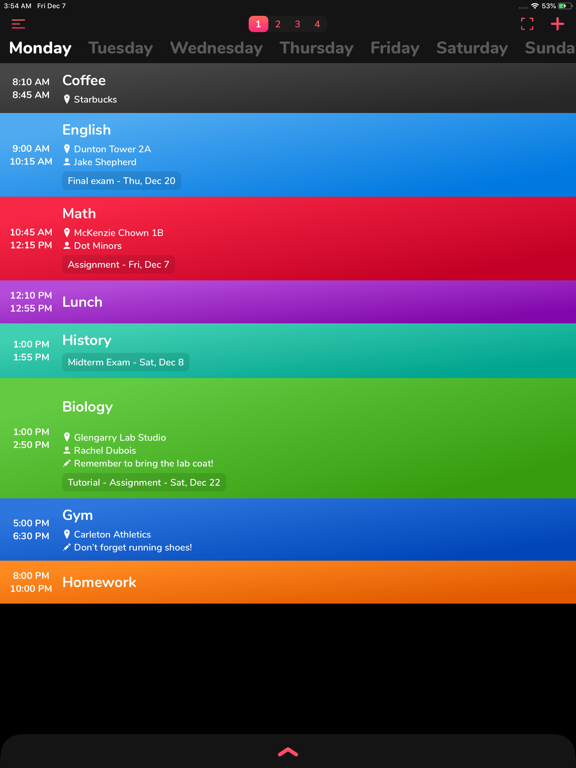

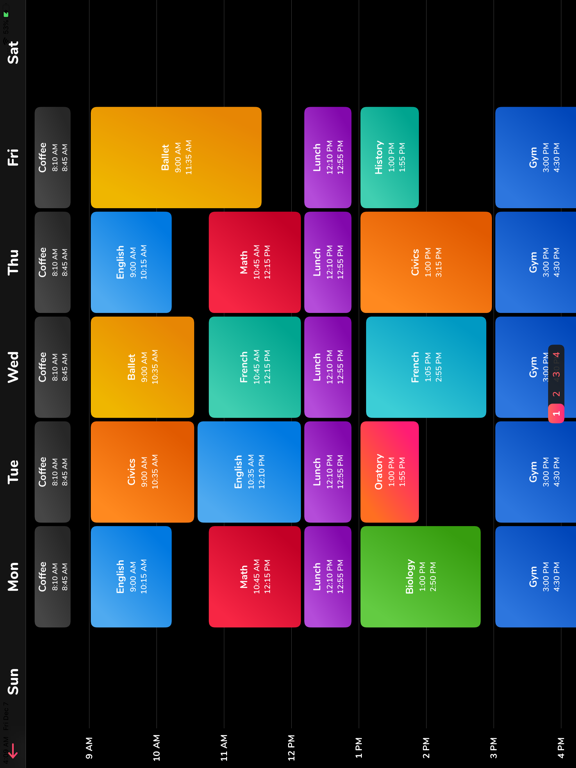
Pricing & paywalls
App Store
- School Timetable Premium — $7.99
Ratings & reviews
App Store
-
5/5This is just what I needed
I’m really loving the app, I’m a graphic designer so I love the layout and interface of the app. It looks and works so smooth. I went thru a few apps and ended up here and I’m definitely keeping it. The app does mostly what I need it to do. It’s a little buggy getting it to sync between my iPad Pro and my iPhone 13 pro phone, haven’t tried the watch app yet but I still like it. Just being picky now but a done/complete button for tasks would be nice and maybe a cool animation when it’s marked complete. Also if there is a past due reminder for things that get missed. And lastly a daily reminder option cause I have some things that are so important that I need to constantly be reminded. Overall this is a great app I’m gonna recommend to all my classmates!
Thabossque · 6 Aug 2026
-
5/5Fantastic and convenient
The ability to have a widget is phenomenal, I always love it when an app has this option. In addition, the information that can be displayed is incredibly convenient; being able to see "Tasks" I need to get done at a quick glance is greatly enhanced by the ability to even designate certain categories to those Tasks. Worth the premium too!
Snake220 · 6 Aug 2026
-
4/5A few suggestions...
I just downloaded the app and played around with it. The app looks beautiful and I like the wealth of color for each class. However, I have a few suggestions: 1. Class times may be different for different days of the week, ex: I may have a Biology class on Tuesday 9:30 am to 10:45 am and Wednesday from 1 pm to 2:30 pm. Your app only lets me input 1 class time for all days in each class. 2. Please add a feature where I can take notes for each individual session of class, ex: under the umbrella of Biology course, along with regular schedule every week, I want to be able to add if next week session is cancelled, or if I want to attend an additional recitation session at different times (but still under the categories of Biology), or if I need to deliver a presentation/submit a paper/bring goggles/talk to professor about something/etc. I know you have the feature Add Variations that is based on every 4 weeks (I will talk more about 4 weeks in my point #3). As I said above, not everything in the class is the same every 4 weeks or for the whole semester, and sometimes I just want to add changes that are temporary 3. Your 4- week idea confuses me. I think I misunderstood but the feature seems like I have to repetitively re-enter all info for each course every 4 weeks?? May I suggest replacing that with stating the starting and ending dates for each course (if one doesn’t know the end date yet, I suggest adding a Continuous button and letting them manually end the course once they no longer need it)? Please let me know if you want me to elaborate on any above points. I will be more than happy to change the rating to 5 stars once my needs are met. Thank you very much for making such a great, useful and beautiful app ❤️❤️
I am a Slytherin · 6 Aug 2026
-
4/5Great, but only one small issue
The app is great! I only have one issue (and it is not a dealbreaker for me, but it is still worth mentioning). The little section that shows the break time between classes, for me, is showing a gap of much longer than it should be. For example, I have two classes that have only an hour and a half between them, but it shows as 17 hours. Again, this isn’t a deal breaker since I know my schedule of course, but it’s still worth mentioning! Love the app otherwise!
Fan767 · 6 Aug 2026
-
5/5Beautiful
This app is truly exceptional at what it does. I use it nearly every day, the interface is clean and intuitive and most importantly this app is fast. It opens instantly on newer phones, which is essential for quickly glancing at a schedule while wandering about at the start of a new quarter. Easy, concise viewing for assignments and completely customizable. Highly recommend.
❍☯︎• · 6 Aug 2026
Privacy & accessibility
App Store
Privacy
- Data Not Collected Developer declared
Accessibility
No accessibility labels collected yet.
Versions
App Store
-
10.0
- Fixed a crash bug on iOS 15 when changing the date and time of class or task. - NOTE regarding widget on iOS 14+: 1. Unlock phone 2. Swipe left to the widget screen 3. Scroll all the way to the bottom 4. Tap the "Edit" button 5. Don't search for the widget. Scroll to the bottom again. 6. Tap "Customize" at the bottom. 7. Look for "School Timetable" in the list and add it. This should give you the widget. I offer an ad and analytics free and beautiful app for the absolute best experience for my users. If you are enjoying the app, please leave me a positive rating on the app store as that helps get the word out to others. If you would like to support development and buy me a coffee, you can purchase the one time in app purchase! No subscriptions! Thank you for your support! This update wouldn't have been possible without the amazing feedback from Reddit! If you have any feedback or feature requests, please email Pran at: [email protected] ---- Previous: - Fixed Apple Watch bug where next day's class was shown instead of today's next class. - Apple Watch complication now also mentions what day of week the class is for. - Fixed a bug where the "Next Class" indicator was incorrect. - Added a help button to explain what Categories is in Tasks.
-
11.0
- Fixed a crash bug when changing the date and time of class or task. - Fixed a bug where the variation number was +1 - Potentially fixed a bug where colors would sometimes appear all black. If this persists, please email me. - NOTE regarding widget on iOS 14+: 1. Unlock phone 2. Swipe left to the widget screen 3. Scroll all the way to the bottom 4. Tap the "Edit" button 5. Don't search for the widget. Scroll to the bottom again. 6. Tap "Customize" at the bottom. 7. Look for "School Timetable" in the list and add it. This should give you the widget. I offer an ad and analytics free and beautiful app for the absolute best experience for my users. If you are enjoying the app, please leave me a positive rating on the app store as that helps get the word out to others. If you would like to support development and buy me a coffee, you can purchase the one time in app purchase! No subscriptions! Thank you for your support! This update wouldn't have been possible without the amazing feedback from Reddit! If you have any feedback or feature requests, please email Pran at: [email protected]
-
13.0
- Fixed an orientation bug. - Fixed a crash bug when changing the date and time of class or task. - Fixed a bug where the variation number was +1 - Potentially fixed a bug where colors would sometimes appear all black. If this persists, please email me. - NOTE regarding widget on iOS 14+: 1. Unlock phone 2. Swipe left to the widget screen 3. Scroll all the way to the bottom 4. Tap the "Edit" button 5. Don't search for the widget. Scroll to the bottom again. 6. Tap "Customize" at the bottom. 7. Look for "School Timetable" in the list and add it. This should give you the widget. I offer an ad and analytics free and beautiful app for the absolute best experience for my users. If you are enjoying the app, please leave me a positive rating on the app store as that helps get the word out to others. If you would like to support development and buy me a coffee, you can purchase the one time in app purchase! No subscriptions! Thank you for your support! This update wouldn't have been possible without the amazing feedback from Reddit! If you have any feedback or feature requests, please email Pran at: [email protected]
-
15.0
- Fixed an orientation bug on iPad where app would show portrait mode when device is in landscape. - Fixed a crash bug when changing the date and time of class or task. - Fixed a bug where the variation number was +1 - Potentially fixed a bug where colors would sometimes appear all black. If this persists, please email me. - NOTE regarding widget on iOS 14+: 1. Unlock phone 2. Swipe left to the widget screen 3. Scroll all the way to the bottom 4. Tap the "Edit" button 5. Don't search for the widget. Scroll to the bottom again. 6. Tap "Customize" at the bottom. 7. Look for "School Timetable" in the list and add it. This should give you the widget. I offer an ad and analytics free and beautiful app for the absolute best experience for my users. If you are enjoying the app, please leave me a positive rating on the app store as that helps get the word out to others. If you would like to support development and buy me a coffee, you can purchase the one time in app purchase! No subscriptions! Thank you for your support! This update wouldn't have been possible without the amazing feedback from Reddit! If you have any feedback or feature requests, please email Pran at: [email protected]
-
16.0
- Fixed another orientation bug on iPad where app would show wrong landscape mode in the full timetable screen. - Fixed a crash bug when changing the date and time of class or task. - Fixed a bug where the variation number was +1 - Potentially fixed a bug where colors would sometimes appear all black. If this persists, please email me. - NOTE regarding widget on iOS 14+: 1. Unlock phone 2. Swipe left to the widget screen 3. Scroll all the way to the bottom 4. Tap the "Edit" button 5. Don't search for the widget. Scroll to the bottom again. 6. Tap "Customize" at the bottom. 7. Look for "School Timetable" in the list and add it. This should give you the widget. I offer an ad and analytics free and beautiful app for the absolute best experience for my users. If you are enjoying the app, please leave me a positive rating on the app store as that helps get the word out to others. If you would like to support development and buy me a coffee, you can purchase the one time in app purchase! No subscriptions! Thank you for your support! This update wouldn't have been possible without the amazing feedback from Reddit! If you have any feedback or feature requests, please email Pran at: [email protected]
-
17.0
- The app now supports importing timetable which has been exported from the app. - Updated the UI for selecting colors for classes and themes. Also added many new colors. - NOTE regarding widget on iOS 14+: 1. Unlock phone 2. Swipe left to the widget screen 3. Scroll all the way to the bottom 4. Tap the "Edit" button 5. Don't search for the widget. Scroll to the bottom again. 6. Tap "Customize" at the bottom. 7. Look for "School Timetable" in the list and add it. This should give you the widget. I offer an ad and analytics free and beautiful app for the absolute best experience for my users. If you are enjoying the app, please leave me a positive rating on the app store as that helps get the word out to others. If you would like to support development and buy me a coffee, you can purchase the one time in app purchase! No subscriptions! Thank you for your support! This update wouldn't have been possible without the amazing feedback from Reddit! If you have any feedback or feature requests, please email Pran at: [email protected] -- Previous: - Fixed another orientation bug on iPad where app would show wrong landscape mode in the full timetable screen. - Fixed a crash bug when changing the date and time of class or task. - Fixed a bug where the variation number was +1 - Potentially fixed a bug where colors would sometimes appear all black. If this persists, please email me.
-
18.0
- Now you can strikethrough your tasks when they are done by either tapping the done button next to the task name or swiping horizontally on it. Tasks marked Done won't receive notifications. - The app now supports importing timetable which has been exported from the app. - Updated the UI for selecting colors for classes and themes. Also added many new colors. - NOTE regarding widget on iOS 14+: 1. Unlock phone 2. Swipe left to the widget screen 3. Scroll all the way to the bottom 4. Tap the "Edit" button 5. Don't search for the widget. Scroll to the bottom again. 6. Tap "Customize" at the bottom. 7. Look for "School Timetable" in the list and add it. This should give you the widget. I offer an ad and analytics free and beautiful app for the absolute best experience for my users. If you are enjoying the app, please leave me a positive rating on the app store as that helps get the word out to others. If you would like to support development and buy me a coffee, you can purchase the one time in app purchase! No subscriptions! Thank you for your support! This update wouldn't have been possible without the amazing feedback from Reddit! If you have any feedback or feature requests, please email Pran at: [email protected] -- Previous: - Fixed another orientation bug on iPad where app would show wrong landscape mode in the full timetable screen. - Fixed a crash bug when changing the date and time of class or task. - Fixed a bug where the variation number was +1 - Potentially fixed a bug where colors would sometimes appear all black. If this persists, please email me.
-
19
- The app now includes an interactive large widget for home screen for iOS 17+ devices. - Legacy widget is still supported on older devices which can be added using steps described at the bottom. I offer an ad and analytics free and beautiful app for the absolute best experience for my users. If you are enjoying the app, please leave me a positive rating on the app store as that helps get the word out to others. If you would like to support development and buy me a coffee, you can purchase the one time in app purchase! No subscriptions! Thank you for your support! If you have any feedback or feature requests, please email Pran at: [email protected] -- Steps for legacy widget for older devices: 1. Unlock phone 2. Swipe left to the widget screen 3. Scroll all the way to the bottom 4. Tap the "Edit" button 5. Don't search for the widget. Scroll to the bottom again. 6. Tap "Customize" at the bottom. 7. Look for "School Timetable" in the list and add it. This should give you the legacy widget on older phones.
-
20
- Fixed a bug where the interactive large widget was clipping the top of the widget. - The app now includes an interactive large widget for home screen for iOS 17+ devices. - Legacy widget is still supported on older devices which can be added using steps described at the bottom. I offer an ad and analytics free and beautiful app for the absolute best experience for my users. If you are enjoying the app, please leave me a positive rating on the app store as that helps get the word out to others. If you would like to support development and buy me a coffee, you can purchase the one time in app purchase! No subscriptions! Thank you for your support! If you have any feedback or feature requests, please email Pran at: [email protected] -- Steps for legacy widget for older devices: 1. Unlock phone 2. Swipe left to the widget screen 3. Scroll all the way to the bottom 4. Tap the "Edit" button 5. Don't search for the widget. Scroll to the bottom again. 6. Tap "Customize" at the bottom. 7. Look for "School Timetable" in the list and add it. This should give you the legacy widget on older phones.
-
2.2
Class variation names now show up in the horizontal fullscreen week view too. Previous update: - Classes now show the break time in between current class and next class - Added the ability to archive tasks! Simply tap on a task and select archive. Tasks can be unarchived from the Search screen. - URLs along with phone numbers and emails (for professor for example) get detected with option to call or email directly from the app. 1. Added a little help button next to "Which weeks?" to explain what it does: 2. Now you can give a name to your "variations" of a class. This name will show up on your timetable as "Class Name • Variation Name" 3. Apple Watch complications now keep the previous class on for 5 extra minutes before moving on to the next class. 4. Small tweak to show the Full screen timetable view much faster. 5. Fixed a crash issue on iPads when exporting data. 6. Added a search screen. Can search classes, tasks, professor, room, notes etc. Search screen can also be used to edit reminders of all classes and tasks at a common place. 7. I moved the “full screen” button to left as search seemed to make more sense on right side. 8. Fixed a bug where switching off task/class reminders wasn't saving. 9. Added the class room/location to the lock screen widget. 10. Made the app icon background dark. 11. Phone numbers and emails (for professor for example) get detected with option to call or email directly from the app. 12. Added a little help button next to "Add variations" to explain what variations do. 13. New animation when purchasing the in app purchase. If you find this app useful, please leave us a positive rating on the app store as that helps get the word out to others! If you have any feature suggestions, bug reports or just wanna say good job, email me at: [email protected]
-
2.3
- Now supports iCloud Backup and Restore! Tap the hamburger menu button on top left and tap "Backup to iCloud" from side menu. On another device signed in with same iCloud account, tap the "Restore from iCloud" button. If you find this app useful, please leave us a positive rating on the app store as that helps get the word out to others! If you have any feature suggestions, bug reports or just wanna say good job, email me at: [email protected]
-
26
· 9 Jul 2026
- Good news!!! Now you can use all features including unlimited classes and tasks for free! Yes, free version lets you use all features. However, I am a small indie developer and your one-time-only purchase helps pay for yearly development fee and lets me keep supporting the app. No subscriptions! Thank you for your support. - Updated the app to use latest SDK. - Fixed text contrast issues when background color was light. - Updated icons for buttons. I offer an ad and analytics free and beautiful app for the absolute best experience for my users. If you are enjoying the app, please leave me a positive rating on the app store as that helps get the word out to others. If you have any feedback or feature requests, please email Pran at: [email protected]
-
3.0
1. Fixed a bug where saving the timetable as a photo was stretched out 2. Fixes for iOS 13 3. Widget now shows dark mode If you find this app useful, please leave us a positive rating on the app store as that helps get the word out to others! If you have any feature suggestions, bug reports or just wanna say good job, email me at: [email protected]
-
3.1
- When only a single week setting is enabled, the widget now says "Classes" instead of W1 If you find this app useful, please leave us a positive rating on the app store as that helps get the word out to others! If you have any feature suggestions, bug reports or just wanna say good job, email me at: [email protected]
-
3.2
- Fixed a bug where sometimes classes would go out of order instead of being chronological ordered. This also fixes a bug which was showing wrong time interval between 2 classes or conflicts. If you find this app useful, please leave us a positive rating on the app store as that helps get the word out to others! If you have any feature suggestions, bug reports or just wanna say good job, email me at: [email protected]
-
3.3
- Apple Watch app and complication now says "Classes" instead of "W1" when only 1 week is enabled - Settings menu's Sync to Watch now has a "Force Sync" option - Fixed a bug where sometimes classes would go out of order instead of being chronological ordered. This also fixes a bug which was showing wrong time interval between 2 classes or conflicts. If you find this app useful, please leave us a positive rating on the app store as that helps get the word out to others! If you have any feature suggestions, bug reports or just wanna say good job, email me at: [email protected]
-
4.5
Stay safe everyone! - Updated the settings page UI - Added new accent theme color setting - Added new setting to switch off Notifications globally - Added new "Additional Reminders" for tasks - you can add as many specific reminders for a task at specific date and time - App now detects emails, sites, phone numbers and addresses in the notes and opens them in respective apps - multiple email and maps clients are supported now - Added more color options - Added "Review App" option - Bug fixes for iPad layout issues I offer an ad and analytics free and beautiful app for the absolute best experience for my users. If you are enjoying the app, please leave me a positive rating on the app store as that helps get the word out to others. If you would like to support development and buy me a coffee, you can purchase the one time in app purchase! No subscriptions! Thank you for your support! This update wouldn't have been possible without the amazing feedback from Reddit! If you have any feedback or feature requests, please email Pran at: [email protected]
-
4.6
Stay safe everyone! - The app now shows "Starts in" for the next class about to start. - Fixed a bug where classes with conflicting times would be out of order. Now the class which finishes first will be placed first. - The widget now updates to show the current class in session. - Other small bug fixes. I offer an ad and analytics free and beautiful app for the absolute best experience for my users. If you are enjoying the app, please leave me a positive rating on the app store as that helps get the word out to others. If you would like to support development and buy me a coffee, you can purchase the one time in app purchase! No subscriptions! Thank you for your support! This update wouldn't have been possible without the amazing feedback from Reddit! If you have any feedback or feature requests, please email Pran at: [email protected] -------- Previous: - Updated the settings page UI - Added new accent theme color setting - Added new setting to switch off Notifications globally - Added new "Additional Reminders" for tasks - you can add as many specific reminders for a task at specific date and time - App now detects emails, sites, phone numbers and addresses in the notes and opens them in respective apps - multiple email and maps clients are supported now - Added more color options - Added "Review App" option - Bug fixes for iPad layout issues
-
4.7
Stay safe everyone! - New setting to set the reminder ringtone. "Hand bell" is my favorite! :) - Fixed a bug where "Starts in" was wrong. - Other small bug fixes. I offer an ad and analytics free and beautiful app for the absolute best experience for my users. If you are enjoying the app, please leave me a positive rating on the app store as that helps get the word out to others. If you would like to support development and buy me a coffee, you can purchase the one time in app purchase! No subscriptions! Thank you for your support! This update wouldn't have been possible without the amazing feedback from Reddit! If you have any feedback or feature requests, please email Pran at: [email protected] ---------- Previous: - The app now shows "Starts in" for the next class about to start. - Fixed a bug where classes with conflicting times would be out of order. Now the class which finishes first will be placed first. - The widget now updates to show the current class in session.
-
4.8
- Fixed a crash bug when changing "number of weeks" setting. Sorry about that. I offer an ad and analytics free and beautiful app for the absolute best experience for my users. If you are enjoying the app, please leave me a positive rating on the app store as that helps get the word out to others. If you would like to support development and buy me a coffee, you can purchase the one time in app purchase! No subscriptions! Thank you for your support! This update wouldn't have been possible without the amazing feedback from Reddit! If you have any feedback or feature requests, please email Pran at: [email protected]
-
4.9
- Fixed a bug where a new install would freeze on splash screen forever. Sorry about that. - Fixed a crash bug when changing "number of weeks" setting. I offer an ad and analytics free and beautiful app for the absolute best experience for my users. If you are enjoying the app, please leave me a positive rating on the app store as that helps get the word out to others. If you would like to support development and buy me a coffee, you can purchase the one time in app purchase! No subscriptions! Thank you for your support! This update wouldn't have been possible without the amazing feedback from Reddit! If you have any feedback or feature requests, please email Pran at: [email protected]
-
5.0
- Fixed a UI bug on the IAP screen. - Fixed a bug where a new install would freeze on splash screen forever. Sorry about that. - Fixed a crash bug when changing "number of weeks" setting. I offer an ad and analytics free and beautiful app for the absolute best experience for my users. If you are enjoying the app, please leave me a positive rating on the app store as that helps get the word out to others. If you would like to support development and buy me a coffee, you can purchase the one time in app purchase! No subscriptions! Thank you for your support! This update wouldn't have been possible without the amazing feedback from Reddit! If you have any feedback or feature requests, please email Pran at: [email protected]
-
7.0
- Fixed Apple Watch bug where next day's class was shown instead of today's next class. - Apple Watch complication now also mentions what day of week the class is for. - Fixed a bug where the "Next Class" indicator was incorrect. - Added a help button to explain what Categories is in Tasks. - NOTE regarding widget on iOS 14: 1. Unlock phone 2. Swipe left to the widget screen 3. Scroll all the way to the bottom 4. Tap the "Edit" button 5. Don't search for the widget. Scroll to the bottom again. 6. Tap "Customize" at the bottom. 7. Look for "School Timetable" in the list and add it. This should give you the widget. I offer an ad and analytics free and beautiful app for the absolute best experience for my users. If you are enjoying the app, please leave me a positive rating on the app store as that helps get the word out to others. If you would like to support development and buy me a coffee, you can purchase the one time in app purchase! No subscriptions! Thank you for your support! This update wouldn't have been possible without the amazing feedback from Reddit! If you have any feedback or feature requests, please email Pran at: [email protected]
-
8.0
- Updated the "Sync to Apple Watch" message to make it more clear. - NOTE regarding widget on iOS 14: 1. Unlock phone 2. Swipe left to the widget screen 3. Scroll all the way to the bottom 4. Tap the "Edit" button 5. Don't search for the widget. Scroll to the bottom again. 6. Tap "Customize" at the bottom. 7. Look for "School Timetable" in the list and add it. This should give you the widget. I offer an ad and analytics free and beautiful app for the absolute best experience for my users. If you are enjoying the app, please leave me a positive rating on the app store as that helps get the word out to others. If you would like to support development and buy me a coffee, you can purchase the one time in app purchase! No subscriptions! Thank you for your support! This update wouldn't have been possible without the amazing feedback from Reddit! If you have any feedback or feature requests, please email Pran at: [email protected] ---- Previous: - Fixed Apple Watch bug where next day's class was shown instead of today's next class. - Apple Watch complication now also mentions what day of week the class is for. - Fixed a bug where the "Next Class" indicator was incorrect. - Added a help button to explain what Categories is in Tasks.
-
9.0
- Fixed a potential crash bug. - NOTE regarding widget on iOS 14+: 1. Unlock phone 2. Swipe left to the widget screen 3. Scroll all the way to the bottom 4. Tap the "Edit" button 5. Don't search for the widget. Scroll to the bottom again. 6. Tap "Customize" at the bottom. 7. Look for "School Timetable" in the list and add it. This should give you the widget. I offer an ad and analytics free and beautiful app for the absolute best experience for my users. If you are enjoying the app, please leave me a positive rating on the app store as that helps get the word out to others. If you would like to support development and buy me a coffee, you can purchase the one time in app purchase! No subscriptions! Thank you for your support! This update wouldn't have been possible without the amazing feedback from Reddit! If you have any feedback or feature requests, please email Pran at: [email protected] ---- Previous: - Fixed Apple Watch bug where next day's class was shown instead of today's next class. - Apple Watch complication now also mentions what day of week the class is for. - Fixed a bug where the "Next Class" indicator was incorrect. - Added a help button to explain what Categories is in Tasks.
Alternatives
- Timetable & Homework Planner — Same category + similar ratings
- Class Schedule Planner: Tibly — Same category + similar ratings
- Weeklie: Class Timetable — Same category + similar ratings
- Assignment Tracker: Timetable — Same category + similar ratings
- Schooly: School Planner & Todo — Same category + similar ratings
Availability by market
- US
Data quality & evidence
- Page completeness
- Live store listing
- Last verified
- 6 Aug 2026
- Sources
- App Store
- Apoku editorial summary has not been published yet.