
Quick verdict
- What it is
- Store information collected; independent summary not yet available.
- At a glance
-
- $8.99
Categories and search queries
Official categories
- Business
- Productivity
AppCorpus categories
Key functions
| Function | Availability | Access | Scope | Evidence |
|---|---|---|---|---|
| Family Sharing | Yes | Unknown | App Store | Store published |
Screens
App Store
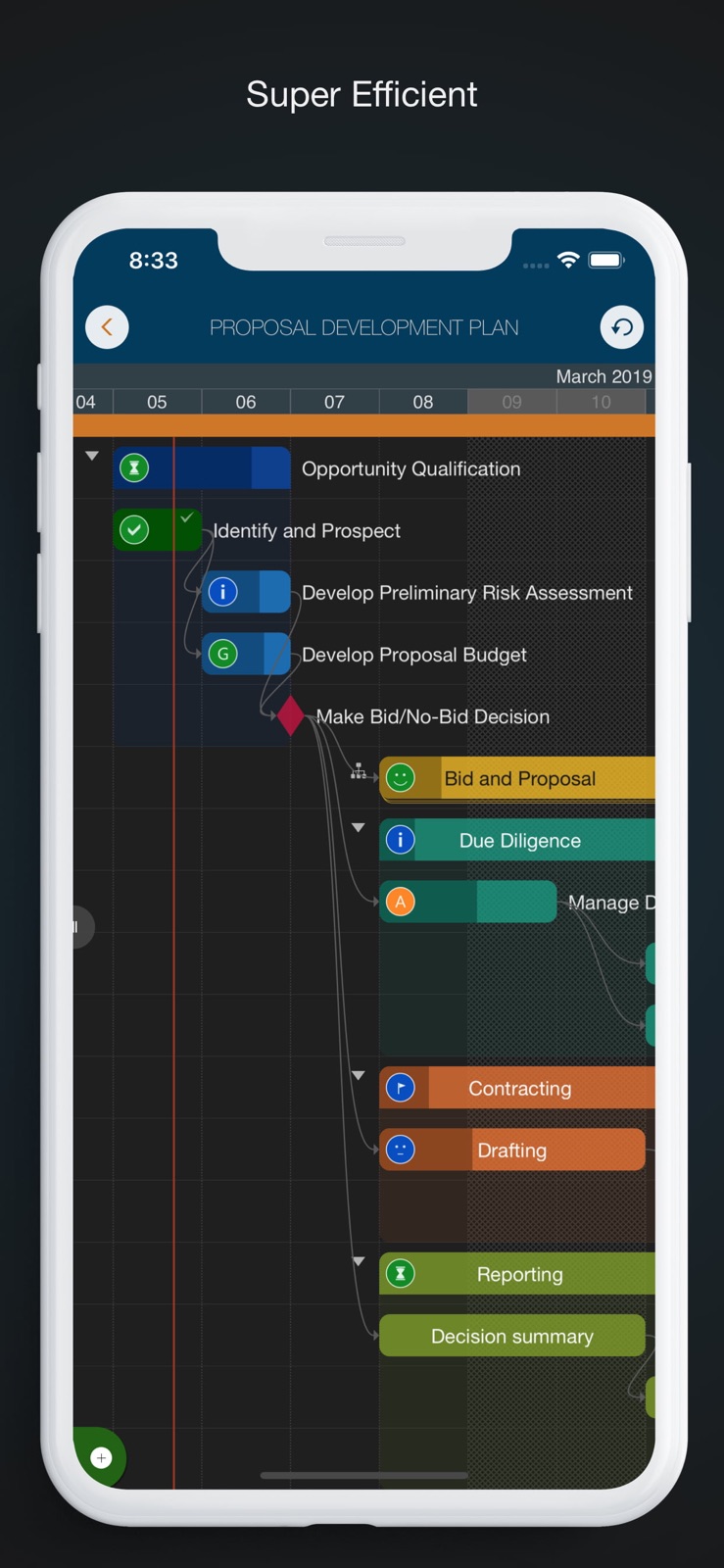
10 store screenshots


Pricing & paywalls
App Store
Shown for US
- Price: $8.99
Ratings & reviews
App Store
Shown for US
-
5/5Amazing app for fair price
It’s rare for an app of this quality to be available for a 1-time purchase. It’s absolutely worth the plunge. Gantt charts can be quite complex, so it’s remarkable how intuitive this app makes managing them, particularly with how small my phone’s screen is compared to an iPad. I am a market research professional and have been using the app every day for a year as a personal tracker for the status of survey fieldwork. I can’t speak to any collaboration features or the desktop app, but for my purposes, it gets a strong recommendation.
Ferrpo · 6 Aug 2026
-
2/5No Syncing Across Devices
Would have been five star if has syncing. When you create a file. That file is in the local app of that device. It’s not synced to another device. Not in iCloud either. You have to export it into iCloud manually. And then you think the changes would just reflect in the iCloud file right? Nope. The iCloud file is a copy of the in-app file. So when you open the file in iCloud on another device, it would be the version of the file at the moment you exported it. And you would have two copies on two separate devices. Sounds confusion right? Because it is. It’s basically the same saving and syncing mechanism from early 2010s, but without the save button beyond export. Workaround for syncing: 1. Make sure you export the file to iCloud when you done working or viewing a project on each device, and export the file to replace the old file. 2. Close the app after you have exported, as your edit won’t then be saved on the iCloud copy. 3. When you open that file on another device, it creates a local in-app file. You are no longer working with the iCloud file. So export and replace the iCloud file afterwards, and close the in-app file, so that you don’t accidentally mistaken it as the newest version when you have worked on another copy of the file on another device. In 2026, this is still how the “syncing” mechanism of this works. Tell me if I’m missing anything. I assume it’s not a difficult fix, to just have one source of truth. Otherwise the app has been great. But the lack of syncing, or even saving creates too much risk in the PM work.
Daniel_ZX · 6 Aug 2026
-
1/5Beware. There is another version!
Update: the developer responded with inane cut-and-paste. Clearly my review is titled to acknowledge the issue. My point is that I am certain most serious users are iPad, and Apple store shows your iPhone version first or only. My review stands because you dont have the integrity to boldly say this is this the wrong version for iPad. I purchased this APP for my iPad and the first thing that I noticed is that the APP is not only optimized for iPhone, but that if you do not own an iPhone, the APP will still run on your iPad, but it will be cumbersome and difficult to use. Personally, I always carry my iPad with me. The thought of trying to use Gantt charts on a tiny phone screen is really anathema. What real function could you hope to gain? Now that I am an older gent, I don’t use my phone for any financial or business inquiry. All of that is done on my iPad where data can be displayed in a functional fashion. To me this version, is a total gimmick. If you see it first on the search list on Apple store, keep scrolling down, they have a superior iPad version that is twice the price, but actually works the way that the iPhone promises but does not deliver. If you accidentally purchase this version this version and want to upgrade to the iPad version, there is no Customer Service or Support. The seller is unresponsive. Their site says that you can purchase both, but no refunds. I have tried, but in the long run, I paid almost $30 for the iPad version. I like it, it works great. STAY AWAY from this version. Please.
Squirrel whispers · 6 Aug 2026
-
4/5Good portable replacement for MS Project.
I’m a Technical Project Manager, Product Manager and ScrumMaster. Having this app on my phone really helps me plan, maintain and adjust resources when I’m away from my laptop. The UX feels like Microsoft Project without the complex overhead. I’ve been using this for nearly a month to manage personal and work relate projects. It’s simple to use, intuitive for beginners and have the common used fields out of the box. The major issue I have and the reason stopping me from giving it 5 stars is that the app crashes when trying to add two or more resources. The crash is constant and very annoying. Luckily the last change does get saved before it crash so you don’t have to redo things.
tonytruong0320 · 6 Aug 2026
-
5/5Used for Project Management Capstone
This is a simple, effective and surprisingly powerful scheduling software that can be used in lieu of MS Projects (and on the mobile platform). Since graduating, I have used on real world projects as a consultant, keeping myself more organized and efficient. I would like to see a more precise scheduling options that would allow to schedule tasks as hours instead of days to complete a single tasks. But the overall usability of this app results in a 5 star rating.
Frozencoastie · 6 Aug 2026
Privacy & accessibility
App Store
Privacy
- Data Not Collected Developer declared
Accessibility
No accessibility labels collected yet.
Versions
App Store
-
10.0
QuickPlan apps are being enhanced continuously. This release brings some new task fields to archive task date information and input url to link outside resource. - Four new archive fields to archived task Start, Finish, Duration and Working days, and App supports to show the active date fields in different color by comparing to the archived data. - Two URL fields Please check out the details at https://goplan.app/documents/ios/releases/10-0
-
10.1
QuickPlan apps are being enhanced continuously. This release brings the iOS 13 dark mode support, enhancements on file sharing and importing. - iOS 13 Dark Mode support. - Importing from Files app. - Manually backup. - User Interface enhancements. https://goplan.app/documents/ios/releases/10-1-phone
-
10.2
- Welcome View improvements - Minor bug fixes
-
11.0
What's New: - Highlight the selected row on the chart. - App Icon updated.
-
12.0
We create apps for you to have a more productive day, the most popular project planning app for iPadOS is now better than ever! What's new: - More color options. - More PDF page size options. - Cost columns wider width option. https://goplan.app/documents/ios/releases/12-0
-
13.0
We create apps for you to have a more productive day. The most popular project planning app for iOS is now better than ever! What's new: - New widget for iOS 14 (https://quickplan.app/documents/ios/user-manual/widget-iphone) - UI optimized for the new iPhones
-
13.1
We create apps for you to have a more productive day. The most popular project planning app for iPadOS is now better than ever! What's new: - New qpp document icon - Project contact management enhanced with better photo quality
-
13.2
We create apps for you to have a more productive day. This version expands the maximum outline level.
-
15.0
We develop apps for you so you can have a more productive day. - Compatible with iOS 15 - Stability and performance improvement
-
15.1
What's New: - Widget updates - Stability and performance improvement
-
15.2
What's New: - Support for editing notes for project members. - Tiny improvements to UI.
-
15.3
UI Optimized for iPhone 14 with Dynamic Island and updated for compatibility with iOS 16.
-
17.0
We are always looking for ways to make QuickPlan more powerful and easy to use for your project planning, management and execution. In this version, we have made a major enhancement that we think you will love: - We have upgraded the baseline feature to archive the task work and costs fields in addition to the date and duration fields. Now you can compare the date, duration, work and costs fields between the actual and the archived data. This will allow you to measure the variance and performance of your project in more detail. We hope you enjoy this enhancement and find it useful for your project management.
-
17.1
This update contains bug fixes and performance improvements.
-
17.2
This update contains bug fixes and performance improvements.
-
17.3
· 17 May 2026
Bug fixes and performance improvements.
-
8.1
"TODAY" enhancements: ・ Up to 5 projects can be included in "TODAY" project list ・ Today Widget be compatible with iOS10 ・ Local Notification (for iOS 10 only). Fire local notification to show the summary of today in-processing tasks "TODAY" is the feature to present the list of "in-processing tasks at today" via ・ Today widget ・ iOS Notification ・ In the home view of QuickPlan app For your choice to get task summary the way you like Details please visit http://www.quickplan.xyz/documents/quickplan-for-ios/releasenotes/quickplanhd81/
-
8.2
The UI has been adapted to take full advantage of iPhone X We're always working to improve your experience on OrgChart through new features and improvements across the product. Follow our Product Updates at @iosmobilinked. Send us any feedback via the in-app support.
-
8.5
What's New ● New option of task link line display style. ● New option to respect the being created task link (Automatically change the date of successor task when creating task link). ● New date display formats ● New option to keep the new task date be same as the date of the previous task Please check out the details at http://www.quickplan.xyz/documents/quickplan-for-ios/releasenotes/quickplan-ios-8-5/
-
8.6
What's New ● New PDF exporting option to show two lines of content on taskbar. ● Tiny bug fixes. Please check out the details at http://www.quickplan.xyz/documents/quickplan-for-ios/releasenotes/quickplan-ios-8-6/
-
8.7
What's New: 1. Quick Look Support - Preview exported PDF, Excel and Image file 2. Tiny Bug Fixes Please check out the release notes at https://quickplan.app/documents/ios/releases/8-7
-
8.8
To be compatible with QuickPlan for macOS 3.0 - "Simple Linked List" link type start to support multiple predecessors and successors. https://quickplan.app/documents/ios/releases/8-8
-
8.9
Thanks for choosing QuickPlan. This release brings support to iPhone XM, XS and XR.
-
9.0
This new release introduces the simple dark mode. Please check out the details at https://quickplan.app/documents/ios/releases/9-0-phone
-
9.1
QuickPlan for iPhone 9.1 brings some tiny enhancements.
Alternatives
- Project Office X: Gantt chart — Same category + similar ratings
- Gantt chart AI planner Ingantt — Same category + similar ratings
- PlanXT- Scheduling,Gantt Chart — Same category + similar ratings
- Merlin Project: Gantt + Kanban — Same category + similar ratings
Availability by market
- US
Data quality & evidence
- Page completeness
- Live store listing
- Last verified
- 6 Aug 2026
- Sources
- App Store
- Independent summary has not been published yet.