
Quick verdict
- What it is
- Store information collected; independent summary not yet available.
- At a glance
-
- From $9.99/mo
- Free to download
- In-app purchases
Categories and search queries
Official categories
- Business
- Productivity
AppCorpus categories
Key functions
| Function | Availability | Access | Scope | Evidence |
|---|---|---|---|---|
| Family Sharing | Yes | Unknown | App Store | Store published |
| Free app | Yes | Free | — | Store published |
| In-app purchases | Yes | Limited free | — | Store published |
Screens
App Store
29 store screenshots

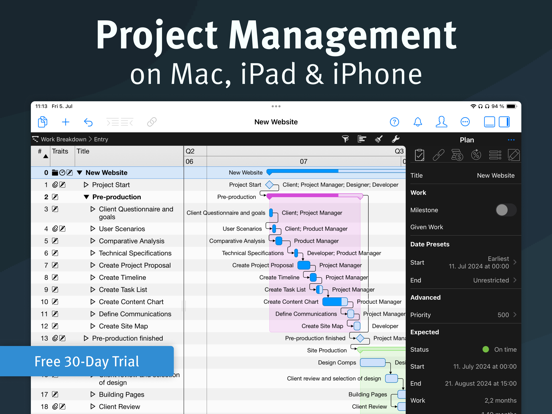


Pricing & paywalls
App Store
- Monthly Subscription — $9.99/month
- Monthly Subscription — $99.99/year ($8.33/mo)
Ratings & reviews
App Store
-
4/5Fantastic PM Tool / ...with some output bugs
Working still with the trial version, but will be subscribing. Great tool for plotting out complex projects, durations, dependencies. Very frictionless touch interface. Perfect integration of Kanban sorting and the report creation rapidly creates meaningful snapshots of project status for distribution to project teams. I work in MS Project on the PC, and have OmniPlan on the iPad. Merlin Project is far and away the best of them when it comes to on screen planning, having a very powerful tool at your disposal. Kanban integration and Reports far surpass both of the others. But...... Project output to pdf, print etc. is a work in progress and creates a pretty big stumbling block when it comes to distributing all of the great information that’s possible to generate in this app. Font color changes to white or disappears. Reports crash when exporting to RTF, text disappears altogether when converting to PDF. Best I’m able to do is export to MS Project which is a program I would love to never use again.. I contacted tech support a few times, they were incredibly responsive and are clearly working on further development. I’m rooting for them. Despite the output bugs, the tool and the team that made it are too good not to support. Incredibly powerful for PMs on complex projects. Hope they work out the bugs soon. Willing to help if I can.
mclnelson · 6 Aug 2026
-
5/5Move over MS Project!
I have been working with MS Project for a number of years and in my search for something compatible with iOS and Mac 8 came across this jewel. Simple and straightforward without sacrificing the needed details of running a project of any sort. After the trial version I downloaded it to my iPad Pro and iPhone and now I am using only Merlin for my side hustles in Project Management. I look forward to the updates where I can customize the columns.
mikejoerod · 6 Aug 2026
-
1/5Lost 2 hours of customization and updates
I have been using Merlin Project for 2 weeks now only on my iPad. I tolerate frequent crashes (e.g. multiple crashes within 1 or 2 hours time frames). But so far, the crashes have only resulted in the loss of the last update. I am only using the app locally on my iPad; no synch with server or iCloud. Then today, I spent about 2 hours adding custom fields, groups, filters, and designing reports. After the last crash, ALL of my customizations were gone (filters, groups, custom fields and their data). There appears to be no way to restore to an earlier version of the project from today. I was considering buying 2 licenses (1 for work, 1 for personal) because they are separate Apple IDs, but now I can’t imagine paying their licensing feeds with the risk of losing my work from these crashes with no backup or restore. And, I am experiencing the crashes on both iPads (Apple IDs) so this is not a machine dependent issue, this is an issue with the stability of the app.
PCB Reviews · 6 Aug 2026
-
3/5Feature-packed
There are so many features in this app and it’s a lot easier to use than some of the others I have tried. I really like the reports and ability to create custom reports which could save a lot of time I currently waste spinning the same information for different groups. ** What I am concerned about is the apps stability ** I downloaded the app yesterday and have experienced several crashes (the screen goes away) while I was trying out the report customizations. For the cost of this app, I do not expect it to crash when looking at the sample projects and going through the different settings and options.
Pryn625 · 6 Aug 2026
-
5/5What I’ve waited for
Merlin was the PM tool I used through my Masters Degree Project Management courses because I wanted to go as “Mac” as possible. The port of that amazing product to iOS in a full-featured thrills me. Some of the areas requires a little more thinking (like how you have to hold on the + button to add an attachment), but I cannot says how thrilled I am!
R2ick · 6 Aug 2026
Privacy & accessibility
App Store
Privacy
- Data Not Linked to You — Analytics — Diagnostics — Crash Data Developer declared
- Data Not Linked to You — Analytics — Usage Data — Product Interaction Developer declared
- Data Not Linked to You — Diagnostics Developer declared
- Data Not Linked to You — Usage Data Developer declared
Accessibility
No accessibility labels collected yet.
Versions
App Store
-
8.0.1
Fixed issues: - Improved general stability. - When printing, some printers produced only blank pages.
-
8.0.2
Fixed issues: - Improved general stability. - The manual format settings for the "Complete" column did not work.
-
8.0.3
Fixed issues: - Improved general stability.
-
8.1.0
New features: - On the iPad, the style inspector of the Mac version is now also available. Use it to design the look of all view elements and define which fields they derive their content from. To open the new inspector, tap the brush icon in the toolbar above a view. - AirPlay (screen sync) lets you display content from your iPad on an external screen. Normally, this mirrors the entire interface. With the new full screen icon, you can now display individual project views full screen and in full resolution. The icon is only visible as long as AirPlay is active. - In the report view, you can now also insert new modules, just like on the Mac. - In the report view settings, you can set the page size, orientation, and margins. Fixed issues: - Improved general stability.
-
8.1.2
Fixed issues: - Improved general stability. - When importing MS Project files, tasks without work could have a wrong completion.
-
8.1.5
Fixed issues: - Improved general stability. - The style editor for net plan cells did not allow to set the "images" format option for the resources field. - Dragging the separator between outline and Gantt chart did not always work correctly when screen synchronization was active. Changes: - Histograms for budget/cost balance fields are now using the "Time Phase Normal" and "Time Phase Critical" style conditions. By default, histogram bars now appear in red or green, depending on whether the budget is exceeded in the corresponding time phase.
-
8.1.6
Fixed issues: - Improved general stability. - The Kanban column for empty status values was ordered last not first. - The application could hang after inserting remaining work. - Sometimes labels were cut off in the Netplan view.
-
8.1.7
Fixes: - Improved general stability.
-
8.1.8
New features: - Added link to Merlin Project discussion forum to the help menu. Fixed issues: - Improved general stability. - Syncing Merlin Project files with a Mac running Dropbox 160.4.4703 or later did not always work. - After unlocking the iPad, the content of a project could be shifted towards the left upper corner of the screen. - The option "Resize Columns" on project view report modules did not always work. - Labels in chart reports could overlap. - Opening the style editor via the context menu did not always pre-select a matching style condition.
-
8.1.9
Fixed issues: - Improved general stability. - Inspector controls for subtitles are not multi-line when text grows longer. - The style inspector did not show inherited colors.
-
8.2.0
New fields for the work-breakdown view, the assignments view and the resources view: - Expected Work Variance: Contains the net difference between Expected Work and Planned Work. A positive value means more work compared to the plan. - Expected Duration Variance: Contains the net difference between Expected Duration and Planned Duration. A positive value means a longer duration compared to the plan. - Expected Start Variance: Contains the net duration between Planned Start and Expected Start. A positive value means a delay in the start. - Expected End Variance: Contains the net duration between Planned End and Expected end. A positive value means a delay at the end. - Expected Cost Variance: The difference between Expected Costs and Planned Costs. A positive value means increased costs compared to the plan. More flexibility in the assignments view: In the assignments view, you can now also display selected fields of the associated activities in rows for assignments. The following new columns are available for this purpose: - Code (Activity) - Notes (Activity) - Tags (Activity) - WBS Code (Activity) - # (Activity) In addition, all user-defined activity fields are available as columns and are also identified by the suffix "(Activity)". You can also display the corresponding fields of the assigned resources in the work-breakdown view. The columns are marked with the suffix "(Resource)". More overview in the work breakdown view: - Customize the display of assigned resources via the context menu of the resource column. With the new "Show content" option, you can now select whether column content is only displayed on the activities or also on activity groups. - Via the context menu of the comment column, you can now set whether the resource names in the column are displayed in full or only with abbreviations. You can also select the format for date and time values. Changes: - The minimum operating system is now iOS 15. - The view settings inspector now closes automatically when you select a new table row. - If you enter actual work values without a time unit in the inspector, the unit is automatically taken from other fields already filled in. - When setting up the first user, Merlin Project now automatically asks you whether guests should have full access, read-only access or no access at all. - If activities are still assigned when deleting resources, a warning dialog is now displayed. - Timescale tiers in Gantt charts can now also be selected via the "Display > Timescale > Tiers" menu. - Objects can now also be moved by dragging when the help function is activated. - When adding new columns, you can now select multiple list entries. Fixed issues: - Documents from some MindManager versions could not be imported. - File attachments could receive an incorrect timestamp. - The earned-value BCWP was not always calculated correctly. - When changing print settings, the print preview did not always adjust correctly. - Reports with charts for activities with very long titles could not be exported or printed. - CTRL clicks did not work in the style inspector. - No values could be set for certain date fields in filters. - General stability has been improved.
-
8.3.0
New Features: - The column inspector now supports multiple selection and allows to add, remove or change multiple columns at once. - The timescale in the Gantt chart can now display year, quarter and week numbers based on fiscal years. In which month your financial year begins can be defined in the project settings. If you then select a row in the Gantt timescale, you can activate the display of fiscal years in the inspector. Financial years are only available in formats that do not contain days or months. Fixes: - Improved general reliability.
-
8.3.1
Fixed issues: - Improved general stability.
-
8.3.2
Fixed issues: - Improved general stability.
-
8.3.3
Fixed issues: - Improved general stability.
-
8.3.4
Fixed issues: - Improved general stability. - Some MindManager documents could not be imported. - On macOS 14 or later, shadows could be drawn incorrectly in the Gantt and netplan views.
-
8.3.5
Fixed issues: - Improved general stability.
-
8.3.6
Fixed issues: - Improved general stability.
-
9.0.0
New Features: Intelligent Assistant: Create new projects from a simple description using artificial intelligence. The assistant automatically generates the activity structure, dependencies, and milestones, estimates efforts and risks, and assigns necessary resources. This powerful new feature is driven by ChatGPT and is included in the Merlin Project subscription. During the free 30-day trial period, creating new documents with the assistant is limited to ten projects per day. Dynamic Baseline: Since version 2.0, Merlin Project has allowed you to compare the current state of a project with an original plan. Previously, these planned values were determined with a clever trick: Merlin Project calculated the project schedule as if the user had not entered any actual values in the current activity structure. This approach provided good results in most cases. However, when the scope changed significantly during a project, this technique could reach its limits. With the new dynamic baseline, you can now accurately compare the current state of your project with any older state. Simply set a date from the past in the "Reference Date" field in the project settings, and all planned fields will show the values expected at that previous point in time. Merlin Project dynamically determines these values, so you don't need to remember to create a baseline in the past. This is possible because every Merlin document already contains the complete history of a project. The start dialog includes a new icon that lets you easily access additional project templates on the ProjectWizards website. Changes: The user interface has a fresh look. Familiar symbols and icons appear with the same high quality but in a new design. The old, insecure FTP protocol for automatically publishing project content has been replaced with SFTP. If you previously used FTP, please create a new SFTP account in the settings of Merlin Project and use it for your publications. Bug Fixes: General stability has been improved.
-
9.0.1
Fixed issues: - Improved general stability.
-
9.0.3
Fixed issues: - Improved general stability.
-
9.1.0
New Features: - Added native support for running Merlin Project on Vision Pro (visionOS). - Support opening of multiple windows for a single project document in Stage Manager. - Modernized context menus and added icons - Modernized main toolbar Fixed Issues: - Improved general stability.
-
9.1.1
Fixed issues: - Improved general stability.
-
9.1.2
New Features: - Added main menu item to switch workarea. - Added main menu item to insert column. Fixed issues: - Improved general stability.
-
9.2.0
· 2 Jul 2026
FIXED ISSUES Improved general stability.
Alternatives
- Project Office X: Gantt chart — Same category + similar ratings
- OmniPlan 4 — Same category + similar ratings
- iProject Viewer — Same category + similar ratings
- Project Plan 365 — Same category + similar ratings
- TeamGantt Companion — Same category + similar ratings
Availability by market
- US
Data quality & evidence
- Page completeness
- Live store listing
- Last verified
- 6 Aug 2026
- Sources
- App Store
- Independent summary has not been published yet.