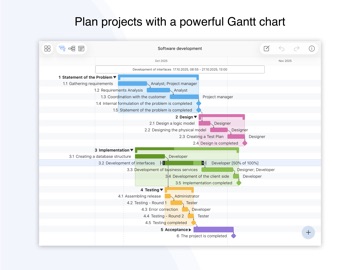
AppCorpus MCP gives your agent current app data, prices, screens, features and sources.
View JSON
GET /api/v3/apps/1639565811
{
  "app_id": 1639565811,
  "canonical_url": "https://appcorpus.com/apps/project-office-x-gantt-chart-1639565811",
  "identity": {
    "name": "Project Office X: Gantt chart",
    "slug": "project-office-x-gantt-chart",
    "developer": {
      "name": "DK CONSULTING, TOV",
      "url": "https://appcorpus.com/developers/dk-consulting-tov-developer_97f47cc87fb55f4f9bc9d9e9287516d4"
    },
    "icon_url": "https://is1-ssl.mzstatic.com/image/thumb/Purple211/v4/d1/ce/33/d1ce33cf-5980-8960-99f2-e7807e461018/AppIcon-0-0-1x_U007epad-0-11-0-85-220.png/512x512bb.jpg",
    "stores": [
      "apple"
    ],
    "platforms": [
      "iphone",
      "ipad"
    ],
    "status": {
      "state": "active",
      "label": "Active",
      "last_checked": "2026-08-06",
      "last_checked_label": "6 Aug 2026",
      "banner": null,
      "region_note": null
    }
  },
  "listings": [
    {
      "store": "apple",
      "status": "ACTIVE",
      "url": "https://apps.apple.com/us/app/project-office-x-gantt-chart/id1639565811?uo=4",
      "rating": 1.0,
      "rating_count": 2,
      "formatted_price": "Free",
      "is_free": true,
      "has_iap": true,
      "has_subscription": false,
      "version": "2.11",
      "updated": "2026-07-22",
      "currency": "USD"
    }
  ],
  "summary": {
    "one_liner": null,
    "summary": null,
    "best_for": [],
    "not_for": [],
    "status": "fallback",
    "at_a_glance": [
      "From $4.99/mo",
      "Free to download",
      "In-app purchases"
    ]
  },
  "categories": {
    "official": [
      "Business",
      "Productivity"
    ],
    "appcorpus": [
      {
        "category_id": "business",
        "label": "Business",
        "url": "https://appcorpus.com/categories/business"
      },
      {
        "category_id": "productivity",
        "label": "Productivity",
        "url": "https://appcorpus.com/categories/productivity"
      }
    ]
  },
  "use_cases": [],
  "features": [
    {
      "capability_id": "family_sharing",
      "label": "Family Sharing",
      "availability": "yes",
      "access_level": "unknown",
      "scope": "App Store",
      "evidence": "Store published"
    },
    {
      "capability_id": "free_app",
      "label": "Free app",
      "availability": "yes",
      "access_level": "free",
      "scope": null,
      "evidence": "Store published"
    },
    {
      "capability_id": "in_app_purchases",
      "label": "In-app purchases",
      "availability": "yes",
      "access_level": "free_limited",
      "scope": null,
      "evidence": "Store published"
    }
  ],
  "pricing": [
    {
      "store": "apple",
      "formatted_price": "Free",
      "is_free": true,
      "has_iap": true,
      "has_subscription": false,
      "currency": "USD",
      "market": "us",
      "last_verified": "2026-08-06",
      "rows": [
        "iOS Standard Monthly — $4.99/month",
        "macOS Standard Monthly — $4.99/month",
        "macOS Standard Monthly — $47.99/year ($3.99/mo)",
        "macOS + iOS Standard Monthly — $7.49/month",
        "iOS Pro Monthly — $9.99/month",
        "macOS Pro Monthly — $9.99/month",
        "macOS Pro Monthly — $95.99/year ($7.99/mo)",
        "macOS + iOS Pro Monthly — $14.99/month",
        "macOS + iOS Pro Monthly — $149.99/year ($12.49/mo)",
        "Free Trial — $0.00"
      ]
    }
  ],
  "screens": [
    {
      "url": "https://is1-ssl.mzstatic.com/image/thumb/PurpleSource221/v4/88/e2/f4/88e2f44a-2d24-8cf5-f488-9ce8da39b2e9/Project_X_13_1.png/1600x1600bb.jpg",
      "store": "apple",
      "platform": "ipad",
      "alt": "Project Office X: Gantt chart ipad screenshot 1"
    },
    {
      "url": "https://is1-ssl.mzstatic.com/image/thumb/PurpleSource221/v4/88/e2/f4/88e2f44a-2d24-8cf5-f488-9ce8da39b2e9/Project_X_13_1.png/360x480bb.jpg",
      "store": "apple",
      "platform": "ipad",
      "alt": "Project Office X: Gantt chart ipad screenshot 2"
    },
    {
      "url": "https://is1-ssl.mzstatic.com/image/thumb/PurpleSource221/v4/03/62/56/03625670-59fd-543a-64e6-0dfc43fa8499/Project_X_13_2.png/1600x1600bb.jpg",
      "store": "apple",
      "platform": "ipad",
      "alt": "Project Office X: Gantt chart ipad screenshot 3"
    },
    {
      "url": "https://is1-ssl.mzstatic.com/image/thumb/PurpleSource221/v4/03/62/56/03625670-59fd-543a-64e6-0dfc43fa8499/Project_X_13_2.png/360x480bb.jpg",
      "store": "apple",
      "platform": "ipad",
      "alt": "Project Office X: Gantt chart ipad screenshot 4"
    },
    {
      "url": "https://is1-ssl.mzstatic.com/image/thumb/PurpleSource211/v4/b9/8e/ed/b98eed79-3b1c-2669-6402-55471e0149b0/Project_X_13_3.png/1600x1600bb.jpg",
      "store": "apple",
      "platform": "ipad",
      "alt": "Project Office X: Gantt chart ipad screenshot 5"
    },
    {
      "url": "https://is1-ssl.mzstatic.com/image/thumb/PurpleSource211/v4/b9/8e/ed/b98eed79-3b1c-2669-6402-55471e0149b0/Project_X_13_3.png/360x480bb.jpg",
      "store": "apple",
      "platform": "ipad",
      "alt": "Project Office X: Gantt chart ipad screenshot 6"
    },
    {
      "url": "https://is1-ssl.mzstatic.com/image/thumb/PurpleSource221/v4/2e/2b/93/2e2b93db-d82d-9a57-5bfe-7de23cd6068e/Project_X_13_4.png/1600x1600bb.jpg",
      "store": "apple",
      "platform": "ipad",
      "alt": "Project Office X: Gantt chart ipad screenshot 7"
    },
    {
      "url": "https://is1-ssl.mzstatic.com/image/thumb/PurpleSource221/v4/2e/2b/93/2e2b93db-d82d-9a57-5bfe-7de23cd6068e/Project_X_13_4.png/360x480bb.jpg",
      "store": "apple",
      "platform": "ipad",
      "alt": "Project Office X: Gantt chart ipad screenshot 8"
    },
    {
      "url": "https://is1-ssl.mzstatic.com/image/thumb/PurpleSource221/v4/ac/1a/14/ac1a1453-84ff-4db2-dd41-620a66bd195f/Project_X_13_5.png/1600x1600bb.jpg",
      "store": "apple",
      "platform": "ipad",
      "alt": "Project Office X: Gantt chart ipad screenshot 9"
    },
    {
      "url": "https://is1-ssl.mzstatic.com/image/thumb/PurpleSource221/v4/ac/1a/14/ac1a1453-84ff-4db2-dd41-620a66bd195f/Project_X_13_5.png/360x480bb.jpg",
      "store": "apple",
      "platform": "ipad",
      "alt": "Project Office X: Gantt chart ipad screenshot 10"
    },
    {
      "url": "https://is1-ssl.mzstatic.com/image/thumb/PurpleSource211/v4/d2/9f/8b/d29f8b3f-a73b-1c9a-0336-15e33d98b61f/Project_X_13_6.png/1600x1600bb.jpg",
      "store": "apple",
      "platform": "ipad",
      "alt": "Project Office X: Gantt chart ipad screenshot 11"
    },
    {
      "url": "https://is1-ssl.mzstatic.com/image/thumb/PurpleSource211/v4/d2/9f/8b/d29f8b3f-a73b-1c9a-0336-15e33d98b61f/Project_X_13_6.png/360x480bb.jpg",
      "store": "apple",
      "platform": "ipad",
      "alt": "Project Office X: Gantt chart ipad screenshot 12"
    },
    {
      "url": "https://is1-ssl.mzstatic.com/image/thumb/PurpleSource221/v4/22/26/89/222689a9-4bf1-8ead-3b9e-88c8d8586951/Project_X_13_7.png/1600x1600bb.jpg",
      "store": "apple",
      "platform": "ipad",
      "alt": "Project Office X: Gantt chart ipad screenshot 13"
    },
    {
      "url": "https://is1-ssl.mzstatic.com/image/thumb/PurpleSource221/v4/22/26/89/222689a9-4bf1-8ead-3b9e-88c8d8586951/Project_X_13_7.png/360x480bb.jpg",
      "store": "apple",
      "platform": "ipad",
      "alt": "Project Office X: Gantt chart ipad screenshot 14"
    },
    {
      "url": "https://is1-ssl.mzstatic.com/image/thumb/PurpleSource211/v4/cf/cd/1d/cfcd1d7a-363c-3b84-b000-622d1a9d6320/Project_X_13_8.png/1600x1600bb.jpg",
      "store": "apple",
      "platform": "ipad",
      "alt": "Project Office X: Gantt chart ipad screenshot 15"
    },
    {
      "url": "https://is1-ssl.mzstatic.com/image/thumb/PurpleSource211/v4/cf/cd/1d/cfcd1d7a-363c-3b84-b000-622d1a9d6320/Project_X_13_8.png/360x480bb.jpg",
      "store": "apple",
      "platform": "ipad",
      "alt": "Project Office X: Gantt chart ipad screenshot 16"
    },
    {
      "url": "https://is1-ssl.mzstatic.com/image/thumb/PurpleSource221/v4/dd/fb/ea/ddfbeade-b487-57ab-8358-9f7e2f8e0e19/Project_X_13_9.png/1600x1600bb.jpg",
      "store": "apple",
      "platform": "ipad",
      "alt": "Project Office X: Gantt chart ipad screenshot 17"
    },
    {
      "url": "https://is1-ssl.mzstatic.com/image/thumb/PurpleSource221/v4/dd/fb/ea/ddfbeade-b487-57ab-8358-9f7e2f8e0e19/Project_X_13_9.png/360x480bb.jpg",
      "store": "apple",
      "platform": "ipad",
      "alt": "Project Office X: Gantt chart ipad screenshot 18"
    },
    {
      "url": "https://is1-ssl.mzstatic.com/image/thumb/PurpleSource211/v4/99/29/b4/9929b4fd-5de7-19d4-e313-95c695f27708/Project_X_13_10.png/1600x1600bb.jpg",
      "store": "apple",
      "platform": "ipad",
      "alt": "Project Office X: Gantt chart ipad screenshot 19"
    },
    {
      "url": "https://is1-ssl.mzstatic.com/image/thumb/PurpleSource211/v4/99/29/b4/9929b4fd-5de7-19d4-e313-95c695f27708/Project_X_13_10.png/360x480bb.jpg",
      "store": "apple",
      "platform": "ipad",
      "alt": "Project Office X: Gantt chart ipad screenshot 20"
    },
    {
      "url": "https://is1-ssl.mzstatic.com/image/thumb/PurpleSource221/v4/99/2c/6c/992c6cd1-e47e-2f5a-42db-bb656e4baf3e/Project_X_6.9_1.png/1320x1600bb.jpg",
      "store": "apple",
      "platform": "iphone",
      "alt": "Project Office X: Gantt chart iphone screenshot 21"
    },
    {
      "url": "https://is1-ssl.mzstatic.com/image/thumb/PurpleSource211/v4/85/1c/95/851c9582-2eee-2412-e280-d6a6429c219b/Project_X_6.9_2.png/1320x1600bb.jpg",
      "store": "apple",
      "platform": "iphone",
      "alt": "Project Office X: Gantt chart iphone screenshot 22"
    },
    {
      "url": "https://is1-ssl.mzstatic.com/image/thumb/PurpleSource211/v4/af/35/e0/af35e061-1331-0f64-6a72-c31f47556cec/Project_X_6.9_3.png/1320x1600bb.jpg",
      "store": "apple",
      "platform": "iphone",
      "alt": "Project Office X: Gantt chart iphone screenshot 23"
    },
    {
      "url": "https://is1-ssl.mzstatic.com/image/thumb/PurpleSource211/v4/49/b4/f6/49b4f671-66f0-bc6e-81a3-7b6cf2cd300c/Project_X_6.9_4.png/1320x1600bb.jpg",
      "store": "apple",
      "platform": "iphone",
      "alt": "Project Office X: Gantt chart iphone screenshot 24"
    },
    {
      "url": "https://is1-ssl.mzstatic.com/image/thumb/PurpleSource221/v4/0a/d0/85/0ad085ca-3a39-9b85-6f22-a831d08827cf/Project_X_6.9_5.png/1320x1600bb.jpg",
      "store": "apple",
      "platform": "iphone",
      "alt": "Project Office X: Gantt chart iphone screenshot 25"
    },
    {
      "url": "https://is1-ssl.mzstatic.com/image/thumb/PurpleSource221/v4/2c/74/48/2c74482b-a17f-3527-b9dd-f1dd2df11167/Project_X_6.9_6.png/1320x1600bb.jpg",
      "store": "apple",
      "platform": "iphone",
      "alt": "Project Office X: Gantt chart iphone screenshot 26"
    },
    {
      "url": "https://is1-ssl.mzstatic.com/image/thumb/PurpleSource211/v4/5c/04/31/5c043135-927d-66bc-1494-cc3548e39cee/Project_X_6.9_7.png/1320x1600bb.jpg",
      "store": "apple",
      "platform": "iphone",
      "alt": "Project Office X: Gantt chart iphone screenshot 27"
    },
    {
      "url": "https://is1-ssl.mzstatic.com/image/thumb/PurpleSource211/v4/d5/4f/0c/d54f0cbf-8a97-5d7c-e986-d1a8bc903fda/Project_X_6.9_8.png/1320x1600bb.jpg",
      "store": "apple",
      "platform": "iphone",
      "alt": "Project Office X: Gantt chart iphone screenshot 28"
    },
    {
      "url": "https://is1-ssl.mzstatic.com/image/thumb/PurpleSource221/v4/84/9c/52/849c524d-8456-7843-5cc8-3a9af3a953bb/Project_X_6.9_9.png/1320x1600bb.jpg",
      "store": "apple",
      "platform": "iphone",
      "alt": "Project Office X: Gantt chart iphone screenshot 29"
    },
    {
      "url": "https://is1-ssl.mzstatic.com/image/thumb/PurpleSource211/v4/b9/4e/13/b94e13d1-f3f2-62ad-078e-c4a7a4716eca/Project_X_6.9_10.png/1320x1600bb.jpg",
      "store": "apple",
      "platform": "iphone",
      "alt": "Project Office X: Gantt chart iphone screenshot 30"
    },
    {
      "url": "https://is1-ssl.mzstatic.com/image/thumb/PurpleSource221/v4/ec/20/85/ec20851c-15c9-9e78-9757-55402087acc4/Project_X_Mac_1.png/1600x1600bb.jpg",
      "store": "apple",
      "platform": "mac",
      "alt": "Project Office X: Gantt chart mac screenshot 31"
    },
    {
      "url": "https://is1-ssl.mzstatic.com/image/thumb/PurpleSource211/v4/37/ce/ee/37ceee73-9edf-40e0-c61f-3650e8f5da2c/Project_X_Mac_2.png/1600x1600bb.jpg",
      "store": "apple",
      "platform": "mac",
      "alt": "Project Office X: Gantt chart mac screenshot 32"
    },
    {
      "url": "https://is1-ssl.mzstatic.com/image/thumb/PurpleSource211/v4/f1/e6/27/f1e627b3-47e0-a9de-e11d-ffefd73bb2a5/Project_X_Mac_3.png/1600x1600bb.jpg",
      "store": "apple",
      "platform": "mac",
      "alt": "Project Office X: Gantt chart mac screenshot 33"
    },
    {
      "url": "https://is1-ssl.mzstatic.com/image/thumb/PurpleSource211/v4/7e/6b/e7/7e6be75f-213e-110f-2338-987ded182451/Project_X_Mac_4.png/1600x1600bb.jpg",
      "store": "apple",
      "platform": "mac",
      "alt": "Project Office X: Gantt chart mac screenshot 34"
    },
    {
      "url": "https://is1-ssl.mzstatic.com/image/thumb/PurpleSource221/v4/26/ee/14/26ee141f-5155-c4fc-8d88-f37d03b0d403/Project_X_Mac_5.png/1600x1600bb.jpg",
      "store": "apple",
      "platform": "mac",
      "alt": "Project Office X: Gantt chart mac screenshot 35"
    },
    {
      "url": "https://is1-ssl.mzstatic.com/image/thumb/PurpleSource221/v4/65/a5/d5/65a5d50b-155d-341b-407d-9f1668ec5d8d/Project_X_Mac_6.png/1600x1600bb.jpg",
      "store": "apple",
      "platform": "mac",
      "alt": "Project Office X: Gantt chart mac screenshot 36"
    },
    {
      "url": "https://is1-ssl.mzstatic.com/image/thumb/PurpleSource211/v4/17/c5/be/17c5bed0-fe06-afe3-5e88-472ccebcca37/Project_X_Mac_7.png/1600x1600bb.jpg",
      "store": "apple",
      "platform": "mac",
      "alt": "Project Office X: Gantt chart mac screenshot 37"
    },
    {
      "url": "https://is1-ssl.mzstatic.com/image/thumb/PurpleSource221/v4/4b/66/e6/4b66e6c5-6135-4d9b-5e27-9c47f8a32922/Project_X_Mac_8.png/1600x1600bb.jpg",
      "store": "apple",
      "platform": "mac",
      "alt": "Project Office X: Gantt chart mac screenshot 38"
    },
    {
      "url": "https://is1-ssl.mzstatic.com/image/thumb/PurpleSource221/v4/88/78/12/887812b3-893d-86c3-f47f-76cb6b7aaff8/Project_X_Mac_9.png/1600x1600bb.jpg",
      "store": "apple",
      "platform": "mac",
      "alt": "Project Office X: Gantt chart mac screenshot 39"
    },
    {
      "url": "https://is1-ssl.mzstatic.com/image/thumb/PurpleSource221/v4/44/70/9a/44709a2e-fe0d-f00a-36b1-eb7121b536de/Project_X_Mac_10.png/1600x1600bb.jpg",
      "store": "apple",
      "platform": "mac",
      "alt": "Project Office X: Gantt chart mac screenshot 40"
    }
  ],
  "ratings": [
    {
      "store": "apple",
      "average": 1.0,
      "count": 2,
      "market": "us",
      "observed_at": "2026-08-06",
      "reviews": [
        {
          "rating": 2,
          "title": "Not Flexible",
          "body": "The help function is terrible, it seems to only bring up blogs extolling the virtues of its own software. The related articles aren't any better. It is buggy. When I put extra tabs in the information bar, it keeps the Group indicator (triangle in the middle to the group name. just annoying. Test can't be formated, that is yiou can bold it or color it to help keep tasks stand out. I would think that for a iOS based Project Planning software for $100 USD, it would be more flexible. Bring back MacProject. By the way, I am a very experienced Microsoft Project user, so I know my way around complicated project planning software. Perhaps they have tried to simplify this one too much or maybe they will improve it in subsequent releases. I hope they do.",
          "author": "Whiskey Juliet Kilo",
          "date": "6 Aug 2026"
        },
        {
          "rating": 5,
          "title": "Finally! An Accessible Project Management Tool with Gantt",
          "body": "I'm so thrilled with this tool. It's difficult to find the sweet spot where Gantt-based project management tools are concerned. You seem to either get someting so basic that you might as well be doing it by hand, or something so complex that you need to take weeks or months to understand it. This allows you to be as basic or in-depth as you need, without infusing the process with a series complicated additional features that bog down management and reporting. If you're looking for an excellent, capable tool at a very good price point, I cannot recommend this one enough.",
          "author": "FLX Thom",
          "date": "6 Aug 2026"
        },
        {
          "rating": 2,
          "title": "Gave up after 2 hours",
          "body": "Documentation is spotty, no tips on mouse hover, and it's just confusing enough for you to spend a long time trying to figure it out. Sorry guys.",
          "author": "BryanTmann",
          "date": "6 Aug 2026"
        },
        {
          "rating": 5,
          "title": "Great project planning program",
          "body": "This tool has been such a help getting everything organized! I used to do all this in a spread sheet. Convenient and easy to use project management program.",
          "author": "andrewvolleyball",
          "date": "6 Aug 2026"
        },
        {
          "rating": 1,
          "title": "Not Microsoft Project!",
          "body": "I thought this was Microsoft Project but after struggling with some issues, more on this later. I found out this was made by a different company. Major issue is that everytime I enter the calendar to adjust the schedule the program readjusts my start dates. Completely useless program.",
          "author": "Socia Society",
          "date": "6 Aug 2026"
        }
      ]
    }
  ],
  "privacy": [
    {
      "store": "apple",
      "declarations": [
        {
          "title": "Data Not Collected",
          "detail": "",
          "source": "Developer declared"
        }
      ],
      "accessibility": [
        {
          "title": "Dark Interface",
          "detail": "SUPPORTED",
          "source": "Store published"
        },
        {
          "title": "Differentiate Without Color Alone",
          "detail": "SUPPORTED",
          "source": "Store published"
        },
        {
          "title": "Sufficient Contrast",
          "detail": "SUPPORTED",
          "source": "Store published"
        }
      ]
    }
  ],
  "changes": [
    {
      "store": "apple",
      "version": "1.1.27",
      "released_at": null,
      "notes": "Project Office X version 1.1.27 is a small bug-squashing and app-improving update to make sure the app runs smoothly."
    },
    {
      "store": "apple",
      "version": "1.1.28",
      "released_at": null,
      "notes": "Project Office X 1.1.28 is for iOS introduces compatibility with iOS 18.0: • Improved performance to support iOS 18.0; • Design improvements: groups titles are marked with bold font; • German localisation improvements."
    },
    {
      "store": "apple",
      "version": "1.1.29",
      "released_at": null,
      "notes": "Project Office X 1.1.29 is focused on app performance improvement and bug fixes."
    },
    {
      "store": "apple",
      "version": "1.1.30",
      "released_at": null,
      "notes": "Project Office X 1.1.30 is focused on app performance improvement."
    },
    {
      "store": "apple",
      "version": "1.1.31",
      "released_at": null,
      "notes": "Project Office X 1.1.31 is a quick update with fixed few issues that went awry and some fine-tuning to keep the app running at peak performance."
    },
    {
      "store": "apple",
      "version": "1.1.32",
      "released_at": null,
      "notes": "Project Office X 1.1.32 is a small update with some additional performance improvements we could make in the process."
    },
    {
      "store": "apple",
      "version": "1.1.33",
      "released_at": null,
      "notes": "Project Office X 1.1.33 is focused on app performance improvement and bug fixes: • Minor design improvements."
    },
    {
      "store": "apple",
      "version": "1.1.34",
      "released_at": null,
      "notes": "Project Office X 1.1.34 is a quick update with some fine-tuning to keep the app running at peak performance."
    },
    {
      "store": "apple",
      "version": "1.1.35",
      "released_at": null,
      "notes": "Project Office X 1.1.35 is a quick update to fix a couple details that went awry."
    },
    {
      "store": "apple",
      "version": "1.1.36",
      "released_at": null,
      "notes": "Project Office X version 1.1.36 is a small bug-squashing and app-improving update to make sure the app runs smoothly."
    },
    {
      "store": "apple",
      "version": "1.1.37",
      "released_at": null,
      "notes": "Project Office X Version 1.1.37 is an update with some additional performance improvements we could make in the process."
    },
    {
      "store": "apple",
      "version": "1.1.38",
      "released_at": null,
      "notes": "Project Office X 1.1.38 is a quick update to fix a couple details that went awry."
    },
    {
      "store": "apple",
      "version": "1.1.39",
      "released_at": null,
      "notes": "Project Office X 1.1.39 is a quick update with fixed few issues that went awry and some fine-tuning to keep the app running at peak performance."
    },
    {
      "store": "apple",
      "version": "2.0",
      "released_at": null,
      "notes": "Project Office X 2.0 for iOS introduces compatibility with iOS 26: • Improved performance to support iOS 26; • Full app redesign to create the most user-friendly interface fully compatible with Mac version; • Outline view added: visualisation of tasks, groups and milestones in a spreadsheet format. Friendly and intuitive interface helps you get things done fast and stays out of your way while doing so."
    },
    {
      "store": "apple",
      "version": "2.1",
      "released_at": null,
      "notes": "Project Office X version 2.1 is a small bug-squashing and app-improving update to make sure the app runs smoothly."
    },
    {
      "store": "apple",
      "version": "2.10",
      "released_at": null,
      "notes": "Project Office X version 2.10 is a small bug-squashing and app-improving update to make sure the app runs smoothly."
    },
    {
      "store": "apple",
      "version": "2.11",
      "released_at": "2026-07-22",
      "notes": "Project Office X version 2.11 is a small update focused on improving performance, enhancing stability, and fixing minor issues to ensure a smoother experience."
    },
    {
      "store": "apple",
      "version": "2.2",
      "released_at": null,
      "notes": "Project Office X Version 2.2 is an update with some additional performance improvements we could make in the process."
    },
    {
      "store": "apple",
      "version": "2.3",
      "released_at": null,
      "notes": "Project Office X 2.3 is a quick update to fix a couple details that went awry."
    },
    {
      "store": "apple",
      "version": "2.4",
      "released_at": null,
      "notes": "Project Office X 2.4 is focused on app performance improvement and bug fixes: • Added new labels on the Gantt chart: Resource Cost and Total Task Cost for clearer financial planning. • Improved the Paste behaviour for more predictable task placement. In the context menu: before - inserts before the group; after - inserts after the group if it’s collapsed, or as the last item inside if it’s expanded; inside - inserts into the group."
    }
  ],
  "alternatives": [
    {
      "app_id": 1043550230,
      "name": "Merlin Project: Gantt + Kanban",
      "url": "https://appcorpus.com/apps/merlin-project-gantt-kanban-1043550230",
      "reason": "Same category + similar ratings"
    },
    {
      "app_id": 742239541,
      "name": "Project Plan 365",
      "url": "https://appcorpus.com/apps/project-plan-365-742239541",
      "reason": "Same category + similar ratings"
    },
    {
      "app_id": 463199295,
      "name": "iProject Viewer",
      "url": "https://appcorpus.com/apps/iproject-viewer-463199295",
      "reason": "Same category + similar ratings"
    },
    {
      "app_id": 1460319993,
      "name": "OmniPlan 4",
      "url": "https://appcorpus.com/apps/omniplan-4-1460319993",
      "reason": "Same category + similar ratings"
    },
    {
      "app_id": 1275159012,
      "name": "TeamGantt Companion",
      "url": "https://appcorpus.com/apps/teamgantt-companion-1275159012",
      "reason": "Same category + similar ratings"
    }
  ],
  "evidence_summary": {
    "index_state": "S1",
    "evidence_level": 1,
    "level_label": "Live store listing",
    "indexable": true,
    "last_verified_at": "2026-08-06",
    "unknown_fields": [
      "Independent summary has not been published yet."
    ],
    "sources": [
      "App Store"
    ]
  },
  "availability_markets": {
    "live": [
      "us"
    ],
    "selected": "us",
    "note": null
  },
  "feature_events": {
    "events": []
  },
  "features_slice": {
    "plans": [
      {
        "code": "ios-standard",
        "label": "iOS Standard Monthly",
        "kind": "subscription",
        "status": "store_listed",
        "prices": [
          {
            "storefront": "us",
            "formatted": "$4.99",
            "billing_period": "monthly"
          }
        ],
        "trial": null
      },
      {
        "code": "macos-standard",
        "label": "macOS Standard Monthly",
        "kind": "subscription",
        "status": "store_listed",
        "prices": [
          {
            "storefront": "us",
            "formatted": "$4.99",
            "billing_period": "monthly"
          },
          {
            "storefront": "us",
            "formatted": "$47.99",
            "billing_period": "yearly"
          }
        ],
        "trial": null
      },
      {
        "code": "macos-ios-standard",
        "label": "macOS + iOS Standard Monthly",
        "kind": "subscription",
        "status": "store_listed",
        "prices": [
          {
            "storefront": "us",
            "formatted": "$7.49",
            "billing_period": "monthly"
          }
        ],
        "trial": null
      },
      {
        "code": "ios-pro",
        "label": "iOS Pro Monthly",
        "kind": "subscription",
        "status": "store_listed",
        "prices": [
          {
            "storefront": "us",
            "formatted": "$9.99",
            "billing_period": "monthly"
          }
        ],
        "trial": null
      },
      {
        "code": "macos-pro",
        "label": "macOS Pro Monthly",
        "kind": "subscription",
        "status": "store_listed",
        "prices": [
          {
            "storefront": "us",
            "formatted": "$9.99",
            "billing_period": "monthly"
          },
          {
            "storefront": "us",
            "formatted": "$95.99",
            "billing_period": "yearly"
          }
        ],
        "trial": null
      },
      {
        "code": "macos-ios-pro",
        "label": "macOS + iOS Pro Monthly",
        "kind": "subscription",
        "status": "store_listed",
        "prices": [
          {
            "storefront": "us",
            "formatted": "$14.99",
            "billing_period": "monthly"
          },
          {
            "storefront": "us",
            "formatted": "$149.99",
            "billing_period": "yearly"
          }
        ],
        "trial": null
      },
      {
        "code": "free-trial",
        "label": "Free Trial",
        "kind": "unknown",
        "status": "store_listed",
        "prices": [
          {
            "storefront": "us",
            "formatted": "$0.00",
            "billing_period": null
          }
        ],
        "trial": null
      }
    ],
    "features": [],
    "unknown_features": [
      "family_sharing"
    ],
    "data_cutoff": "6 Aug 2026"
  }
}