
Quick verdict
- What it is
- Store information collected; an Apoku editorial summary is not yet published.
- At a glance
-
- Free to download
Categories and search queries
Official categories
- Medical
- News
Apoku categories
Key functions
| Function | Availability | Access | Scope | Evidence |
|---|---|---|---|---|
| Free app | Yes | Free | Context-specific | Store published |
Screens
App Store
18 store screenshots
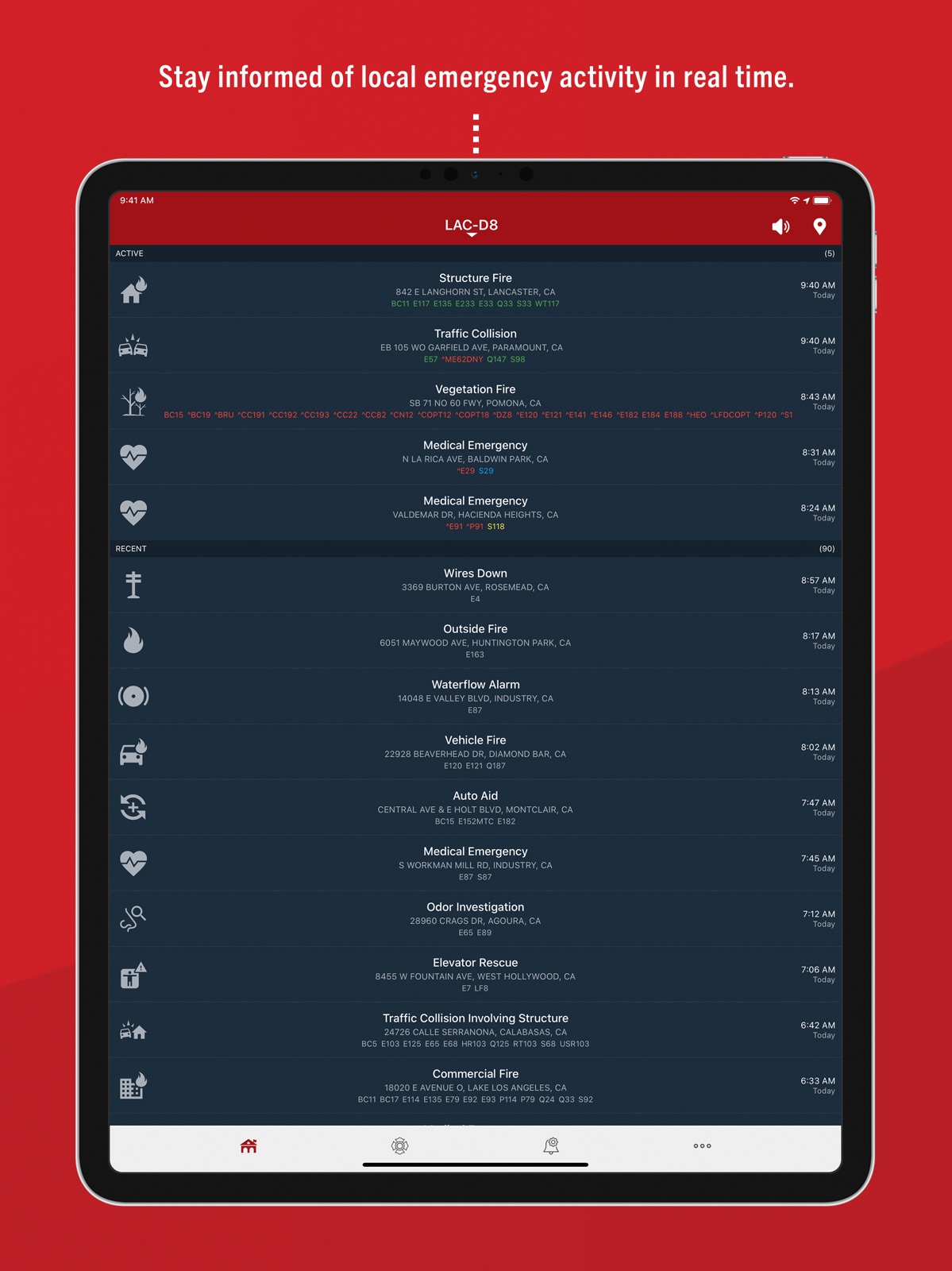
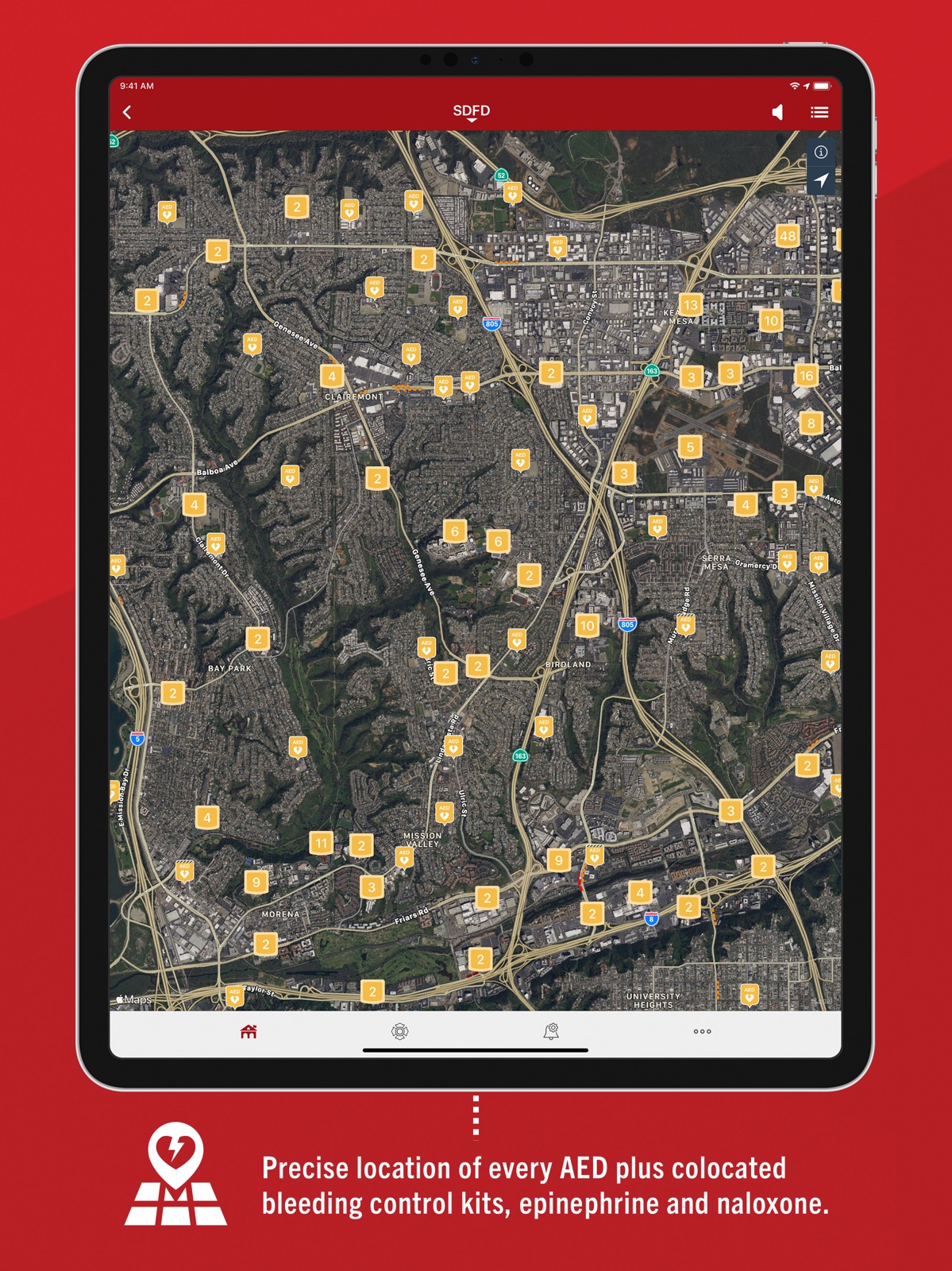
Pricing & paywalls
App Store
Shown for US
- Free to download
Ratings & reviews
App Store
Shown for US
-
5/5Reality and Gratitude
This app is helpful in many ways. The most important to me is knowing how hard, well and selflessly the agencies and each person, each role works to help our communities. People, pets, wildlife, structures. It’s incredibly grounding to know what’s going on around me and everyone should listen occasionally to hear reality and have gratitude for all people involved in emergencies. I see a lot of reviews mention avoid traffic and that is disheartening to me. Yes, it can help with that but there are other apps for that. This one lets us understand all that goes into a call for help. Police are excluded for good reason, some sensitive situations, as well. But I appreciate the work done by them just as much and understand why we cannot hear those details. The app also shows where AED devices are located which could help tremendously if someone is certified, knows how to use them and it’s needed before medics arrive. Same for anyone in need of CPR. This app allows us to help each other…appreciate those who save lives, wildlife, homes and other emergencies. It’s not just for traffic or gossip. It brings trivial problems into perspective and I always feel immense gratitude and amazement of coordination when I listen. It’s almost a form of meditation…not in the sense of using others’ emergencies but remembering and hearing reality. Some things we stress about aren’t crucial. I am grateful we have this app to know what’s going on, help if we can and adjust mindsets, feel gratitude.
Linz E R · 29 Sep 2026
-
5/5Pulse point likes
PulsePoint is an amazing app that allows first responders to be alerted and know what is going on in their local/ community. PulsePoint has allowed my volunteer fire company to respond to fires quicker. We have been alerted by PulsePoint while at the station many times for house fires, sometimes even minutes before the pagers go off! It also is amazing because it allows us to know who is en route and who is on scene. While all incorporating the calls onto a map. I believe it’s an game changing app and it will continue to be of good use in the future to fire company’s big and small around the United States! I highly recommend it to other first responders. Now to my wants... or wishes if you would! I would like to see more options of notifications especially for the new types of calls on the app. Maybe notifications for trash fires, vehicle fires, investigations, and gas leaks. I would also love it if the app would allow you too pick what areas you are notified for. My county is very large and my phone seems to go off a lot for fires I don’t necessarily want to be notified about😂 Any who, I would like to see maybe a area you could draw out or a by township alert system. Such as, I only want to be notified for fires, accidents and so on in the following townships blank, blank, and blank. And then I would only get a notification for them so when my PulsePoint goes off I know I’m probably going to an emergency, rather then being let down that the fire is 5 fire station locals away😭. And to conclude my Statement of words😂 I would like to pat PulsePoint on the back for being an amazing app! Good job people who made it and continue to make it great!
Alex Fighting 51st · 29 Sep 2026
-
5/5Some things that should be added.
First off, I love the new look of the app. It is very clean. Some things that should be added are like the ability to change what kind of mapping app you use when you hit the Navigate button. Second of all, you should have the ability to have custom tones for different calls. Some that you put in the app and then somewhere where other people can make custom tones. Next, you should have accounts, so that people can save calls, and have alerts for specific stations and departments. You also should include like an on scene button for CPR alerts that will send a notification to dispatch saying that someone is on scene that knows how to do COR. That good with the account idea, and the next idea which is an area where you have to be CPR certified to get CPR notifications. Have a list of places that you can get certified, but only allow people with CPR certification to get notified. Finally, I just want to say how much I love this app, it has helped me out so much with stuff. Thank you for making this app. It's awesome.
Johnny Calhoun · 29 Sep 2026
-
4/5Great app, but could be better
All of my coworkers use this app. About 1600 of them! It works great giving us a jump on emergencies. It’s almost perfect. Except....I don’t use it at night along with many others. There are way too many incidents throughout the night all over the city. I would be up all night if I leave on all of the notifications. It’s like listening to radio dispatch tone after tone and most of the time isn’t you. I would love to see settings for individual companies. For example, if you set your company as Engine 1, your phone would notify you if the incident involved E1. The phone could be set to ring, vibe and/or even turn on your phone light for a length of time. With today’s technology it shouldn’t be that difficult to accomplish. This would also be a great option during the day. Every report of a fire notification has fireman on edge for several seconds and we all pull our phones out to see the location. Most of the time it involves other stations and a majority of them end up being nothing. There is no reason to continuously alert members for a run they are not on for no reason, unless they choose too. Love the app and will continue to use it, but sorry PulsePoint, you are not user friendly when we need to get some sleep. Columbus, OH
Cbuke · 29 Sep 2026
-
4/5Changed to require location
Edit: The dev reached out and indeed you don’t need to allow location. The app does spam a couple pop-ups saying “Location Required - Pulse Point needs access to your location for this feature. Please update your app settings under the “Privacy” menu.” This is on the feed page which also says I’m not subscribed to any feeds, even though I am. You have to select the pull down menu towards the top-center to select the subscribed feeds. It is confusing and I don’t recall having to do this before. Anyway it works, but minus one star for the extra step and misleading message. Used this app almost daily but now I have to delete it. They went from letting you put in your chosen location and following the relevant agencies to demanding you always let them know your location. There’s no reason to make that setting mandatory to use the basic functions except for data gathering. I get that some people want notifications, but not everyone wants to hand over personal information to a faceless corp. It’s a shame they decided to do this. Hope they make a way to allow for more privacy in the future.
revidescent · 29 Sep 2026
Privacy & accessibility
App Store
Privacy
- Data Not Linked to You — Analytics — Diagnostics — Other Diagnostic Data Developer declared
- Data Not Linked to You — Analytics — Diagnostics — Performance Data Developer declared
- Data Not Linked to You — App Functionality — Location — Coarse Location Developer declared
- Data Not Linked to You — App Functionality — Location — Precise Location Developer declared
- Data Not Linked to You — Product Personalization — Identifiers — Device ID Developer declared
- Data Not Linked to You — Diagnostics Developer declared
- Data Not Linked to You — Identifiers Developer declared
- Data Not Linked to You — Location Developer declared
Accessibility
- Dark Interface — SUPPORTED Store published
- Differentiate Without Color Alone — SUPPORTED Store published
- Larger Text — SUPPORTED Store published
- Sufficient Contrast — SUPPORTED Store published
- Voice Control — SUPPORTED Store published
- VoiceOver — SUPPORTED Store published
Versions
App Store
-
26.4.5328
Optimized for iOS 26 with improved performance and compatibility.
-
26.7.5371
· 23 Jul 2026
• New railroad crossing map layer with real-time TRAINFO status where monitored (such as crossing closing soon and estimated clearing time for closed crossings). • You can now save incidents for later reference when writing reports, drafting public information, or recording an exposure (Pro). • You can now add a photo to a hydrant record directly from the map layer (Pro). • Bug fixes along with several minor UI/UX improvements.
-
26.8.5383
· 6 Aug 2026
• Key peformance improvements and bug fixes.
-
26.8.5387
· 28 Aug 2026
• In regions that use both PulsePoint Respond and Genasys Protect, PulsePoint's Community Alert/Advisory message type now provides an additional channel for automatic distribution of Genasys mass notifications. • CPR-needed alerts now use an adaptive radius to more effectively locate responders. • Stability improvements and bug fixes.
-
4.11
• Jurisdictional boundary is now displayed in Agency Profile. • Stability improvements and bug fixes.
-
4.12
• Visualize regional coverage and select agencies to follow with a new map-based perspective on the Agencies tab. • Test and troubleshoot device and app notification settings with a new readiness feature on the Notifications tab. • We’ve added an intelligent help center on the More tab to provide instant answers to common support questions for your particular device and configuration. • Stability improvements and bug fixes.
-
4.13
• Expanded incident detail (primarily for professional Verified Responder use). • Shared incident links now open in the app, instead of a browser, whenever possible. • You can now add a screenshot to a support ticket (on the More tab). • Stability improvements and bug fixes. Learn more at https://www.pulsepoint.org/whats-new-in-pulsepoint-respond-v4-13-ios
-
4.14
• Improved map functionality. • New Preferences menu on the More tab offers new incident filter options. • Access code is now displayed when locked AED cabinets are recommended on CPR-needed events. • Stability improvements and bug fixes. Learn more at https://www.pulsepoint.org/whats-new-in-pulsepoint-respond-v4-14-ios
-
4.14.1
• Stability improvements and bug fixes.
-
4.15
• Follow multiple agencies in a single user-curated feed. • Stability improvements and bug fixes. Learn more at https://www.pulsepoint.org/whats-new-in-pulsepoint-respond-v4-15-ios
-
4.15.1
• Stability improvements and bug fixes.
-
4.16
• New map layer for stations. • Support for additional call types. • Significant new functionality for professional responders. • Stability improvements and bug fixes.
-
4.16.1
• Stability improvements and bug fixes.
-
4.17
• New functionality for professional responders. • Stability improvements and bug fixes.
-
4.18
• Cross-jurisdiction functionality for professional responders. • Stability improvements and bug fixes.
-
4.19
• Highway/traffic camera map layer. • Wildfire camera map layer for professional responders. • Stability improvements and bug fixes. Learn more at https://www.pulsepoint.org/responder-types-and-features
-
4.19.1
• New support tools. • Stability improvements and bug fixes.
-
4.20
• Support for Destination View outside of primary jurisdiction (professional responders). • Stability improvements and bug fixes.
-
4.21
• Support for multi-agency dispatch notifications (professional responders). • Stability improvements and bug fixes.
-
4.22
• Incidents can now include supplemental posts such as agency messages, images, and links to external content to provide ongoing information and context. We've included a sample screenshot in the App Store preview images. • The CPR-needed alert notification sound now repeats up to three times for greater awareness of nearby need. • A new On Duty feed has been added. This is a special incident list that mirrors current Unit/Group selections (professional responders). • A new Units map layer (AVL) has been added (professional responders). • Stability improvements, bug fixes, and minor UI adjustments.
-
4.23
• Unit/Group notifications can now be received as a Critical Alert if desired (Pro). • UI/UX improvements to the Units (AVL) map layer (Pro). • Stability improvements and bug fixes.
-
4.24
• CPR-needed alerts now show the real-time location of Fire and EMS units enroute to the incident. If you receive an alert and indicate you're responding, you'll be able to see the location of these emergency vehicles as they travel to the scene. Please note that this feature is only available where local agencies support it. • A new light appearance mode has been added along with adjustments for an improved dark mode experience. You'll find these options under Preferences in the More footer menu. • Enhanced driving/walking directions on CPR-needed alerts. • Recent Incident History for the response location is now displayed below the narrative text (Pro). • Stability improvements, bug fixes, and a few UX/UI tweaks. Learn more at pulsepoint.org/whats-new-in-pulsepoint-respond-v4-24
-
4.25
• It’s now easier to confirm you’re responding—or let us know you can’t—after receiving a CPR-needed alert. • A new "Details" button is now available on the CPR-needed alert screen providing quick access to the incident narrative (Pro). • Added support for "Staged" unit dispatch status. • Stability improvements and bug fixes.
-
4.26
• Assigned Responders: Volunteer firefighters, paid-call personnel, and specialized teams can now share their real-time availability and dispatch status (e.g., enroute station, unavailable) with other responders and agency personnel. • Performance and stability: Bug fixes and general improvements.
-
4.26.1
• Assigned Responders: Volunteer firefighters, paid-call personnel, and specialized teams can now share their real-time availability and dispatch status (e.g., enroute station, unavailable) with other responders and agency personnel. • Performance and stability: Bug fixes and general improvements.
-
4.27
• CPR-Needed Alert Readiness Widget: By continuously monitoring key settings such as responder type registration, notification selections, and location sharing, the CPR-Needed Alert Readiness Widget provides a glanceable interactive tile that confirms your device is properly configured—or warns you of any issue that would prevent receiving an emergency alert. Tap the widget to see details and guidance for resolving any problems. Learn more at https://www.pulsepoint.org/cpr-needed-alert-readiness-widget • Performance and stability: Bug fixes and general improvements.
-
4.28
Apple CarPlay: View active incidents and get directions on your car's built-in display with a simplified, distraction-free interface designed for the road. Learn more at https://www.pulsepoint.org/carplay • Performance and stability: Bug fixes and general improvements.
Alternatives
- NREMT — Same category + similar ratings
- Handtevy Mobile — Same category + similar ratings
- MyUPMC — Same category + similar ratings
- Providence — Same category + similar ratings
- Sharp HealthCare — Same category + similar ratings
- Sentara MyChart — Same category + similar ratings
Availability by market
- US
Data quality & evidence
- Page completeness
- Live store listing
- Last verified
- 29 Sep 2026
- Sources
- App Store
- Apoku editorial summary has not been published yet.