
Procreate
A powerful digital art studio for creating expressive sketches, paintings, and animations.
iPhone
Quick verdict
- What it is
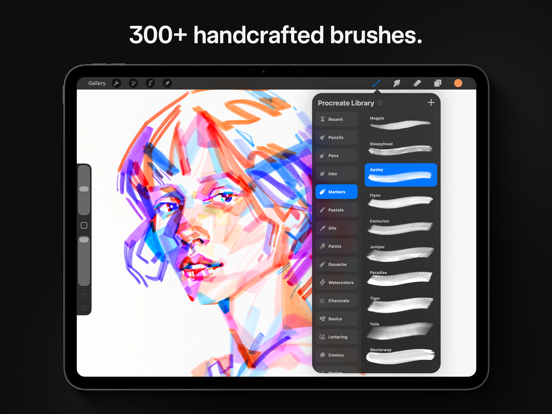
- Procreate is a complete art studio with a range of tools and features, including 100s of handmade brushes, a suite of industry-leading artistic tools, and an advanced layer system.
- Best for
-
- artists
- designers
- illustrators
- At a glance
-
- $12.99
Categories and search queries
Official categories
- Graphics & Design
- Productivity
AppCorpus categories
Key functions
| Function | Availability | Access | Scope | Evidence |
|---|---|---|---|---|
| Family Sharing | Yes | Unknown | App Store | Store published |
Screens
App Store
20 store screenshots



Pricing & paywalls
App Store
Shown for US
- Price: $12.99
Ratings & reviews
App Store
Shown for US
-
5/5Please make an account system! READ PLZ ‼️
Listen, I absolutely love this app, it doesn't become extremely laggy at times, and it's just overall great, I could say a lot, but WHAT I REALLY WISH was in this app that would make it an amazing 10/10 is like an Account System! I've seen many artists lose their beloved art pieces because either they couldn't do backup with like iCloud or like their drawing device probably broke or whatever. Backup process could be extremely difficult to do especially when you have NO STORAGE to save anything! Listen, I would've bought more storage but I'm still a minor and obviously can't really do that. but, listen it would just really make everything so much more amazing and just relieving if there was a way to make an account so then it could save all artwork, and if you get a new device, you can log right in and receive your artwork back again without any issues. Again, I absolutely love your app, I've been using it for about three years maybe or two! But sadly I've had to delete a year worth of artwork because of this storage or backup issues, I was worrying about losing my artwork and trying to do the backup thing and only to come to a sad conclusion that I really deleted the artwork for no reason at all, I absolutely hate the 5gb iCloud does, but oh MY GODDDD I would much Appreciate it if you read this! 💗 I would greatly appreciate it too if you do actually make an account system, much appreciated! :) (please 😭)
Urilad · 30 Aug 2026
-
5/5a pretty solid app for any skill range
I’ve been using procreate for a few months now, and overall it’s been an amazing platform, and I tried out probably 10+ different drawing apps to see which ones worked the best for me, so this app really tops them all. I can’t say I really have too many complaints other than small nitpicks. But heres some smaller things that I would really love to see on this app- I think it would be very beneficial if there could be a slider/more customization for the paint bucket tool specifically, to change the fill rate and opacity, maybe the texture of the fill-in, and all that jazz. as for the animation, I have two suggestions, think it would be very nice if you could make the layers set up into “frames” rather than just layers, because if you add more than like 3 “frames”, even if you’ve made each frame into a group, it turns into hellfire and makes my brain hurt. another thing- and this ones my biggest complaint about the animation feature, I reeeaaallllyyy wish you could add/insert sound into the app, combined with all of this app’s other amazing features it would be awesome for animatics/animations/etc and the inability to add sound is one of that potential downfalls for that. Besides that I have been very happy with this app and it has caused me to be able to open commissions and hopefully someday make a living off of what I love, so thank you for all of the effort and care you’ve put into this app so far and I am so excited to see where it will go in the future!
spiritwolf121 · 30 Aug 2026
-
5/5It’s wonderful!
I love Procreate so much, having a iPad Pro with a Apple Pencil works so well with this app, the price is worth buying it. Tbh I stop using my laptop for drawing since the drawing and painting feels so natural and smooth though sometimes when I try to use the short cuts it won’t work other than that it’s works like a charm. There are some things that could be worked on, color picking a color from a reference or from the color wheel isn’t the exactly what it should look like while painting with it, it’s a little bit off, though It’s not noticeable at first (it’s not a big problem at all it just something I’ve noticed while using Procreate over the years) and now the blending tool, the blending tool can be really good but sometimes the blending tool can be frustrating to work with and sometimes while blending it makes the color muddy or won’t give a nice type a texture, I know sometimes it can be what brush you use for the blending tool. It would be nice to get a better version of it, also it might be a bug or something but when I leave a painting and go back I lose some of the progress of the painting and I haft to redo what I’ve already done. Other than those small details this is the best app for everyone it’s easy to use, you can create masterpieces with it, I wouldn’t go to another drawing app, I would say THIS is a app that you should try out. Everyone from 3 to 90 years old can use this app. It’s the best app out there just get it try it out !!!!!!
JillyBean91334 · 30 Aug 2026
-
5/5Genuinely satisfied
I am genuinely and truly happy with procreate. I don’t announce my appreciation for things very often but I will try to more often. It has assisted me with my mobile art set up for years and I am always using it either for main projects or supplementing. I love it for sketches , storyboards, and illustrations. I deeply appreciate that it is one time purchase, so many companies who were doing just fine with one time purchase continually remove the option to nickel and dime their userbase (of whom don’t get my money! I have gladly dropped programs for LESS.) but this and the integrity, utility, and growth procreate has given us in all its years has made me, well, genuinely grateful. I love page assist and the animation feature. I’m a button girly, I don’t do gestures much so i appreciate the menus and drop downs. Do I have some issues with this program- absolutely. I wish import images kept quality when I moved them, I wish I could get the square shape right, I wish I could use more layers cus I can only make short comics with procreate alone. I wish the text feature was more like clips in that all text works in one layer. Fill is ridiculously sensitive, gif forbid I have any gals between my linework and it doesn’t reference multiple layers like other programs do. Making blocking a pain sometime. But what program is perfect? Procreate is one of the few that gets very close to perfect and next to just right. So thank you creators or procreate ,you have made me genuinely happy and i appreciate it.
annoyiser · 30 Aug 2026
-
5/5Magical App and a go-to for my Creative Director husband
This app is the only one my husband uses as Creative Director for a very successful, exploding social platform. His art has been a big factor in the success of the company…in the words of the CEO/Founder, with whom he is good friends. He has become buddies with some very famous people through that platform; much of those online interactions have begun through his artwork. (He has also gotten to know some celebrities by arguing with them, 😂 He has gotten into online “wars” with very famous people on his social platform and others. It blows my mind! Imagine fighting with a celebrity! These battles sometimes go on and on, because it turns out they are as equally hard-headed as my husband 🤣 He sometimes wins them over, and they end up friending each other like something out of flipping Forrest Gump. He has formed creative partnerships with some people you would not believe. Procreate is part of this! Oh, btw side note: I have to say here that one celebrity, a really likable one, was a friend of my hubby’s on Twitter. My hubby Tweeted something on there from his own head that was hilarious and popular. Three days after that, this aforementioned celebrity copied it word-for-word in a Tweet. It immediately went viral and was quoted in different places in the media. While my hubby wasn’t thrilled about it, he viewed it as a compliment and was like, oh well. He is so laid back. I, however, was indignant about it. 😂
Discount_Dracula · 30 Aug 2026
Privacy & accessibility
App Store
Privacy
- Data Not Collected Developer declared
Accessibility
- Dark Interface — SUPPORTED Store published
- Larger Text — SUPPORTED Store published
- Reduced Motion — SUPPORTED Store published
- VoiceOver — SUPPORTED Store published
Versions
App Store
-
5.3.10
Say hello to the exciting new features for Apple Pencil Pro in Procreate. Apple Pencil Pro with Procreate unlocks new ways to customize your favorite brushes, introducing new possibilities for your workflow. This update releases support for barrel roll, squeeze and haptic feedback. Brush Settings for barrel roll Barrel roll supercharges Procreate brushes in Brush Studio, providing a new way to control shape rotation, stroke jitter, color dynamics, grain rotation, size, opacity and more. You can add barrel roll to many other settings in the Apple Pencil tab, or by tapping the numeric entry button on the slider and switching on barrel roll. Squeeze Hover over your canvas and squeeze to select the layer you wish to work on, speeding up navigation on even the most complex projects. Squeeze to pick colors with Eyedropper or use QuickMenu to activate shortcuts without ever touching the screen. Assign squeeze to custom actions with Actions → Prefs → Gesture controls. Haptic feedback Haptic feedback provides a more tactile experience when making selection masks, transforming layers, using ColorDrop, drawing QuickShapes and more. Try turning on Snapping on the Transform toolbar to feel the layer snap to the canvas edges. Liquify Twirl with barrel roll You now have full control over rotation in Liquify Twirl. Twist the Apple Pencil Pro back and forth to bend your layers exactly how you want them. To learn how to Procreate like an expert, please visit the Procreate Handbook: https://help.procreate.com/procreate/handbook
-
5.3.11
This is a compatibility update to get you ready for everything new coming your way.
-
5.3.12
This is a compatibility update to get you ready for everything new coming your way.
-
5.3.13
This update provides compatibility for the newest iPads. We’re also boosting performance with a number of fixes. • The Photos Picker will successfully import photos onto the canvas without becoming unresponsive • Exporting an animation from within a canvas will no longer corrupt your layers temporarily • Importing multi-layer PSDs into the Gallery via drag and drop will preserve your layers • Tapping the canvas after exporting in any animated file format will crash no more • Pasting into an empty Layer Mask is back to behaving as expected Experiencing an issue or have a question? We'd love to help! You can reach our Customer Care team at procre.at/support
-
5.3.14
You asked (a while ago) and we've listened! Not only can you Group, you can now even Ungroup. Tap the Layer Group to find it in the Layer Options menu. This update also brings a multitude of bug fixes. • Importing large PDF files into the Gallery will no longer cause a crash. • The secondary component of a Dual Brush will display at the correct size when Dynamic brush scaling is toggled off. • Repeated crashing of the Color Panel caused by errant palettes will no longer interrupt your flow. • Merging down on a Clipping Mask when Animation Assist is active won’t close the app. • The Remove function in Selections is now removing instead of adding. • Things will continue to run smoothly if layers are dragged from a large canvas into another artwork. Work on our next major update is well underway and it's all about everyone's most important tools; brushes.
-
5.3.15
This is a compatibility update with important fixes and a bonus new feature. This update delivers some important fixes along with greater support for Animated PNGs. - Animated PNG frames will be preserved upon import instead of being flattened. - There's another fix for those who crash when opening the Color Panel. - Add text to your canvas with dictation and no crashing. - Brushes should no longer be mysteriously overridden. - No more crashes when you adjust the ColorDrop Threshold with Animation Assist or Page Assist enabled. We're busy working on our next major update, for more information check out what our CEO had to say: procre.at/procreateroadmap.
-
5.3.4
Apple Pencil hover has just gotten even better and this update now lets you preview Tilt and Azimuth. Procreate is giving you one more reason to smile. You can now add Text with the Smiley Sans font in both simplified Chinese and Roman characters.
-
5.3.5
Selamat datang to Malay and Indonesian speakers! Procreate also welcomes some bug fixes: • Importing portrait images from iPhone into Reference Companion will no longer stretch • Fix for flicking across your Gradient Maps or Animation Assist to rapidly scroll • Support for .jpf and .m4v • Your default color palette is always visible when switching between Compact and Cards If you want to keep drawing on your layer without Drawing Assist, tap the assisted layer twice and tap Drawing Assist from the Layers Options menu to turn it off.
-
5.3.6
This is a compatibility update to get you ready for everything new coming your way.
-
5.3.7
This update includes a fix for dragging brushes from Procreate to our brand new 2D animation app Procreate Dreams! Available now on the App Store.
-
5.3.8
This update to Procreate reintroduces option key functionality for keyboards, and improves Smiley Sans font for Chinese Simplified. Procreate also welcomes stability improvements and bug fixes. If you're looking for more resources and help, head to help.procreate.com/procreate
-
5.3.9
This update adds compatibility for the latest iPads. Full support for the new Apple Pencil Pro is coming soon.
-
5.4
This update delivers an all-new brush library, bursting with hundreds of wonderful brushes. There is stacks more to love in this update too, like search and libraries. We’ve had lots of fun with this massive overhaul. Now it’s your turn. New Brushes This is big. Get ready to express yourself in a whole new way with Procreate’s new brush collection. 18 new sets with over 150 brushes built from the ground up with our in-house Brush Developer Kyle T. Webster. It’s like being handed the keys to your own fully stocked art store; one that’s filled with brushes and styles that combine real-world familiarity with the endless possibilities of digital art. The beloved Classic brush library is still available by pinching out. Brush Search We see you brush collectors, and we are here for you — brush search has arrived! This highly requested feature will make finding the ideal brush so much faster. To search, simply swipe down in the library and start typing text or emoji. Brush Libraries Libraries will take your workflow and projects to a higher level. Build collections containing the brush sets you need most and dive into your creative zone. To access, create, edit, or share libraries, use the pinch gesture in the brush panel. We’ll start you off with two libraries: the new Procreate Library and the Classic Library. What you make next is up to you. Brush File Management Sleep better at night by protecting your precious brush collection. Backup, organize and share them right in the Files app. Choose from storing your brushes On My iPad or in iCloud Drive, and if you change your mind, you can move them later in the Actions menu. New Brush Studio Settings While crafting the new Procreate Library, we made a bunch of new brush settings. You can now remove anti-aliasing with alpha threshold; perfect for pixel art. We’ve also added more controls for spacing, shape roundness, stroke jitter, and per brush pressure curves. Brush Preview Brush thumbnails have been updated to better reflect how brushes mark the canvas. And with the new Preview tab in Brush Studio, you can make further adjustments to how your brush thumbnails appear in the brush library. Color Improvements iPad mini owners rejoice. Color history is now visible on all devices, including the small but mighty ones. There are also fresh, new color palettes. If you can’t see them, select ‘Restore example palettes’ from the + menu in the palette panel. Custom Brush Set Icons Finally, you can personalize brush set icons to quickly find your favorite sets. Pick an icon from a list or rename your set with an emoji to use that instead. As always, our team is here to help at support.procreate.com. We’re keen to see how these new brushes thrive out in the wild; if you create something with them, please tag #Procreate in all the right places.
-
5.4.1
This update delivers an all-new brush library, bursting with hundreds of wonderful brushes. There is stacks more to love in this update too, like search and libraries. We’ve had lots of fun with this massive overhaul. Now it’s your turn. New Brushes This is big. Get ready to express yourself in a whole new way with Procreate’s new brush collection. 18 new sets with over 150 brushes built from the ground up with our in-house Brush Developer Kyle T. Webster. It’s like being handed the keys to your own fully stocked art store; one that’s filled with brushes and styles that combine real-world familiarity with the endless possibilities of digital art. The beloved Classic brush library is still available by pinching out. Brush Search We see you brush collectors, and we are here for you — brush search has arrived! This highly requested feature will make finding the ideal brush so much faster. To search, simply swipe down in the library and start typing text or emoji. Brush Libraries Libraries will take your workflow and projects to a higher level. Build collections containing the brush sets you need most and dive into your creative zone. To access, create, edit, or share libraries, use the pinch gesture in the brush panel. We’ll start you off with two libraries: the new Procreate Library and the Classic Library. What you make next is up to you. Brush File Management Sleep better at night by protecting your precious brush collection. Backup, organize and share them right in the Files app. Choose from storing your brushes On My iPad or in iCloud Drive, and if you change your mind, you can move them later in the Actions menu. New Brush Studio Settings While crafting the new Procreate Library, we made a bunch of new brush settings. You can now remove anti-aliasing with alpha threshold; perfect for pixel art. We’ve also added more controls for spacing, shape roundness, stroke jitter, and per brush pressure curves. Brush Preview Brush thumbnails have been updated to better reflect how brushes mark the canvas. And with the new Preview tab in Brush Studio, you can make further adjustments to how your brush thumbnails appear in the brush library. Color Improvements iPad mini owners rejoice. Color history is now visible on all devices, including the small but mighty ones. There are also fresh, new color palettes. If you can’t see them, select ‘Restore example palettes’ from the + menu in the palette panel. Custom Brush Set Icons Finally, you can personalize brush set icons to quickly find your favorite sets. Pick an icon from a list or rename your set with an emoji to use that instead. As always, our team is here to help at support.procreate.com. We’re keen to see how these new brushes thrive out in the wild; if you create something with them, please tag #Procreate in all the right places.
-
5.4.10
This update includes 25 new fonts for customising your text, including brand new choices for Arabic, Hindi, Thai, and Japanese. The fonts Eina and Jack Armstrong BB are no longer available, but you can continue to edit your image layers, or rasterise your text layer to keep your exact design. You can also choose to replace these fonts with a similar option. Did you know you can import your own fonts into Procreate? Tap the Import button on the text Edit Style keyboard, drag and drop, or place them into your On My iPad → Procreate → Fonts folder.
-
5.4.11
This update includes some small, but highly requested features! Eyedropper can pick colors exclusively from the active layer, and you can select all layers then duplicate, share, and merge them all at once. ¡Bienvenidos amigos de Latino América! Procreate is now a better experience for Spanish speakers, supporting both Spanish from Spain and Spanish from Latin America. Eyedropper active layer Tap with a second finger while you are picking colors to toggle between sampling from your current layer and the whole canvas. You can pick colors from a layer even if the pixels are behind something else. Multiple layer actions Swipe right on all the layers you like the look of, and tap on the Layers title to get some new options. In addition to grouping and deleting in bulk, you can now merge, duplicate and share. You can also Select All and do all those things to all your layers. There's also a bunch of high value fixes for: - brushes duplicating themselves. - transforming layer masks. - improving the end of stroke on devices with hover. - content deleting after undoing layer merges and then moving layers. Did you know in Gesture Controls under Eyedropper toggling on Apple Pencil squeeze means you can pick colors without ever touching the screen?
-
5.4.12
· 27 Jul 2026
This update includes some small, but highly requested features! Eyedropper can pick colors exclusively from the active layer, and you can select all layers then duplicate, share, and merge them all at once. We've also fixed an issue where pinching to zoom could stop working when using Apple Pencil Pro squeeze. ¡Bienvenidos amigos de Latino América! Procreate is now a better experience for Spanish speakers, supporting both Spanish from Spain and Spanish from Latin America. Eyedropper active layer Tap with a second finger while you are picking colors to toggle between sampling from your current layer and the whole canvas. You can pick colors from a layer even if the pixels are behind something else. Multiple layer actions Swipe right on all the layers you like the look of, and tap on the Layers title to get some new options. In addition to grouping and deleting in bulk, you can now merge, duplicate and share. You can also Select All and do all those things to all your layers. There's also a bunch of high value fixes for: - brushes duplicating themselves. - transforming layer masks. - improving the end of stroke on devices with hover. - content deleting after undoing layer merges and then moving layers. Did you know in Gesture Controls under Eyedropper toggling on Apple Pencil squeeze means you can pick colors without ever touching the screen?
-
5.4.2
This update delivers an all-new brush library, bursting with hundreds of wonderful brushes. There is stacks more to love in this update too, like search and libraries. We’ve had lots of fun with this massive overhaul. Now it’s your turn. New Brushes This is big. Get ready to express yourself in a whole new way with Procreate’s new brush collection. 18 new sets with over 150 brushes built from the ground up with our in-house Brush Developer Kyle T. Webster. It’s like being handed the keys to your own fully stocked art store; one that’s filled with brushes and styles that combine real-world familiarity with the endless possibilities of digital art. The beloved Classic brush library is still available by pinching out. Brush Search We see you brush collectors, and we are here for you — brush search has arrived! This highly requested feature will make finding the ideal brush so much faster. To search, simply swipe down in the library and start typing text or emoji. Brush Libraries Libraries will take your workflow and projects to a higher level. Build collections containing the brush sets you need most and dive into your creative zone. To access, create, edit, or share libraries, use the pinch gesture in the brush panel. We’ll start you off with two libraries: the new Procreate Library and the Classic Library. What you make next is up to you. Brush File Management Sleep better at night by protecting your precious brush collection. Backup, organize and share them right in the Files app. Choose from storing your brushes On My iPad or in iCloud Drive, and if you change your mind, you can move them later in the Actions menu. New Brush Studio Settings While crafting the new Procreate Library, we made a bunch of new brush settings. You can now remove anti-aliasing with alpha threshold; perfect for pixel art. We’ve also added more controls for spacing, shape roundness, stroke jitter, and per brush pressure curves. Brush Preview Brush thumbnails have been updated to better reflect how brushes mark the canvas. And with the new Preview tab in Brush Studio, you can make further adjustments to how your brush thumbnails appear in the brush library. Color Improvements iPad mini owners rejoice. Color history is now visible on all devices, including the small but mighty ones. There are also fresh, new color palettes. If you can’t see them, select ‘Restore example palettes’ from the + menu in the palette panel. Custom Brush Set Icons Finally, you can personalize brush set icons to quickly find your favorite sets. Pick an icon from a list or rename your set with an emoji to use that instead. As always, our team is here to help at support.procreate.com. We’re keen to see how these new brushes thrive out in the wild; if you create something with them, please tag #Procreate in all the right places.
-
5.4.3
This update delivers an all-new brush library, bursting with hundreds of wonderful brushes. There is stacks more to love in this update too, like search and libraries. We’ve had lots of fun with this massive overhaul. Now it’s your turn. New Brushes This is big. Get ready to express yourself in a whole new way with Procreate’s new brush collection. 18 new sets with over 150 brushes built from the ground up with our in-house Brush Developer Kyle T. Webster. It’s like being handed the keys to your own fully stocked art store; one that’s filled with brushes and styles that combine real-world familiarity with the endless possibilities of digital art. The beloved Classic brush library is still available by pinching out. Brush Search We see you brush collectors, and we are here for you — brush search has arrived! This highly requested feature will make finding the ideal brush so much faster. To search, simply swipe down in the library and start typing text or emoji. Brush Libraries Libraries will take your workflow and projects to a higher level. Build collections containing the brush sets you need most and dive into your creative zone. To access, create, edit, or share libraries, use the pinch gesture in the brush panel. We’ll start you off with two libraries: the new Procreate Library and the Classic Library. What you make next is up to you. Brush File Management Sleep better at night by protecting your precious brush collection. Backup, organize and share them right in the Files app. Choose from storing your brushes On My iPad or in iCloud Drive, and if you change your mind, you can move them later in the Actions menu. New Brush Studio Settings While crafting the new Procreate Library, we made a bunch of new brush settings. You can now remove anti-aliasing with alpha threshold; perfect for pixel art. We’ve also added more controls for spacing, shape roundness, stroke jitter, and per brush pressure curves. Brush Preview Brush thumbnails have been updated to better reflect how brushes mark the canvas. And with the new Preview tab in Brush Studio, you can make further adjustments to how your brush thumbnails appear in the brush library. Color Improvements iPad mini owners rejoice. Color history is now visible on all devices, including the small but mighty ones. There are also fresh, new color palettes. If you can’t see them, select ‘Restore example palettes’ from the + menu in the palette panel. Custom Brush Set Icons Finally, you can personalize brush set icons to quickly find your favorite sets. Pick an icon from a list or rename your set with an emoji to use that instead. As always, our team is here to help at support.procreate.com. We’re keen to see how these new brushes thrive out in the wild; if you create something with them, please tag #Procreate in all the right places.
-
5.4.4
This update delivers an all-new brush library, bursting with hundreds of wonderful brushes. There is stacks more to love in this update too, like search and libraries. We’ve had lots of fun with this massive overhaul. Now it’s your turn. New Brushes This is big. Get ready to express yourself in a whole new way with Procreate’s new brush collection. 18 new sets with over 150 brushes built from the ground up with our in-house Brush Developer Kyle T. Webster. It’s like being handed the keys to your own fully stocked art store; one that’s filled with brushes and styles that combine real-world familiarity with the endless possibilities of digital art. The beloved Classic brush library is still available by pinching out. Brush Search We see you brush collectors, and we are here for you — brush search has arrived! This highly requested feature will make finding the ideal brush so much faster. To search, simply swipe down in the library and start typing text or emoji. Brush Libraries Libraries will take your workflow and projects to a higher level. Build collections containing the brush sets you need most and dive into your creative zone. To access, create, edit, or share libraries, use the pinch gesture in the brush panel. We’ll start you off with two libraries: the new Procreate Library and the Classic Library. What you make next is up to you. Brush File Management Sleep better at night by protecting your precious brush collection. Backup, organize and share them right in the Files app. Choose from storing your brushes On My iPad or in iCloud Drive, and if you change your mind, you can move them later in the Actions menu. New Brush Studio Settings While crafting the new Procreate Library, we made a bunch of new brush settings. You can now remove anti-aliasing with alpha threshold; perfect for pixel art. We’ve also added more controls for spacing, shape roundness, stroke jitter, and per brush pressure curves. Brush Preview Brush thumbnails have been updated to better reflect how brushes mark the canvas. And with the new Preview tab in Brush Studio, you can make further adjustments to how your brush thumbnails appear in the brush library. Color Improvements iPad mini owners rejoice. Color history is now visible on all devices, including the small but mighty ones. There are also fresh, new color palettes. If you can’t see them, select ‘Restore example palettes’ from the + menu in the palette panel. Custom Brush Set Icons Finally, you can personalize brush set icons to quickly find your favorite sets. Pick an icon from a list or rename your set with an emoji to use that instead. As always, our team is here to help at support.procreate.com. We’re keen to see how these new brushes thrive out in the wild; if you create something with them, please tag #Procreate in all the right places.
-
5.4.5
This is a compatibility update to get you ready for everything new coming your way.
-
5.4.6
This version includes some important bug fixes for the iPadOS compatibility update, including Text sliders supporting negative values, improvements to layer thumbnail visibility, and improved performance in the Brushes panel with large amounts of brushes.
-
5.4.7
This is a compatibility update to help Procreate run smoothly across all devices.
-
5.4.8
OK. We went too far. This update sharpens the corners of your Gallery thumbnails. It also calms down the height of Animation and Page Assist and fixes an issue in 3D painting where you couldn't import meshes without normals. Remember that all your custom brushes are available in the Classic Library by pinching the brush panel, or tapping the Procreate Library title.
-
5.4.9
This compatibility update helps you get the best out of Procreate on every supported device and operating system version.
Alternatives
- Brushes for Procreate — Same category + similar ratings
- Tools for Procreate — Same category + similar ratings
- Adobe Illustrator: Graphic Art — Same category + similar ratings
- Clip Studio Paint — Same category + similar ratings
- Adobe Fresco: Draw & Paint App — Same category + similar ratings
- MediBang Paint – Drawing & Art — Same category + similar ratings
Availability by market
- US
Data quality & evidence
- Page completeness
- Independent summary published
- Last verified
- 30 Aug 2026
- Sources
- App Store