
Pano Tuner Lite
Tune instruments with precision and accuracy
by Kaleloft Limited Liability Company
iPhone · iPad
Quick verdict
- What it is
- Pano Tuner Lite is a music tuning app that allows users to tune various instruments with precision and accuracy. It features historical temperaments, custom tunings, and a clear, readable meter.
- Best for
-
- musicians
- music teachers
- At a glance
-
- Free to download
Categories and search queries
Official categories
- Music
- Entertainment
AppCorpus categories
Key functions
| Function | Availability | Access | Scope | Evidence |
|---|---|---|---|---|
| Free app | Yes | Free | — | Store published |
Screens
App Store
3 store screenshots

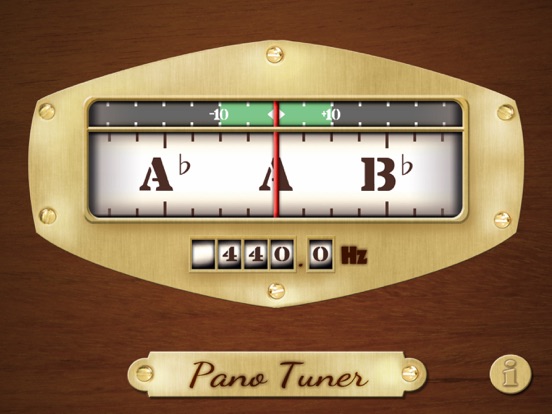
Pricing & paywalls
App Store
- Free
Ratings & reviews
App Store
-
5/5Liked It So Much, I Bought the Paid Version
I reached a point where I just could not stand my piano due to the middle section (where the kids bang out their music) being so out of tune. Tuner can’t get here for another week so I just needed something to get buy. I’m not a trained piano tech or tuner but I tried (in vain) to get that middle section at least close using the upper and lower registers as a point of reference but I just couldn’t figure it out well enough to get the temperament restored. Finally, desperate for at least a “survival” tuning to hold me until the pro can get here, I tried this app. After sampling the lower and upper registers, I could visually see how the octaves were stretched and could pick a point on the +/- measurement that followed the pattern. Lo and behold it worked! At least well enough to not hurt my ears until the pro can get hear and really get it dialed in. With the paid version I can get more precise visual range and expect it will become very helpful between visits from the pro tuner. If it can do a piano this well, I imagine it would be awesome for a guitar or violin.
MV Dave · 6 Aug 2026
-
5/5Much better than I expected
I had my piano professionally tuned 2 weeks ago but my tuner must have spaced out on the last octave. It was horribly sharp and the last 5 notes sounded the same. Admittedly, most of us don’t play those notes that often but when they’re out of tune, you realize you play them more than you think. It was so bad that it was just too painful for me to wait for him to come back and fix his mistake. So after ordering a tuning kit, I downloaded this app. As any pianist knows, the uppermost octave is particularly challenging to tune by ear because the strings are so short and the tone is so tinny. I first tested the app on middle A and sure enough it read 339.9, close enough to A440 to which the piano was tuned. And, as I heard, the last octave was at least a quarter to a half step sharp. The tuner was able to distinguish between the uppermost 4 notes which all sounded identical to my ear. The app is simple to use and extremely discerning and sensitive, even to very small adjustments. It is so sensitive that I caution everyone to make sure there is no ambient noise in the room while you’re tuning. I don’t know what extra benefits the paid app provides other than no ads which are very unobtrusive in a thin bar at the top of the screen. Truthfully, the free app works so well I would have been happy to pay for it.
LV953 · 6 Aug 2026
-
4/5Very good program—great for my use as an early to mid-level adult “learner.”
I have used this program for a number of years. I look up playing the violin hi very casual basis a number of years ago because we had a full size violin sitting around our home for the last 25 years sinceMy family and I moved from Indianapolis to Springfield Ohio and my daughters never went back to Suzuki violin or any other type of lessons. I have had a long career as a physician which has certainly captured much of my attention and so I did not develop in the early years probably buy my own distractions and somewhat likely because I really did not have necessarily very effective teachers. I use this program as I am playing the violin because with no frets on the violin, it is very easy to not land squarely on the notes and be sharp or flat depending upon what notes it is that you were playing. This has been, therefore a great source of help to be able to stand in front of my music as I play so making it more obvious to me when my second finger, for instance, wanders up the string slightly creating a sharp note because as an older person, my fingers do not separate as easily as I did when I was younger and so playing a high fourth finger note will drag the second finger with it. The point about long slow work with being that one of the skills that is necessary to be developed in a violin player is exact placement of fingers being very careful with half stops and whole stops. This program reacts instantaneously and definitely shows whether or not I am right on the notes or not. My problem with this program and the only thing that I do not like is that I just recently went from an iPhone 8 plus to an iPhone 12 promax. The issue is that every time I finish using the Pano program, I have to reset my phone because otherwise I am locked into the Pano program. That is rather frustrating. There is obviously something not compatible between The program and the iPhone 12. Otherwise I would have given the program a five star in every respect.
Stevedw52 · 6 Aug 2026
-
5/5Latest update a stunning improvement & overhaul, even without the paid version!
I must say, the older versions of this app left much to be desired— the tuner would frantically jump from frequency to frequency in a snappy hard-to-follow fashion, and pressing the “i” button (what is now the settings button) would simply crash the app on iOS 18. The app is now much smoother (and more stable) and now has a “note playback,” key changes, concert A calibration, and note labels (something that seems to be a cool unique feature of this particular tuner), all for free! The paid version also has its own impressive additional features, but the instruments I play that I have access to I do not play enough that they need the highly specialized, reliable, and versatile tuning that it provides in this chapter of my life. TL;DR: Great tuner! Get this one!
Engi-here · 6 Aug 2026
-
5/5Great for many instruments
I’ve used about 3 different tuning apps so far, but none of them even compared to this app. From the perfect accuracy, the easy interface, and the fact that it’s FREE, I’ve used this app almost everyday. As a person who plays 10 instruments, I’ve used it in instruments from my saxes to my guitars, and even my banjo! It holds up just as well as a physical tuner or tuning fork, and can even work on stage with lots of noises. I love how you can change the frequency of “A” so it makes it simpler for tuning transposing instruments like my clarinet. Have recommended this to friends and will be using it for years to come!
Janeathor · 6 Aug 2026
Privacy & accessibility
App Store
Privacy
- Data Not Linked to You — Analytics — Diagnostics — Crash Data Developer declared
- Data Not Linked to You — Analytics — Diagnostics — Performance Data Developer declared
- Data Not Linked to You — Analytics — Identifiers — Device ID Developer declared
- Data Not Linked to You — Analytics — Location — Coarse Location Developer declared
- Data Not Linked to You — Analytics — Usage Data — Advertising Data Developer declared
- Data Not Linked to You — Analytics — Usage Data — Product Interaction Developer declared
- Data Not Linked to You — Third-Party Advertising — Identifiers — Device ID Developer declared
- Data Not Linked to You — Third-Party Advertising — Location — Coarse Location Developer declared
- Data Not Linked to You — Third-Party Advertising — Usage Data — Advertising Data Developer declared
- Data Not Linked to You — Diagnostics Developer declared
- Data Not Linked to You — Identifiers Developer declared
- Data Not Linked to You — Location Developer declared
- Data Not Linked to You — Usage Data Developer declared
- Data Used to Track You — Identifiers — Device ID Developer declared
- Data Used to Track You — Identifiers Developer declared
Accessibility
No accessibility labels collected yet.
Versions
App Store
-
1.2.11
* 64-bit support
-
1.2.12
Regulated ad system Note: iOS 5 support has been dropped. Do not update if you use iOS 5.
-
1.2.13
iPhone 6 Plus settings button issue fix on iOS 9
-
1.2.14
This update from Apple will improve the functionality of this app. No new features are included. iPhone 6 Plus settings button issue fix on iOS 9
-
1.2.15
Built to target the latest iOS versions
-
2.0.0
Visual updates Sensitivity updates
-
2.0.3
Brought the old design back Fixed issues on note orders
-
2.0.5
Small bar orientation on low-to-high configuration fix
-
2.0.8
More visible accidentals (sharps and flats) Configurable La - Si - Do and La - Ti - Do
-
2.1.0
More detailed transpose descriptions
-
2.1.1
Developer URL changes
-
2.1.2
Fix for iOS 18 audio glitches
-
2.2.1
• New portrait layout • Low reference tones are now audible • Cleaner, more accurate reference-tone playback • Visual polish and bug fixes
-
2.2.11
Polish, by popular demand: the sharp and flat symbols are bigger and easier to read from a distance, settings changes now show on the dial the moment you return to it, and the Meter Direction setting also flips the pitch-trace graph. Thanks to the sharp-eyed players who wrote in!
-
2.2.13
A treat for the detail-minded: optional octave numbers on the dial (like A#4 with a small subscript, in Settings), and a new Pitch Trace switch - turn the graph off for the classic landscape-only tuner many of you asked back. Plus a quick way to rate Pano Tuner in Settings. Thanks for tuning with us!
-
2.2.14
Now speaking five more languages — Hebrew, Traditional Chinese, Ukrainian, Bengali, and Greek. We also gave the flat symbol a bigger, clearer look, kept the octave numbers steady while you tune, and made listening more reliable with a smoother dial — especially on older phones. Thanks for tuning with us!
-
2.2.16
The needle now jumps straight to a new note instead of sweeping to it, so playing note after note keeps up with you. Thanks for tuning with us!
-
2.2.17
Housekeeping in the free version's banner ads: rotating or resizing the screen no longer makes the app quietly re-request ads over and over, and the new ad now swaps in without a blank flicker. Less battery and data spent on ads, none of it on your tuning. Thanks for tuning with us!
-
2.2.18
Softly played notes now register instantly — a gentle bow stroke or a quiet piano note switches the dial right away instead of holding the previous note. Thanks for tuning with us!
-
2.2.21
Fixed the display staying locked on the previous note after tuning two strings together — bowed instruments like the violin now follow string changes correctly. Thanks to the player who wrote in with the exact recipe, and thanks for tuning with us!
-
2.2.22
· 19 Jul 2026
A quick follow-up to last week's update: tuning the lowest piano keys is precise and responsive again — the new note-tracking logic could briefly misread deep bass strings as they faded. Thanks for the sharp reports, and thanks for tuning with us!
-
2.2.3
Smoother, faster, more responsive tuning — especially on older devices — with a more stable meter and refinements under the hood. Thanks for using Pano Tuner!
-
2.2.5
Now in your language! Pano Tuner is fully localized — note names, settings, and more. You can also reset all your settings to their defaults in one tap, while keeping any custom temperaments. Thanks for using Pano Tuner!
-
2.2.7
Steadier tuning for plucked and struck instruments: when you tune a lyre, oud, harp, or similar, the needle now holds firmly on the note as it rings and fades, instead of drifting or jumping. Pano Tuner is now also available in more languages, including a right-to-left interface for Arabic, Urdu, and Persian. Plus a fix so the reference tone matches the note shown when you transpose. Thanks for using Pano Tuner!
-
2.2.9
Better tuning with Bluetooth headphones: Pano Tuner now always listens through your device's own microphone, so tuning keeps working while your AirPods or headset play the sound. Also fixed: the tuner could stop responding after a phone call, Siri, or an alarm — it now picks right back up on its own — and the reference tone stays exactly on pitch when headphones connect or disconnect. Thanks for tuning with Pano Tuner!
Alternatives
- Tuner Lite by Piascore — Same category + similar ratings
- Tuner T1 — Same category + similar ratings
- Guitar Tuner - Chromatic — Same category + similar ratings
- Pitched Tuner - Tuning App — Same category + similar ratings
- pianoscope – Piano Tuner — Same category + similar ratings
- Pro Guitar Tuner — Same category + similar ratings
Availability by market
- US
Data quality & evidence
- Page completeness
- Independent summary published
- Last verified
- 6 Aug 2026
- Sources
- App Store