
Quick verdict
- What it is
- Store information collected; independent summary not yet available.
- At a glance
-
- Free to download
- In-app purchases
Categories and search queries
Official categories
- Music
- Utilities
AppCorpus categories
Key functions
| Function | Availability | Access | Scope | Evidence |
|---|---|---|---|---|
| Family Sharing | Yes | Unknown | App Store | Store published |
| Free app | Yes | Free | — | Store published |
| In-app purchases | Yes | Limited free | — | Store published |
Screens
App Store
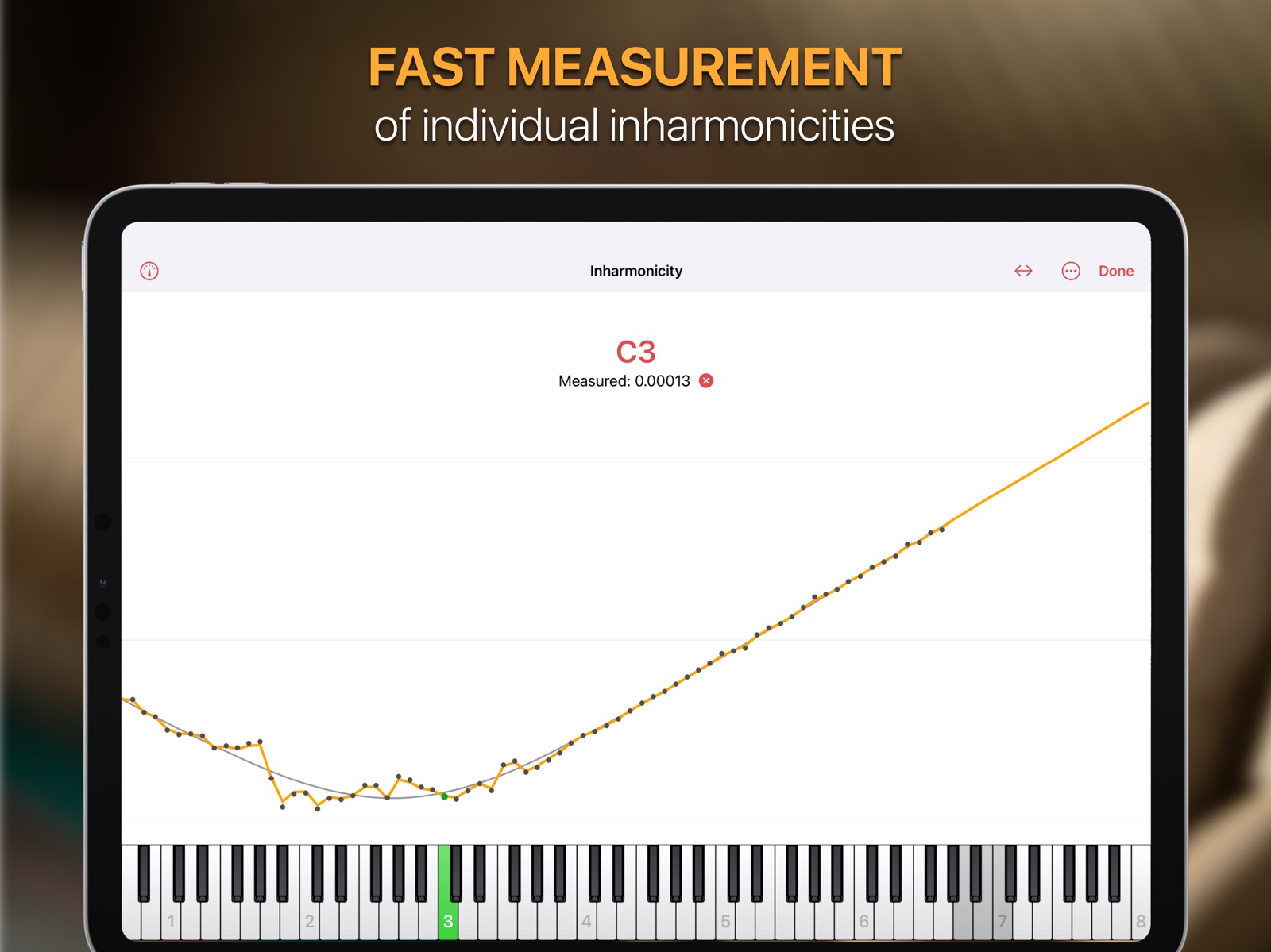
9 store screenshots



Pricing & paywalls
App Store
- Free to download
- In-app purchases
Ratings & reviews
App Store
-
5/5😍Amazing🎹Tuner🥳
Really love this tuner and was able to successfully a severely detuned [untuned for decade(s?)] upright I was gifted, despite it being my first time piano tuning - although I have decades of mechanical and multi-instrumental + mixing & mastering production under my belt. This app was clutch in pulling it off successfully. The pro features are amazing and I'd love to give 6+ stars for the automatically ending free trial in stark opposition to the dastardly auto-enrollment avaricious big companies do. I sincerely applaud the developer's integrity! 🙌 IMHO, the pro version is where it's at, but at 600$ it is steep and although I believe that's a fair price for how cutting edge the algorithm is, I would love to see an installment option; like if you could buy pro for a year (150$) and after 4 years that converts to the lifetime that would be awesome. I did just find out that if you buy the standard for 100$, you only pay the difference to upgrade to pro, so perhaps the pro sub works as described above? Idk I found out about the upgrade on their site forum but cannot find any info on how the sub works. Im gonna snag the standard version for now so I can tune up thru the winter seasons swings. Thanks again for making such a beautiful app. Happy playing y'all! 🎹 🎉 Love & Blessings! ❤️💛💚
16849:! $€~jah · 31 Jul 2026
-
5/5A well built tuning app for professionals
I have been a professional piano technician for over twenty years and I’ve finally found a tuning app that I am very comfortable with. I own and have used most of the other professional piano tuning apps that are available. I don’t want to mention the other apps by name or talk negatively about them because their developers have worked hard to create excellent apps that serve piano tuners well. Instead, I will speak about the strengths of Pianoscope and talk about why it has become my favorite tuning app. 1. This app is so well built. Everything about it is intuitive and easy to look at while I’m tuning a piano. Many of the other tuning apps have a cluttered screen with unimportant information that distracts me while I’m tuning. I find that the simplicity of how everything is presented allows me to concentrate on tuning the note that I’m working on then move on to the next note hands free. Tuning is a pleasant experience. 2. The developer is very open to feedback and is responsive to questions. After interacting with the developer I can tell that this app will evolve in a positive way over time. 3. I’m not sure what math is used to evaluate the inharmonicity but the tuning curves that are created are very good. The notes stand up to all the beat tests that I can use. If the tuning curve needs adjusted it is very easy to manipulate manually as needed. Again, it is just a well built app that instills confidence in my tuning when I use it.
mikesworkbench · 31 Jul 2026
-
5/5A Tuning Must-Have
I have only used the 14 day free trial thus far, but it a couple of sittings my friend and I, with minimal experience, got my piano tuned beautifully!!! We tried tuning by ear, which seemed at first to work, but ultimately sounded a bit off... this gives you precise quality control, enabling you to tune down to the cent! I will say on some lower treble and bass strings the tuner jumps around quite a bit— not sure why, but I still feel it works great! I highly recommend! I have yet to purchase it... I think $100 bucks is a bit overpriced, but hey, the creator’s got to make money too, and how many people honestly purchase a tuning app? I think for me, the cost is definitely worth it— I mean, how much do piano tuners charge? I would not recommend paying all that money for the pro version... I did not see any of the pro features to be useful enough to spend that much... they are features not even professional piano tuners need.
Ilikecloudyweather · 31 Jul 2026
-
5/5Simply the best
I have used other electronic tuners, including some pretty sophisticated and expensive (professional) ones and yet after using Pianoscope the difference was clear from the first tuning. Notes around the tenor C3 area are more precise and the 3rds and 10ths are more even, but the main thing is the overall sound of my piano. It was quite an emotional response actually as for the first time since leaving the showroom, my grand piano sounded so full and wonderful that I was lost in playing it for hours. And yes, it seems to have held its tuning better than before, although I do spend quite a lot of time and care on it. I can thoroughly recommend this tuner. I particularly like the multi-display (strobe and line) ways you can check the tuning, and the option to change the display - very useful. I think pianoscope is the new benchmark for electronic tuners for sure.
Wannadoo · 31 Jul 2026
-
5/5Simple to use, professional results.
I have a Kawai GS70, which is a 7.5 foot grand. I like it to be beautifully in tune, and was often frustrated that just a few notes in the 5th octave would not stay in tune and ruin my playing experience. That 5th octave is the melody line in many romantic era pieces. I know nothing about tuning a piano, and needed more of a guide than my ear to get it precise (which is essential for those three sections of string to be in perfect unison). So I got this app, and it is very easy to use. You will need some mutes and a tuning hammer and that’s it! I got the hang of it very quickly, and my piano has never sounded better. I have even even ventured into the 4th and 6th octaves and am fine tuning notes. This is all in just 2 days of the trial period! Thank you for this wonderful app. My instrument sings now and is a joy to play.
JHG2512 · 31 Jul 2026
Privacy & accessibility
App Store
Privacy
- Data Not Linked to You — App Functionality — Diagnostics — Other Diagnostic Data Developer declared
- Data Not Linked to You — Diagnostics Developer declared
Accessibility
No accessibility labels collected yet.
Versions
App Store
-
2.7.2
- Improved general stability. - Added Kellner well temperament. - Optimize concert pitch: Fixed problem with reusing previously measured pitches.
-
2.7.3
Fixed issues: - In areas without cellular reception, the app could appear as unlicensed. - Measuring the concert pitch in the instrument settings did not work for offsets of more than 50 cents.
-
2.7.4
General stability fixes.
-
2.7.5
Changes: - The “Optimize concert pitch” function is now also supported with a single note measurement. However, it is still recommended to measure several notes. Fixed issues: - Entering trailing spaces in text fields in the instrument settings panel could lead to problems under iOS 18. - Thumbnails of pianoscope files showed a text preview instead of an icon under iOS 18. - Audio interruptions like phone calls, notifications or playing songs could block the audio input until the app was restarted.
-
2.7.6
Fixed issue with activating the audio input on older devices like the iPhone SE 1.
-
2.7.7
More improvements to audio input on older devices like the iPhone SE 1.
-
3.0.0
NEW FEATURES • Improved tuning curve algorithm v3, now enhanced with artificial intelligence. For many instruments, it achieves better stretch in the bass and, when required by the tuning style, purer twelfths in the treble. • Enhanced partials display, now showing up to 50 partials to support voicing of high frequencies. You can disable the normalization of partial levels and specify the displayed partial amplitude range in decibels. • New Passthrough mode for the tone generator. When using a headset, this mode lets pianoscope capture the sound you play via the microphone and play it back live through your headphones. If you select a partial bar in the partials view, the app applies a bandpass filter to isolate that specific frequency range—an excellent tool for aural training. Keep in mind that Bluetooth headphones often introduce latency, so Passthrough works best with wired headphones. • Introducing Time Charts — visualize various parameters of a piano sound and track their evolution over time. To access them, tap the new Time Charts item in the main menu. This feature requires iOS 17 / iPadOS 17 or later. • Multi-channel audio processing. Pianoscope 3 can now process signals from multiple audio channels and seamlessly combine the results into its pitch display. These signals may come from external audio interfaces or built-in microphones. • Newer iPhones feature up to four built-in microphones, while newer iPad Pro models even five. By enabling the new Use Multiple Mics switch, pianoscope analyzes each microphone’s signal independently and merges the results, improving tuning consistency—particularly in cases of false beats in the high treble. • New Prefer No Interruptions option. When activated in the audio settings, iOS will only visually display interruptions such as incoming calls, without disrupting the audio recording. • Save and recall settings with ease. The new Save function in the settings panel allows you to save all current settings under a custom name and restore them later. If you add the gear symbol to the toolbar in the tuning view, you can quickly access saved settings by long pressing. This is ideal for setting up different configurations for tuning, concert preparation, pitch-raising, voicing, etc., and switching between them effortlessly. You can also use this function to transfer settings to another device. • Export and import custom tuning styles. You can now export a custom tuning style to a file and import it onto another device. • Improved search for tuning documents. You can now find tuning documents based on instrument details such as Manufacturer, Model, Serial Number, or Notes. Searching for documents works both in the iOS Files app and within pianoscope's document management. • Quick document preview in the iOS Files app. The Files app offers an alternative way to locate specific tuning documents in a list. Simply tap and hold on a tuning document, then select Quick Look from the context menu. This opens a QuickLook Preview that displays key document information without needing to open it in pianoscope. • In the Tuning Curve panel, you can now pinch horizontally with two fingers to smoothly adjust the curve’s width or pinch vertically to change its height. The latter gesture is new and makes it easier to differentiate closely spaced deviation curves. • Extended freeze indicator duration. You can now increase the freeze duration to up to 5000 ms. Longer durations help resolve frequencies affected by false beats in strings but may also slow down the tuning process. To simplify switching between freeze durations, pianoscope 3 introduces three different sets of durations. You can switch between them in the settings or directly from the tuning view by long-pressing the snowflake symbol in the main toolbar. • New Delay column. This feature allows you to shift the start of the freeze measurement by a selected duration after the attack. Full release notes: https://tinyurl.com/2jbawvd6
-
3.0.1
Fixed issues: - Under some circumstances, recording the inharmonicity of low bass notes did not work.
-
3.0.2
- Fixed issue with attack detection for low bass notes. - Increased default freeze times between C6 and C8 to improve resolving of slow false beats.
-
3.0.3
Fixed Issues: - Time chart recording could be reset while a tone was still sounding. - The "Coleman 10" temperament contained the same offsets as the "Coleman 11" temperament.
-
3.0.4
Fixed issues: - Inharmonicity measurement: With automatic key selection mode other than "Entire Range" some played notes were sometimes not recognized.
-
3.0.5
Fixed Issues: - When measuring for pitch raise, pianoscope could spuriously detect note attacks during the decay of a note.
-
3.1.0
New Features: - Added new temperaments: * Neidhardt Große Stadt 1724 * Neidhardt Dorf 1732 * Rameau 1737 * Marpurg III 1776 * Hummel Viennese 1829 * Bach / Lehmann 2005 * Meantone 1/3 Syntonic * Meantone 1/6 Syntonic - It is now possible to create custom temperaments in the Pianoscope Standard edition. - You can now graphically visualize offsets and beat rates of intervals in the major triads of any temperament (iOS 17 or later). Changes: - Differentiated the names of the "Jousse Well" and "Jousse Quasi-Equal" temperaments.
-
3.1.1
Improved general stability.
-
3.2.0
New Features: - Added Traditional Chinese localization. - The tone generator audio output can now be calibrated. - The tone generator can now optionally boost the volume of selected partials. Changes: - The audio input calibration was moved the audio input settings pane.
-
3.3.0
Fixed issues: - Improved general stability. - Importing tuning curves from TuneLab files has been improved. - The loudness modelling option was not respected in expected values mode of the partials view. New Features: - Option for increasing the height of the tuning scale: Main Menu > Settings > Pitch > Indicator > Scale > Height - The pitch measurement view now shows the mean and median deviation from the target tuning curve in cents.
-
3.3.1
Fixed issues: - The deviation from the target tuning curve was not always shown in the pitch measurement view.
-
3.3.2
Fixed Issues: - Under iOS 26, the back button of the tuning curve panel could be cut off. - Long-pressing the back button in the tuning curve panel made the button disappear. - Under iOS 26, selecting keys on the on-screen keyboard did not always work correctly when tapping near the iOS home indicator. - Improved attack detection for bass notes. - When pitch-raising, the pitch display could sometimes freeze when repeatedly striking the same note.
-
3.3.3
Fixed Issues: - Under some circumstances, the automatic key detection could make octave errors during the sustain of a note. - The back navigation item in the tuning curve view did not correctly toggle its symbol.
-
4.0.0
NEW SPECTRUM DISPLAY Version 4.0 of pianoscope introduces a new spectrum display. It shows the frequency spectrum around a single partial within the tuning scale, allowing you to visually identify multiple frequencies contributing to that partial. This makes it possible to analyze false beats or perform coarse pitch raises without muting unisons. ACTIVATING THE SPECTRUM DISPLAY There are three ways to enable the spectrum display: 1. Use the switch in Settings → Pitch → Spectrum. 2. If you have added the Pitch item to the main toolbar, long-press it and enable the spectrum directly from the context menu. 3. Add the new Spectrum item to the main toolbar. Tap it to toggle the spectrum on and off. IMPROVED INHARMONICITY MODEL Instead of predicting inharmonicities from the measurements using a theoretical model, the new version can use the exact frequency spacings of partial tones. This new mode is active in newly created documents when you set the inharmonicity weighting to 100%. To apply it to existing documents, re-record the inharmonicity and set the weighting to 100%. The new mode can improve precision with problematic strings whose partials are difficult to predict. However, for it to bring an improvement, you need to measure the inharmonicity with muted unisons. If you don't want to spend the time muting unisons, you should leave the new mode off and stay at the default setting of 85%, which produces good tuning results for most purposes. BETTER HIGH TREBLE RECOGNITION Improved signal processing makes the highest notes easier to detect and lock onto. MENU BAR ON iPad On iPadOS 26, many pianoscope functions can now be accessed via the main menu bar or via keyboard shortcuts. IMPROVED BATTERY EFFICIENCY Reduced energy use means more tuning time before you need to recharge. REDESIGNED START SCREEN A fresh new look for browsing and managing your tuning files. EXTENDED TUNE SCALE The tune scale has a new ±200 Cents range setting for pitch-raising very flat instruments. INSTRUMENT TOOLBAR SHORTCUT Long-pressing the instrument toolbar item now shows a menu with shortcuts to instrument settings and functions like "Optimize Concert Pitch". INHARMONICITY IN TEMPERAMENT DIAGRAMS The temperament diagram now offers an option to account for inharmonicity when calculating beat rates. It also allows you to select an octave. These options are available in the more menu. SIMPLIFIED CHINESE pianoscope is now also available in Simplified Chinese. NEW SYSTEM REQUIREMENTS The app now requires iOS 18 / iPadOS 18 or later.
-
4.0.1
Improved general stability.
-
4.0.2
Fixed issues: - The tuning scale did not consistently update after the device was rotated. - The automatic key detection could get stuck on wrong notes. New Features: - Added Japanese localization.
-
4.0.3
Fixed Issues: - Occasionally, spurious treble notes were detected when playing bass notes. - In some cases, the freeze indicator failed to appear for a played note.
-
4.0.4
Fixed issue with indicator freezing in the high treble.
-
4.0.5
· 29 Jun 2026
FIXED ISSUES • Changes to a custom tuning style are now saved reliably. • The notes for the highest wound string and the treble struts of a pitch raise can now again be set by playing them on the piano. • Opening a tuning document is no longer occasionally delayed by a few seconds.
Alternatives
- Pitch Pro Tuner & Metronome — Same category + similar ratings
Availability by market
- US
Data quality & evidence
- Page completeness
- Live store listing
- Last verified
- 31 Jul 2026
- Sources
- App Store
- Independent summary has not been published yet.